Page 50 of 73
yes
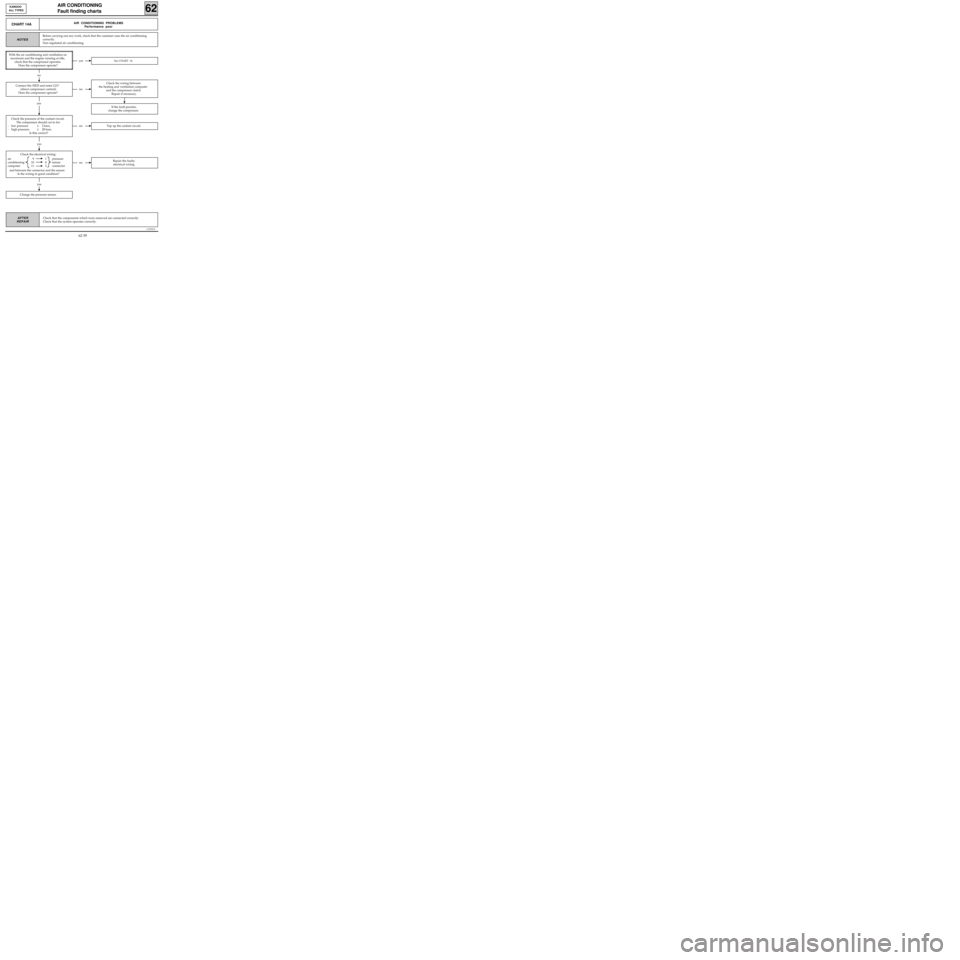
Check the electrical wiring:
air 9 1 pressure
conditioning 10 4 sensor
computer 11 3 connector
and between the connector and the sensor.
Is the wiring in good condition?
c11010.0
AIR CONDITIONING
Fault finding charts
62
KANGOO
ALL TYPES
AFTER
REPAIR
CHART 14AAIR CONDITIONING PROBLEMS
Performance poor
NOTES
yesSee CHART 14.
no
no
If the fault persists,
change the compressor.
yes
noRepair the faulty
electrical wiring.
yes
noTop up the coolant circuit.
Change the pressure sensor.
Before carrying out any work, check that the customer uses the air conditioning
correctly.
Non regulated air conditioning.
With the air conditioning and ventilation on
maximum and the engine running at idle,
check that the compressor operates.
Does the compressor operate?
Connect the XR25 and enter G21*
(direct compressor control).
Does the compressor operate?
Check the pressure of the coolant circuit.
The compressor should cut in for:
- low pressure≥ 2 bars,
- high pressure≤ 28 bars.
Is this correct?
Check the wiring between
the heating and ventilation computer
and the compressor clutch.
Repair if necessary.
Check that the components which were removed are connected correctly.
Check that the system operates correctly.
62-39
Page 51 of 73

Check the electrical wiring between:
air 9 1 pressure
conditioning 10 4 sensor
computer 11 5 connector
and between the connector and the sensor.
Is the electrical wiring in good condition?
c11010.0
AIR CONDITIONING
Fault finding charts
62
KANGOO
ALL TYPES
AFTER
REPAIR
yes
CHART 14BAIR CONDITIONING PROBLEMS
Performance poor
NOTES
no
yes
noRepair the faulty electrical wiring.
yes
noTop up the coolant.
Change the pressure sensor.
Before carrying out any work, check that the customer uses the air conditioning
correctly.
Non regulated air conditioning.
Check the operation of the fan assembly.
Connect the XR25 and enter G22* and G23*
(direct fan assembly control).
Does the fan assembly operate
at low and high speed?
Check the pressure of the coolant circuit.
The fan assembly should be:
- operating for a pressure≥ 10 bars,
- stopped for a pressure≥ 20 bars.
Is this correct?
Check the electrical wiring
between tracks 22 and 23 of the heating and
ventilation computer and the fan assembly.
Repair if necessary.
If the fault persists,
change the fan assembly.
Check that the components which were removed are connected correctly.
Check that the system operates correctly.
62-40
Page 52 of 73
Check the continuity and insulation from 12
volts of the electrical wiring
between:
air 22 F2 low speed
conditioning relay
computer 23 M2 high speed
relay
Is the wiring in good condition?
c11010.0
AIR CONDITIONING
Fault finding charts
62
KANGOO
ALL TYPES
AFTER
REPAIR
CHART 15COOLING FAN DOES NOT OPERATE
NOTES
yes
noRepair the faulty
electrical wiring.
noChange the faulty relay(s).
yes
noRepair.
yes
A
Non regulated air conditioning.
The compressor operates.
Check the condition of the fuses.
Change them if necessary.
Check that 12 volts is present on track 5 of the
low speed and high speed relays.
Is this correct?
Check that the fan assembly is correctly
supplied with 12 volts and 0 volt.
Is this correct?
Check that the components which were removed are connected correctly.
Check that the system operates correctly.
62-41
Page 53 of 73
yes
Check the electrical wiring between:
heating and 9 1 inter-
ventilation 10 4 mediate
computer 11 3 connector
and between:
inter- 1 A pressure
mediate 4 C sensor
connector 3 B
Is the wiring in good condition?
c11010.0
AIR CONDITIONING
Fault finding charts
62
KANGOO
ALL TYPES
AFTER
REPAIR
CHART 15
CONT
A
noTop up the coolant circuit.
yes
noRepair the faulty
electrical wiring.
With the air conditioning selected and
ventilation on maximum, check the pressure
of the coolant circuit using the XR25 by
entering #16.
- The fan cuts in at low speed for a pressure
≥ 10 bars,
- The fan cuts in at high speed for a pressure
≥ 20 bars.
Are the pressure values correct?
Change the pressure sensor.
If the fault persists,
change the fan.
Check that the components which were removed are connected correctly.
Check that the system operates correctly.
62-42
Page 59 of 73

TIGHTENING TORQUES (in daN.m)
AIR CONDITIONING
Evaporator
62
13831R
Pressure relief valve to evaporator bolt 0.6
Connecting pipes to pressure relief valve
retaining nut 0.8
Pressure relief valve connecting pipe to
dehydration canister retaining bolt 0.8
Condenser connecting pipe to
dehydration canister retaining bolt 1.2
Compressor connecting pipe to condenser
retaining bolt 0.8
Connecting pipes to compressor
retaining bolt 2.1
Compressor retaining bolt 2.1
Circuit pressure sensor 0.8
REMOVAL
Disconnect the battery.
Drain the R134a coolant circuit using the filling
equipment.
Disconnect the R134a connecting pipes (bolt 1) to
the pressure relief valve.
Install the plugs on the pipes and the pressure re-
lief valve.Remove:
- the windscreen wiper arms,
- the air inlet grille,
- the six plenum chamber closure panel (2) retai-
ning bolts (A) and remove the plenum cham-
ber,
- the evaporator protector in the plenum cham-
ber.
Disconnect the electrical connectors (4) and the
earth leads (5).
Remove the intermediate sleeve (6) between the
evaporator housing and the heater fan assembly.
13826R
62-48
Page 60 of 73

AIR CONDITIONING
Evaporator
62
Move aside the dashboard by removing:
- the six steering column mounting bolts,
- the four dashboard side retaining nuts and the
two bolts behind the ashtray assembly.
NOTE: take care to protect the sections of the
dashboard which are susceptible to damage using
cloths.
Remove the two evaporator housing mountings
behind the dashboard on the passenger side.
Remove the evaporator housing.
Carefully remove the evaporator from its housing.
REFITTING
Check that the harness tubes are not in contact
(risk of noise).
Proceed in the reverse order to removal.
Tighten the retaining nut (connecting pipes to
pressure relief valve) to 0.8 daN.m (pay attention
to the condition of the seals).
NOTE: when refitting the dashboard, check:
- that the electrical wiring is positioned correctly,
- that the air flow pipes are positioned correctly
(glove box for example).
Create a vacuum, then fill the R134a coolant cir-
cuit using the filling equipment.
IMPORTANT
When an evaporator is changed, add 30 ml of
P.A.G. SP 10 oil to the circuit.
Use the same oil for refitting the seals taking care
to position them correctly.
62-49
Page 71 of 73

AIR CONDITIONING
Electrical control
62
13827R
• EVAPORATOR SENSOR (depending on assem-
bly)
REMOVAL
Disconnect the battery.
Remove:
- the windscreen wiper arms,
- the air inlet grille,
- the evaporator protector in the plenum cham-
ber.
Disconnect the evaporator sensor connector and
the air recirculation motor connector.
Free the wiring from its fasteners.
Remove the evaporator sensor.
REFITTING
Proceed in the reverse order to removal.
Ensure that the sensor is correctly positioned on
its seat on the evaporator.
•0.28 Ω
FAN ASSEMBLY SPEED RESISTOR (2)
This is secured to the engine cooling fan support.
•
RECIRCULATION MOTOR
It is only possible to gain access to the recircula-
tion motor following removal of the air blower
unit (refer to the relevant section) and therefore
the evaporator assembly. •
PRESSURE SENSOR
The pressure sensor (1) is located next to the
condenser on the pressure relief valve-
dehydration canister high pressure pipe.
All work on the pressure sensor can be carried out
without draining the coolant circuit. It is secured
to a "SKRADER" valve.
Tightening torque: 0.8 daN.m.
This pressure sensor is fitted with seal. Check that
it is in good condition on refitting and lubricate it
using
P.A.G. SP 10 oil.
62-60
Page:
< prev 1-8 9-16 17-24

