1998 PONTIAC BONNEVILLE stop start
[x] Cancel search: stop startPage 126 of 395
NOTICE:
If you keep driving your vehicle with this light on, after a while, your emission controls may not
work as well,
your fuel economy may not be as
good and your engine may not run as smoothly.
This could lead
to costly repairs that may not be
covered by your warranty. If the
Light Is Flashing
The
following may prevent more serious damage to
your vehicle:
Reducing vehicle speed.
Avoiding hard accelerations.
0 Avoiding steep uphill grades.
0 If you are towing a trailer, reduce the amount of
cargo being hauled as soon as it is possible.
This light should come on, as a check to show you it is
working, when the ignition is on and the engine is not
running. If the light doesn’t come on, have it repaired.
This light will also come on during a malfunction in one
of two ways:
0 Light Flashing -- A misfire condition has been
detected.
A misfire increases vehicle emissions and
may damage the emission control system on your vehicle. Dealer or qualified service center diagnosis
and service may be required.
malfunction has been detected on your vehicle.
Dealer
or qualified service center diagnosis and
service
may be required.
0 Light On Steady -- An emission control system If
the light stops flashing and remains
on steady, see
“If the Light Is On Steady” following.
If the light continues to flash, when it is safe to do so,
stop the vehicle. Find a safe place to park your vehicle.
Turn the key off, wait at least 10 seconds and restart the
engine. If the light remains on steady, see “If the Light
Is On Steady” following. If the light is still flashing,
follow the previous steps, and drive the vehicle to your
dealer or qualified service center for service.
2-69
Page 145 of 395
To find your comfort zone, start with 75" F (24" C)
temperature setting and allow about 20 minutes for the
system to regulate. Press the
TEMP button up or down
to adjust the temperature setting if necessary, If you
choose the temperature setting of
60°F (15 "C), the
system will remain
at that maximum cooling setting and
will not regulate the
fan speed. If you choose the
temperature setting
of 90°F (33"c), the system will
remain at that maximum heating setting and will not
regulate the fan speed. Choosing either maximum
setting will not cause the system to heat
or cool
any faster.
Pressing
the AUTO button will display the requested
temperature, fan speed and air delivery mode for five
seconds, then change
to display the outside air
temperature. Be careful not to put
anythmg over the
sensor located
in the middle of the instrument panel near
the windshield,
or over the sensor in the grille above the
radio. These sensors are used by the automatic system to
regulate temperature.
The exterior temperature display sensor is in front of the
vehicle, near the radiator. The displayed temperature is
most accurate when the vehicle is moving. During stops,
or while idling, the display shows the previous driving
temperature for best system control.
To avoid blowing cold air in cold weather, the system
will delay
turning on the fan until warm air is available.
The length of delay depends on outside
air temperature,
engine coolant temperature, and time since
the engine
was last started. Pushing the fan button will override this
delay and change the fan to a selected single speed.
If you leave your vehicle, the system will remember the
control setting
the next time you start your engine.
Manual Operation
You may also manually adjust the air delivery mode or
fan speed.
'/J HEAR Manually selecting HEAT by cycling
through
the MODE settings will deliver air to the
floor outlets.
3 DEFOG: Manually selecting DEFOG by cycling
through the
MODE settings will deliver air to the floor
and windshield outlets.
a
Lo
BIDLEVEL: Manually selecting BI-LEVEL by
cycling through the MODE setting will deliver warm air
to the floor and cooler air to the middle instrument
panel outlets.
3-4
Page 162 of 395
FWD (6): Press and hold this button to quickly advance
within a track.
You will hear sound at a reduced volume.
The display
will show elapsed time.
RECALL: Press this button to see what track is
currently playing. Press
RECALL again within five
seconds to see how long the track has been playing.
When a new track starts to play, the track number will
also appear. Press RECALL a third time and the time of
day will be displayed.
AM-FM: Press this button to play the radio when a disc
is playing. The disc will stop but remain
in the player.
CD/PLAY: Press this button to change to the disc
function when the radio is
on.
EJECT: Press this button to remove the disc or stop the
disc and switch to the radio. EJECT will work with the
radio
off.
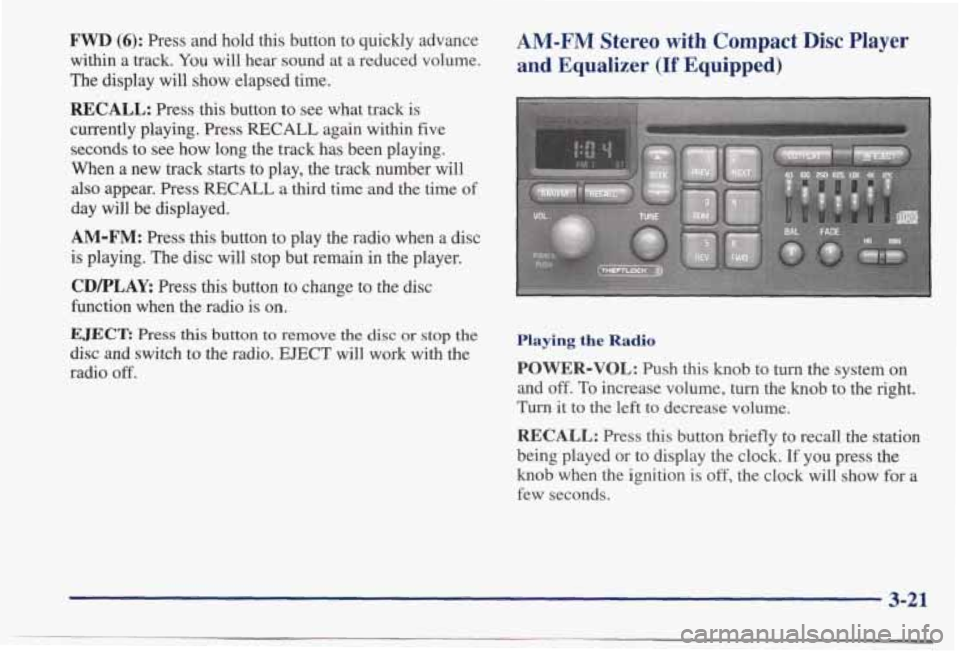
AM-FM Stereo with Compact Disc Player
and Equalizer
(If Equipped)
Playing the Radio
POWER-VOL: Push this knob to turn the system on
and
off. To increase volume, turn the knob to the right.
Turn it to the left to decrease volume.
RECALL: Press this button briefly to recall the station
being played or to display the clock. If you press the
knob when the ignition is off, the clock will show for a
few seconds.
3-21
Page 164 of 395
If you’re driving on a very rough road or if it’s very hot,
the disc may not play
and E (error) and a number may
appear on the radio display. If the disc comes out, it
could be that:
0 The disc is upside down.
It is dirty, scratched or wet.
0 The air is very humid. (If so, wait about an hour and
If any error occurs repeatedly or if an error can’t be
corrected, please contact your dealer.
If your radio
displays
an error number, write it down and provide it to
your dealer when reporting the problem.
PREV (1): Press this button or the SEEK down arrow to
go to the start
of the current track if more than eight
seconds have played.
If you hold the button or press it
more than once, the player will continue moving back
through the disc.
try again.)
NEXT (2): Press this button or the SEEK up arrow to
go to the start of the next track. If you hold the button or
press it more than once, the player will continue moving
forward through the disc.
RDM (3): Press this button to hear the tracks in random,
rather than sequential, order. The display will show
RDM. Press
RDM again to turn off random play.
REV (5): Press and hold this button to quickly reverse
within
a track. Release it to play the passage. You will
hear sound at
a reduced volume. The display will show
elapsed time.
FWD (6): Press and hold this button to quickly advance
within a track.
You will hear sound at a reduced volume.
The display will show elapsed time.
RECALL: Press this button to see what track is
currently playing. Press
RECALL again within five
seconds to see how long the track has been playing.
When a new track starts to play, the track number will
also appear. Press RECALL a third time and the time of
day will be displayed.
AM-FM: Press this button to play the radio when a disc
is playing. The disc will stop but remain
in the player.
CD/PLAY: Press this button to change to the disc
function when the radio is on.
EJECT: Press this button to remove the disc or stop the
disc and switch to the radio.
EJECT will work with the
radio
off.
3-23
Page 167 of 395
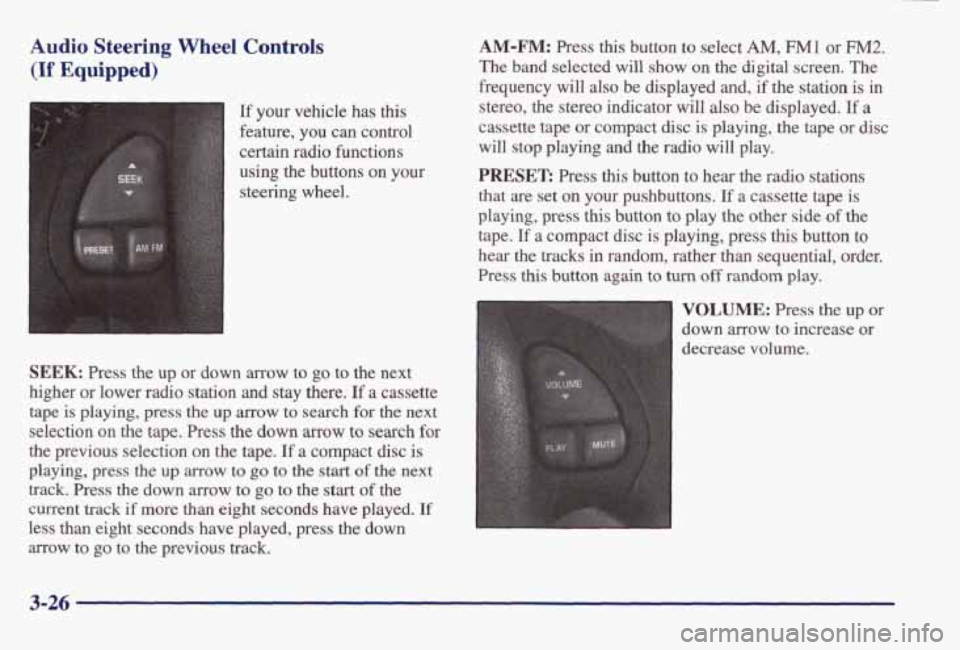
Audio Steering Wheel Controls
(If Equipped)
A
SEEK t
t,
1
[f your vehicle has this
feature, you can control
certain radio functions
using the buttons
on your
steering wheel.
SEEK: Press the up or down arrow to go to the next
higher or lower radio station
and stay there. If a cassette
tape is playing, press the up
arrow to search for the next
selection on the tape. Press the
down arrow to search for
the previous selection on the tape. If a compact disc is
playing, press the up arrow to go to the start of the next
track.
Press the down arrow to go to the start of the
current track
if more than eight seconds have played. If
less than eight seconds have played, press the down
arrow to
go to the previous track.
AM-FM: Press this button to select AM, F"1 or FM2.
The band selected will show on the digital screen. The
frequency will
also be displayed and, if the station is in
stereo, the stereo indicator will also be displayed.
If a
cassette tape or compact disc is playing, the tape or disc
will stop playing and the radio will play.
PRESET: Press this button to hear the radio stations
that are set on
your pushbuttons. If a cassette tape is
playing, press
this button to play the other side of the
tape.
If a compact disc is playing, press this button to
hear the
tracks in random, rather than sequential, order.
Press
this button again to turn off random play.
VOLUME: Press the up or
down arrow to increase or
decrease volume.
3-26
Page 180 of 395
Avoid needless heavy braking. Some people drive in spurts
-- heavy acceleration followed by heavy
braking
-- rather than keeping pace with traffic. This is a
mistake. Your brakes may not have time to cool between
hard stops. Your brakes will wear out much faster if you
do a lot of heavy braking.
If you keep pace with the
traffic and allow realistic following distances, you will
eliminate a lot of unnecessary braking. That means
better braking and longer brake life.
If your engine ever stops while you’re driving, brake
normally but don’t
pump your brakes. If you do, the
pedal may get harder to push down.
If your engine
stops, you will still have some power brake assist. But
you
will use it when you brake. Once the power assist is
used up, it may take longer to stop and the brake pedal
will
be harder to push.
Anti-Lock Brakes (ABS)
Your vehicle has anti-lock brakes (ABS). ABS is an
advanced electronic braking system that will help
prevent a braking
skid.
When you start your engine, or when you begin to drive
away, your anti-lock brake system will check itself. You
may hear a momentary motor or clicking noise while
this test is going on, and you may even notice that your
brake pedal moves or pulses
a little. This is normal.
I
ANTILOCK (e)
If there’s a problem with the
anti-lock brake system,
this
warning light will stay on.
See “Anti-Lock Brake
System Warning Light” in
the Index.
4-7
Page 182 of 395
Remember: Anti-lock doesn’t change the time you need to get your foot up to the brake pedal or always decrease
stopping distance.
If you get too close to the vehicle in
fiont of you, you won’t have time to apply your brakes
if that vehicle suddenly slows or stops. Always leave
enough room up ahead to stop, even though you have anti-lock brakes.
Using Anti-Lock
Don’t pump the brakes. Just hold the brake pedal down
fiiy and let anti-lock work for you. You may feel a
slight brake pedal pulsation or notice some noise, but
this is normal.
Traction Control System (If Equipped)
Your vehicle may have a traction control system that
limits wheel spin. This is especially useful in slippery
road conditions. The system operates only if it senses
that one or both of the front wheels
are spinning or
beginning to lose traction. When this happens, the system works the front brakes and reduces engine power
to
limit wheel spin.
You may feel
or hear the system working, but this
is normal.
If your vehicle is in cruise control when the traction
control system begins to limit wheel spin, the cruise
control will automatically disengage. When road
conditions allow you to safely use it again, you may
reengage the cruise control. (See “Cruise Control”
in the Index.)
TRACTION
OFF
This light should come on
briefly when you start the
engine.
If it stays on or
comes on while you are
driving, there’s a problem
with your traction
control system.
See “Traction Control System Warning Light” in the
Index. When this warning light is on, the system will not
limit wheel spin. Adjust
your driving accordingly.
The traction control system automatically comes on
whenever you start your vehicle. To limit wheel spin,
especially in slippery road conditions, you should
always leave the system on. But you can turn the
traction control system
off if you ever need to. (You
should turn the system
off if your vehicle ever gets stuck
in
sand, mud, ice or snow. See ‘‘Rockiniz Your Vehicle”
in the Index.)
4-9
Page 186 of 395
Passing
The driver of a vehicle about to pass another on a
two-lane highway waits for just the right moment,
accelerates, moves around the vehicle ahead, then goes
back into the right lane again. A simple maneuver?
Not necessarily! Passing another vehicle on a two-lane
highway is a potentially dangerous move, since the
passing vehicle occupies the same lane as oncoming
traffic for several seconds. A miscalculation, an error in
judgment, or a brief surrender to frustration or anger can
suddenly put the passing driver face to face with the
worst of all traffic accidents
-- the head-on collision.
So here are some tips for passing:
“Drive ahead.” Look down the road, to the sides and to
crossroads for situations that might affect your passing
patterns.
If you have any doubt whatsoever about
making a successful pass, wait for
a better time.
0 Watch for traffic signs, pavement markings and lines.
If you can see a sign up ahead that might indicate a
turn or an intersection, delay your pass. A broken
center line usually indicates it’s all right to pass
(providing the road ahead
is clear). Never cross a solid
line
on your side of the lane or a double solid line,
even if the road seems empty of approaching traffic.
0 Do not get too close to the vehicle you want to
pass while you’re awaiting an opportunity. For one
thing, following too closely reduces your area of
vision, especially if you’re following a larger
vehicle. Also, you won’t have adequate space if the
vehicle ahead suddenly slows or stops. Keep back
a
reasonable distance.
0 When it looks like a chance to pass is coming up,
start to accelerate but stay in the right lane and don’t
get too close. Time your move
so you will be
increasing speed as the time comes
to move into the
other lane. If the way is clear to pass, you will have a
“running start” that more than makes up for the
distance you would lose by dropping back. And if
something happens to cause you to cancel your
pass,
you need only slow down and drop back again and wait for another opportunity.
0 If other cars are lined up to pass a slow vehicle, wait
your turn. But take care that someone isn’t trying to
pass you as you pull out
to pass the slow vehicle.
Remember to glance over your shoulder and check
the blind spot.
4-13