Page 5799 of 6000
7A–18 AUTOMATIC TRANSMISSION (AW30-40LE)
901RW176
F07RW033
740RY00013
740RY00014
901RY00014
TECH2 CONNECTION
The Tech2 scan tool is used to electrically diagnose the
automatic transmission system and to check the system. The
Tech2 enhances the diagnosis efficiency though all the
troubleshooting can be done without the Tech2.
The Tech2 is a portable, compact, and light tester. When it is
connected to the diagnosis connector of the vehicle, you can
perform a variety of diagnoses and tests by communicating
with the Transmission Control Module (TCM) of the vehicle.
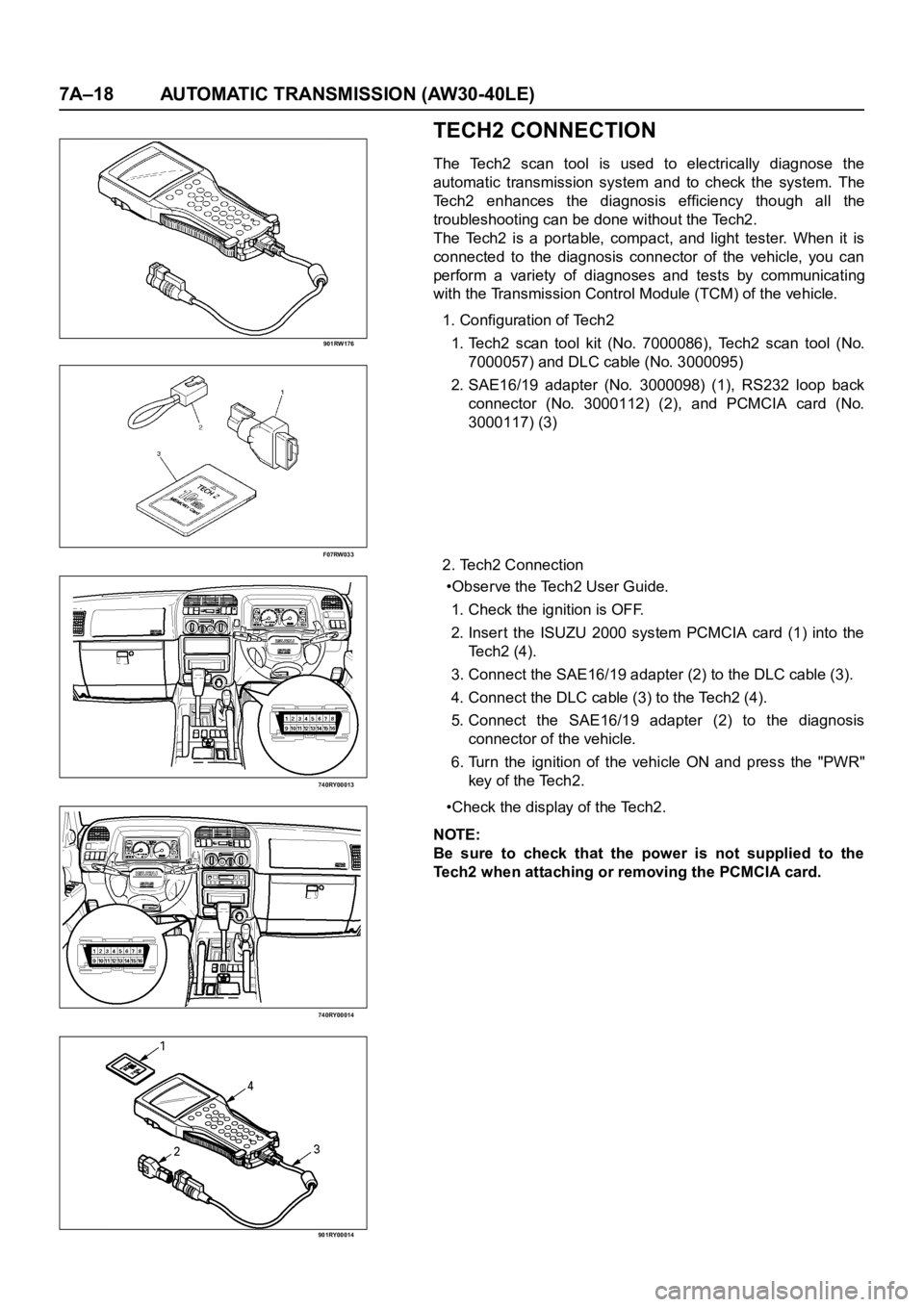
1. Configuration of Tech2
1. Tech2 scan tool kit (No. 7000086), Tech2 scan tool (No.
7000057) and DLC cable (No. 3000095)
2. SAE16/19 adapter (No. 3000098) (1), RS232 loop back
connector (No. 3000112) (2), and PCMCIA card (No.
3000117) (3)
2. Tech2 Connection
•Observe the Tech2 User Guide.
1. Check the ignition is OFF.
2. Inser t the ISUZU 2000 system PCMCIA card (1) into the
Te c h 2 ( 4 ) .
3. Connect the SAE16/19 adapter (2) to the DLC cable (3).
4. Connect the DLC cable (3) to the Tech2 (4).
5. Connect the SAE16/19 adapter (2) to the diagnosis
connector of the vehicle.
6. Turn the ignition of the vehicle ON and press the "PWR"
key of the Tech2.
•Check the display of the Tech2.
NOTE:
Be sure to check that the power is not supplied to the
Tech2 when attaching or removing the PCMCIA card.
Page 5800 of 6000
AUTOMATIC TRANSMISSION (AW30-40LE) 7A–19
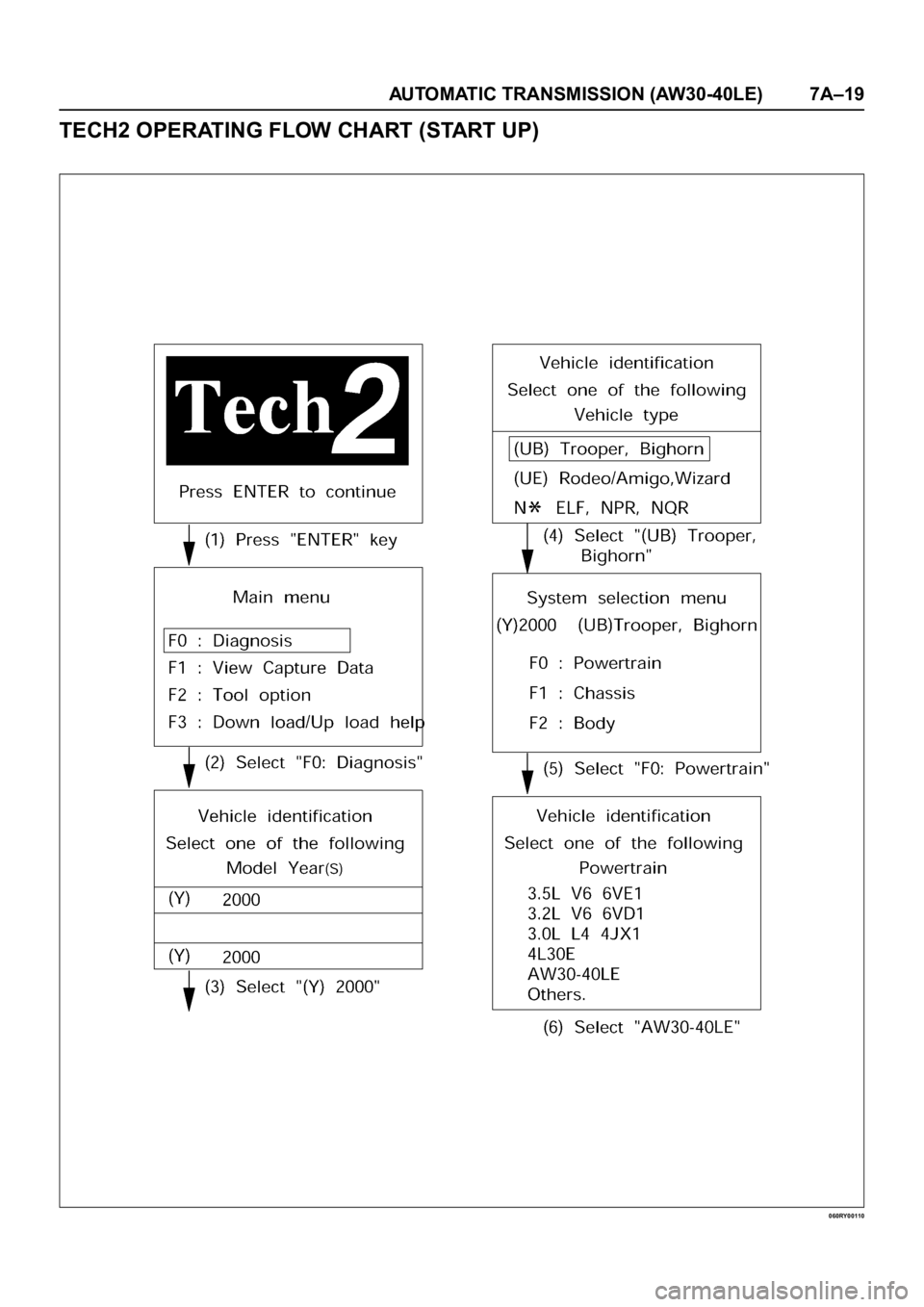
TECH2 OPERATING FLOW CHART (START UP)
060RY00110
Page 5801 of 6000

7A–20 AUTOMATIC TRANSMISSION (AW30-40LE)
Once the test vehicle has been identified an “Application
(Power train) Menu" screen appears. Please select the
appropriate application.
The following table shows, which functions are used for
the available equipment versions.
Diagnostic Trouble Codes
The purpose of the “Diagnostic Trouble Codes" mode is
to display stored TCM trouble codes.
When “Diagnostic Trouble Codes" is selected an
“Application Menu" screen appears.
Clear DTC Information
The purpose of the “Clear DTC Information" mode is to
command the clearing of stored TCM trouble codes.
When “Clear DTC Information" is selected, a “Clear
DTC Information", warning screen appears. This screen
informs you that by cleaning DTC's, “all stored DTC
information in controller will be erased".
Do you want to clear DTC's (Yes/No).
Press either the Yes or No key when answering.
After clearing codes, confirm system operation by test
driving the vehicle.
Allow the vehicle to shift through all four forward gears in
a manner which attempts to repeat the failure condition.
NOTE: When the trouble has not been repaired and thetrouble code cannot be erased, check the vehicle again.
DTC Information
When “DTC Information" is selected, an “Application
Menu" appears with a list of DTC information function
keys addressing DTC specifics and their origins.
Function key selections may vary for particular vehicle
and/or system.
Data Display
The purpose of the “Data Display" mode is to
continuously monitor data parameters.
The current actual values of all impor tant sensors and
signals in the system are display through F1 mode.
When “Data Display" is selected an “Application Menu"
appears.
See “TRANSMISSION DATA" and “TCC DATA” on next
page.
Snapshot
When “Snapshot" is selected an “Application Menu"
appears.
When “Transmission Snapshot" application is selected
from the “Application Menu", a “Snapshot Menu"
appears, displaying several options. “Snapshot" options
may vary from one system to another.
“Snapshot" allows a recording of all vehicle parameters.
There parameters may then be replayed at a future
point in time.
This action allows you to focus on making the condition
occur, rather than trying to view all of the data in
anticipation of the fault. The snapshot will collect
parameter information around a trigger point that you
select.
When a snapshot is taken. It is recorded onto the
PCMCIA memory card. When the Tech2 is powered
down. Snapshots are not lost.
Actuator Tests
The purpose of “Actuator Tests" mode is to check for
correct operation of electronic system actuators.
Lamps
You can operate the lamps by pressing the ON and OFF
buttons.
Preconditions: P or N position
Solenoid
Solenoid S1(1-2/3-4), S2(2-3) and TCC Solenoid
(Torque Converter Clutch)
You can operate the solenoids by pressing the ON and
OFF buttons.
Preconditions: P or N position, no vehicle speed, no
engine speed
Pressure Control Solenoid (PCS)
You can operate the PC Solenoid by pressing the ON
and OFF buttons. ON will command a maximum current
of 1000 mA and OFF a minimum of 200 mA.
Preconditions: P or N position, no vehicle speed, engine
running F0: Diagnostic Trouble Codes
F0: Read DTC Info Ordered By Priority
F1: Clear DTC Information
F2: DTC Information
F0: History
F1: MIL SVS or Message Requested
F2: Last Test Failed
F3: Test Failed Since Code Cleared
F4: Not Ran Since Code Cleared
F5: Failed This Ignition
F1: Data Display
F0: Transmission Data
F1: TCC Data
F2: Snapshot
F3: Actuator Tests
F0: Lamps
F0: Check Light Test
F1: Power Lamp Test
F2: Winter Lamp Test
F3: AT Oil Temperature Lamp Test
F1: Solenoids
F0: Solenoid 2-3 Test
F1: Solenoid 1-2/3-4 Test
F2: TCC Solenoid Test
F3: Pressure Control Solenoid (PCS)
Page 5802 of 6000

AUTOMATIC TRANSMISSION (AW30-40LE) 7A–21
TRANSMISSION DATA
Item Unit Enigne running at idle
Current Gear1
Lock Up Inactive, Active Inactive
Selector PositionPar k
AT Output Speed (Automatic Transmission) RPM 0 RPM
Output Speed (Meter Signal Side) RPM 0 RPM
AT Input Speed (Automatic Transmission) RPM 0 RPM
Engine Speed RPM 695
745 RPM
Vehicle Speed (Output Side) km/h 0 km/h
Throttle Position % 0 %
Throttle Position Sensor V 0.25
0.45V
AT Oil Temperature (Automatic Transmission)
C, F70 80C (158 176F)
Shift Pattern
Desired PCS Pressure (Pressure Control Solenoid) kPa
PCS Desired Current (Pressure Control Solenoid) mA
PCS Actual Current (Pressure Control Solenoid) mA
Overdrive Off Switch Off, On
Brake Switch Open 0V, Closed 12V Closed 12V
Winter Switch Open, Closed 0V Open
Power Switch Open, Closed 0V Open
Diagnostic Request Open, Closed Open
Winter Lamp Inactive 12V, Active 0V Inactive 12V
Power Lamp Inactive 12V, Active 0V Inactive 12V
Check Light Inactive 12V, Active 0V Inactive 12V
AT Oil Temperature Lamp (Automatic Transmission) Inactive 12V, Active 0V Inactive 12V
Solenoid 2-3 Inactive 0V, Active 12V Inactive 0V
Solenoid 1-2/3-4 Inactive 0V, Active 12V Active 12V
TCC Solenoid (Torque Conver ter Clutch) Inactive 0V, Active 12V Inactive 0V
Page 5803 of 6000
7A–22 AUTOMATIC TRANSMISSION (AW30-40LE)
TCC DATA
Item Unit Enigne running at idle
Current Gear1
Lock Up Inactive, Active Inactive
AT Output Speed (Automatic Transmission) RPM 0 RPM
Output Speed (Meter Signal Side) RPM 0 RPM
AT Input Speed (Automatic Transmission) RPM 0 RPM
Engine Speed RPM 695
745 RPM
Vehicle Speed (Output Side) km/h 0 km/h
Throttle Position % 0 %
Gear Ratio :1 2.804
AT Oil Temperature (Automatic Transmission)
C, F 70 80C (158 176F)
TCC Slip Speed RPM 695
745 RPM
TCC Solenoid Pressure Desired kPa 0 kPa
Desired TCC Solenoid Current mA 0 mA
Actual TCC Solenoid Current mA 0 mA
Page 5804 of 6000

AUTOMATIC TRANSMISSION (AW30-40LE) 7A–23
INTERMITTENT CONDITIONS
If the Tech2 displays a code as intermittent, or if after a
test drive a code does not reappear, the problem is most
likely a faulty electrical connection or loose wiring.
Terminals should always be the prime suspect.
Intermittent rarely occur in sophisticated electronic
components such as the Transmission Control Module
(TCM).
When an intermittent problem is encountered, check
suspect circuits for:
• Poor terminal to wire connection.
• Terminals not fully seated in the connector body
(backed out).
• Improperly formed or damaged terminals.
• Loose, dirty, or corroded ground connections.
HINT: Any time you have an intermittent in more than
one circuit, check whether the circuits share a
common ground connection.
• Pinched or damaged wires.
• Electro-Magnetic Interference (EMI)
HINT: Check that all wires are properly routed away
from spark plug wires, distributor wires, coil,
and generator. Also check for improperly
installed electrical options, such as lights, 2-
way radios, etc.
Use the F2: SNAPSHOT mode of the Tech2 to help
isolate the cause of an intermittent fault. The snapshot
mode will record information before and after the
problem occurs. Set the snapshot to "trigger" on the
suspect code (or codes) or, if you notice the repor ted
symptom during test drive, trigger the snapshot
manually.
After the snapshot has been triggered, command the
Tech2 to play back the flow of data recorded from each
of the various sensors. Signs of an intermittent fault in a
sensor circuit are a sudden unexplainable jump in data
values out of the normal range.
Page 5805 of 6000
7A–24 AUTOMATIC TRANSMISSION (AW30-40LE)
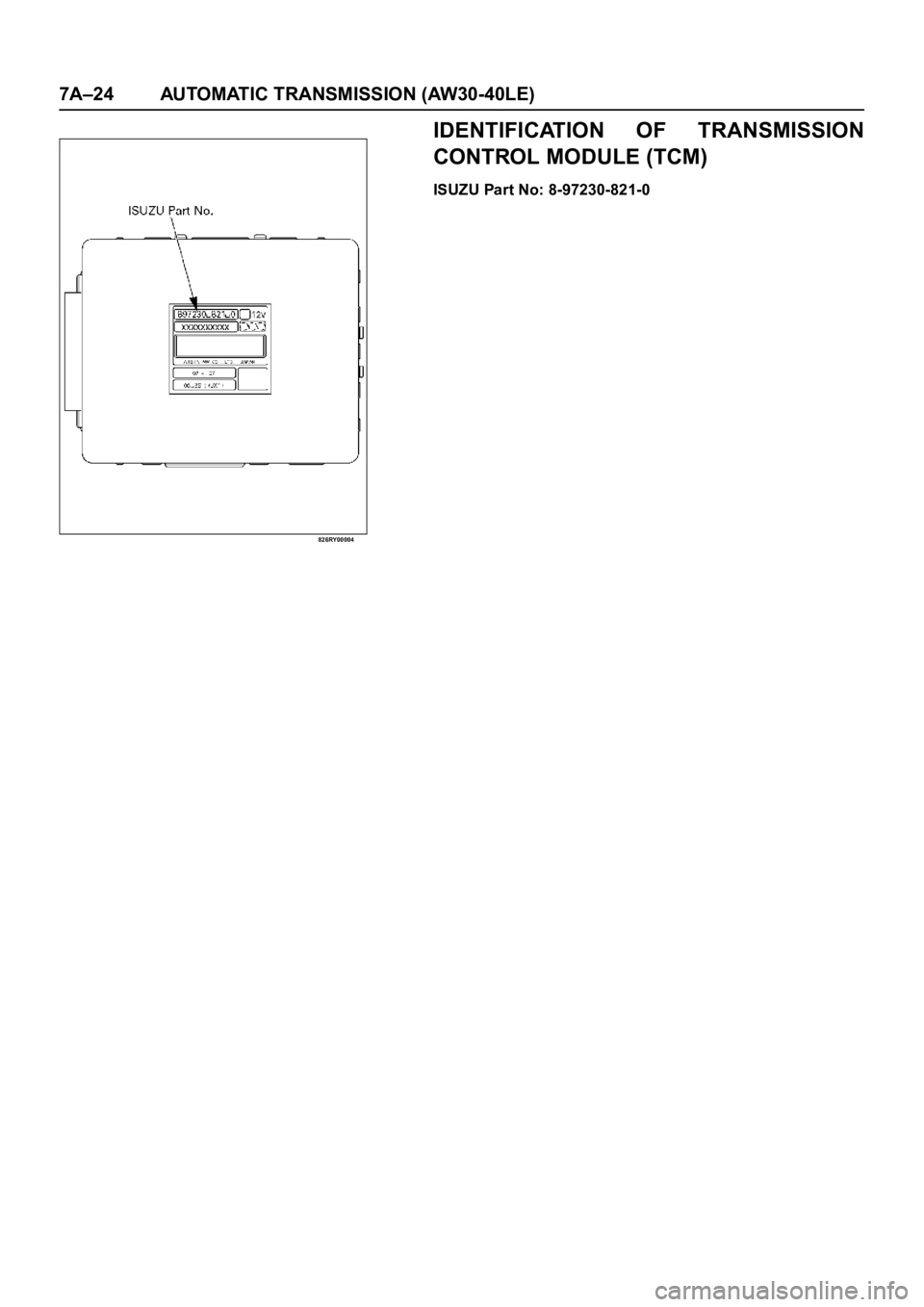
826RY00004
IDENTIFICATION OF TRANSMISSION
CONTROL MODULE (TCM)
ISUZU Part No: 8-97230-821-0
Page 5806 of 6000
AUTOMATIC TRANSMISSION (AW30-40LE) 7A–25
DIAGNOSTIC TROUBLE CODES (DTC) CHECK
DTC
NUMBERFLASHING
CODEDESCRIPTION
P0120 21 ANALOG THROTTLE SIGNAL FAILURE (VTH)
P0502 24 SPEED METER SENSOR FAILURE (SP1)
P0705 17 GEAR SELECTOR FAILURE (PRND2L)
P0710 16 OIL TEMPERATURE SENSOR FAILURE (OT2)
P0717 14 INPUT REVOLUTION SENSOR FAILURE (NC0)
P0722 11 OUTPUT REVOLUTION SENSOR FAILURE (SP2)
P0727 13 ENGINE REVOLUTION SIGNAL FAILURE (NE)
P0743 33 TORQUE CONVERTER CLUTCH CONTROL LOCK-UP (ON/OFF) SOLENOID
FA I L U R E ( S L )
P0748 35 PRESSURE CONTROL SOLENOID FAILURE (STH)
P0753 31 SOLENOID 1 FAILURE (S1)
P0758 32 SOLENOID 2 FAILURE (S2)
P1121 23 ANALOG THROTTLE SIGNAL FAILURE (VREF, VGND)