Page 2997 of 3573
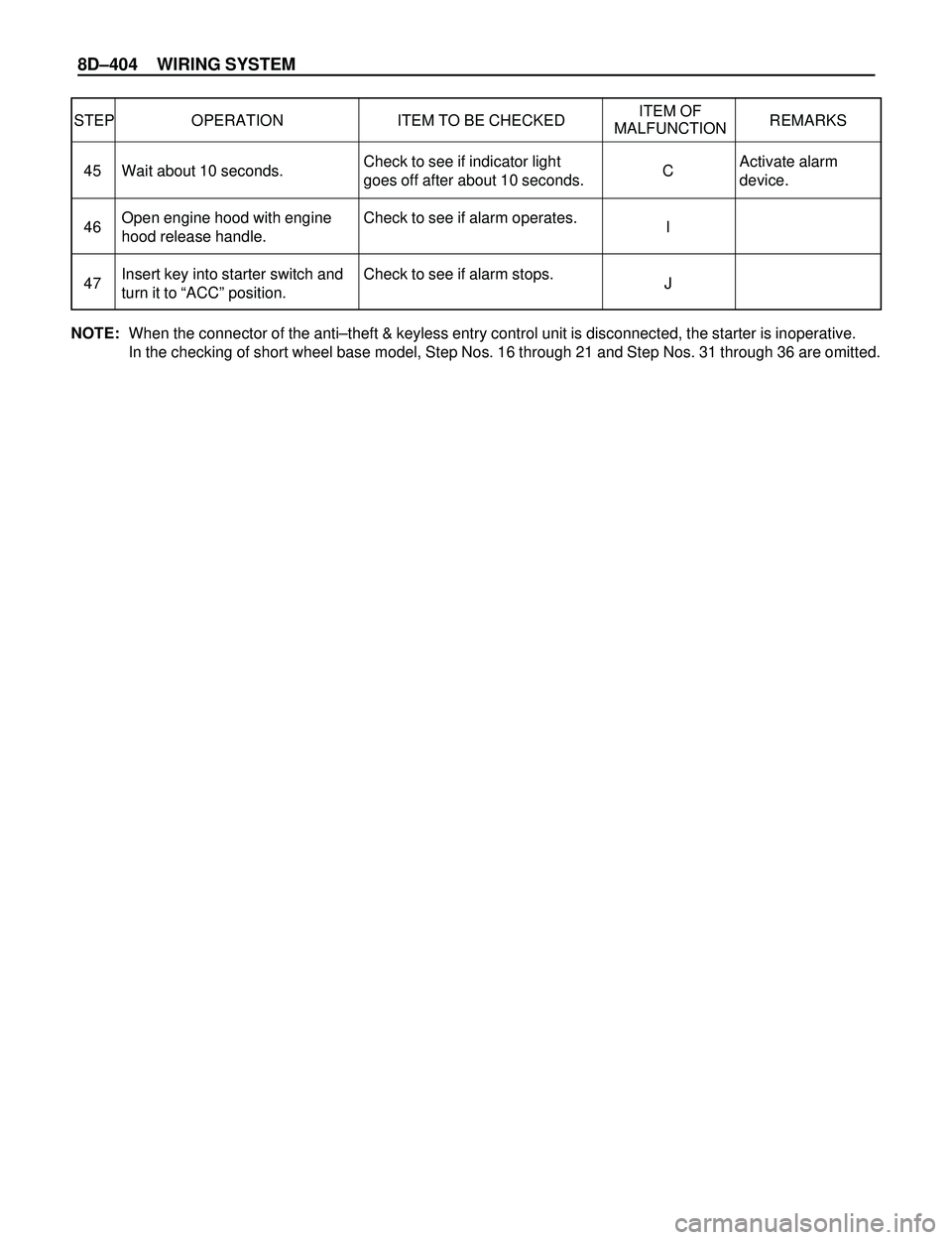
8DÐ404 WIRING SYSTEM
STEP OPERATION ITEM TO BE CHECKEDITEM OF
REMARKS
MALFUNCTION
Activate alarm
device. Check to see if indicator light
goes off after about 10 seconds.
Check to see if alarm operates.
Check to see if alarm stops. Wait about 10 seconds.
Open engine hood with engine
hood release handle.
Insert key into starter switch and
turn it to ÒACCÓ position.C
I
J 45
46
47
NOTE:When the connector of the antiÐtheft & keyless entry control unit is disconnected, the starter is inoperative.
In the checking of short wheel base model, Step Nos. 16 through 21 and Step Nos. 31 through 36 are omitted.
Page 2998 of 3573
WIRING SYSTEM 8DÐ405
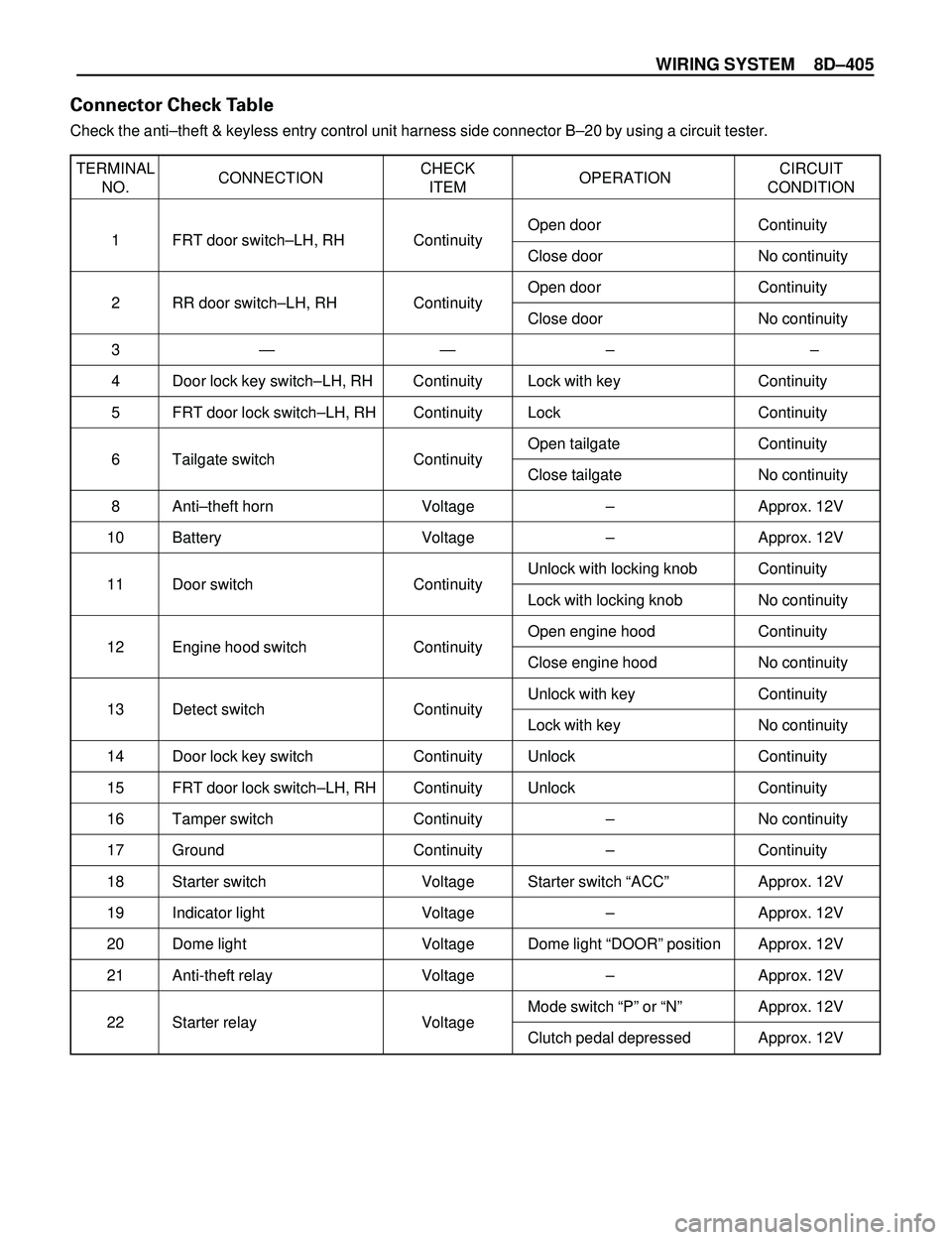
TERMINAL
CONNECTIONCHECK
OPERATIONCIRCUIT
NO. ITEM CONDITION
1 FRT door switchÐLH, RH ContinuityOpen door Continuity
Close door No continuity
2 RR door switchÐLH, RH ContinuityOpen door Continuity
Close door No continuity
3Ñ Ñ Ð Ð
4 Door lock key switchÐLH, RH Continuity Lock with key Continuity
5 FRT door lock switchÐLH, RH Continuity Lock Continuity
6 Tailgate switch ContinuityOpen tailgate Continuity
Close tailgate No continuity
8 AntiÐtheft horn Voltage Ð Approx. 12V
10 Battery Voltage Ð Approx. 12V
11 Door switch ContinuityUnlock with locking knob Continuity
Lock with locking knob No continuity
12 Engine hood switch ContinuityOpen engine hood Continuity
Close engine hood No continuity
13 Detect switch ContinuityUnlock with key Continuity
Lock with key No continuity
14 Door lock key switch Continuity Unlock Continuity
15 FRT door lock switchÐLH, RH Continuity Unlock Continuity
16 Tamper switch Continuity Ð No continuity
17 Ground Continuity Ð Continuity
18 Starter switch Voltage Starter switch ÒACCÓ Approx. 12V
19 Indicator light Voltage Ð Approx. 12V
20 Dome light Voltage Dome light ÒDOORÓ position Approx. 12V
21 Anti-theft relay Voltage Ð Approx. 12V
22 Starter relay VoltageMode switch ÒPÓ or ÒNÓ Approx. 12V
Clutch pedal depressed Approx. 12V
Connector Check Table
Check the antiÐtheft & keyless entry control unit harness side connector BÐ20 by using a circuit tester.
Page 3210 of 3573
8F±15 BODY STRUCTURE
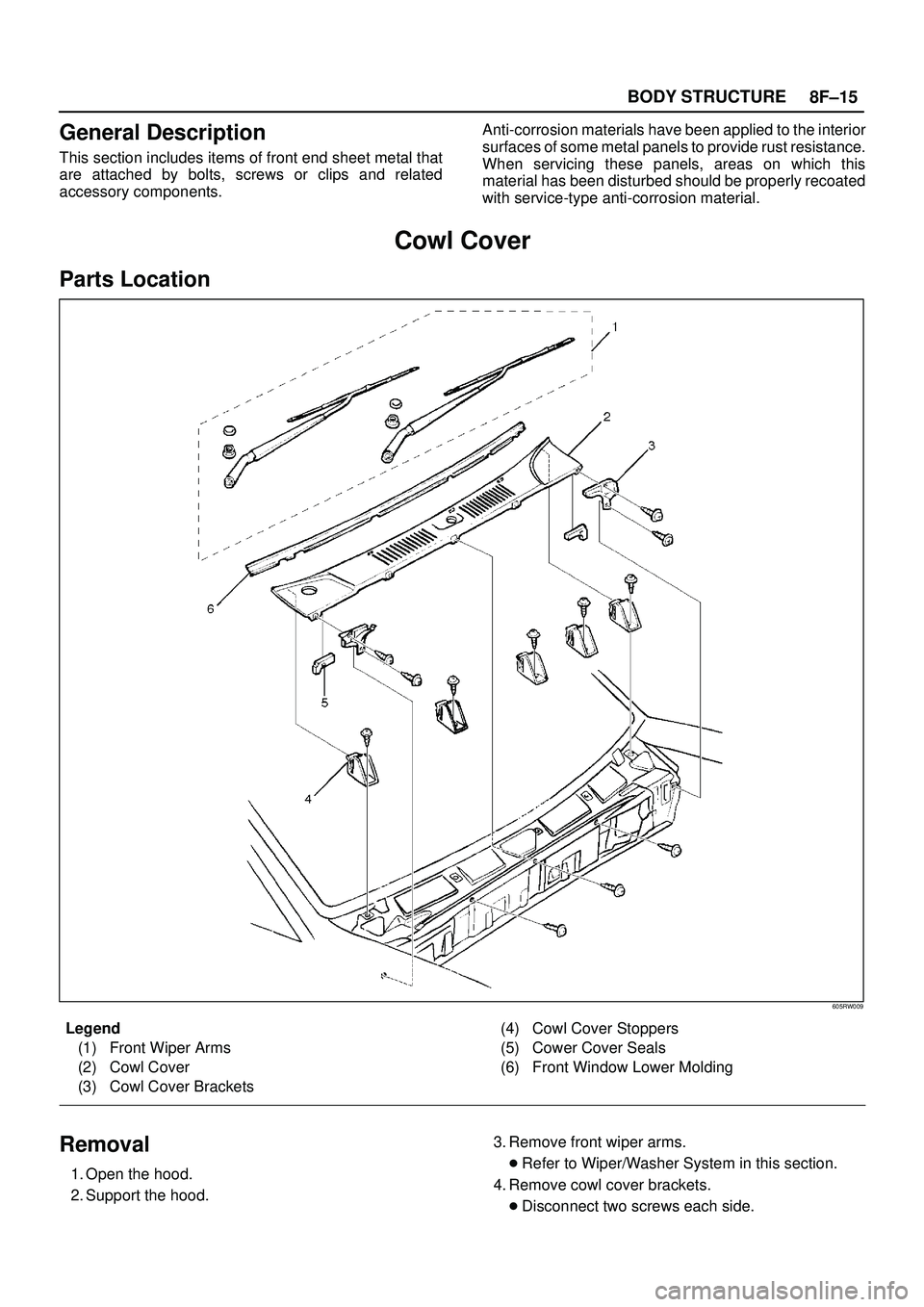
General Description
This section includes items of front end sheet metal that
are attached by bolts, screws or clips and related
accessory components.Anti-corrosion materials have been applied to the interior
surfaces of some metal panels to provide rust resistance.
When servicing these panels, areas on which this
material has been disturbed should be properly recoated
with service-type anti-corrosion material.
Cowl Cover
Parts Location
605RW009
Legend
(1) Front Wiper Arms
(2) Cowl Cover
(3) Cowl Cover Brackets(4) Cowl Cover Stoppers
(5) Cower Cover Seals
(6) Front Window Lower Molding
Removal
1. Open the hood.
2. Support the hood.3. Remove front wiper arms.
�Refer to Wiper/Washer System in this section.
4. Remove cowl cover brackets.
�Disconnect two screws each side.
Page 3211 of 3573
8F±16BODY STRUCTURE
5. Remove cowl cover.
�Disconnect three screws.
6. Remove cowl cover seals.
7. Remove front window lower molding.8. Remove cowl cover stoppers.
Installation
To install, follow the removal steps in reverse order.
Engine Hood
Removal
1. Open the hood.
2. Support the hood.
3. Remove windowshield washer nozzle tube.
880RS001
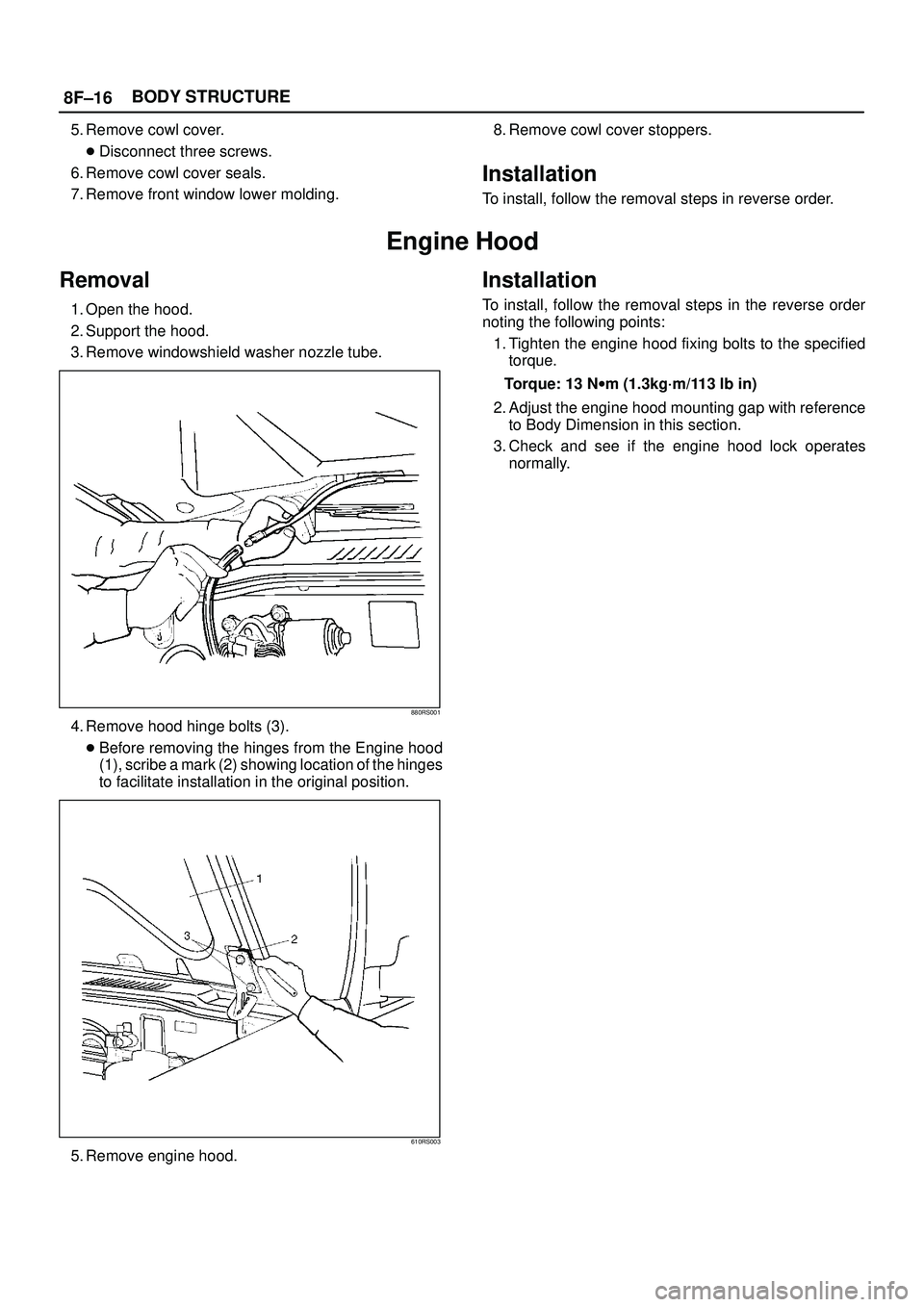
4. Remove hood hinge bolts (3).
�Before removing the hinges from the Engine hood
(1), scribe a mark (2) showing location of the hinges
to facilitate installation in the original position.
610RS003
5. Remove engine hood.
Installation
To install, follow the removal steps in the reverse order
noting the following points:
1. Tighten the engine hood fixing bolts to the specified
torque.
Torque: 13 Nwm (1.3kg´m/113 lb in)
2. Adjust the engine hood mounting gap with reference
to Body Dimension in this section.
3. Check and see if the engine hood lock operates
normally.
Page 3215 of 3573
8F±20BODY STRUCTURE
Installation
To install, follow the removal steps in reverse order noting
the following points:
1. Reroute the control cable to its original position, and
check and see if the lock assembly and control lever
work normally.2. Tighten the hood lock assembly fixing bolts to the
specified torque.
Torque : 10 Nwm (1.0kg´m/87 lb in)
Radiator Grille And Front End Lower Panel
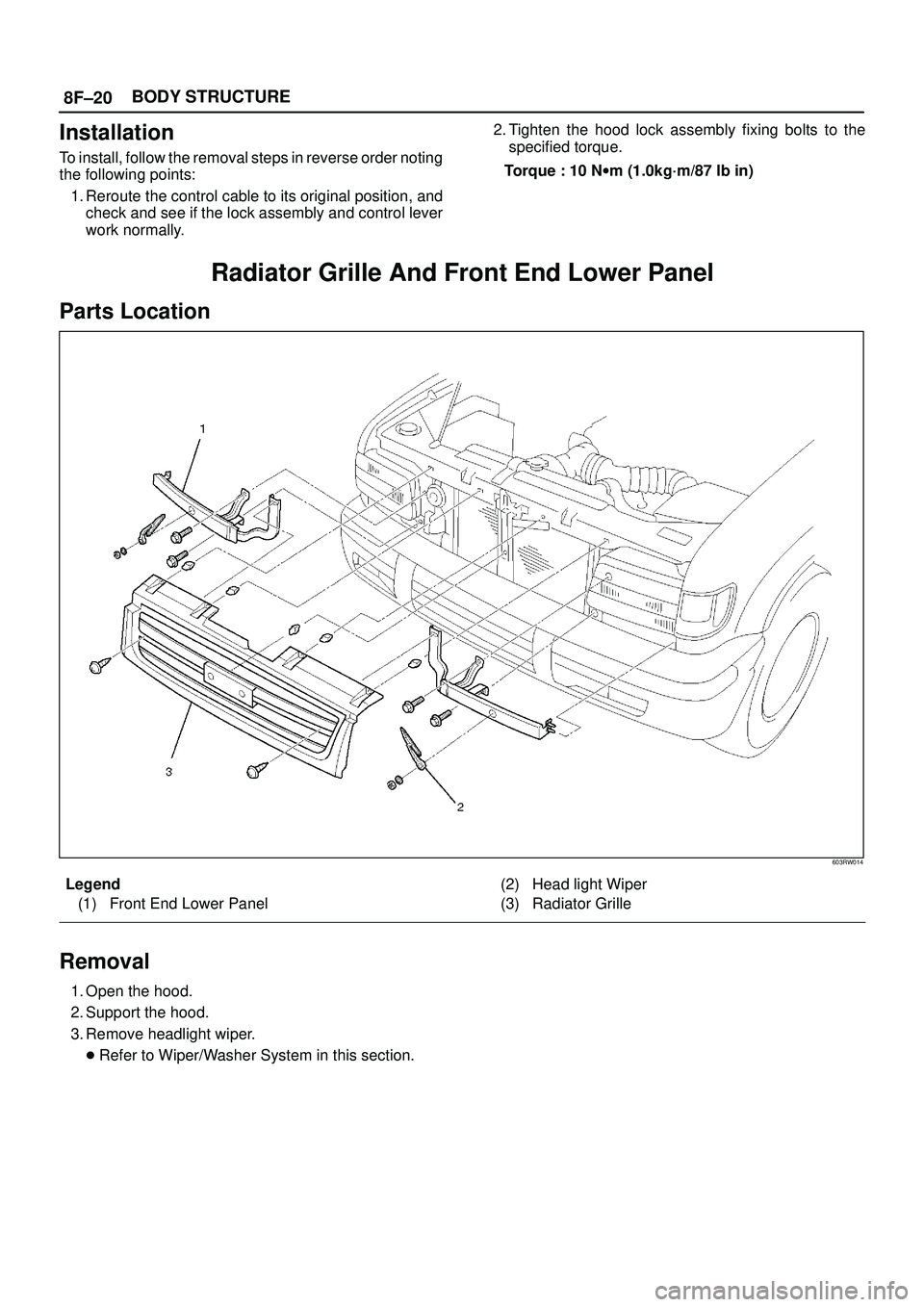
Parts Location
603RW014
Legend
(1) Front End Lower Panel(2) Head light Wiper
(3) Radiator Grille
Removal
1. Open the hood.
2. Support the hood.
3. Remove headlight wiper.
�Refer to Wiper/Washer System in this section.
Page 3217 of 3573
8F±22BODY STRUCTURE
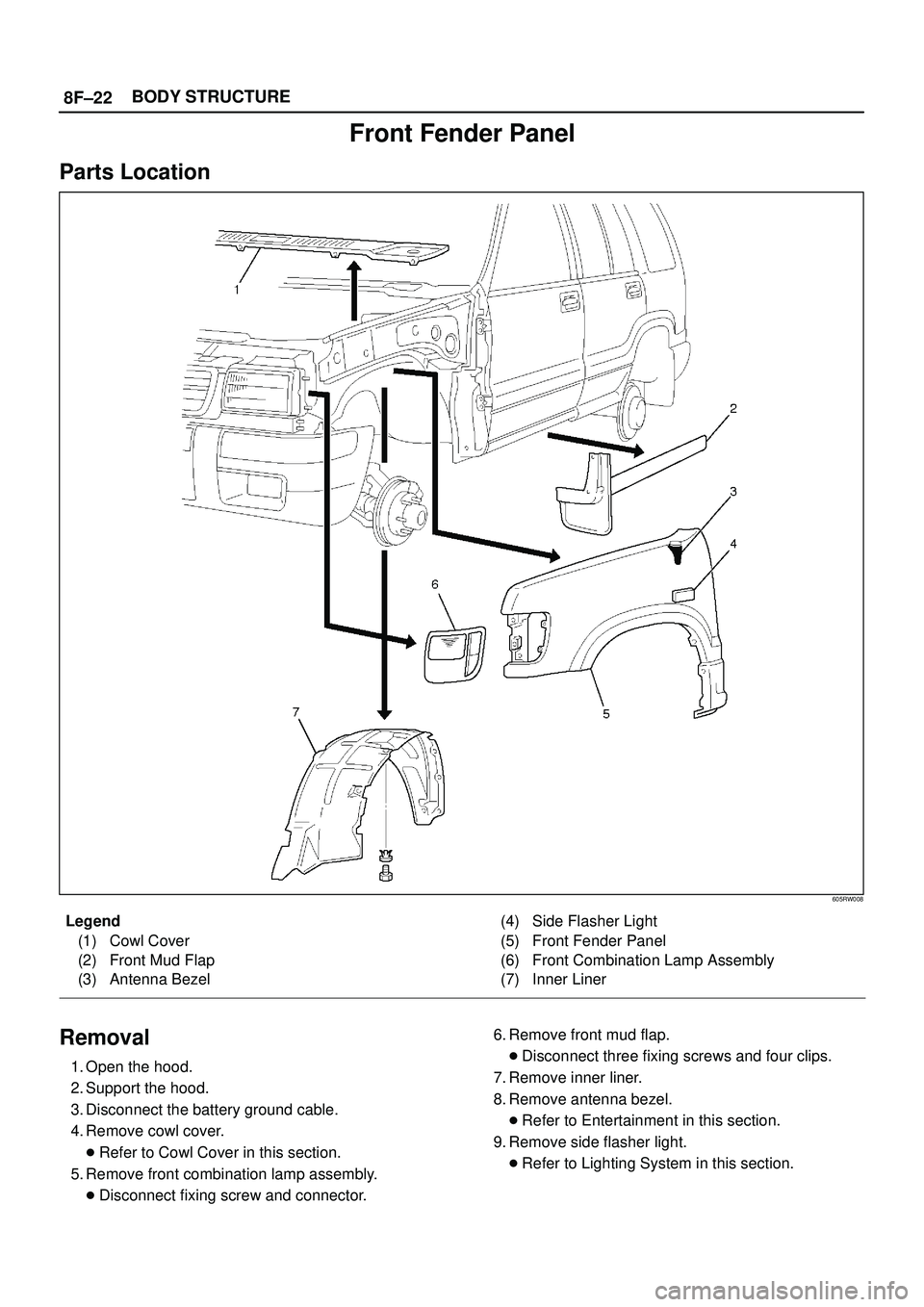
Front Fender Panel
Parts Location
605RW008
Legend
(1) Cowl Cover
(2) Front Mud Flap
(3) Antenna Bezel(4) Side Flasher Light
(5) Front Fender Panel
(6) Front Combination Lamp Assembly
(7) Inner Liner
Removal
1. Open the hood.
2. Support the hood.
3. Disconnect the battery ground cable.
4. Remove cowl cover.
�Refer to Cowl Cover in this section.
5. Remove front combination lamp assembly.
�Disconnect fixing screw and connector.6. Remove front mud flap.
�Disconnect three fixing screws and four clips.
7. Remove inner liner.
8. Remove antenna bezel.
�Refer to Entertainment in this section.
9. Remove side flasher light.
�Refer to Lighting System in this section.
Page 3245 of 3573
8F±50BODY STRUCTURE
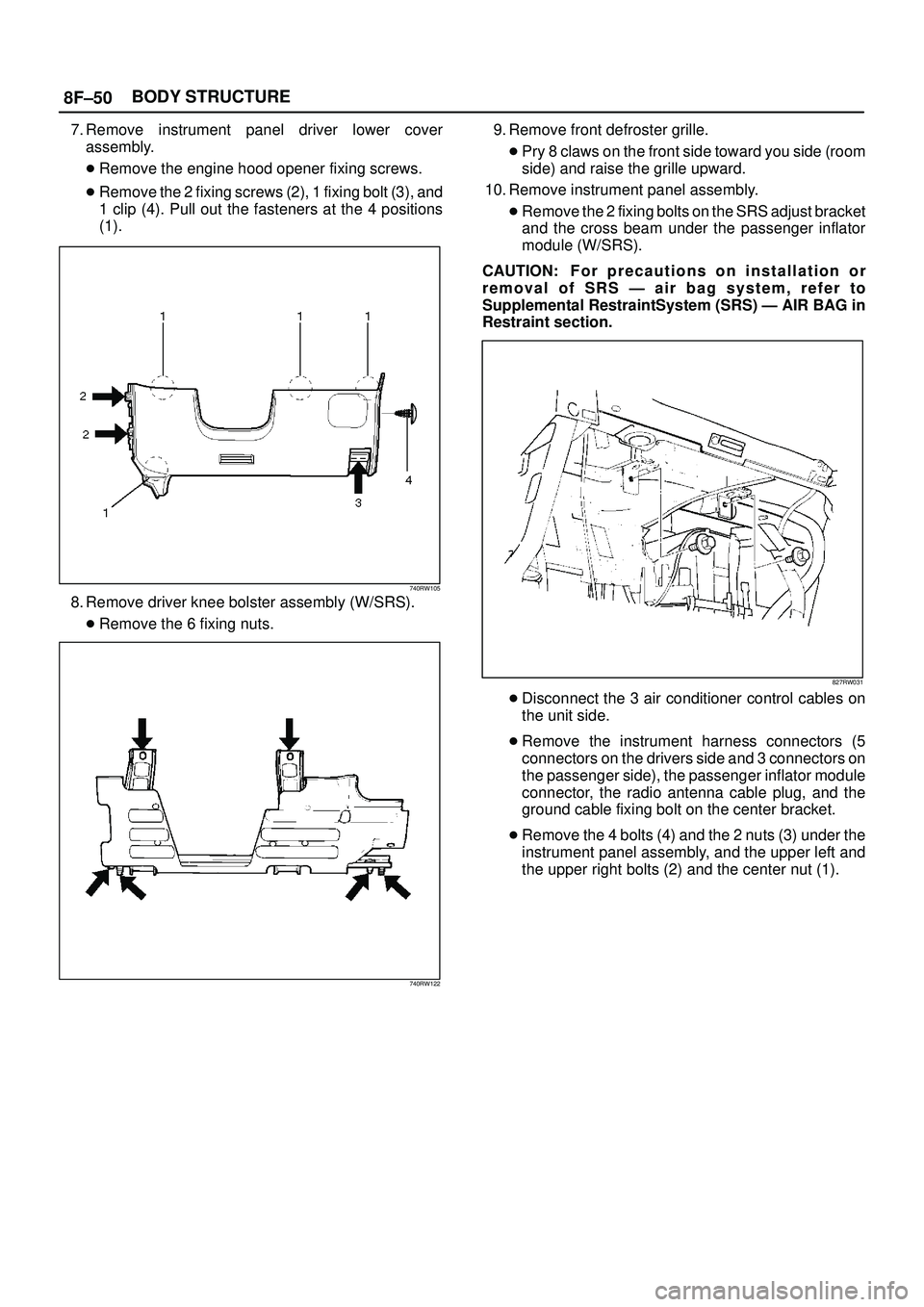
7. Remove instrument panel driver lower cover
assembly.
�Remove the engine hood opener fixing screws.
�Remove the 2 fixing screws (2), 1 fixing bolt (3), and
1 clip (4). Pull out the fasteners at the 4 positions
(1).
740RW105
8. Remove driver knee bolster assembly (W/SRS).
�Remove the 6 fixing nuts.
740RW122
9. Remove front defroster grille.
�Pry 8 claws on the front side toward you side (room
side) and raise the grille upward.
10. Remove instrument panel assembly.
�Remove the 2 fixing bolts on the SRS adjust bracket
and the cross beam under the passenger inflator
module (W/SRS).
CAUTION: F o r p recautions on installation or
removal of SRS Ð air bag system, refer to
Supplemental RestraintSystem (SRS) Ð AIR BAG in
Restraint section.
827RW031
�Disconnect the 3 air conditioner control cables on
the unit side.
�Remove the instrument harness connectors (5
connectors on the drivers side and 3 connectors on
the passenger side), the passenger inflator module
connector, the radio antenna cable plug, and the
ground cable fixing bolt on the center bracket.
�Remove the 4 bolts (4) and the 2 nuts (3) under the
instrument panel assembly, and the upper left and
the upper right bolts (2) and the center nut (1).
Page 3248 of 3573
8F±53 BODY STRUCTURE
Installation
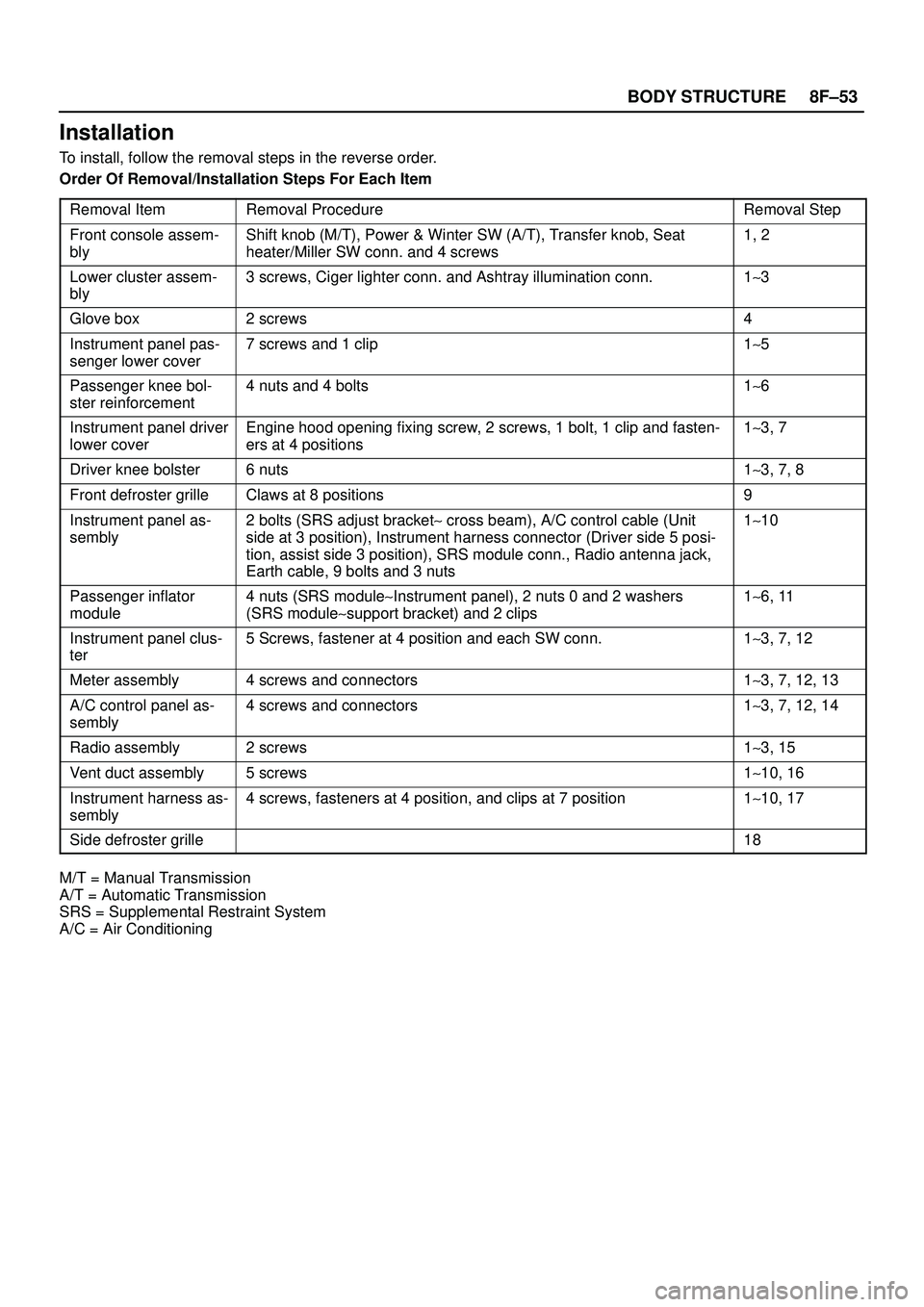
To install, follow the removal steps in the reverse order.
Order Of Removal/Installation Steps For Each Item
Removal Item
Removal ProcedureRemoval Step
Front console assem-
blyShift knob (M/T), Power & Winter SW (A/T), Transfer knob, Seat
heater/Miller SW conn. and 4 screws1, 2
Lower cluster assem-
bly3 screws, Ciger lighter conn. and Ashtray illumination conn.1~3
Glove box2 screws4
Instrument panel pas-
senger lower cover7 screws and 1 clip1~5
Passenger knee bol-
ster reinforcement4 nuts and 4 bolts1~6
Instrument panel driver
lower coverEngine hood opening fixing screw, 2 screws, 1 bolt, 1 clip and fasten-
ers at 4 positions1~3, 7
Driver knee bolster6 nuts1~3, 7, 8
Front defroster grilleClaws at 8 positions9
Instrument panel as-
sembly2 bolts (SRS adjust bracket~ cross beam), A/C control cable (Unit
side at 3 position), Instrument harness connector (Driver side 5 posi-
tion, assist side 3 position), SRS module conn., Radio antenna jack,
Earth cable, 9 bolts and 3 nuts1~10
Passenger inflator
module4 nuts (SRS module~Instrument panel), 2 nuts 0 and 2 washers
(SRS module~support bracket) and 2 clips1~6, 11
Instrument panel clus-
ter5 Screws, fastener at 4 position and each SW conn.1~3, 7, 12
Meter assembly4 screws and connectors1~3, 7, 12, 13
A/C control panel as-
sembly4 screws and connectors1~3, 7, 12, 14
Radio assembly2 screws1~3, 15
Vent duct assembly5 screws1~10, 16
Instrument harness as-
sembly4 screws, fasteners at 4 position, and clips at 7 position1~10, 17
Side defroster grille18
M/T = Manual Transmission
A/T = Automatic Transmission
SRS = Supplemental Restraint System
A/C = Air Conditioning