1998 ISUZU TROOPER light
[x] Cancel search: lightPage 224 of 3573
1BÐ98 AIR CONDITIONING
*1. Displaying the Current Trouble Diagnosing Table
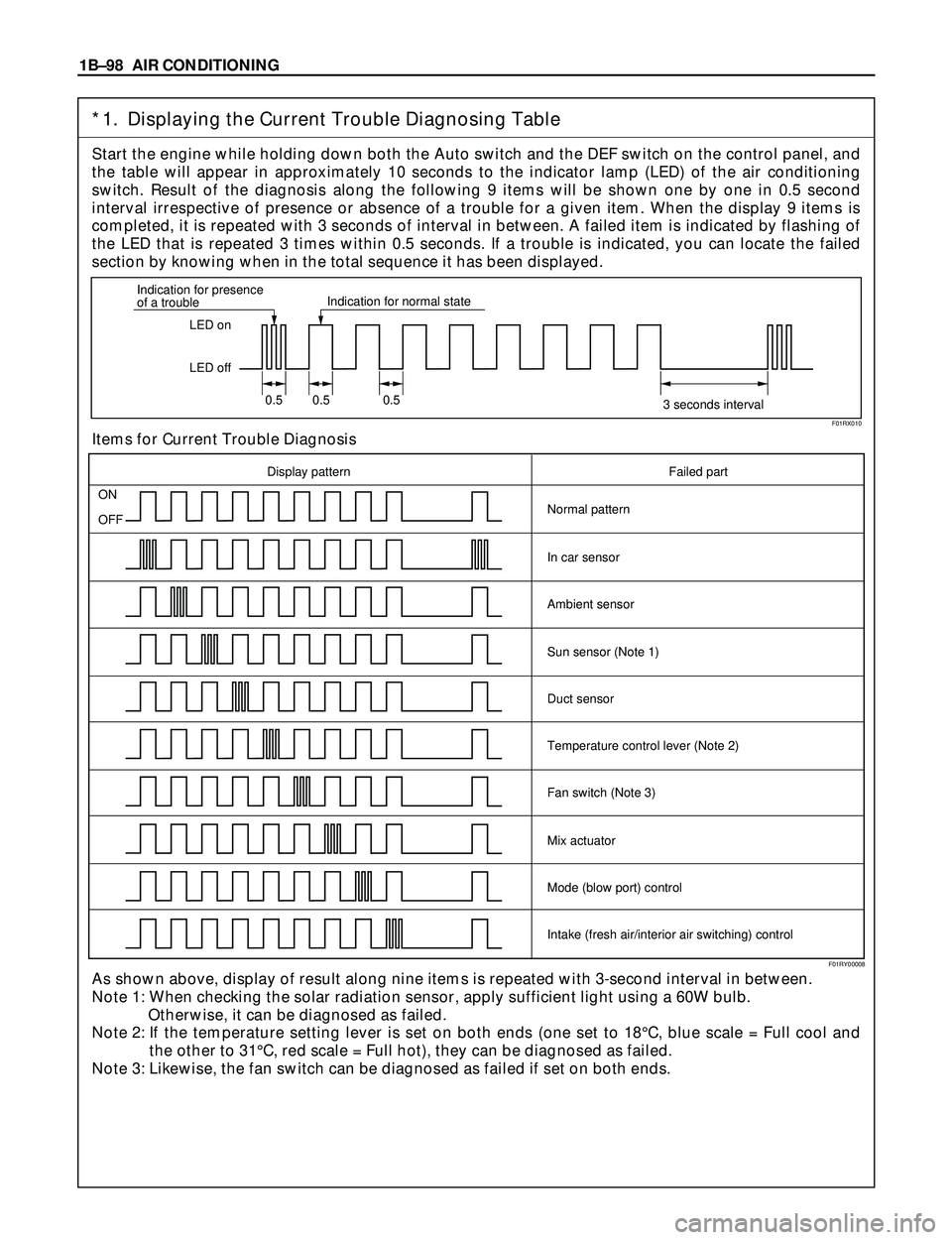
Start the engine while holding down both the Auto switch and the DEF switch on the control panel, and
the table will appear in approximately 10 seconds to the indicator lamp (LED) of the air conditioning
switch. Result of the diagnosis along the following 9 items will be shown one by one in 0.5 second
interval irrespective of presence or absence of a trouble for a given item. When the display 9 items is
completed, it is repeated with 3 seconds of interval in between. A failed item is indicated by flashing of
the LED that is repeated 3 times within 0.5 seconds. If a trouble is indicated, you can locate the failed
section by knowing when in the total sequence it has been displayed.
Items for Current Trouble Diagnosis
As shown above, display of result along nine items is repeated with 3-second interval in between.
Note 1: When checking the solar radiation sensor, apply sufficient light using a 60W bulb.
Otherwise, it can be diagnosed as failed.
Note 2: If the temperature setting lever is set on both ends (one set to 18¡C, blue scale = Full cool and
the other to 31¡C, red scale = Full hot), they can be diagnosed as failed.
Note 3: Likewise, the fan switch can be diagnosed as failed if set on both ends.
LED on
LED off Indication for presence
of a troubleIndication for normal state
0.5 0.5 0.5
3 seconds interval
ON
OFF
Display pattern Failed part
Normal pattern
In car sensor
Ambient sensor
Sun sensor (Note 1)
Duct sensor
Temperature control lever (Note 2)
Fan switch (Note 3)
Mix actuator
Mode (blow port) control
Intake (fresh air/interior air switching) control
F01RX010
F01RY00008
Page 274 of 3573
1D Ð 18 COMPRESSOR OVERHAUL
HD6 TYPE COMPRESSOR
Metric Thread Size Information
Compressor to mounting bracket bolts (Front)
M10´ 1.5 Ð 6H
Compressor to mounting bracket bolts (Rear)
M8´ 1.25 Ð 6H
Suction-discharge port screw
M10´ 1.5 Ð 6HCompressor shaft
M9´ 1.25 Ð 6H
Internal hub-clutch drive assembly
M22´ 1.5 Ð 6H
COMPRESSOR CLUTCH PLATE AND HUB
ASSEMBLY
Removal
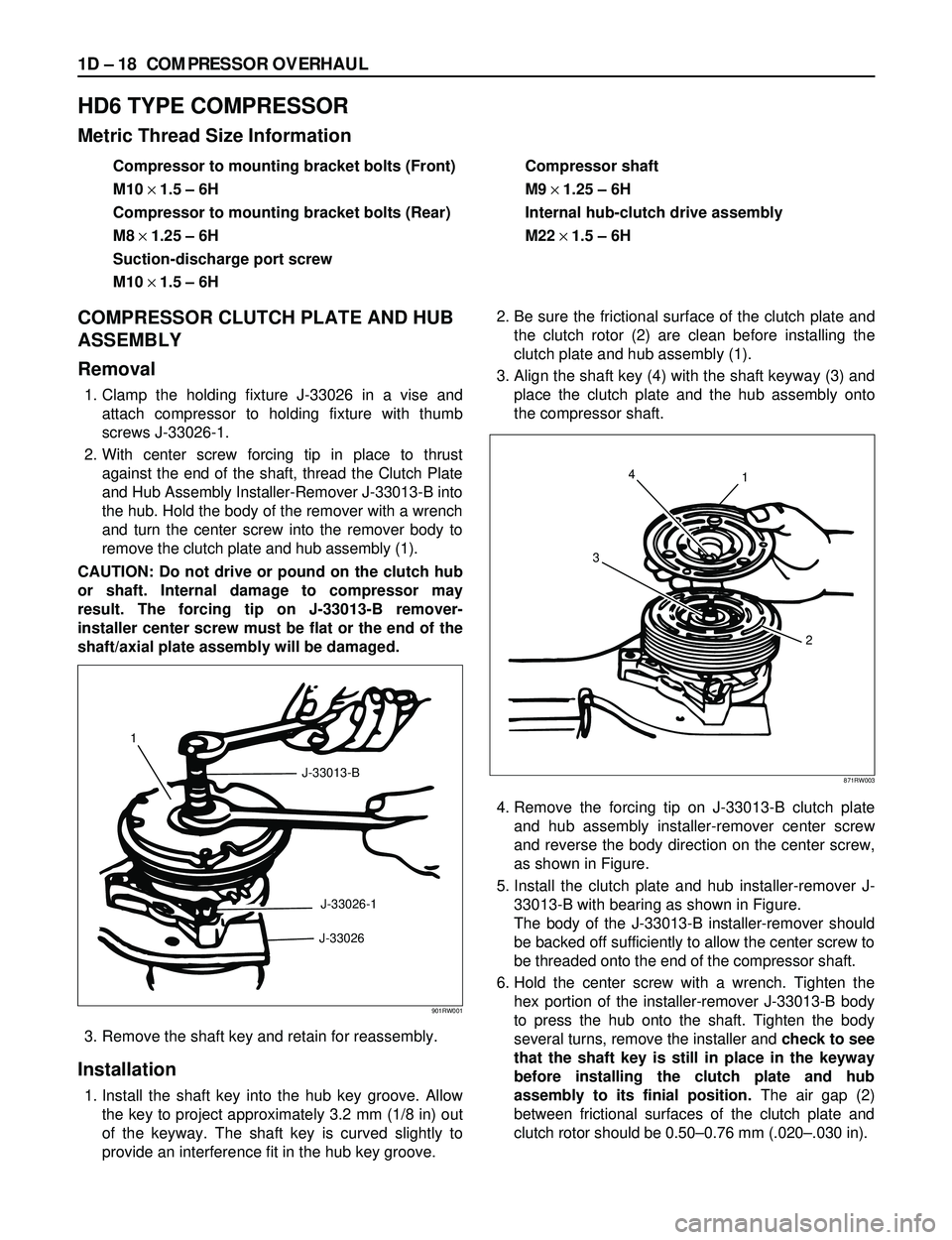
1. Clamp the holding fixture J-33026 in a vise and
attach compressor to holding fixture with thumb
screws J-33026-1.
2. With center screw forcing tip in place to thrust
against the end of the shaft, thread the Clutch Plate
and Hub Assembly Installer-Remover J-33013-B into
the hub. Hold the body of the remover with a wrench
and turn the center screw into the remover body to
remove the clutch plate and hub assembly (1).
CAUTION: Do not drive or pound on the clutch hub
or shaft. Internal damage to compressor may
result. The forcing tip on J-33013-B remover-
installer center screw must be flat or the end of the
shaft/axial plate assembly will be damaged.
3. Remove the shaft key and retain for reassembly.
Installation
1. Install the shaft key into the hub key groove. Allow
the key to project approximately 3.2 mm (1/8 in) out
of the keyway. The shaft key is curved slightly to
provide an interference fit in the hub key groove.2. Be sure the frictional surface of the clutch plate and
the clutch rotor (2) are clean before installing the
clutch plate and hub assembly (1).
3. Align the shaft key (4) with the shaft keyway (3) and
place the clutch plate and the hub assembly onto
the compressor shaft.
4. Remove the forcing tip on J-33013-B clutch plate
and hub assembly installer-remover center screw
and reverse the body direction on the center screw,
as shown in Figure.
5. Install the clutch plate and hub installer-remover J-
33013-B with bearing as shown in Figure.
The body of the J-33013-B installer-remover should
be backed off sufficiently to allow the center screw to
be threaded onto the end of the compressor shaft.
6. Hold the center screw with a wrench. Tighten the
hex portion of the installer-remover J-33013-B body
to press the hub onto the shaft. Tighten the body
several turns, remove the installer and check to see
that the shaft key is still in place in the keyway
before installing the clutch plate and hub
assembly to its finial position.The air gap (2)
between frictional surfaces of the clutch plate and
clutch rotor should be 0.50Ð0.76 mm (.020Ð.030 in).
1
J-33013-B
J-33026-1
J-33026
901RW001
4
31
2
871RW003
Page 275 of 3573
COMPRESSOR OVERHAUL 1D Ð 19
CAUTION: If the center screw is threaded fully onto
the end of the compressor shaft. or if the body of
the installer is held and the center screw is rotated,
the key will wedge and will break the clutch hub.7. Remove installer J-33013-B, check for proper
positioning of the shaft key (even or slightly above
the clutch hub).
8. Spin the pulley rotor by hand to see that the rotor is
not rubbing the clutch drive plate.
COMPRESSOR CLUTCH ROTOR AND/OR
BEARING
Removal
1. Remove the clutch plate and hub assembly as
described previously.
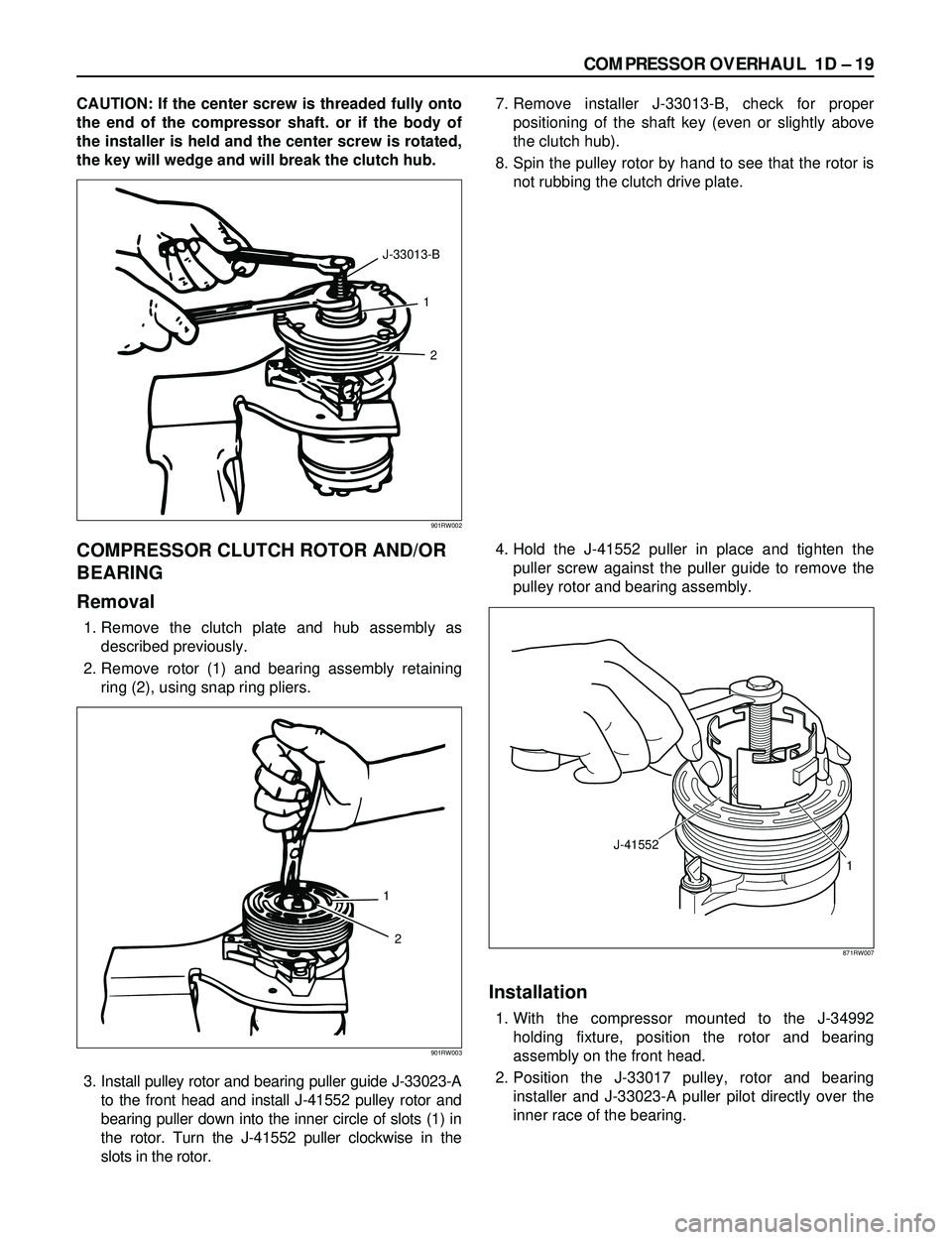
2. Remove rotor (1) and bearing assembly retaining
ring (2), using snap ring pliers.
3. Install pulley rotor and bearing puller guide J-33023-A
to the front head and install J-41552 pulley rotor and
bearing puller down into the inner circle of slots (1) in
the rotor. Turn the J-41552 puller clockwise in the
slots in the rotor.4. Hold the J-41552 puller in place and tighten the
puller screw against the puller guide to remove the
pulley rotor and bearing assembly.
Installation
1. With the compressor mounted to the J-34992
holding fixture, position the rotor and bearing
assembly on the front head.
2. Position the J-33017 pulley, rotor and bearing
installer and J-33023-A puller pilot directly over the
inner race of the bearing.
1
2 J-33013-B
901RW002
1
2
901RW003
J-41552
1
871RW007
Page 289 of 3573
SERVICE INFORMATION 00 – 7
Problem Possible Cause Correction
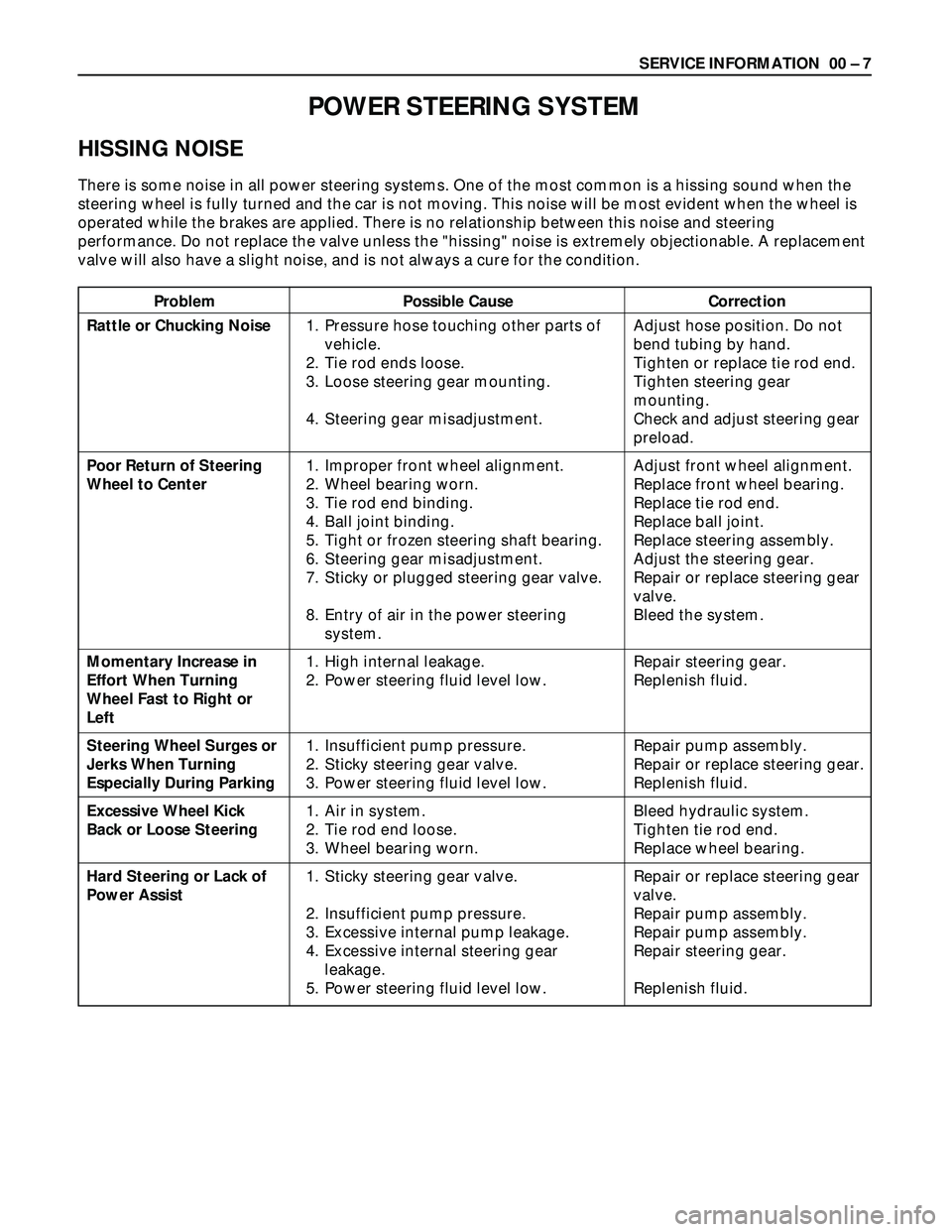
POWER STEERING SYSTEM
HISSING NOISE
There is some noise in all power steering systems. One of the most common is a hissing sound when the
steering wheel is fully turned and the car is not moving. This noise will be most evident when the wheel is
operated while the brakes are applied. There is no relationship between this noise and steering
performance. Do not replace the valve unless the "hissing" noise is extremely objectionable. A replacement
valve will also have a slight noise, and is not always a cure for the condition.
Rattle or Chucking Noise
Poor Return of Steering
Wheel to Center
Momentary Increase in
Effort When Turning
Wheel Fast to Right or
Left
Steering Wheel Surges or
Jerks When Turning
Especially During Parking
Excessive Wheel Kick
Back or Loose Steering
Hard Steering or Lack of
Power Assist1. Pressure hose touching other parts of
vehicle.
2. Tie rod ends loose.
3. Loose steering gear mounting.
4. Steering gear misadjustment.
1. Improper front wheel alignment.
2. Wheel bearing worn.
3. Tie rod end binding.
4. Ball joint binding.
5. Tight or frozen steering shaft bearing.
6. Steering gear misadjustment.
7. Sticky or plugged steering gear valve.
8. Entry of air in the power steering
system.
1. High internal leakage.
2. Power steering fluid level low.
1. Insufficient pump pressure.
2. Sticky steering gear valve.
3. Power steering fluid level low.
1. Air in system.
2. Tie rod end loose.
3. Wheel bearing worn.
1. Sticky steering gear valve.
2. Insufficient pump pressure.
3. Excessive internal pump leakage.
4. Excessive internal steering gear
leakage.
5. Power steering fluid level low.Adjust hose position. Do not
bend tubing by hand.
Tighten or replace tie rod end.
Tighten steering gear
mounting.
Check and adjust steering gear
preload.
Adjust front wheel alignment.
Replace front wheel bearing.
Replace tie rod end.
Replace ball joint.
Replace steering assembly.
Adjust the steering gear.
Repair or replace steering gear
valve.
Bleed the system.
Repair steering gear.
Replenish fluid.
Repair pump assembly.
Repair or replace steering gear.
Replenish fluid.
Bleed hydraulic system.
Tighten tie rod end.
Replace wheel bearing.
Repair or replace steering gear
valve.
Repair pump assembly.
Repair pump assembly.
Repair steering gear.
Replenish fluid.
Page 292 of 3573
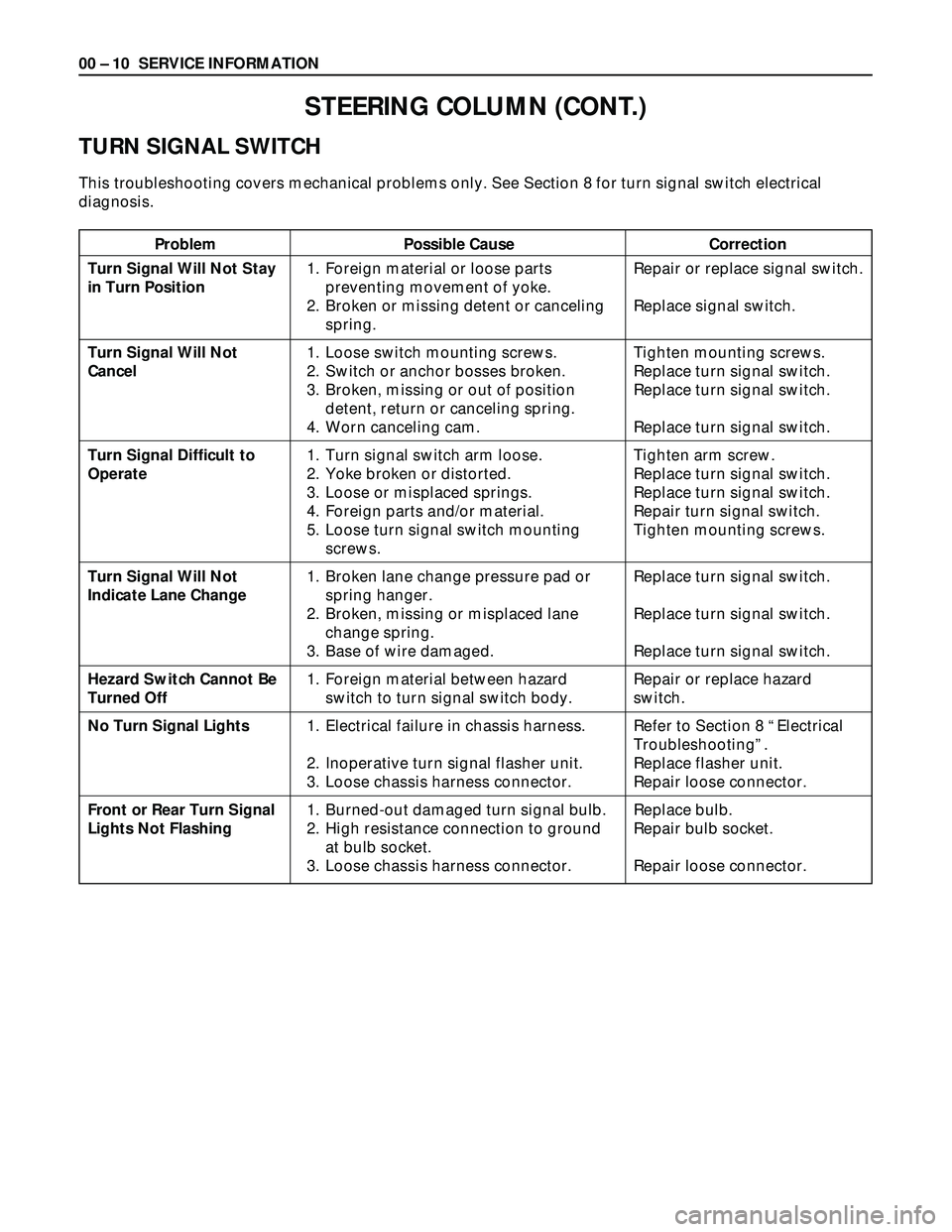
00 – 10 SERVICE INFORMATION
Problem Possible Cause Correction
STEERING COLUMN (CONT.)
TURN SIGNAL SWITCH
This troubleshooting covers mechanical problems only. See Section 8 for turn signal switch electrical
diagnosis.
Turn Signal Will Not Stay
in Turn Position
Turn Signal Will Not
Cancel
Turn Signal Difficult to
Operate
Turn Signal Will Not
Indicate Lane Change
Hezard Switch Cannot Be
Turned Off
No Turn Signal Lights
Front or Rear Turn Signal
Lights Not Flashing1. Foreign material or loose parts
preventing movement of yoke.
2. Broken or missing detent or canceling
spring.
1. Loose switch mounting screws.
2. Switch or anchor bosses broken.
3. Broken, missing or out of position
detent, return or canceling spring.
4. Worn canceling cam.
1. Turn signal switch arm loose.
2. Yoke broken or distorted.
3. Loose or misplaced springs.
4. Foreign parts and/or material.
5. Loose turn signal switch mounting
screws.
1. Broken lane change pressure pad or
spring hanger.
2. Broken, missing or misplaced lane
change spring.
3. Base of wire damaged.
1. Foreign material between hazard
switch to turn signal switch body.
1. Electrical failure in chassis harness.
2. Inoperative turn signal flasher unit.
3. Loose chassis harness connector.
1. Burned-out damaged turn signal bulb.
2. High resistance connection to ground
at bulb socket.
3. Loose chassis harness connector.Repair or replace signal switch.
Replace signal switch.
Tighten mounting screws.
Replace turn signal switch.
Replace turn signal switch.
Replace turn signal switch.
Tighten arm screw.
Replace turn signal switch.
Replace turn signal switch.
Repair turn signal switch.
Tighten mounting screws.
Replace turn signal switch.
Replace turn signal switch.
Replace turn signal switch.
Repair or replace hazard
switch.
Refer to Section 8 “Electrical
Troubleshooting”.
Replace flasher unit.
Repair loose connector.
Replace bulb.
Repair bulb socket.
Repair loose connector.
Page 304 of 3573

2A – 2 FRONT END ALIGNMENT
GENERAL DESCRIPTION
“Front End Alignment” refers to the angular relationship between the front wheels, the front suspension
attaching parts and the ground.
Proper front end alignment must be maintained in order to insure efficient steering, good directional
stability and to prevent abnormal tire wear.
The most important factors of front end alignment are wheel toe-in, wheel camber and axle caster.
DEFINITION OF TERMS
CAMBER
Camber is the inward or outward tilting of the front wheels
from the vertical. When the wheels tilt outward at the top,
the camber is positive (+). When the wheels tilt inward at
the top, the camber is negative (–). The amount of tilt
measured in degrees from the vertical is called the camber
angle.
If camber is extreme or unequal between the wheels,
improper steering and excessive tire wear will result.
Negative camber causes wear on the inside tire, while
positive camber causes wear to the outside.
CASTER
Caster is the tilting of the wheel axis either forward or
backward from the vertical (when viewed from the side of
the vehicle). A backward tilt is positive(+) and a forward tilt
is negative(–).
On the short and long arm type suspension you cannot
see a caster angle without a special instrument, but if you
look straight down from the top of the upper control arm
to the ground, the ball joints do not line up (fore and aft)
when a caster angle other than 0 degree is present. With a
positive angle, the lower ball joint would be slightly ahead
(toward the front of the vehicle) of the upper ball joint
center line.
TOE-IN
Toe-in is the turning of the front wheels. The actual
amount of toe-in is normally a fraction of a degree. Toe-in
is measured from the center of the tire treads or from the
inside of the tires. The purpose of toe-in is to insure
parallel rolling of the front wheels and to offset any small
deflections of the wheel support system which occurs
when the vehicle is rolling forward. Incorrect toe-in results
in excessive toe-in and unstable steering. Toe-in is the last
alignment to be set in the front end alignment procedure.
Page 314 of 3573
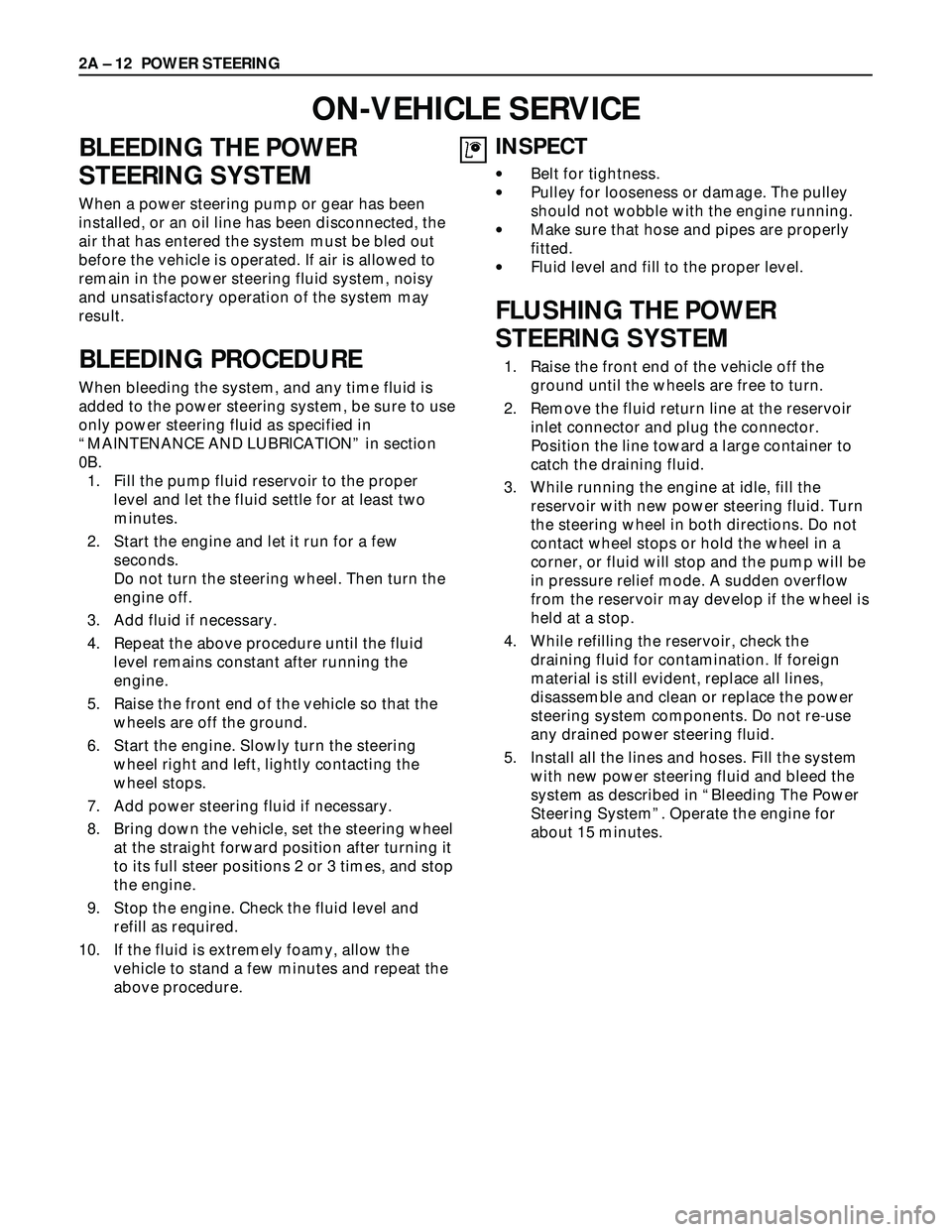
BLEEDING THE POWER
STEERING SYSTEM
When a power steering pump or gear has been
installed, or an oil line has been disconnected, the
air that has entered the system must be bled out
before the vehicle is operated. If air is allowed to
remain in the power steering fluid system, noisy
and unsatisfactory operation of the system may
result.
BLEEDING PROCEDURE
When bleeding the system, and any time fluid is
added to the power steering system, be sure to use
only power steering fluid as specified in
“MAINTENANCE AND LUBRICATION” in section
0B.
1. Fill the pump fluid reservoir to the proper
level and let the fluid settle for at least two
minutes.
2. Start the engine and let it run for a few
seconds.
Do not turn the steering wheel. Then turn the
engine off.
3. Add fluid if necessary.
4. Repeat the above procedure until the fluid
level remains constant after running the
engine.
5. Raise the front end of the vehicle so that the
wheels are off the ground.
6. Start the engine. Slowly turn the steering
wheel right and left, lightly contacting the
wheel stops.
7. Add power steering fluid if necessary.
8. Bring down the vehicle, set the steering wheel
at the straight forward position after turning it
to its full steer positions 2 or 3 times, and stop
the engine.
9. Stop the engine. Check the fluid level and
refill as required.
10. If the fluid is extremely foamy, allow the
vehicle to stand a few minutes and repeat the
above procedure.
INSPECT
•Belt for tightness.
•Pulley for looseness or damage. The pulley
should not wobble with the engine running.
•Make sure that hose and pipes are properly
fitted.
•Fluid level and fill to the proper level.
FLUSHING THE POWER
STEERING SYSTEM
1. Raise the front end of the vehicle off the
ground until the wheels are free to turn.
2. Remove the fluid return line at the reservoir
inlet connector and plug the connector.
Position the line toward a large container to
catch the draining fluid.
3. While running the engine at idle, fill the
reservoir with new power steering fluid. Turn
the steering wheel in both directions. Do not
contact wheel stops or hold the wheel in a
corner, or fluid will stop and the pump will be
in pressure relief mode. A sudden overflow
from the reservoir may develop if the wheel is
held at a stop.
4. While refilling the reservoir, check the
draining fluid for contamination. If foreign
material is still evident, replace all lines,
disassemble and clean or replace the power
steering system components. Do not re-use
any drained power steering fluid.
5. Install all the lines and hoses. Fill the system
with new power steering fluid and bleed the
system as described in “Bleeding The Power
Steering System”. Operate the engine for
about 15 minutes. 2A – 12 POWER STEERING
ON-VEHICLE SERVICE
Page 358 of 3573
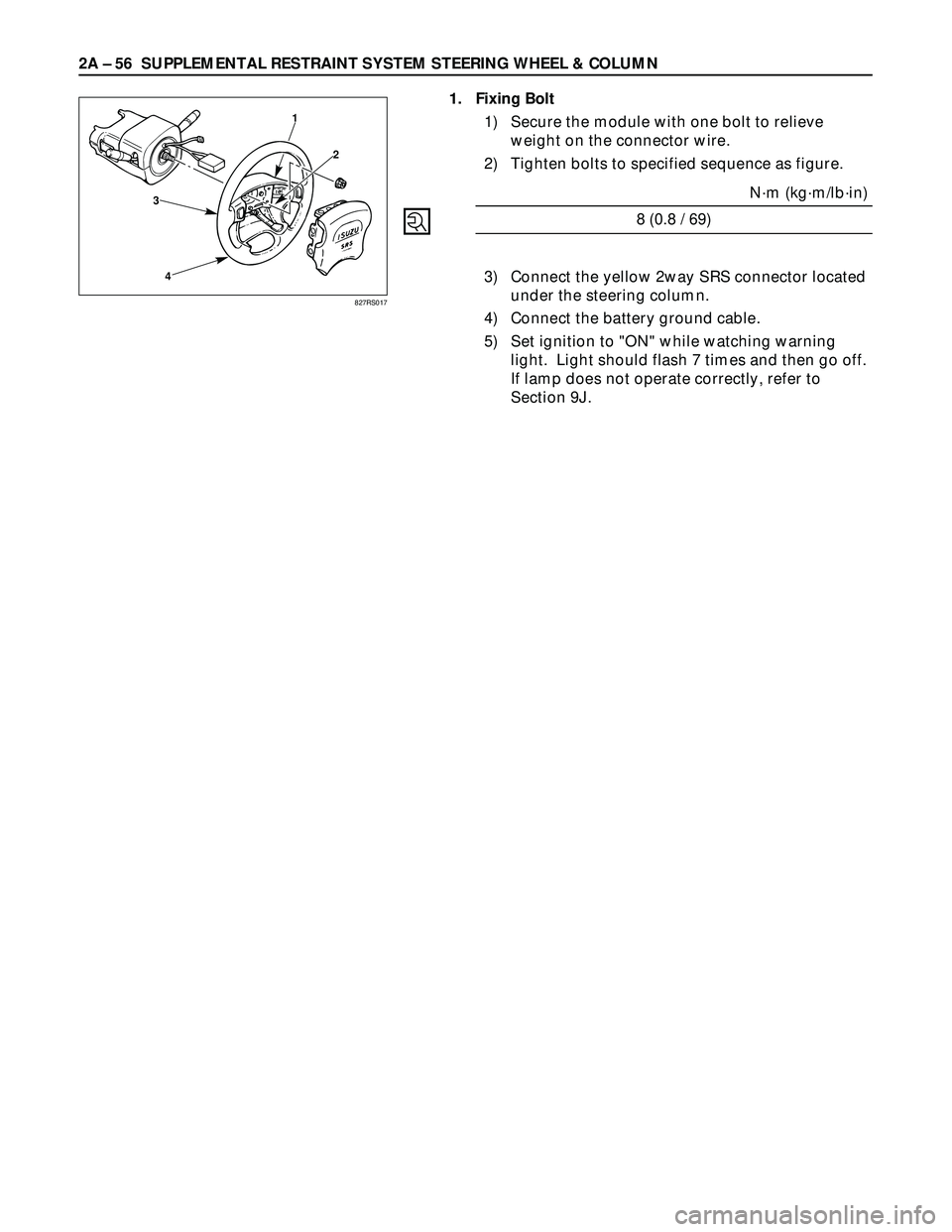
2A – 56 SUPPLEMENTAL RESTRAINT SYSTEM STEERING WHEEL & COLUMN
3
41
2
1. Fixing Bolt
1) Secure the module with one bolt to relieve
weight on the connector wire.
2) Tighten bolts to specified sequence as figure.
N·m (kg·m/lb·in)
8 (0.8 / 69)
3) Connect the yellow 2way SRS connector located
under the steering column.
4) Connect the battery ground cable.
5) Set ignition to "ON" while watching warning
light. Light should flash 7 times and then go off.
If lamp does not operate correctly, refer to
Section 9J.
827RS017