Page 1224 of 1681
Combination Light Switch :
OFFd
I
.,\
Lr"
G (Not us.d)
Tuln Signal Switch :
Terminal
PositionFJ
Headlight switchOFF
:m:oo
=DLOWo--ooo
HIGHoooo
Passing switchOFF
ONoo
LEFTRIGHT
I
Position
TerminalB
RIGHToo
NEUTRAL
LEFToo
23-167
Page 1226 of 1681
)
Headlight
Description
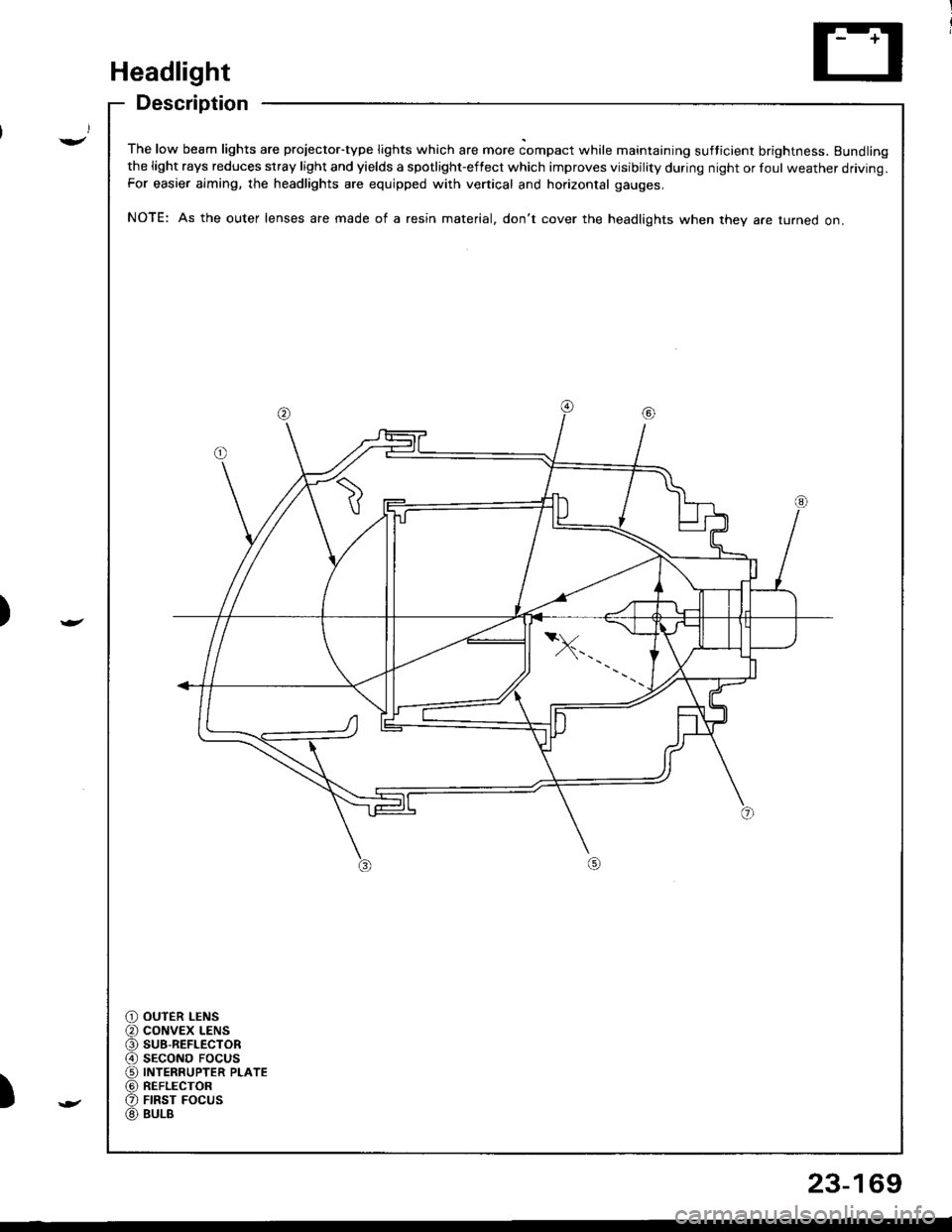
The low beam lights are projector-type lights which are more compact while maintaining sufticient brightness. Bundlingthe light rays reduces stray light and yields a spotlight-effect which improves visibility during night or foul weather driving.For easier aiming, the headlights are equipped with vertical and horizontal gauges.
NOTE: As the outer lenses are made of a resin material, don't cover the headlights when they a.e turned on.
OUTER LENSCONVEX LENSSU8-REFLECTORSECOND FOCUSINTERRUPTER PLATEREFLECTORFIRST FOCUSBULB
23-169
Page 1227 of 1681
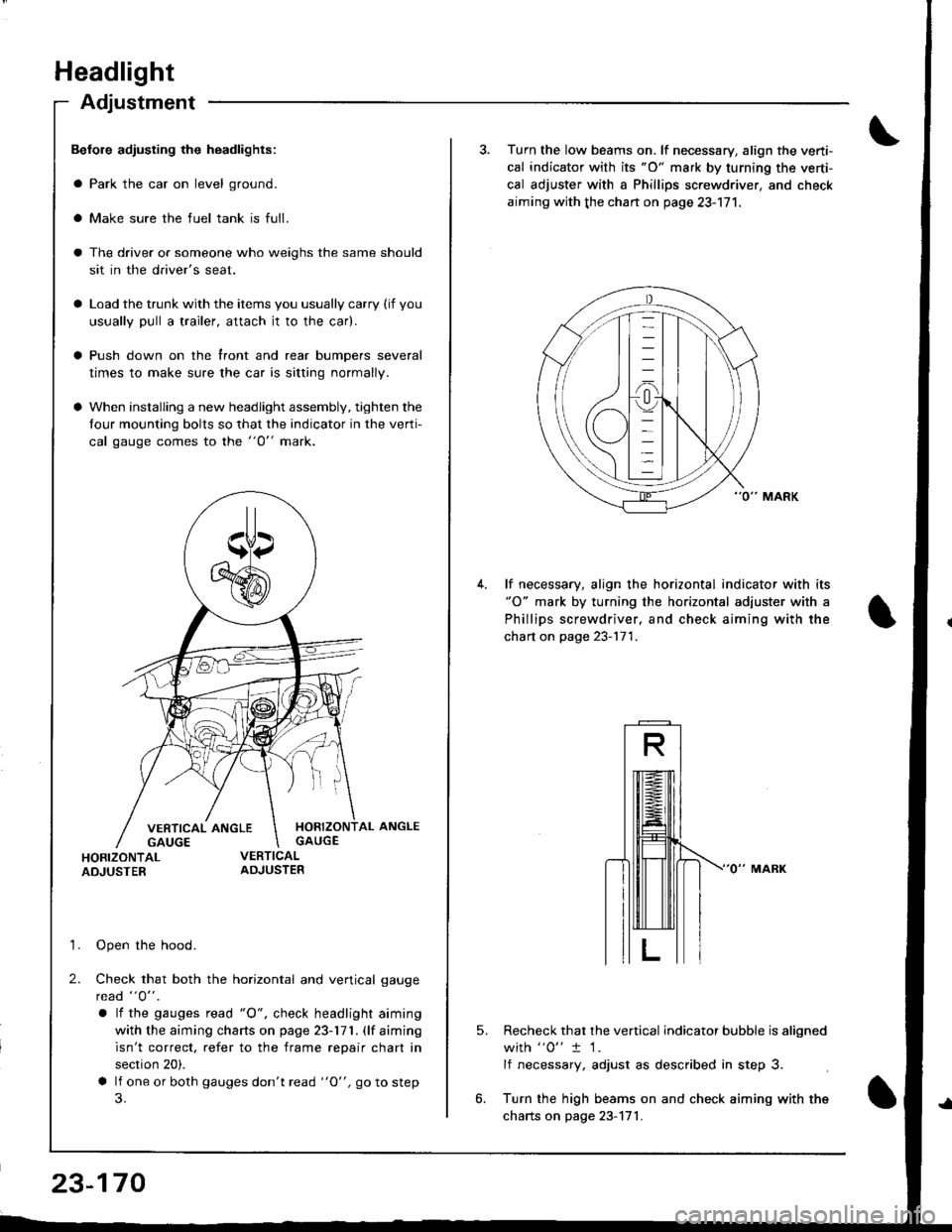
Headlight
Adjustment
Befole adiusting the headlights:
a Park the car on level ground.
a Make sure the fuel tank is full.
The driver or someone who weighs the same should
sit in the driver's seat.
Load the trunk with the items you usually carry (if you
usually pull a trailer, attach jt to the car).
Push down on the front and rear bumpers several
times to make sure the car is sitting normally.
When installing a new headlight assembly, tighten the
four mounting bolts so that the indicator in the verti-
cal gauge comes to the "O" mark.
HORIZONTAL ANGLEGAUGE
HORIZONTALADJUSTER
'1. Open the hood.
2. Check that both the horizontal and vertical gauge
rcad "O" .
a lf the gauges tead "O", check headlight aiming
with the aiming charts on page 23-171. (lf aiming
isn't correct. refer to the frame repair chart in
section 20).
a lf one or both gauges don't read "O", go to step
23-170
3. Turn the low beams on. lf necessary, align the verti-
cal indicator with its "O" mark by turning the verti-
cal adjuster with a Phillips screwdriver, and check
aiming with the chan on page 23-171.
lf necessary, align the horizontal indicator with its"O" mark by turning the horizontal adjuster with a
Phillips screwdriver, and check aiming with the
chart on page 23-171.
5.Recheck that the vertical indicator bubble is aligned
with "0" t 1.
lf necessary, adjust as described in step 3.
Turn the high beams on and check aiming with the
charts on page 23-171.
Page 1228 of 1681
)
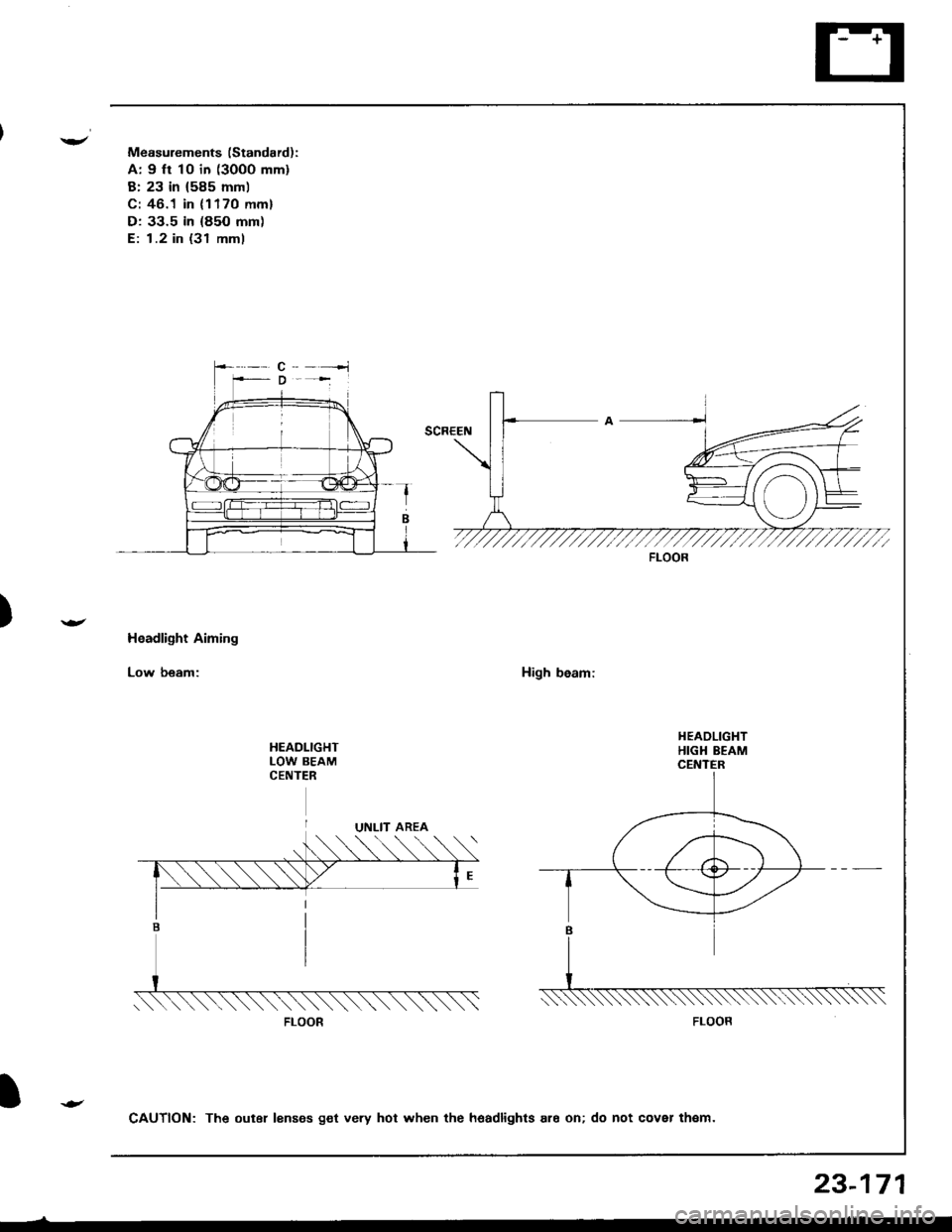
Measurements (Standard):
A: 9 ft 10 in (3000 mm)
B: 23 in (585 mml
C: 46.1 in (1170 mm)
D: 33.5 in (85O mm)
E: 1.2 in (31 mml
Headlight Aiming
Low beam:High beam:
HEADLIGHTLOW BEAMCENTER
FLOOR
FLOOR
CAUTION: The outer lenses get very hot when the hoadlights ar6 on; do not cover th€m.
23-171
Page 1229 of 1681
Headlight
Headlight Replacement
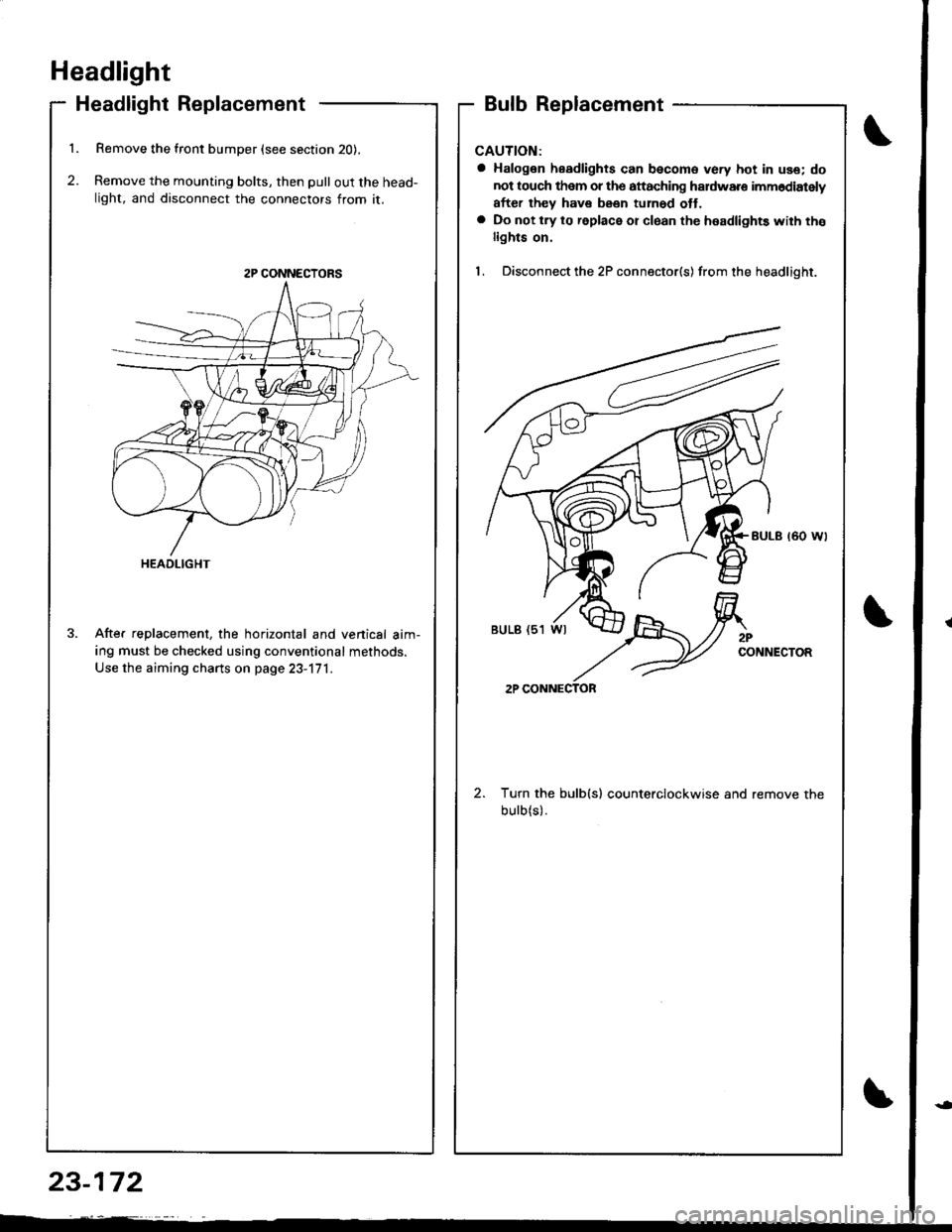
1. Remove the front bumper (see section 20).
2. Remove the mounting bolts, then pull out the head-
light, and disconnect the connectors from it.
After replacement, the horizontal and venical aim-
ing must be checked using conventional methods.
Use the aiming charts on page 23-171.
Bulb Replacement
CAUTION:
a Halogen headlights can becomo very hot in use; do
not touch them or the attaching haldware imm6diately
after they have been tuh6d ott.a Do not try to replace or cl6an the headlights with tho
lights on.
1. Disconnect the 2P connector(s) from the headlight.
Turn the bulb(s) counterclockwise and remove the
bulb(s).
2P CONNECTORS
HEADLIGHT
2PCONNECTOR
2P CONNECTOR
23-172
Page 1236 of 1681
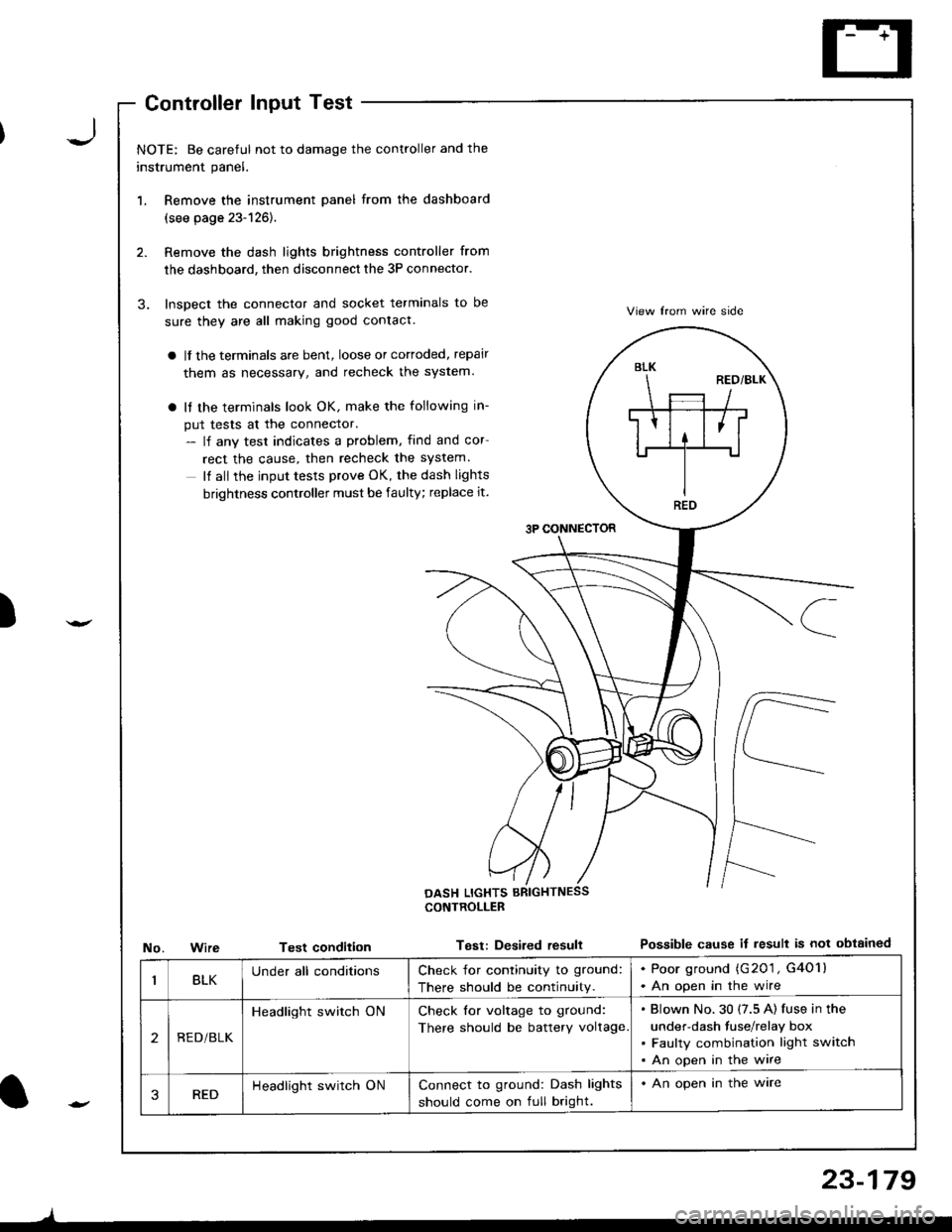
J
)
'1.
3.
NOTE: Be careful not to damage the controller and the
instrument panel.
Remove the instrument panel from the dashboard
(see page 23-126).
Remove the dash lights brightness controller from
the dashboard, then disconnect the 3P connector.
Inspect the connector and socket terminals to be
sure they are all making good contact.
a lf the terminals are bent, loose or cortoded, repair
them as necessary, and recheck the system.
a It the terminals look OK, make the following in-
put tests at the connector.- lf any test indicates a problem, find and cor
rect the cause, then recheck the system.
It all the input tests prove OK, the dash lights
brightness controller must be faulty; replace it.
3P CONNECTOR
View lrom wire side
Possible cause if result is not obtainedNo.WireTest condition
CONTROLLEB
Test: Desired resull
BLK
REO
BLKUnder all conditionsCheck for continuity to ground:
There should be continuity.
. Poor ground (G201 , G4O1l. An open in the wire
2REDi BLK
Headlight switch ONCheck for voltage to ground:
There should be battery voltage
Blown No.30 (7.5 A) fuse in the
under-dash fuse/relay box
Faulty combination light switch
An open in the wire
3REDHeadlight switch ONConnect to ground: Dash lights
should come on full bright.
. An open in the ware
l-
)
23-179
Page 1279 of 1681
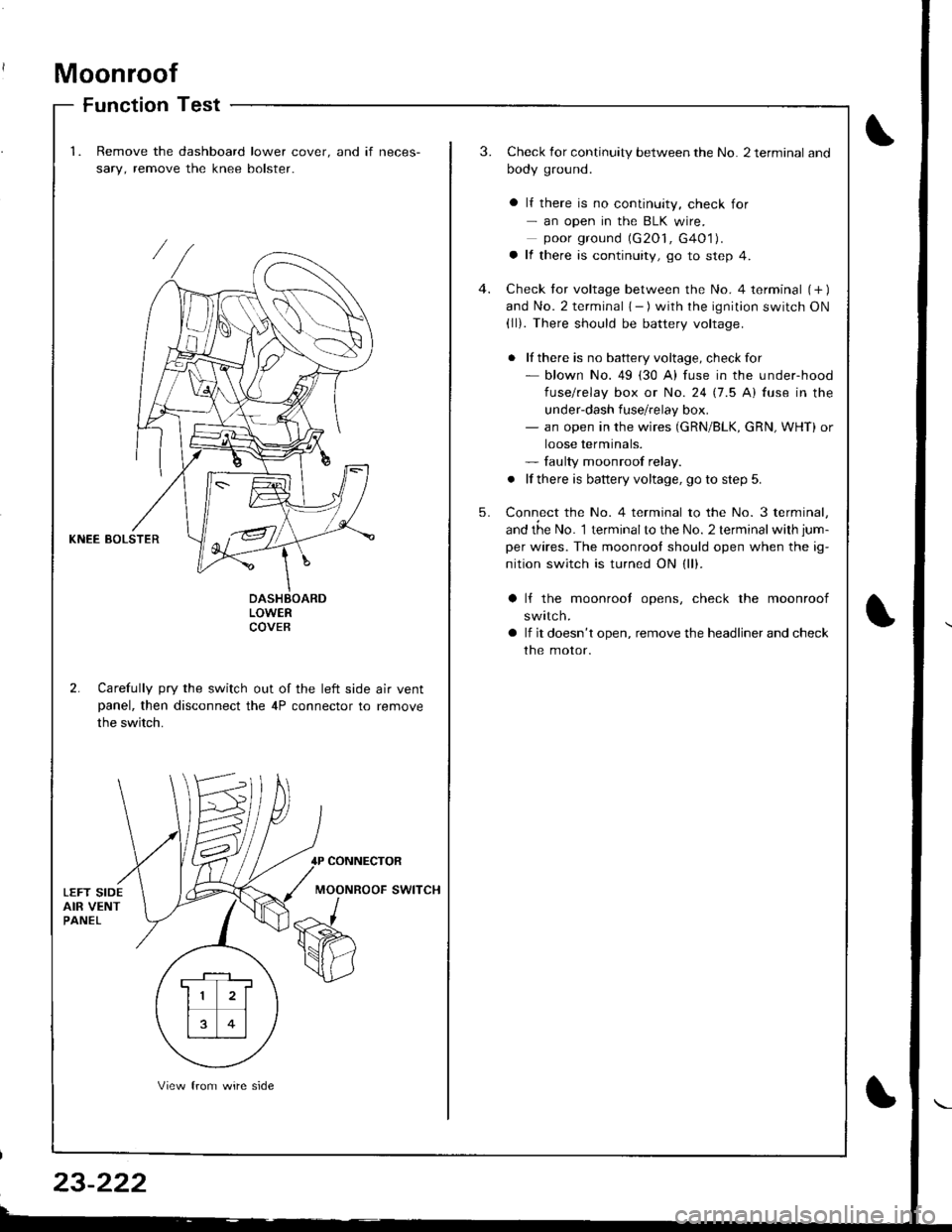
Moonroof
Function Test
1.Remove the dashboard lower cover. and if neces-
sary, remove the knee bolster.
3.Check for continuity between the No. 2 terminal and
body ground.
a lf there is no continuity, check for- an open in the BLK wire.poor ground (G2O1, G4O1).a lf there is continuity, go to step 4.
Check tor voltage between the No. 4 terminal (+ )and No. 2 terminal { - ) with the ignition switch ON(ll). There should be battery voltage.
. lf there is no battery voltage, checkfor- blown No. 49 (30 A) fuse in the under-hood
fuse/relay box or No. 24 17.5 Al fuse in the
under-dash fuse/relay box.- an open in the wires (GRN/BLK, cRN, WHT) or
loose terminals.- faulty moonroof relay.
. lf there is battery voltage, go to step 5.
Connect the No. 4 terminal to the No. 3 terminal,
and the No. 1 terminalto the No. 2 terminal with jum-
per wires. The moonrool should open when the ig-
nition switch is turned ON (ll).
4.
5.
KNEE BOLSTER
LOWERCOVEB
2. Carefully pry the switch out of the left side air ventpanel, then disconnect the 4P connector to remove
the switch.
lf the moonrool opens, check the moonroof
swttcn.
lf it doesn't open, remove the headliner and check
the motor.
CONNECTOR
MOONROOF SWITCH
. F-_1 ,
11 2l
rt1
13 0l
View from wire side
Page 1280 of 1681
Terminal
;'..b;--\BcD
OFFCF--o
OPENO--_oo--_o
CLOSEo-_O
o-o
Switch Test
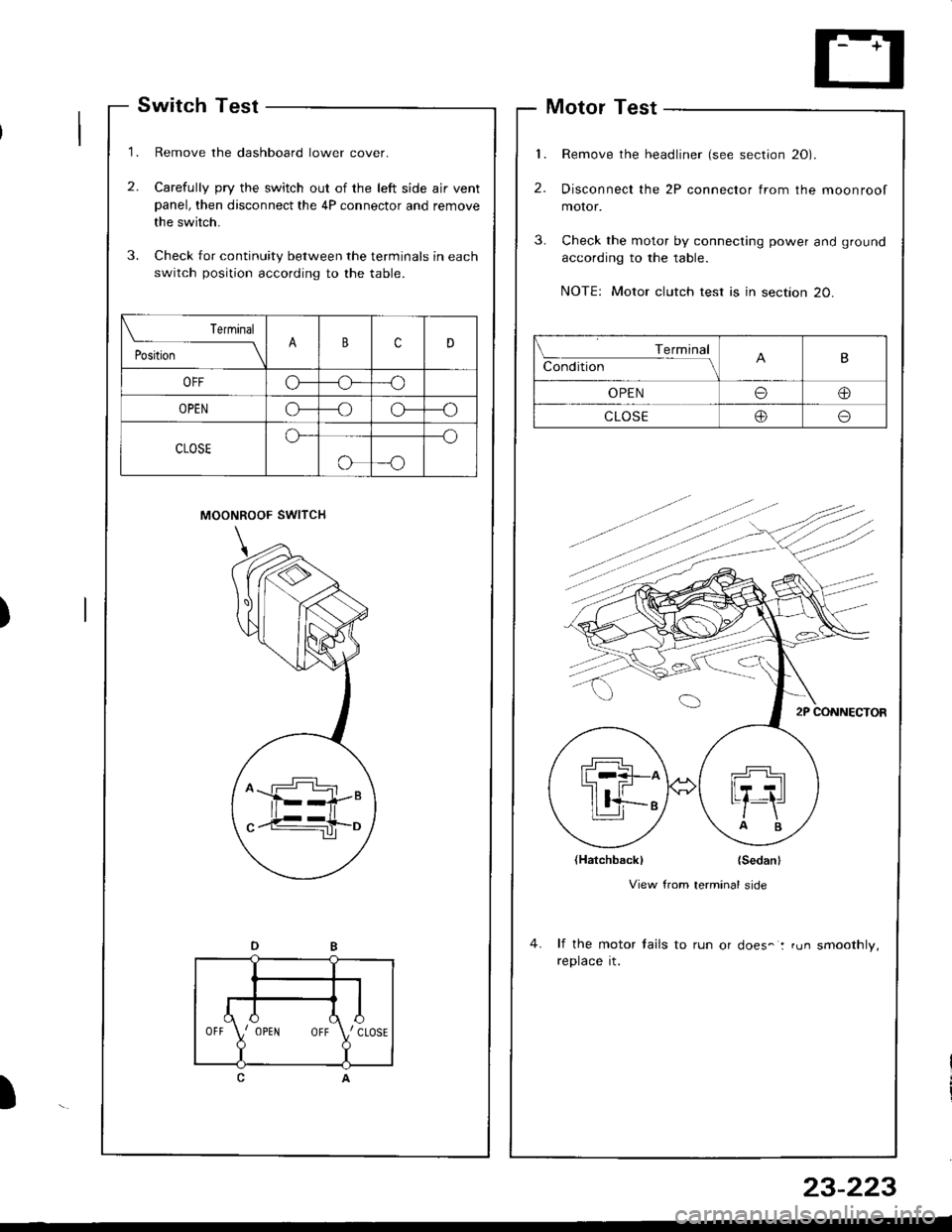
Remove the dashboard lower cover.
Carefully pry the switch out of the left side ajr ventpanel, then disconnect the 4P connector and remove
the switch.
Check for continuity between the terminals in each
switch position according to the table.
MOONROOF SWITCH
1.
2.
Motor Test
Remove the headliner (see section 20).
Disconnect the 2P connector from the moonroof
moror.
Check the motor by connecting power and ground
according to the table.
NOTE: Motor clutch test is in section 20.
{Hatchbackl {Sedanl
View from terminal side
lf the motor tails to run or does-: run smoothly,reptace rt.
)
)
Terminal
Conditbn - ll\B
OPENoo
CLOSEoo
,l
\{J\,, CLOSE
?
IOPENOFF
23-223

Tuln Signal Switch :
Terminal
PositionFJ
Headlight switchOFF
:m:oo
=DLOWo--ooo
HIGHoooo
Passing switchOFF
ONoo
LEFTRIGHT
I
Position
TerminalB
RIG")