1998 CHEVROLET CORVETTE tow
[x] Cancel search: towPage 151 of 378
Downloaded from www.Manualslib.com manuals search engine ABS ACTIVE (Anti-Lock Brake System Active) - :
When your anti-lock system is adjusting brake pressure
to help avoid a braking skid, the ABS ACTIVE message
will be displayed.
Slippery road conditions may exist if this message is
displayed,
so adjust your driving accordingly. The
message will stay on for a few seconds after the system
stops adjusting brake pressure.
SERVICE ABS (Anti-Lock Brake System) - : If the
SERVICE ABS message is displayed when you
are
driving, stop as soon as possible and turn the ignition
off. Then start the engine again to reset the system. If
the message stays on, or comes back on again while you
are driving, your vehicle is in need of service. If the
regular brake system warning light isn’t on, you still
have brakes, but don’t have anti-lock brakes. If the
regular brake system light is also on, you don’t have
anti-lock brakes and there is a problem with your
brakes.
See “Brake System Warning Light” earlier in
this section.
If the SERVICE ABS message is being displayed, your
traction control system and the optional active handling system will also be disabled. The driver information
center will scroll three messages SERVICE ABS,
SERVICE TRACTION SYS. and SERVICE ACTIVE
HNDLG and the instrument cluster car icon will be illuminated.
The driver can acknowledge these messages
by pressing the reset button three times. When the
service message is displayed the computer controlled
systems will not assist the driver and you should have
the system repaired as soon as possible. Adjust your
driving accordingly.
SERVICE COLUMN LOCK: The system that
controls the locking and unlocking of the steering
column may not work properly. Have the vehicle towed
to a dealer for service.
LOW OIL PRESSURE: You will hear four chimes and
the CHECK GAGES telltale will come on when this
message is displayed.
To acknowledge the warning,
press the RESET button. After you press the
RESET
button, a message will be displayed and you will hear a
chime every minute until the vehicle is serviced.
If you
do not press RESET, the message will remain on the
digital display until the vehicle is serviced.
Low oil pressure may be the result of a combination of
low oil level and abrupt changes in the vehicle’s
direction. When this warning
is displayed, you should
not operate the engine at high
RPM or make fast abrupt
moves. When convenient, you should check the oil
level. See “Engine Oil” in the Index.
Page 161 of 378
Downloaded from www.Manualslib.com manuals search engine Comfort Controls
This section tells you how to make your air system work
for you. Your comfort control system uses
ozone-friendly
R- 134a refrigerant.
With these systems, you can control the heating, cooling and ventilation in your vehicle. Your vehicle also has
a flow-through ventilation system described later
in
this section.
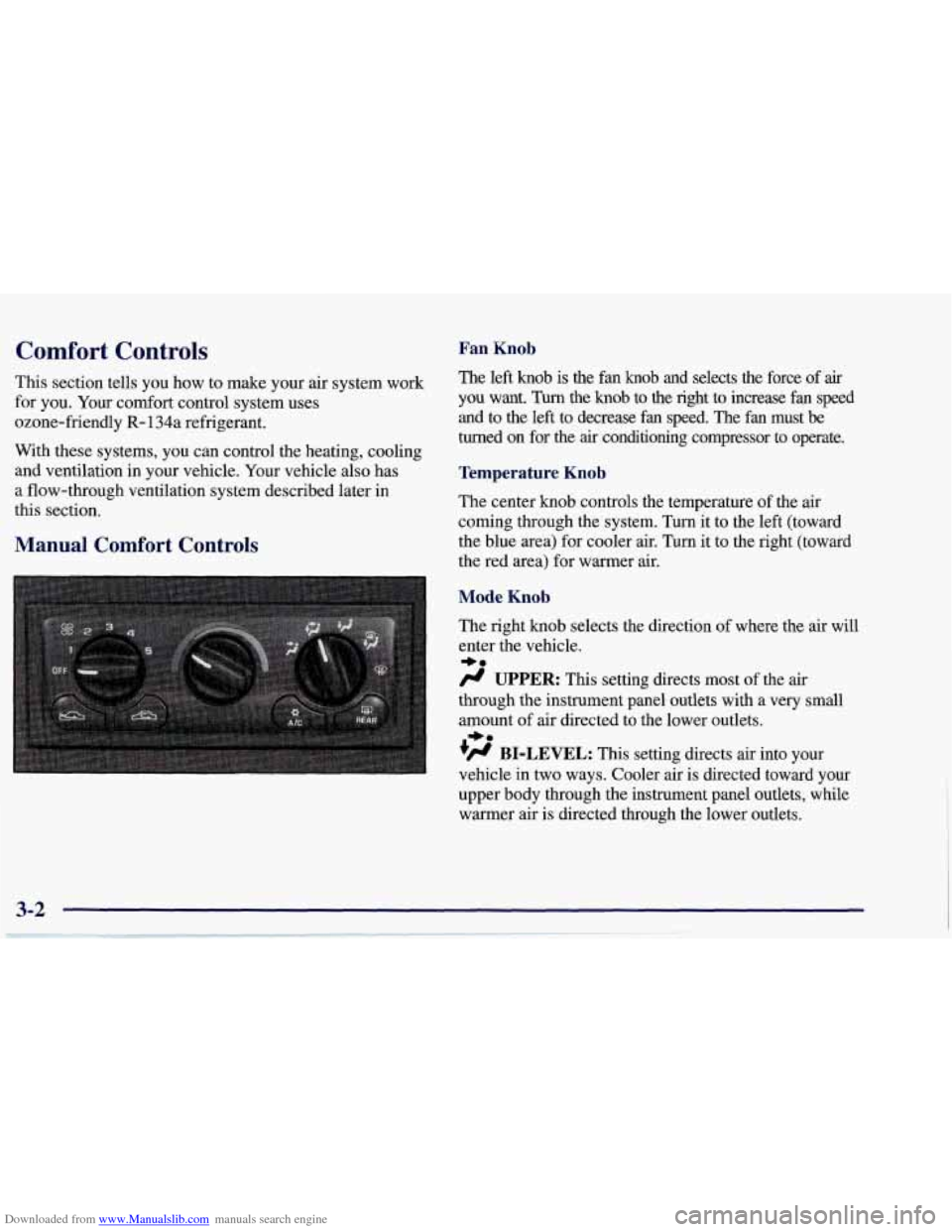
Manual Comfort Controls
Fan Knob
The left knob is the fan knob and selects the force of air
you want. Turn the knob to the right to increase fan speed
and to the
left to decrease fan speed. The fan must be
turned on for the
air conditioning compressor to operate.
Temperature Knob
The center knob controls the temperature of the air
coming through the system.
Turn it to the left (toward
the blue area) for cooler air. Turn it to the right (toward\
the red area) for warmer air.
Mode Knob
The right knob selects the direction of where the air will
enter the vehicle.
/.I UPPER: This setting directs most of the air
through the instrument panel outlets with a very small
amount of air directed to the lower outlets.
+H BI-LEVEL: This setting directs air into your
vehicle in two ways. Cooler air
is directed toward your
upper body through the instrument panel outlets, while
warmer air is directed through the lower outlets.
*e
+e
Page 162 of 378
Downloaded from www.Manualslib.com manuals search engine a
+' LOWER: This setting directs most of the air
through the lower ducts to the floor area of the vehicle with some of the air also directed toward the windshield
and side window vents.
+# DEFOG: This setting divides the air between the
windshield and lower outlets with a small amount directed toward the side window vents. This is useful
when fog appears on the windshield or side glass due to
rain or snowy conditions.
DEFROST Use this setting to quickly remove fog
or frost from the windshield. This setting directs most of
the airflow to the windshield with
a small amount
directed toward the lower and side window outlets.
Mode Buttons
These buttons control the air intake, the air conditioning and the rear window defogger operation.
FRESH AIR: Press this button and it will bring
outside air into your vehicle. The light on the button will
come on when operating. Use this setting while trying to
defrost or defog windows to help clear moisture.
RECIRCULATE: Press this button to limit the
amount of fresh air entering your vehicle by
recirculating most of the
air inside your vehicle. The
light on the button will come on when operating. This
setting is helpful when you are trying to cool the air
quickly or to limit odors entering your vehicle.
RECIRCULATE cannot be used while in the DEFROST
or
DEFOG modes.
e A/C: This button turns the air conditioning
compressor
off or on under most conditions. The light
on the A/C button comes on when the compressor is
operating. The air conditioning does not operate at
temperatures below approximately
35 OF to 40°F (2" C
to 4°C). The air conditioning cools and dehumidifies the
air coming into the vehicle. The air conditioning cannot
be turned
off in DEFROST as it helps to remove
moisture from the vehicle. It also helps to keep the
windows clear.
The air conditioning may be forced
off at high engine
speeds
or high engine oil or coolant temperatures.
3-3
Page 166 of 378
Downloaded from www.Manualslib.com manuals search engine MODE: Press the MODE button to manually lock in the
current air delivery setting and to stop the automatic
mode control. Pressing the MODE button will delete
AUTO from the digital display and the mode graphics
will be shown. To change the setting, press the MODE
button again. The AUTO button must be pressed to
return to the automatic mode selection.
-bo
UPPER: This setting directs most of the air
through the instrument panel outlets and a very small amount to the lower outlets.
+# BI-LEVEL: This setting directs air into your
vehicle in two ways. Cooler air is directed toward your upper body through the instrument panel outlets, while
warmer air is directed through the lower outlets.
+# LOWER: This setting directs most of the air to
the floor area and some of it toward the windshield and
side window vents.
+’, DEFOG: This setting divides the air between
the windshield and lower outlets and a small amount
toward the side window vents. This is useful when fog
appears
on the windshield or side glass due to rain or
snowy conditions.
+e
e
w.
Mode Buttons
These buttons control climate control OWOFF, air
intake, front defrost, rear defrost and the air
conditioning operation.
OFF: Press the OFF button to turn off the climate
control system.
This is the only setting that fully shuts
off the fan. The digital display will show only the
outside temperature. You can still adjust the driver set
temperature, the passenger temperature offset and the
air
intake mode while in OFF.
a A/C: This button turns the air conditioning
compressor on or
off, except in the FRONT defrost
mode. The light on the
A/C button will come on when
the compressor is operating in either the automatic or
manual mode. The air conditioning may also be forced
off at high engine speeds. The light on the A/C button
will flash
if pressed when air conditioning operation is
not allowed.
3-7
Page 167 of 378
Downloaded from www.Manualslib.com manuals search engine FRESH AIR: Press this button to provide fresh
air from the outside. The light on this air intake button
will come on to show when it is operating. When in the
AUTO mode, the system automatically selects FRESH
AIR instead of RECIRCULATE, as required, to control
the temperature in the vehicle. By pressing FRESH
AIR, the system
will lock into the fresh air mode. Any
adjustment to the air intake must then be made
manually.
FRESH AIR should be used when trying to
defrost or defog windows to help reduce moisture inside
the vehicle.
RECIRCULATE: Press this button to limit the
amount
of fresh air entering the vehicle. The light on
this air intake button will come on to show when it is
operating. RECIRCULATE is helpful when you are
trying to cool the air quickly or trying to limit odors and
dust from entering the vehicle. When in the AUTO
mode, the system automatically selects RECIRCULATE
to cool the vehicle’s temperature. By pressing this
button, the system will lock into the recirculated air
mode. Any adjustment to the air intake must then be
made manually. The recirculated air mode is not allowed
in the front defrost or defog modes as fresh air helps
reduce moisture inside the vehicle.
FRONT: Press the FRONT defrost button to
quickly remove fog or frost from the windshield. This
setting directs most of the airflow to the windshield and
a small amount toward the lower and side window
outlets. The light on the button will come
on and the
digital display will show the defrost mode symbol and
fan speed when the front defrost mode is being used.
Pressing FRONT defrost again will return the system to
the last operating mode.
If the system is
in FRONT defrost when you shut the
engine
off, it will restart in FRONT defrost unless the
engine is off for longer than
40 minutes. If the engine is
off longer than 40 minutes, the system will restart in the
operating mode you had set prior to FRONT defrost.
The air conditioning cools and dehumidifies air coming
into the vehicle. It also operates in defrost to help
remove moisture from the vehicle. The air conditioning
does not operate at temperatures below approximately 35°F to
40°F (2°C to 4°C). If the system is operating in
the AUTO mode, turning the air conditioning
off will
delete AUTO from the digital display and show current
mode and fan settings. The AUTO button must be
pressed to return to the automatic mode operation.
3-8
Page 192 of 378
Downloaded from www.Manualslib.com manuals search engine Section 4 Your Driving and the Road
Here you’ll find information about driving on different kinds of roads and in varying weather conditions. We’ve also
included many other useful tips on driving.
4-2
4-2
4-5 4-6
4-10
4- 12
4- 12
4-13
4-15
Defensive Driving
Drunken Driving
Control of a Vehicle
Braking
Steering
Off-Road Recovery
Passing
Loss of Control
Driving at Night
4- 16
4- 19
4-20
4-2
1
4-22
4-22
4-24
4-29
4-30
Driving in Rain and on Wet Roads
City Driving
Freeway Driving
Before Leaving
on a Long Trip
Highway Hypnosis
Hill and Mountain Roads
Winter Driving
Loading Your Vehicle
Towing
A Trailer
4-1
Page 221 of 378
Downloaded from www.Manualslib.com manuals search engine Do not load your vehicle any heavier than the
GVWR, or either the maximum front or rear
GAWR. If you do, parts on your vehicle can break,
or it can change the way your vehicle handles.
These could cause you to lose control.
Also,
overloading can shorten the life of your vehicle.
NOTICE:
Your warranty does not cover parts or
components that fail because of overloading.
If you put things inside your vehicle -- like suitcases,
tools, packages
or anything else -- they will go as fast as
the vehicle goes.
If you have to stop or turn quickly, or
if there is a crash, they’ll keep going.
rn I
A CAUTION:
Things you put inside your vehicle can strike
and injure people in a sudden stop or turn, or
in
a crash.
0 Put things in the rear area of your vehicle.
Never stack heavier things, like suitcases,
lky to spread the weight evenly.
inside the vehicle
so that some of them are
above the tops of the seats.
Don’t leave an unsecured child restraint in
your vehicle.
0 When you carry something inside the
vehicle, secure
it whenever you can.
Towing A Trailer
Your Corvette is neither designed nor intended to tow
a trailer.
Page 222 of 378

Downloaded from www.Manualslib.com manuals search engine Section 5 Problems on the Road
Here you’ll find what to do about some problems that can occur on the ro\
ad.
5-2
5-3
5-8 5-13 Hazard Warning Flashers
Jump Starting
Towing Your Vehicle
Engine Overheating
5-16 Cooling System
5-22 If a Tire Goes Flat
5-22 If You’re Stuck: In Sand, Mud, Ice or Snow
5-1