1998 CHEVROLET CORVETTE key
[x] Cancel search: keyPage 60 of 378
Downloaded from www.Manualslib.com manuals search engine Your RFA system operates on a radio frequency subject
to Federal Communications Commission (FCC) Rules
and with Industry Canada.
This device complies with Part
15 of the FCC Rules.
Operation is subject to the following two conditions:
(1) this device may not cause harmful interference,
and
(2) this device must accept any interference
received, including interference that may cause
undesired operation.
This device complies with RSS-210 of Industry Canada.
Operation is subject to the following two conditions:
(1) this device may not cause interference, and (2) this
device must accept
any interference received, including
interference that may cause undesired operation of
the device.
Changes or modifications to this system by other than an
authorized service facility could void authorization to
use this equipment. If
you ever notice a decrease in the key fob transmitter
range, try doing one of the following:
0
0
0
0
0
0
Check to determine if battery replacement is
necessary. See the instructions that follow.
Check the distance. You may be too far from your
vehicle. You may need to stand closer during rainy
or snowy weather.
Check the location. Other vehicles or objects may be
blocking the signal. Take a few steps to the left or
right, hold the transmitter higher, and
try again.
Check to make sure that an electronic device
such as a cellular phone or lap top computer is not
causing interference.
Try to resynchronize the transmitter by pressing
and holding the LOCK and UNLOCK buttons for
seven seconds when standing next to the vehicle.
If you’re still having trouble, see your dealer or a
qualified technician for service.
2-7
Page 61 of 378
Downloaded from www.Manualslib.com manuals search engine Operation
You don’t have to do anything for the RFA to work
when the passive feature is on.
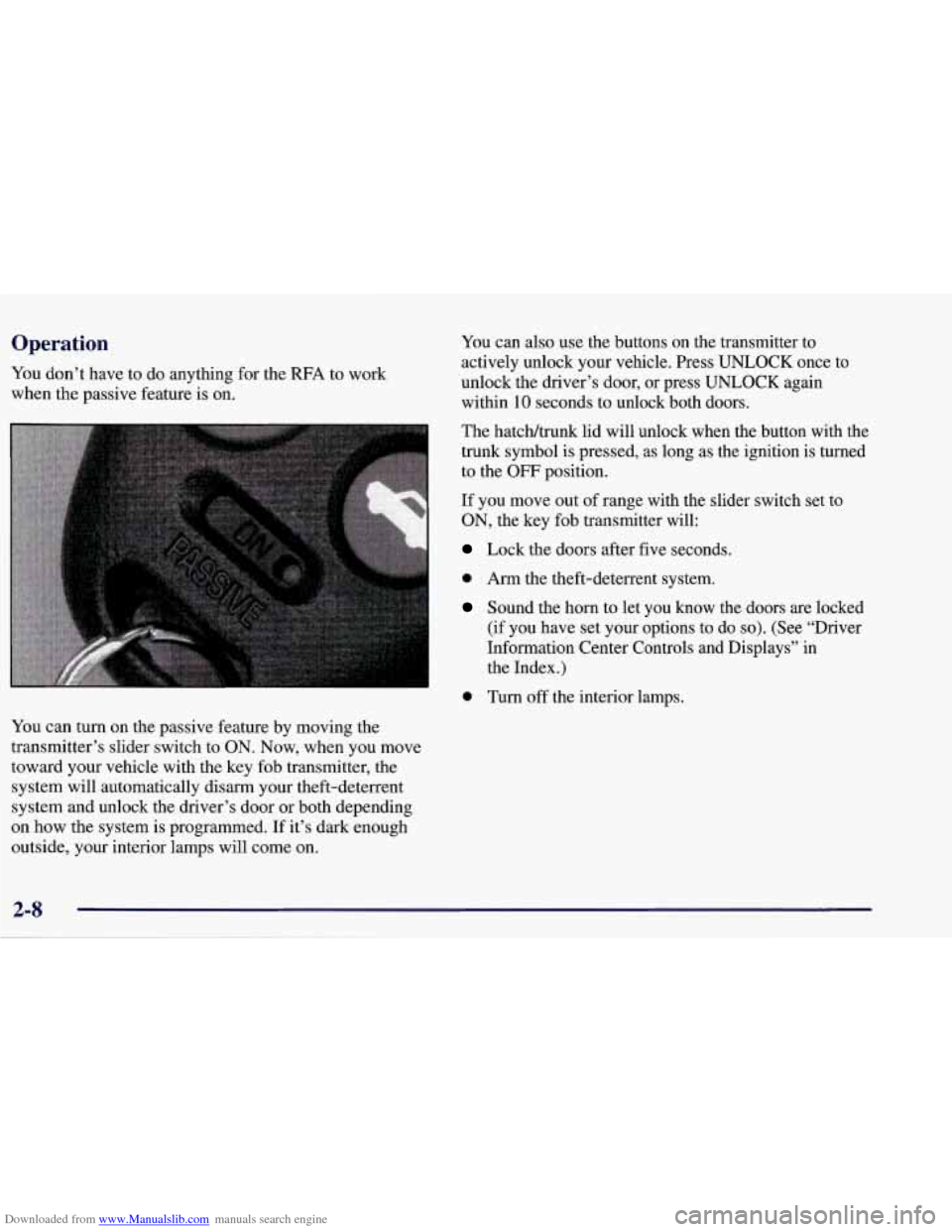
You can turn on the passive feature by moving the
transmitter’s slider switch to
ON. Now, when you move
toward your vehicle with the key fob transmitter, the
system will automatically disarm your theft-deterrent
system and unlock the driver’s door or both depending
on how the system is programmed. If it’s dark enough
outside,
your interior lamps will come on.
You can also use the buttons on the transmitter to
actively unlock your vehicle. Press UNLOCK once to
unlock the driver’s door, or press UNLOCK again
within 10 seconds to unlock both doors.
The hatchltrunk lid will unlock when the button with the
trunk symbol is pressed, as long as the ignition is turned
to the
OFF position.
If you move out of range with the slider switch set to
ON, the key fob transmitter will:
Lock the doors after five seconds.
0 Arm the theft-deterrent system.
Sound the horn to let you know the doors are locked
(if you have set your options to
do so). (See “Driver
Information Center Controls and Displays” in
the Index.)
0 Turn off the interior lamps.
Page 62 of 378
Downloaded from www.Manualslib.com manuals search engine The system has a feature that makes it difficult for you
to lock your keys in your vehicle.
If you leave your keys
in the ignition and attempt to lock the doors, the vehicle
will not lock and a chime will sound to remind you that
the keys are in the ignition.
If the door lock is pressed
again, within five seconds, the doors will lock and the
keys can be locked in the car. If you leave the keys
in
the ignition and move away with the key fob transmitter,
the doors still will not lock. You should notice that the
horn doesn’t sound and return to get your keys out of
the ignition.
The system will allow you to lock your keys in the
vehicle if you didn’t leave them in the ignition. You
should, however, be able to use the key fob transmitter
to get them out as long as the passive slide switch
is in
the
ON position. After 15 seconds of no motion, the key
fob transmitter shuts down to save the battery. Wait
about
30 seconds, then rock the vehicle. The key fob
transmitter should “wake up” and unlock the doors.
This system can’t guarantee that you will never be
locked out of your vehicle. If the battery is low or if the
key fob transmitter is in a place where the signal can’t
get to the antenna,
it won’t unlock the doors. Always
remember to take your keys with you.
Panic Alarm Button
When you press the special horn button on the key
fob transmitter, your vehicle’s horn will sound. This
panic alarm button will allow you to attract attention,
if needed.
If the horn alarm sounds, there are three ways to turn
it off:
Push the panic alarm button on the key fob
Wait 90 seconds, and the horn will turn off by
transmitter again.
itself
or
0 Turn the key to any position in the ignition switch,
except
OFT.
RF’A Settings
You can adjust the settings on the system through the
Driver Information Center (DIC). You can have just the
driver’s or both door locks passively unlock, change the
type of alarm used by the theft-deterrent, or have lamps
come on when you approach the vehicle. See “Driver
Information Center Controls and Displays” in the Index.
2-9
Page 63 of 378
Downloaded from www.Manualslib.com manuals search engine I’urning the Passive System Off
You can disable the passive feature by moving the
transmitter’s slider switch to
OFF. The vehicle will no
longer automatically disarm your theft-deterrent system or unlock the doors, however, you will be able to
actively control use of the door locks, the hatch/trunk lid
release and the panic alarm using the four transmitter
buttons. (These buttons also work when the passive feature is on.)
Make sure to fully slide the switch to either side when
turning the key fob transmitter on and
off. You should
feel a double click when sliding the switch back
and forth.
You can also check whether the passive system is on or
off by closing the door and moving away from the
vehicle with the keys and transmitter. If the doors lock,
the passive system is on.
If you are working around your vehicle and keeping
your keys with you, you might want to
turn the RFA
passive system off. If you don’t, the transmitter will
keep locking and unlocking your doors.
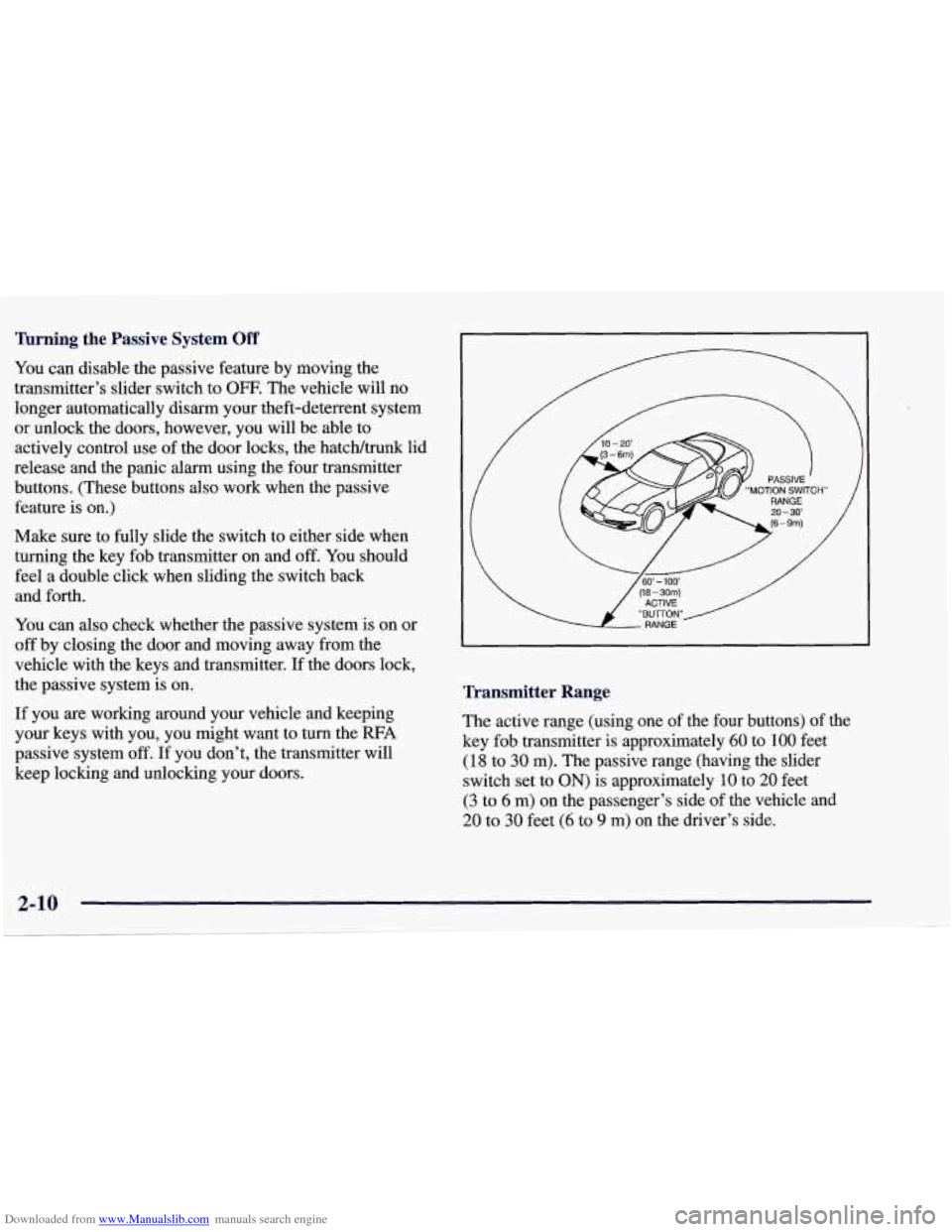
Transmitter Range
The active range (using one of the four buttons) of the
key fob transmitter
is approximately 60 to 100 feet
(18 to 30 m). The passive range (having the slider
switch set to
ON) is approximately 10 to 20 feet
(3 to 6 m) on the passenger’s side of the vehicle and
20 to 30 feet (6 to 9 m) on the driver’s side.
Page 64 of 378
Downloaded from www.Manualslib.com manuals search engine Resynchronizing Your Transmitter
Your RFA system uses a continually changing code for
increased security. Normally, the receiver in your
vehicle will keep track of this changing code.
,If your
vehicle does not respond to your transmitter, do the
following to determine what’s wrong:
1. Get closer to the vehicle and try pressing a button
again. Your battery may be low (If
so, see “Battery
Replacement” in the Index).
2. While standing close to your vehicle, press the
LOCK and UNLOCK buttons on your transmitter at
the same time and hold
for seven seconds. This will
attempt to resynchronize
the security code in your
RFA key fob transmitter.
3. When resynchronization is achieved, the horn
will chirp.
Loss of synchronization will occur after transmitter
battery replacement or disconnection of the
vehicle’s battery.
If attempts to resynchronize your transmitter to the
vehicle are not successful, you may need
to match the
transmitter to the vehicle.
Matching Transmitter(s) To Your Vehicle
Each key fob transmitter is coded to prevent another
transmitter from unlocking your vehicle.
If a transmitter
is lost or stolen,
a replacement can be purchased through
your dealer. Remember to bring any remaining
transmitters with you when you go to your dealer. When
the dealer matches the replacement transmitter to your
vehicle, any remaining transmitters must also be
matched. Once your dealer has coded the new
transmitter, the lost transmitter will not unlock your
vehicle. Each vehicle can have only three transmitters
matched to it.
To match transmitters to your vehicle:
1. Turn the ignition key to the ON position.
2. Clear any warning messages on the Driver
Information Center (DIC) by pressing the
RESET button.
3. Press the OPTIONS button on the DIC several times
until the blank page is displayed, then press and hold
the RESET button for two seconds.
2-11
Page 65 of 378
Downloaded from www.Manualslib.com manuals search engine 4. When the message FOB TRAINING is displayed,
push the RESET button once. The message
HOLD
LK + UNLK 1ST FOB will be displayed.
5. Press and hold the LOCK and UNLOCK buttons on
the transmitter simultaneously for
15 seconds.
6. When a transmitter is learned, the DIC will display
FOB LEARNED and then prompt you to learn the
next transmitter.
7. Repeat Steps 5 and 6 for each additional transmitter.
8. Remove the key from the ignition.
The programming mode will shut
off if
0 You don’t program any transmitters for two minutes.
0 You take the key out of the ignition.
0 You have programmed three transmitters.
Battery Replacement
Under normal use, the battery in your key fob
transmitter should last about
18 months.
You can tell the battery is weak if the transmitter won’t
work at the normal range
in any location. If you have to
get close to your vehicle before the transmitter works,
it’s probably time to change the battery.
NOTICE:
When replacing the battery, use care not to touch
any of the circuitry. Static from your body
transferred to these surfaces may damage
the transmitter.
2-12
Page 67 of 378
Downloaded from www.Manualslib.com manuals search engine Remote Hatch/Trunk Lid Release
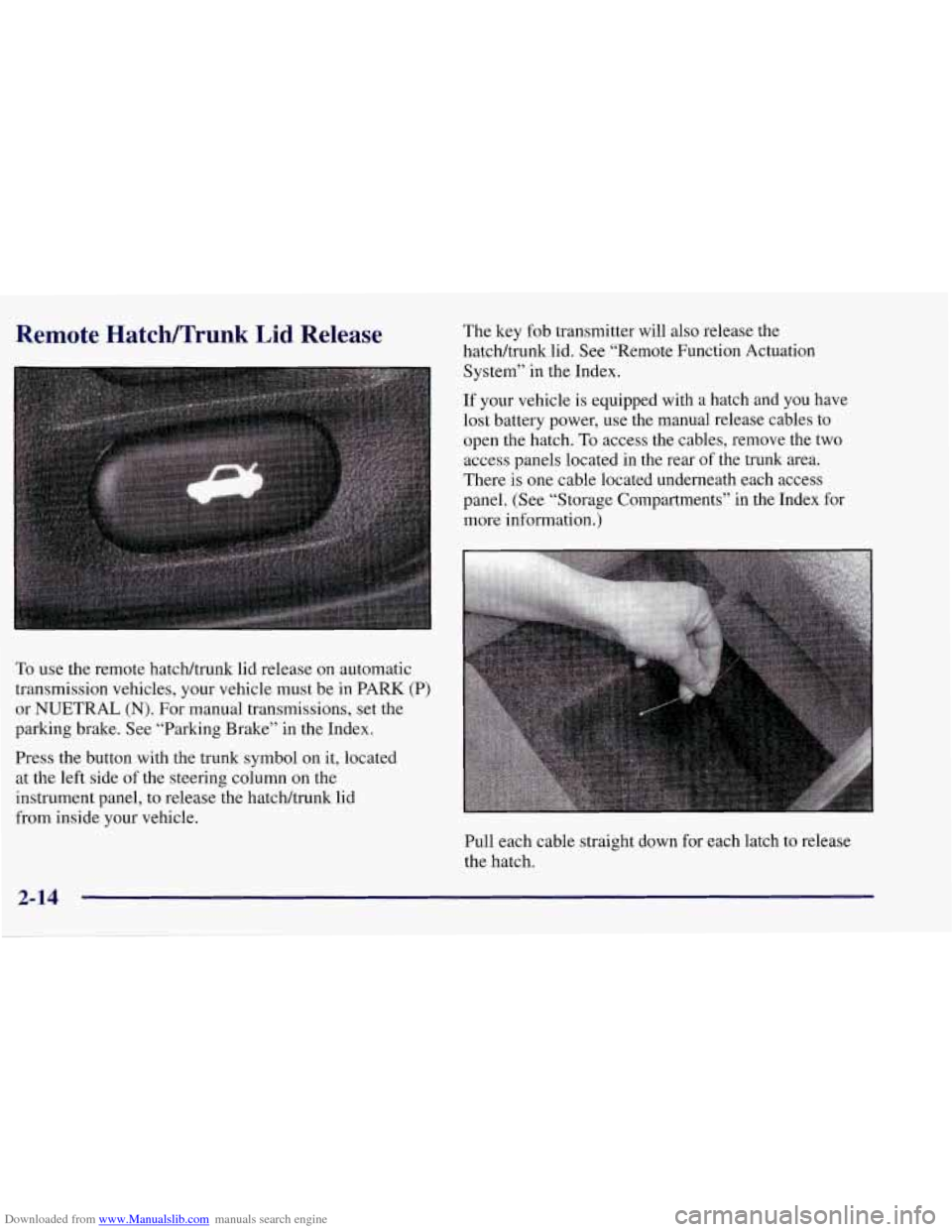
To use the remote hatcWtrunk lid release on automatic
transmission vehicles, your vehicle must be in PARK (P)
or NUETRAL
(N). For manual transmissions, set the
parking brake. See “Parking Brake” in the Index.
Press the button with the trunk symbol on it, located
at the left side of the steering column
on the
instrument panel, to release the hatchhunk lid
from inside your vehicle. The
key fob transmitter will also release the
hatcWtrunk lid. See “Remote Function Actuation
System” in the Index.
If your vehicle
is equipped with a hatch and you have
lost battery power, use the manual release cables to
open the hatch.
To access the cables, remove the two
access panels located in the rear of the trunk area.
There is one cable located underneath each access
panel. (See “Storage Compartments” in the Index for
more information.)
Pull each cable straight down for each latch to release
the hatch.
2-14
Page 69 of 378
Downloaded from www.Manualslib.com manuals search engine NOTICE:
If you put things in the hatcldtrunk area, be sure
they won’t break the glass when you close it.
Never slam the hatcldtrunk lid down. You could
break the glass or damage the defogger grid.
When you close the hatchhrunk lid, make sure
you pull down from the center, not the sides.
If
you pull the hatcldtrunk lid down from the side
too often, the weatherstrip can be damaged.
NOTICE:
Do not store heavy or sharp objects in the three
storage compartments located in the hatcldtrunk
area.
If you do, the objects could damage
the underbody.
Theft
Vehicle theft is big business, especially in some cities.
Although your vehicle has a number of theft-deterrent features, we
know that nothing we put on it can make it
impossible to steal. However,
there are ways you can help.
Key in the Ignition
If you leave your vehicle with the keys inside, it’s an
easy target for joy riders or professional thieves
-- so
don’t do it.
When you park your vehicle and open the driver’s door,
you’ll hear a tone reminding you to remove your key
from the ignition and take it with you. Always do this.
Your steering wheel will be locked, and
so will your
ignition.
If you have an automatic transmission, taking
your key out also locks your transmission. And
remember to lock the doors.