1998 CADILLAC SEVILLE ignition
[x] Cancel search: ignitionPage 140 of 378
Downloaded from www.Manualslib.com manuals search engine Driver Unlock Key Off
Press the down arrow on the INFO button one or more
times until the DRIVER UNLOCK
KEY OFF prompt
appears. This feature will automatically unlock only the
driver’s door when the ignition key is moved to
OW. To
turn the feature on, press ON/OFF until ON is displayed
on the DIC. To
turn the feature off, press ON/OFF until
OFF is displayed.
Doors Unlock in PARK (P)
Press the down arrow on the INFO button one or more
times until the DOORS UNLOCK
IN PARK prompt
appears. This feature will automatically unlock all doors
when the vehicle is shifted into PARK
(P). To turn the
feature on, press
ON/OFF until ON is displayed on the
DIC.
To turn the feature off, press ON/OFF until OFF
is displayed.
Doors Unlock Key Off
Press the down arrow on the INFO button one or more
times until the DOORS UNLOCK
KEY OFF prompt
appears.
This feature will automatically unlock all doors
when the ignition key is turned to
OFF. To turn the
feature on, press
ON/OFF until ON is displayed on the
DIC.
To turn the feature off, press ON/OFF until OFF
is displayed.
Curbview Assist Mirror (If Equipped)
Press the down arrow on the INFO button one or more times
until the MIRROR TO CURB IN REV prompts appears on
the DIC display.
This feature will move the passenger’s
outside rearview mirror
to a curb view position when the
console shifter is placed
in REVERSE (R) and it will return
the mirror to the last known driving position when the
console shifter is moved out of REVERSE (R).
To turn this
feature on, press the ON/OFF button until ON is displayed on
the DIC. To
turn the feature off, press the ON/OFF button
until OFF is displayed. For more information, see “Curbview
Assist Mirror”
in the Index.
Driver’s Names Set/Recall (If Equipped)
After the FEATURE PROGRAMMING prompt is
displayed on the Driver Information Center (DIC) and
the
ON/OFF button is pressed, the prompts DRIVER
NO 1 or DRIVER NO 2 will appear. These prompts
correspond to which
RKE transmitter button or memory
recall button has been pressed on the
RKE transmitter.
You may have your name and a second driver’s name
displayed here replacing the prompts DRIVER
NO 1
and DRIVER NO 2. A dealership can program your
vehicle to display the names you want. The names will
appear whenever the key position
is turned to ON only
if RKE transmitters 1 or 2 are used to enter the vehicle
or buttons
1 or 2 on the driver’s door are pressed.
2-79
Page 144 of 378
Downloaded from www.Manualslib.com manuals search engine BATTERY VOLTAGE HIGH - 8: This message shows
that the electrical charging system is overcharging (more
than 16 volts). To avoid being stranded, have the electrical
system checked by your dealership.
You can reduce the
charging overload by using the accessories.
Turn on the
lamps and radio, set the climate control on
AUTO and the
fan speed on
HI, and turn the rear window defogger on.
You can monitor battery voltage on the DIC by pressing
the
INFiO button. The normal range is 11.5 to 15.5 volts
when the engine is running.
BATTERY VOLTAGE LOW - 6: This message will
appear when the electrical system is charging less than
9 volts or if the battery has been drained. If this message
appears immediately after starting, it
is possible that the
generator can still recharge the battery. The battery should recharge while driving but may take a few hours
to do
so. Consider using an auxiliary charger (be sure to
follow the manufacturer’s instructions) to boost the
battery after returning home or to a final destination. If
this message appears while driving or after starting your
vehicle and stays on, have
it checked immediately to
determine the cause of this problem.
To help the
generator recharge the battery quickly, you can reduce
the load on the electrical system by turning
off the
accessories.
You can monitor battery voltage on the DIC
by pressing the INFO button. The normal range is 11.5
to 15.5 volts.
CHANGE BRAKE PADS - 125: This message is used
to notify you that the brake pads may have worn down.
A sensor is connected to the brake pads and is triggered
when they wear to a certain point. Have the front and
rear brakes serviced by your dealer as soon as possible.
CHANGE TRANS FLUID - 47: This message will
appear when
it is time to replace the transaxle fluid. See
the Maintenance Schedule booklet for the proper fluid and change intervals.
CHECK BRAKE FLUID - 37: This message will
display if the ignition is in
ON to inform the driver that
the brake fluid level is low. Have the brake system
serviced by a technician as soon as possible. See “Brake
System Warning Light” in the Index.
CHECK COOLANT LEVEL - 2: This message will
appear when there is a low level of engine coolant. Have
the cooling system serviced by a technician as soon
as possible.
CHANGE ENGINE OIL - 82: This means that the life
of the engine oil has expired and it should be changed
within
200 miles. See “Engine Oil” and “Filter
Recommendations” in the Maintenance Schedule
booklet. After
an oil change, the Oil Life Indicator must
be reset. See “Oil Life Indicator” in the Index
on how to
reset
it.
2-83
Page 146 of 378
Downloaded from www.Manualslib.com manuals search engine ENGINE MISFIRE -- EASE OFF GAS
PEDAL
- 114: An engine misfire has occurred. You’ll
need to ease
off the gas pedal.
message will appear when the engine has overheated. Stop and
turn the engine off immediately to avoid severe engine
damage. See “Engine Overheating” in the Index.
A multiple chime will also sound when this message
is disp1ay.d.
ENGINE POWER REDUCED - 41: This message
informs you that the vehicle is reducing engine power
because the transaxle is being placed in gear under
conditions that may cause damage to the vehicle’s
engine, transaxle or ability to accelerate.
FUEL LEVEL LOW - 11: This message serves as a
warning that the fuel level in the tank is critically low.
Stop for fuel soon.
A single chime will also sound when
this message is displayed.
HEADLAMPS SUGGESTED - 23: If it’s dark enough
outside and the headlamps and twilight sentinel control are
off, a HEADLAMPS SUGGESTED message will display
on the
DIC. This message informs the driver that turning on
the exterior lamps is recommended even though the
DRL are
still illuminated. It has become dark enough outside to
require the headlamps and/or other exterior lamps.
This
message will also appear if the optional rainsense wiping
feature is on and the twilight sentinel is
off.
ENGINE OVERHEATED STOP ENGINE - 42: This
ICE POSSIBLE - 13: This message appears when
the outside air temperature is cold enough to create icy
road conditions.
LEFT REAR DOOR A JAR - 142: The left rear door
is open or ajar when this message appears. The ignition
must be
in the ON position for this message to display.
A chime will also sound when the vehicle’s speed is
greater than
3 mph (4.8 kmh).
OIL PRESSURE LOW STOP ENGINE - 35: If this
message appears while the engine is running, stop the
engine and do not operate it until the cause of low oil
pressure is corrected. Severe damage to the engine can
result.
A multiple chime will also sound when this
message is displayed.
PASSENGER DOOR AJAR - 141: The passenger’s
door
or rear doors are open or ajar when this message
appears. The ignition must be in the
ON position for this
message to display.
A chime will also sound when the
vehicle’s speed
is greater than 3 mph (4.8 km/h).
Page 147 of 378
Downloaded from www.Manualslib.com manuals search engine RIGHT REAR DOOR A JAR - 143: The right rear
door is open or ajar when this message appears. The key
must be in the
ON position for this message to display.
A chime will also sound when the vehicle’s speed is
greater than
3 mph (4.8 km/h).
SERVICE “AC” SYSTEM - 14: This message appears
when the electronic sensors that control the air
conditioning and heating systems are no longer working.
Have the climate control system serviced if you notice a
drop in heating and air conditioning efficiency.
SERVICE AIR BAG - 83: There is a problem with the
Supplemental Inflatable Restraint (air bag) system when
this message appears. Let only a qualified technician
work on your vehicle. See your dealership for service
at once.
SERVICE CHARGING SYS - 102: This message will
display when a problem with the charging system has been
detected. Have your vehicle serviced at your dealership.
SERVICE ELECTRICAL SYS - 106: This message
will display
if an electrical problem has occurred within
the PCM or the ignition switch. Have your vehicle serviced by your dealership.
SERVICE FUEL SYSTEM - 101: The PCM has
detected a problem within the fuel system when this
message appears. See your dealership for service.
SERVICE IDLE CONTROL - 107: A problem with
the idle control has occurred when
this message displays.
Take your vehicle to your dealership for service.
SERVICE STABILITY SYS - 54 : If you ever see the
SERVICE STABILITY
SYS message, it means there
may be a problem with your stability enhancement
system. If you see this message, try to reset the system
(stop;
turn off the engine; then start the engine again). If
the SERVICE STABILITY
SYS message still comes on,
it means there is a problem. You should see your dealer
for service. Reduce your speed and drive accordingly.
A single chime will also sound when this message
is displayed.
SERVICE STEERING SYS - 127: This message is
displayed when a problem has been detected in the
Magnasteer
TM variable effort steering system. Service
is required.
SERVICE SUSPENSION SYS - 84: This message is
displayed to indicate that the suspension system is not
operating properly.
To correct this problem, have your
vehicle serviced
at your dealership.
2-86
Page 148 of 378
Downloaded from www.Manualslib.com manuals search engine SERVICE THEFT SYSTEM - 34: This message
means there is a problem in the Personalized
Automotive Security System (PASS-Key
111). A fault
has been detected in the system which means that the
PASS-Key I11 system is disabled and is not protecting
the vehicle. The vehicle usually restarts, however, you
may want to take your vehicle to a proper service center
before turning off the engine.
SERVICE TRANSMISSION - 100: See your dealer
for repair.
SERVICE VEHICLE SOON - 3: This message is
displayed when a non-emissions related powertrain
malfunction occurs. Have your vehicle serviced by
a
technician as soon as possible.
SPEED LIMITED TO 90 - 113: A failure in the
suspension control system has occurred when this
message appears. The PCM determines the speed to
which your vehicle is limited. Have your vehicle serviced if this message appears.
STABILITY SYS ENGAGED - 55 : You may see the
STABILITY
SYS ENGAGED message on the Driver
Information Center. It means that an advanced,
computer-controlled system has come on to help your
vehicle continue
to go in the direction in which you’re
steering. This stability enhancement system activates
when the computer senses that your vehicle is just
starting to spin, as it might
if you hit a patch of ice or
other slippery spot on the road. When the system is on,
you may hear a noise or feel
a vibration in the brake
pedal. This is normal.
When the STABILITY SYS ENGAGED message is on,
you should continue to steer in the direction you want to
go. The system is designed to help you in bad weather or
other difficult driving situations by making the most of
whatever road conditions will permit. If the STABILITY
SYS ENGAGED message comes on, you’ll know that
something has caused your vehicle to start to spin,
so
you should consider slowing down.
STARTING DISABLED REMOVE KEY - 33: This
message will appear when the Personalized Automotive Security System (PASS-Key
111) senses that an improper
ignition key
is being used to try to start the vehicle.
Check the ignition key for damage. If
it is damaged, it
may need
to be replaced. If you see no damage, remove
the key and
try to start the vehicle again. If it still does
not start,
try another ignition key.
2-87
Page 149 of 378
Downloaded from www.Manualslib.com manuals search engine THEFT ATTEMPTED - 40: This message is
displayed
if the theft system has detected a break-in
attempt while
you were away from your vehicle.
TOP SPEED FUEL CUT-OFF - 111: This message
will appear when the
PCM senses that the maximum
speed for your vehicle has been reached. The speed of
your vehicle will surge as the fuel supply is cutoff. This
allows your vehicle to stay in
a safe tire operating range.
The top speed is set based on the top speed rating of
the tires.
TRACTION ENGAGED - 91 : When your traction
control system is limiting wheel spin, the TRACTION
ENGAGED message will be displayed. Slippery road conditions may exist if this message is displayed,
so
adjust your driving accordingly. This message will stay
on for a few seconds after the traction control system
stops limiting wheel spin.
TRACTION OFF - 89: This message will be displayed
after the traction control has been turned
off by the
button
on the center console.
TRACTION READY - 90: This message informs the
driver that the traction control system
is available. This
occurs when the traction ordoff button on the console has
been returned to ON (pressing the button once turns the
traction control system
off: pressing the button again turns
the system back on). This message will automatically
disappear from the display after five seconds.
TRACTION SUSPENDED - 56: This message
displays when the traction control system has been
temporarily shut off because your vehicle’s brakes have overheated. This message does not indicate a problem
with your vehicle’s traction control system. After a few
minutes, the traction control system will be available
again and the TRACTION
READY message
will appear.
TRANS HOT IDLE ENGINE - 112: This message
indicates that the transaxle fluid
in your vehicle is too
hot. Stop and allow your vehicle to idle until it cools
down or until this message is removed.
TRUNK OPEN - 24: This message indicates that the
trunk is open when the ignition is on.
TURN SIGNAL ON - 20: This message is a reminder,
after driving about a mile, that you have the turn signal
on.
A multiple chime will also sound when this message
is displayed.
2-88
Page 155 of 378
Downloaded from www.Manualslib.com manuals search engine If your vehicle is sitting out on a hot day and you have it
set on
AUTO, the air will first flow out the floor outlets
for a few seconds. This is normal. This is to remove hot
air from the air outlets.
As the air is cooled, the airflow
will move through the air conditioning outlets.
To avoid blowing cold air in cold weather, the system
will start at reduced fan speeds until warm air is
available. The length of reduction depends on the
outside air temperature, engine coolant temperature
or the time since the engine was last started.
As the
coolant warms up, the blower fan speed will gradually
increase and air will flow from the heater outlets, with
some airflow to the windshield to prevent fogging under
most normal conditions. If you select defrost mode or a
manual fan speed, this function will be skipped.
If you leave your vehicle, the system will remember
the control setting the next time you start your engine,
except for recirculation and defrost. Each ignition
cycle cancels recirculation. Defrost will change to
automatic operation when the ignition is shut
off and
then turned back on.
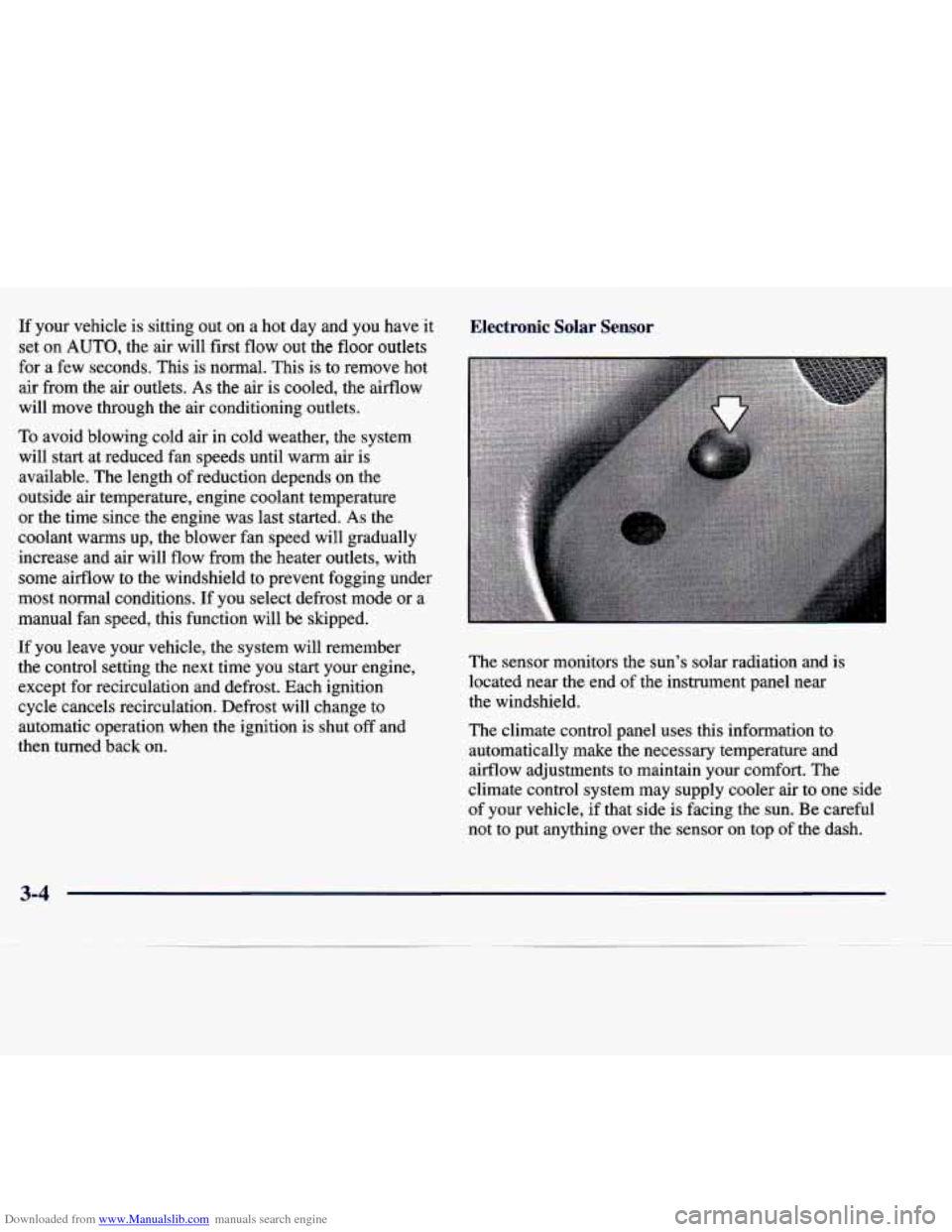
Electronic Solar Sensor Electronic Solar Sensor
The sensor monitors the sun’s solar radiation and is
located near the end of the instrument panel near
the windshield.
The climate control panel uses this information to
automatically make
the necessary temperature and
airflow adjustments to maintain your comfort. The
climate control system may supply cooler air to one side
of your vehicle, if that side is facing the sun. Be careful
not to put anything over the sensor on top
of the dash.
3-4
Page 161 of 378
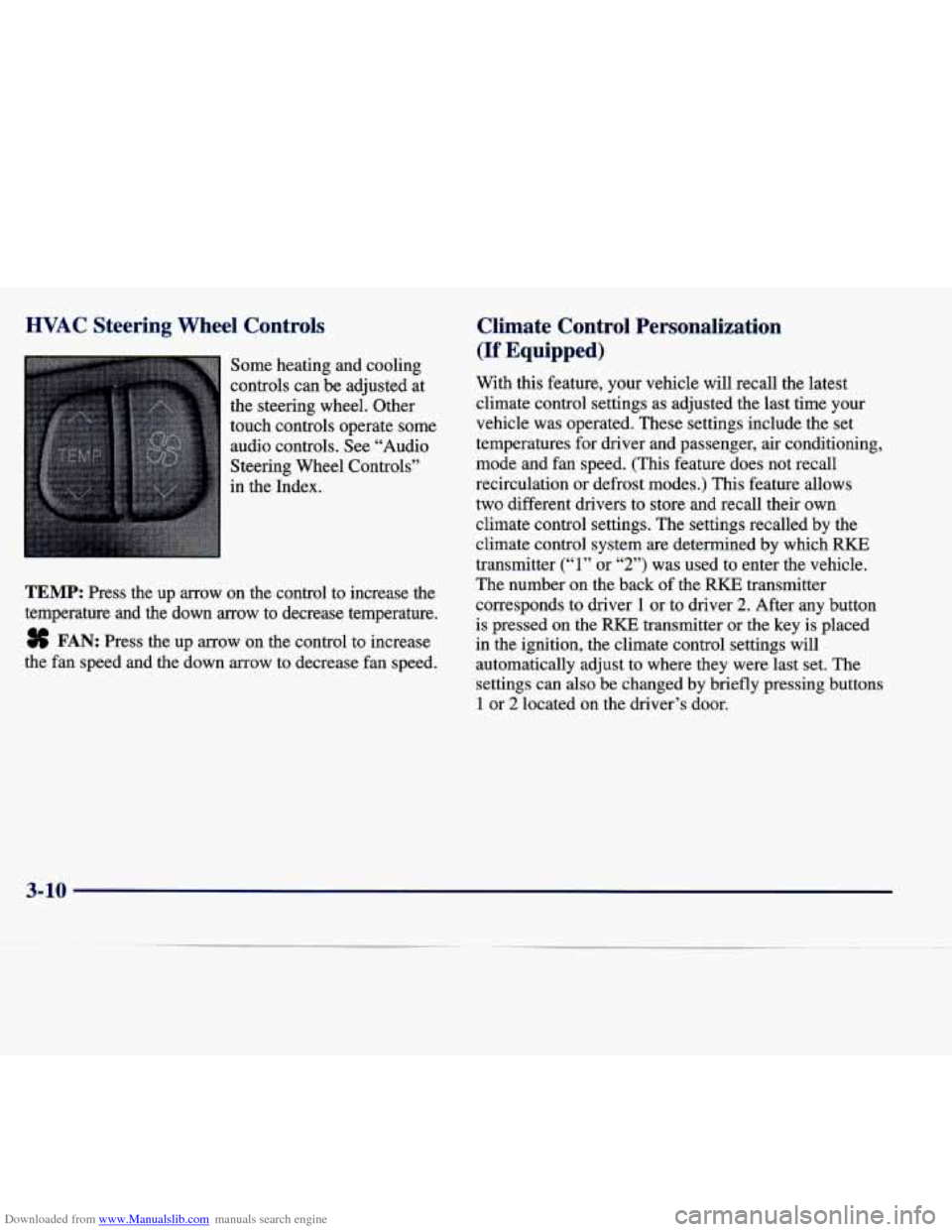
Downloaded from www.Manualslib.com manuals search engine HVAC Steering Wheel Controls
Some heating and cooling
controls can be adjusted at
the steering wheel. Other
touch controls operate some
audio controls. See “Audio
Steering Wheel Controls”
in the Index.
TEMP: Press the up arrow on the control to increase the
temperature and the down
arrow to decrease temperature.
8 FAN: Press the up arrow on the control to increase
the fan speed and the down arrow to decrease fan speed.
Climate Control Personalization
(If Equipped)
With this feature, your vehicle will recall the latest
climate control settings as adjusted the last time your
vehicle was operated. These settings include the set
temperatures for driver and passenger, air conditioning,
mode and fan speed. (This feature does not recall
recirculation
or defrost modes.) This feature allows
two different drivers to store and recall their own
climate control settings. The settings recalled by the
climate control system
are determined by which RKE
transmitter
(“1” or “2”) was used to enter the vehicle.
The number on the back
of the RKE transmitter
corresponds to driver
1 or to driver 2. After any button
is pressed on the
RKE transmitter or the key is placed
in the ignition, the climate control settings will
automatically adjust to where they were last set. The
settings can also be changed by briefly pressing buttons
1 or 2 located on the driver’s door.
3-10