Page 2921 of 3342
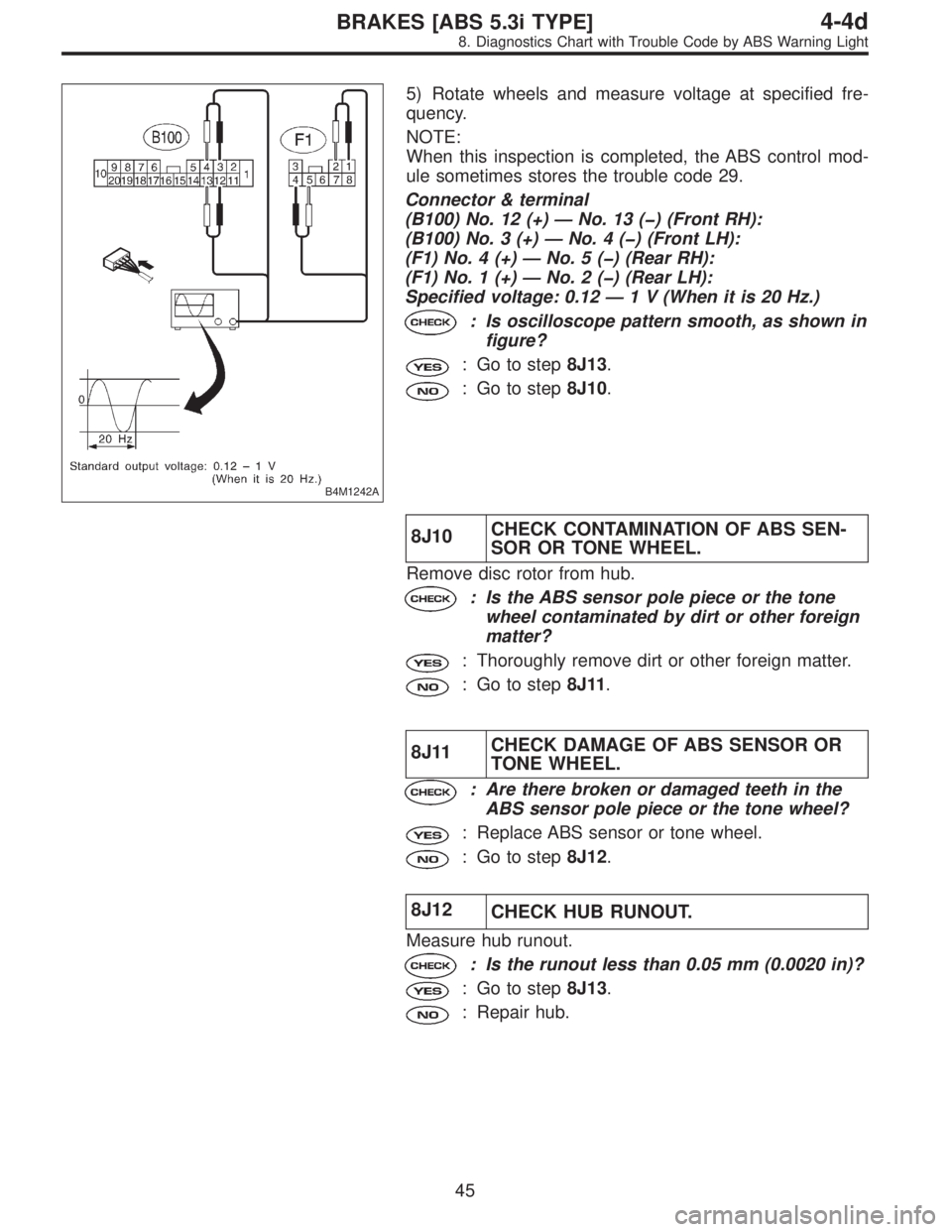
B4M1242A
5) Rotate wheels and measure voltage at specified fre-
quency.
NOTE:
When this inspection is completed, the ABS control mod-
ule sometimes stores the trouble code 29.
Connector & terminal
(B100) No. 12 (+)—No. 13 () (Front RH):
(B100) No. 3 (+)—No.4() (Front LH):
(F1) No. 4 (+)—No.5() (Rear RH):
(F1) No. 1 (+)—No.2() (Rear LH):
Specified voltage: 0.12—1 V (When it is 20 Hz.)
: Is oscilloscope pattern smooth, as shown in
figure?
: Go to step8J13.
: Go to step8J10.
8J10CHECK CONTAMINATION OF ABS SEN-
SOR OR TONE WHEEL.
Remove disc rotor from hub.
: Is the ABS sensor pole piece or the tone
wheel contaminated by dirt or other foreign
matter?
: Thoroughly remove dirt or other foreign matter.
: Go to step8J11.
8J11CHECK DAMAGE OF ABS SENSOR OR
TONE WHEEL.
: Are there broken or damaged teeth in the
ABS sensor pole piece or the tone wheel?
: Replace ABS sensor or tone wheel.
: Go to step8J12.
8J12
CHECK HUB RUNOUT.
Measure hub runout.
: Is the runout less than 0.05 mm (0.0020 in)?
: Go to step8J13.
: Repair hub.
45
4-4dBRAKES [ABS 5.3i TYPE]
8. Diagnostics Chart with Trouble Code by ABS Warning Light
Page 2949 of 3342
8Y1CHECK ALL FOUR WHEELS FOR FREE
TURNING.
: Have the wheels been turned freely such as
when the vehicle is lifted up, or operated on
a rolling road?
: The ABS is normal. Erase the trouble code.
: Go to step8Y2.
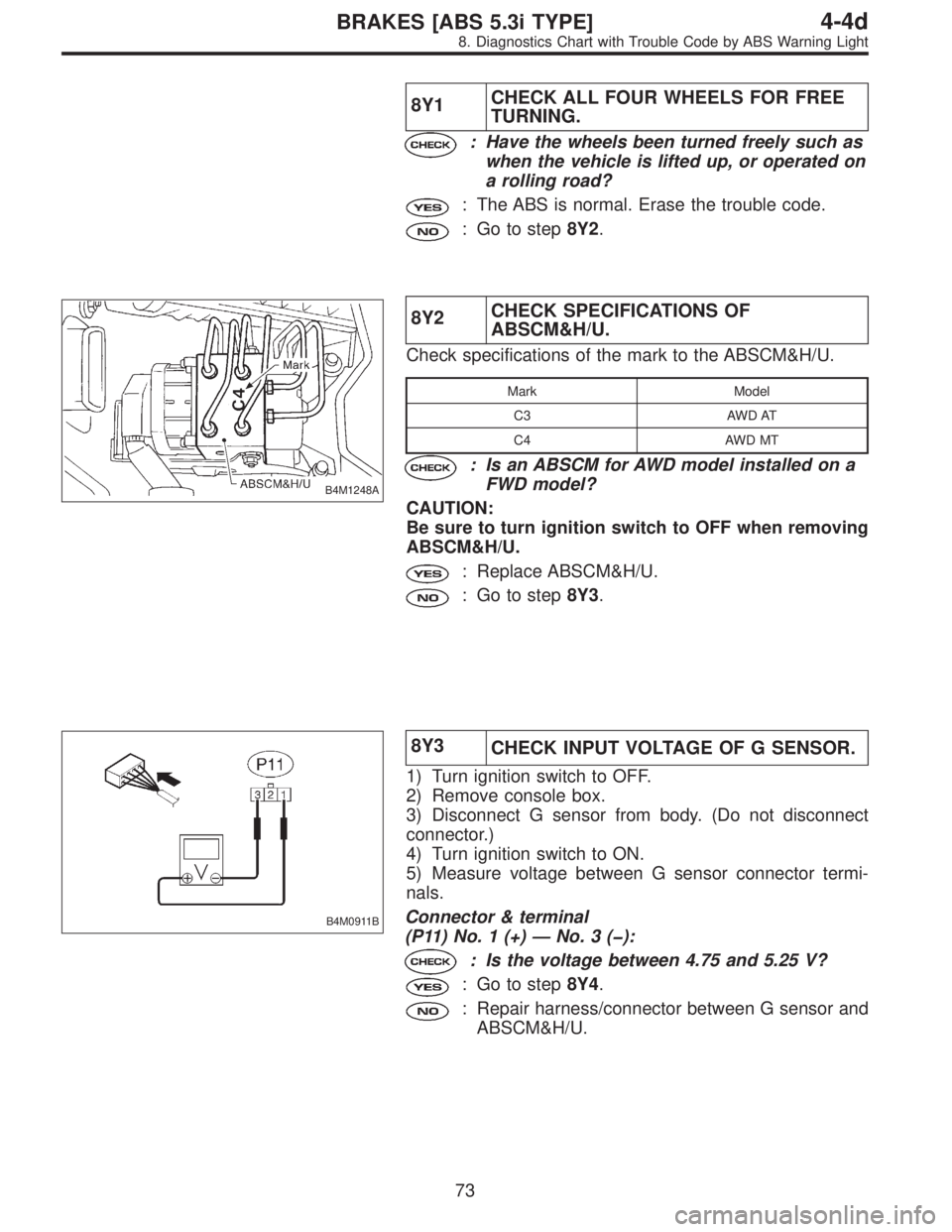
B4M1248A
8Y2CHECK SPECIFICATIONS OF
ABSCM&H/U.
Check specifications of the mark to the ABSCM&H/U.
Mark Model
C3 AWD AT
C4 AWD MT
: Is an ABSCM for AWD model installed on a
FWD model?
CAUTION:
Be sure to turn ignition switch to OFF when removing
ABSCM&H/U.
: Replace ABSCM&H/U.
: Go to step8Y3.
B4M0911B
8Y3
CHECK INPUT VOLTAGE OF G SENSOR.
1) Turn ignition switch to OFF.
2) Remove console box.
3) Disconnect G sensor from body. (Do not disconnect
connector.)
4) Turn ignition switch to ON.
5) Measure voltage between G sensor connector termi-
nals.
Connector & terminal
(P11) No. 1 (+)—No.3():
: Is the voltage between 4.75 and 5.25 V?
: Go to step8Y4.
: Repair harness/connector between G sensor and
ABSCM&H/U.
73
4-4dBRAKES [ABS 5.3i TYPE]
8. Diagnostics Chart with Trouble Code by ABS Warning Light
Page 2952 of 3342
B4M0915
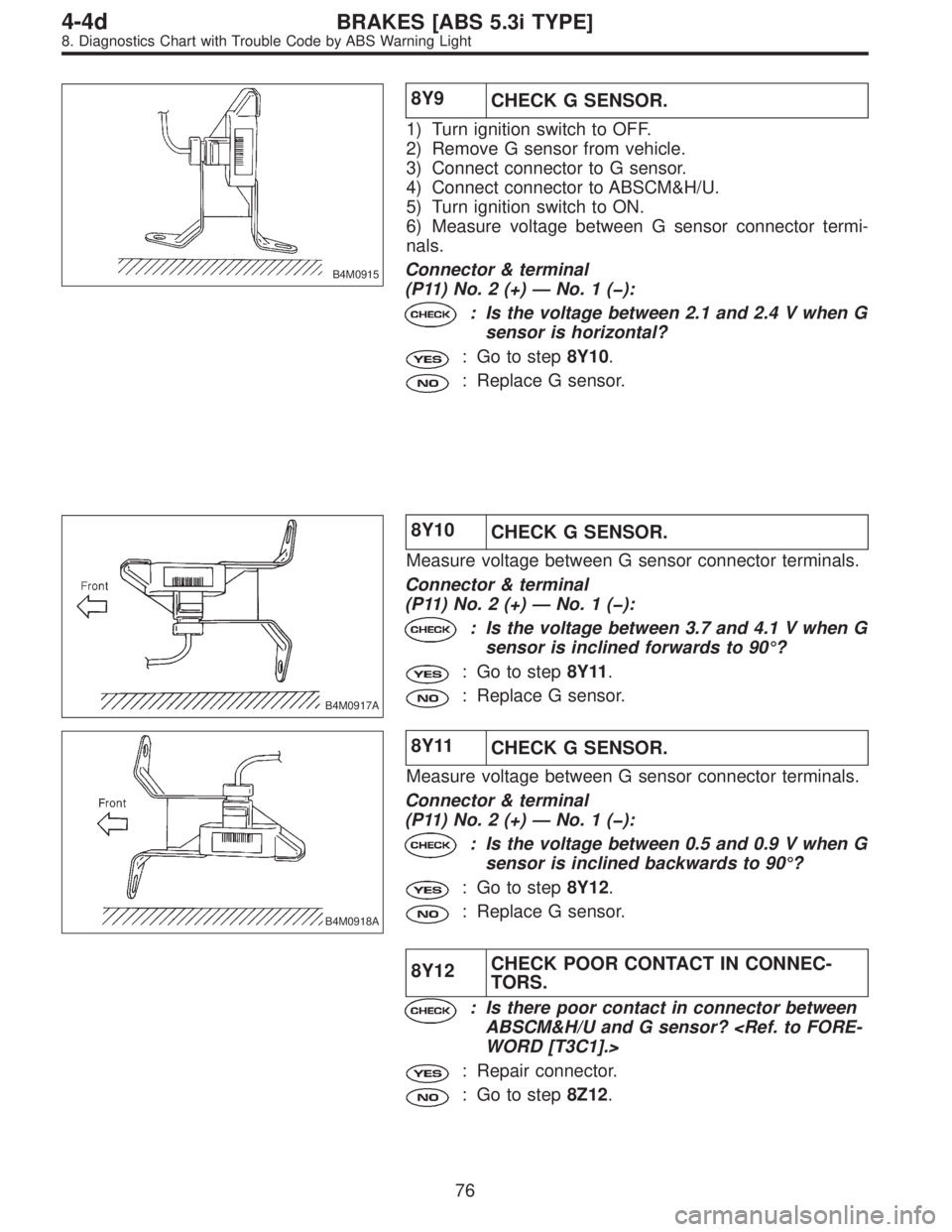
8Y9
CHECK G SENSOR.
1) Turn ignition switch to OFF.
2) Remove G sensor from vehicle.
3) Connect connector to G sensor.
4) Connect connector to ABSCM&H/U.
5) Turn ignition switch to ON.
6) Measure voltage between G sensor connector termi-
nals.
Connector & terminal
(P11) No. 2 (+)—No.1():
: Is the voltage between 2.1 and 2.4 V when G
sensor is horizontal?
: Go to step8Y10.
: Replace G sensor.
B4M0917A
8Y10
CHECK G SENSOR.
Measure voltage between G sensor connector terminals.
Connector & terminal
(P11) No. 2 (+)—No.1():
: Is the voltage between 3.7 and 4.1 V when G
sensor is inclined forwards to 90°?
: Go to step8Y11.
: Replace G sensor.
B4M0918A
8Y11
CHECK G SENSOR.
Measure voltage between G sensor connector terminals.
Connector & terminal
(P11) No. 2 (+)—No.1():
: Is the voltage between 0.5 and 0.9 V when G
sensor is inclined backwards to 90°?
: Go to step8Y12.
: Replace G sensor.
8Y12CHECK POOR CONTACT IN CONNEC-
TORS.
: Is there poor contact in connector between
ABSCM&H/U and G sensor?
WORD [T3C1].>
: Repair connector.
: Go to step8Z12.
76
4-4dBRAKES [ABS 5.3i TYPE]
8. Diagnostics Chart with Trouble Code by ABS Warning Light
Page 2966 of 3342
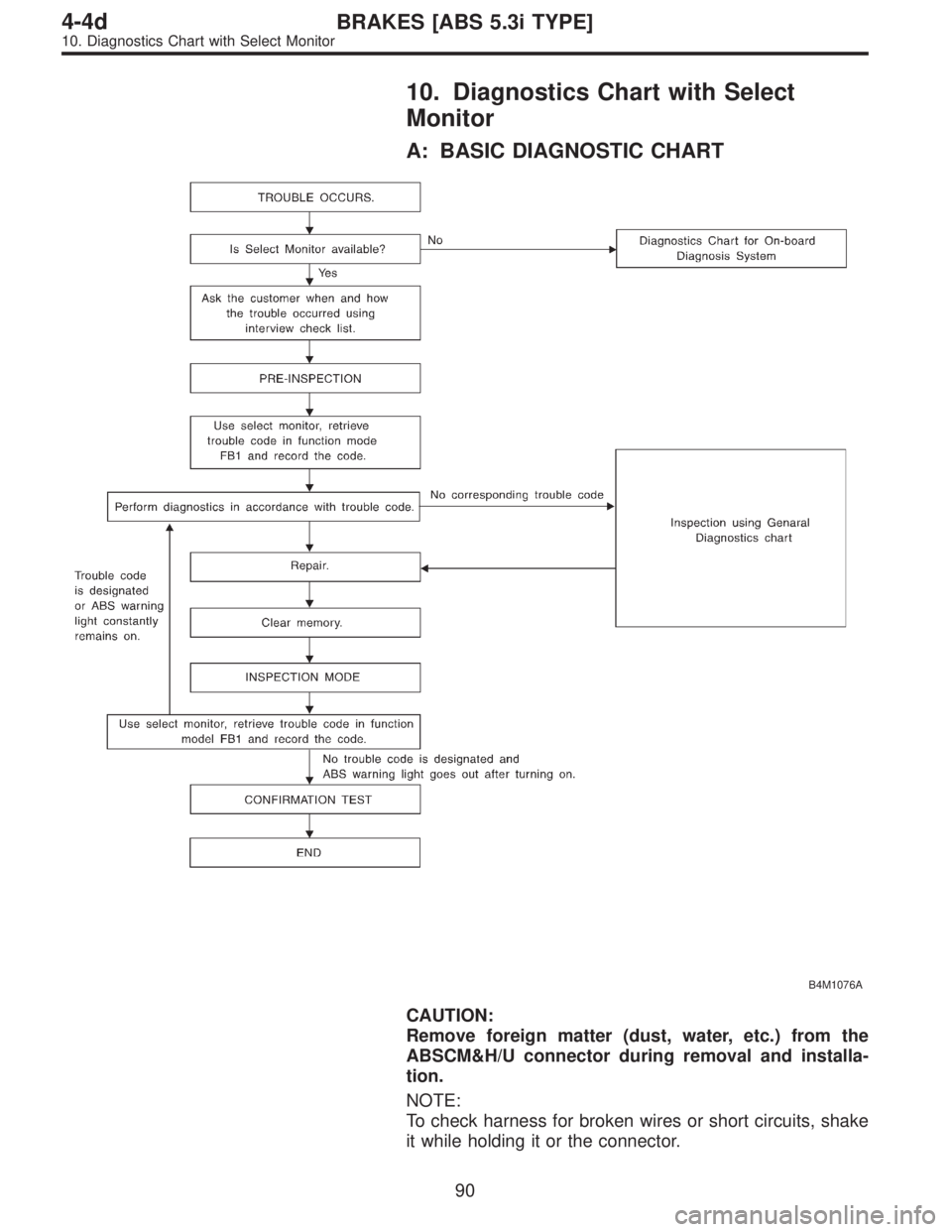
10. Diagnostics Chart with Select
Monitor
A: BASIC DIAGNOSTIC CHART
B4M1076A
CAUTION:
Remove foreign matter (dust, water, etc.) from the
ABSCM&H/U connector during removal and installa-
tion.
NOTE:
To check harness for broken wires or short circuits, shake
it while holding it or the connector.
90
4-4dBRAKES [ABS 5.3i TYPE]
10. Diagnostics Chart with Select Monitor
Page 2990 of 3342
B4M1242A
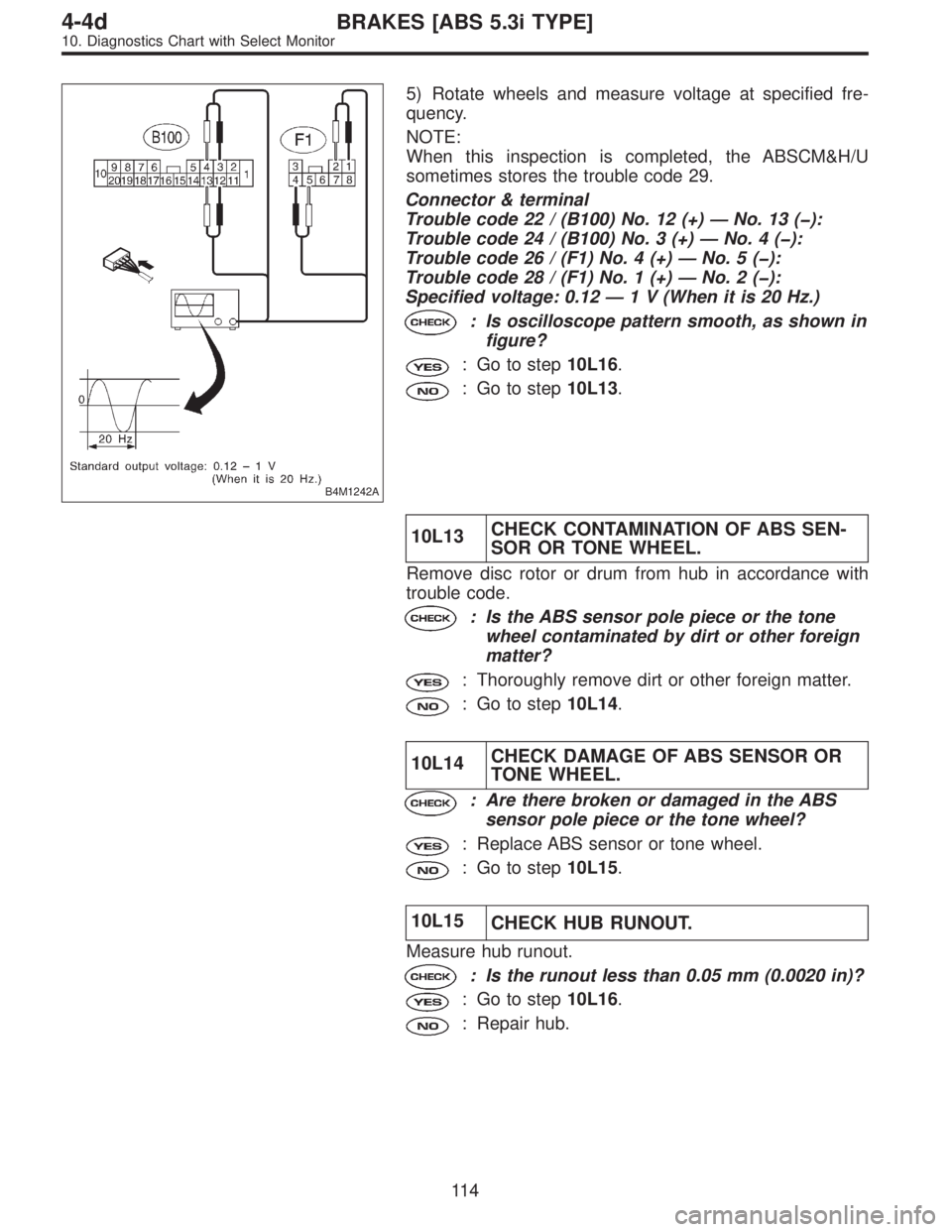
5) Rotate wheels and measure voltage at specified fre-
quency.
NOTE:
When this inspection is completed, the ABSCM&H/U
sometimes stores the trouble code 29.
Connector & terminal
Trouble code 22 / (B100) No. 12 (+)—No. 13 ():
Trouble code 24 / (B100) No. 3 (+)—No.4():
Trouble code 26 / (F1) No. 4 (+)—No.5():
Trouble code 28 / (F1) No. 1 (+)—No.2():
Specified voltage: 0.12—1 V (When it is 20 Hz.)
: Is oscilloscope pattern smooth, as shown in
figure?
: Go to step10L16.
: Go to step10L13.
10L13CHECK CONTAMINATION OF ABS SEN-
SOR OR TONE WHEEL.
Remove disc rotor or drum from hub in accordance with
trouble code.
: Is the ABS sensor pole piece or the tone
wheel contaminated by dirt or other foreign
matter?
: Thoroughly remove dirt or other foreign matter.
: Go to step10L14.
10L14CHECK DAMAGE OF ABS SENSOR OR
TONE WHEEL.
: Are there broken or damaged in the ABS
sensor pole piece or the tone wheel?
: Replace ABS sensor or tone wheel.
: Go to step10L15.
10L15
CHECK HUB RUNOUT.
Measure hub runout.
: Is the runout less than 0.05 mm (0.0020 in)?
: Go to step10L16.
: Repair hub.
11 4
4-4dBRAKES [ABS 5.3i TYPE]
10. Diagnostics Chart with Select Monitor
Page 2998 of 3342
B4M1242A
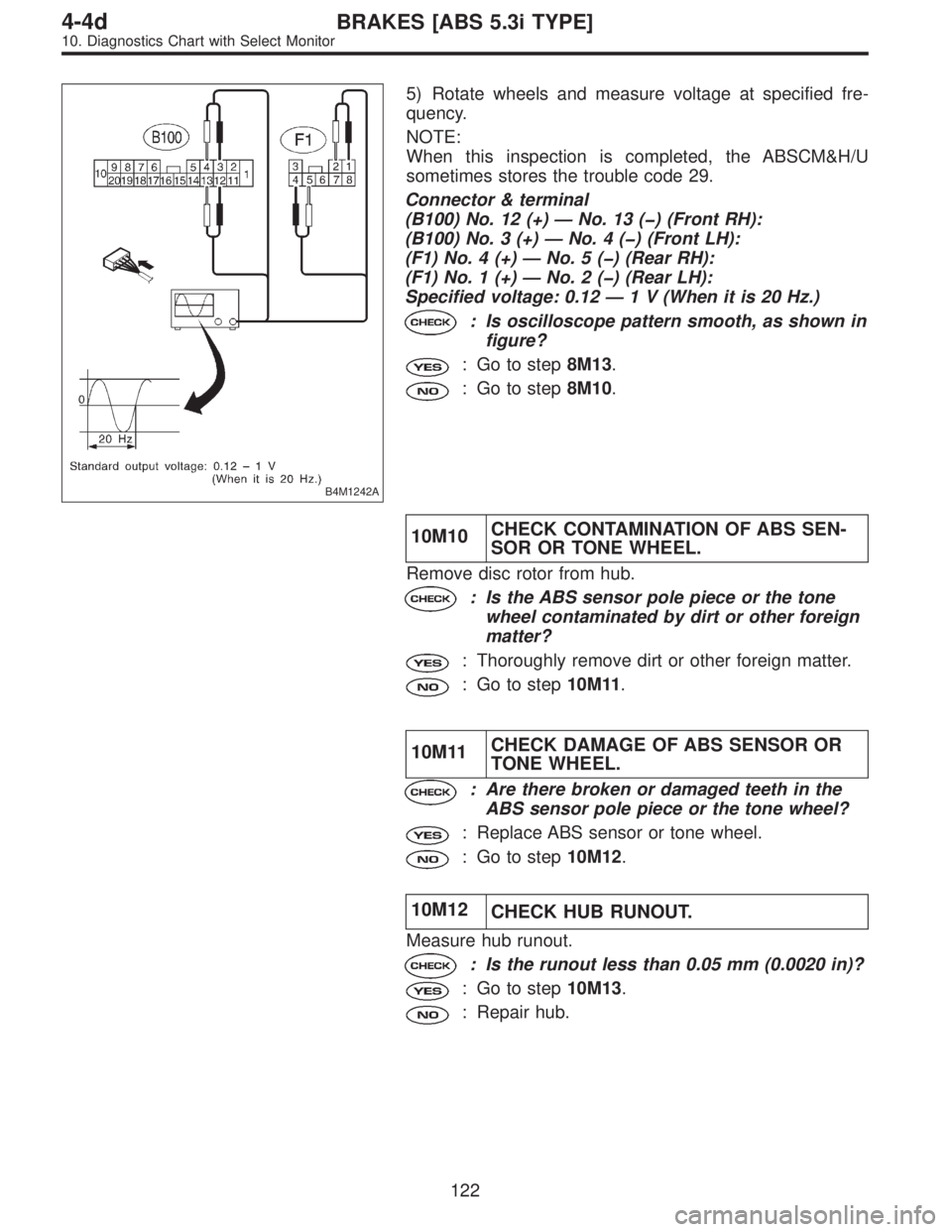
5) Rotate wheels and measure voltage at specified fre-
quency.
NOTE:
When this inspection is completed, the ABSCM&H/U
sometimes stores the trouble code 29.
Connector & terminal
(B100) No. 12 (+)—No. 13 () (Front RH):
(B100) No. 3 (+)—No.4() (Front LH):
(F1) No. 4 (+)—No.5() (Rear RH):
(F1) No. 1 (+)—No.2() (Rear LH):
Specified voltage: 0.12—1 V (When it is 20 Hz.)
: Is oscilloscope pattern smooth, as shown in
figure?
: Go to step8M13.
: Go to step8M10.
10M10CHECK CONTAMINATION OF ABS SEN-
SOR OR TONE WHEEL.
Remove disc rotor from hub.
: Is the ABS sensor pole piece or the tone
wheel contaminated by dirt or other foreign
matter?
: Thoroughly remove dirt or other foreign matter.
: Go to step10M11.
10M11CHECK DAMAGE OF ABS SENSOR OR
TONE WHEEL.
: Are there broken or damaged teeth in the
ABS sensor pole piece or the tone wheel?
: Replace ABS sensor or tone wheel.
: Go to step10M12.
10M12
CHECK HUB RUNOUT.
Measure hub runout.
: Is the runout less than 0.05 mm (0.0020 in)?
: Go to step10M13.
: Repair hub.
122
4-4dBRAKES [ABS 5.3i TYPE]
10. Diagnostics Chart with Select Monitor
Page 3044 of 3342
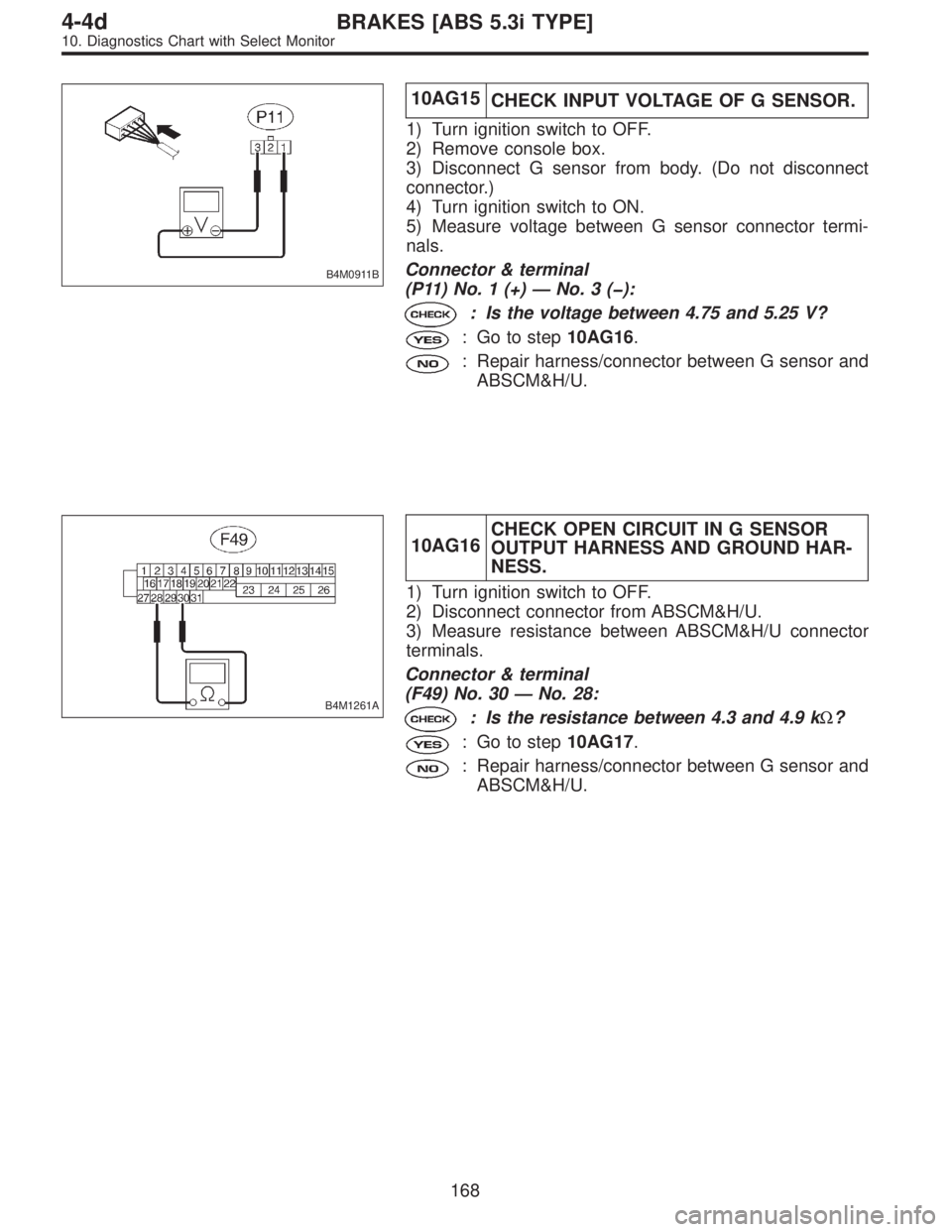
B4M0911B
10AG15
CHECK INPUT VOLTAGE OF G SENSOR.
1) Turn ignition switch to OFF.
2) Remove console box.
3) Disconnect G sensor from body. (Do not disconnect
connector.)
4) Turn ignition switch to ON.
5) Measure voltage between G sensor connector termi-
nals.
Connector & terminal
(P11) No. 1 (+)—No.3():
: Is the voltage between 4.75 and 5.25 V?
: Go to step10AG16.
: Repair harness/connector between G sensor and
ABSCM&H/U.
B4M1261A
10AG16CHECK OPEN CIRCUIT IN G SENSOR
OUTPUT HARNESS AND GROUND HAR-
NESS.
1) Turn ignition switch to OFF.
2) Disconnect connector from ABSCM&H/U.
3) Measure resistance between ABSCM&H/U connector
terminals.
Connector & terminal
(F49) No. 30—No. 28:
: Is the resistance between 4.3 and 4.9 kΩ?
: Go to step10AG17.
: Repair harness/connector between G sensor and
ABSCM&H/U.
168
4-4dBRAKES [ABS 5.3i TYPE]
10. Diagnostics Chart with Select Monitor
Page 3048 of 3342
![SUBARU LEGACY 1997 Service Repair Manual B4M0927
10AH1CHECK OUTPUT OF G SENSOR USING
SELECT MONITOR.
1) Press [F], [1] and [0] on the select monitor.
2) Read the select monitor display.
: Is the indicated reading between 2.1 and 2.5
V when t](/manual-img/17/57434/w960_57434-3047.png "SUBARU LEGACY 1997 Service Repair Manual B4M0927
10AH1CHECK OUTPUT OF G SENSOR USING
SELECT MONITOR.
1) Press [F], [1] and [0] on the select monitor.
2) Read the select monitor display.
: Is the indicated reading between 2.1 and 2.5
V when t")
B4M0927
10AH1CHECK OUTPUT OF G SENSOR USING
SELECT MONITOR.
1) Press [F], [1] and [0] on the select monitor.
2) Read the select monitor display.
: Is the indicated reading between 2.1 and 2.5
V when the G sensor is in horizontal posi-
tion?
: Replace ABSCM&H/U.
: Go to step10AH2.
B4M1263A
10AH2
CHECK BATTERY SHORT OF HARNESS.
1) Turn ignition switch to OFF.
2) Remove console box.
3) Disconnect connector from G sensor.
4) Disconnect connector from ABSCM&H/U.
5) Measure voltage between ABSCM&H/U connector and
chassis ground.
Connector & terminal
(F49) No. 6 (+)—Chassis ground ():
: Is the voltage less than 1 V?
: Go to step10AH3.
: Repair harness between G sensor and
ABSCM&H/U.
B4M1263A
10AH3
CHECK BATTERY SHORT OF HARNESS.
1) Turn ignition switch to ON.
2) Measure voltage between ABSCM&H/U connector and
chassis ground.
Connector & terminal
(F49) No. 6 (+)—Chassis ground ():
: Is the voltage less than 1 V?
: Go to step10AH4.
: Repair harness between G sensor and
ABSCM&H/U.
172
4-4dBRAKES [ABS 5.3i TYPE]
10. Diagnostics Chart with Select Monitor