Page 75 of 305

71
3. Rotate the headlamp switch counterclockwise
from the OFF position.
4. The autolamp will automatically turn the lamps
on and off for you.
Do not put any articles on top of the photocell that
is located in the top left corner of the instrument
panel. This photocell controls the autolamp. If you
cover it, the photocell reacts as if it is nighttime,
and the lamps turn on.
To turn the autolamp off, rotate the headlamp
switch clockwise to the OFF position.You can set the autolamp so the headlamps stay on
for up to three minutes after you turn your vehicle
off.
q
The further you rotate the headlamp switch
counterclockwise, the longer the lamps will stay
on after you leave your vehicle. Similarly, if you
rotate the switch only slightly, the headlamps
stay on for only a short time after you turn
your vehicle off.
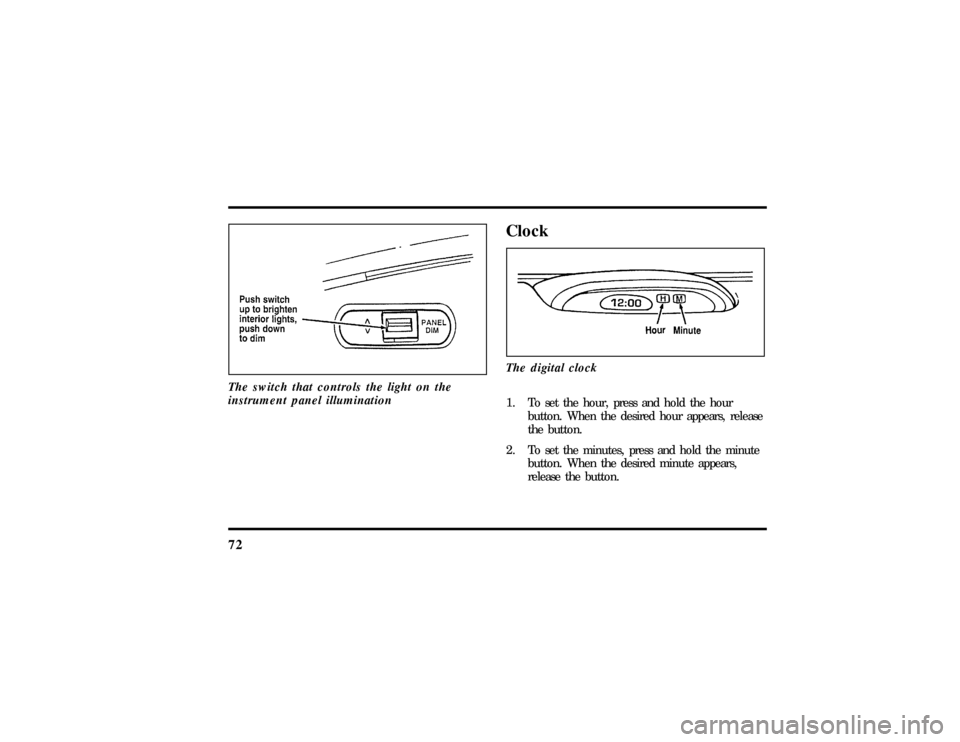
Turning On Interior LightsTo turn on the interior lights, push the headlamp
switch in.Instrument Panel IlluminationWith the light knob in the parking lamps or the
headlamps position, you can brighten or dim the
lights in the instrument panel with the rocker
switch.
File:05fncft.ex
Update:Mon Jun 17 13:49:49 1996
Page 76 of 305
72The switch that controls the light on the
instrument panel illumination
ClockThe digital clock1. To set the hour, press and hold the hour
button. When the desired hour appears, release
the button.
2. To set the minutes, press and hold the minute
button. When the desired minute appears,
release the button.
File:05fncft.ex
Update:Mon Jun 17 13:49:49 1996
Page 77 of 305
73
Ashtray and CupholderYour vehicle has an ashtray/cupholder mounted to
the lower center of the instrument panel.
To open the ashtray, pull out the bottom edge of
the drawer until it stops.
To close, remove cup(s) and push drawer forward
until closed.Power Point Electrical OutletThe power point outlet is located under the
instrument panel to the right of the ashtray. This
outlet should be used in place of the cigarette
lighter for optional electrical accessories.
NOTE:Do not plug optional electrical accessories
into the cigarette lighter. Electrical system damage
could occur.
To access the outlet, pull the cap off.
IgnitionUnderstanding the Positions of the
IgnitionThe positions of the key in the ignitionACC allows some of your vehicle's electrical
accessories such as the radio and the windshield
wipers to operate while the engine is not running.
File:05fncft.ex
Update:Mon Jun 17 13:49:49 1996
Page 78 of 305

74NOTE:Your vehicle is also equipped with an
accessory timer. This allows some of your
accessories to remain on for up to 10 minutes after
the ignition is turned to the OFF position. The
accessory timer is cancelled if any door is opened,
the dimmer switch is used, or the ignition is turned
to the ON position.
The automatic transmission gearshift must be in P
(Park) to move the key to the LOCK position.
LOCK locks the steering wheel. It also locks the
gearshift lever.
LOCK is the only position that allows you to
remove the key. The LOCK feature helps to protect
your vehicle from theft.
OFF allows you to shut off the engine and all
accessories without locking the steering wheel, or
the gearshift lever.ON allows you to test your vehicle's warning lights
to make sure they work before you start the engine.
The key returns to the ON position once the engine
is started and remains in this position while the
engine runs.
START cranks the engine. Release the key once the
engine starts so that you do not damage the starter.
The key should return to ON when you release it.
Key SystemThe vehicle is equipped with a master key and valet
key lock system. The master key will actuate doors,
trunk, glove box, ignition and remote trunk release.
The valet key will actuate doors and ignition only.
The valet key is marked ªvaletº.
File:05fncft.ex
Update:Mon Jun 17 13:49:49 1996
Page 80 of 305
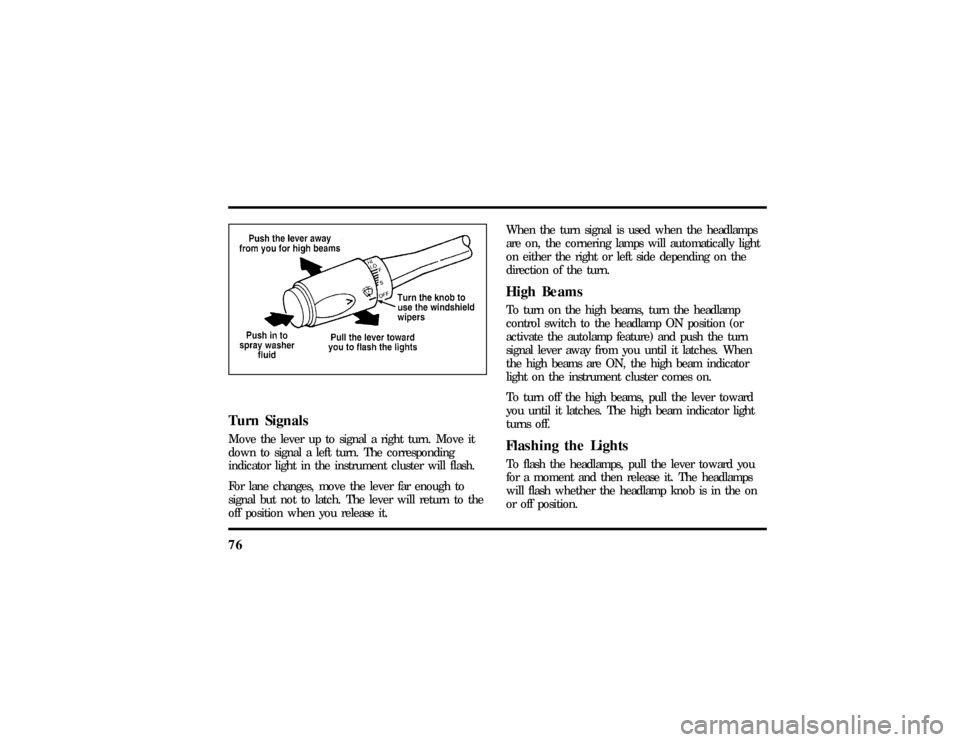
76Turn SignalsMove the lever up to signal a right turn. Move it
down to signal a left turn. The corresponding
indicator light in the instrument cluster will flash.
For lane changes, move the lever far enough to
signal but not to latch. The lever will return to the
off position when you release it.When the turn signal is used when the headlamps
are on, the cornering lamps will automatically light
on either the right or left side depending on the
direction of the turn.
High BeamsTo turn on the high beams, turn the headlamp
control switch to the headlamp ON position (or
activate the autolamp feature) and push the turn
signal lever away from you until it latches. When
the high beams are ON, the high beam indicator
light on the instrument cluster comes on.
To turn off the high beams, pull the lever toward
you until it latches. The high beam indicator light
turns off.Flashing the LightsTo flash the headlamps, pull the lever toward you
for a moment and then release it. The headlamps
will flash whether the headlamp knob is in the on
or off position.
File:05fncft.ex
Update:Mon Jun 17 13:49:49 1996
Page 88 of 305

84q
Accelerate with your accelerator pedal, then
press SET ACCEL.
You may accelerate with the accelerator pedal at
any time during speed control usage. Releasing the
accelerator pedal will return your vehicle speed to
the previously programmed set speed.
To Set a Lower Set Speedq
Press and hold COAST. Release the switch
when the desired vehicle speed is reached. OR
q
Press and release COAST. Each press will
decrease the set speed by 1 mph (1.6 km/h).
OR
q
Depress the brake pedal. When the desired
vehicle speed is reached, press SET ACCEL.
To Disengage Speed Controlq
Depress the brake pedal.
Disengaging the speed control will not erase the
previously programmed set speed.
To Return to a Set Speedq
Press RES (RESUME). For RES (RESUME) to
operate, the vehicle speed must be faster than
30 mph (48 km/h).
Indicator Light (If Equipped)Lights when either the SET ACCEL or RES
(RESUME) switches are pressed and remains lighted
until it is either disengaged or turned off.
File:05fncft.ex
Update:Mon Jun 17 13:49:49 1996
Page 93 of 305
89
MirrorsAutomatic Dimming Inside Rearview
Mirror (If equipped)The electronic day/night mirror will change from
the normal state to the non-glare state when bright
lights (glare) reach the mirror. This mirror functions
at night, and has a limited function at dusk or
dawn. From the non-glare state, the mirror will
return to the normal state after a short delay. The
delay starts when the glare goes away. The delay
prevents excessive changing of the mirror as traffic
moves behind and around the vehicle, or on rolling
hills and curves.The automatic non-glare mirror
To turn the mirror on or off, push the On/Off
switch, located on the bottom of the mirror. The
switch will illuminate in the on position.
The electronic mirror measures the brightness of the
light coming in from the rear of the vehicle. It
automatically makes a correction in the glare state.
The mirror may be turned off in either the normal
or non-glare position.
File:05fncft.ex
Update:Mon Jun 17 13:49:49 1996
Page 94 of 305
90There are two light sensors (photocells) in this
mirror. The sensor that detects rear glare is located
inside a window in the center of the mirror. The
second light sensor which determines outside light
level is located on the backside of the mirror case.
The driver's side mirror is activated by these sensors
to prevent glare when traffic is behind or around
the vehicle.
NOTE:Do not block the sensor on the backside of
the mirror (i.e., with a parking tag, car deodorizer,
etc.) since this may impair proper mirror
performance.
One important safety feature is that the mirror
automatically returns to the normal position
whenever the vehicle is placed in R (Reverse)
(when the mirror is in the ON position). This
feature ensures a bright clear view in the mirror
when backing up.
Do not clean the housing or glass of any mirror
with harsh abrasives, fuel or other petroleum-based
cleaning products.
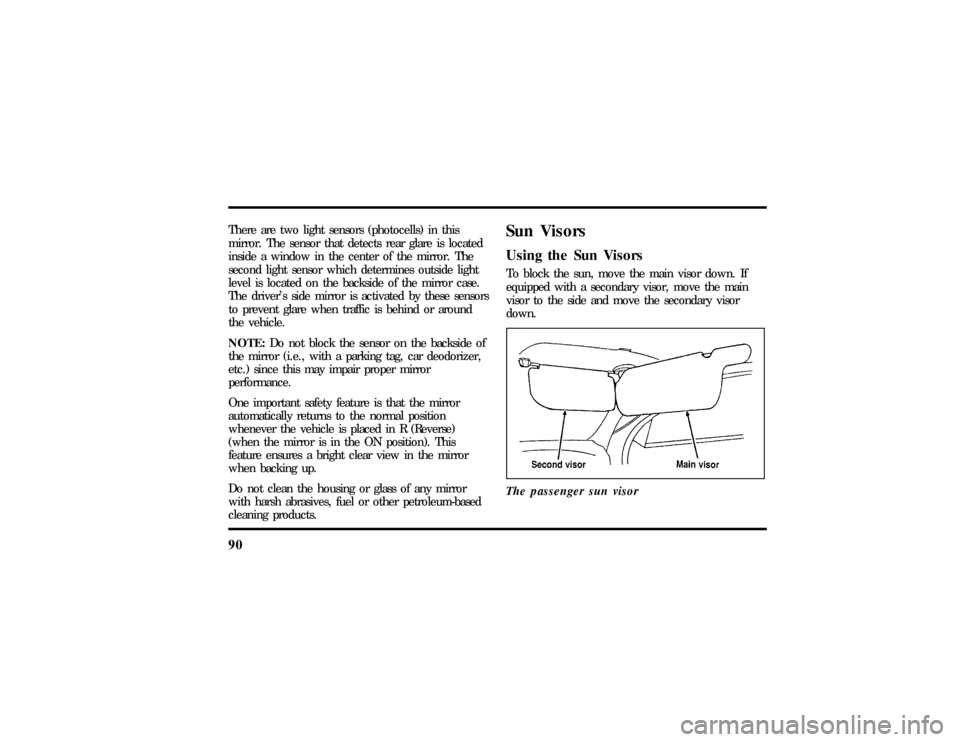
Sun VisorsUsing the Sun VisorsTo block the sun, move the main visor down. If
equipped with a secondary visor, move the main
visor to the side and move the secondary visor
down.
The passenger sun visor
File:05fncft.ex
Update:Mon Jun 17 13:49:49 1996