Page 46 of 305

41
q
Rewinding the tape
To rewind the tape, press the ªREWº button. The
radio will automatically begin playing while the tape
is rewinding. The light above the ªREWº button
will blink while in the rewind mode. Press ªREWº
again or press the ªTAPEº button to stop
rewinding.
q
Using the ªSEEKº function with your cassette
tape player
While in the tape mode, push the right
aside of
the ªSEEKº button to seek forward to the next
selection on the tape. Push the left
bside to
restart a currently playing tape selection.
q
Using the ªBlank Skipº function with your
cassette tape player
Press the ªBlank Skipº button to activate the blank
skip mode. After approximately 20 seconds of blank
program, the tape will seek forward to the next
program.
q
Using the ªSCANº function with your cassette
tape player
Pushing the ªSCANº button will begin the forward
scan mode on the tape currently playing, stopping
on each tape selection for approximately eight
seconds.
To stop the scan mode on the presently sampled
tape selection, press the ªSCANº button or the
ªTAPEº button.
q
How to change the side of the tape being
played
The alternate side of the tape can be selected by
pressing the ªSIDE 1-2º button.
File:04fnast.ex
Update:Thu Jun 20 15:13:21 1996
Page 47 of 305

42How to eject the tapeTo stop the tape and eject the cassette, press the
ªEJECTº button. The tape will eject only when in
the tape mode. The cassettecannotbe ejected
when the radio is playing an ªAMº or ªFMº
station. The system will revert to radio mode when
the cassette is ejected.How to store the tapePress the ªAMº, ªFM1/FM2º, or the ªBANDº
button located on the Redundant Control switch on
your steering wheel (if equipped) while a tape is
loaded.Using the DolbyHB noise reduction
featureNOTE:Noise reduction system manufactured under
license from Dolby Labs Licensing Corporation.
ªDolbyº and double-D symbol are trademarks of
Dolby Laboratories Licensing Corporation.Push thekbutton to activate. When activated,
the light above thekbutton will be illuminated.
Tape error messagesYour cassette tape player is equipped to diagnose
certain problems you may experience. Error codes
are as follows:
TD E1 Ð Radio tries to change sides of tape 3
times in a 10 second span. Push ªEJECTº and try
another tape. If problem persists, refer problem to
qualified personnel for service.
TD E2 Ð Tape eject failure. Radio tries to eject
tape and it will not eject. Push ªEJECTº to eject
tape. If the tape will not eject, refer problem to
qualified personnel for service.
TD E3 Ð Loading error. Push ªEJECTº to eject
tape. Reload tape. If the same error code appears in
the display, try another tape.
File:04fnast.ex
Update:Thu Jun 20 15:13:21 1996
Page 48 of 305

43
Tips on Caring for the Cassette Player
and TapesIn order to keep your cassette tape player
performing the way it was meant to, read and
follow these simple precautions:q
Using a Ford Cassette Cleaning Cartridge or
equivalent to clean the tape player head after
10-12 hours of play will help maintain the best
playback sound and proper tape operation.
q
Only cassettes that are 90 minutes long or less
should be used. Tapes longer than 90 minutes
are thinner and subject to breakage or may jam
the tape player mechanism.
q
Protect cassettes from exposure to direct
sunlight, high humidity and extreme heat or
cold. If they are exposed to extreme conditions,
allow them to reach a moderate temperature
before playing.
q
If a tape is loose inside the cassette, tighten it
before playing by putting your finger or a pencil
into one of the holes and turning the hub until
the tape is tight.
q
Loose labels on cassette tapes can become
lodged in the mechanism. Remove any loose
label material before inserting a cassette.
q
Do not leave a tape in the cassette tape player
when not in use. High heat in the vehicle can
cause the cassette to warp.
File:04fnast.ex
Update:Thu Jun 20 15:13:21 1996
Page 53 of 305

48Operating the CD Compression featureThe compression feature will bring soft and loud
passages closer together for a more consistent
listening level.
To turn the compression on, press the light above
the ªkCOMPº button. When on, the ªk
COMPº button will illuminate. Press the button
again to turn off.Operating the Shuffle featureThe shuffle feature on your CD player allows you to
listen to your disc selections in a different order.
When this feature is activated, your CD player will
randomly select and play tracks on the disc.
Press the ªSHUFFLEº button to turn on, press it
again to turn off. When on, the light above the
ªSHUFFLEº button will illuminate.
Operating the ªSCANº functionPress the ªSCANº button to enter the scan mode.
The CD player will begin scanning the disc,
stopping on each listenable track for approximately
an eight second sampling. This continues until you
press the ªSCANº button a second time.Operating the Shuffle and Scan features
simultaneouslyBoth the shuffle and scan features can be activated
simultaneously. In this mode, the player will
randomly pick a selection and play the first eight
seconds. This process is continued until either the
ªSCANº button or ªSHUFFLEº button is pressed a
second time.
File:04fnast.ex
Update:Thu Jun 20 15:13:21 1996
Page 57 of 305

52When the radio waves are reflected off objects or
structures, the reflected signal cancels the normal
signal, causing the antenna to pick up noise and
distortion. Cancellation effects are most prominent
in metropolitan areas, but also can become quite
severe in hilly terrain and depressed roadways.
To minimize these conditions, a stereo/mono blend
circuit has been incorporated into this system. This
feature automatically switches a weak stereo signal
to a clearer monaural signal, which improves the
quality of reception.
Several sources of static are normal conditions on
AM frequencies. These can be caused by power
lines, electric fences, traffic lights and
thunderstorms.
Another reception phenomenon isStrong Signal
Capture and Overload. This can occur when
listening to a weak station and when passing
another broadcast tower. The close station may
capture the more distant station, although thedisplayed frequency does not change. While passing
the tower, the station may switch back and forth a
few times before returning to the original station.
When several broadcast towers are present
(common in metropolitan areas), several stations
may overload the receiver, resulting in considerable
station changing, mixing and distortion.
Automatic gain control circuitry for both AM and
FM bands has been incorporated into this system to
reduce strong signal capture and overload.
All About Radio FrequenciesThe Federal Communications Commission (FCC)
and the Canadian Radio Telecommunications
Commission (CRTC) establish the frequencies that
AM and FM radio stations may use for their
broadcasts. The allowable frequencies are, AM: 530,
540...1600, 1610 kHz in 10 kHz steps; FM: 87.9,
88.1...107.7, 107.9 MHz in 0.2 MHz steps.
File:04fnast.ex
Update:Thu Jun 20 15:13:21 1996
Page 72 of 305
68
TheInterio ran dExterio rLights
WARNING
Th eDaytim eRunnin gLigh t(DRL)
Page 73 of 305
69
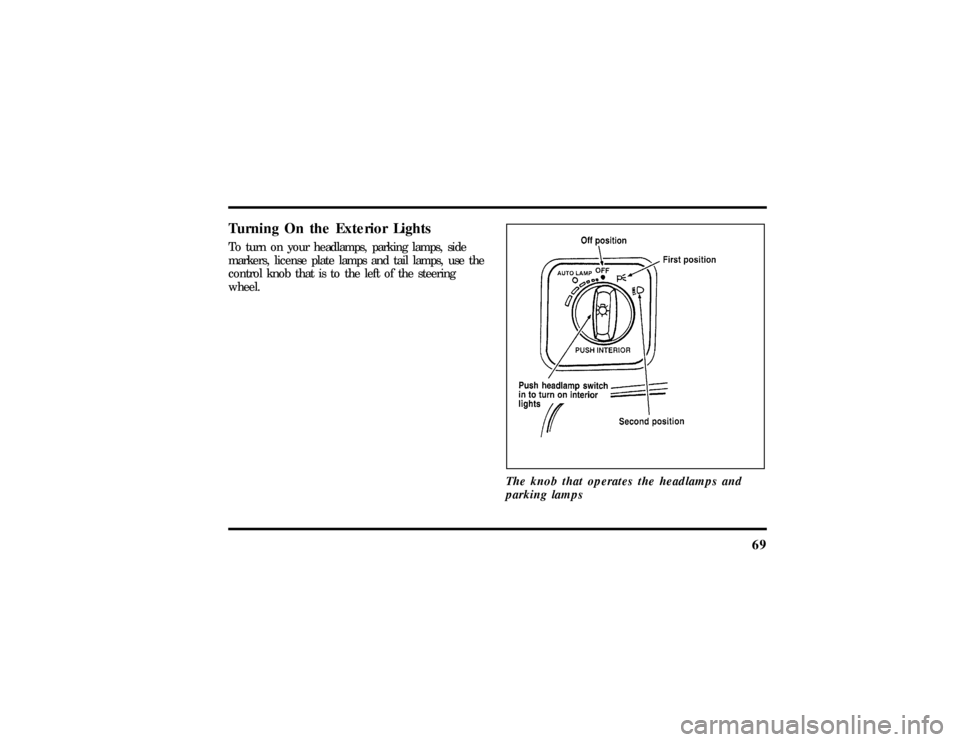
Turning On the Exterior LightsTo turn on your headlamps, parking lamps, side
markers, license plate lamps and tail lamps, use the
control knob that is to the left of the steering
wheel.
The knob that operates the headlamps and
parking lamps
File:05fncft.ex
Update:Mon Jun 17 13:49:49 1996
Page 74 of 305
70To turn on the parking lamps, tail lamps, side
markers, and license plate lamps, turn the knob
clockwise to the first position.
For more information about how the high beams
work, see the high beam section later in this
chapter.Setting the Autolamp On/Off Delay
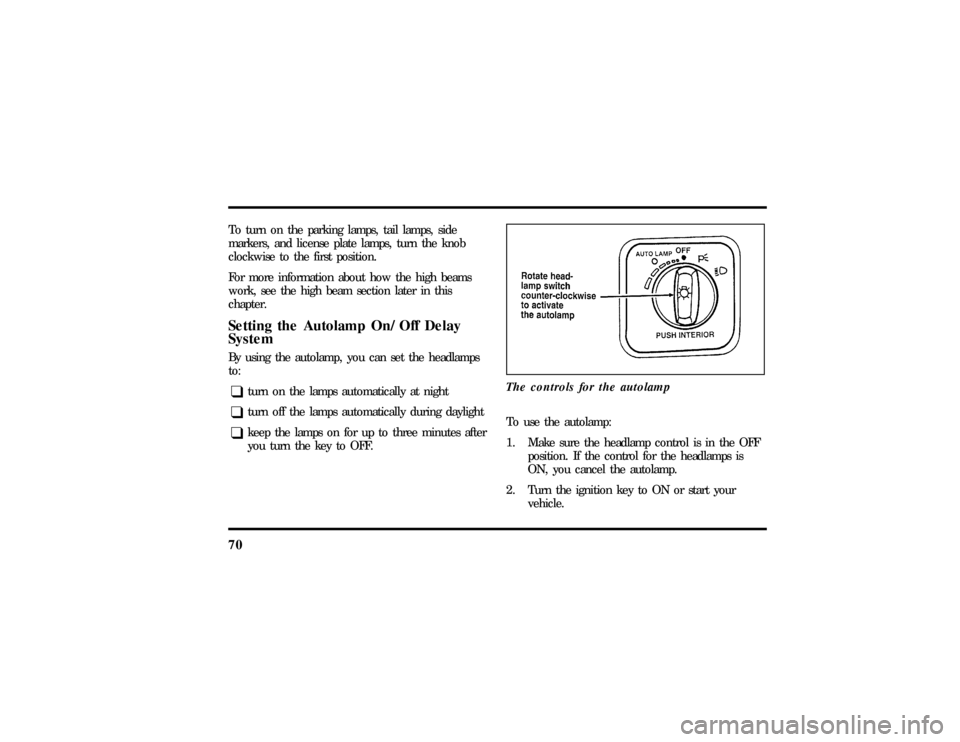
SystemBy using the autolamp, you can set the headlamps
to:q
turn on the lamps automatically at night
q
turn off the lamps automatically during daylight
q
keep the lamps on for up to three minutes after
you turn the key to OFF.The controls for the autolamp
To use the autolamp:
1. Make sure the headlamp control is in the OFF
position. If the control for the headlamps is
ON, you cancel the autolamp.
2. Turn the ignition key to ON or start your
vehicle.
File:05fncft.ex
Update:Mon Jun 17 13:49:49 1996