Page 103 of 241

Audio System
Press the CD button until "CD"
appears in the display. The system
will start to play the first track of the
first disc in the magazine.
When that disc ends, the next disc in the magazine is loaded and played.
After the last disc finishes, the system returns to disc 1.
To select a different disc, press the appropriate preset button (1 — 6). If
you select an empty slot in the magazine, the changer will, after
finding that slot empty, try to load the CD in the next slot. This
continues until it finds a CD to load
and play.
You can use the TUNE/SEEK switch to select tracks within a disc.
If you push and release the TUNE/
SEEK switch, the system will move
to the beginning of a track. Push the switch up to move to the beginning
of the next track, and push the
switch down to move to the begin-
ning of the current track. If you push and hold the TUNE/
SEEK switch, you will hear a beep
and the system will continue to move
across tracks. Release the switch
when you think it has reached the desired place on the disc.
RPT —
When you activate the
Repeat feature by pressing the
A. SEL/RPT button, the system continuously replays the current
track. You will see RPT in the display as a reminder. Press the button
again to turn it off.
RANDOM PLAY —
This feature,
when activated, plays the tracks on a CD in random order, rather than in
the order they are recorded on the CD. To activate Random Play, press
the A. SEL/RPT button until you see
A. SEL in the display. The system will then select and play tracksrandomly on the current disc. When
all tracks on that disc have been
played, the next disc is loaded and played randomly. This continues
until you deactivate Random Play by
pressing A. SEL/RPT again.
If the system is in Repeat mode, you must turn it off by pressing A. SEL/RPT before you can select Random
Play. Then press the button again
until you see A. SEL displayed.
To take the system out of CD mode, press the AM or FM button, or inserta cassette in the player. When you
return to CD mode, play will contin-
ue at the same disc and track.
If you turn the system off while a CD
is playing, either with the PWR/VOL
knob or the ignition switch, play will continue at the same point when you
turn it back on.
Comfort and Convenience FeaturesProCarManuals.comMain Menu Table of Contents s t
Page 104 of 241
Audio System
Protecting Compact Discs
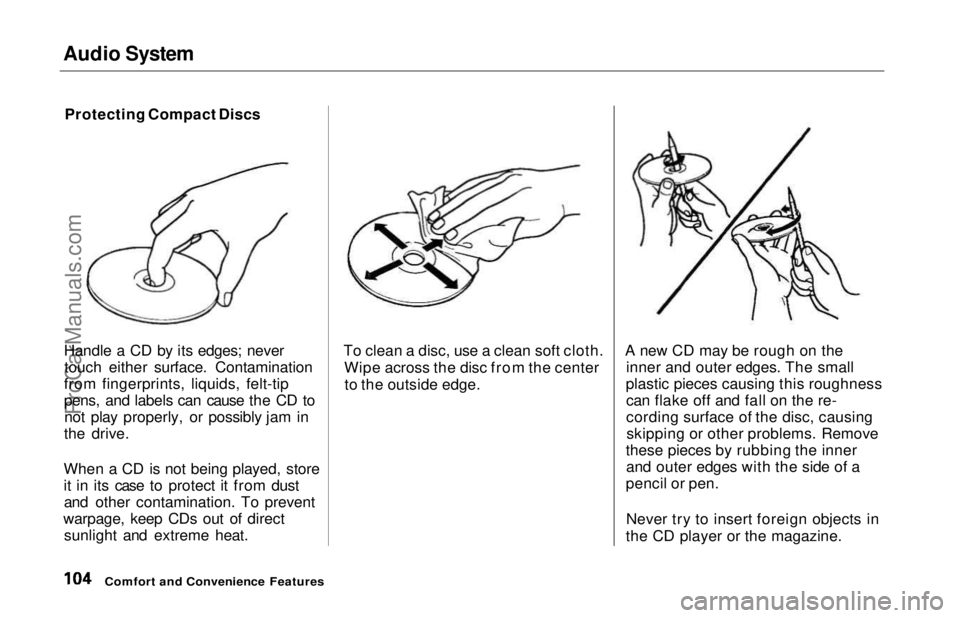
Handle a CD by its edges; never touch either surface. Contamination
from fingerprints, liquids, felt-tip
pens, and labels can cause the CD to not play properly, or possibly jam in
the drive.
When a CD is not being played, store
it in its case to protect it from dust and other contamination. To prevent
warpage, keep CDs out of direct sunlight and extreme heat. To clean a disc, use a clean soft cloth.
Wipe across the disc from the centerto the outside edge. A new CD may be rough on the
inner and outer edges. The small
plastic pieces causing this roughness can flake off and fall on the re-
cording surface of the disc, causingskipping or other problems. Remove
these pieces by rubbing the inner and outer edges with the side of a
pencil or pen.
Never try to insert foreign objects in
the CD player or the magazine.
Comfort and Convenience FeaturesProCarManuals.comMain Menu Table of Contents s t
Page 105 of 241
Audio System
CD Changer Error Indications
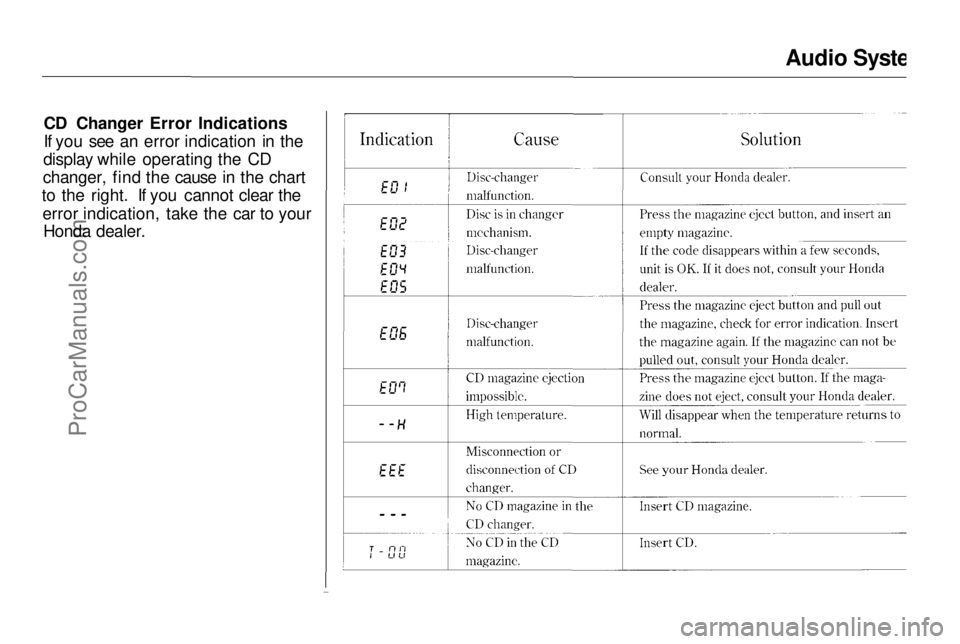
If you see an error indication in the
display while operating the CD
changer, find the cause in the chart
to the right. If you cannot clear the
error indication, take the car to your Honda dealer.
Comfort and Convenience FeaturesProCarManuals.comMain Menu Table of Contents s t
Page 106 of 241

Audio System
Theft Protection
On U.S. EX model
Your car's audio system will disable itself if it is disconnected from
electrical power for any reason. To
make it work again, the user must
enter a specific five-digit code in the
Preset buttons. Because there are
hundreds of number combinations
possible from five digits, making the system work without knowing the
exact code is nearly impossible.
You should have received a card that lists your audio system's codenumber and serial number. It is best
to store this card in a safe place at
home. In addition, you should write
the audio system's serial number in
this Owner's Manual. If you should
happen to lose the card, you must obtain the code number from your
Honda dealer. To do this, you will
need the system's serial number. If your car's battery is disconnected
or goes dead, the audio system will
disable itself. If this happens, you
will see "Code" in the frequency display the next time you turn on the
system. Use the Preset buttons to
enter the five-digit code. If it is
entered correctly, the radio will start
playing.
If you make a mistake entering the
code, do not start over or try to
correct your mistake. Complete the
five-digit sequence, then enter the correct code. You have three tries toenter the correct code. If you are
unsuccessful in three attempts, you
must then leave the system on for
one hour before trying again. You will have to store your favorite
stations in the Preset buttons after
the system begins working. Your
original settings were lost when
power was disconnected.
Comfort and Convenience FeaturesProCarManuals.comMain Menu Table of Contents s t
Page 128 of 241
The Braking System, Driving in Bad Weather
If anything goes wrong, the ABS
indicator on the instrument panel
comes on (see page 35). This means
the anti-lock function of the braking
system has shut down. The brakes
still work like a conventional system
without anti-lock, providing normal stopping ability. You should have the
dealer inspect your vehicle as soon
as possible if this light stays on after
you start the engine, or comes on while driving. Driving in Bad Weather
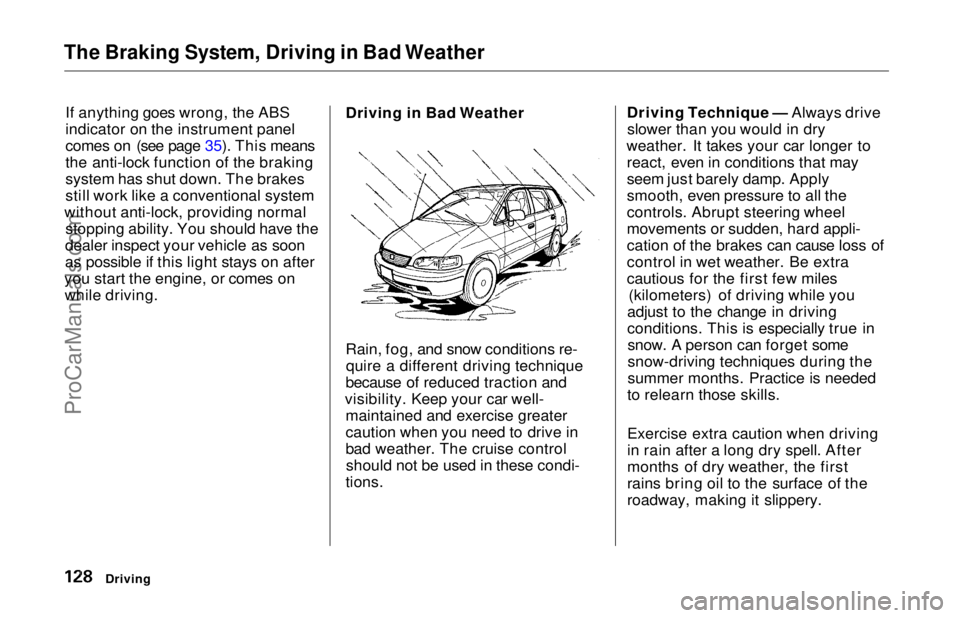
Rain, fog, and snow conditions re-
quire a different driving technique
because of reduced traction and
visibility. Keep your car well- maintained and exercise greater
caution when you need to drive in
bad weather. The cruise controlshould not be used in these condi-
tions. Driving Technique — Always drive
slower than you would in dry
weather. It takes your car longer to react, even in conditions that may
seem just barely damp. Apply
smooth, even pressure to all the
controls. Abrupt steering wheel
movements or sudden, hard appli-
cation of the brakes can cause loss of
control in wet weather. Be extra
cautious for the first few miles (kilometers) of driving while you
adjust to the change in driving
conditions. This is especially true in snow. A person can forget some
snow-driving techniques during the
summer months. Practice is needed
to relearn those skills.
Exercise extra caution when driving
in rain after a long dry spell. After
months of dry weather, the first
rains bring oil to the surface of the
roadway, making it slippery.
DrivingProCarManuals.comMain Menu Table of Contents s t
Page 135 of 241
Towing a Trailer
If you have to stop while going uphill,
do not hold the car in place by
pressing on the accelerator. This can cause the automatic transmission to
overheat. Use the parking brake or
footbrake.
When parking your car and trailer, especially on a hill, be sure to follow
all the normal precautions. Turn
your front wheels into the curb, set the parking brake firmly, and put the
transmission in Park. In addition,
place wheel chocks at each of the
trailer's tires. Backing up with a trailer is difficult
and takes practice. Drive slowly,
make small movements with the
steering wheel, and have someone
stand outside to guide you. Grip the
steering wheel on the bottom (rather
than the usual position near the top).
Move your hand to the left to get the
trailer to move to the left, and right
to move the trailer right.
DrivingProCarManuals.comMain Menu Table of Contents s t
Page 185 of 241
Exterior Care
Washing
Frequent washing helps preserve
your car's beauty. Dirt and grit can scratch the paint, while tree sap and
bird droppings can permanently ruin the finish.
Wash your car in a shady area, not in direct sunlight. If the car is parked in
the sun, move it into the shade and
let the exterior cool down before you start.
Only use the solvents and cleaners
recommended in this Owner's
Manual.
Chemical solvents and strong cleaners
can damage the paint, metal, and
plastic on your car.
Rinse the car thoroughly with cool
water to remove loose dirt.
Fill a bucket with cool water. Mix
in a mild detergent, such as
dishwashing liquid or a product
made especially for car washing.
Wash the car, using the water and detergent solution and a soft-
bristle brush, sponge, or soft cloth. Start at the top and work your way
down. Rinse frequently.
Check the body for road tar, tree
sap, etc. Remove these stains with
tar remover or turpentine. Rinse it off immediately so it does not
harm the finish. Remember to re-
wax these areas, even if the rest of the car does not need waxing. When you have washed and rinsed
the whole exterior, dry it with a
chamois or soft towel. Letting itair-dry will cause dulling and water
spots.
As you dry the car, inspect it for chips and scratches that could allow
corrosion to start. Repair them with
touch-up paint (see page 187).
The radio antenna on your car does not
need to be removed when you use a "drive-through'' car wash. However, if
you remove the antenna, make sure to
reinstall it and tighten it securely using
an appropriate tool.
Appearance Care
NOTICE
NOTICEProCarManuals.comMain Menu Table of Contents s t
Page 189 of 241
Corrosion Protection
Two factors normally contribute to causing corrosion in your car:
1. Moisture trapped in body cavities. Dirt and road salt that collects in
hollows on the underside of the car stays damp, promoting
corrosion in that area.
2. Removal of paint and protective coatings from the exterior and
underside of the car. Many corrosion-preventive measures
are built into your Honda. You can
help keep your car from corroding
by performing some simple periodic
maintenance:
Repair chips and scratches in the
paint as soon as you discover them.
Inspect and clean out the drain
holes in the bottom of the doors and body.
Check the floor coverings for
dampness. Carpeting and floor
mats may remain damp for a long
time, especially in winter. This dampness can eventually cause
the floor panels to corrode. Use a high-pressure spray to clean
the underside of your car. This is
especially important in areas that
use road salt in winter. It is also a
good idea in humid climates and areas subject to salt air. Be careful
of the ABS wheel sensors and
wiring at each wheel.
Have the corrosion-preventivecoatings on the underside of your
car inspected and repaired
periodically.
Appearance CareProCarManuals.comMain Menu Table of Contents s t