1997 BUICK PARK AVENUE start stop button
[x] Cancel search: start stop buttonPage 125 of 420
It will operate garage doors and gates, or other devices
controlled by radio frequency such as home/office
lighting systems.
The transmitter will learn and transmit the frequencies
of most current transmitters and is powered by your
vehicle’s battery and charging system.
This device complies with Part
15 of the FCC Rules.
Operation is subject to the following two conditions:
(1) This device may not cause harmful interference,
and
(2) This device must accept any interference
received, including interference that may cause
undesired operation.
Programming the Transmitter
Do not use the universal transmitter with any garage
door opener that does not have the “stop and reverse”
safety feature. This includes any garage door opener
model manufactured before April 1, 1982.
Be sure that people and objects are clear of the garage
door
you are programming!
Your vehicle’s engine should be turned off while
programming your transmitter. Follow these steps to
program up to three channels:
1.
2.
3.
4.
If you have previously programmed a universal
transmitter channel, proceed to Step
2. Otherwise,
hold down the two outside buttons on the universal
transmitter until the amber light begins to flash
rapidly (approximately
20 seconds). Then release the
buttons. This procedure initializes the memory and
erases any previous settings for all three channels.
Hold the end of your hand-held transmitter against
the bottom surface of the universal transmitter
so
that you can still see the amber light.
Decide which one of the three channels you want to
program. Using both hands, press the hand-held
transmitter button and the desired button on the
universal transmitter. Continue to hold both buttons
through Step
4.
Hold down both buttons until you see the amber light
on the universal transmitter first flash slowly, then
rapidly. The rapid flashing, which could take up to
90 seconds, indicates that the universal transmitter
has been programmed. Release both buttons once the
light starts
to flash rapidly.
2-65
ProCarManuals.com
Page 154 of 420
Comfort Controls
This section tells you how to operate your comfort
controls. Your comfort control system uses
ozone-friendly
R- 134a refrigerant.
With these systems, you can control the heating, cooling
and ventilation in your Buick. Your vehicle also has a
flow-through ventilation system described later in
this section.
Personal Choice Comfort Controls
(If Equipped)
This feature allows two different drivers to store and
recall their own climate control settings for temperature, air delivery mode, fan and passenger climate control
(ordoff) status. The Personal Choice settings recalled
are determined by the transmitter used to enter the
vehicle. After the
UNLOCK button of a remote keyless
entry transmitter is pressed, and the ignition is in
RUN,
the climate control will adjust to the last settings of the
identified driver. The settings can also be changed by
briefly pressing one of the
MEMORY seat switches
located on the driver’s door panel. When adjustments
are made, the new settings
are automatically saved for
the driver.
Dual Automatic ComforTemp Climate Control
Your Buick has the dual automatic comfortemp climate
control system. The following information tells you how
it works.
You will hear a beep each time a button is pushed and a
small light on the button will indicate which buttons are
active. The lights are on all buttons except
TEMP, FAN
and
AIR FLOW. The display will show fan speed,
comfort level setting and airflow direction for a few seconds whenever any button, except for the rear
defog, is pushed, and then it will display the outside
temperature. The outside temperature reading is most
accurate when the vehicle is moving.
During stops, when driving slow, or when the engine is
first started after a short trip, the outside temperature
reading can be affected by road or engine heat. In order
to ensure proper automatic climate control operation, the outside temperature display may not update as quickly
as expected.
3-2
ProCarManuals.com
Page 173 of 420
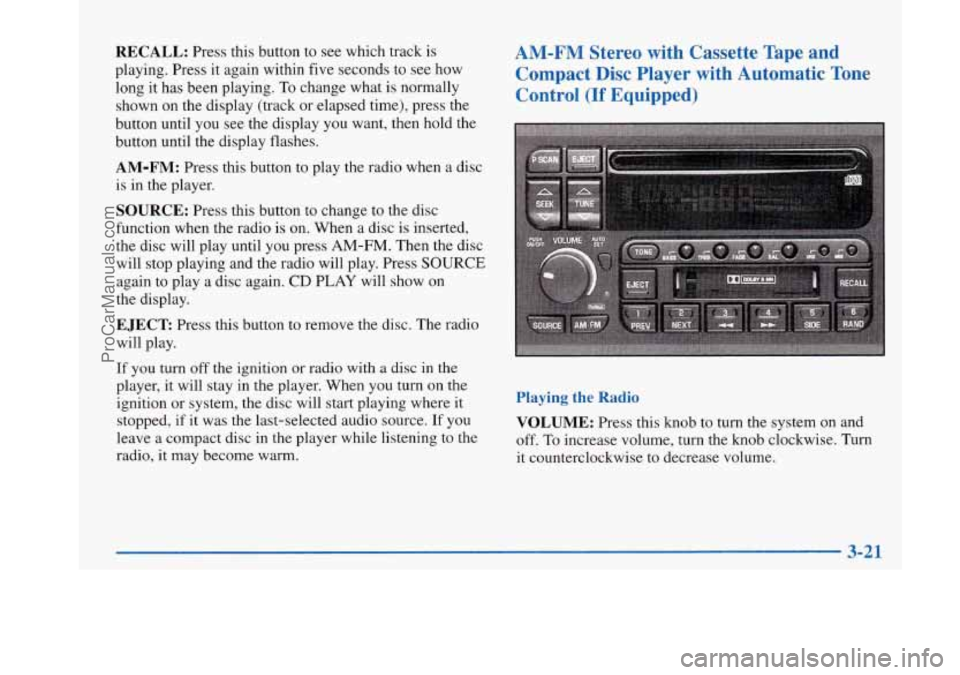
RECALL: Press this button to see which track is
playing. Press it again within five seconds to see how
long it has been playing.
To change what is normally
shown on the display (track or elapsed time), press the
button until you see the display you want, then hold the
button until the display flashes.
AM-FM: Press this button to play the radio when a disc
is in the player.
SOURCE: Press this button to change to the disc
function when the radio is on. When a disc is inserted,
the disc will play until you press
AM-FM. Then the disc
will stop playing and the radio will play. Press
SOURCE
again to play a disc again. CD PLAY will show on
the display.
EJECT Press this button to remove the disc. The radio
will play.
AM-FM Stereo with Cassette Tape and
Compact Disc Player with Automatic Tone Control
(If Equipped)
If you turn off the ignition or radio with a disc in the
player, it will stay in the player. When you turn on the
ignition or system, the disc will start playing where it
stopped, if it was the last-selected audio source.
If you
leave a compact disc in the player while listening to the
radio, it may become warm.
Playing the Radio
VOLUME:
Press this knob to turn the system on and
off.
To increase volume, turn the knob clockwise. Turn
it counterclockwise to decrease volume.
3-21
ProCarManuals.com
Page 178 of 420

-
1 I
The SEEK down and up arrows will also find the
previous and next selections on the disc.
44 (3): Press and hold this button to quickly reverse
within a track. You will hear sound.
.. (4): Press and hold this button to quickly advance
within a track. You will hear sound.
RAND (4): Press this button to hear the tracks in
random, rather than sequential, order. Press RAND
again to turn off random play.
RECALL: Press this button to see which track is
playing. Press it again within five seconds to see how
long it has been playing.
To change what is normally
shown on the display (track or elapsed time), press the
RECALL button until you see the display you want,
then hold the RECALL button until the display flashes.
AM-FM: Press this button to play the radio when a disc
is in the player.
SOURCE: Press this button to change to the disc
function when the radio
is on. When a disc is inserted,
the disc will play until you press AM-FM. Then the disc
will stop playing and the radio will play. Press SOURCE
again to play a disc again. CD PLAY will show on
the display.
EJECT Press this button to remove the disc. The radio
will play.
If you turn off the ignition or radio with a disc in the
player, it will stay in the player. When you turn on the
ignition or system, the disc will start playing where it
stopped, if it was the last-selected audio source.
Also, as a protection feature, if a CD is ejected and left
in the player, it will be pulled back in the player with the
ignition on or off. If you leave a compact disc
in the
player while listening to the radio, it may become warm.
3-26
ProCarManuals.com
Page 182 of 420
P SCAN: When you press P SCAN while playing a CD,
you will hear the first few seconds of each track on a
disc. Press
P SCAN again to stop on a CD. The CD
will mute while scanning.
Theft-Deterrent Feature
THEFTLOCK" is designed to discourage theft of your
radio. It works by using a secret code to disable all radio
functions whenever battery power is removed.
If THEFTLOCK is active, the THEFTLOCK indicator
will flash when the ignition is off.
The THEFTLOCK feature for the radio may be used or
ignored. If ignored, the system plays normally and the
radio is not protected by the feature. If
THEFTLOCK
is activated, your radio will not operate if stolen.
When THEFTLOCK is activated, the radio will display
LOC to indicate a locked condition anytime battery
power is removed. If your battery loses power for any
reason, you must unlock the radio with the secret code
before
it will operate.
Activating the Theft-Deterrent Feature
The instructions which follow, explain how to enter your
secret code to activate the THEFTLOCK system. It is
recommended that you read through all nine steps
before starting the procedure. NOTE:
If
you allow more than 15 seconds to elapse
between any steps, the radio automatically reverts to
time and you must start the procedure over at Step
4.
1.
2.
3.
4.
5.
6.
7.
8.
9.
Write down any three or four-digit number from
000 to 1999 and keep it in a safe place separate from
the vehicle.
Turn the ignition to ACCESSORY or RUN.
Turn the radio
off.
Press the 1 and 4 buttons together. Hold them down
until
--- shows on the display. Next you will use the
secret code number which you have written down.
Press MIN and
000
Press MIN again to
with your code.
Press HRS to make
with your code. will
appear on the display.
make the last two digits agree
the first one or two digits agree
Press AM-FM after you have confirmed that the
code matches the secret code you have written down.
The display will show REP to let you know that you
need to repeat Steps
5 through 7 to confirm your
secret code.
Press AM-FM and this time the display will show
SEC to let you know that your radio is secure.
3-30
ProCarManuals.com