Page 379 of 1399
BR−46−
BRAKE LOAD SENSING PROPORTIONING AND BY− PASS
VALVE (LSP & BV)
1028
Author�: Date�:
1996 LAND CRUISER (RM451U)
5. IF NECESSARY, CHECK VALVE BODY
(a) Assemble the valve body in the uppermost position.
HINT:
When the brakes are applied, the piston will move down about
1 mm (0.039 in.). Even at this time, the piston should not make
contact with or move the load sensing spring.
(b) In this position, check the rear brake pressure.
Front brake pressure
kPa (kgf/cm2, psi)
Rear brake pressure kPa (kgf/cm2, psi)
3,434 (35, 498)3,434 (35, 498)
5,396 (55, 783)3,630 − 4,218
(37 − 43, 527 − 612)
9,810 (100, 1,424)4,513 − 5,494
(46 − 56, 655 − 797)
Brought to you by BirfMark
Brought to you by BirfMark
Version 1.11 - 03/16/2010
Page 385 of 1399
BR1DH−01
R05477
A
BR−52−
BRAKE LOAD SENSING PROPORTIONING AND BY− PASS
VALVE (LSP & BV)
1996 LAND CRUISER (RM451U)
INSTALLATION
1. INSTALL LSP & BV ASSEMBLY
Install the LSP & BV assembly to the frame with the 4 bolts. Torque: 25 N·m (260 kgf·cm, 19 ft·lbf)
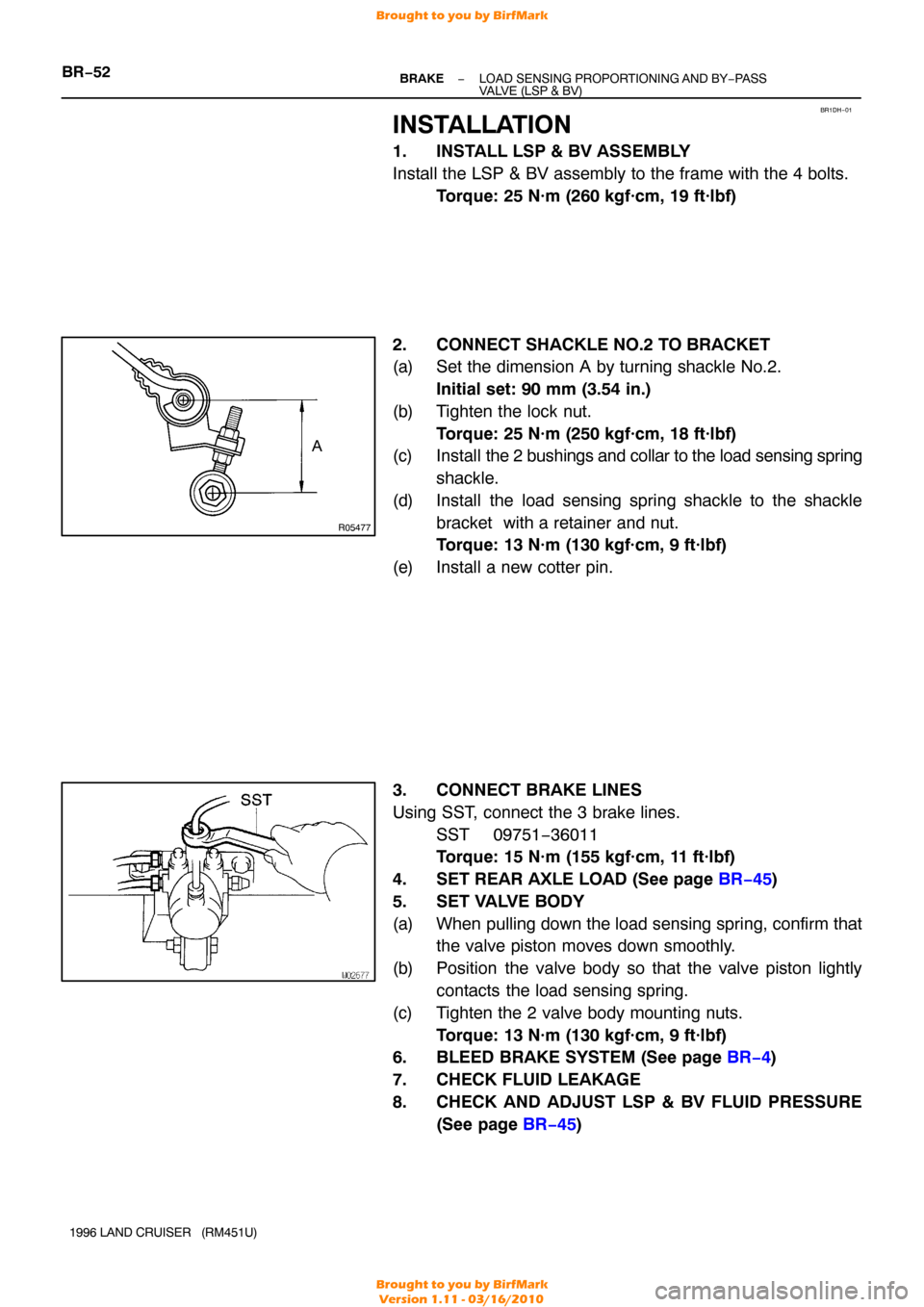
2. CONNECT SHACKLE NO.2 TO BRACKET
(a) Set the dimension A by turning shackle No.2. Initial set: 90 mm (3.54 in.)
(b) Tighten the lock nut. Torque: 25 N·m (250 kgf·cm, 18 ft·lbf)
(c) Install the 2 bushings and collar to the load sensing spring
shackle.
(d) Install the load sensing spring shackle to the shackle bracket with a retainer and nut.
Torque: 13 N·m (130 kgf·cm, 9 ft·lbf)
(e) Install a new cotter pin.
3. CONNECT BRAKE LINES
Using SST, connect the 3 brake lines. SST 09751−36011
Torque: 15 N·m (155 kgf·cm, 11 ft·lbf)
4. SET REAR AXLE LOAD (See page BR−45 )
5. SET VALVE BODY
(a) When pulling down the load sensing spring, confirm that the valve piston moves down smoothly.
(b) Position the valve body so that the valve piston lightly contacts the load sensing spring.
(c) Tighten the 2 valve body mounting nuts. Torque: 13 N·m (130 kgf·cm, 9 ft·lbf)
6. BLEED BRAKE SYSTEM (See page BR−4 )
7. CHECK FLUID LEAKAGE
8. CHECK AND ADJUST LSP & BV FLUID PRESSURE (See page BR−45 )
Brought to you by BirfMark
Brought to you by BirfMark
Version 1.11 - 03/16/2010
Page 387 of 1399

BR1334
R00326
BR−54
−
BRAKE ABS ACTUATOR
1036
Author�: Date�:
1996 LAND CRUISER (RM451U)
4. INSPECT BRAKE ACTUATOR OPERATION
(a) Start the engine, and run it at idle.
(b) Turn the selector switch of the actuator checker to
”FRONT RH” position.
(c) Push and hold in the SUB MOTOR switch for a few se- conds.
(d) Depress the brake pedal and hold it until the step (g) is
completed.
(e) Push the POWER switch, and check that the brake pedal
does not go down.
NOTICE:
Do not keep the POWER switch pushed down for more than
10 seconds.
(f) Release the switch, and check that the pedal goes down.
(g) Push and hold in the SUB MOTOR switch for a few se- conds, and check that the pedal returns.
(h) Release the brake pedal.
(i) Push and hold in the SUB MOTOR switch for a few se- conds.
(j) Depress the brake pedal and hold it for about 15 seconds.
As you hold the pedal down, push the SUB MOTOR
switch for a few seconds. Check that the brake pedal
does not pulsate.
(k) Release the brake pedal.
5. INSPECT FOR OTHER WHEELS
(a) Turn the selector switch to ”FRONT LH” position.
(b) Repeating (c) to (j) of the step 4, check the actuator opera-
tion similarly.
(c) Similarly, inspect ”REAR” position.
6. PUSH SUB MOTOR SWITCH
(a) Push and hold in the SUB MOTOR switch for a few se- conds.
(b) Stop the engine.
Brought to you by BirfMark
Brought to you by BirfMark
Version 1.11 - 03/16/2010
Page 420 of 1399
CH−18
−
CHARGING GENERATOR
1996 LAND CRUISER (RM451U)
7. INSTALL BRUSH HOLDER
(a) Install the brush holder on the rectifier end frame with the
2 screws.
NOTICE:
Be careful of the holder installation direction. Torque: 2.0 N·m (20 kgf·cm, 17 in.·lbf)
(b) Place the brush holder cover on the brush holder.
8. INSTALL REAR END COVER
(a) Install the end cover together with the rectifier plate. (1) Hand tighten the bolt first for positioning the plate.
(2) Tighten the 3 nuts and bolt.
Torque:
Bolt: 3.8 N·m (39 kgf·cm, 34 in.·lbf)
Nut: 4.4 N·m (45 kgf·cm, 39 in.·lbf)
(b) Install the terminal insulator with the nut. Torque: 4.1 N·m (42 kgf·cm, 36 in.·lbf)
9. CHECK THAT ROTOR ROTATES SMOOTHLY
Brought to you by BirfMark
Brought to you by BirfMark
Version 1.11 - 03/16/2010
Page 427 of 1399

CO114−02
CO−6
−
COOLING WATER PUMP
1996 LAND CRUISER (RM451U)
INSTALLATION
1. INSTALL WATER PUMP
Install a new gasket and the water pump with the 4 bolts and 2
nuts. Torque: 21 N·m (210 kgf·cm, 15 ft·lbf)
2. INSTALL WATER PUMP PULLEY, FAN SHROUD, FAN WITH FLUID COUPLING AND DRIVE BELTS
(a) Install fan to the fluid coupling.
(b) Place the fan with fluid coupling, water pump pulley and fan shroud in position.
(c) Temporarily install the fan pulley mounting nuts.
(d) Install the fan shroud with the 2 bolts. Torque: 5.0 N·m (50 kgf·cm, 43 in.·lbf)
(e) Connect the oil cooler hose to the clamp on the fan
shroud.
(f) Install the drive belts with the adjusting bolt and pivot bolt.
(g) Stretch the belts tight and tighten the 4 water pump pulley mounting nuts.
(h) Adjust the drive belts (See page CH−2 ).
3. CONNECT NO.3 WATER BYPASS HOSE
4. CONNECT RADIATOR INLET HOSE
5. FILL RADIATOR WITH ENGINE COOLANT
6. START ENGINE AND CHECK FOR LEAKS
Brought to you by BirfMark
Brought to you by BirfMark
Version 1.11 - 03/16/2010
Page 431 of 1399
CO116−01
CO−10
−
COOLING THERMOSTAT
1996 LAND CRUISER (RM451U)
INSTALLATION
1. PLACE THERMOSTAT IN WATER PUMP
(a) Install a new gasket on to the thermostat.
(b) Align the thermostat jiggle valve with the protrusion of the
water inlet housing, and insert the thermostat in the water
inlet housing.
HINT:
The jiggle valve may be set within 15 ° of either side of the pre-
scribed position.
2. INSTALL WATER INLET
Install the water inlet with the 3 nuts. Torque: 21 N·m (210 kgf·cm, 15 ft·lbf)
3. FILL RADIATOR WITH ENGINE COOLANT
4. START ENGINE AND CHECK FOR LEAKS
Brought to you by BirfMark
Brought to you by BirfMark
Version 1.11 - 03/16/2010
Page 437 of 1399

CO118−01
CO−16
−
COOLING RADIATOR
1996 LAND CRUISER (RM451U)
INSTALLATION
1. INSTALL RADIATOR
(a) Install the 2 radiator brackets with the 4 nuts. Torque: 12 N·m (120 kgf·cm, 9 ft·lbf)
(b) Install the radiator with the 2 bolts and 2 nuts. Torque:
Bolt: 18 N·m (185 kgf·cm, 13 ft·lbf)
Nut: 12 N·m (120 kgf·cm, 9 ft·lbf)
2. CONNECT A/T OIL COOLER HOSES
3. CONNECT RADIATOR OUTLET HOSE
4. INSTALL WATER PUMP PULLEY, FAN SHROUD, FAN WITH FLUID COUPLING AND DRIVE BELTS
(a) Place the fan with fluid coupling, water pump pulley and fan shroud in position.
(b) Temporarily install the fan pulley mounting nuts.
(c) Install the fan shroud with the 2 bolts. Torque: 5.0 N·m (50 kgf·cm, 43 in.·lbf)
(d) Connect the oil cooler hose to the clamp on the fan
shroud.
(e) Install the drive belts with the adjusting bolt and pivot bolt.
(f) Stretch the belts tight and tighten the 4 water pump pulley mounting nuts.
(g) Adjust the drive belts (See page CH−2 ).
5. CONNECT RADIATOR RESERVOIR HOSE
6. CONNECT RADIATOR INLET HOSE
7. CONNECT NO.3 WATER BYPASS HOSE
8. INSTALL RADIATOR GRILLE
Install the radiator grille with the 5 screws and clip.
9. INSTALL BATTERY AND BATTERY TRAY
(a) Install the battery tray with the 5 bolts.
(b) Connect the ground strap with the bolt.
(c) Install the battery with the hold−down clamp and nuts.
(d) Connect the battery cables.
10. FILL RADIATOR WITH ENGINE COOLANT
11. START ENGINE AND CHECK FOR LEAKS
12. CHECK AUTOMATIC TRANSMISSION FLUID LEVEL
Brought to you by BirfMark
Brought to you by BirfMark
Version 1.11 - 03/16/2010
Page 443 of 1399

FI3605
ON
OFF Flashing
0.13 Second
DI−6
−
DIAGNOSTICS ENGINE
1996 LAND CRUISER (RM451U)
NOTICE:
When simulating symptoms with an OBD II scan tool (ex-
cluding TOYOTA hand −held tester) to check the DTC, use
normal mode. For codes on the DTC chart subject to ”2 trip
detection logic”, turn the ignition switch OFF after the
symptom is simulated the first time. Then repeat the simu-
lation process again. When the problem has been simu-
lated twice, the MIL lights up and the DTCs are recorded in
the ECM.
3. INSPECT DIAGNOSIS (CHECK MODE)
HINT:
TOYOTA hand−held tester only:
Compared to the normal mode, the check mode has an in-
creased sensitivity to detect malfunctions.
Furthermore, the same diagnostic items which are detected in
the normal mode can also be detected in the check mode.
(a) Check the DTC. (1) Initial conditions
�Battery positive voltage 11 V or more.
�Throttle valve fully closed.
�Transmission in ”park” or ”neutral” position.
�Air conditioning switched OFF.
(2) Turn ignition switch OFF.
(3) Prepare the TOYOTA hand−held tester.
(4) Connect the TOYOTA hand−held tester to DLC3 in
the fuse box at the lower left of the instrument panel.
(5) Turn the ignition switch ON and push the TOYOTA hand−held tester ON.
(6) Switch the TOYOTA hand −held tester normal mode
to check mode (Check that the MIL flashes.).
(7) Switch the engine (The MIL goes out after the en- gine start.).
(8) Simulate the conditions of the malfunction de- scribed by the customer.
NOTICE:
Leave the ignition switch ON until you have checked the
DTC, etc. (9) After simulating the malfunction conditions, use theTOYOTA hand−held tester diagnosis selector to
check the DTCs and freezed frame data, etc.
HINT:
Take care not to turn the ignition switch OFF. T urning the ignition
switch OFF switches the diagnosis system from check mode to
normal mode, so all DTCs, etc. are erased.
Brought to you by BirfMark
Brought to you by BirfMark
Version 1.11 - 03/16/2010