1996 NISSAN FRONTIER lock
[x] Cancel search: lockPage 73 of 198
Metal or chrome tape usage
The cassette player is automatically set to
high performance play when playing a metal
or chrome cassette tape.
The indicator will come on when playing a
metal or chrome cassette tape.
Ejecting the cassette tape
Push the EJECT button. The tape automati-
cally comes out.
Precautions on cassette player op-
eration
cTo maintain good quality sound, NIS-
SAN recommends using cassette
tapes of 60 minutes or shorter in
length.
cCassette tapes should be removed
from the player when not in use. Store
cassettes in their protective cases,
away from direct sunlight, heat, mois-
ture and magnetic sources.
cDirect sunlight can cause the cassette
to become deformed. The use of a
deformed cassette may cause the cas-
sette to jam in the player.cDo not use a cassette that has a label
which is peeling and loose. If used,
the label could jam in the player.
cIf a cassette has loose tape, insert a
pencil through one of the cassette
hubs and rewind the tape firmly
around the hubs. Loose tape may
cause tape jamming and wavering
sound quality.
cOver a period of time, the playback
head, capstan and pinch roller may
gather a tape coating residue as the
tape passes over the head. This resi-
due accumulation can cause a weak
or wavering sound and should be re-
moved periodically with a head clean-
ing tape. If the residue is not removed
periodically, the player may need to
be disassembled for cleaning.The antenna cannot be shortened but can
be removed. Turn its base counterclockwise
to remove the antenna.
CAUTION
Be sure to remove the antenna before
washing the vehicle in an automatic car
wash, or the antenna may be damaged.
MANUAL ANTENNA
3-20
ZX
Page 76 of 198

4 Starting and driving
Precautions when starting and driving ............... 4-2
On-pavement and off-road driving precautions . 4-3
Drinking alcohol/drugs and driving ..................... 4-4
Ignition switch ..................................................... 4-4
Before starting the engine .................................. 4-5
Driving with automatic transmission ................... 4-6
Driving with manual transmission ...................... 4-9
Starting the engine ........................................... 4-10
Parking brake operation ................................... 4-11
Cruise control ................................................... 4-11
Break-in schedule ............................................. 4-13
Increasing fuel economy ................................. 4-13
Transfer case shifting procedures for
4-wheel drive vehicles ...................................... 4-14
Auto-lock free-running hubs ............... 4-15
Manual-lock free-running hubs .......... 4-19
Driving your 4-wheel drive safely ....... 4-22
Tires of 4-wheel drive ........................ 4-23
Parking/parking on hills .................................... 4-24
Precautions when driving ................................. 4-25
Rear anti-lock brake system ............................ 4-26
Cold weather driving cautions .......................... 4-27
ZX
Page 79 of 198
WARNING
Alcohol in the blood stream reduces
coordination, delays reaction time and
impairs judgement. Driving after drink-
ing alcohol increases the likelihood of
being involved in an accident injuring
yourself and others. Additionally, if you
are injured in the accident alcohol can
increase the severity of injury.
NISSAN is committed to safe driving. How-
ever, you must choose not to drive under
the influence of alcohol. Every year thou-
sands of people are injured or killed in
alcohol related accidents. Although the local
laws vary on what is considered to be
legally intoxicated, the fact is that alcohol
affects all people differently and most
people underestimate the effects of alcohol.
Remember, drinking and driving don't mix!
And that's true for drugs, too (over the
counter, prescription, and illegal drugs).
Don't drive if your ability to operate your
vehicle is impaired by alcohol, drugs, or
some other physical condition.
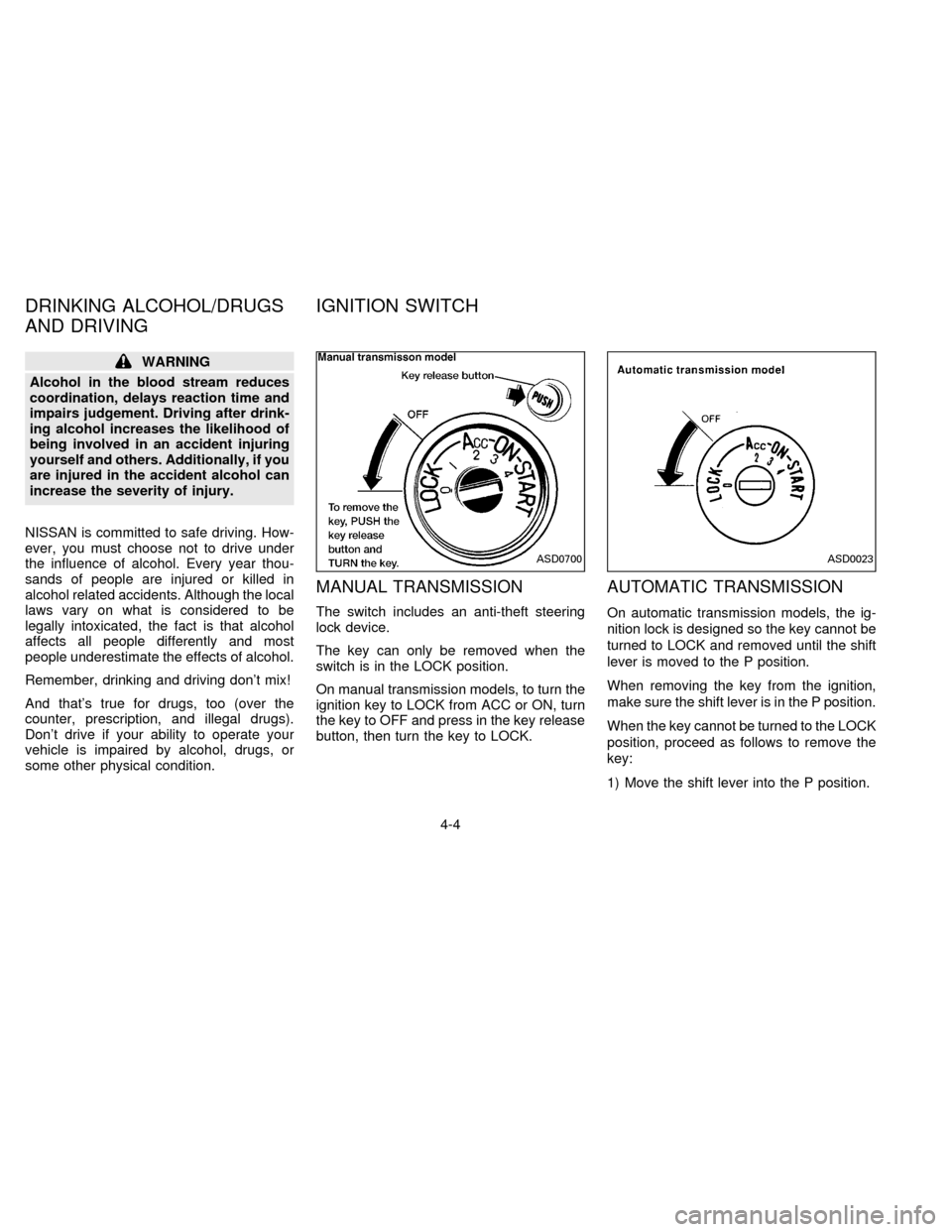
MANUAL TRANSMISSION
The switch includes an anti-theft steering
lock device.
The key can only be removed when the
switch is in the LOCK position.
On manual transmission models, to turn the
ignition key to LOCK from ACC or ON, turn
the key to OFF and press in the key release
button, then turn the key to LOCK.
AUTOMATIC TRANSMISSION
On automatic transmission models, the ig-
nition lock is designed so the key cannot be
turned to LOCK and removed until the shift
lever is moved to the P position.
When removing the key from the ignition,
make sure the shift lever is in the P position.
When the key cannot be turned to the LOCK
position, proceed as follows to remove the
key:
1) Move the shift lever into the P position.
ASD0700ASD0023
DRINKING ALCOHOL/DRUGS
AND DRIVINGIGNITION SWITCH
4-4
ZX
Page 80 of 198
2) Turn the ignition key slightly in the ON
direction.
3) Turn the key toward the LOCK position.
4) Remove the key.
The shift lever is designed so it cannot be
moved out of P and into any of the other
gear positions if the ignition key is turned to
OFF or if the key is removed from the
switch.The shift lever can be moved if the
ignition switch is in the ACC position.
The shift lever can also be moved if the
ignition switch is in the ON position and
the foot brake pedal is depressed.
WARNING
cTo lock the steering wheel, remove
the key. To unlock the steering
wheel, insert the key and turn it gen-
tly while rotating the steering wheel
slightly right and left.
cNever remove the key while driving.
If the key is removed, the steering
wheel will lock. This may cause the
driver to lose control of the vehicle
and could result in serious vehicle
damage or personal injury.
Key positions
LOCK Normal parking position (0)
OFF (Manual transmission model) (1)
The engine can be turned off without locking
the steering wheel. When removing the key
from the key cylinder, push the key release
button at this position and turn the key to
LOCK.
ACC (Accessories) (2)
This position activates electrical accesso-
ries such as the radio when the engine is
not running.
ON (Normal operating position) (3)
This position turns on the ignition system
and electrical accessories.
START (4)
This position starts the engine. As soon as
the engine has started, release the key. It
automatically returns to the ON position.cMake sure the area around the vehicle is
clear.
cCheck fluid levels such as engine oil,
coolant, brake and clutch fluid, and win-
dow washer fluid as frequently as pos-
sible, at least whenever you refuel.
cCheck that all windows and lights are
clean.
cVisually inspect tires for their appearance
and condition. Also check tires for proper
inflation.
cLock all doors.
cPosition seat and adjust head restraints.
cAdjust inside and outside mirrors.
cFasten seat belts and ask all passengers
to do likewise.
cCheck the operation of warning lights
when key is turned to the ON (3) position.
BEFORE STARTING THE
ENGINE
4-5
ZX
Page 82 of 198

Shifting with automatic transmission
Push the button to shift into P, R or from D
to 2. All other positions can be selected
without pushing the button.
P (Park):
Use this selector position when the vehicle
is parked or when starting the engine. Al-
ways be sure the vehicle is at a complete
stop. For maximum safety, depress the
brake pedal, then push in the selector lever
button and move the lever to the P position.
Apply the parking brake. When parking on a
hill, apply the parking brake first, then shiftthe lever into the P position.
Shifting from P (Park)
If the ignition switch is in the ON position
and the foot brake pedal is depressed, but
the shift lever still cannot be moved out of P
(Park) use the following procedure:
1. Shut the engine off and remove the key.
2. Apply the parking brake.
3. Reinsert the key and turn it clockwise to
the ACC position.
4. Depress the brake pedal, move the shift
lever to N (Neutral) and start the engine.These instructions for starting the vehicle in
N (Neutral) should only be used until service
can be obtained.
R (Reverse):
Use this position to back up. Shift into this
position only after the vehicle has com-
pletely stopped.
N (Neutral):
Neither forward nor reverse gear is en-
gaged. The engine can be started in this
position. You may shift to N and restart a
stalled engine while the vehicle is moving.
D (Drive):
Use this position for all normal forward
driving.
2 (Second gear):
Use for hill climbing, effective engine brak-
ing on downhill grades or starting on slip-
pery roads.
Do not downshift into the 2 position at speeds
over 62 MPH (100 km/h), and do not exceed
62 MPH (100 km/h) in the 2 position.
ASD0701
4-7
ZX
Page 88 of 198

During the first 1,000 miles (1,600 km),
follow these recommendations for the future
reliability and economy of your new vehicle.
Failure to follow these recommendations
may result in vehicle damage or shortened
engine life.
cDo not run the engine over 4,000 rpm.
cDo not drive over the following speed
limits:
2-wheel drive models:
55 MPH (90 km/h)
4-wheel drive models
(2H or 4H position):
55 MPH (90 km/h)
4-wheel drive models
(4L position):
30 MPH (50 km/h)
cDo not accelerate at full throttle in any
gear.
cAvoid quick starts.
cAvoid hard braking as much as possible.
cDo not tow a trailer for the first 500 miles
(800 km).c
For the first 300 miles (500 km), it is
recommended that you drive in the
2-wheel drive (2H) position with the free-
running hubs set in LOCK if your vehicle
is equipped with manual-lock free-
running hubs.
cAccelerate slowly and smoothly. Maintain
cruising speeds with a constant accelera-
tor position.
cDrive at moderate speeds on the high-
way. Driving at high speeds lowers fuel
economy.
cAvoid unnecessary stopping and brak-
ing. Maintain a safe distance behind
other vehicles.
cUse a proper gear range which suits road
conditions. On level roads, shift into high
gear as soon as possible.
cAvoid unnecessary engine idling.
SD0001
BREAK-IN SCHEDULE INCREASING FUEL
ECONOMY
4-13
ZX
Page 90 of 198
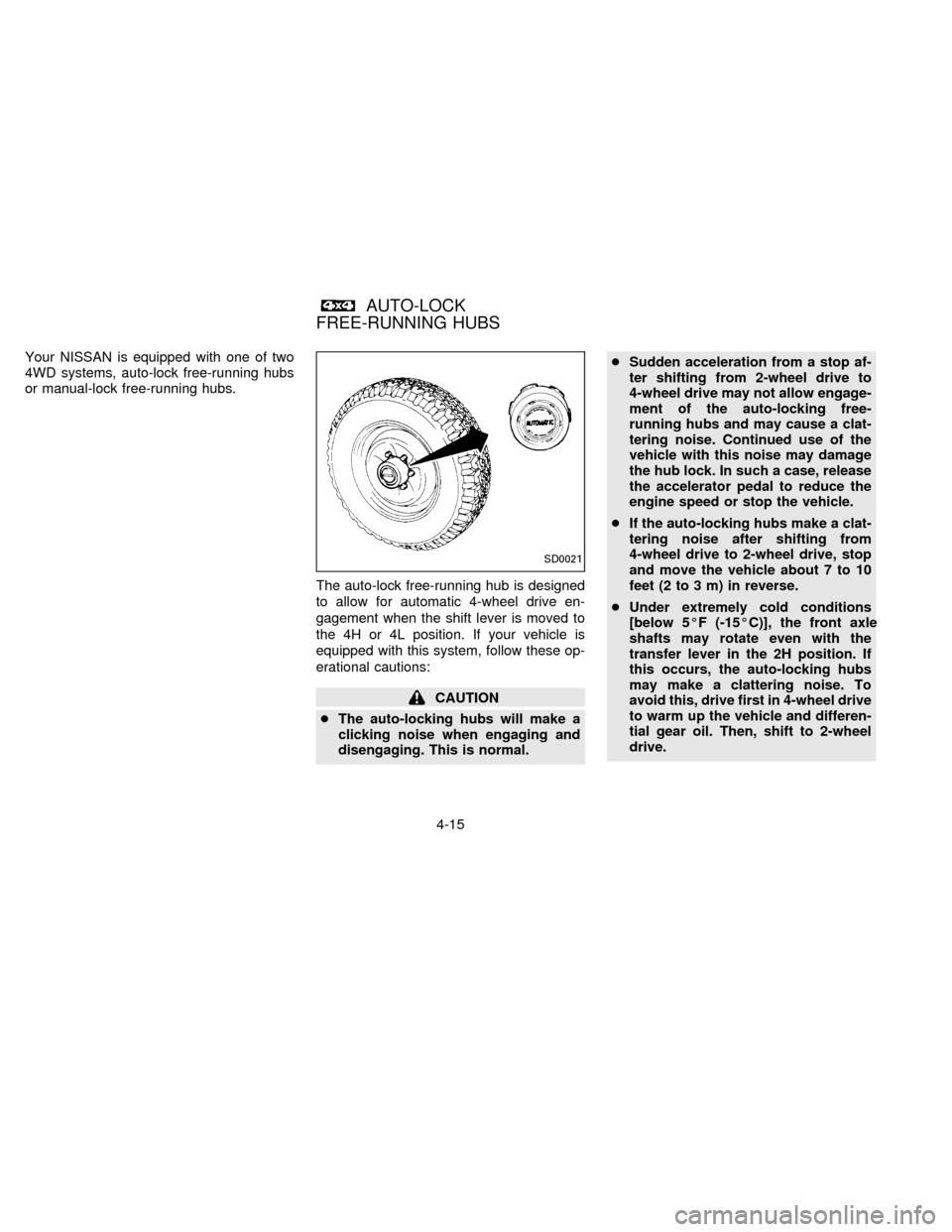
Your NISSAN is equipped with one of two
4WD systems, auto-lock free-running hubs
or manual-lock free-running hubs.
The auto-lock free-running hub is designed
to allow for automatic 4-wheel drive en-
gagement when the shift lever is moved to
the 4H or 4L position. If your vehicle is
equipped with this system, follow these op-
erational cautions:
CAUTION
cThe auto-locking hubs will make a
clicking noise when engaging and
disengaging. This is normal.cSudden acceleration from a stop af-
ter shifting from 2-wheel drive to
4-wheel drive may not allow engage-
ment of the auto-locking free-
running hubs and may cause a clat-
tering noise. Continued use of the
vehicle with this noise may damage
the hub lock. In such a case, release
the accelerator pedal to reduce the
engine speed or stop the vehicle.
cIf the auto-locking hubs make a clat-
tering noise after shifting from
4-wheel drive to 2-wheel drive, stop
and move the vehicle about 7 to 10
feet (2 to 3 m) in reverse.
cUnder extremely cold conditions
[below 5ÉF (-15ÉC)], the front axle
shafts may rotate even with the
transfer lever in the 2H position. If
this occurs, the auto-locking hubs
may make a clattering noise. To
avoid this, drive first in 4-wheel drive
to warm up the vehicle and differen-
tial gear oil. Then, shift to 2-wheel
drive.
SD0021
AUTO-LOCK
FREE-RUNNING HUBS
4-15
ZX
Page 91 of 198
cIn cold weather, it may be necessary
to reduce speed or stop the vehicle
in order to shift from 2-wheel drive to
4-wheel drive.
cWhen shifting into or out of 4-wheel
drive while driving, do not stop shift
lever movement midway. An incom-
plete shift may cause a clattering
noise from the auto-locking hubs.
Continued use of the vehicle with
this noise may damage the hub lock.
Drive in 4-wheel drive to stop the
noise. Shift to 2-wheel drive as de-
scribed.
4-16
ZX