1996 NISSAN ALTIMA light
[x] Cancel search: lightPage 75 of 183

next broadcasting station. Once the highest
broadcasting station is reached, the radio
will continue in the ªSEEKº mode at the
lowest broadcasting station. If using the
``
'' button, once the lowest broadcast-
ing station is reached, the radio will continue
in the ``SEEK'' mode at the highest broad-
casting station. Pushing the button again
will continue the ªSEEKº function.
SCAN tuning
Push the SEEK/SCAN tuning button ``
''
or ``'' for more than 1.5 seconds. SCAN
tuning begins from low to high frequencies
or high to low frequencies, depending on
which button is pressed. SCAN tuning stops
at each broadcasting station for five sec-
onds. Pushing the button again during this
five second period will stop SCAN tuning
and the radio will remain tuned to that
station.
Station memory operations
Six stations can be set for each band.
1. Tune to the desired station.
2. Push the desired select button for morethan 3 seconds. (For example, in the
diagram ch2 is to be memorized. The
radio stops playing momentarily when
the select button is pushed.)
3. The indicator ``ch2'' will then illuminate in
the display and the sound will resume.
Memorizing is now complete.
4. Other buttons can be set in the same
manner.
If the battery cable is disconnected, or if the
radio fuse blows, the radio memory will be
cancelled. In that case, reset the desired
stations.
Cassette tape operation
Turn the ignition key to ``ACC'' or ``ON'', and
then lightly insert the cassette tape into the
tape door. The cassette tape will be auto-
matically pulled into the player.
The radio or CD will turn off (if it is on) and
the cassette tape will begin to play.
Do not force the cassette tape into the
tape door.
Pressing strongly could cause player
damage.
If the system is turned off by pushing the
AHA0503
3-18
ZX
Page 76 of 183
POWERbutton with the cassette tape still in
the player, the tape will resume playing
when the POWER button is pushed once
again.
TAPE button
cWhen this button is pushed with the
system turned off and a tape loaded, the
system will come on and the tape will
play.
cWhen this button is pushed with either
the radio or compact disc turned on and
the tape loaded, the compact disc or the
radio will automatically be turned off and
the tape will play.
While the tape is playing, pushing the TAPE
button stops tape play. Pushing the button
again resumes tape play.
FF (fast forward), REW (rewind)
button
Push the FF (fast forward) button to fast
forward the tape. To rewind the tape, push
the REW (rewind) button. Either the indica-
tor light ``
'' or ``'' will come on when
the FF or REW function is started. To stop
the FF or REW function, press the TAPE
button.
Automatic Program Search (APS)
FF, APS REW button
When the APS FF button is pushed while
the tape is being played, the next program
will start to play from the beginning. Push
the APS FF button several times to skip
through programs. The tape will advance
the number of times the button is pushed
(up to 9 programs).
When the APS REW button is pushed once,
the program being played starts over from
the beginning. Push several times to fast
rewind programs. The tape will rewind back
the number of times the button is pushed.
Either the indicator light ``
'' or
``'' will come on when the APS FF or
APS REW function is started.
This system searches for the blank intervals
between selections. If there is a blank inter-
val within one program or there is no interval
between programs, the system may not
stop in the desired or expected location.
PROG (program) button
Push the PROG (program) button to change
the tape side while the tape is being played.The cassette tape will automatically change
directions to play the other side when the
first side is completed.
Dolby NR (noise reduction)
button
Push the``DOLBY NR'' button for
Dolby NR encoded tapes to reduce high
frequency tape noise. The indicator will
come on.
Dolby NR is manufactured under license
from Dolby Laboratories Licensing Corpora-
tion. ``DOLBY NR'' and the double-D symbol
are trademarks of Dolby Laboratories Li-
censing Corporation.
TAPE EJECT button
Push this button to eject an inserted tape.
When the tape is ejected while it is being
played, the system will be turned off.
Precautions on cassette player op-
eration
cTo maintain good quality sound,
NISSAN recommends that you use
cassette tapes of 60 minutes or
shorter in length.
3-19
ZX
Page 77 of 183
cCassette tapes should be removed
from the player when not in use. Store
cassettes in their protective cases
and away from direct sunlight, heat,
moisture or magnetic sources.
Direct sunlight can cause the cassette
to become deformed. The use of de-
formed cassettes may cause the cas-
sette to jam in the player.
cDo not use cassettes that have peel-
ing or loose labels. If used, the label
could jam in the player.
cIf a cassette has loose tape, insert a
pencil through one of the cassette
hubs and rewind the tape firmly.
Loose tape may cause jamming and
wavering sound quality.
cOver a period of time, the playback
head, capstan and pinch roller may
gather a tape coating residue as the
tape passes over the head. This resi-
due accumulation can cause a weak
or wavering sound and should be re-
moved periodically with a head clean-
ing tape.
If the residue is not removed periodi-
cally, the player may need to be dis-
assembled for cleaning.Compact Disc (CD) Player Opera-
tion
Turn the ignition key to the ``ACC'' or ``ON''
position and insert the compact disc into the
slot with the label side facing up. The com-
pact disc will be guided automatically into
the slot and start playing.
If the radio or tape is already operating, it
will automatically turn off and the compact
disc will play.
Forcing in the compact disc will damage
the player.
If the system has been turned off while the
compact disc was playing, pushing the
POWER button will start the compact disc.
CD button
When this button is pushed with the system
off and the compact disc loaded, the system
will turn on and the compact disc will start to
play.
When this button is pushed with the com-
pact disc loaded but the tape or the radio
playing, the tape or radio will automatically
be turned off and the compact disc will start
to play.When this button is pushed while the com-
pact disc is playing, the compact disc will
stop playing. When this button is pushed
with the compact disc stopped, the compact
disc will start to play.
FF (fast forward), REW (rewind)
button
When the FF (fast forward) or REW (rewind)
button is pushed while the compact disc is
being played, the compact disc will play
while fast forwarding or rewinding. When
the button is released, the compact disc will
return to normal play speed.
Automatic Program Search (APS)
FF, APS REW button
When the APS FF button is pushed while
the compact disc is being played, the pro-
gram following the present one will start to
play from its beginning. Push several times
to skip through programs. The compact disc
will advance the number of times the button
is pushed. (When the last program on the
compact disc is skipped through, the first
program will be played.)
When the APS REW button is pushed, the
3-20
ZX
Page 78 of 183
program being played returns to its begin-
ning. Push several times to skip back through
programs. The compact disc will go back the
number of times the button is pushed.
PROG (program) button
When this button is pushed while the com-
pact disc is being played, the play pattern
will change as follows:
ALL: All the programs will be played repeat-
edly in sequence.
1: Only one program (the one being played
when the PROG button is pushed) will be
repeated.
RANDOM: Programs will be played at ran-
dom, not following the sequence on the
compact disc. The same program may be
repeated twice.
h(no mark): All the programs will be played
in sequence and stop when the last pro-
gram is finished.
cWhen the compact disc is ejected, the
play pattern will automatically change
to ALL.
CD EJECT button
When the CD EJECT button is pushed withthe compact disc loaded, the compact disc
will be ejected.
When this button is pushed while the com-
pact disc is being played, the compact disc
will eject and the system will turn off.
If the compact disc ejects and is not
removed within 10 seconds, it will be
pulled back into the slot to protect it.
CD (DISC) indicator light
This light comes on when the compact disc
is loaded.
CAUTION
cDuring cold weather or rainy days,
the player may malfunction due to
the humidity. If this occurs, remove
the CD and dehumidify or ventilate
the player completely.
cThe player may skip while driving on
rough roads.
cThe CD player sometimes cannot
function when the compartment tem-
perature is extremely high. Decrease
the temperature before use.
cDo not expose the CD to direct sun-
light.
Power antenna (If so equipped)
The power antenna will automatically ex-
tend when the radio is turned on, and retract
when switched off. If the radio is left on, the
antenna will retract and extend with the
ignition key ``OFF-ON'' operation.
CAUTION
cBefore turning the radio on, make
sure that there is no one near the
antenna outlet and there is enough
space for it to extend.
cTo prevent damage, be sure that an-
tenna is fully retracted before the
vehicle enters an automated car
wash.
cDirt and other foreign matter on the
power antenna rod may interrupt its
operation. Clean the rod periodically
with a damp cloth. This type of
cleaning is especially important dur-
ing the winter seasons in areas
where road salt and other chemicals
may be spread on road surfaces and
splashed onto the antenna rod.
ANTENNA
3-21
ZX
Page 84 of 183
1) Move the shift lever into the ``P'' (Park)
position.
2) Turn the ignition key slightly in the ``ON''
direction.
3) Turn the key toward the ``LOCK'' posi-
tion.
4) Remove the key.
If the key is removed from the ignition
switch, the shift lever cannot be moved from
``P'' (Park).The shift lever can be moved if
the ignition switch is in the ``ACC'' posi-
tion. The shift lever can also be moved if
the ignition switch is in the ``ON'' posi-
tion and the foot brake pedal is de-
pressed.
There is an ``OFF'' position in between
``LOCK'' and ``ACC'', although it does not
show on the key cylinder. When the ignition
is in ``OFF'' the steering wheel is not locked.
In order for the steering wheel to be locked,
it must be turned about 1/8 of a turn coun-
terclockwise from the straight up position,
and the key must be removed from the
ignition.WARNING
To lock the steering wheel, remove the
key. To unlock the steering wheel, in-
sert the key and turn it gently while
rotating the steering wheel slightly
right and left.
Never remove the key while driving. If
the key is removed, the steering wheel
will lock. This may cause the driver to
lose control of the vehicle and could
result in serious vehicle damage or
personal injury.
``OFF'' (Manual transmission model) (1)
The engine can be turned off without locking
the steering wheel.
``ACC'' (Accessories) (2)
This position activates electrical accesso-
ries such as the radio when the engine is
not running.
``ON'' Normal operating position (3)
This position turns on the ignition system
and the electrical accessories.``START'' (4)
This position activates the starter motor,
which starts the engine.
cMake sure the area around the vehicle is
clear.
cMaintenance items listed here should be
checked periodically, for example, each
time you check engine oil.
cCheck that all windows and lights are
clean.
cVisually inspect tires for their appearance
and condition. Also check tires for proper
inflation.
cLock all doors.
cPosition seat and adjust head restraints.
cAdjust inside and outside mirrors.
cFasten seat belts and ask all passengers
to do likewise.
cCheck the operation of warning lights
when key is turned to the ``ON'' (3) posi-
tion.
BEFORE STARTING THE
ENGINE
4-5
ZX
Page 87 of 183

Overdrive switch
ON: For normal driving, push the over-
drive switch ON with the shift lever in
the ``D'' position. The transmission
will shift into OVERDRIVE as the
vehicle speed increases.
The overdrive will not engage until the
engine has warmed up.OFF: For driving up and down long slopes
where engine ``braking'' would be
advantageous, push the switch OFF.
When cruising at a low speed or
climbing a gentle slope, you may feel
uncomfortable shift shocks as the
transmission shifts between 3rd and
overdrive repeatedly. In this case,
set the overdrive switch in the OFF
position. The O/D OFF indicator light
on the instrument panel will come on
at this time.
When driving conditions change, reset the
overdrive switch to the ON position.
Remember not to drive at high speeds for
extended periods of time with the overdrive
switch set in the OFF position. This reduces
the fuel economy.
To change gears, fully depress the clutch
pedal, and then move the gearshift lever.
After shifting, release the clutch pedal slowly.
On the 5-speed transmission model, you
cannot shift directly from 5th gear into Re-
verse. First shift into Neutral, then into Re-
verse.
If it is difficult to move the gear shift lever
into Reverse or First, shift into Neutral, then
release and depress the clutch pedal again
and shift into Reverse or First.
Driving precautions
cDo not rest your foot on the clutch pedal
ASD0511SD1022
DRIVING WITH MANUAL
TRANSMISSION
4-8
ZX
Page 88 of 183

while driving. This may cause clutch
damage.
cStop your vehicle completely before shift-
ing into reverse.
cWhen the vehicle is stopped for a dura-
tion, for example at a stop light, shift to
neutral and release the clutch pedal with
the foot brake applied.
Suggested upshift speeds
Shown below are suggested vehicle speeds
for shifting into a higher gear. These sug-
gestions relate to fuel economy and vehicle
performance. Actual upshift speeds will vary
according to road conditions, the weather
and individual driving habits.
For normal acceleration in low altitude ar-
eas [less than 4,000 ft (1,219 m)]:
Gear changeACCEL
shift point
MPH (km/h)CRUISE
shift point
MPH (km/h)
1st to 2nd 15 (24) 15 (24)
2nd to 3rd 25 (40) 18 (29)
3rd to 4th 36 (58) 30 (48)
4th to 5th 40 (64) 39 (63)
For quick acceleration in low altitude areas
and high altitude areas [over 4,000 ft (1,219
m)]:
Gear change MPH (km/h)
1st to 2nd 15 (24)
2nd to 3rd 25 (40)
3rd to 4th 40 (64)
4th to 5th 45 (72)
Suggested maximum speed in each
gear
Downshift to a lower gear if the engine is not
running smoothly, or if you need to accelerate.
Do not exceed the maximum suggested
speed (shown below) in any gear. For level
road driving, use the highest gear sug-
gested for that speed. Always observe
posted speed limits, and drive according to
the road conditions, which will ensure safe
operation. Do not over-rev the engine when
shifting to a lower gear as it may cause
engine damage or loss of vehicle control.
Gear MPH (km/h)
1st 30 (50)
2nd 60 (95)
3rd 90 (145)
4th þ
5th þ1. Apply the parking brake.
2.Automatic transmission:
Move the shift lever to ``P'' (Park) or ``N''
(Neutral). (``P'' preferred.)
The shift lever cannot be moved out of
``P'' and into any of the other gear
positions if the ignition key is turned to
``OFF'' or if the key is removed.
The starter is designed not to operate
if the shift lever is in any of the driving
positions.
Manual transmission:
Move the gearshift lever to ``N'' (Neutral),
and depress the clutch pedal to the floor
while cranking the engine.
The starter is designed not to operate
unless the clutch pedal is depressed.
3. Crank the enginewith your foot off the
accelerator pedalby turning the ignition
key to ``START''. Release the key when
the engine starts. If the engine starts, but
fails to run, repeat the above procedure.
Ð If the engine is very hard to start in
extremely cold or hot weather, de-
press and hold the accelerator pedal
to help start the engine.
Ð In the summer, when restarting the
engine within 30 minutes after it has
STARTING THE ENGINE
4-9
ZX
Page 89 of 183
been stopped, keep the accelerator
pedal fully depressed while starting.
CAUTION
Do not operate the starter for more than
15 seconds at a time. If the engine does
not
start, wait 10 seconds before crank-
ing again, otherwise the starter could be
damaged.
4.Warm-up
Allow the engine to idle for at least 30
seconds after starting. Drive at moderate
speed for a short distance first, especially
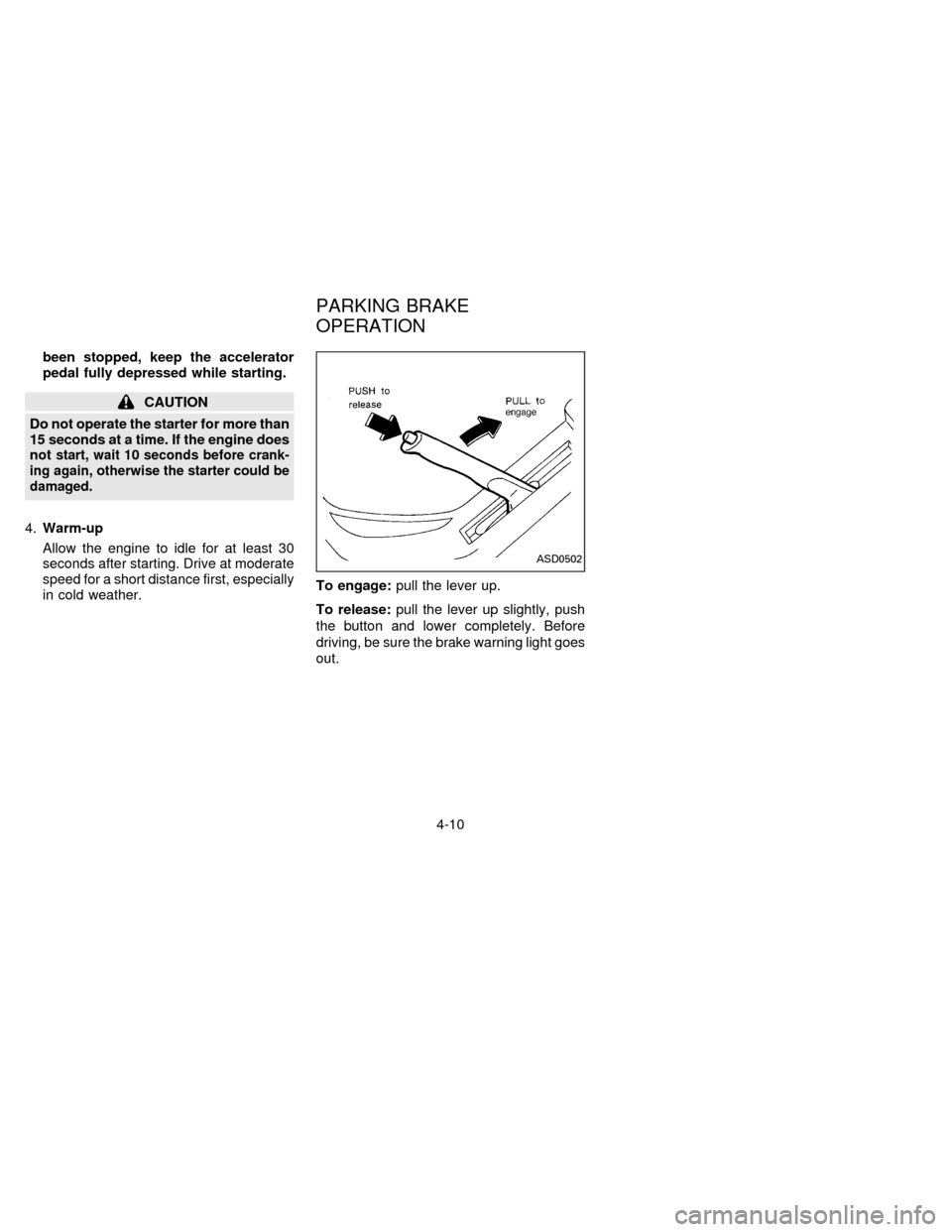
in cold weather.To engage:pull the lever up.
To release:pull the lever up slightly, push
the button and lower completely. Before
driving, be sure the brake warning light goes
out.
ASD0502
PARKING BRAKE
OPERATION
4-10
ZX