Page 67 of 320

If the FUEL LEVEL ERROR message is
displayed this means that there is a problem
with the fuel indication system and you should
contact your dealer for service as soon as
possible.
RESET
A press of the RESET button will allow you to
reset the current feature displayed. Warnings,
Average Fuel Economy, and Trip odometers
are the only features which respond to the
RESET button. Distance to Empty (DTE),
RIDE/STEER and MENU are unaffected by
pressing the RESET switch.
DISPLAY
Pressing this button will cause the message
center display to turn off. Pressing it again will
cause the display to come on again. Warnings
override an off display and must be reset in
order for the display to be off again.
64RIDE/STEER
Pressing this button once will allow you to
adjust your RIDE CONTROL settings, between
NORMAL, PLUSH and FIRM. The settings are
changed by pressing the SELECT button while
RIDE CONTROL is displayed.
Pressing the RIDE/STEER button a second time
will allow you to adjust the STEERING
EFFORT settings between NORMAL, LOW,
and HIGH. The settings are changed by
pressing the SELECT button while STEERING
EFFORT is displayed.
NOTE: The combination of FIRM RIDE
CONTROL and LOW STEERING EFFORT is
undesirable and cannot be selected.
MENU
Pressing this button will allow You to change
various convenience settings throughout the
vehicle. The settings for each feature are
changed by pressing the SELECT button-
Page 68 of 320

Pressing the MENU button once will allow you
to enable or disable the EXPRESS WINDOW
feature. This feature allows one tap down
operation on the driver's window using the
window switch on the driver's door armrest.
Pressing MENU again will allow you to enable
or disable the AUTO DOOR LOCK feature.
This feature automatically locks all doors when
the driver shifts out of PARK, all doors are
closed, the driver's seat is occupied, and the
vehicle is traveling over three mph (5 km/h).
Pressing MENU again will allow you to
enable or disable the HORN CHIRP feature.
When HORN CHIRP is ON the horn will
briefly sound when the Remote Entry Key
Fob LOCK button is pressed. This verifies
the doors have been locked and the ANTI-
THEFT system has been armed (if equipped).
Pressing MENU again will allow you to
enable or disable the SEAT ACCESS feature.
When ON, the driver's seat will move back 2
inches (5 cm) or toend of seat track travel when the vehicle is
turned off and the ignition key is removed.
Upon the driver entering the vehicle and
closing the door, the seat will move
forward to its previous position.
Pressing MENU again will allow you to enable or
disable the REVERSE MIRRORS feature. When
ON, the outside rearview mirrors tilt down when
the gearshift is placed in R (Reverse). This
provides for an improved view of the side of the
vehicle and curb area when backing up. When
you shift out of REVERSE the mirrors return to
their previous positions.
Odometer
The odometer tells you the total number of miles
(kilometers) your vehicle has been driven.
If the odometer displays the word Error, please
contact your dealer for service.
65
Page 70 of 320

4. Check the coolant level following the
instructions on checking and adding coolant
to your engine, see the Engine Coolant in
the Index. If you do not follow these
instructions, you or others could be injured.
If the coolant continues to overheat, have the
coolant system serviced as soon as possible.
Fuel Gauge
The fuel gauge displays approximately how
much fuel you have in the fuel tank. The
ignition switch must be in the OFF position
while filling the tank with at least three gallons
(I I liters) for the fuel gauge to indicate the
new level. If the ignition is left ON or less than
3 gallons (I 1 liters) of fuel are added the fuel
gauge will not immediately indicate the new
fuel level. The gauge will gradually correct
itself to indicate the true fuel level.Overhead Console Warnings
If your Continental is equipped with the Pressure
Alert System, a warning will appear in the overhead
console when the pressure in one of your vehicle's
tires drops below acceptable levels or if the system
has malfunctioned.LOW TIREPRESSURESee Securities in the Features chapter for more
information.
67
Page 83 of 320
Do not put objects under the front seats that
interfere with the flow of air to the back seat
area. Remove any snow, ice, or leaves from the air
intake area of your EATC System which
could block the air intake. The intake area is
located at the bottom of the windshield, under
the hood at the passenger side rear corner.
Service
If your EATC is not operating as described here,
take it to your dealer to have it checked. System
diagnostics are built in which will allow your
dealer to readily identify problems that might
occur.
80Rear Window Defroster and
Heated Sideview Mirrors
The rear window and heated outside mirrors
defroster switch activates the defroster for the
rear window to clear frost, fog, or thin ice from
both the inside and outside of the rear window
and activates the heated outside rearview
mirrors.
The button for the rear window and heated
outside mirrors defroster is on the instrument
panel to the right of the steering column.
Page 146 of 320

THIS DEVICE COMPLIES WITH FCC RULES,
PART 15. OPERATION IS SUBJECT TO THE
FOLLOWING TWO CONDITIONS: (1) THIS
DEVICE MAY NOT CAUSE HARMFUL
INTEREFERENCE AND (2) THIS DEVICE
MUST ACCEPT ANY INTEREFERENCE THAT
MAY BE RECEIVED, INCLUDING
INTEREFERENCE THAT MAY CAUSE
UNDESIRABLE OPERATION.
Maintenance Warning
The "Low Tire Pressure" warning will illuminate
and stay on when one of your vehicle's tires drops
below 18 psi (124 kps). The warning light will also
come on and stay lit if the Pressure Alert System has
malfunctioned.
If this warning appears, check the pressure in your
tires at the earliest possible convenience and adjust
any tire that is low to the recommended air pressure
level. This information can be found on the Service
Station Information page at the back of this manual
or on the driver's door placard.If the warning remains on after you have
adjusted the tires to recommended air pressure
levels, take your vehicle to an authorized
Lincoln/Mercury dealer for service.
Flat Tire Warning
If the sensors detect a tire pressure lower than I
0 psi (68 kps), the "Low Tire Pressure" warning
will flash repeatedly in the overhead console and
the message "Warning Low Tire Pressure" will
be displayed in the Message Center, indicating
an impending flat tire. If this condition occurs,
your Securitire requires service as soon as
possible. Refer to Servicing Your Secutitires.
NOTE: The Pressure Alert System will
activate only when the vehicle is moving faster
than 10 mph (15 km/h).
143
Page 147 of 320

Servicing Your Securitires/!\ WARNINGDo not use aerosol tire inflator/sealer withSecuritires. Doing so may damage the tire'spressure sensor.If you cannot service your Securitire immediately,
replace it with your mini-spare as soon as it is safe
to do so.
Your mini-spare tire can be used until your
Securitire has been repaired. See Tires in the
Servicing chapter of this guide for more information
on using the spare.
It is recommended that you always have your
Securitires serviced by an authorized Michelin tire
dealer. Each Securitire is equipped with a
pressure sensor around the wheel rim. This
sensor could be damaged when removing and
installing the tire. Servicing a Securitire at
144locations other than your Michelin tire dealer
lmay adversely affect your warranty.
If you have questions concerning your
Securitires or servicing, please call the Michelin
Tire Information Line at 1-800-847-3435 or
contact your local Michelin tire dealer.
Lincoln RESCU System
(If equipped) /!\ WARNINGIt is important that you understand thelimitations of your Lincoln RESCUSystem prior to initiating an activation.See Lincoln RESCU System Limitationslater in this chapter for details.
Page 149 of 320
The operator verbally obtains details of Your
situation and, if necessary, ties your vehicle into a
three-way phone call with the United States Auto
Club or local 911 or other emergency services to
dispatch the appropriate assistance to your
location. Once the situation has been appropriately
handled, the operator will terminate the call, the
system warning light will stop flashing and the
system will be reset. In most situations, ONLY
the response center can terminate an assistance
request.
General Description
Lincoln's Remote Emergency Satellite Cellular
Unit (RESCU) is designed to expedite roadside or
emergency assistance to distressed motorists who
are uncertain of their location and/or are uncertain
of who to contact for assistance.
The Lincoln RESCU System utilizes Global
Positioning System (GPS) technology and the
146nation's cellular phone network to track vehicle
location and, at the touch of a button, put you in
voice contact with the Lincoln Security
Response Center.
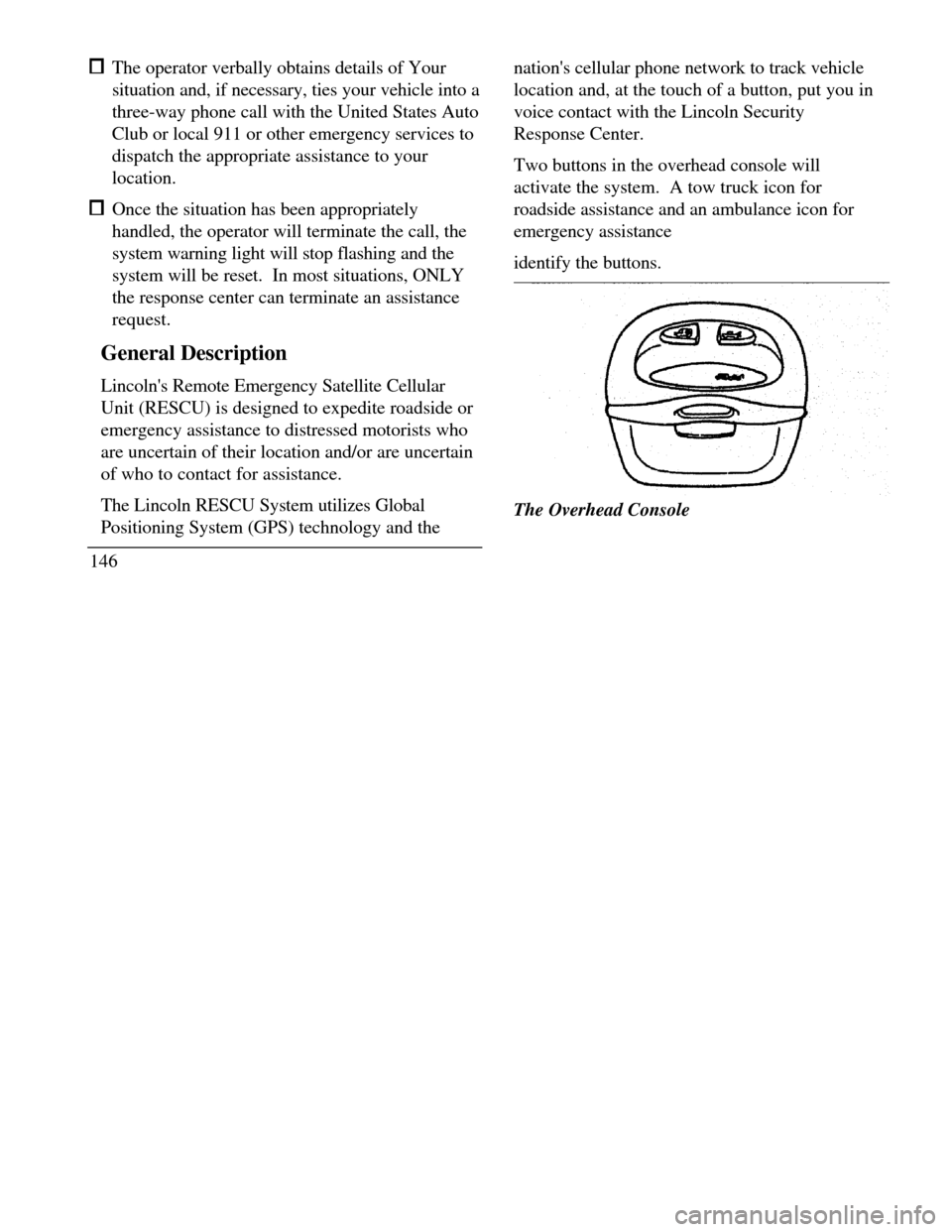
Two buttons in the overhead console will
activate the system. A tow truck icon for
roadside assistance and an ambulance icon for
emergency assistance
identify the buttons.The Overhead Console
Page 151 of 320

When this button is pressed, the Lincoln Security
Response Center relays details of your situation and
your location to the United States Auto Club
(USAC) via a three-way phone call. The response
center/USAC will: dispatch the appropriate service vehicle to your
location. provide the service vehicle's estimated time of
arrival. call back approximately three minutes after the
service vehicle's estimated time of arrival to
confirm that assistance has arrived.
Ambulance Button
(Emergency Assistance)
The ambulance button should be selected if
emergency assistance is required. This feature
should be used: if you have been involved in an accident
148 to report a crime or fire when medical attention is required to receive assistance in any emergency
situationThe Emergency Assistance button
When this button is pressed, the Lincoln
Security Response Center relays details of your
situation and your location to local 911 or other
emergency services via a three-way phone call.
The response center/emergency services will: dispatch the appropriate emergency help to
your location
