Page 65 of 320

Doors Closed Trunk Closed Trunk Closed Exterior Lamps Distance to Empty Fuel Level TractionControl (if equipped)
System Warnings
System warnings alert you to possible
problems or malfunctions in your vehicle's
operating systems. There are up to 18 warning
messages which can be displayed by the M/C
to show the status of the monitored systems.
The M/C will display the last selected feature if
there are no more warning messages. This
allows you to use the full functionality of the
M/C after you acknowledge the warning by
pressing the RESET button and clearing the
warning message.
62WARNINGACT10NDoor AjarDriver's Door AjarCheck Engine TempCheck Charging SystemLow Fuel LevelWarning returns after 10 minutesLow Engine CoolantLow Oil LevelLow Tire Pressure(if equipped)Headlamp OutBrake Lamp OutCheck Traction Control(if equipped)Check Ride ControlTrunk AjarWarning reappears after key is turnedCheck Steering Assistfrom OFF to ONLow Washer FluidAir Leveling DisabledTail lamp OutFront Turn Lamp Out
Page 84 of 320

The button that controls the rear window
defroster and heated outside rearview mirrors
Clear away any snow that is on the rear window
and outside rearview mirrors before using the
defroster. With the engine running, push the
defroster button.
After approximately 10 minutes, the defroster
will turn off. If the window or mirrors are still
not clear, turn the defroster on again.The defroster will turn off when the ignition key is
turned to the OFF or START position.
The heating elements are bonded to the inside of
the rear window. Do not use sharp objects to
scrape the inside of the rear window or use
abrasive cleaners to clean it. Doing so could
damage the heating elements.
The Interior and Exterior Lights
Daytime Running Light System
(Canadian vehicles only)
The Daytime Running Light (DRL) system turns
the high beam headlamps on, with a reduced light
output, when:
œ The headlamp system is in the OFF position,
and
œ The vehicle is running, and
œ The vehicle has a fully released parking brake.
81
Page 100 of 320
NOTE: If your speed increases above your set
speed while driving in (Overdrive) on a
downhill grade, you may want to shift to D
(Drive) to reduce vehicle speed. The speed
control cannot reduce the vehicle speed if it goes
above your set speed on a downhill grade. For
the best fuel economy during normal driving
conditions, leave the shift select in (Overdrive), or resume as soon as practical./! WARNINGDo not use the speed control in heavytraffic or on roads that are winding,slippery, or unpaved.Accelerating With the Speed Control
Operating
You can use the accelerator pedal to speed up
momentarily. When you take your foot off the
accelerator, the vehicle will return to the set
speed.Resetting the Speed Control
To reset the speed control to a lower speed, use
one of the following procedures: COAST - Press and hold the COAST switch.
Release the switch when the vehicle slows down
to the desired speed. Lightly tap the brake pedal. When the vehicle
attains the desired speed, press the SET
ACCEL switch and release it immediately. TAP-DOWN - Press and release the COAST
switch momentarily for each m.p.h. (1.6 km/h)
reduction in speed desired.
If vehicle speed is reduced below 30 mph (50
km/h) by any of the above methods, then you must
manually accelerate to a speed over 30 mph (50
km/h) and reset the system.
97
Page 101 of 320

To reset the speed control to a higher speed,
follow one of these procedures: ACCEL - Press and hold the SET ACCEL
switch. Release the switch when the vehicle
has accelerated to the desired speed. Depress the accelerator pedal. When the
vehicle attains the desired speed, press the
SET ACCEL switch and release it
immediately. TAP-UP - Press and release the SET ACCEL
switch momentarily for each m.p.h. (1.6 km/h)
increase in speed desired.
To Cancel Speed Control
Speed control can be cancelled at any time by
pressing the brake pedal slightly. After
cancelling, you can return to the speed you set by
pressing the RES switch, or set a new speed by
pressing the SET ACCEL or COAST switches.
98To Turn Speed Control Off
Press the OFF switch.
Speed control is also turned OFF each time the
vehicle ignition is shut off.
Cancelling and Resuming a Set Speed
If you press the brake pedal, speed control is
suspended. You can return to the set speed by
pressing the RES switch, as long as you did not
press the OFF switch. You must be driving at least
30 mph (48 km/h).
Your vehicle will gradually return to the previously
set speed and then maintain it.
Page 141 of 320
Positive Retention Driver's Side Floor
Mat
Installing the floor mat
Position the floor mat in foot well. Place mat eyelet
over pointed end of retention post from the rear and
rotate forward to install. Adjust floor mat position
to allow proper operation of accelerator pedal and
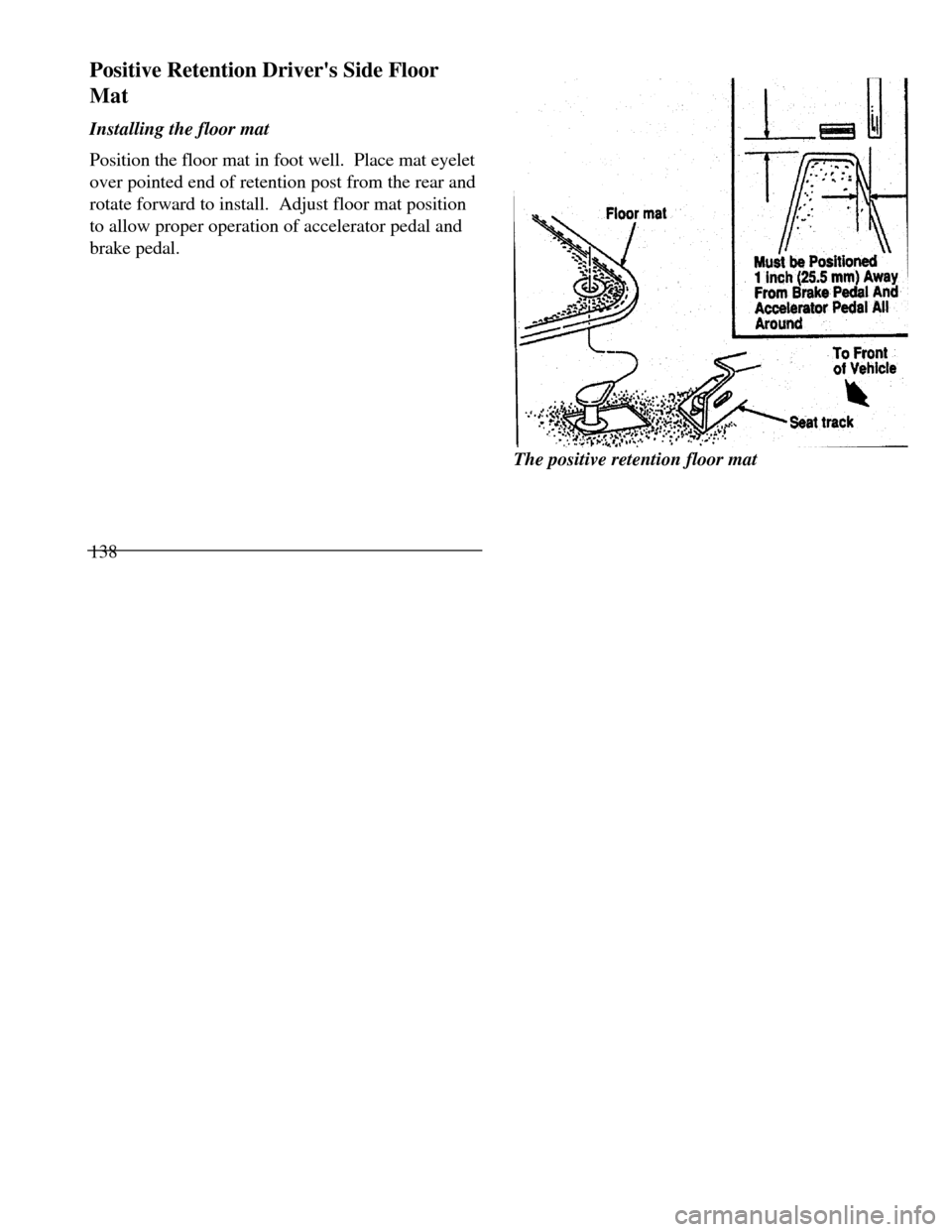
brake pedal.
138Must be Positioned 1 inch (25.5 mm) Away From Brake Pedal And Accelerator Pedal All Around To Front of
Vehicle Seat track floor matThe positive retention floor mat
Page 182 of 320
Driving Your ContinentalYour vehicle has an automatic overdrive
transaxle. You may be familiar with the term
"transmission." We use transaxle because it is a
more accurate term for vehicles that have front-
wheel drive.
Driving with an Automatic
Overdrive Transaxle
Your automatic overdrive transaxle provides
fully automatic operation in either (Overdrive) or D (Drive). Driving with the shift
selector in (Overdrive) gives the best fuel
economy for normal driving conditions. For
manual control, start in 1 (First) and then shift
manually.
Your vehicle is equipped with an Electronic
Powertrain Control Module that limits engine
and/or vehicle speeds with a cut-out mode to
promote durability.Putting Your Vehicle in Gear
Your vehicle's gearshift can be on the column
or on the console./! WARNINGHold the brake pedal down while youmove the gearshift lever from position toposition. If you do not hold the brakepedal down, your vehicle may moveunexpectedly and injure someone.179
Page 183 of 320

To operate:
1.Start the engine.
2.Depress and hold the brake pedal.
3.Depress the thumb button (console-mounted
gearshift only).
4.Move the gearshift lever out of P (Park).
Your vehicle is equipped with a Brake Shift
Interlock safety feature. This feature prevents
the gearshift from being moved from the P
(Park) position until the brake pedal is
depressed. This feature is active when the
ignition is in the ON position. If the gearshift
lever CANNOT be moved from P (Park) with
the brake pedal depressed:
1.Turn the engine off and remove the ignition
key.
2.Apply parking brake.
3.Reinsert the ignition key and turn clockwise
to the first position (OFF).
1804.Depress the brake pedal, depress the
thumb button (console-mounted gearshift
only), move the gearshift lever to N
(Neutral) and start the engine.
If you need to shift out of P (Park) by using
the alternate procedure described above, it is
possible that a fuse has blown and that your
brakelamps may also not be functional.
Please refer to the Servicing Your
Continental chapter for instructions on
checking and replacing fuses./! WARNINGDO NOT DRIVE YOUR VEHICLEUNTIL YOU VERIFY THAT THEBRAKELAMPS ARE WORKING.
Page 184 of 320
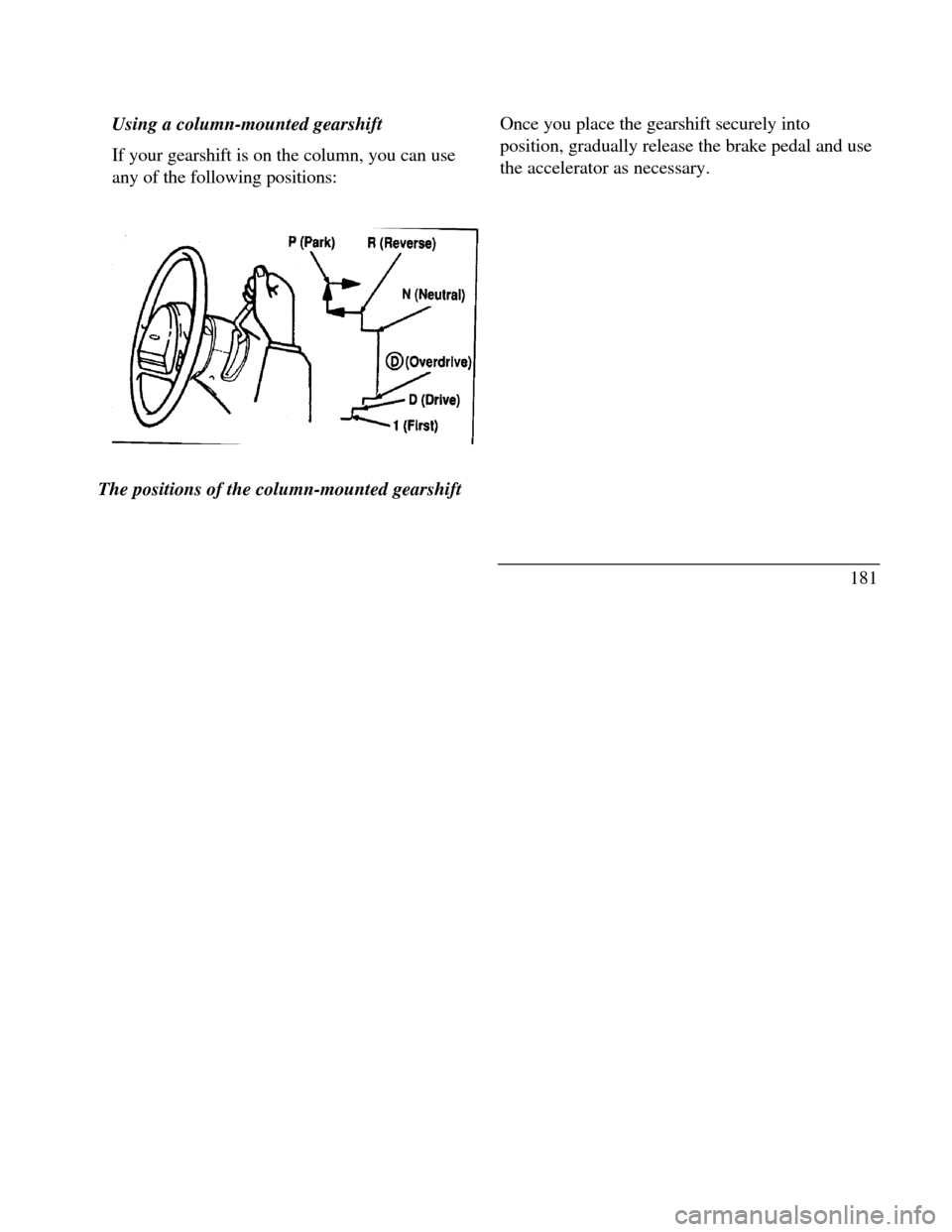
Using a column-mounted gearshift
If your gearshift is on the column, you can use
any of the following positions:Park neutral reverst overdrive drive first
The positions of the column-mounted gearshiftOnce you place the gearshift securely into
position, gradually release the brake pedal and use
the accelerator as necessary.
181