1996 CHRYSLER VOYAGER lock
[x] Cancel search: lockPage 522 of 1938

(4) Turn the ignition switch to the On position.
Check for battery voltage at the fused ignition switch
output (run/start) circuit cavity of the SKIM wire
harness connector. If OK, use a DRB scan tool and
the proper Diagnostic Procedures manual to complete
the diagnosis of the SKIS. If not OK, repair the open
circuit to the fuse in the fuseblock module as
required.
SERVICE PROCEDURES
SMART KEY IMMOBILIZER SYSTEM
TRANSPONDER PROGRAMMING
Two programmed Smart Key transponders are
included with the Smart Key Immobilizer System
(SKIS) when it is shipped from the factory. The
Smart Key Immobilizer Module (SKIM) can be pro-
grammed to recognize up to six additional transpon-
ders, for a total of eight Smart Keys. The following
ªCustomer Learnº programming procedure for the
programming of additional transponders requires
access to at least two of the valid Smart Keys. If two
valid Smart Keys are not available, Smart Key pro-
gramming will require the use of a DRB scan tool
and the proper Diagnostic Procedures manual.
PROGRAMMING THE SKIM MODULE WITH
THE DRBIII
(1) Turn the ignition on. Transmission must be in
park or neutral. Alarm set lamp will flash.
(2) Use the DRBIII and select ªSKIMº under the
ªMISCELLANEOUSº menu.
(3) Select ªPROGRAM PINº and enter the cus-
tomer 4±digit PIN number.
(4) Select ªUPDATE VINº. The SKIM module will
learn the VIN from the PCM in gasoline engine vehi-
cles, and from the BCM in diesel engine vehicles.
(5) Select ªCOUNTRY CODEº and enter the cor-
rect country.
(6) Select ªPROGRAM NEW EMSº. The SKIM
module will send the ªsecret keyº data to the PCM.
(7) Program ignition keys to the SKIM module.
PROGRAMMING IGNITION KEYS WITH THE
DRBIII
(1) Turn ignition on. Transmission must be in park
or neutral. Alarm set lamp will flash.
(2) Use the DRBIII and select ªSKIMº under the
ªMISCELLANEOUSº menu.
(3) Select ªLEARN NEW KEYº. Alarm Set lamp
will begin flashing.
NOTE: The PIN must be re-entered each time an
additional key is learned.(4) Insert key into ignition switch. Once the key
has been learned, the Alarm Set lamp will turn off.
REMOVAL AND INSTALLATION
SMART KEY IMMOBILIZER MODULE
WARNING: ON VEHICLES EQUIPPED WITH AIR-
BAGS, REFER TO GROUP 8M - PASSIVE
RESTRAINT SYSTEMS BEFORE ATTEMPTING ANY
STEERING WHEEL, STEERING COLUMN, OR
INSTRUMENT PANEL COMPONENT DIAGNOSIS OR
SERVICE. FAILURE TO TAKE THE PROPER PRE-
CAUTIONS COULD RESULT IN ACCIDENTAL AIR-
BAG DEPLOYMENT AND POSSIBLE PERSONAL
INJURY.
(1) Disconnect and isolate the battery negative
cable.
(2) Remove the knee blocker from the instrument
panel. See Knee Blocker in Group 8E - Instrument
Panel Systems for the procedures.
(3) Remove the three screws that secure the lower
steering column shroud to the upper shroud.
(4) If the vehicle is so equipped, move the tilt
steering column to the fully lowered position.
(5) If the vehicle is so equipped, loosen the two
nuts that secure the non-tilt steering column upper
mounting bracket to the dash panel steering column
support bracket studs. Lower the column far enough
to remove the upper steering column shroud.
(6) Remove both the upper and lower shrouds from
the steering column.
Fig. 2 Steering Column Shrouds Remove/Install
8Q - 4 VEHICLE THEFT/SECURITY SYSTEMSNS/GS
DIAGNOSIS AND TESTING (Continued)
Page 523 of 1938
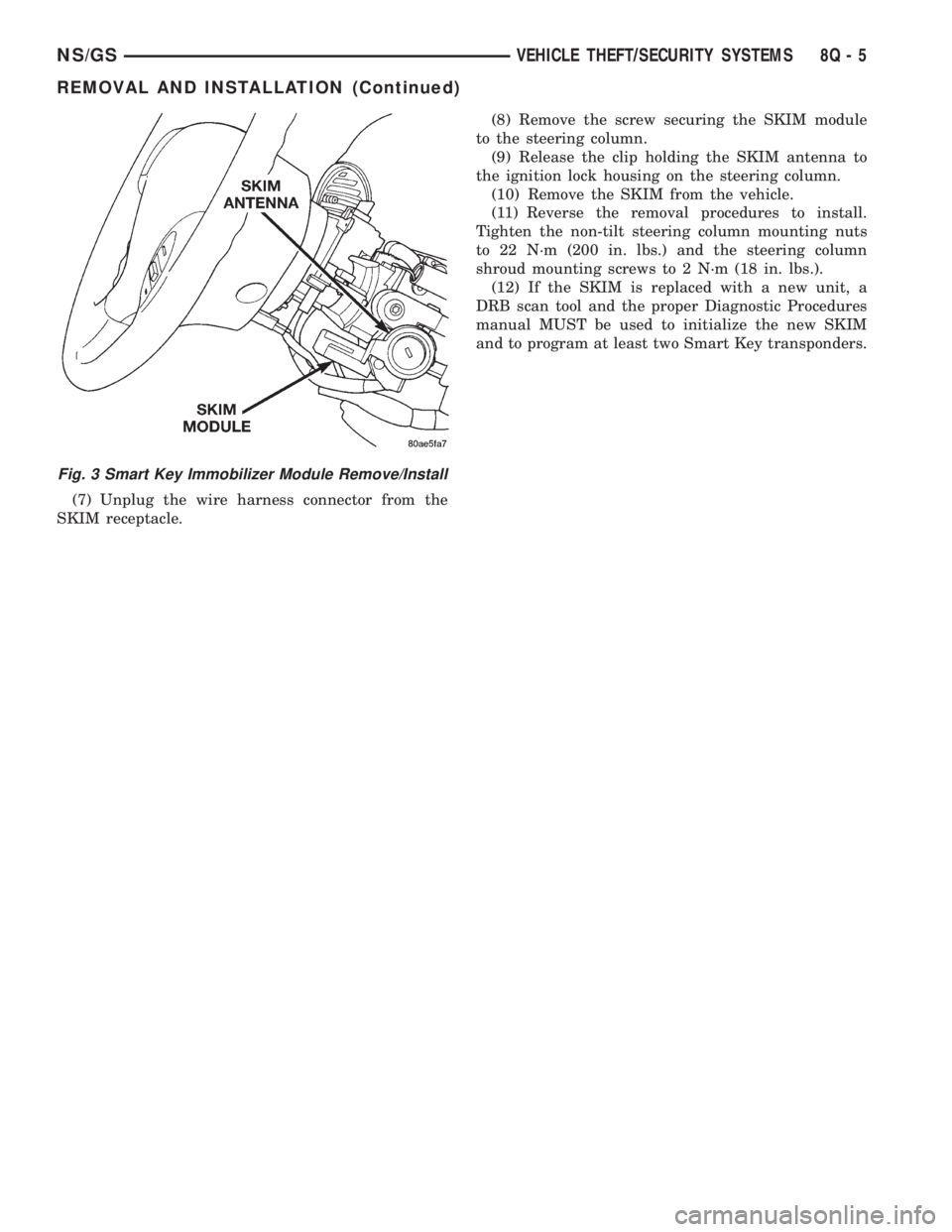
(7) Unplug the wire harness connector from the
SKIM receptacle.(8) Remove the screw securing the SKIM module
to the steering column.
(9) Release the clip holding the SKIM antenna to
the ignition lock housing on the steering column.
(10) Remove the SKIM from the vehicle.
(11) Reverse the removal procedures to install.
Tighten the non-tilt steering column mounting nuts
to 22 N´m (200 in. lbs.) and the steering column
shroud mounting screws to 2 N´m (18 in. lbs.).
(12) If the SKIM is replaced with a new unit, a
DRB scan tool and the proper Diagnostic Procedures
manual MUST be used to initialize the new SKIM
and to program at least two Smart Key transponders.
Fig. 3 Smart Key Immobilizer Module Remove/Install
NS/GSVEHICLE THEFT/SECURITY SYSTEMS 8Q - 5
REMOVAL AND INSTALLATION (Continued)
Page 527 of 1938

If motor grunts and does not move, verify that reg-
ulator is not binding.
WIRING VOLTAGE TEST
The following wiring test determines whether or
not voltage is continuous through the body harness
to switch.
(1) Remove the master power window switch and
bezel assembly from the driver door. Refer to Group
23, Body for proper procedures.
(2) Disconnect wire connector from back of power
window switch.
(3) Switch ignition ON position.
(4) Connect the clip end of a 12 volt test light to
Pin 13 in door harness connector at the window
switch. Touch the test light probe to Pin 9 and then
to Pin 11.
²If the test light illuminates, the wiring circuit
between the battery and switch is OK.
²If light does not illuminate, check the 40 amp
fuse in the Power Distribution Center or for a broken
wire.
²The power window motors are protected with
Positive Temperature Coefficient (PTC) device that
prevents motor burn out. Check Junction Block.
²Refer to Group 8W, Wiring Diagrams for circuit
information and component locations.
REMOVAL AND INSTALLATION
POWER VENT WINDOW MOTOR
REMOVAL
(1) Disconnect battery negative cable.
(2) Remove D-pillar trim panel.
(3) Disconnect wire connector from power vent
motor.
(4) Remove nut holding crank to vent glass.
(5) Remove bolts holding power vent motor to
D-pillar (Fig. 4).
(6) Remove power vent motor.
(7) Pull the crank system from the motor.
INSTALLATION
Before installing crank, cycle replacement motor to
the open position. Install crank hinge in extended
position to the motor and for installation, reverse the
above procedures.
POWER WINDOW SWITCH
To remove power window switches refer to Group
23, Body for proper procedures.
POWER WINDOW MOTOR
WARNING: DO NOT HAVE ANY HANDS OR FIN-
GERS IN SECTOR GEAR AREA WHERE THEY CAN
BE PINCHED BY SMALL MOVEMENTS OF REGULA-
TOR LINKAGE.
REMOVAL
(1) Tape the window in its existing position to
remove its weight from the regulator system.
(2) Cut and remove the tie wrap at the window
motor. Its no longer required.
(3) Disconnect window motor wire connector from
door harness.
(4) Remove screws and nuts holding window motor
to the inner panel.
(5) Remove the motor from the door inner panel,
let it hang from the cables.
(6) With the cables still attached to the failed
motor, Install the replacement motor to the door
inner panel. Tighten down the screws and nuts to 3.4
to 4.5 N´m ( 30 to 40 in. lbs.) of torque.
(7) Separate the failed motor from regulator by:
²Removing the drum cover plate.
²Lift the cable guide off the motor, the drum with
cables, will be lifted off simultaneously (Fig. 5).
CAUTION: Do not allow the drum to separate from
the cable guide, by dropping drum or letting the
cables unwind.
INSTALLATION
(1) Install the cable guide and drum into the
replacement motor.
Fig. 4 Vent Window Motor
NSPOWER WINDOWS 8S - 3
DIAGNOSIS AND TESTING (Continued)
Page 535 of 1938
CIRCUIT DESCRIPTION
Power to both driver and passenger seats, as well
as power door locks, rear blower, and front fog lamps
(if so equipped), is provided by the A3 circuit through
a 40 amp MAXI-fuse in the Power Distribution Cen-
ter (PDC) under the hood. If all of these devices are
nonfunctional, replace the MAXI-fuse. If the new
MAXI-fuse blows immediately, correct the wiring
short to Ground that could be on any of those afore-
mentioned loads before proceeding further.
Once the power is back ON, if the power seats still
do not work, check the 30 amp circuit breaker that is
located in the driver's seat wiring harness approxi-
mately 10 inches from the 4-way connector. The
power feed circuit to the 30 amp circuit breaker is 14
ga. A3 RD/WT.
Following the 30 amp circuit breaker is a 14 ga.
wire designated as F35 RD that provides power into
the Memory Seat/Mirror Module and is double
crimped with a 14 ga. F35A RD that provides power
to the passenger seat through the 4-way connector.If the power door locks, rear blower, and front fog
lamps (if so equipped) are functional and the seats
are both nonfunctional, repair/replace the open wir-
ing and/or circuit breaker in the driver's seat harness
to correct the condition.
Ensure that the 12 ga. ground wire Z1 BK from
the electrical distribution wiring ground splice into
the 4-way connector is providing ground. The Z1 BK
is double crimped at the seat harness side of the
4-way connector taking a 14 ga. Z1 BK into the
10-way connector (cavity 7) 14 ga. This double crimp
carries a 20 ga. Z1A BK to cavity 3 of the power seat
switch 10-way. If the passenger power seat is func-
tional, and the driver's seat is nonfunctional examine
the circuit F35 RD from the double crimped circuit
breaker connector into the 10-way connector cavity 8
of the control module for continuity. Repair or replace
as necessary. If the driver's seat is still nonfunc-
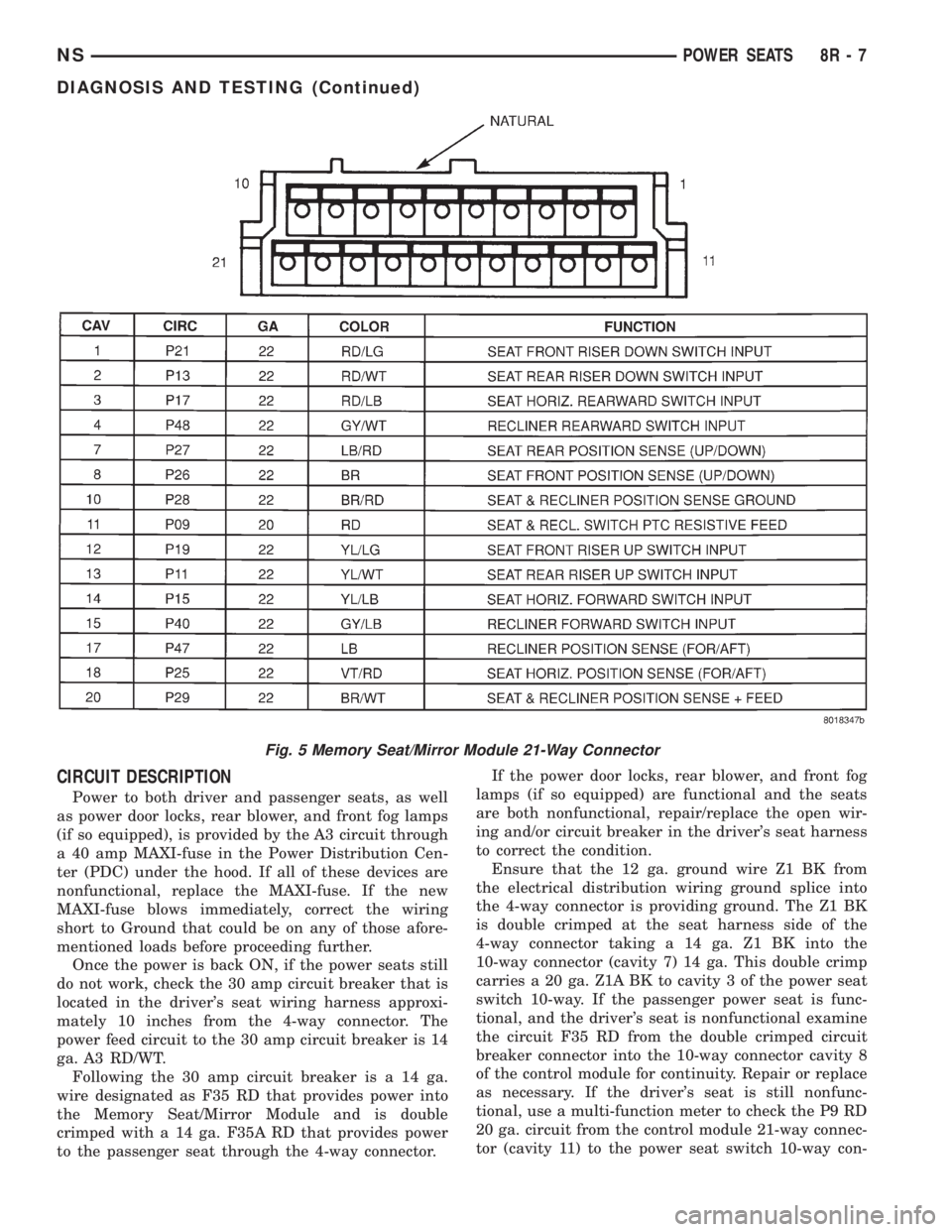
tional, use a multi-function meter to check the P9 RD
20 ga. circuit from the control module 21-way connec-
tor (cavity 11) to the power seat switch 10-way con-
Fig. 5 Memory Seat/Mirror Module 21-Way Connector
NSPOWER SEATS 8R - 7
DIAGNOSIS AND TESTING (Continued)
Page 537 of 1938

coming from the module, replace the Memory Seat/
Mirror Module.
²If P9 low current battery is present at (cavity 5)
referenced to ground Z1 (cavity 1) of the seat switch,
verify the presence of the P9 voltage at the switch
outputs. If there is no output voltage from the
switch, replace the switch.
²If P9 voltage is present at the output of the
switch, but there is no reaction from the memory
seat/mirror module, verify that the P9 voltage is
present at the appropriate 21-way connector pins
into the module. If the P9 voltage is not present at
the 21-way connector, repair or replace the seat wir-
ing harness. If the verification check of the seat wir-
ing harness is correct, replace the control module.
(2) If the control module does not respond with a
relay click to a specific seat switch when actuated,
verify the continuity of the particular circuit between
the seat switch and the Memory Seat/Mirror Module.
If the P9 voltage is present at the correct input of the
21-way connector of the module when the switch is
actuated, but there is no response by the module,
replace the Memory Seat/Mirror Module.
(3) If the Memory Seat/Mirror Module responds
with a relay click when a seat switch is actuated for
a given direction, but there is no reaction from a seat
or recliner motor relating to that switch input, dis-
connect the 10-way connector from the control mod-
ule. Jumper the battery and ground from cavities 8
and 7 of the seat harness 10-way connector to the
proper cavities for the seat or recliner motor in ques-
tion and direction of travel desired. If the motor oper-
ates, replace the control module. If the motor does
not operate, verify continuity of the wiring into the
motor 2-way connector. Repair or replace the wiring
as necessary. If the wiring has continuity, and the
motor will not operate when fed directly, replace the
track assembly, since the motor/transmission combi-
nations are not designed to be serviced on an individ-
ual basis.
SEAT AND RECLINER POSITION SENSING
Seat and recliner position sense ground reference
circuit P28 BR/RD feed is from the memory seat/mir-
ror module (cavity 10) 21-way connector to each of
the position sense connectors.
Seat and recliner position sense +5 volt feed circuit
P29 BR/WT feed is from the memory seat/mirror
module (cavity 20) 21-way connector to each of the
position sense connectors.
To test for the presence of a sense voltage, a volt
meter must be used as follows:
²Connect the negative probe to the P28 circuit
(cavity 10) of the 21-way connector.
²Connect the positive probe to the P29 circuit
(cavity 20) of the 21-way connector and verify a volt-age reading between 3.5 and 5 volts when a seat or
recliner switch is activated.An internal timer in
the Memory Seat/Mirror Module (MSM Module)
regulates the length of time this voltage stays
active i.e., 3 seconds from the time that the
switch was activated, unless the switch is held
or while the transmission is out of PARK.If the
voltage is less than 3.5, there is a fault in the system
that is drawing it down. To troubleshoot this circuit,
disconnect the 25-way connector from the MSM Mod-
ule (this removes all of the vehicle mirror circuitry).
If the voltage is still less than 3.5, disconnect each of
the position sense connectors from each of the
motors. If the voltage remains less than 3.5, replace
the MSM Module. If the voltage increases when a
motor is disconnected from the system, determine if
the fault is in the wiring or the motor assembly.
Repair or replace the wire harness assembly as
needed. If the fault is in the motor position sensing
potentiometer, replace the track assembly.
²The potentiometers built onto the motor end-bell
provide voltages to the MSM Module through the
21-way connector, which change as follows, corre-
sponding to the given seat actuations. Refer to Seat
Actuations Table.
SERVICE PROCEDURES
REMOTE KEYLESS ENTRY (RKE) DATA LINK
The memory seat/mirror module interfaces with
the RKE via a serial data link (single wire). The pro-
gramming sequence to relate an RKE transmitter to
the chosen seat, recliner and side view mirror posi-
tions consists of the following steps:
(1) Adjust the seat, recliner and side view mirrors
to the desired position.
(2) Press momentarily and release memory switch
S.
(3) Press momentarily and release memory switch
1or2.
(4) Press momentarily and release a LOCK button
on an RKE transmitter.
(5) To program the second driver's position, follow
the previous sequence with a second transmitter.
(6) To recall either of the programmed positions
with an RKE transmitter, press momentarily and
release an UNLOCK button on one of the pro-
grammed RKE transmitters.An unprogrammed
RKE transmitter will have no effect on the sys-
tem.
(7) The RKE receiver uses the serial data link to
notify the module of a request from a programmed
transmitter, that an UNLOCK button has been
pressed. This UNLOCK request (from a transmitter
associated with either switch 1 or 2) will activate the
NSPOWER SEATS 8R - 9
DIAGNOSIS AND TESTING (Continued)
Page 539 of 1938

POWER MIRRORS
CONTENTS
page page
GENERAL INFORMATION
HEATED MIRROR........................ 1
INTRODUCTION......................... 1
MEMORY MIRRORS...................... 1
DIAGNOSIS AND TESTING
HEATED MIRROR TEST................... 1MIRROR MOTOR TEST................... 1
MIRROR SWITCH TEST................... 1
REMOVAL AND INSTALLATION
POWER MIRROR SWITCH................. 3
POWER MIRROR........................ 3
GENERAL INFORMATION
INTRODUCTION
Electrically-operated remote control mirrors are
controlled by a switch assembly located on the head-
lamp switch bezel in the instrument panel.
The vehicle uses a rocker switch for right or left
side mirror selection and a single platform button for
mirror UP, DOWN, RIGHT, or LEFT movement.
The motors which operate the mirrors are part of
the mirror assembly and cannot be serviced sepa-
rately.
HEATED MIRROR
Heated mirrors are available on models with
Power Mirrors and Rear Window Defogger only. The
heated mirror is controlled by the rear window defog-
ger switch. The heated mirror is ON when the rear
window defogger is ON.
MEMORY MIRRORS
For memory mirrors refer to Group 8R, Power
Seats section Memory Seat/Mirror system.
DIAGNOSIS AND TESTING
MIRROR MOTOR TEST
(1) Remove headlamp switch bezel. Refer to Group
8E, Instrument Panel and Gauges.
(2) Disconnect wiring harness connector to the
power mirror switch and headlamp switch.
(3) Using two jumper wires:
²Connect one to a 12-volt source
²Connect the other to a good body ground
²Refer to the Mirror Test Chart for wire hookups
at the switch connector (Fig. 1).(4) If results shown in chart are not obtained,
check for broken or shorted circuit, or replace mirror
assembly as necessary.
MIRROR SWITCH TEST
(1) Remove power mirror switch from mounting
position.
(2) Disconnect wiring harness at switch connector.
(3) Using a ohmmeter, test for continuity between
the terminals of the switch as shown in the Mirror
Switch Continuity Chart (Fig. 2).
(4) If results shown in the chart are not obtained,
replace the switch.
HEATED MIRROR TEST
Heated mirrors are available on models with
Power Mirrors and Rear Window Defogger only. The
heated mirror is controlled by the rear window defog-
ger switch. The heated mirror is ON when the rear
window defogger is ON.
TEST PROCEDURE
(1) The mirror should be warm to the touch.
(2) If not, check the 10 amp fuse (12) in the junc-
tion block behind the instrument panel to the left of
the steering column.
(3) Test voltage at rear window defogger switch.
²If no voltage repair wire.
²Apply voltage to one wire and ground the other,
refer to (Fig. 1) for pin numbers. Mirror should
become warm to the touch.
²If not remove mirror glass and test the wires for
continuity. If no continuity repair wires.
²If wires are OK, replace mirror glass.
²To test defogger switch refer to Group 8N, Elec-
trically Heated Systems.
NSPOWER MIRRORS 8T - 1
Page 553 of 1938

²Stores transmitter data in permanent memory -
retraining is not required even if the battery dies or
is disconnected.
To operate, simply press the appropriate button on
the Universal Transmitter. The red LED will light up
while the signal is being transmitted.
NOTE: For security reasons, you are able to erase
the trained frequencies.
DIAGNOSIS AND TESTING
READING/DOME LAMP DIAGNOSIS
The dome lamps operate in conjunction with the
Remote Keyless Entry system. Refer to the Wiring
Diagrams group of this manual for component loca-
tions and circuit information. For additional diagnos-
tic information on lamp operation controlled by Body
Control Module (BCM) refer to the Body Diagnostic
Procedures Manual. For diagnosis of the reading
lamps and switches refer to (Fig. 3).
TRAVELER MESSAGES
Traveler data is obtained from the Body Control
Module (BCM) on the CCD bus wires. The CMTC
will not display information for any of the screens forwhich it did not receive the bus messages. The label
corresponding to the missing information will be lit.
If no traveler data is displayed, check the CCD com-
munications and the BCM. If the brightness level is
improper check the CCD bus. One general method
for checking the CCD bus communications between
CMTC and the BCM is refer to the following proce-
dure.
(1) STEP the CMTC to the Elapsed Time (ET).
(2) Press and release the reset button to reset the
module.
(3) If the elapsed time clock does not reset, or fails
to update, check the CCD wires and the BCM. The
DRB is recommended for checking the CCD and the
BCM.
(4) Perform the CMTC self diagnosis before replac-
ing the module.
UNIVERSAL TRANSMITTER
Before proceeding in diagnosis, check the transmit-
ter for battery voltage and a good ground at the
transmitter harness connector.
²The unit may not have been trained correctly,
try retraining the transmitter.
²The batteries in the hand-held transmitter may
be dead.
Fig. 3 Reading/Dome Lamp Diagnosis
NSOVERHEAD CONSOLE 8V - 3
DESCRIPTION AND OPERATION (Continued)
Page 556 of 1938

COMPASS MINI-TRIP COMPUTER (CMTC)
MODULE
REMOVAL
(1) Disconnect battery negative cable.
(2) Remove overhead console.
(3) Remove the six screws holding CMTC module
to overhead console (Fig. 6).
(4) Remove CMTC module from console.
INSTALLATION
For installation, reverse the above procedures.
COMPASS MINI-TRIP COMPUTER (CMTC) LAMP
BULBS
REMOVAL
(1) Remove overhead console.
(2) Rotate bulb socket counterclockwise one quar-
ter turn (Fig. 7).(3) Pull bulb socket from CMTC module.
INSTALLATION
For installation, reverse the above procedures.
FRONT HEADER READING/COURTESY LAMP
REMOVAL
(1) Place a small flat tool in the slot at the forward
edge of the lamp lens and twist (Fig. 8).
(2) Remove lens.
(3) Insert the tip of the tool under the inside, rear
edge of the reflector/light shield. Carefully pry reflec-
tor/light shield out.
(4) Remove the lamp by pressing forward the brass
terminal and rotating the lamp clockwise to remove.
INSTALLATION
For installation, reverse the above procedures.
When installing the lamp lens, first guide the switch
contact tab on the lens between the lamp switch
plunger and the lamp bezel. Then snap lens onto the
two lens pivots on the bezel.
OVERHEAD CONSOLE
REMOVAL
(1) Open the transmitter bin door (Fig. 9).
(2) Remove screw holding the overhead console to
the headliner. With the screw removed the console is
retained by one engagement tab located inside the
eyeglass storage bin.
(3) Open the eyeglass bin door.
(4) Press the retaining tab which is located
directly above the door latch.
(5) Lower rear of console away from headliner.
(6) Pull console rearward to disengage clips hold-
ing front of console to roof armature and lower con-
sole.
(7) Disconnect wire connectors from back of CMTC
and reading lamps. Ensure the connectors lock tabs
are fully depressed before disconnecting.
(8) Remove overhead console.
INSTALLATION
For installation, reverse the above procedures.
READING/COURTESY LAMP
Removal
(1) Using a trim stick, lightly pry outward the for-
ward end of reading lamp lens (Fig. 10).
(2) Rotate reading/courtesy lamp socket one quar-
ter turn counterclockwise.
(3) Pull socket out of lamp (Fig. 11).
(4) Pull lamp from socket.
Fig. 6 Compass Mini-Trip Computer
Fig. 7 CMTC Lamp Bulbs
8V - 6 OVERHEAD CONSOLENS
REMOVAL AND INSTALLATION (Continued)