1995 Oldsmobile Cutlass Supreme ignition
[x] Cancel search: ignitionPage 129 of 340
t.
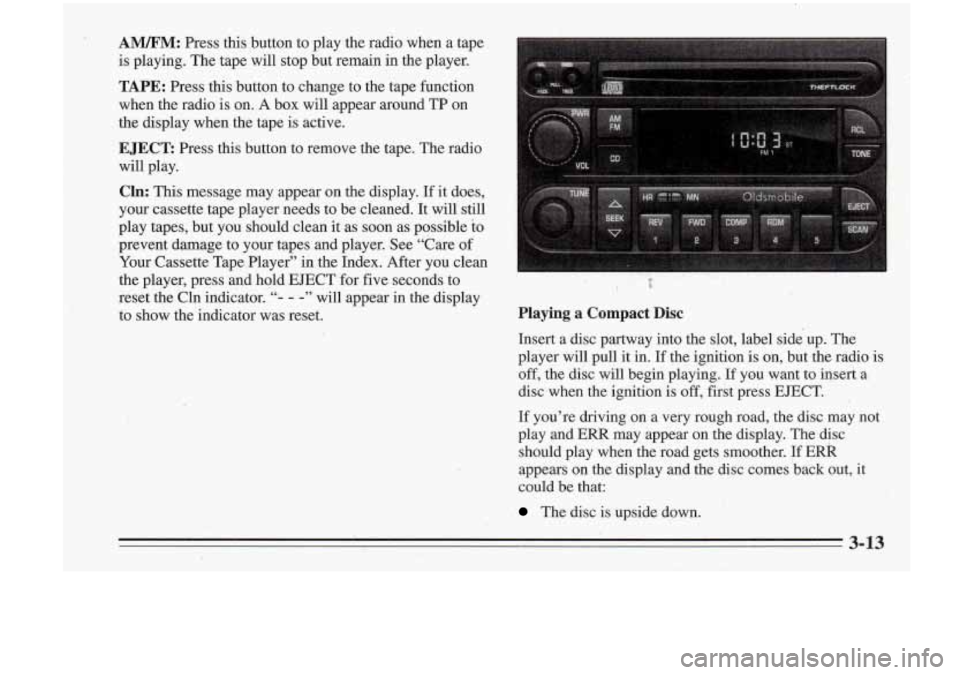
A”: Press this button to play the radio when a tape
is playing. The tape will stop but remain in the player.
TAPE: Press this button to change to the tape function
when the radio is on.
A box will appear around TP on
the display when the tape
is active.
EJECT: Press this button to remove the tape. The radio
will play.
Cln: This message may appear on the display. If it does,
your cassette tape player needs to be cleaned. It will still
play tapes, but you should clean it.as soon as possible
to
prevent damage to your tapes and player. See “Care of
Your Cassette Tap,e Player” in the Index. After you clean
the player, press and hold EJECT for five seconds to
reset the Cln indicator.
“- - -” will appear in the display
to show the indicator was reset.
k? I ‘b
Playing a Compact Disc
Insert a disc partway into the slot, label side up. The
player will pull it in.
If the ignition is on, but .the radio is
off, the disc will begin playing. If YOU want to insert a
disc,,when ,the ignition is
off, first press EJECT.
If you’re driving on a very rough road, the disc may not
play and
ERR may appear on the display. The disc
should play when the road gets smoother.
If ERR
appears on the display and the disc comes ‘back out, it
could be that:
The disc is upside down.
3-13
Page 130 of 340
I
.. I. ,. , I
-It is dirt); scratched or Wet.
..
FWD: Press and hold,this button to advance to a
It is very humid. If so, wait about an hour and try . . passage quickly. You -will hear sound at a reduced
volume. The display will show elapsed time.
again.
RCL: Press this button to see which track is playing.
Press it again- within five seconds to see how long it has
been playing. (elapsed time). To change what
is normally
J COW: Press this button to make soft and loud
passages more nearly equal in volume. COMP will appear on the display.
shown on the display (track or elapsed time), press the
RDM: Press this button to hear the tracks in random
button .until you see the display you want, then hold the.
order. Press it again to
turn off random'play.
. button until the display flashes. ' , " AM/FM: Press this button to play the radio when.a disc
SEEK: Press the down mow to go to the start of the 3;'. is playing. The disc will stop but'remain in the player.
CD: Press this button to change.to the disc function
when the radio
is on. The disc will start playing at the
point where it
was stopped. A box will appear around
CD on the display when the disc is active.
' current track, if more than eight seconds. have,piayed: 8''
'. 8 Press the up arrow to go to the next track. If you hold-
the button or press it more than once, the player will
1 continue miwing back or forward through the disc.
-button again to stop scanning. If you turn
off the ignition or radio with a disc in the
3-14
- - -
REV: Press and hold this button to return to a passage
quickly. You will hear sound at a reduced volume. The
display will show elapsed time.
,
player, it will stay in the player. When ,you turn' on the
ignition or system, the disc will start playing where
it
was stopped.
Page 133 of 340
Disabling THEFTLOCK
If you want to turn off THEFTLOCK, you will need to
enter your code.
If you lose or forget your code, see
your retailer.
1. Turn the ignition on and the radio off.
2. Press the 1 and 4 preset buttons at the same time and
hold until
SEC shows on the display.
You now have only
15 seconds between each of the
following steps.
3. Press MN and “000” will appear on the display.
4. Press MN again and hold until the last two digits of
5. Press and hold HR until the first digit or digits of
your code
appear.
your code appear.
4. Press AM/FM after you make sure the code matches
!lie one you wrote down.
“- - -” should appear on the
display, meaning your system is unsecured.
If SEC
appears, you entered the wrong code and the system
is still secured.
Understanding Radio Reception
FM Stereo
EM Stereo will give you the best sound, but FM signals
will reach only about
10 to 40 miles (14 to 45 km). Tall
buildings or hills can interfere with
FM signals, causing
the sound to come and go.
AM
The range for most AM stations is greater than for F”,
especially at night. The longer range, however, can
cause stations to interfere withveach other.
AM can also
pick up noise from things like storms and power lines.
To lower this noise, try reducing the treble level.
Tips about Your Audio System
Hearing damage from loud noise is almost undetectable
until it is too late. Your hearing. can adapt to higher
volumes
of sound. Sound that seems normal can be loud
and harmful to your hearing. Take precautions by
adjusting the volume control on your radio to a safe sound level before your hearing adapts to it.
3-17
Page 136 of 340
:Power Antenna Mast Care
Your power antenna will look its best and work well if
it’s cleaned from time
to time. To clean the antenna
mast:
1. Turn on the ignition and radio to raise the antenna.
2. Dampen a clean cloth with mineral spirits or
equivalent solvent.
dirt.
3. Wipe the cloth over the mast sections, removing any
4. Wipe dry with a clean cloth.
i. 5. Make the antenna go up and down by turning the
radio or ignition off and on.
6. Then repeat if necessary.
I NOTICE:
Before entering an automatic car wash, turn off
your radio to make the power antenna go down.
This will prevent the mast from possibly getting
damaged.
If the antenna does not go down when
you turn the radio
off, it may be damaged or
need to be cleaned. In either case, lower the
antenna by hand by carefully pressing the
antenna down.
If the mast portion of your antenna is damaged, you can
easily replace it. See your retail.er for a replacement kit
and follow the instructions in the kit.
NOTICE:
Don’t lubricate the power antenna. Lubrication
could damage
it.
‘i
3-20 .. .. .
Page 175 of 340
2. Get the vehicles close enougn so the jumper cables
can reach, but be sure the vehicles aren’t touching
each other. If they are, it could cause a ground
connection you don’t want. You wouldn’t be able to
start your Oldsmobile, and the bad grounding could
damage the electrical systems.
You could be injured if the vehicles roll. Set the
parking brake firmly on each vehicle. Put
an
automatic transaxle in PARK (P) or a manual
transaxle in
NEUTRAL (N).
3. Turn off the ignition on both vehicles. Turn off all
lamps that aren’t needed, and radios.
This will avoid
sparks and help Save both batteries. And it could
save your radio!
“NOTICE:
If you leave your radio on, it could be badly
damaged. The repairs wouldn’t be covered by
your warranty.
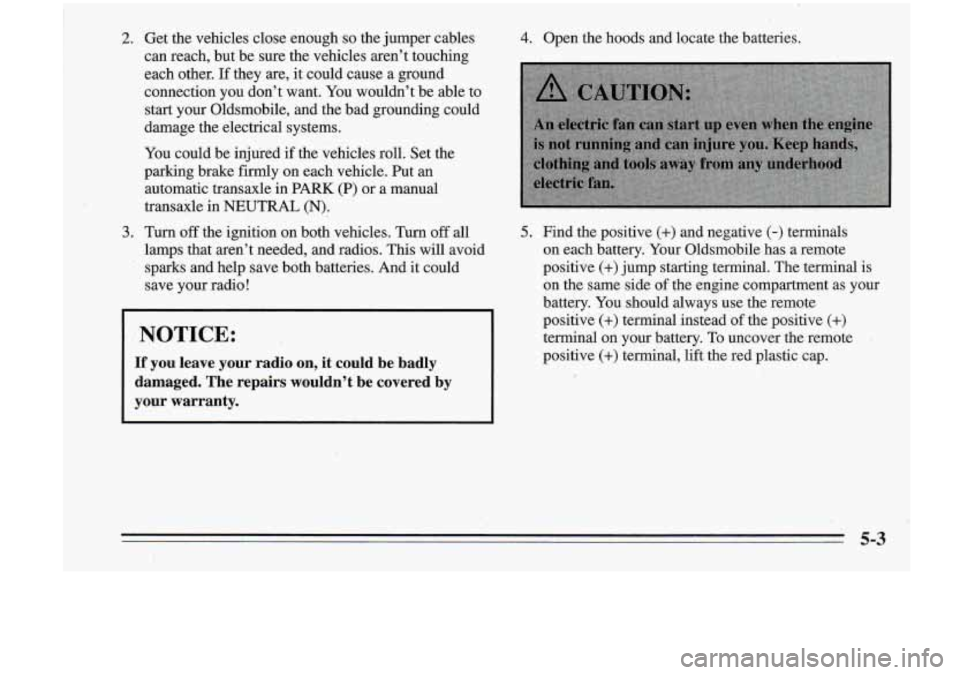
4. Open the hoods and locate the batteries.
5. Find the positive (+) and negative (-) terminals
on each battery. Your Oldsmobile has a remote
positive
(+) jump starting terminal. The terminal is
on the same side
of the engine compartment as your
battery. You should always use the remote
positive
(+) terminal instead of the positive (+)
terminal on your battery. To uncover the remote .
positive (+) termihal, lift the red plastic cap.
1
5-3
..
Page 180 of 340
r. ..
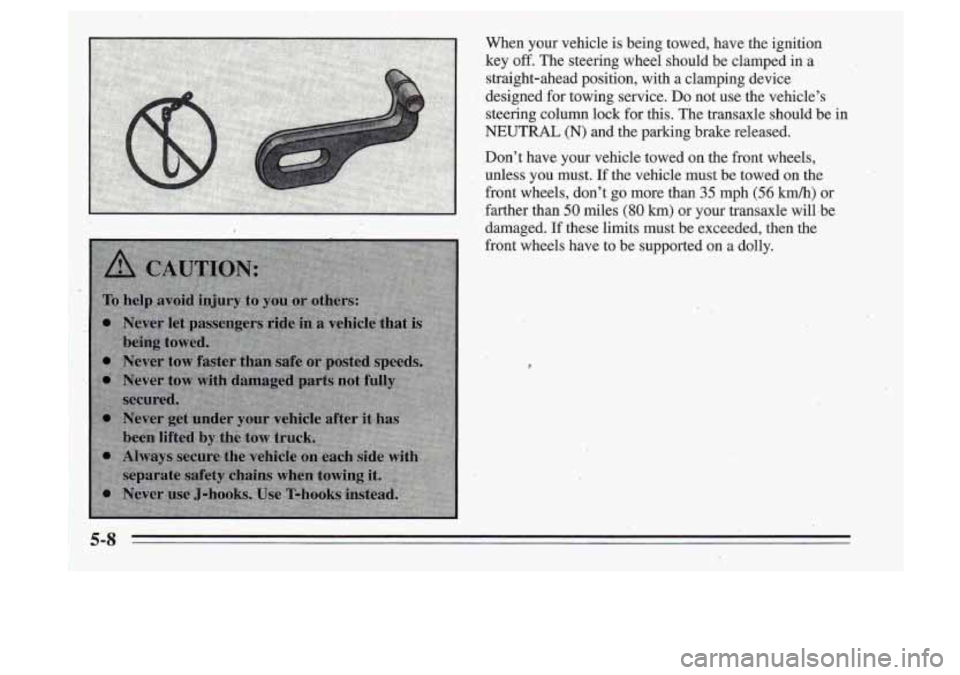
When your vehicle is being towed, have the ignition
key
off. The steering wheel should be clamped in a
straight-ahead position, with a clamping device
designed for towing service.
DQ not use the vehicle’s
steering column lock for this. The transaxle should be’in
NEUTRAL (N) and the parking brake released.
Don’,t have your vehicle towed on the front wheels,
unless you must.. If the vehicle ‘must be towed
on the
front wheels, don’t go more
than 35 mph (56 km/h) or
farther than
50 miles (80 km) or your transaxle wilLbe
damaged. If these limits must be exceeded, then the
front wheels have
to be supported on a dolly.
Page 263 of 340
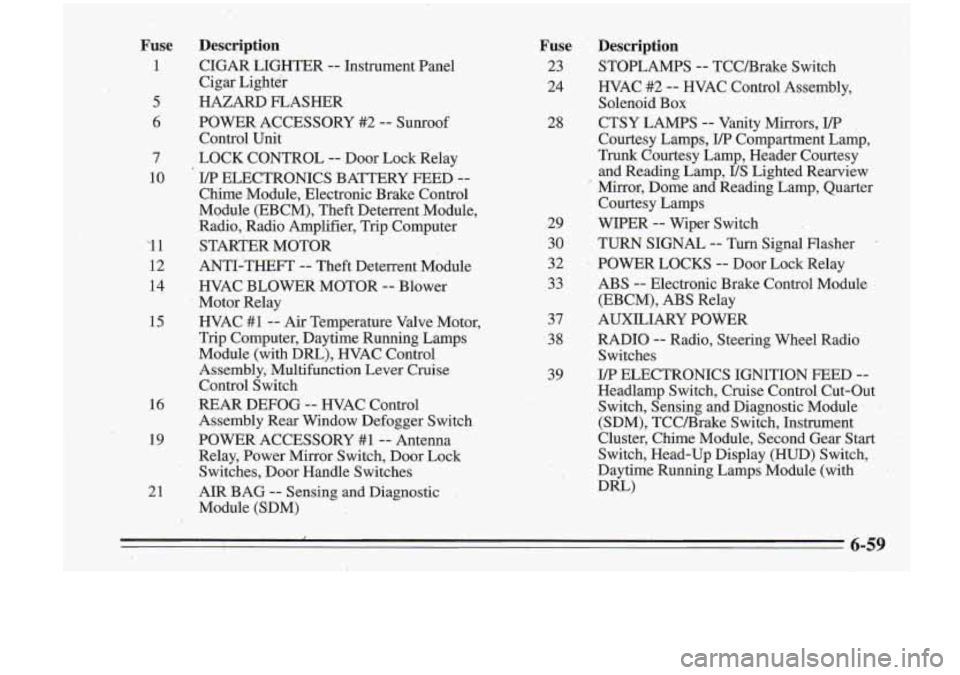
Fuse Description
1 CIGAR LIGHTER -- Instrument Panel
Cigar Lighter
5 HAZARD FLASHER
6 POWER ACCESSORY #2 -- Sunroof
Control Unit
7 LOCK CONTROL
-- Door Lock Relay
10
I/P ELECTRONICS BATTERY FEED --
Chime Module, Electronic Brake Control
Module (EBCM), Theft Deterrent Module,
Radio, Radio Amplifier, Trip Computer
'1 1 STARTER MOTOR
12 ANTI-THEFT -- Theft Deterrent Module
14 HVAC BLOWER-MOTOR -- Blower
Motor Relay
15 HVAC #1 -- Ai-r Temperature Valve Motor,
Trip Computer, Daytime Running Lamps
Module (with Dm), WAC Control
Assembly, Multifunction Lever Cruise
Control Switch
16 REAR DEFOG -- HVAC Control
Assembly Rear Window Defogger Switch
19 POWER ACCESSORY #1-- Antenna
Relay, Power Mirror Switch, Door Lock
Switches, Door Handle Switches
Fuse Description
23 STOPLAMPS -- TCCBrake Switch
24 HVAC #2
.-- HVAC Control Assembly,
28 CTSY LAMPS
-- Vanity Mirrors, I/P
Solenoid Box
Courtesy Lamps,
I/P Compartment Lamp,
Trunk Courtesy Lamp, Header Courtesy
and Reading Lamp,
US Lighted Rearview
' Mirror, Dome and Reading Lamp, Quarter
Courtesy Lamps
29 WIPER -- Wiper Switch
30 TURN SIGNAL
-- Turn, Signal Flasher -
32 POWER LOCKS -- Door Lock-Relay
33 ABS
-- Electropic Brake Control Module
37 AUXILIARY POWER
38 RADIO
-- Radio, Steering Wheel Radio
39 ELECTRONICS IGNITION FEED
-- '
(EBCM), ABS Relay
Switches
Headlamp Switch, Cruise Control Cut-Out
Switch, Sensing and Diagnostic Module
-'
(SDM), TCCBrake Switch, Instrument
Cluster, Chime Module, Second 'Gear Start
Switch, Head-Up Display (HUD) Switch,
Daytime Running Lamps Module (with
Dm)
21 AIR BAG -- Sensing and Diagnostic
Module (SDM)
6-59
Page 265 of 340
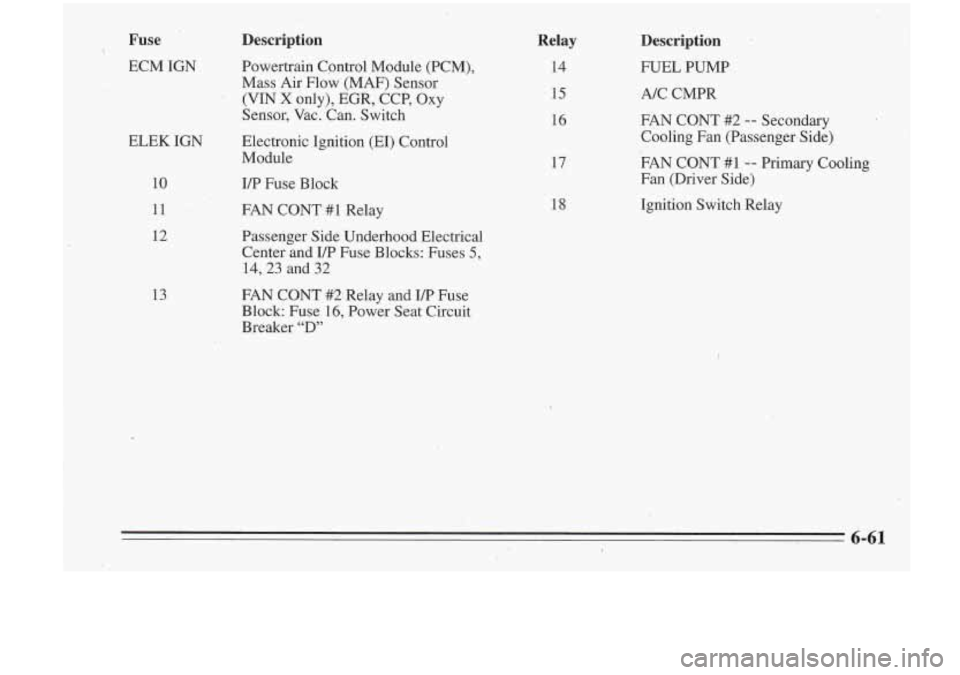
Fuse Description
ECM IGN Powertrain Cpntrol Module (PCM), Mass Air Flow (MAF) Sensor
(VIN X only), EGR, CCP, Oxy
Sensor, Vac. Can. Switch
ELEK IGN Electronic Ignition
(m) Control
Module
10
11
12
13
I/P Fuse Block
FAN CONT
#1 Relay
Passenger Side Underhood Electrical Center and
UP Fuse Blocks: Fuses 5,
14,23 and 32
FAN CONT #2:Relay and ITP Fuse
Block Fuse 16, Power Seat Circuit
Breaker
“D”
Relay
14
15
16
17
18
Description
FUEL PUMP
A/C CMPR
FAN CONT #2 --- Secondary
Cooling Fan (Passenger Side)
FAN CONT #1
-- Primary Cooling
Fan (Driver Side)
Ignition Switch Relay