Page 71 of 240
Center Pocket, Coin Box, Vanity Mirror
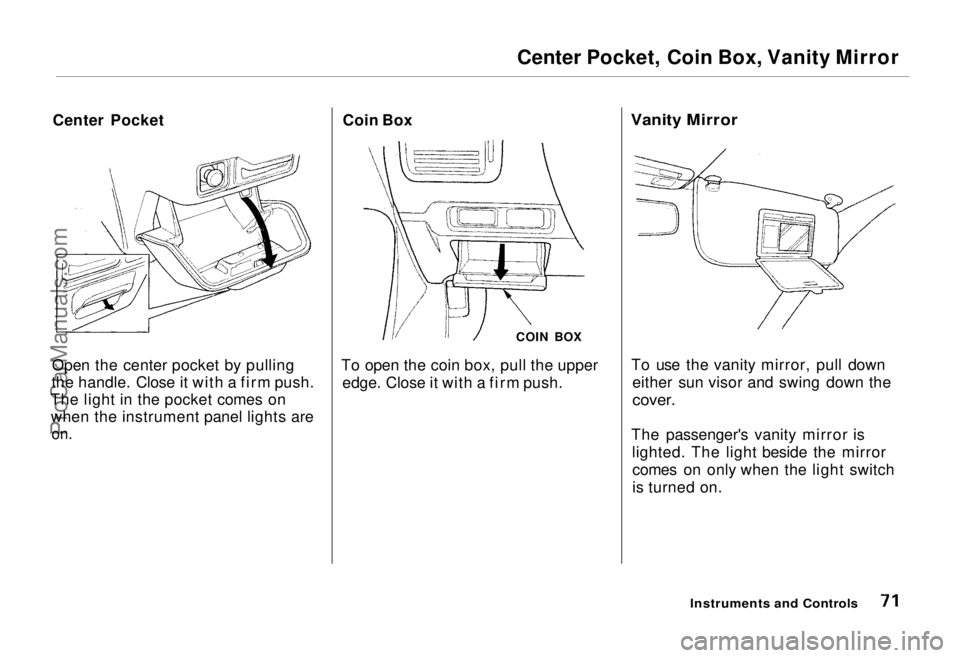
Center Pocket
Open the center pocket by pulling
the handle. Close it with a firm push.
The light in the pocket comes on when the instrument panel lights are
on.
Coin Box
COIN BOX
To open the coin box, pull the upper edge. Close it with a firm push.
Vanity Mirror
To use the vanity mirror, pull down either sun visor and swing down the
cover.
The passenger's vanity mirror is lighted. The light beside the mirrorcomes on only when the light switch
is turned on.
Instruments and ControlsProCarManuals.comMain Menu Table of Contents s t
Page 72 of 240
Cigarette Lighter, Ashtrays
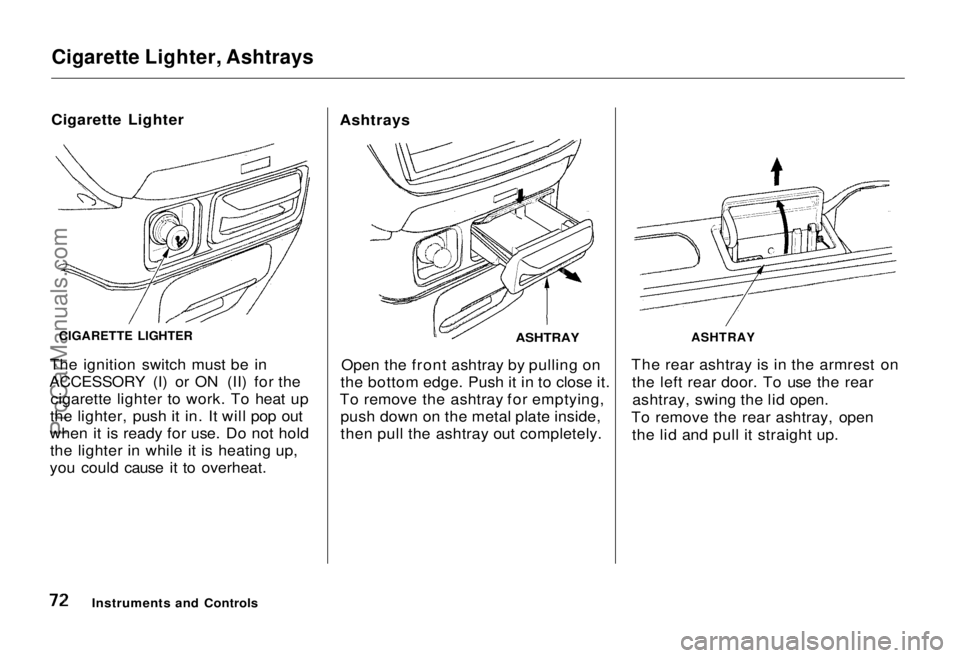
Cigarette Lighter
The ignition switch must be in
ACCESSORY (I) or ON (II) for the cigarette lighter to work. To heat up
the lighter, push it in. It will pop out
when it is ready for use. Do not hold the lighter in while it is heating up,
you could cause it to overheat. Ashtrays
ASHTRAY
Open the front ashtray by pulling on
the bottom edge. Push it in to close it.
To remove the ashtray for emptying, push down on the metal plate inside,
then pull the ashtray out completely. The rear ashtray is in the armrest on
the left rear door. To use the rearashtray, swing the lid open.
To remove the rear ashtray, open the lid and pull it straight up.
Instruments and Controls
CIGARETTE LIGHTER
ASHTRAYProCarManuals.comMain Menu Table of Contents s t
Page 73 of 240
Ashtrays, Interior Lights
Use the ashtray only for cigarettes,
cigars and other smoking materials. To
prevent a possible fire and damage to
your car, don't put paper or other
things that can burn in the ashtray.
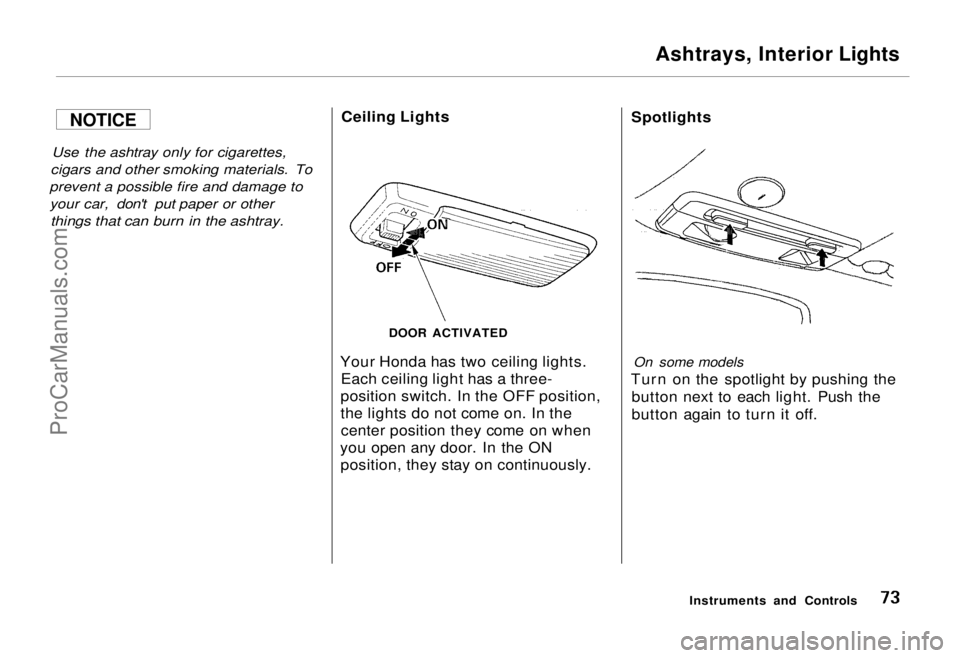
Ceiling Lights
Your Honda has two ceiling lights. Each ceiling light has a three-
position switch. In the OFF position,
the lights do not come on. In the center position they come on when
you open any door. In the ON position, they stay on continuously. Spotlights
On some models
Turn on the spotlight by pushing the button next to each light. Push the
button again to turn it off.
Instruments and Controls
DOOR ACTIVATED
NOTICEProCarManuals.comMain Menu Table of Contents s t
Page 74 of 240
Interior Lights
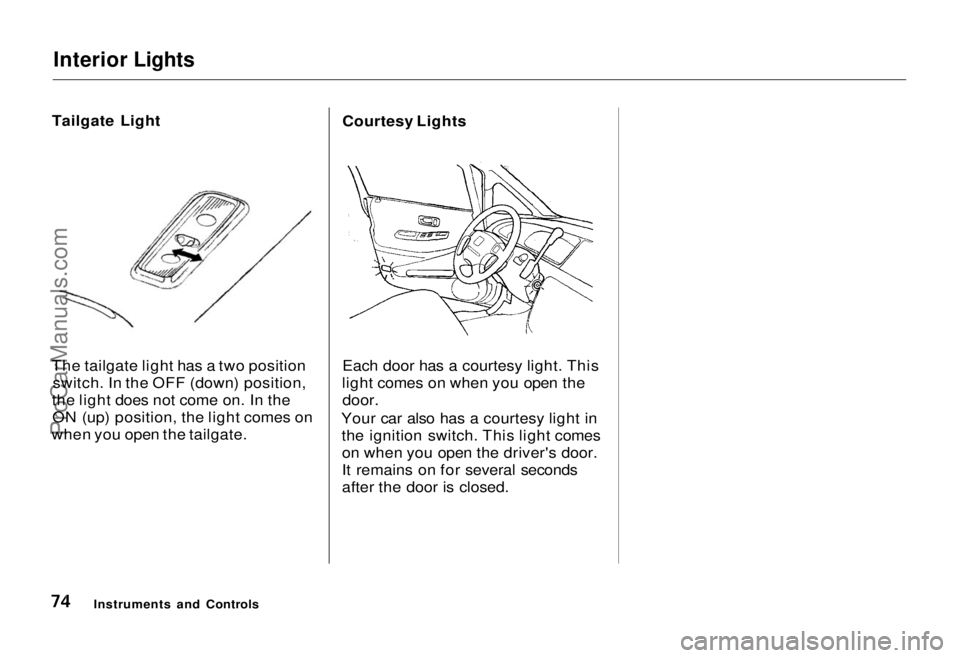
Tailgate Light
The tailgate light has a two position switch. In the OFF (down) position,
the light does not come on. In the ON (up) position, the light comes on
when you open the tailgate. Courtesy Lights
Each door has a courtesy light. This
light comes on when you open the
door.
Your car also has a courtesy light in the ignition switch. This light comeson when you open the driver's door.
It remains on for several seconds
after the door is closed.
Instruments and ControlsProCarManuals.comMain Menu Table of Contents s t
Page 78 of 240
Heating and Cooling
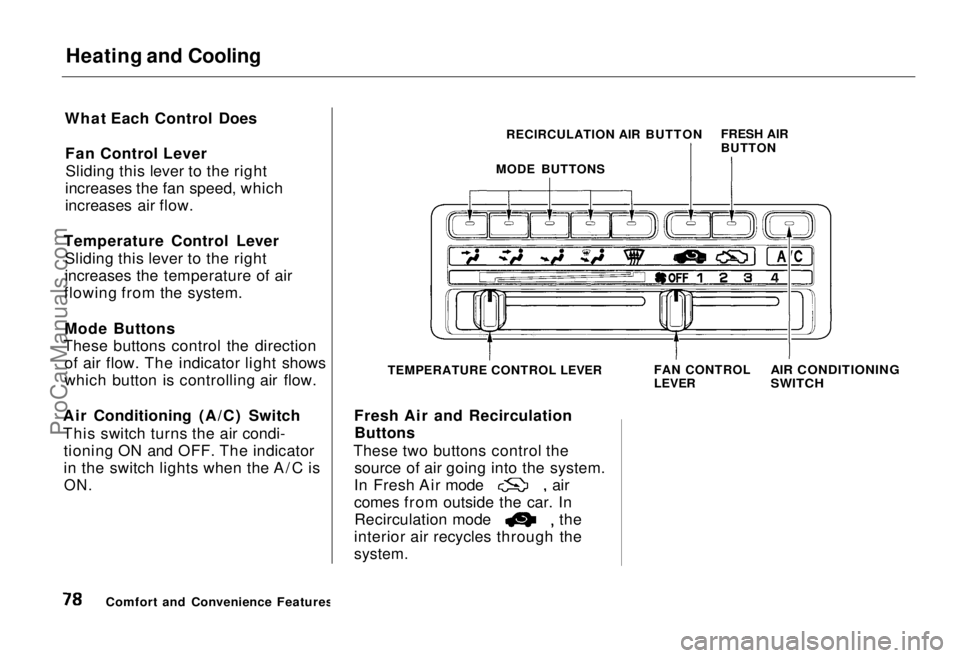
What Each Control Does Fan Control LeverSliding this lever to the right
increases the fan speed, which
increases air flow.
Temperature Control Lever Sliding this lever to the right
increases the temperature of air
flowing from the system.
Mode Buttons
These buttons control the direction of air flow. The indicator light shows
which button is controlling air flow.
Air Conditioning (A/C) Switch
This switch turns the air condi- tioning ON and OFF. The indicator
in the switch lights when the A/C is
ON.
TEMPERATURE CONTROL LEVER
Fresh Air and Recirculation Buttons
These two buttons control the source of air going into the system. In Fresh Air mode air
comes from outside the car. In
Recirculation mode the
interior air recycles through the
system.
FAN CONTROL
LEVER
AIR CONDITIONING
SWITCH
Comfort and Convenience Features FRESH AIR
BUTTON
RECIRCULATION AIR BUTTON
MODE BUTTONSProCarManuals.comMain Menu Table of Contents s t
Page 87 of 240
Audio System
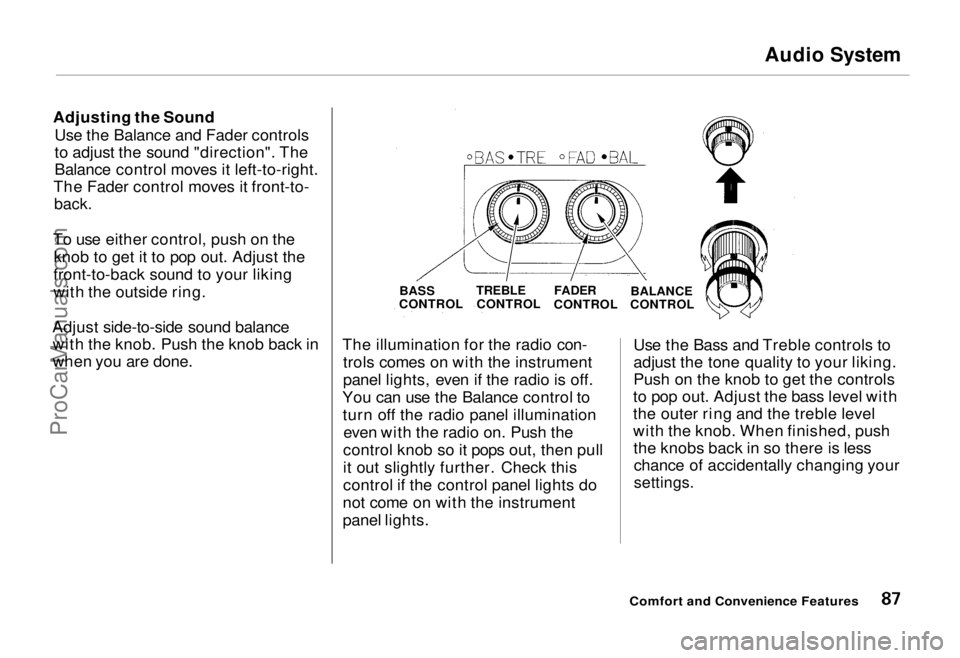
Adjusting the Sound Use the Balance and Fader controls
to adjust the sound "direction". The
Balance control moves it left-to-right.
The Fader control moves it front-to-
back.
To use either control, push on the knob to get it to pop out. Adjust the
front-to-back sound to your liking
with the outside ring.
Adjust side-to-side sound balance with the knob. Push the knob back in
when you are done. The illumination for the radio con-
trols comes on with the instrument
panel lights, even if the radio is off.
You can use the Balance control to turn off the radio panel illumination even with the radio on. Push the
control knob so it pops out, then pull
it out slightly further. Check this
control if the control panel lights do
not come on with the instrument
panel lights. Use the Bass and Treble controls to
adjust the tone quality to your liking.
Push on the knob to get the controls
to pop out. Adjust the bass level with
the outer ring and the treble level
with the knob. When finished, push the knobs back in so there is lesschance of accidentally changing your
settings.
Comfort and Convenience Features
BASS
CONTROL
TREBLE
CONTROL
FADER
CONTROL BALANCE
CONTROLProCarManuals.comMain Menu Table of Contents s t
Page 89 of 240
Audio System
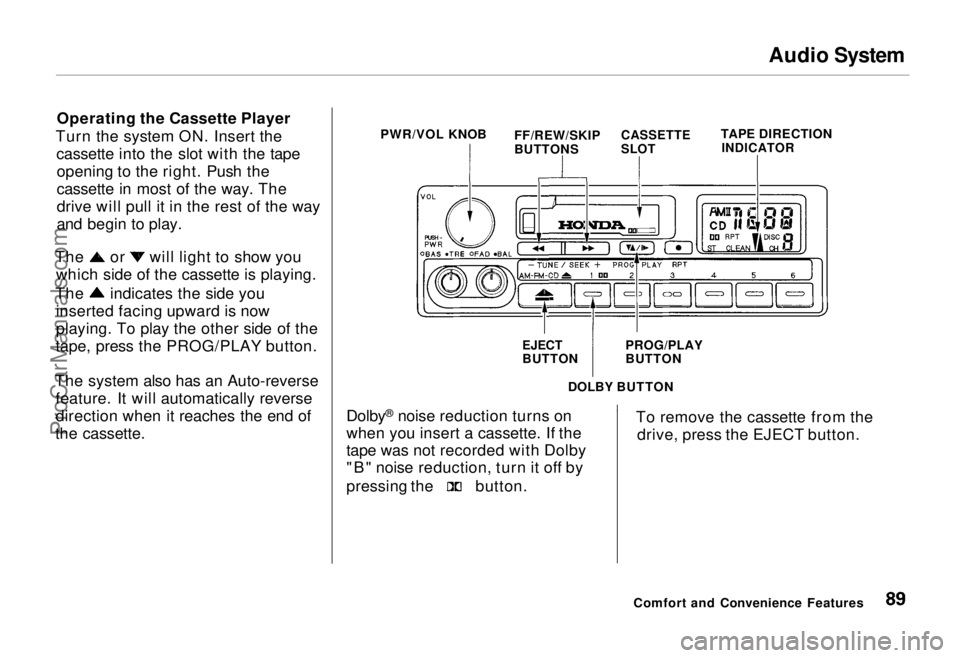
Operating the Cassette Player
Turn the system ON. Insert the cassette into the slot with the tapeopening to the right. Push the
cassette in most of the way. The
drive will pull it in the rest of the way
and begin to play. The or will light to show you
which side of the cassette is playing. The indicates the side you
inserted facing upward is now
playing. To play the other side of the
tape, press the PROG/PLAY button.
The system also has an Auto-reverse feature. It will automatically reverse
direction when it reaches the end of
the cassette. PWR/VOL KNOB
TAPE DIRECTION
INDICATOR
DOLBY BUTTON
Dolby ®
noise reduction turns on
when you insert a cassette. If the
tape was not recorded with Dolby
"B" noise reduction, turn it off by pressing the button.
To remove the cassette from the
drive, press the EJECT button.
Comfort and Convenience Features
FF/REW/SKIP
BUTTONS
CASSETTE
SLOT
EJECT
BUTTON PROG/PLAY
BUTTONProCarManuals.comMain Menu Table of Contents s t
Page 94 of 240
Audio System
Presetting
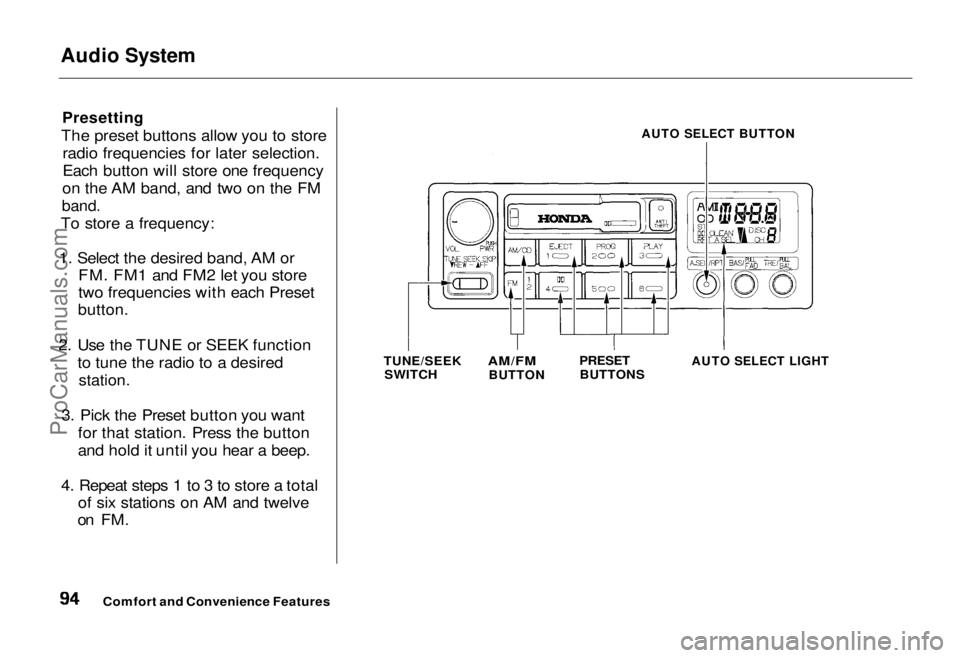
The preset buttons allow you to store radio frequencies for later selection.
Each button will store one frequency
on the AM band, and two on the FM
band.
To store a frequency:
1. Select the desired band, AM or FM. FM1 and FM2 let you store
two frequencies with each Preset
button.
2. Use the TUNE or SEEK function to tune the radio to a desired
station.
3. Pick the Preset button you want for that station. Press the button
and hold it until you hear a beep.
4. Repeat steps 1 to 3 to store a total of six stations on AM and twelve
on FM.
AUTO SELECT BUTTON
TUNE/SEEK SWITCH
AM/FM
BUTTON
PRESET
BUTTONS
AUTO SELECT LIGHT
Comfort and Convenience FeaturesProCarManuals.comMain Menu Table of Contents s t