1995 HONDA ODYSSEY cruise control
[x] Cancel search: cruise controlPage 33 of 240
Instruments and Controls
This section gives information about the controls and displays thatcontribute to the daily operation of
your Honda. All the essential controls are within easy reach.
Control Locations............................ 34
Indicator Lights................................ 35
Gauges............................................. 39
Speedometer............................... 39
Trip Meter................................... 39
Odometer..................................... 39
Temperature Gauge................... 40
Fuel Gauge.................................. 40
Maintenance Required
Indicator................................... 40
Controls Near the Steering Wheel...................................... 41
Headlights...................................
42
Daytime Running
Lights............ 42
Instrument Panel Brightness.... 43
Turn Signals................................. 43
Windshield Wipers...................... 44
Windshield Washers................... 44 Rear Window Wiper and Washer...................................... 45
Hazard Warning.......................... 45
Rear Window Defogger.............. 45
Steering Wheel Adjustment....... 46
Steering Wheel Controls ................ 48 Cruise Control.............................. 48
Horn............................................. 51
Keys and Locks................................ 51
Keys............................................... 51
Ignition Switch............................. 52
Power Door Locks....................... 53Remote Transmitter.................... 54
Childproof Door Locks............... 54
Tailgate......................................... 55 Glove Box..................................... 55
Seats................................................. 56
Passenger Seating...................... 56
Seat Adjustments........................ 56
Driver's Seat Power HeightAdjustment.............................. 57
Head Restraints.......................... 58
Third Seat Access....................... 58 Removing the Second Seats
in the Six-Passenger Model.... 59
Folding the Second Seats in the Seven-Passenger
Model................................... 60
Reclining the Second Seat.......... 61
Folding the Third Seat in All Models...........................
62
Power Windows.............................. .
64
Sunroof............................................. 65
Mirrors............................................. 66
Adjusting the Power Mirrors.....
67
Parking Brake.................................
68
Digital Clock..................................... 68
Beverage Holder.............................. 69 Dashboard Compartment............... 70
Center Poket.................................... 71
Coin Box........................................... 71
Vanity Mirror................................... 71
Cigarette Lighter............................. 72
Ashtrays........................................... 72
Interior Lights.................................. 73
Ceiling Lights.............................. 73
Spotlights..................................... 73
Tailgate Light............................... 74 Courtesy Lights........................... 74
Instruments and ControlsProCarManuals.comMain Menu s t
Page 35 of 240
Indicator Lights
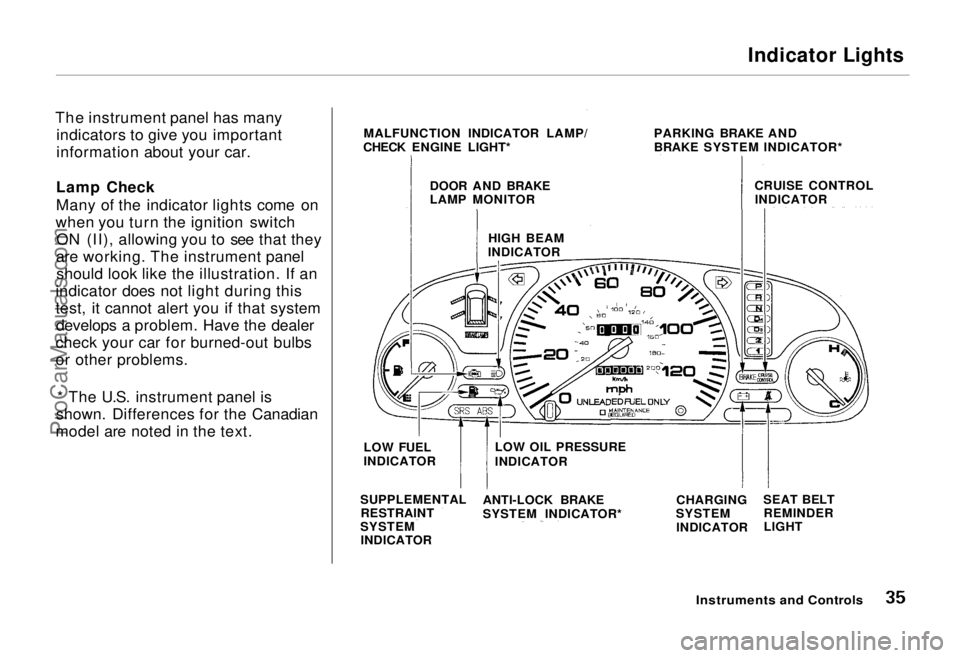
The instrument panel has many indicators to give you important
information about your car.
Lamp Check
Many of the indicator lights come on
when you turn the ignition switch ON (II), allowing you to see that they
are working. The instrument panel should look like the illustration. If an
indicator does not light during this
test, it cannot alert you if that system develops a problem. Have the dealer
check your car for burned-out bulbs
or other problems.
* The U.S. instrument panel is
shown. Differences for the Canadian
model are noted in the text.
Instruments and Controls
MALFUNCTION INDICATOR LAMP/
CHECK ENGINE LIGHT* PARKING BRAKE AND
BRAKE SYSTEM INDICATOR*
CRUISE CONTROLINDICATOR
DOOR AND BRAKE
LAMP MONITOR
HIGH BEAM
INDICATOR
LOW FUEL
INDICATOR
SUPPLEMENTAL RESTRAINT
SYSTEM INDICATOR LOW OIL PRESSURE
INDICATOR
ANTI-LOCK BRAKE
SYSTEM INDICATOR* CHARGING
SYSTEM
INDICATOR SEAT BELT
REMINDER
LIGHTProCarManuals.comMain Menu Table of Contents s t
Page 38 of 240
Indicator Lights
Turn Signal andHazard WarningIndicators
The left or right turn signal light blinks when you signal a lane changeor turn. If the light does not blink or
blinks rapidly, it usually means one of the turn signal bulbs is burned out (see page 178). Replace the bulb as
soon as possible, since other drivers
cannot see that you are signalling.
When you turn on the Hazard
Warning switch, both turn signal lights blink. All turn signals on theoutside of the car should flash.
"Daytime Running
Lights" Indicator
Canadian models only
This indicator lights when you turnthe ignition to ON (II) with the
headlight switch off and the parking
brake set. It should go off if you turnon the headlights or release the
parking brake. If it comes on at any other time, it means there is a
problem with the DRL. There may also be a problem with the high
beam headlights.
High Beam Indicator
This light comes on with the high beam headlights. See page 42 for
information on the headlight
controls.
Cruise Control Indicator
This lights when you set the cruise
control. See page 48 for information
on operating the cruise control.
Low Fuel Indicator
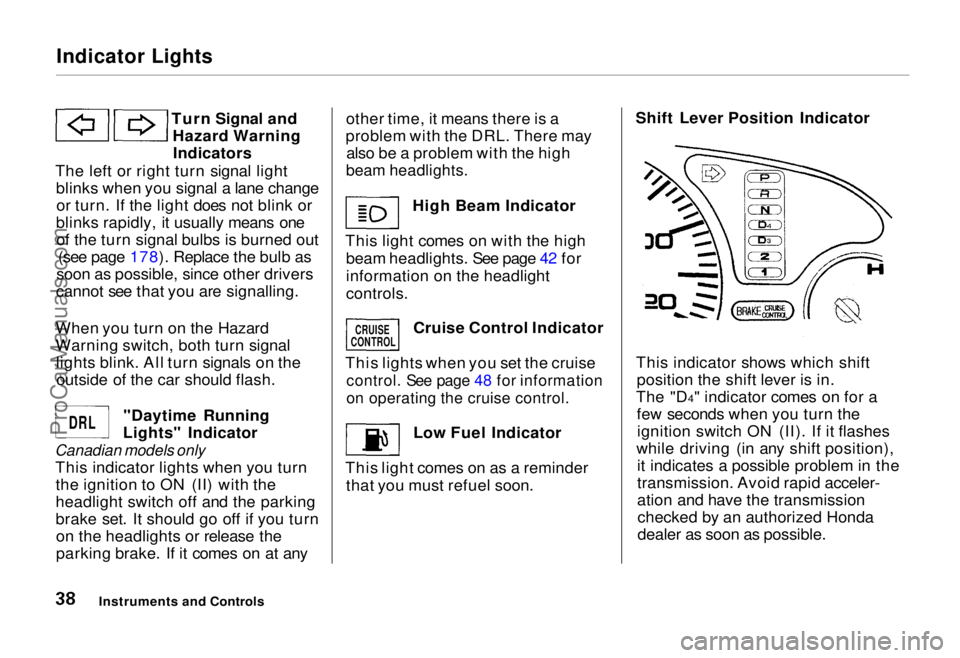
This light comes on as a reminder that you must refuel soon. Shift Lever Position Indicator
This indicator shows which shift position the shift lever is in.
The "D4" indicator comes on for a few seconds when you turn theignition switch ON (II). If it flashes
while driving (in any shift position), it indicates a possible problem in the
transmission. Avoid rapid acceler-
ation and have the transmissionchecked by an authorized Honda
dealer as soon as possible.
Instruments and Controls
CRUISE
CONTROL
DRL
ProCarManuals.comMain Menu Table of Contents s t
Page 41 of 240
Controls Near the Steering Wheel
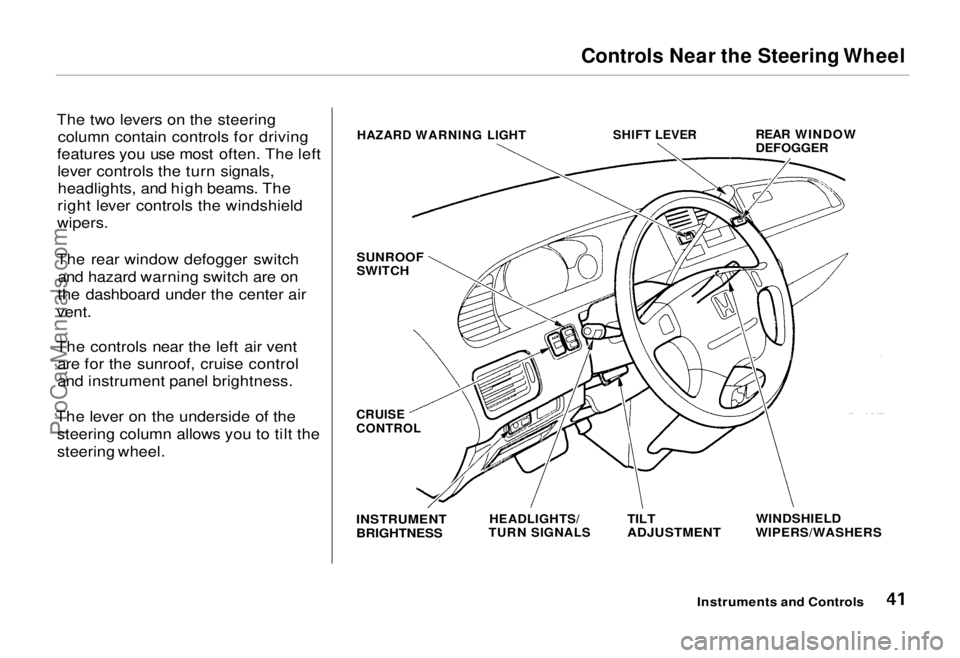
The two levers on the steering column contain controls for driving
features you use most often. The left lever controls the turn signals,headlights, and high beams. The
right lever controls the windshield
wipers.
The rear window defogger switch and hazard warning switch are on
the dashboard under the center air
vent.
The controls near the left air vent are for the sunroof, cruise control
and instrument panel brightness.
The lever on the underside of the steering column allows you to tilt the
steering wheel.
Instruments and Controls
HAZARD WARNING LIGHT
SHIFT LEVER
REAR WINDOW
DEFOGGER
SUNROOF
SWITCH
WINDSHIELD
WIPERS/WASHERS
TILT
ADJUSTMENT
HEADLIGHTS/
TURN SIGNALS
INSTRUMENT
BRIGHTNESS
CRUISE
CONTROLProCarManuals.comMain Menu Table of Contents s t
Page 48 of 240
Steering Wheel Controls
Cruise Control
Cruise control allows you to maintain
a set speed above 25 mph (40 km/h)
without keeping your foot on the accelerator pedal. It is for cruising on
straight, open highways. It is not
recommended for conditions such as
city driving, winding roads, slippery
roads, heavy rain, or bad weather.
You should have full control of the car under those conditions. Using the Cruise Control
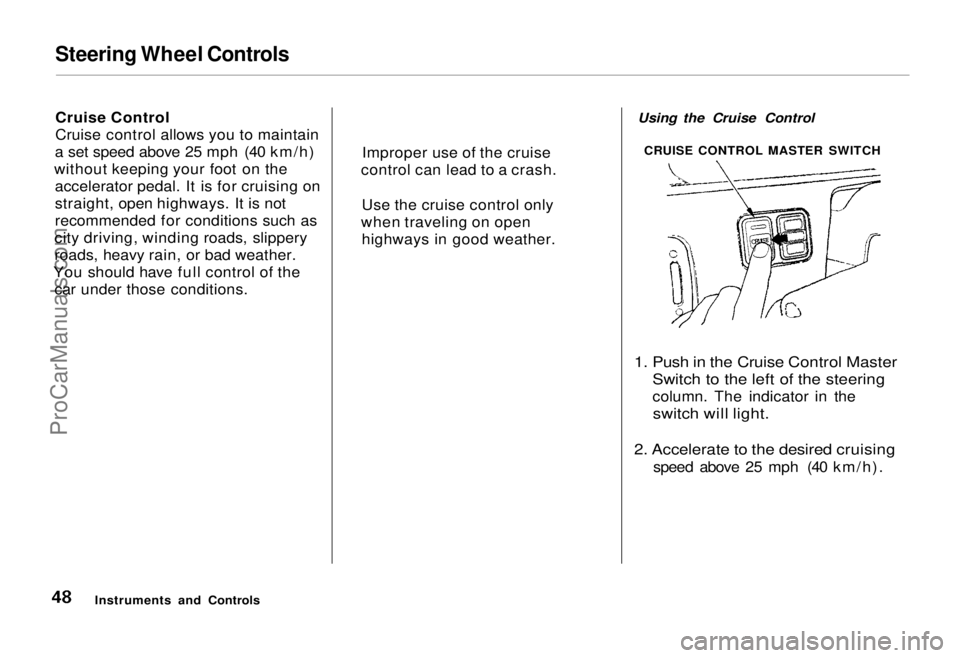
1. Push in the Cruise Control Master Switch to the left of the steering
column. The indicator in the
switch will light.
2. Accelerate to the desired cruising
speed above 25 mph (40 km/h).
Instruments and Controls CRUISE CONTROL MASTER SWITCH
Improper use of the cruise
control can lead to a crash.
Use the cruise control only
when traveling on open highways in good weather.ProCarManuals.comMain Menu Table of Contents s t
Page 49 of 240
Steering Wheel Controls
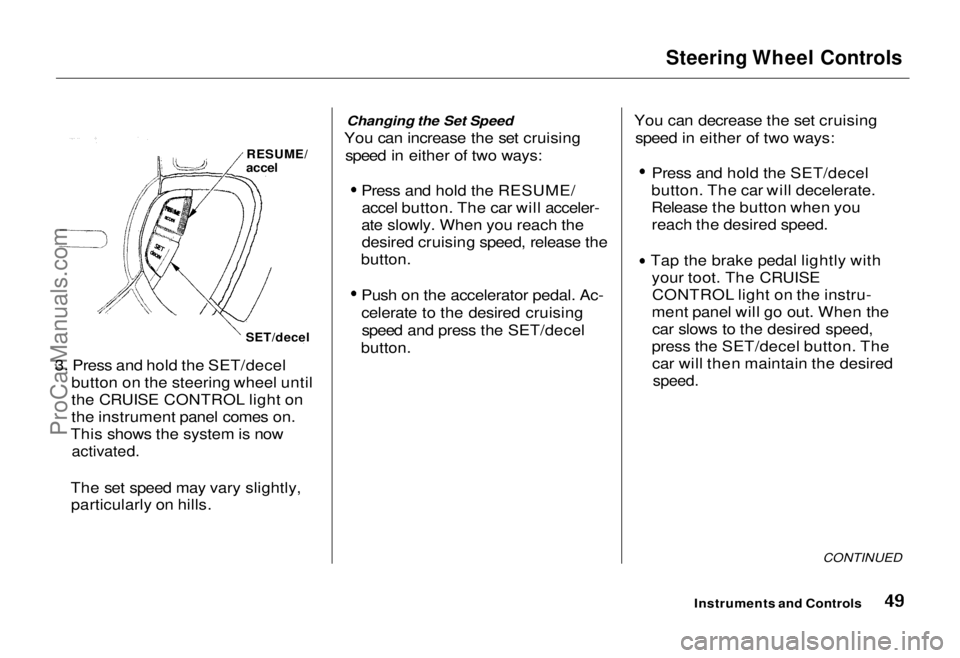
3. Press and hold the SET/decel button on the steering wheel until
the CRUISE CONTROL light on
the instrument panel comes on.
This shows the system is now
activated.
The set speed may vary slightly, particularly on hills. Changing the Set Speed
You can increase the set cruising speed in either of two ways:
Press and hold the RESUME/accel button. The car will acceler-
ate slowly. When you reach the desired cruising speed, release the
button.
Push on the accelerator pedal. Ac-
celerate to the desired cruisingspeed and press the SET/decel
button.
You can decrease the set cruising
speed in either of two ways:
Press and hold the SET/decel
button. The car will decelerate.
Release the button when you reach the desired speed.
Tap the brake pedal lightly with your toot. The CRUISECONTROL light on the instru-
ment panel will go out. When the car slows to the desired speed,
press the SET/decel button. The car will then maintain the desired
speed.
CONTINUED
Instruments and Controls
RESUME/
accel
SET/decelProCarManuals.comMain Menu Table of Contents s t
Page 50 of 240
Steering Wheel Controls
Even with the cruise control turned
on, you can still use the accelerator
pedal to speed up for passing. After
completing the pass, take your foot
off the accelerator pedal. The car
will return to the set cruising speed.
Resting your foot on the brake or
clutch pedal will cause the cruise
control to cancel.
Cancelling the Cruise Control
Any of these actions cause the cruise control to cancel.
Tap the brake pedal.Press the SET/decel and RE-
SUME/accel buttons at the same
time.
Press the Cruise Control Master
Switch.
When you tap the brake pedal, or press the SET and RESUME buttonsat the same time, the CRUISE
CONTROL light on the instrument
panel will go out and the car will
begin to slow down. You can use the
accelerator pedal in the normal way. If you use the brake pedal to cancel
cruise control, the system retains the
previously-set cruising speed. To
return to that speed, accelerate to
above 25 mph (40 km/h) and press
the RESUME/accel button until the CRUISE CONTROL light comes on.
The car will accelerate to the same cruising speed as before.
If you cancel cruise control by
pressing the SET and RESUME
buttons at the same time, the previously-set cruising speed iserased. To use the cruise control,
accelerate to the desired cruisingspeed and press the SET/decel
button.
Pressing the Cruise Control Master
Switch turns the system completely off and erases the previous cruising
speed from memory. To use the
system again, refer to Using the
Cruise Control.
Instruments and ControlsProCarManuals.comMain Menu Table of Contents s t
Page 114 of 240
Fuel Economy
The condition of your car and your driving habits are the two most
important things that affect the fuel
mileage you get.
Vehicle Condition Always maintain your car according to the maintenance schedule. This
will keep it in top operating condition.
An important part of that mainte- nance is the Periodic Checks (see
page 144). For example an under-inflated tire causes more "rolling
resistance," which uses fuel. It also
wears out faster, so check the tire
pressure at least monthly. In winter,
the build-up of snow on your car's
underside adds weight and rolling
resistance. Frequent cleaning helps
your fuel mileage and reduces the chance of corrosion. Driving Habits
You can improve fuel economy by driving moderately. Rapid acceler-
ation, abrupt cornering, and hard
braking use more fuel.
Always drive in the highest gear that allows the engine to run and acceler-
ate smoothly.
Depending on traffic conditions, try
to maintain a constant speed. Every
time you slow down and speed up,
your car uses extra fuel. Use the cruise control, when appropriate, to
increase fuel economy. A cold engine uses more fuel than a
warm engine. It is not necessary to "warm-up" a cold engine by letting it
idle for a long time. You can drive away in about a minute, no matter
how cold it is outside. The engine
will warm up faster, and you get better fuel economy. To cut down on
the number of "cold starts," try tocombine several short trips into one.
The air conditioning puts an extra load on the engine which makes ituse more fuel. Turn off the A/C to
cut down on air conditioning use.Use the flow-through ventilation
when the outside air temperature is moderate.
Before DrivingProCarManuals.comMain Menu Table of Contents s t