Page 135 of 386
Malfunction Indicator Lamp (Service Engine Soon Light)
RVI
llrll
I
K2329
A computer monitors operation of your fuel, ignition and emission control
systems. This light should come on when the ignition is on,
but the engine is
not running, as a check
to show you it is working. If it does not come on at
all, have it fixed right away. If it stays on, or comes on while you are driving,
the computer is indicating that you have a problem. You should take your
vehicle in
for service soon.
If you keep driving your vehicle with this light on, after awhile the emission
controls won’t work as well, your fuel economy won’t be as good, and
your engine may not
run as smoothly. This could lead to costly repairs not
covered
by your warranty. I
2-72
Page 139 of 386
Features & Controls
Gages
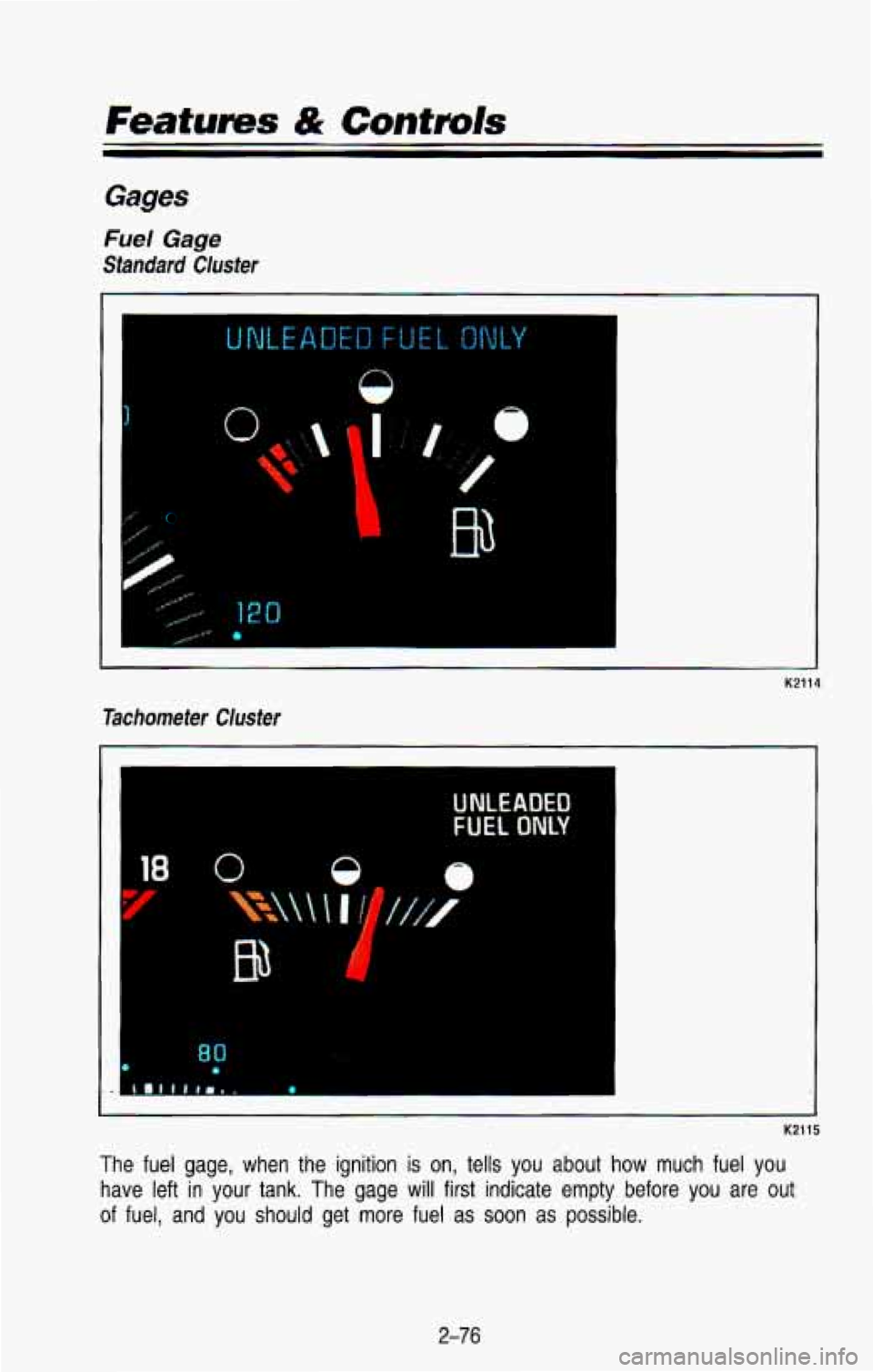
Fuel Gage
Standard Cluster
0
I"
I'
-.
Tachometer Cluster
-I
K2114
UNLEADED
FUEL ONLY
1. .4
K2115
The fuel gage, when the ignition is on, tells you about how much fuel you
have left in your tank.
The gage will first indicate empty before you are out
of fuel, and you should get more fuel as soon as possible.
2-76
Page 140 of 386

Listed are four situations you may experience with your fuel gage:
At the gas station, the fuel pump shuts off before the gage reads full.
It takes a little more or less fuel to fill up than the fuel gage indicated.
For example, the gage may have indicated the tank
was half full, but it
actually took a little more or less than half the tank’s capacity to
fill the
tank.
The gage moves a little when you turn a corner or speed up. \
The gage doesn’t go back to empty when you turn off the ignition.
None
of these indicate a ,problem with the fuel gage.
For information on how to
fill your fuel tank see “Fuel-Filling Your Tank” in
the Index.
For your fuel tank capacity, see “Fuel-Tank Capacity”
in the Index.
Engine Coolant Temperature Gage
260
This gage shows the engine coolant temperature. If the gage pointer moves
into the red area, about 260°F
(145°C) or more, your engine is too hot! It
means that your engine coolant has overheated.
If you have been operating
your vehicle under normal operating conditions, you should pull \
off the road,
stop your vehicle and turn
off the engine as soon as possible.
Hot Coolant Can Burn You Badly!
In “Problems on the Road”, this manual shows what to do. See “Engine
Overheating” in the Index.
2-77
Page 142 of 386
A reading in the low pressure zone may be caused by a dangerouslv low oil
level or other problem causing low oil pressure. Check your oi\
l as soon as
possible.
CAUTION
Don’t keep driving if the oil pressure is low. If you do, your engine
can become so hot that it catches on fire, You or others could be
burned. Check your oil as soon as possible and have your vehicle
serviced.
e NOTICE
I
Damage to your engine from neglected oil problems can rnstly at,,
not covered by your ‘Avanty.
I
Voltmeter
Standard Cluster
14
Tachometer Cluster
19
GL
K2336
When your engine is not running, but the ignition is on (in \
the Run position),
this gage
shows your battery’s state of charge in DC volts. When the engine
is running, the gage shows the condition
of the charging system. Readings
between the low and high warning zones indicate the normal ope\
rating range.
Readings in either warning zone indicate a possible problem in \
the electrical
system.
2-79
Page 156 of 386

Rear Window Defogger
K2112 J
You can tell if your vehicle has this option by looking at the rear window. If
you see lines running across the glass, you have it. These are the wires
which heat your window.
NOTICE
I Scraping the inside of your rear window could cut and damage the
defogger. Your warranty would not cover this damage. And don't put
decals there, you might have
to scrape them off. I
For best results, clear the window of as much snow or ice as possible first.
To turn on the rear window defogger, find the switch marked REAR DEFOG
on your instrument panel, just below the heater system. Press \
the right side
of the switch, with the defog symbol on it, until the light in the switch comes
on, then release
it. The rear window defogger will only work if the ignition
switch
is turned to RUN.
You can turn the defogger off at any time by pressing the left, lighted side of
the switch. The defogger will shut itself
off after several minutes, so that the
glass does not get too hot.
If the defogger shuts off, and the window still
isn't clear, turn the defogger on again.
3-1 1
Page 158 of 386
AM Stereo
This means the Deleo@ system can receive C-QUAM@ stereo broadcasts.
Many
AM stations around the country use C-QUAM@ to produce stereo,
though some do not. (C-QUAM@
is a registered trademark of Motorola, Inc.).
If your Deleo@ system can get C-QUAM@, your “STEREO” light will come on
when you’re receiving it.
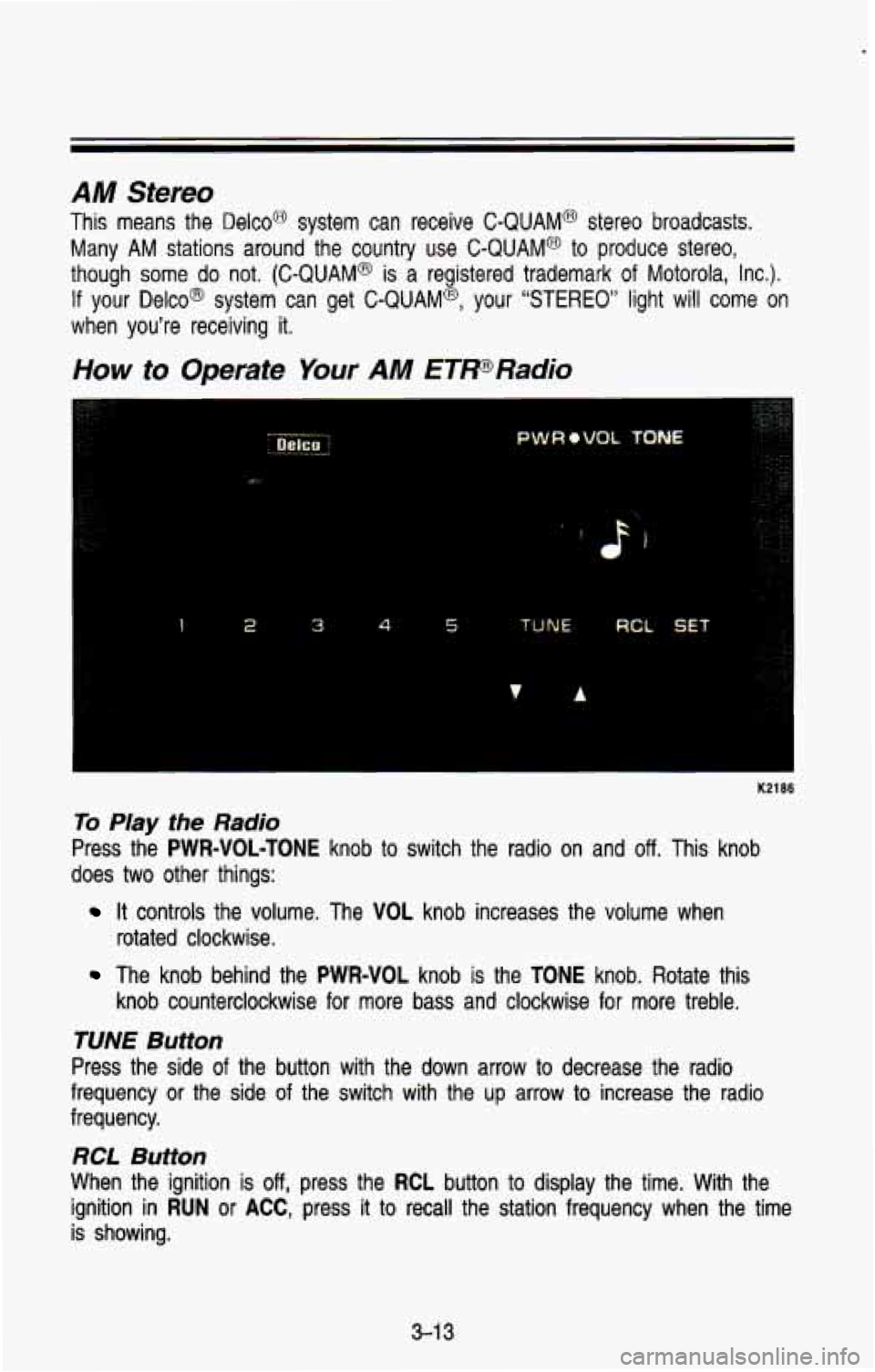
How to Operate Your AM ETPRadio
1 2 3 4 5 TUNE RCL SET
K2186
To Play the Radio
Press the PWR=VOL-TONE knob to switch the radio on and off. This knob
does
two other things:
rotated clockwise.
It controls the volume. The VOL knob increases the volume when
The knob behind the PWR-VOL knob is the TONE knob. Rotate this
knob counterclockwise for more bass and clockwise for more treb\
le.
RCL Button
When the ignition is off, press the RCL button to display the time. With the
ignition in
RUN or ACC, press it to recall the station frequency when the time
is showing.
3-1 3
Page 159 of 386
Comfort Controls & Audio Systems
Pushbutions
The five pushbuttons let you return to favorite stations. Just:
Tune in the station you want.
Press the SET button. (SET appears in the VF display for a few
seconds).
Within 5 seconds, press one of the five pushbuttons to store the station.
Whenever
you press that button, the preset station will return.
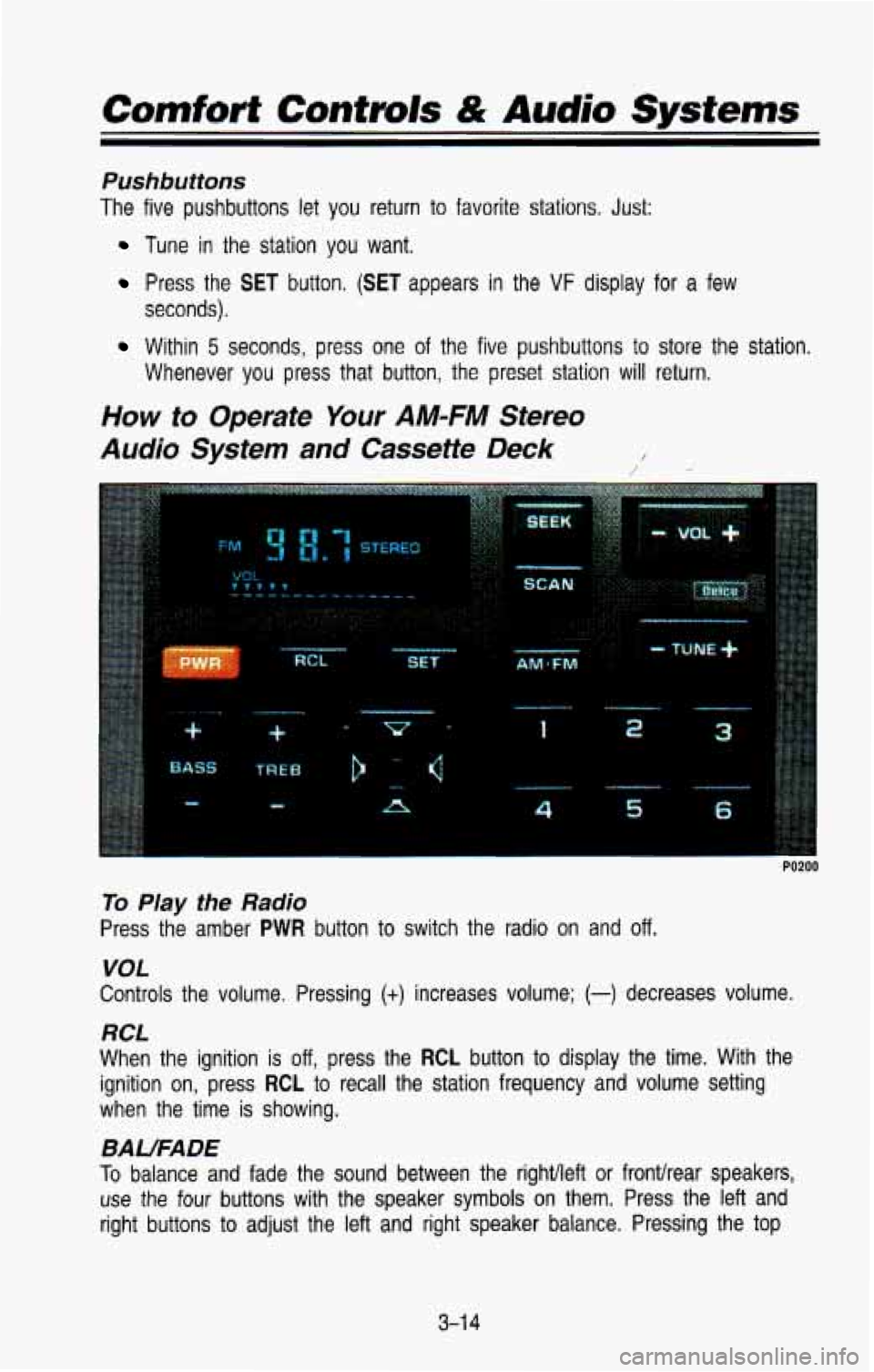
How to Operate Your AM-FM Stereo
Audio System
and Cassette Deck /
1
P
6
PO200
To Play the Radio
Press the amber PWR button to switch the radio on and off.
VOL
Controls the volume. Pressing (+) increases volume; (-) decreases volume.
RCL
When the ignition is off, press the RCL button to display the time. With the
ignition on, press
RCL to recall the station frequency and volume setting
when the time is showing.
BAUFADE
To balance and fade the sound between the rightlleft or fronthear \
speakers,
use the four buttons with the speaker symbols on them. Press \
the left and
right buttons
to adjust the left and right speaker balance. Pressing the top
3-1 4
Page 162 of 386
 up, then the up arrow means that
that side is being played. Likewise, a down arrow would indica\
te that side
“2”
(or")
If a tape is inserted with side “1” (or “A”) up, then the up arrow means that
that side is being played. Likewise, a down arrow would indica\
te that side
“2”
(or “B”) had been selected. The player will automatically switch to the \
other
side of the tape when the first side ends.
EJECT
To remove the tape or stop the tape and switch to radio, press the EJCT
button.
How to Operate Your AM-FM Stereo
Audio System and Cassette Deck with Equalizer
rui99
To Play the Radio
Press the amber PWR button to switch the radio on and off.
VOL
Controls the volume. Pressing (t) increases volume; (-) decreases volume.
RCL
When the ignition is off, press the RCL button to display the time. With the
ignition on, press
RCL to recall the station frequency and volume setting
when the time
is showing.
BAUFADE
To balance and fade the sound between the righvleft or fronthear speakers,
use the four buttons with the speaker symbols
on them. Press the left and
right buttons to adjust the
left and right speaker balance. Pressing the top
and bottom buttons adjusts the front and rear speaker volume,
or fade. The
relative balance and fade adjustments are shown on the
VF display.
3-1 7