1991 LEXUS SC300 code 32
[x] Cancel search: code 32Page 217 of 4087
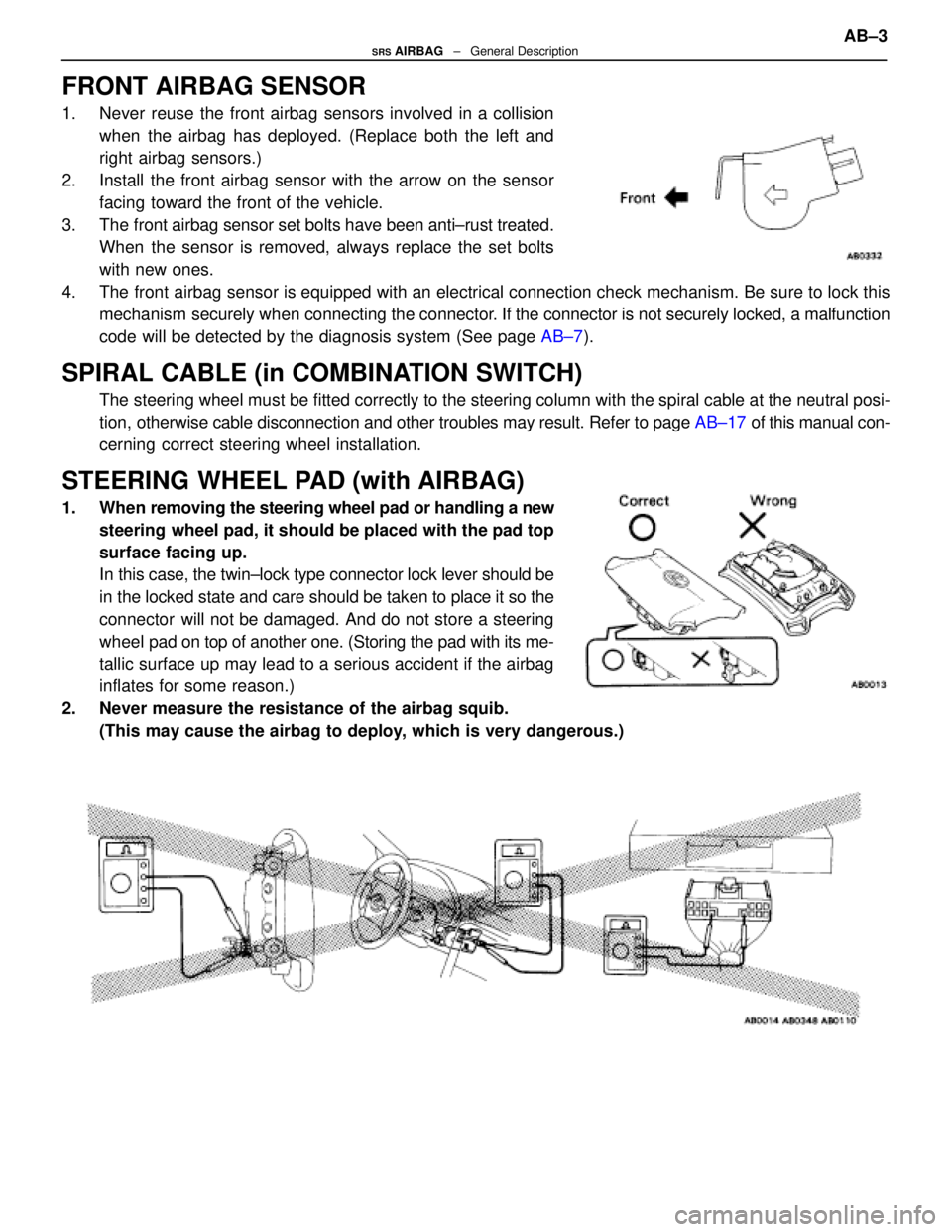
FRONT AIRBAG SENSOR
1. Never reuse the front airbag sensors involved in a collisionwhen the airbag has deployed. (Replace both the left and
right airbag sensors.)
2. Install the front airbag sensor with the arrow on the sensor facing toward the front of the vehicle.
3. The front airbag sensor set bolts have been anti±rust treated. When the sensor is removed, always replace the set bolts
with new ones.
4. The front airbag sensor is equipped with an electrical connection check mechanism. Be sur\
e to lock this mechanism securely when connecting the connector. If the connector is not securely locked, a malfunction
code will be detected by the diagnosis system (See page AB±7).
SPIRAL CABLE (in COMBINATION SWITCH)
The steering wheel must be fitted correctly to the steering column with the\
spiral cable at the neutral posi-
tion, otherwise cable disconnection and other troubles may result. Refer to pa\
ge AB±17 of this manual con-
cerning correct steering wheel installation.
STEERING WHEEL PAD (with AIRBAG)
1. When removing the steering wheel pad or handling a new steering wheel pad, it should be placed with the pad top
surface facing up.
In this case, the twin±lock type connector lock lever should be
in the locked state and care should be taken to place it so the
connector will not be damaged. And do not store a steering
wheel pad on top of another one. (Storing the pad with its me-
tallic surface up may lead to a serious accident if the airbag
inflates for some reason.)
2. Never measure the resistance of the airbag squib. (This may cause the airbag to deploy, which is very dangerous.)
AB±3SRS AIRBAG ± General Description
WhereEverybodyKnowsYourName
Page 228 of 4087
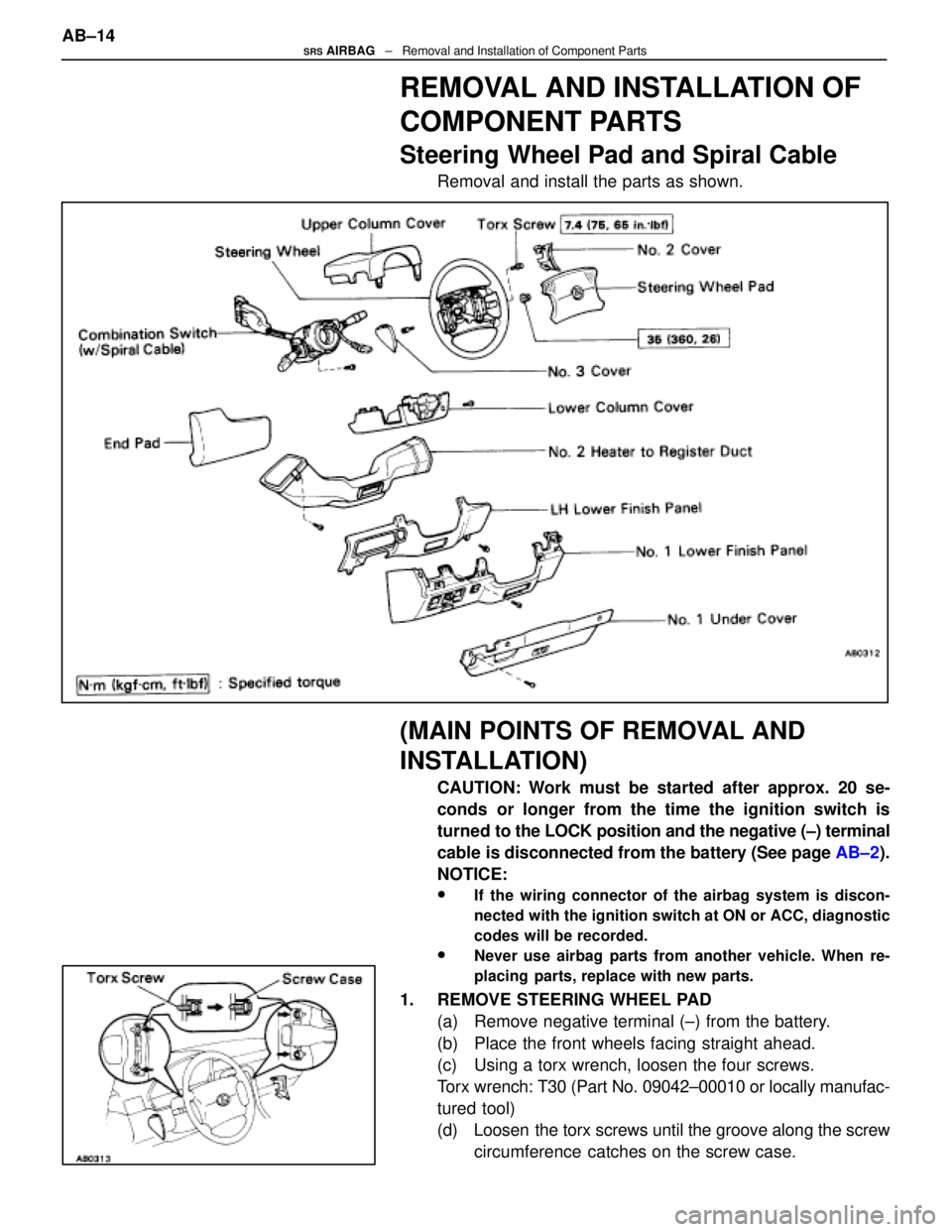
REMOVAL AND INSTALLATION OF
COMPONENT PARTS
Steering Wheel Pad and Spiral Cable
Removal and install the parts as shown.
(MAIN POINTS OF REMOVAL AND
INSTALLATION)
CAUTION: Work must be started after approx. 20 se-
conds or longer from the time the ignition switch is
turned to the LOCK position and the negative (±) terminal
cable is disconnected from the battery (See page AB±2).
NOTICE:
wIf the wiring connector of the airbag system is discon-
nected with the ignition switch at ON or ACC, diagnostic
codes will be recorded.
wNever use airbag parts from another vehicle. When re-
placing parts, replace with new parts.
1. REMOVE STEERING WHEEL PAD (a) Remove negative terminal (±) from the battery.
(b) Place the front wheels facing straight ahead.
(c) Using a torx wrench, loosen the four screws.
Torx wrench: T30 (Part No. 09042±00010 or locally manufac-
tured tool)
(d) Loosen the torx screws until the groove along the screwcircumference catches on the screw case.
AB±14
SRS AIRBAG
± Removal and Installation of Component Parts
WhereEverybodyKnowsYourName
Page 230 of 4087
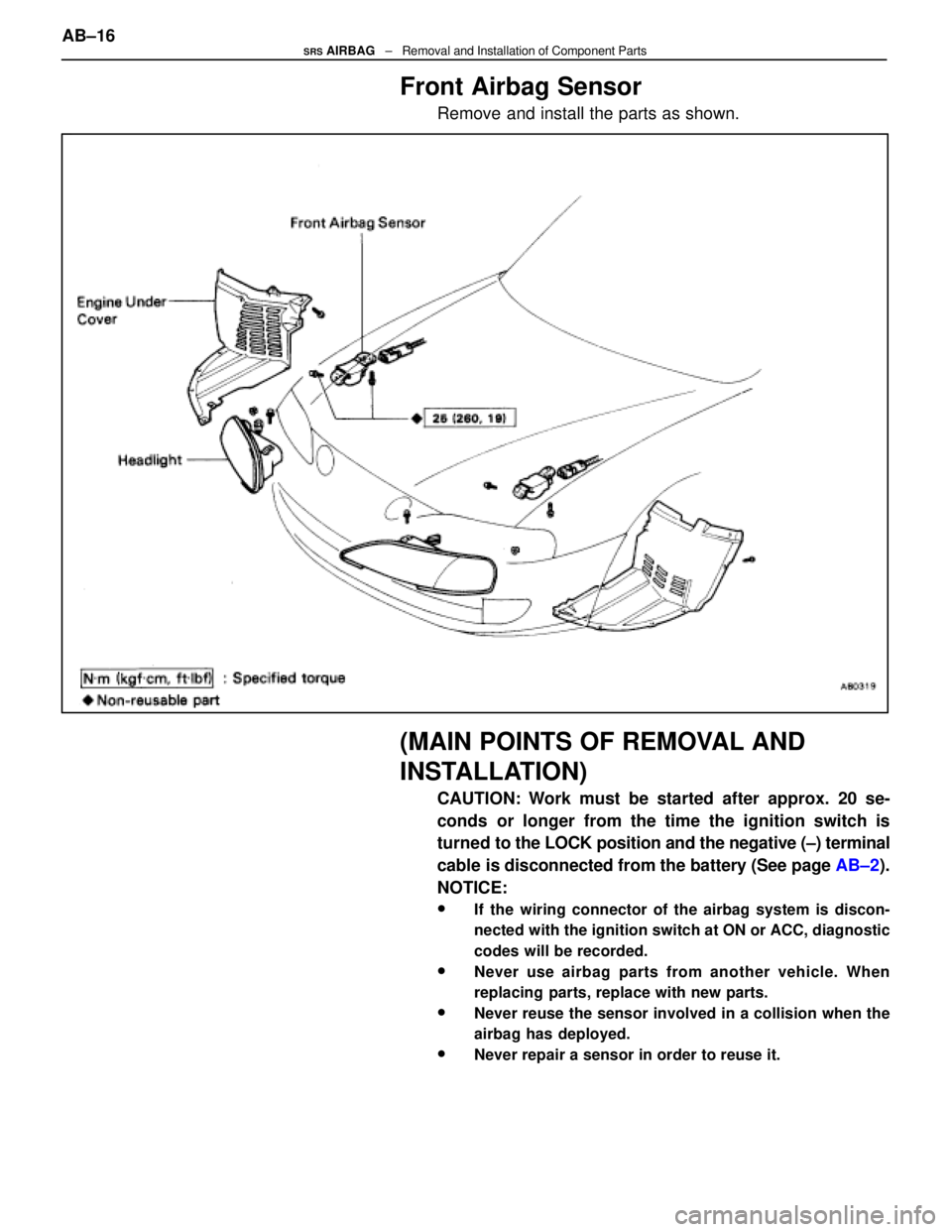
Front Airbag Sensor
Remove and install the parts as shown.
(MAIN POINTS OF REMOVAL AND
INSTALLATION)
CAUTION: Work must be started after approx. 20 se-
conds or longer from the time the ignition switch is
turned to the LOCK position and the negative (±) terminal
cable is disconnected from the battery (See page AB±2).
NOTICE:
wIf the wiring connector of the airbag system is discon-
nected with the ignition switch at ON or ACC, diagnostic
codes will be recorded.
wNever use airbag parts from another vehicle. When
replacing parts, replace with new parts.
wNever reuse the sensor involved in a collision when the
airbag has deployed.
wNever repair a sensor in order to reuse it.
AB±16SRS AIRBAG ± Removal and Installation of Component Parts
WhereEverybodyKnowsYourName
Page 231 of 4087
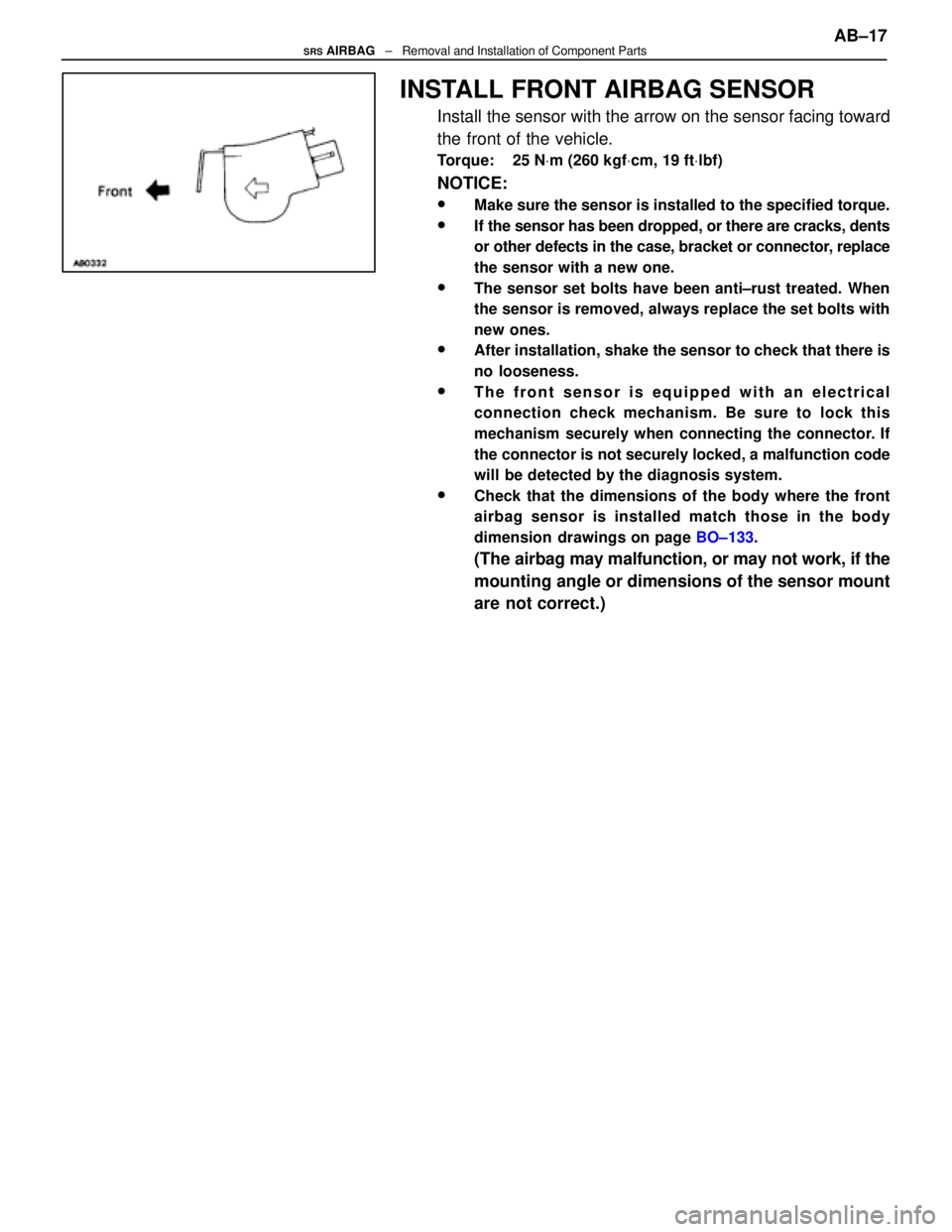
INSTALL FRONT AIRBAG SENSOR
Install the sensor with the arrow on the sensor facing toward
the front of the vehicle.
Torque: 25 NVm (260 kgf Vcm, 19 ft Vlbf)
NOTICE:
wMake sure the sensor is installed to the specified torque.
wIf the sensor has been dropped, or there are cracks, dents
or other defects in the case, bracket or connector, replace
the sensor with a new one.
wThe sensor set bolts have been anti±rust treated. When
the sensor is removed, always replace the set bolts with
new ones.
wAfter installation, shake the sensor to check that there is
no looseness.
wThe front sensor is equipped with an electrical
connection check mechanism. Be sure to lock this
mechanism securely when connecting the connector. If
the connector is not securely locked, a malfunction code
will be detected by the diagnosis system.
wCheck that the dimensions of the body where the front
airbag sensor is installed match those in the body
dimension drawings on page BO±133.
(The airbag may malfunction, or may not work, if the
mounting angle or dimensions of the sensor mount
are not correct.) AB±17
SRS AIRBAG
± Removal and Installation of Component Parts
WhereEverybodyKnowsYourName
Page 239 of 4087

How To Proceed With Troubleshooting
Malfunction symptoms of the airbag system are difficult to confirm, so the diagnostic codes become the most
important source of information when troubleshooting. Perform troubleshooting of the airbag system in ac\
cor-
dance with the following procedure:
HINT: Do not disconnect the battery negative (±) terminal cable until st\
ep [ 3 ], Diagnostic Code Check and Re-
cording, has been completed.1. CUSTOMER PROBLEM ANALYSIS Using the CUSTOMER PROBLEM ANALYSIS CHECK SHEET (See page AB±29) for reference, ask the
customer in as much detail as possible about the problem.
2. WARNING LIGHT CHECK Check the airbag warning light. If the light remains on, a malfunction is sto\
red in the center airbag sensor,
assembly, so proceed to step [ 3 ]. If the airbag warning light is not on, a malf\
unction has occurred in the
airbag warning light circuit, so perform troubleshooting for code 22.
HINT: Code 22 is recorded when a malfunction occurs in the airbag warning li\
ght system.
If an open malfunction occurs in the airbag warning light system, the airb\
ag warning light does not light up,
so that until the malfunction is repaired, the diagnostic codes (includin\
g code 22) cannot be confirmed.
3. DIAGNOSTIC CODE CHECK AND RECORDING Check the diagnostic codes and make a note of any malfunction codes which are\
output. If a normal code
is output, an abnormality in the power source circuit may have occurred, so perform troubleshootin\
g for
source voltage in step [ 8 ].
If code 22 is output, skip steps [ 4 ] and [ 5 ] and proceed to step [ 7\
].
4. CLEARING OF MALFUNCTION CODE (EXCEPT CODE 41) Clear the malfunction code.
HINT: The malfunction code output in step [ 3 ] indicates that a malfunction \
has occurred in the circuit desig-
nated by the malfunction code, but does not indicate whether the malfunction \
is still occurring or whether
it was in the past.
Accordingly, it is necessary to find out the present condition of the malfunction oc\
currence by clearing the
malfunction code and performing the diagnostic code check again. If this\
operation is neglected and trou-
bleshooting is performed using only the malfunction code confirmed in step [ 3 ], isola\
ting the problem com-
ponent becomes difficult and invites mistaken diagnosis.
5. DIAGNOSTIC CODE CHECK AND RECORDING [ 6 ] SYMPTOM SIMULATION After repeating ignition switch ON±OFF operation (ON: wait 20 secs., OFF: wait 20 secs.) 5 times, check
the diagnostic codes. If any code other than code 41 is output, the malfunc\
tion is still occurring, so proceed
to step [ 7 ].
If code 41 only is output, the following three cases are possible:
w Intermittent trouble occurred previously, but it is now normal.
w The problem has been corrected, but clearing of code 41 has been forgott\
en.
w There is a malfunction in the circuit for code 41.
Focusing on the circuit of the malfunction code stored in step 3, use th\
e simulation method in step [ 6 ]
in order to simulate the malfunction. If the malfunction occurs, proceed t\
o step [ 7 ]; if not, proceed to step.
[ 12 ]. AB±25
SRS AIRBAG
± Troubleshooting
WhereEverybodyKnowsYourName
Page 240 of 4087

NOTICE: When connecting the battery after clearing the malfunction code, always\
do it with the igni-
tion switch in LOCK position. When the battery has been reconnected, turn the ignition switch to
ACC or ON position after at least 2 seconds have elapsed.
If the battery is reconnected with the ignition switch in ACC or ON posi\
tion, or the ignition switch
is turned to ACC or ON within 2 seconds of connecting the battery, it is possible that the diagnosis
system will not operate normally.
HINT: Determine the malfunction in the airbag system in step [ 6 ] by whethe\
r or not a malfunction code
other than code 41 is output.
7. DIAGNOSTIC CODE CHART Proceed to the appropriate flow chart in step [ 8 ] in accordance with the malfunction code found in step
[ 5 ] or [ 6 ].
8. CIRCUIT INSPECTION [ 9 ] REPAIR Find out if the problem lies in a sensor, actuator or wire harness and connector, and repair the problem.
After the problem part is repaired, reinstall the disassembled parts. Do not \
start work until at least 20 se-
conds after the ignition switch is turned to the LOCK position and the negati\
ve (±) terminal cable is discon-
nected.
CAUTION: If incorrect procedure is used, a malfunction may occur in the system o\
r there is the dan-
ger that airbag may be accidentally activated during the repair operation. Carefully read the GEN-
ERAL DESCRIPTION (See page AB±2) and the cautions for each operation, and perform repairs in
the correct order using the correct methods.
HINT: The following illustration for the CIRCUIT INSPECTION shows each conne\
ctor for the circuit from
the center airbag sensor assembly to the steering wheel pad (squib).
10 CLEARING OF MALFUNCTION CODE (EXCEPT CODE 41) When all the malfunction codes found in steps [ 5 ] and [ 6 ] have been repa\
ired, clear the malfunction
codes.
AB±26
SRS AIRBAG
± Troubleshooting
WhereEverybodyKnowsYourName
Page 241 of 4087

11. DIAGNOSTIC CODE CHECKAfter repeating ignition switch ON±OFF operation (ON: wait 20 secs., OFF: wait 20 secs.) 5 times, check
the diagnostic codes. If only code 41 is displayed, proceed to step [ 12 ]. If a code other than code 41 is
displayed, return to step [ 7 ] and troubleshoot the displayed malfuncti\
on code.
NOTICE: When connecting the battery after clearing the malfunction code,\
always do it with the ignition
switch in LOCK position. When the battery has been reconnected, turn the ignition \
switch to ACC or ON
position after at least 2 seconds have elapsed.
If the battery is reconnected with the ignition switch in ACC or ON positi\
on, or the ignition switch is turned
ACC or ON within 2 seconds of connecting the battery, it is possible that the diagnosis system will not oper-
ate normally.
12. CLEARING OF MALFUNCTION CODE 41 STORED IN MEMORY Clear malfunction code 41 stored in memory. This operation is not necessary only in case that the power
source voltage returns to normal.
13. CONFIRMATION TEST Check the warning light again and confirm that all the malfunctions have been\
repaired. If the warning light
indicates an abnormality, repeat the operation again from step [ 2 ]. If code 41 is output at st\
ep [ 3 ], skip
steps [ 4 ] and [ 5 ] and proceed to step [ 7 ]. AB±27
SRS AIRBAG
± Troubleshooting
WhereEverybodyKnowsYourName
Page 242 of 4087
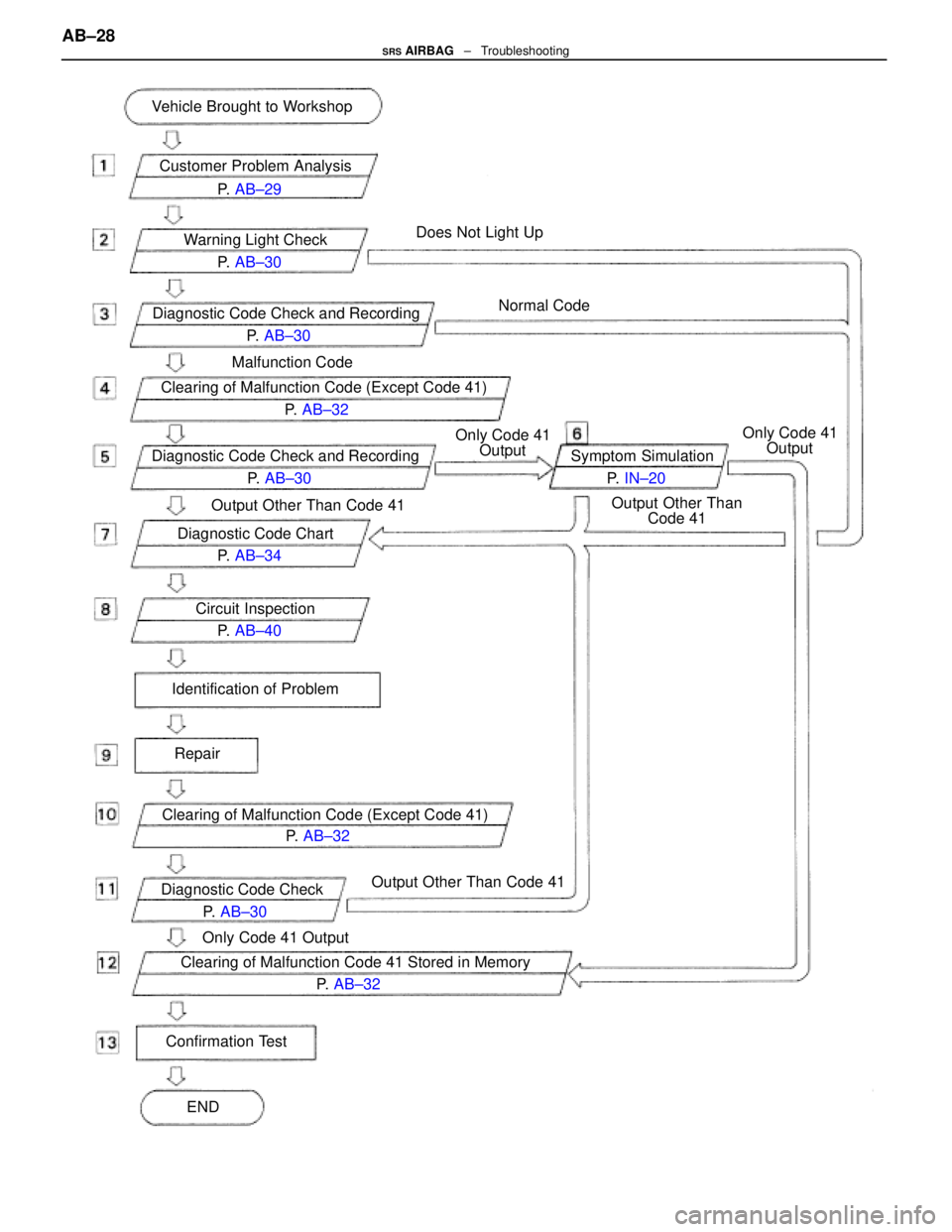
Customer Problem Analysis
Diagnostic Code Check and Recording P. AB±30
P.
AB±29
Warning Light Check P. AB±30
Diagnostic Code Check and Recording P. AB±30
Clearing of Malfunction Code (Except Code 41) P. AB±32
Diagnostic Code Chart P. AB±34
Circuit Inspection P. AB±40
Identification of Problem
Repair
Vehicle Brought to Workshop
Symptom SimulationP. IN±20
Clearing of Malfunction Code (Except Code 41) P. AB±32
Diagnostic Code Check P. AB±30
Clearing of Malfunction Code 41 Stored in Memory P. AB±32
Confirmation Test
ENDOnly Code 41 Output
Output Other Than Code 41
Output Other Than Code 41
Only Code 41
Output
Output Other ThanCode 41 Only Code 41
Output
Does Not Light Up
Normal Code
Malfunction Code
AB±28SRS AIRBAG ± Troubleshooting
WhereEverybodyKnowsYourName