Page 30 of 136
Warning and Indicator Lights
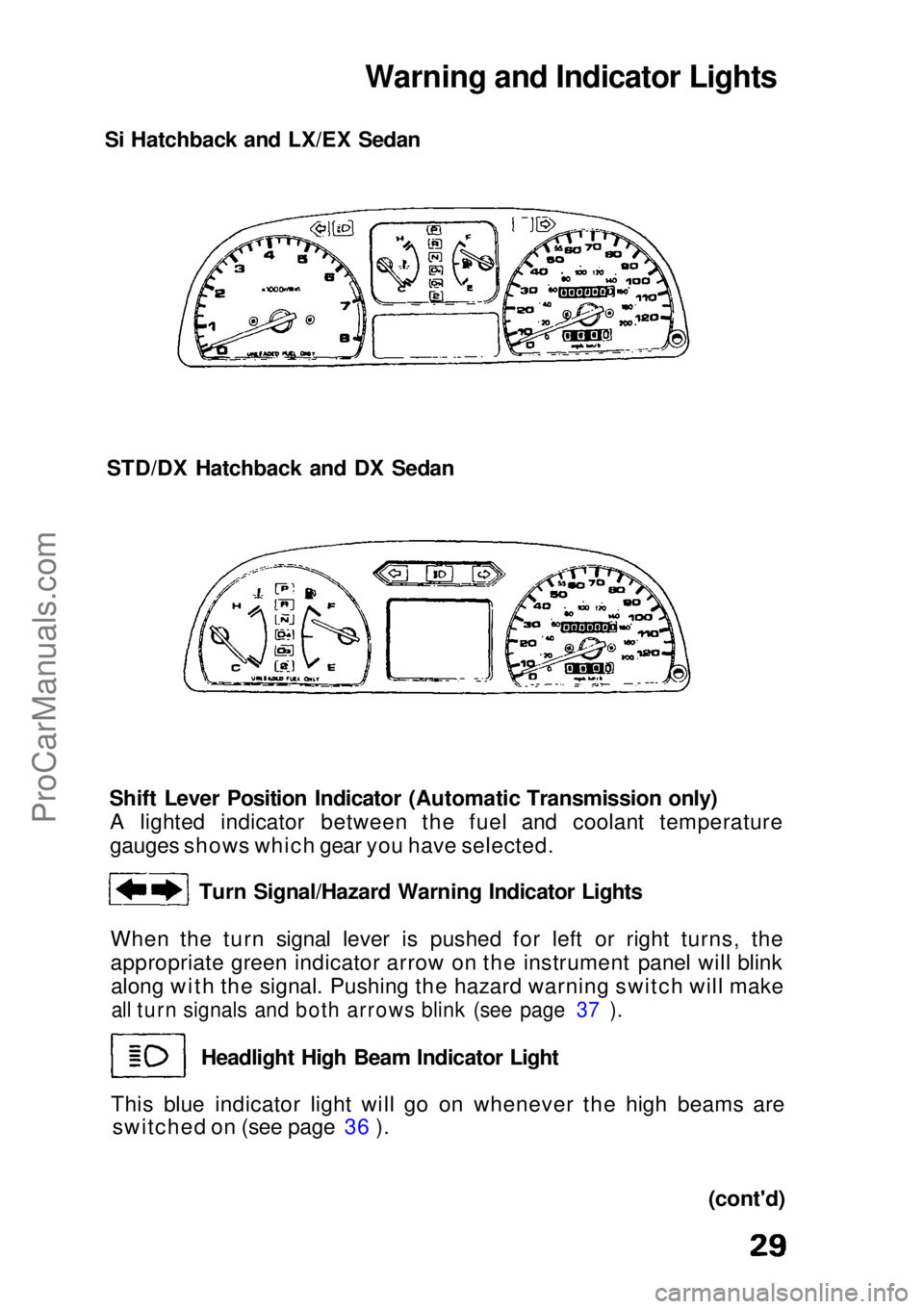
Si Hatchback and LX/EX Sedan
STD/DX Hatchback and DX Sedan
Shift Lever Position Indicator (Automatic Transmission only)A lighted indicator between the fuel and coolant temperature
gauges shows which gear you have selected.
Turn Signal/Hazard Warning Indicator Lights
When the turn signal lever is pushed for left or right turns, the
appropriate green indicator arrow on the instrument panel will blink along with the signal. Pushing the hazard warning switch will make
all turn signals and both arrows blink (see page 37 ).
Headlight High Beam Indicator Light
This blue indicator light will go on whenever the high beams are switched on (see page 36 ).
(cont'd)ProCarManuals.comMain Menu s t
Page 31 of 136
Warning and Indicator Lights (cont'd)
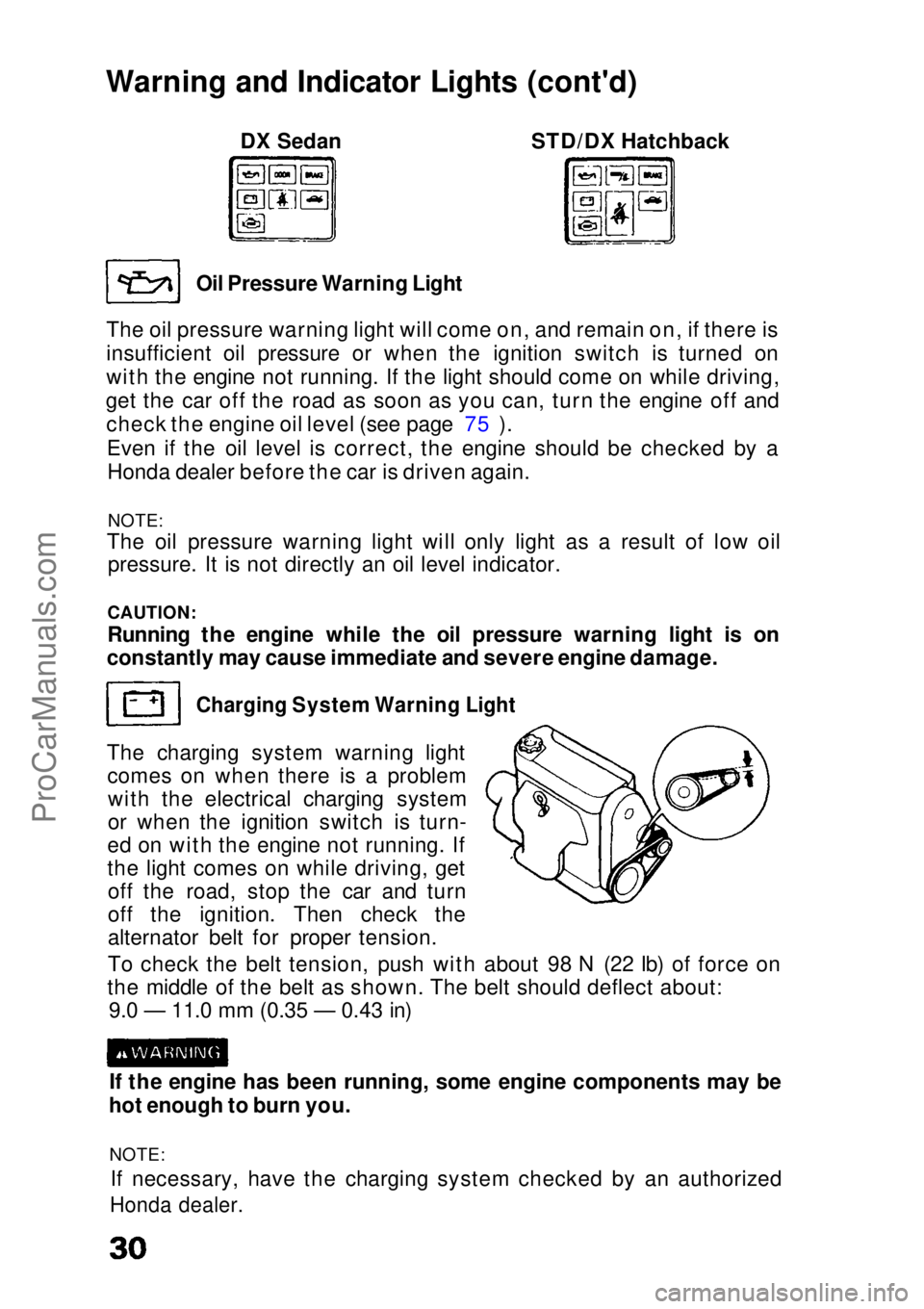
DX Sedan STD/DX Hatchback
Oil Pressure Warning Light
The oil pressure warning light will come on, and remain on, if there is
insufficient oil pressure or when the ignition switch is turned on
with the engine not running. If the light should come on while driving,
get the car off the road as soon as you can, turn the engine off and check the engine oil level (see page 75 ).
Even if the oil level is correct, the engine should be checked by aHonda dealer before the car is driven again.
NOTE:
The oil pressure warning light will only light as a result of low oil
pressure. It is not directly an oil level indicator.
CAUTION:
Running the engine while the oil pressure warning light is on
constantly may cause immediate and severe engine damage.
Charging System Warning Light
The charging system warning light comes on when there is a problemwith the electrical charging system
or when the ignition switch is turn-
ed on with the engine not running. If
the light comes on while driving, get off the road, stop the car and turn
off the ignition. Then check the
alternator belt for proper tension.
To check the belt tension, push with about 98 N (22 Ib) of force on
the middle of the belt as shown. The belt should deflect about: 9.0 — 11.0 mm (0.35 — 0.43 in)
If the engine has been running, some engine components may be
hot enough to burn you.
NOTE: If necessary, have the charging system checked by an authorized
Honda dealer.ProCarManuals.comMain Menu s t
Page 32 of 136
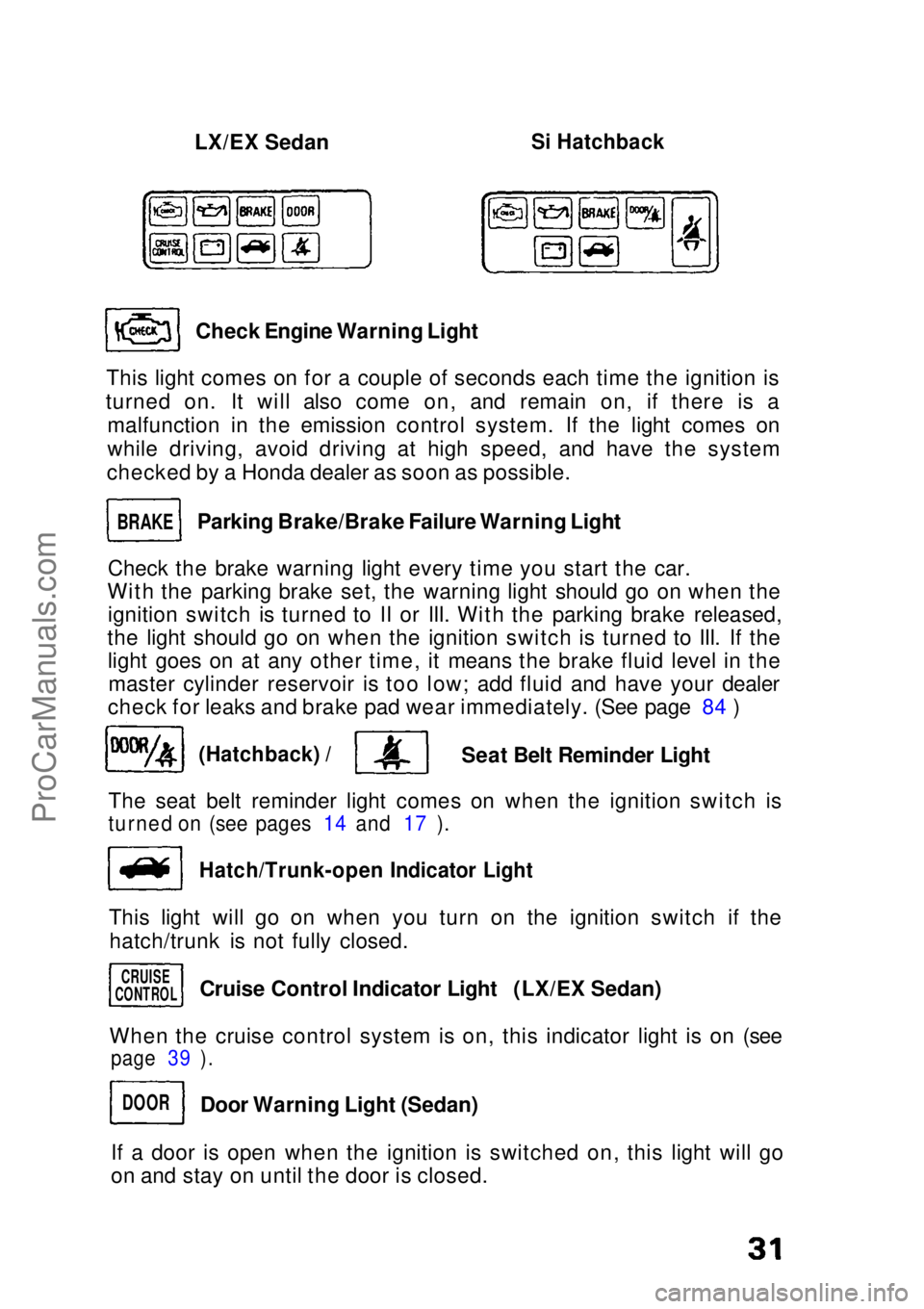
LX/EX Sedan
Si Hatchback
Check Engine Warning Light
This light comes on for a couple of seconds each time the ignition is
turned on. It will also come on, and remain on, if there is a malfunction in the emission control system. If the light comes on
while driving, avoid driving at high speed, and have the system
checked by a Honda dealer as soon as possible.
Parking Brake/Brake Failure Warning Light
Check the brake warning light every time you start the car.
With the parking brake set, the warning light should go on when the ignition switch is turned to II or III. With the parking brake released,
the light should go on when the ignition switch is turned to III. If the light goes on at any other time, it means the brake fluid level in themaster cylinder reservoir is too low; add fluid and have your dealer
check for leaks and brake pad wear immediately. (See page 84 )
(Hatchback) /
Seat Belt Reminder Light
The seat belt reminder light comes on when the ignition switch is
turned on (see pages 14 and 17 ).
Hatch/Trunk-open Indicator Light
This light will go on when you turn on the ignition switch if the hatch/trunk is not fully closed.
When the cruise control system is on, this indicator light is on (see
page 39 ).
If a door is open when the ignition is switched on, this light will go
on and stay on until the door is closed.
BRAKE
CRUISE
CONTROL
DOOR
Cruise Control Indicator Light (LX/EX Sedan)
Door Warning Light (Sedan)ProCarManuals.comMain Menu s t
Page 33 of 136
Tilt Steering
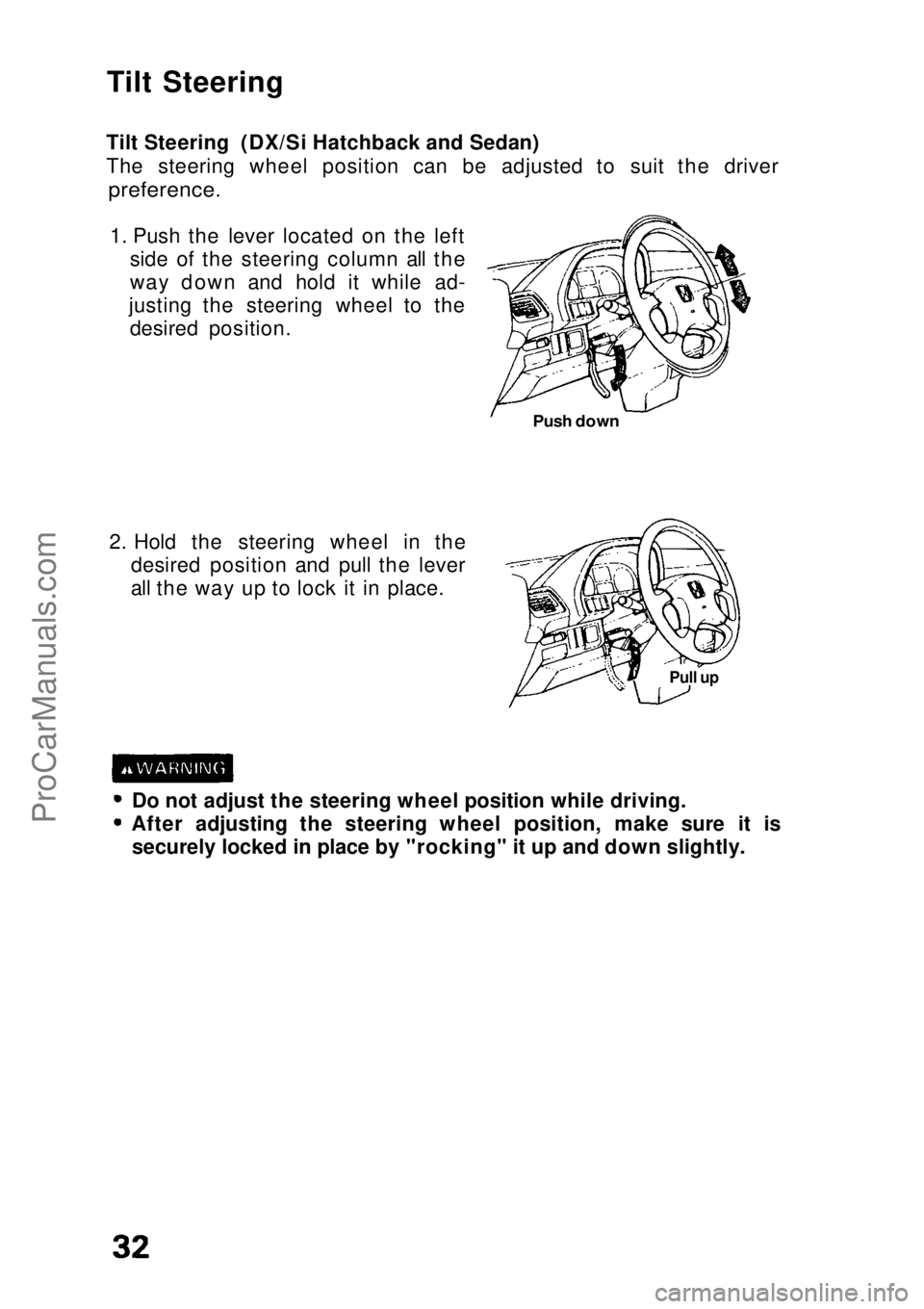
Tilt Steering (DX/Si Hatchback and Sedan)
The steering wheel position can be adjusted to suit the driver
preference.
1. Push the lever located on the left side of the steering column all the
way down and hold it while ad-
justing the steering wheel to the desired position.
2. Hold the steering wheel in the desired position and pull the lever
all the way up to lock it in place.
Do not adjust the steering wheel position while driving. After adjusting the steering wheel position, make sure it is
securely locked in place by "rocking" it up and down slightly.
Pull up
Push downProCarManuals.comMain Menu s t
Page 34 of 136
Windshield Wipers/Washer/Defogger
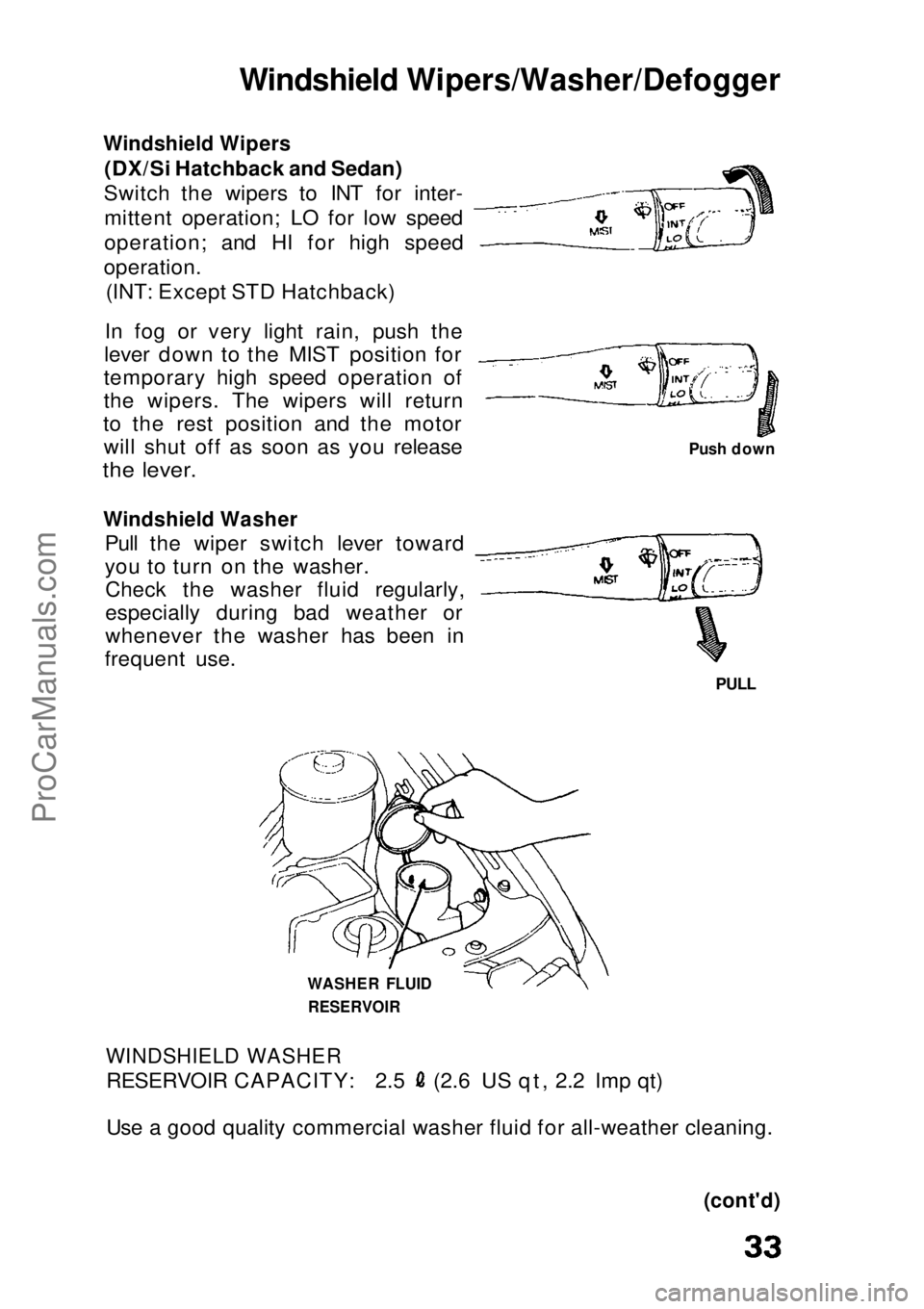
Windshield Wipers
(DX/Si Hatchback and Sedan)
Switch the wipers to INT for inter- mittent operation; LO for low speed
operation; and HI for high speed
operation. (INT: Except STD Hatchback)
In fog or very light rain, push the
lever down to the MIST position for
temporary high speed operation of
the wipers. The wipers will return
to the rest position and the motor will shut off as soon as you release
the lever.
Windshield Washer
Pull the wiper switch lever toward
you to turn on the washer.Check the washer fluid regularly,
especially during bad weather or
whenever the washer has been in
frequent use.
PULL
WASHER FLUID RESERVOIR
WINDSHIELD WASHER
RESERVOIR CAPACITY: 2.5 (2.6 US qt, 2.2 Imp qt)
Use a good quality commercial washer fluid for all-weather cleaning.
(cont'd)
Push downProCarManuals.comMain Menu s t
Page 35 of 136
Windshield Wipers/Washer/Defogger (cont'd)
CAUTION:
Do not use radiator antifreeze in the windshield washer; it will
damage the paint.
Do not use a vinegar/water combination in the windshield
washer; it will damage the pump. Prolonged operation of the washer without fluid may damage
the pump.
In freezing weather, warm the windshield with the defrosters
before using the washer. This will help prevent icing which could
seriously impair visibility.
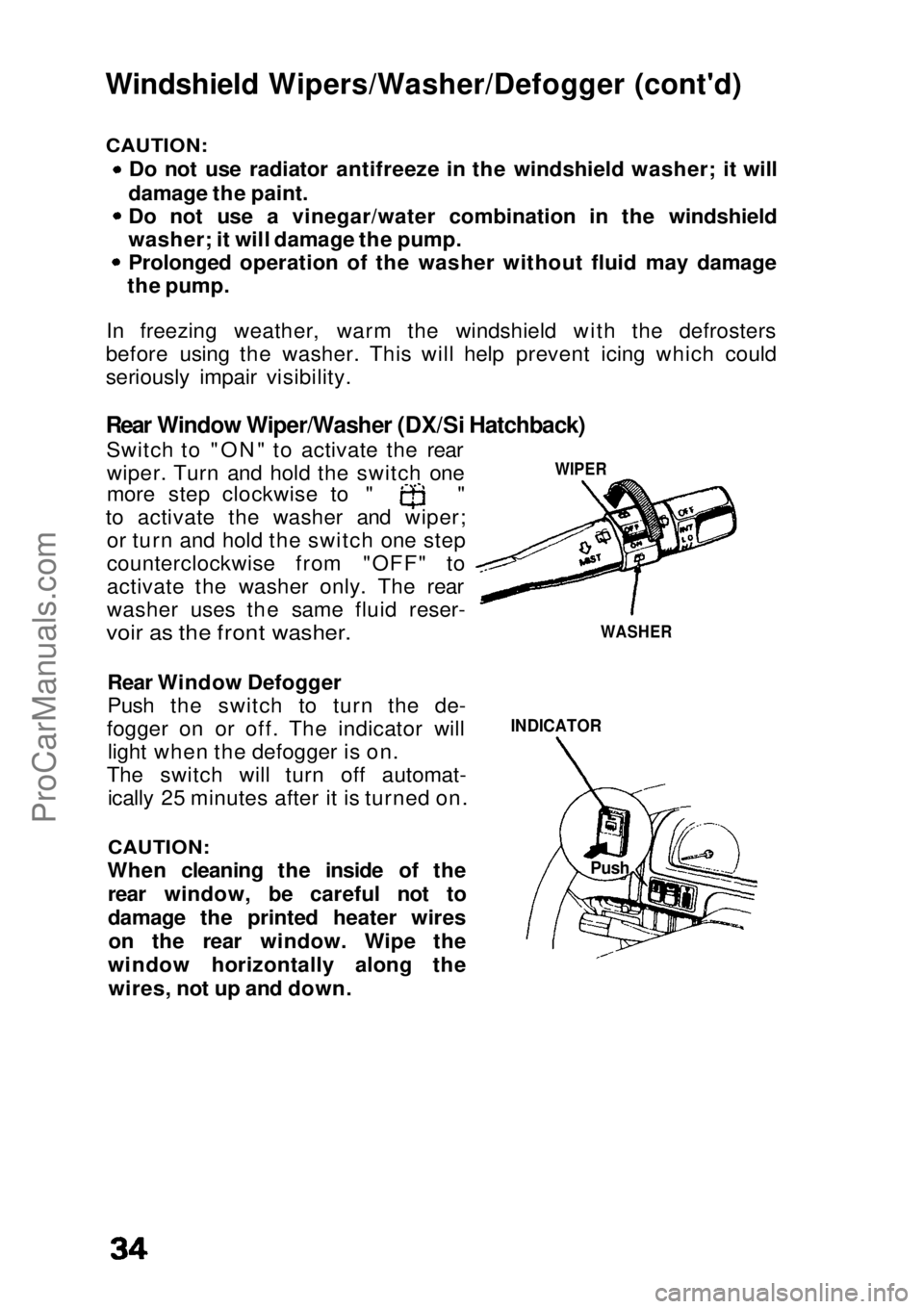
Rear Window Wiper/Washer (DX/Si Hatchback)
Switch to "ON" to activate the rearwiper. Turn and hold the switch one more step clockwise to " "
to activate the washer and wiper; or turn and hold the switch one step
counterclockwise from "OFF" to
activate the washer only. The rear
washer uses the same fluid reser-
voir as the front washer.
Rear Window Defogger
Push the switch to turn the de-
fogger on or off. The indicator will light when the defogger is on.
The switch will turn off automat- ically 25 minutes after it is turned on.
CAUTION:
When cleaning the inside of the rear window, be careful not to
damage the printed heater wireson the rear window. Wipe the
window horizontally along the wires, not up and down.
INDICATOR
WIPER
WASHER
PushProCarManuals.comMain Menu s t
Page 36 of 136
Mirrors
Rearview Mirrors
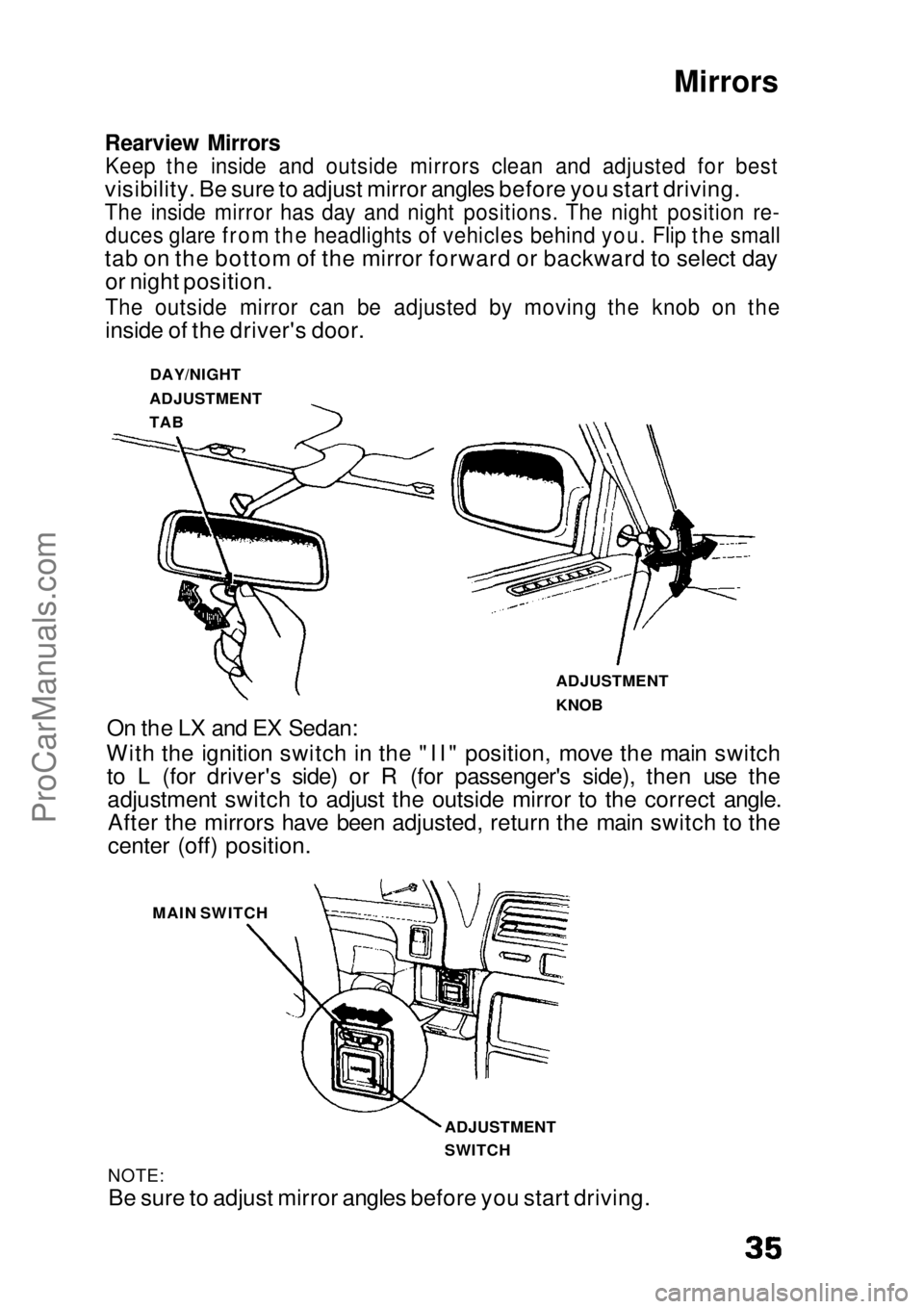
Keep the inside and outside mirrors clean and adjusted for best
visibility. Be sure to adjust mirror angles before you start driving.
The inside mirror has day and night positions. The night position re-
duces glare from the headlights of vehicles behind you. Flip the small
tab on the bottom of the mirror forward or backward to select day or night position.
The outside mirror can be adjusted by moving the knob on the
inside of the driver's door.
On the LX and EX Sedan:
With the ignition switch in the "II" position, move the main switch to L (for driver's side) or R (for passenger's side), then use theadjustment switch to adjust the outside mirror to the correct angle.After the mirrors have been adjusted, return the main switch to the
center (off) position.
NOTE:
Be sure to adjust mirror angles before you start driving. DAY/NIGHT
ADJUSTMENT
TAB
ADJUSTMENT
KNOB
MAIN SWITCH
ADJUSTMENT
SWITCHProCarManuals.comMain Menu s t
Page 37 of 136
Lights
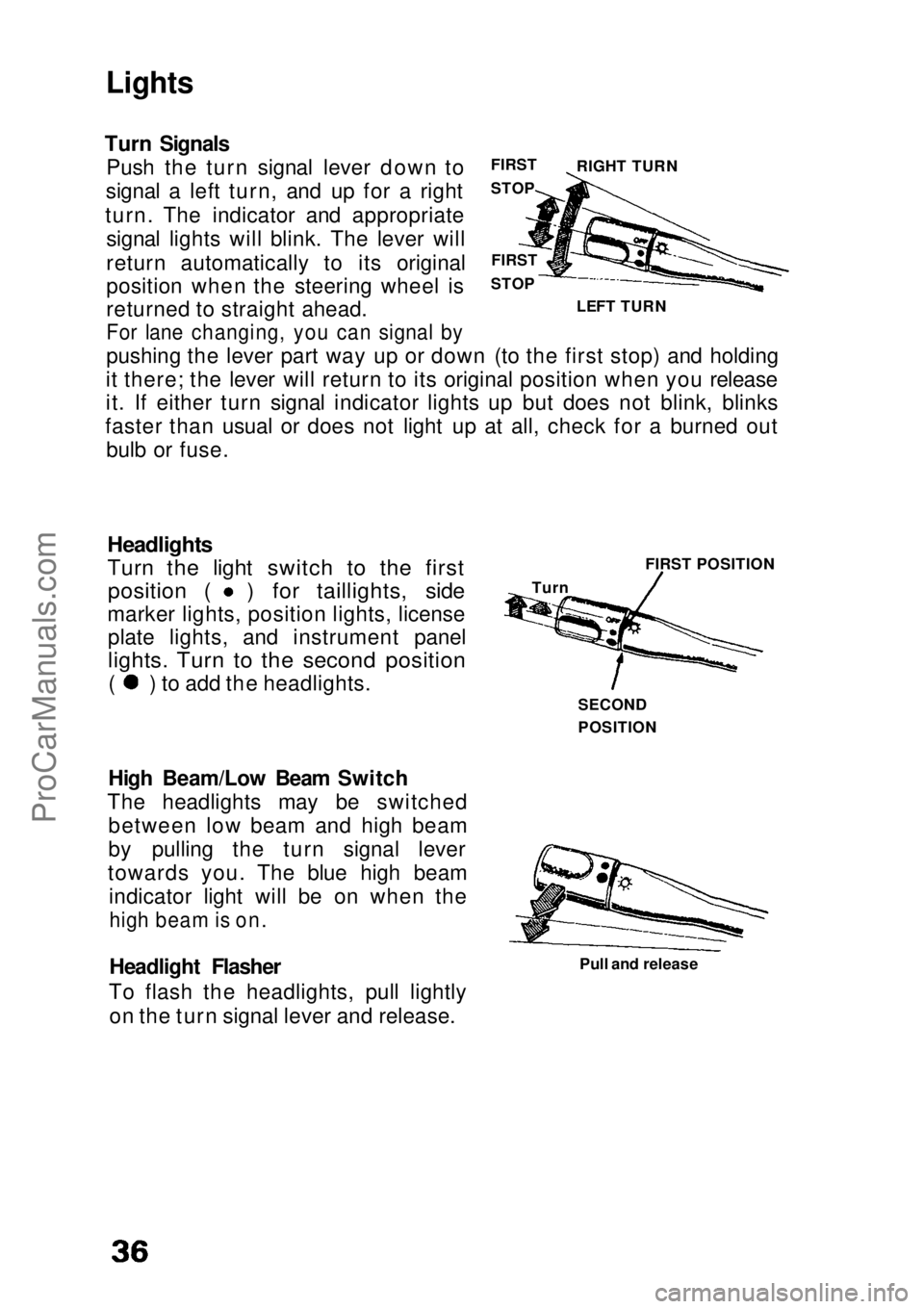
Turn Signals Push the turn signal lever down to
signal a left turn, and up for a right
turn. The indicator and appropriate signal lights will blink. The lever will
return automatically to its original
position when the steering wheel is
returned to straight ahead.
For lane changing, you can signal by
pushing the lever part way up or down (to the first stop) and holding
it there; the lever will return to its original position when you release
it. If either turn signal indicator lights up but does not blink, blinks
faster than usual or does not light up at all, check for a burned out bulb or fuse.
Headlights
Turn the light switch to the first
position ( ) for taillights, side
marker lights, position lights, license plate lights, and instrument panel
lights. Turn to the second position
( ) to add the headlights.
High Beam/Low Beam Switch
The headlights may be switched between low beam and high beam
by pulling the turn signal lever
towards you. The blue high beam indicator light will be on when the
high beam is on.
Headlight Flasher
To flash the headlights, pull lightly on the turn signal lever and release. Pull and release
FIRST
STOP
FIRST
STOP LEFT TURN RIGHT TURN
Turn FIRST POSITION
SECOND
POSITIONProCarManuals.comMain Menu s t