Lights
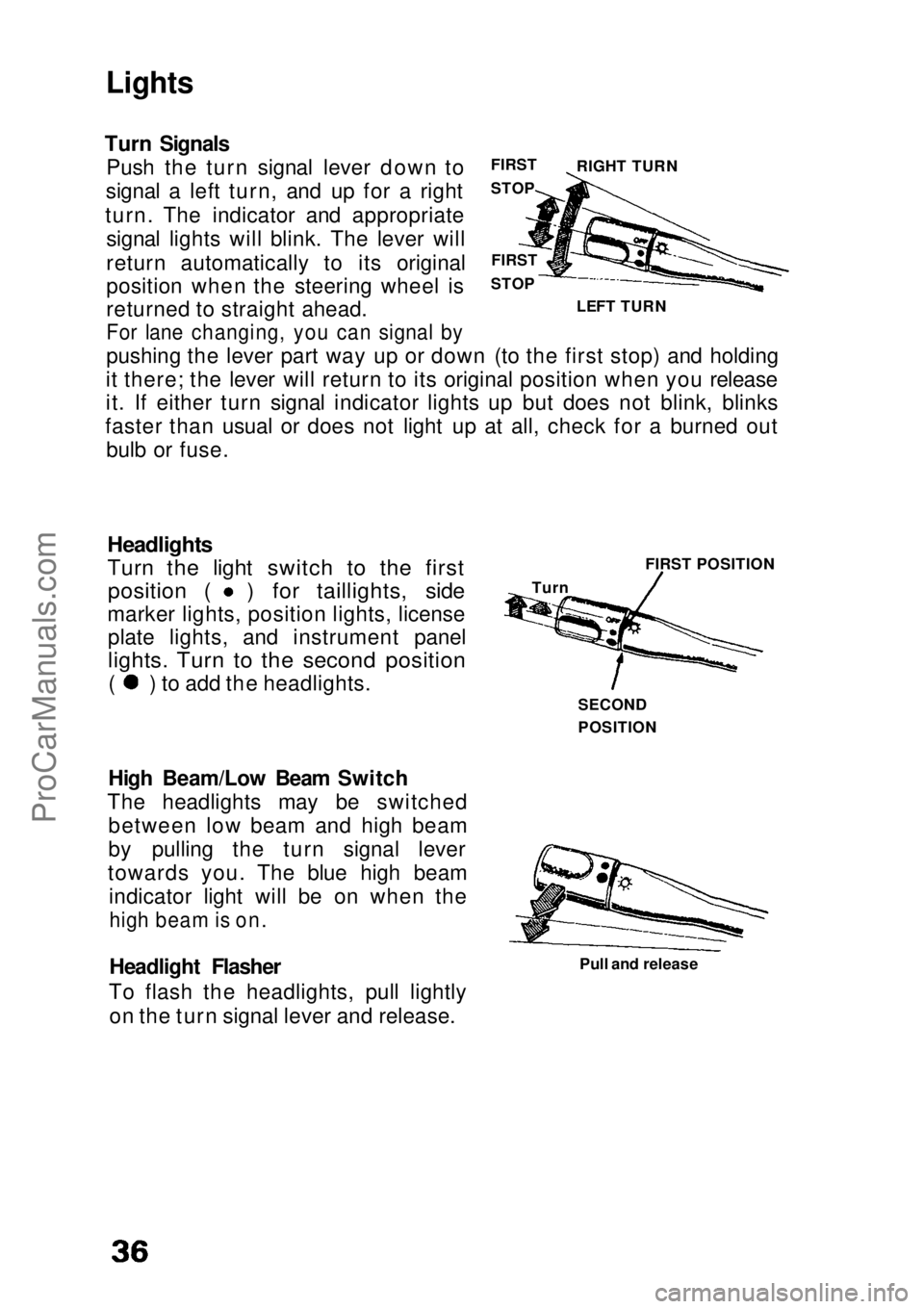
Turn Signals Push the turn signal lever down to
signal a left turn, and up for a right
turn. The indicator and appropriate signal lights will blink. The lever will
return automatically to its original
position when the steering wheel is
returned to straight ahead.
For lane changing, you can signal by
pushing the lever part way up or down (to the first stop) and holding
it there; the lever will return to its original position when you release
it. If either turn signal indicator lights up but does not blink, blinks
faster than usual or does not light up at all, check for a burned out bulb or fuse.
Headlights
Turn the light switch to the first
position ( ) for taillights, side
marker lights, position lights, license plate lights, and instrument panel
lights. Turn to the second position
( ) to add the headlights.
High Beam/Low Beam Switch
The headlights may be switched between low beam and high beam
by pulling the turn signal lever
towards you. The blue high beam indicator light will be on when the
high beam is on.
Headlight Flasher
To flash the headlights, pull lightly on the turn signal lever and release. Pull and release
FIRST
STOP
FIRST
STOP LEFT TURN RIGHT TURN
Turn FIRST POSITION
SECOND
POSITIONProCarManuals.comMain Menu s t