1991 FORD FESTIVA lights
[x] Cancel search: lightsPage 2 of 454
Back To Article
INST RUMENT PANEL
1991 ACCESSORIES & SAFET Y EQUIPMENT Ford Motor Co. Switches & Instrum ent Panels - Standard
DESCRIPTION & OPERATION
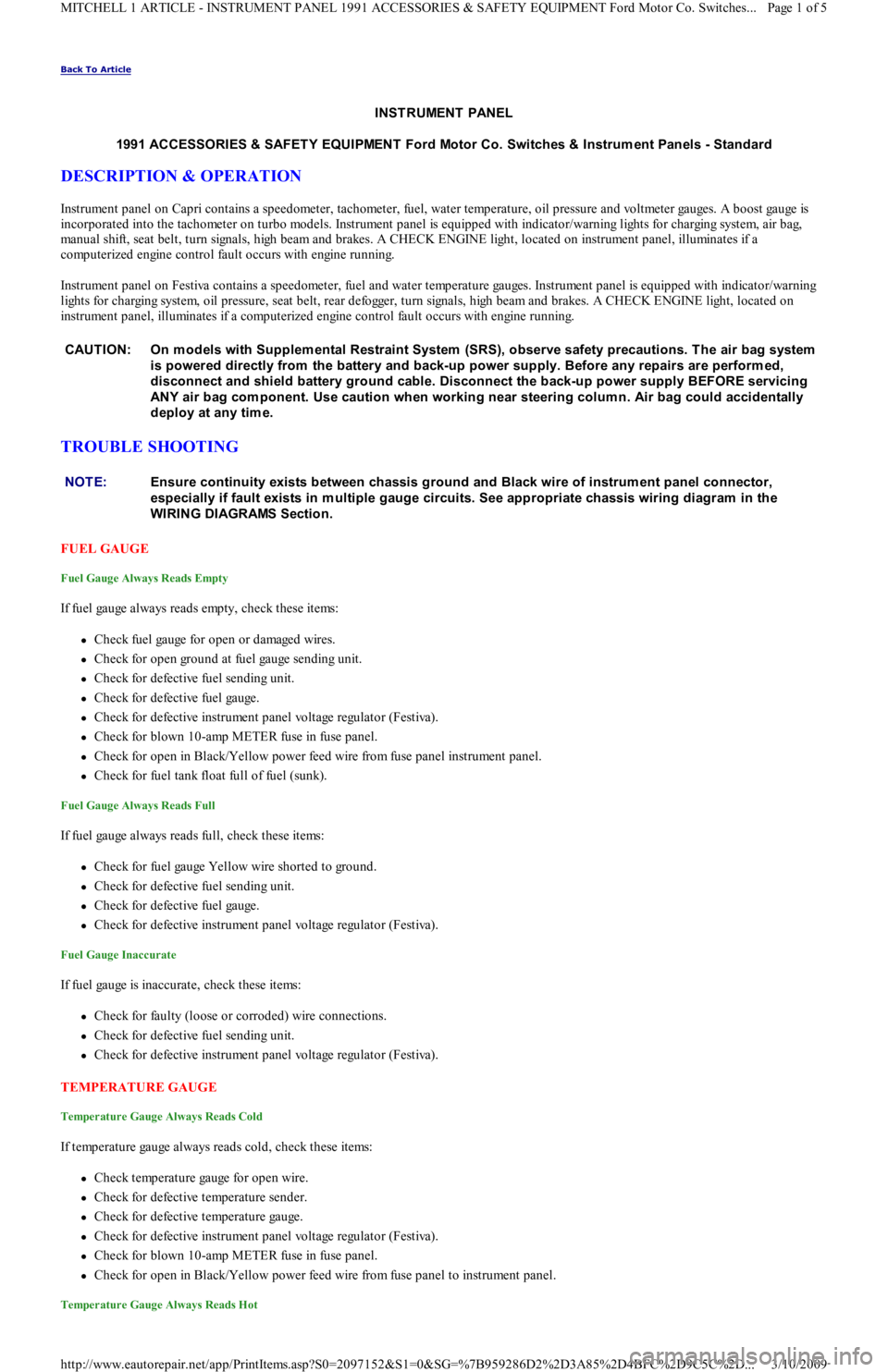
Instrument panel on Capri contains a speedometer, tachometer, fuel, water temperature, oil pressure and voltmeter gauges. A boost gauge is
incorporated into the tachometer on turbo models. Instrument panel is equipped with indicator/warning lights for charging system, air b ag,
manual shift, seat belt, turn signals, high beam and brakes. A CHECK ENGINE light, located on instrument panel, illuminates if a
computerized engine control fault occurs with engine running.
Instrument panel on Festiva contains a speedometer, fuel and water temperature gauges. Instrument panel is equipped with indicator/warning
lights for charging system, oil pressure, seat belt, rear defogger, turn signals, high beam and brakes. A CHECK ENGINE light, located on
instrument panel, illuminates if a computerized engine control fault occurs with engine running.
TROUBLE SHOOTING
FUEL GAUGE
Fuel Gauge Always Reads Empty
If fuel gauge always reads empty, check these items:
Check fuel gauge for open or damaged wires.
Check for open ground at fuel gauge sending unit.
Check for defective fuel sending unit.
Check for defective fuel gauge.
Check for defective instrument panel voltage regulator (Festiva).
Check for blown 10-amp METER fuse in fuse panel.
Check for open in Black/Yellow power feed wire from fuse panel instrument panel.
Check for fuel tank float full of fuel (sunk).
Fuel Gauge Always Reads Full
If fuel gauge always reads full, check these items:
Check for fuel gauge Yellow wire shorted to ground.
Check for defective fuel sending unit.
Check for defective fuel gauge.
Check for defective instrument panel voltage regulator (Festiva).
Fuel Gauge Inaccurate
If fuel gauge is inaccurate, check these items:
Check for faulty (loose or corroded) wire connections.
Check for defective fuel sending unit.
Check for defective instrument panel voltage regulator (Festiva).
TEMPERATURE GAUGE
Temperature Gauge Always Reads Cold
If temperature gauge always reads cold, check these items:
Check temperature gauge for open wire.
Check for defective temperature sender.
Check for defective temperature gauge.
Check for defective instrument panel voltage regulator (Festiva).
Check for blown 10-amp METER fuse in fuse panel.
Check for open in Black/Yellow power feed wire from fuse panel to instrument panel.
Temperature Gauge Always Reads Hot
CAUT ION: On m odels with Supplem ental Restraint System (SRS), observe safety precautions. T he air bag system
is powered directly from the battery and back-up power supply. Before any repairs are perform ed,
disconnect and shield battery ground cable. Disconnect the back-up power supply BEFORE servicing
ANY air bag com ponent. Use caution when working near steering colum n. Air bag could accidentally
deploy at any tim e.
NOTE:Ensure continuity exists between chassis ground and Black wire of instrum ent panel connector,
especially if fault exists in m ultiple gauge circuits. See appropriate chassis wiring diagram in the
WIRING DIAGRAMS Section.
Page 1 of 5 MITCHELL 1 ARTICLE - INSTRUMENT PANEL 1991 ACCESSORIES & SAFETY EQUIPMENT Ford Motor Co. Switches
...
3/10/2009 http://www.eautorepair.net/app/PrintItems.asp?S0=2097152&S1=0&SG=%7B959286D2%2D3A85%2D4BFC%2D9C5C%2D
...
Page 5 of 454

TURBO BOOST GAUGE & SENSOR (CAPRI)
1. Disconnect 3-pin boost sensor electrical connected located on right side of firewall. Turn ignition on. Measure voltage between
Yellow/Green and Black wires. Voltage should be greater than 10 volts. Turn ignition off. If voltage is greater than 10 volts, go t o n e xt
step. If voltage is 10 volts or less, repair Yellow/Green or Black wires as necessary.
2. Remove instrument panel. See INSTRUMENT PANEL
under REMOVAL & INSTALLATION. Disconnect instrument panel 8-pin
connector. With boost sensor disconnected, measure resistance through White/Black between instrument panel and boost sensor harness
connector. If resistance is less than 5 ohms, go to next step. If resistance is 5 ohms or more, repair or replace White/Black wire.
3. With 8-pin instrument panel connector disconnected, ground White/Black at boost gauge. Boost gauge should read low. Apply 12 vo l t s
to White/Black wire at boost gauge. Boost gauge should read high. If boost gauge operates as specified, go to next step. If boost gauge
does not operate as specified, replace boost gauge.
4. Reconnect instrument panel connectors (if removed). With ignition on and boost sensor disconnected, install jumper wire between
Yellow/Green and White/Black wires of boost sensor vehicle harness connector. Boost gauge should read high. If boost gauge reads
high, replace boost sensor. If boost gauge does not read high, go to TROUBLE SHOOTING
for other possible causes.
REMOVAL & INSTALLATION
INSTRUMENT PANEL
Removal & Installation (Capri)
1. Disconnect negative battery cable. Pull storage compartment from heater/radio bezel. Pull outward and remove trim covers located on
both sides of steering column. Remove retaining screws and carefully pull instrument panel bezel partially away from dash. Disconnect
electrical connectors from clock and switches in bezel. Remove instrument panel bezel.
2. Disconnect speedometer cable from transaxle. Remove instrument panel retaining screws and slide instrument panel outward. Press lock
tab and release speedometer cable from instrument panel. Remove electrical connectors from rear of instrument panel. Remove
instrument panel. To install instrument panel, reverse removal procedure.
Removal & Installation (Festiva)
1. Disconnect negative battery cable. Remove upper and lower steering column covers. Remove screws from panel bezel and remove bezel.
Disconnect rear wiper switch and rear defogger switch wiring harness connectors (if equipped).
2. Remove instrument panel-to-dash screws. Pull panel from dash. Reach behind panel and release speedometer drive cable lock tab. Lift
lock tabs and disconnect 2 electrical connectors from rear of panel. Remove panel. To install instrument panel, reverse removal
procedure.
INDICATOR LIGHTS
Removal & Installation
Remove instrument panel for access to indicator light bulbs. See INSTRUMENT PANEL under REMOVAL & INSTALLATION. To remove
bulb, rotate bulb counterclockwise to disengage locking tabs. When tabs release, pull bulb from printed circuit board. To install bulb, reverse
removal procedure. Install instrument panel and test lights.
SPEEDOMETER R & I
Removal & Installation (Capri)
R e mo ve n e ga t ive b a t t e r y c a b l e . R e mo ve in st r u me n t p a n e l . S e e INSTRUMENT PANEL under REMOVAL & INSTALLATION. Disassemble
instrument panel and remove speedometer/tachometer/boost gauge assembly from instrument panel. To install, apply a 3/16" (4.6 mm) b al l o f
Silicone Damping Grease (D7AZ-19A331-A) into drive hole of speedometer head. Reverse removal procedure to complete installation.
Removal & Installation (Festiva)
R e mo ve n e ga t ive b a t t e r y c a b l e . R e mo ve in st r u me n t p a n e l . S e e INSTRUMENT PANEL under REMOVAL & INSTALLATION. Disassemble
instrument panel and remove speedometer head assembly from instrument panel. Speedometer is a separate module and can be removed
independently from gauges. To install, reverse removal procedure.
SPEED SENSOR
On vehicles equipped with speed control, a speed sensor is mounted in speedometer head assembly. If replacement is necessary, speedometer
head assembly must be replaced. See SPEEDOMETER R & I
under REMOVAL & INSTALLATION.
FUEL GAUGE
Removal & Installation
Remo ve in st ru men t p an el . See INSTRUMENT PANEL under REMOVAL & INSTALLATION. Disassemble panel and remove fuel gauge.
To install gauge, reverse removal procedure. On Capri, the fuel/volt gauge must be replaced as an assembly.
FUEL SENDING UNIT
Removal & Installation
1. For Festiva, remove rear seat. For Capri, remove rear seat cushion. On Festiva, remove carpet hold-down pins and lift carpet for access
to sending unit access plate. On all models, remove access plate screws. NOTE:Federal law requires that a label stating the odom eter has been repaired or replaced be affixed to any
vehicle that has its odom eter repaired, replaced or set to zero.
Page 4 of 5 MITCHELL 1 ARTICLE - INSTRUMENT PANEL 1991 ACCESSORIES & SAFETY EQUIPMENT Ford Motor Co. Switches
...
3/10/2009 http://www.eautorepair.net/app/PrintItems.asp?S0=2097152&S1=0&SG=%7B959286D2%2D3A85%2D4BFC%2D9C5C%2D
...
Page 18 of 454
Back To Article
ST EERING COLUMN SWIT CHES
1991 ACCESSORIES & SAFET Y EQUIPMENT Ford Motor Co. Steering Colum n Switches
DESCRIPTION & OPERATION
DISABLING AIR BAG SYSTEM
To disable SRS, disconnect battery cable. Unplug back-up power supply 3-way harness connector. System is now disabled. Back-up power
supply is mounted to inside of instrument panel, left of glove box opening. Glove box door must be opened past its stops and lowered toward
floor to access back-up power supply.
ACTIVATING AIR BAG SYSTEM
To activate SRS, reconnect back-up power supply connector and negative battery cable. From passenger's side of vehicle, turn ignition switch
to RUN position. System is now activated. Check AIR BAG light to ensure system is functioning properly.
TESTING
HAZARD WARNING SWITCH & TURN SIGNAL SWITCH
Capri
1. Remove steering column covers to access turn signal/hazard switch connectors. Turn ignition on. Using a 12-volt test light, ensure
battery voltage is present at Green/Red and Green/Yellow wires at turn signal/hazard switch connectors. If battery voltage is not present,
check METER and HAZARD fuses. Also check hazard and turn signal flasher units and replace as necessary.
2. If battery voltage is present at Green/Red and Green/Yellow wires, place turn signal switch in RIGHT position. Check both Green/White
wires at switch connector. Test light should flash on and off in constant cycles.
3. Place turn signal switch in LEFT position. Check both Green/Black wires at switch connector. Test light should flash on and off in
constant cycles. If turn signal/hazard switch does not function as specified, replace switch.
Festiva
1. Remove steering column covers to access turn signal/hazard switch connectors. Turn ignition on. Using a 12-volt test light, ensure
battery voltage is present at White/Black and Black/Yellow wires at hazard and turn signal switch connectors. If battery voltage is not
present, check METER and HAZARD fuses.
2. If battery voltage is present at White/Black and Black/Yellow wires, place turn signal/hazard switch in RIGHT position. Check
Green/Black wire at switch connector. Test light should flash on and off in constant cycles.
3. Place turn signal/hazard switch in LEFT position. Check Green/White wire at switch connector. Test light should flash on and off in
constant cycles. If turn signal/hazard switch does not function as specified, replace switch.
HEADLIGHT SWITCH
Capri
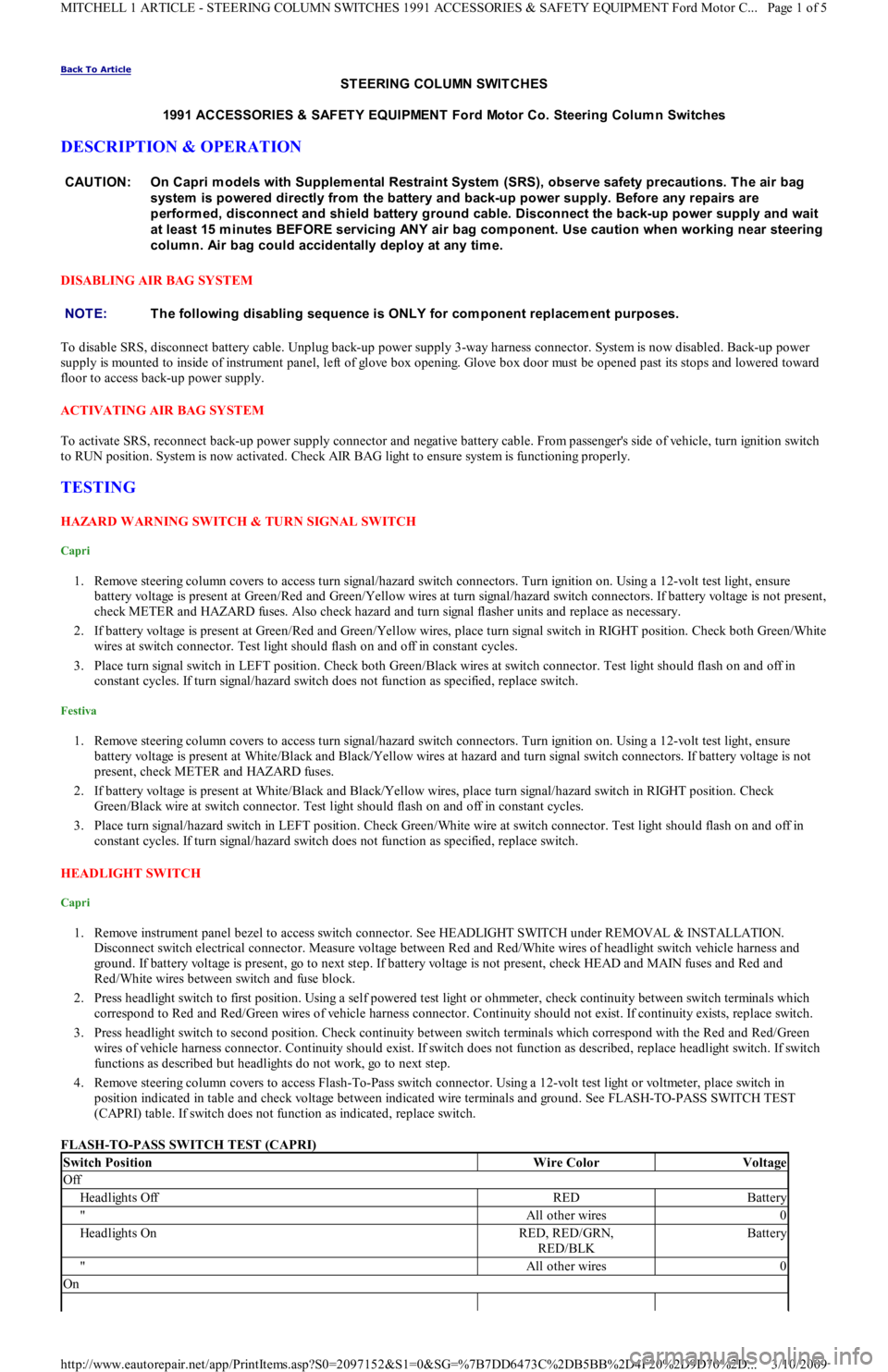
1. Remove instrument panel bezel to access switch connector. See HEADLIGHT SWITCH under REMOVAL & INSTALLATION.
Disconnect switch electrical connector. Measure voltage between Red and Red/White wires of headlight switch vehicle harness and
ground. If battery voltage is present, go to next step. If battery voltage is not present, check HEAD and MAIN fuses and Red and
Red/White wires between switch and fuse block.
2. Press headlight switch to first position. Using a self powered test light or ohmmeter, check continuity between switch terminals which
correspond to Red and Red/Green wires of vehicle harness connector. Continuity should not exist. If continuity exists, replace switch.
3. Press headlight switch to second position. Check continuity between switch terminals which correspond with the Red and Red/Green
wires of vehicle harness connector. Continuity should exist. If switch does not function as described, replace headlight switch. If swit ch
functions as described but headlights do not work, go to next step.
4. Remove steering column covers to access Flash-To-Pass switch connector. Using a 12-volt test light or voltmeter, place switch in
position indicated in table and check voltage between indicated wire terminals and ground. See FLASH-TO-PASS SWITCH TEST
(CAPRI) table. If switch does not function as indicated, replace switch.
FLASH-TO-PASS SWITCH TEST (CAPRI) CAUTION: On Capri m odels with Supplem ental Restraint System (SRS), observe safety precautions. T he air bag
system is powered directly from the battery and back-up power supply. Before any repairs are
perform ed, disconnect and shield battery ground cable. Disconnect the back-up power supply and wait
at least 15 m inutes BEFORE servicing ANY air bag com ponent. Use caution when working near steering
colum n. Air bag could accidentally deploy at any tim e.
NOTE:T he following disabling sequence is ONLY for com ponent replacem ent purposes.
Switch PositionWire ColorVoltage
Off
Headlights OffREDBattery
"All other wires0
Headlights OnRED, RED/GRN,
RED/BLKBattery
"All other wires0
On
Page 1 of 5 MITCHELL 1 ARTICLE - STEERING COLUMN SWITCHES 1991 ACCESSORIES & SAFETY EQUIPMENT Ford Motor C
...
3/10/2009 http://www.eautorepair.net/app/PrintItems.asp?S0=2097152&S1=0&SG=%7B7DD6473C%2DB5BB%2D4F20%2D9D70%2D
...
Page 19 of 454
Festiva
Disconnect headlight switch. Using an ohmmeter, place switch in position indicated in table and check continuity between switch terminals
that correspond to wire colors listed. See HEADLIGHT SWITCH CONTINUITY TEST (FESTIVA) table. If switch does not function
indicated, replace switch.
HEADLIGHT SWITCH CONTINUITY TEST (FESTIVA)
IGNITION SWITCH
Capri
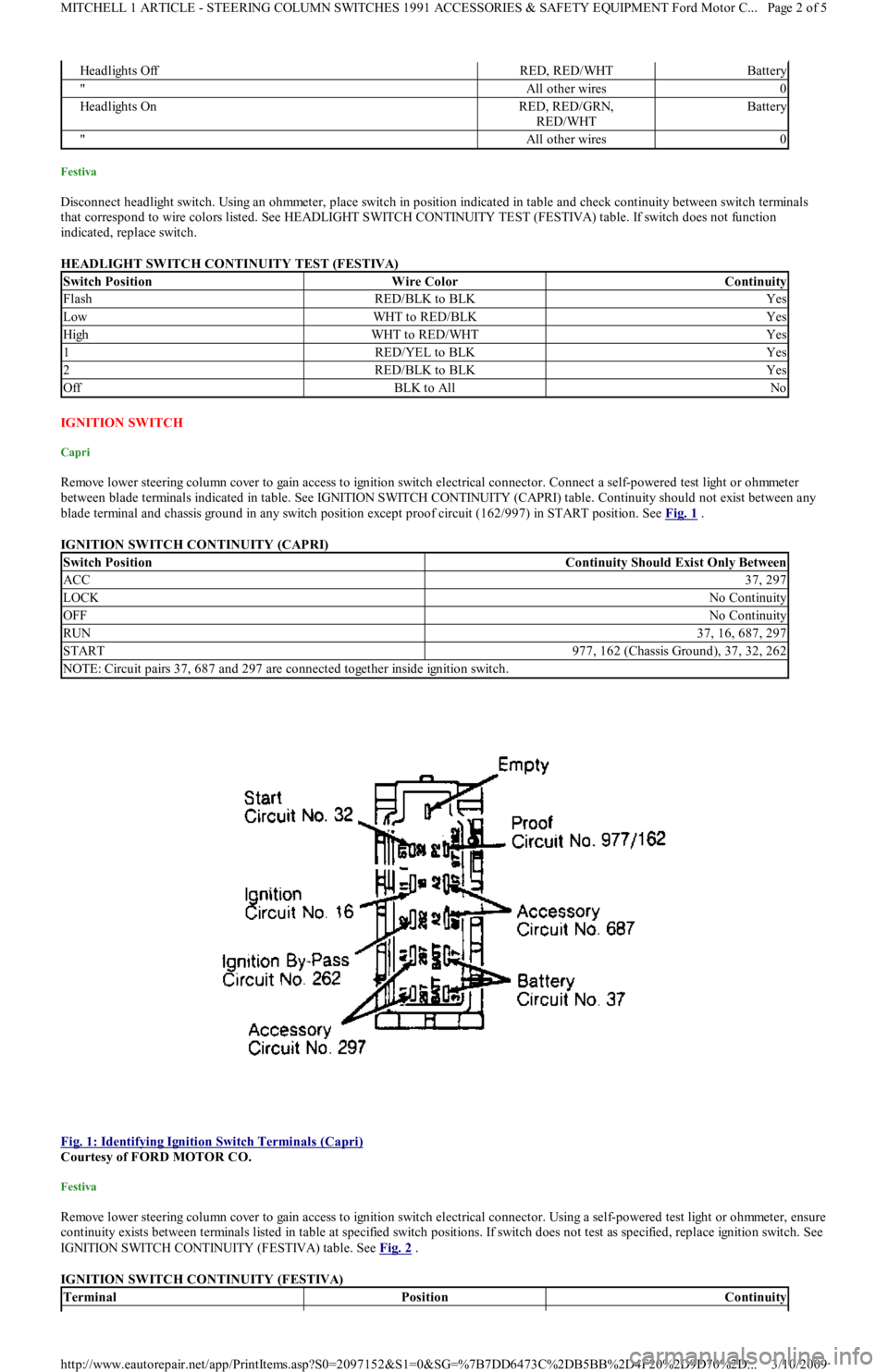
Remove lower steering column cover to gain access to ignition switch electrical connector. Connect a self-powered test light or ohmmeter
between blade terminals indicated in table. See IGNITION SWITCH CONTINUITY (CAPRI) table. Continuity should not exist between any
blade terminal and chassis ground in any switch position except proof circuit (162/997) in START position. See Fig. 1
.
IGNITION SWITCH CONTINUITY (CAPRI)
Fig. 1: Identifying Ignition Switch Terminals (Capri)
Courtesy of FORD MOTOR CO.
Festiva
Remove lower steering column cover to gain access to ignition switch electrical connector. Using a self-powered test light or ohmmeter, ensure
continuity exists between terminals listed in table at specified switch positions. If switch does not test as specified, replace ignition switch. See
IGNITION SWITCH CONTINUITY (FESTIVA) table. See Fig. 2
.
IGNITION SWITCH CONTINUITY (FESTIVA)
Headlights OffRED, RED/WHTBattery
"All other wires0
Headlights OnRED, RED/GRN,
RED/WHTBattery
"All other wires0
Switch PositionWire ColorContinuity
FlashRED/BLK to BLKYes
LowWHT to RED/BLKYes
HighWHT to RED/WHTYes
1RED/YEL to BLKYes
2RED/BLK to BLKYes
OffBLK to AllNo
Switch PositionContinuity Should Exist Only Between
ACC37, 297
LOCKNo Continuity
OFFNo Continuity
RUN37, 16, 687, 297
START977, 162 (Chassis Ground), 37, 32, 262
NOTE: Circuit pairs 37, 687 and 297 are connected together inside ignition switch.
TerminalPositionContinuity
Page 2 of 5 MITCHELL 1 ARTICLE - STEERING COLUMN SWITCHES 1991 ACCESSORIES & SAFETY EQUIPMENT Ford Motor C
...
3/10/2009 http://www.eautorepair.net/app/PrintItems.asp?S0=2097152&S1=0&SG=%7B7DD6473C%2DB5BB%2D4F20%2D9D70%2D
...
Page 44 of 454
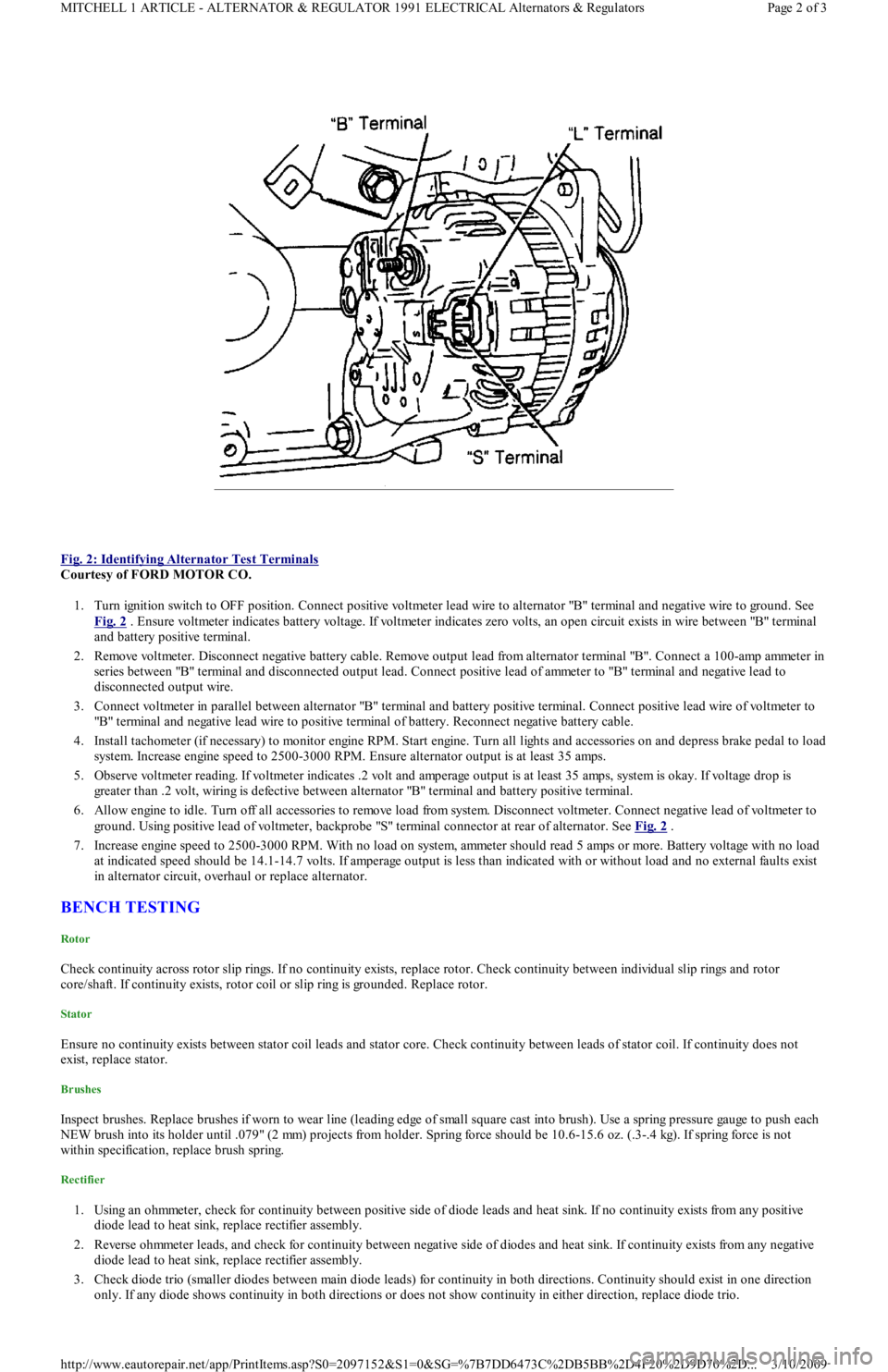
Fig. 2: Identifying Alternator Test Terminals
Courtesy of FORD MOTOR CO.
1. Turn ignition switch to OFF position. Connect positive voltmeter lead wire to alternator "B" terminal and negative wire to ground. See
Fig. 2
. Ensure voltmeter indicates battery voltage. If voltmeter indicates zero volts, an open circuit exists in wire between "B" terminal
and battery positive terminal.
2. Remove voltmeter. Disconnect negative battery cable. Remove output lead from alternator terminal "B". Connect a 100-amp ammeter in
series between "B" terminal and disconnected output lead. Connect positive lead of ammeter to "B" terminal and negative lead to
disconnected output wire.
3. Connect voltmeter in parallel between alternator "B" terminal and battery positive terminal. Connect positive lead wire of voltmeter to
"B" terminal and negative lead wire to positive terminal of battery. Reconnect negative battery cable.
4. Install tachometer (if necessary) to monitor engine RPM. Start engine. Turn all lights and accessories on and depress brake pedal to load
system. Increase engine speed to 2500-3000 RPM. Ensure alternator output is at least 35 amps.
5. Observe voltmeter reading. If voltmeter indicates .2 volt and amperage output is at least 35 amps, system is okay. If voltage drop is
greater than .2 volt, wiring is defective between alternator "B" terminal and battery positive terminal.
6. Allow engine to idle. Turn off all accessories to remove load from system. Disconnect voltmeter. Connect negative lead of voltmeter to
ground. Using positive lead of voltmeter, backprobe "S" terminal connector at rear of alternator. See Fig. 2
.
7. Increase engine speed to 2500-3000 RPM. With no load on system, ammeter should read 5 amps or more. Battery voltage with no load
at indicated speed should be 14.1-14.7 volts. If amperage output is less than indicated with or without load and no external faults exist
in alternator circuit, overhaul or replace alternator.
BENCH TESTING
Rotor
Check continuity across rotor slip rings. If no continuity exists, replace rotor. Check continuity between individual slip rings and rotor
core/shaft. If continuity exists, rotor coil or slip ring is grounded. Replace rotor.
Stator
Ensure no continuity exists between stator coil leads and stator core. Check continuity between leads of stator coil. If continuity does not
exist, replace stator.
Brushes
Inspect brushes. Replace brushes if worn to wear line (leading edge of small square cast into brush). Use a spring pressure gauge to push each
NEW brush into its holder until .079" (2 mm) projects from holder. Spring force should be 10.6-15.6 oz. (.3-.4 kg). If spring force is not
within specification, replace brush spring.
Rectifier
1. Using an ohmmeter, check for continuity between positive side of diode leads and heat sink. If no continuity exists from any positive
diode lead to heat sink, replace rectifier assembly.
2. Reverse ohmmeter leads, and check for continuity between negative side of diodes and heat sink. If continuity exists from any n e ga t ive
diode lead to heat sink, replace rectifier assembly.
3. Check diode trio (smaller diodes between main diode leads) for continuity in both directions. Continuity should exist in one direction
only. If any diode shows continuity in both directions or does not show continuity in either direction, replace diode trio.
Page 2 of 3 MITCHELL 1 ARTICLE - ALTERNATOR & REGULATOR 1991 ELECTRICAL Alternators & Regulators
3/10/2009 http://www.eautorepair.net/app/PrintItems.asp?S0=2097152&S1=0&SG=%7B7DD6473C%2DB5BB%2D4F20%2D9D70%2D
...
Page 49 of 454
Back To Article
FUSES & CIRCUIT BREAKERS
Fuses & Circuit Breakers 1988-93 Festiva
FUSES & FUSIBLE LINKS
FUSE PANEL & FUSIBLE LINK BLOCK LOCATIONS
The vehicle has a fuse block with fusible links and a fuse panel with circuit fuses. The fuse panel is located behind the instrument panel, left o
f
the steering column. The fuse block is located under the hood.
FUSE PANEL IDENTIFICATION
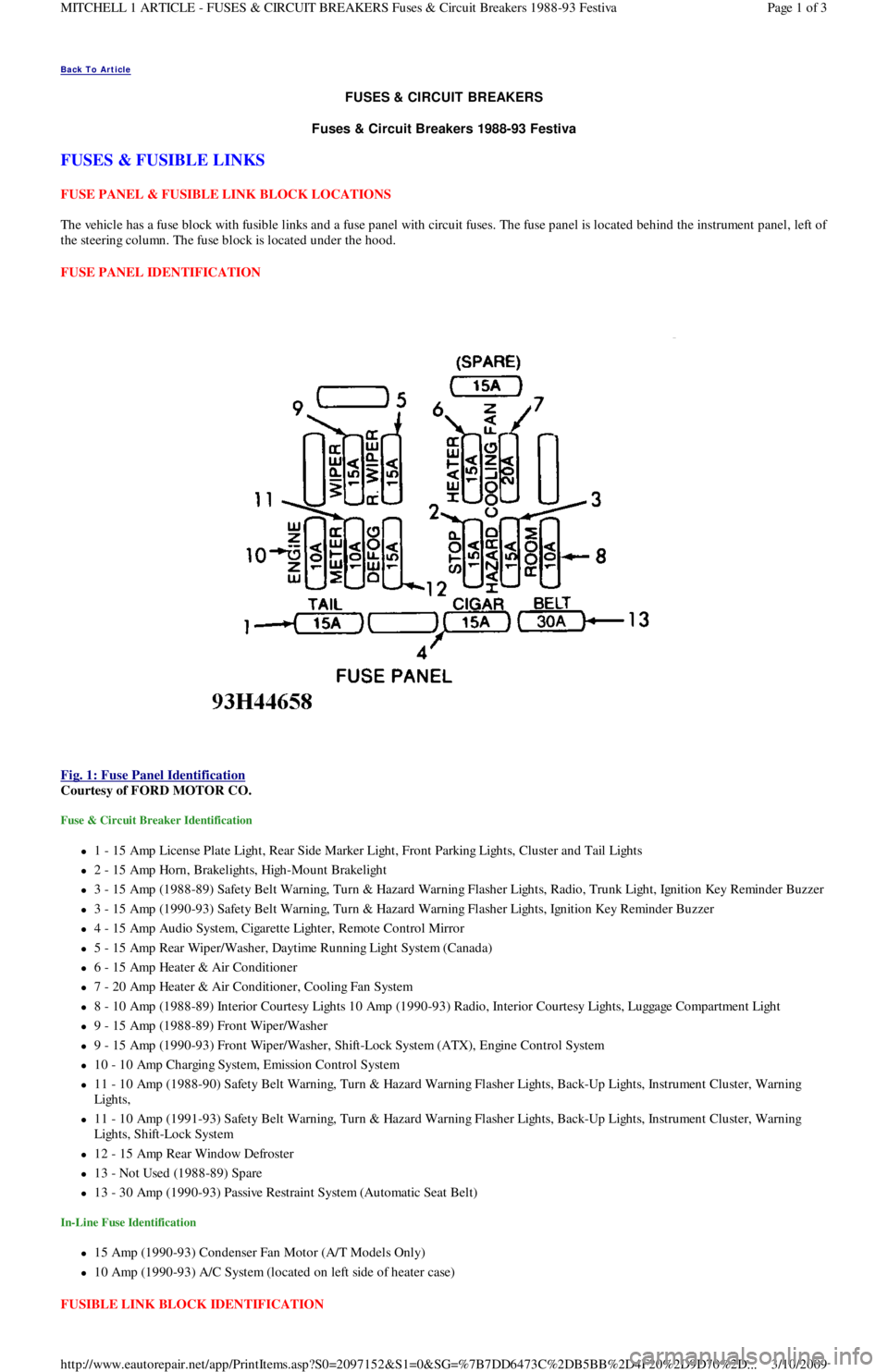
Fig. 1: Fuse Panel Identification
Courtesy of FORD MOTOR CO.
Fuse & Circuit Breaker Identification
1 - 15 Amp License Plate Light, Rear Side Marker Ligh t , Fr o n t P a r kin g Ligh t s, C l u st e r a n d Ta il Ligh t s
2 - 15 Amp Horn, Brakelights, High-Mount Brakelight
3 - 15 Amp (1988-89) Safety Belt Warning, Turn & Hazard Warning Flasher Lights, Radio, Trunk Light, Ignition Key Reminder Buzzer
3 - 15 Amp (1990-93) Safety Belt Warning, Turn & Hazard Warning Flasher Lights, Ignition Key Reminder Buzzer
4 - 15 Amp Audio System, Cigarette Lighter, Remote Control Mirror
5 - 15 Amp Rear Wiper/Washer, Daytime Running Light System (Canada)
6 - 15 Amp Heater & Air Conditioner
7 - 20 Amp Heater & Air Conditioner, Cooling Fan System
8 - 10 Amp (1988-89) Interior Courtesy Lights 10 Amp (1990-93) Radio, Interior Courtesy Lights, Luggage Compartment Light
9 - 15 Amp (1988-89) Front Wiper/Washer
9 - 15 Amp (1990-93) Front Wiper/Washer, Shift-Lock System (ATX), Engine Control System
10 - 10 Amp Charging System, Emission Control System
11 - 10 Amp (1988-90) Safety Belt Warning, Turn & Hazard Warning Flasher Lights, Back-Up Lights, Instrument Cluster, Warning
Lights,
11 - 10 Amp (1991-93) Safety Belt Warning, Turn & Hazard Warning Flasher Lights, Back-Up Lights, Instrument Cluster, Warning
Lights, Shift-Lock System
12 - 15 Amp Rear Window Defroster
13 - Not Used (1988-89) Spare
13 - 30 Amp (1990-93) Passive Restraint System (Automatic Seat Belt)
In-Line Fuse Identification
15 Amp (1990-93) Condenser Fan Motor (A/T Models Only)
10 Amp (1990-93) A/C System (located on left side of heater case)
FUSIBLE LINK BLOCK IDENTIFICATION
Page 1 of 3 MITCHELL 1 ARTICLE - FUSES & CIRCUIT BREAKERS Fuses & Circuit Breakers 1988-93 Festiva
3/10/2009 http://www.eautorepair.net/app/PrintItems.asp?S0=2097152&S1=0&SG=%7B7DD6473C%2DB5BB%2D4F20%2D9D70%2D
...
Page 50 of 454
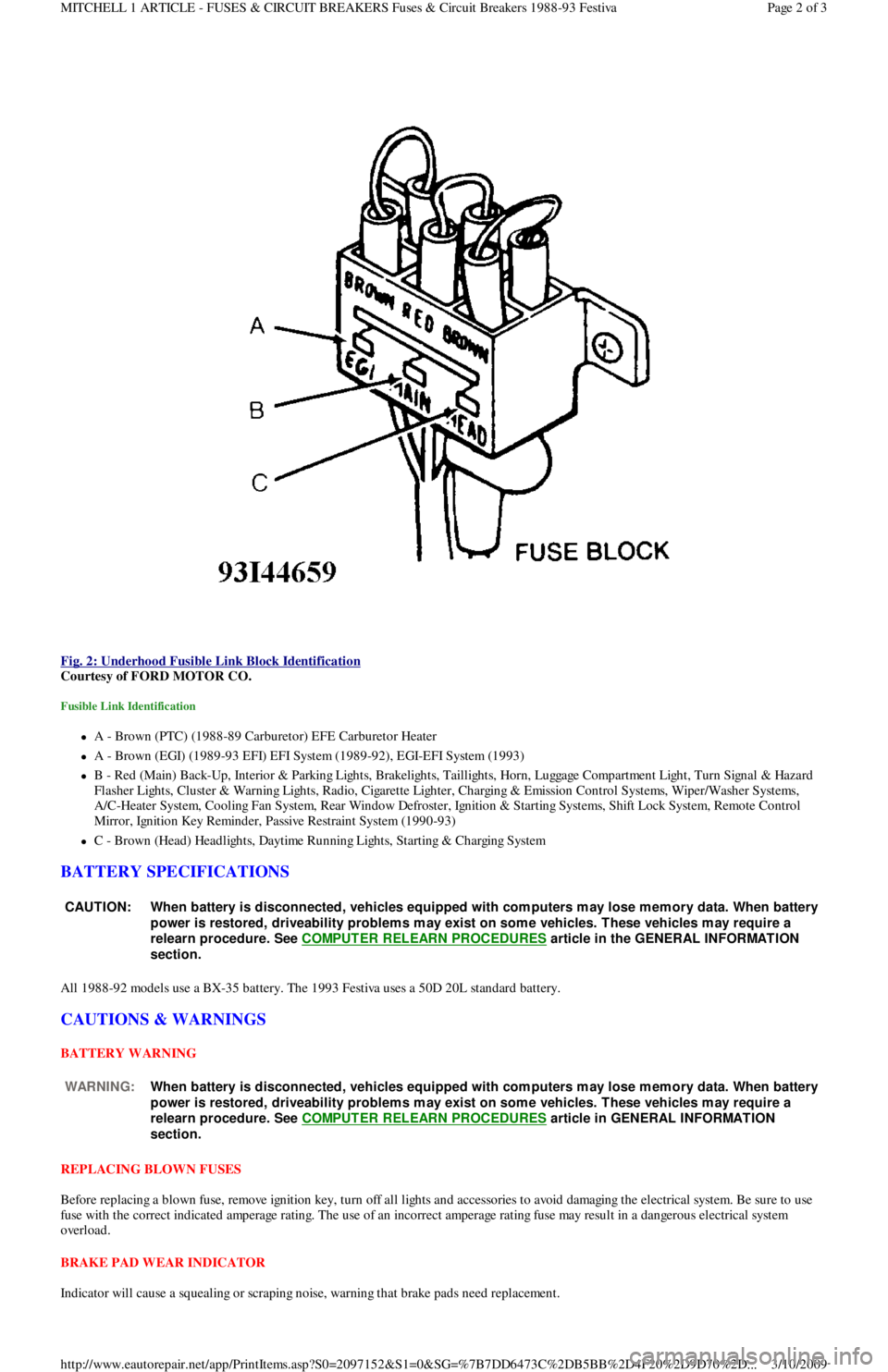
Fig. 2: Underhood Fusible Link Block Identification
Courtesy of FORD MOTOR CO.
Fusible Link Identification
A - Brown (PTC) (1988-89 Carburetor) EFE Carburetor Heater
A - Brown (EGI) (1989-93 EFI) EFI System (1989-92), EGI-EFI System (1993)
B - Red (Main) Back-Up, Interior & Parking Lights, Brakelights, Taillights, Horn, Luggage Compartment Light, Turn Signal & Hazard
F l a sh e r Ligh t s, C l u st e r & Wa r n in g Ligh t s, R a d io , C iga r e t t e Ligh t e r , C h a r gin g & E missio n C o n t r o l S yst e ms, Wip e r / Wa sh e r S yst e ms,
A/C-Heater System, Cooling Fan System, Rear Window Defroster, Ignition & Starting Systems, Shift Lock System, Remote Control
Mirror, Ignition Key Reminder, Passive Restraint System (1990-93)
C - Brown (Head) Headlights, Daytime Running Lights, Starting & Charging System
BATTERY SPECIFICATIONS
All 1988-92 models use a BX-35 battery. The 1993 Festiva uses a 50D 20L standard battery.
CAUTIONS & WARNINGS
BATTERY WARNING
REPLACING BLOWN FUSES
Before replacing a blown fuse, remove ignition key, turn off all lights and accessories to avoid damaging the electrical system. Be sure to use
fuse with the correct indicated amperage rating. The use of an incorrect amperage rating fuse may result in a dangerous electrical system
overload.
BRAKE PAD WEAR INDICATOR
Indicator will cause a squealing or scraping noise, warning that brake pads need replacement.
CAUT ION: When battery is disconnected, vehicles equipped with com puters m ay lose m em ory data. When battery
power is restored, driveability problem s m ay exist on som e vehicles. T hese vehicles m ay require a
relearn procedure. See COMPUTER RELEARN PROCEDURES
article in the GENERAL INFORMAT ION
section.
WARNING:When battery is disconnected, vehicles equipped with com puters m ay lose m em ory data. When battery
power is restored, driveability problem s m ay exist on som e vehicles. T hese vehicles m ay require a
relearn procedure. See COMPUTER RELEARN PROCEDURES
article in GENERAL INFORMAT ION
section.
Page 2 of 3 MITCHELL 1 ARTICLE - FUSES & CIRCUIT BREAKERS Fuses & Circuit Breakers 1988-93 Festiva
3/10/2009 http://www.eautorepair.net/app/PrintItems.asp?S0=2097152&S1=0&SG=%7B7DD6473C%2DB5BB%2D4F20%2D9D70%2D
...
Page 65 of 454

Fig. 2: Ground Numbers & Locations (2001 & Prior Model Years)
WIRING DIAGRAM COMPONENT LOCATIONS
When trying to locate a component in a wiring diagram and you don't know the specific system where it is located, use this handy component
locator to find the system wiring diagram in which the component is located. Then, go to that system and locate the component within the
wiring diagram.
For example, if you don't know the specific system in which the ignition switch is located, look up ignition switch in the wiring diagram
component location tables and go to the appropriate wiring diagram(s) which contain either full or partial views of the ignition switch. The full
view of the ignition switch is located in Power Distribution.
The first listing for the component will be the full or most complete view of the component. Additional listings will be partial views of the
component. Not all components are used on all models.
All components will have a partial view in Ground Distribution and Power Distribution. Data Link Connectors show connecting circuits
between modules. Alternate names for components may be listed in wiring diagram component locations tables.
WIRING DIAGRAM COMPONENT LOCATIONS
ComponentWiring Diagram
ABS Electronic Control UnitAnti-Lock Brakes; Data Link Connectors
ABS Hydraulic UnitAnti-Lock Brakes
Acceleration SensorAnti-Lock Brakes
Accessory Delay RelayPower Windows
A/C Compressor Clutch RelayEngine Performance
A/C SensorEngine Performance
A/C Pressure SwitchEngine Performance
Adaptive Lamp Control ModuleExterior Lights
Air Bag(s)Air Bag Restraint System
Air Bag ModuleAir Bag Restraint System
Air Bag Sensor(s)Air Bag Restraint System
Air Injection Pump RelayEngine Performance
Air Temperature SensorOverhead Console
Alternator (Generator)Generators & Regulators
Anti-Theft Control ModuleAnti-Theft System; Starters
Page 3 of 6 MITCHELL 1 ARTICLE - GENERAL INFORMATION Using Mitchell1's Wiring Diagrams
3/10/2009 http://www.eautorepair.net/app/PrintItems.asp?S0=2097152&S1=0&SG=%7B959286D2%2D3A85%2D4BFC%2D9C5C%2D
...