1991 FORD FESTIVA key
[x] Cancel search: keyPage 252 of 454
Back To Article
GENERAL INFORMATION
Com puter Relearn Procedures
COMPUTER RELEARN PROCEDURES
Vehicles equipped with engine or transmission computers may require a relearn procedure after vehicle battery is disconnected. Many vehicle
computers memorize and store vehicle operation patterns for optimum driveability and performance. When vehicle battery is disconnected,
this memory is lost. The computer will use default data until new data from each key start is stored. As computer memorizes vehicle operation
for each new key start, driveability is restored. Vehicle computers may memorize vehicles operation patterns for 40 of more key starts.
Customers often complain of driveability problems during relearn stage because vehicle acts differently then before being serviced. Depending
on type and make of vehicle and how it is equipped, the following complaints (driveability problems) may exist:
Harsh Or Poor Shift Quality
Rough Or Unstable Idle
Hesitation Or Stumble
Rich Or Lean Running
Poor Fuel Mileage
These symptoms and complaints should disappear after a number of drive cycles have been memorized. To reduce the possibility of
complaints, after any service which requires battery power to be disconnected, vehicle should be road tested.
GENERIC COMPUTER RELEARN PROCEDURES
Some manufacturers identify a specific relearn procedure which will help establish suitable driveability during relearn stage. These procedures
are especially important if vehicle is equipped with and electronically controlled automatic transmission or transaxle. Always complete
procedure before returning vehicle to customer. The following general procedures are to be used if driveability problems are encountered after
power loss or battery has been disconnected. These procedures may provide an aid in eliminating these problems.
Automatic Transmission
Set parking brake, start engine in "P" or "N" position. Warm-up vehicle to normal operating temperature or until cooling fan cycles.
Allow vehicle to idle for one minute in "N" position. Select "D" and allow engine to idle for one minute.
Accelerate at normal throttle position (20-50%) until vehicle shifts into top gear.
Cruise at light to medium throttle.
Decelerate to a stop, allowing vehicle to downshift, and use brakes normally.
Process may be repeated as necessary.
Manual Transmission
Place transmission in Neutral position.
Ensure emergency brake has been set and all accessories are turned off.
Start engine and bring to normal operating temperature.
Allow vehicle to idle in Neutral for one minute.
Initial relearn is complete, and process will be completed during normal driving.
Copyr ight 2009 Mitchell Repair Information Company, LLC. All Rights Reserved.
Article GUID: A00012612
Page 1 of 1 MITCHELL 1 ARTICLE - GENERAL INFORMATION Computer Relearn Procedures
3/10/2009 http://www.eautorepair.net/app/PrintItems.asp?S0=2097152&S1=0&SG=%7B9B990D68%2D660A%2D45E9%2D8F46%2DE
...
Page 278 of 454
Back To Article
GENERAL INFORMATION
Parasitic Load Explanation & T est Procedures
* PLEASE READ THIS FIRST *
GENERAL INFORMATION
The term Parasitic Load refers to electrical devices that continue to use or draw current after the ignition switch is turned to OFF position. This
small amount of continuous battery draw is expressed in milliamps (mA). On Chrysler vehicles, a typical Parasitic Load should be no more
than 30 milliamps (0.030 amps). On Ford Motor Co. and General Motors vehicles produced after 1980, a typical Parasitic Load should be no
more than 50 milliamps (0.050 amps).
Vehicles produced since 1980 have memory devices that draw current with ignition off for as long as 20 minutes before shutting down the
Parasitic Drain. When Parasitic Load exceeds normal specifications, the vehicle may exhibit dead battery and no-start condition.
Follow test procedure for checking Parasitic Loads to completion. A brief overview of a suggested test procedure is included along with some
typical Parasitic Load specifications. Refer to GENERAL MOTORS PARASITIC LOAD TABLE chart.
TESTING FOR PARASITIC LOAD
The battery circuit must be opened to connect test switch (shunt) and ammeter into the circuit. When a battery cable is removed, timer circuits
within the vehicle computer are interrupted and immediately begin to discharge. If in doubt about the condition of the ammeter fuse, test it
with an ohmmeter prior to beginning test. An open fuse will show the same reading (00.00) as no parasitic drain. Begin test sequence with the
meter installed and on the 10-amp scale. Select lower scale to read parasitic draw.
CHRYSLER IGNITION OFF DRAW (IOD) TEST
To test for excessive IOD, verify that all electrical accessories are OFF. Turn off all lights, remove ignition key, and close all doors and decklid.
If the vehicle is equipped with electronic accessories (illuminated entry, automatic load leveler, body computer, or high line radio), allow the
system to automatically shut off (time out), up to 3 minutes.
1. Raise the hood and disconnect both battery cables, negative first.
2. Reconnect the negative cable and connect a typical 12-volt test light (low wattage bulb) between the positive cable clamp and the
positive battery post. Remove the engine compartment lamp bulb. If the test light does not light, proceed to step 3
. If the test light does
light, proceed to step, 4
. The test light will indicate IOD greater than 3 amps. After higher amperage IOD has been corrected, proceed to
step 3
.
3. ith 12-volt test light still connected (not lit), connect an ammeter (milliampere scale) between the positive cable clamp and the positive
battery post, disconnect test light, refer to instructions provided with ammeter being used. A reading of 30 milliamperes or less indicates
normal electrical draw. If ammeter reads more than 30 milliamperes, excessive IOD must be corrected.
4. Locate the fuse panel and remove fuses or circuit breakers one at a time, and observe ammeter after each fuse or circuit breaker is
removed. If test light goes out and the reading drops below 30 milliamperes when a certain fuse or circuit breaker is removed, that circuit
may have a defect.
5. If IOD is detected after all fuses and circuit breakers have been removed, disconnect the 60-way connector at the Single Module Engine
Control (SMEC), located outboard of the battery.
6. If excessive IOD is detected after all fused circuits and SMEC have been verified, disconnect the B+ terminal from the alternat o r. If
reading drops below 30 milliamperes, reinstall all fuses and circuit breakers, reconnect B+ terminal at alternator, reconnect battery, and
perform alternator diagnostics.
7. Install engine compartment lamp bulb.
TEST PROCEDURE USING TEST SWITCH
1. Turn ignition off. Remove negative battery terminal cable. Install Disconnect Tool (J-38758) test switch male end to negative battery
cable. Turn test switch knob to OFF position (current through meter). Install negative battery cable to the female end of test switch. NOTE:This is GENERAL inform ation. This article is not intended to be specific to any unique situation or
individual vehicle configuration. For m odel-specific inform ation see appropriate articles where
available.
NOTE:This is GENERAL inform ation. This article is not intended to be specific to any unique situation or
individual vehicle configuration. For m odel-specific inform ation see appropriate articles where
available.
NOTE:This is GENERAL inform ation. This article is not intended to be specific to any unique situation or
individual vehicle configuration. For m odel-specific inform ation see appropriate articles where
available.
CAUT ION: Always turn ignition off when connecting or disconnecting battery cables, battery chargers or jum per
cables. DO NOT turn test switch to OFF position (which causes current to run through am m eter or
vehicle electrical system ).
NOTE:Mem ory functions of various accessories m ust be reset after the battery is reconnected.
CAUT ION: IOD greater than 3 am ps m ay dam age m illam pm eter.
Page 1 of 4 MITCHELL 1 ARTICLE - GENERAL INFORMATION Parasitic Load Explanation & Test Procedures
3/10/2009 http://www.eautorepair.net/app/PrintItems.asp?S0=2097152&S1=0&SG=%7B9B990D68%2D660A%2D45E9%2D8F46%2DE
...
Page 279 of 454
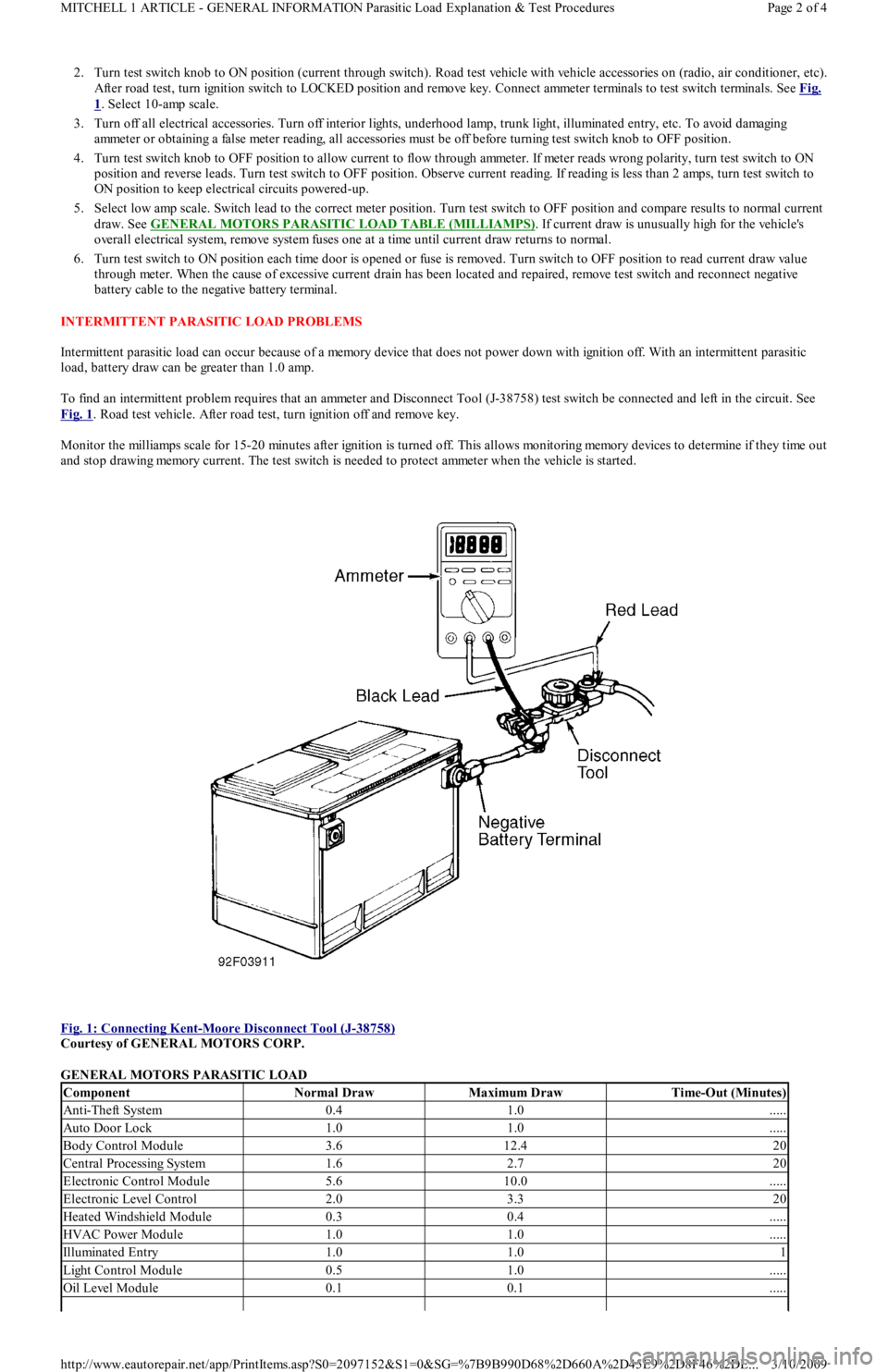
2. Turn test switch knob to ON position (current through switch). Road test vehicle with vehicle accessories on (radio, air conditioner, etc).
After road test, turn ignition switch to LOCKED position and remove key. Connect ammeter terminals to test switch terminals. See Fig.
1. Select 10-amp scale.
3. Turn off all electrical accessories. Turn off interior lights, underhood lamp, trunk light, illuminated entry, etc. To avoid damaging
ammeter or obtaining a false meter reading, all accessories must be off before turning test switch knob to OFF position.
4. Turn test switch knob to OFF position to allow current to flow through ammeter. If meter reads wrong polarity, turn test switch to ON
position and reverse leads. Turn test switch to OFF position. Observe current reading. If reading is less than 2 amps, turn test switch to
ON position to keep electrical circuits powered-up.
5. Select low amp scale. Switch lead to the correct meter position. Turn test switch to OFF position and compare results to normal current
draw. See GENERAL MOTORS PARASITIC LOAD TABLE (MILLIAMPS)
. If current draw is unusually high for the vehicle's
overall electrical system, remove system fuses one at a time until current draw returns to normal.
6. Turn test switch to ON position each time door is opened or fuse is removed. Turn switch to OFF position to read current draw va l u e
through meter. When the cause of excessive current drain has been located and repaired, remove test switch and reconnect negative
battery cable to the negative battery terminal.
INTERMITTENT PARASITIC LOAD PROBLEMS
Intermittent parasitic load can occur because of a memory device that does not power down with ignition off. With an intermittent parasitic
load, battery draw can be greater than 1.0 amp.
To find an intermittent problem requires that an ammeter and Disconnect Tool (J-38758) test switch be connected and left in the circuit. See
Fig. 1
. Road test vehicle. After road test, turn ignition off and remove key.
Monitor the milliamps scale for 15-20 minutes after ignition is turned off. This allows monitoring memory devices to determine if they time out
and stop drawing memory current. The test switch is needed to protect ammeter when the vehicle is started.
Fig. 1: Connecting Kent
-Moore Disconnect Tool (J-38758)
Courtesy of GENERAL MOTORS CORP.
GENERAL MOTORS PARASITIC LOAD
ComponentNormal DrawMaximum DrawTime-Out (Minutes)
Anti-Theft System0.41.0.....
Auto Door Lock1.01.0.....
Body Control Module3.612.420
Central Processing System1.62.720
Electronic Control Module5.610.0.....
Electronic Level Control2.03.320
Heated Windshield Module0.30.4.....
HVAC Power Module1.01.0.....
Illuminated Entry1.01.01
Light Control Module0.51.0.....
Oil Level Module0.10.1.....
Page 2 of 4 MITCHELL 1 ARTICLE - GENERAL INFORMATION Parasitic Load Explanation & Test Procedures
3/10/2009 http://www.eautorepair.net/app/PrintItems.asp?S0=2097152&S1=0&SG=%7B9B990D68%2D660A%2D45E9%2D8F46%2DE
...
Page 280 of 454
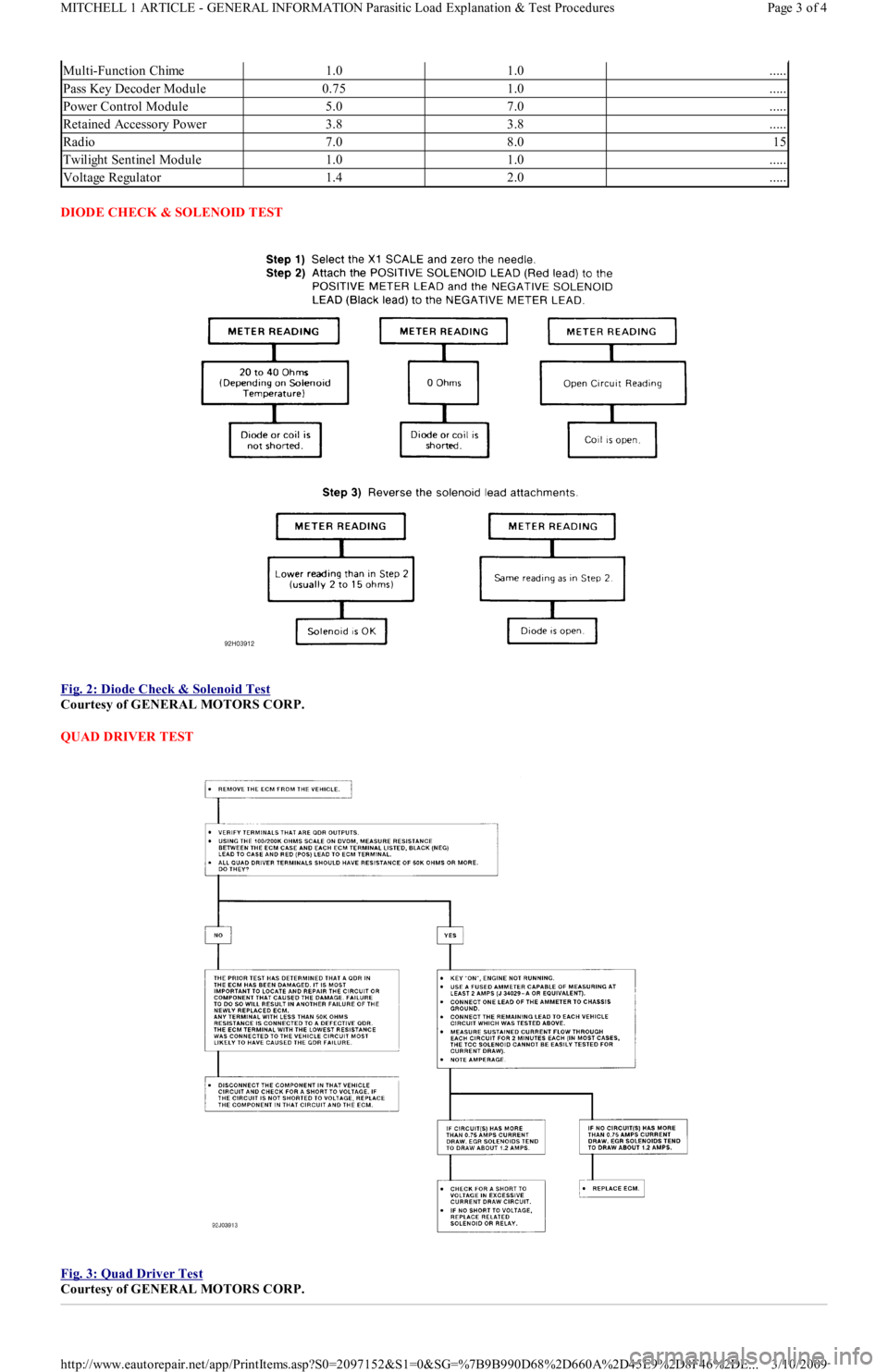
DIODE CHECK & SOLENOID TEST
Fig. 2: Diode Check & Solenoid Test
Courtesy of GENERAL MOTORS CORP.
QUAD DRIVER TEST
Fig. 3: Quad Driver Test
Courtesy of GENERAL MOTORS CORP.
Multi-Function Chime1.01.0.....
Pass Key Decoder Module0.751.0.....
Power Control Module5.07.0.....
Retained Accessory Power3.83.8.....
Radio7.08.015
Twilight Sentinel Module1.01.0.....
Voltage Regulator1.42.0.....
Page 3 of 4 MITCHELL 1 ARTICLE - GENERAL INFORMATION Parasitic Load Explanation & Test Procedures
3/10/2009 http://www.eautorepair.net/app/PrintItems.asp?S0=2097152&S1=0&SG=%7B9B990D68%2D660A%2D45E9%2D8F46%2DE
...
Page 310 of 454
Back To Article
GENERAL SERVICING
1991 Ford Com pressor Overhaul
REMOVAL & INSTALLATION
FORD FS-6 6-CYL CLUTCH ASSEMBLY
Removal
1. Using Spanner (T70P-4067-A), remove compressor shaft nut. Thread Hub Remover (T80L-19703-B) into clutch plate. Tighten center
bolt in hub remover to remove clutch plate and shims.
2. Remove snap ring. Remove pulley assembly from compressor. If assembly cannot be easily removed, place Shaft Protector (T80L-
19703-G) over shaft. Using Puller (D81P-19703-B), remove pulley assembly. Remove clutch coil retaining snap ring. Remove clutch
coil.
3. If bearing replacement is required, place pulley on Support (T80L-19703-E). Drive bearing from pulley using Bearing Remover (T80L-
19703-J).
Installation
1. If bearing is to be installed, place pulley on support. Using Bearing Installer (T80L-19703-C), drive bearing into pulley. Stake pulley in
4 places to retain bearing.
2. Install clutch coil on compressor so locating pin on compressor engages with hole in clutch coil. Install snap ring. Using hammer and
Pulley Installer (T80L-19703-J), tap pulley assembly on compressor.
3. Install snap ring with beveled side away from compressor. Using Clutch Plate Installer (T80L-19703-F), install clutch plate and shims.
Install and tighten compressor shaft nut to 10-14 ft. lbs. (14-19 N.m).
4. Using feeler gauge, measure air gap between clutch plate and pulley surface in 3 locations around pulley. Rotate pulley 180 degrees and
recheck clearance. Proper clearance is .021-.036" (.05-.91 mm). Adjust shim thickness to obtain correct clearance.
FORD FS-6 6-CYL SHAFT SEAL
Removal
1. Discharge system using approved refrigerant recovery/recycling equipment and remove compressor. Drain oil from compressor and
record amount for reassembly.
2. Remove clutch assembly. See FORD FS-6 6-CYL CLUTCH ASSEMBLY R & I in this article. Ensure compressor outer surface is clean.
Attach compressor on Clamp & Holding Fixture (T81P-19623-D). Place fixture in vise.
3. Using Key Remover (T81P-19623-NH), remove key from compressor shaft. Remove front head-to-compressor retaining bolts. Remove
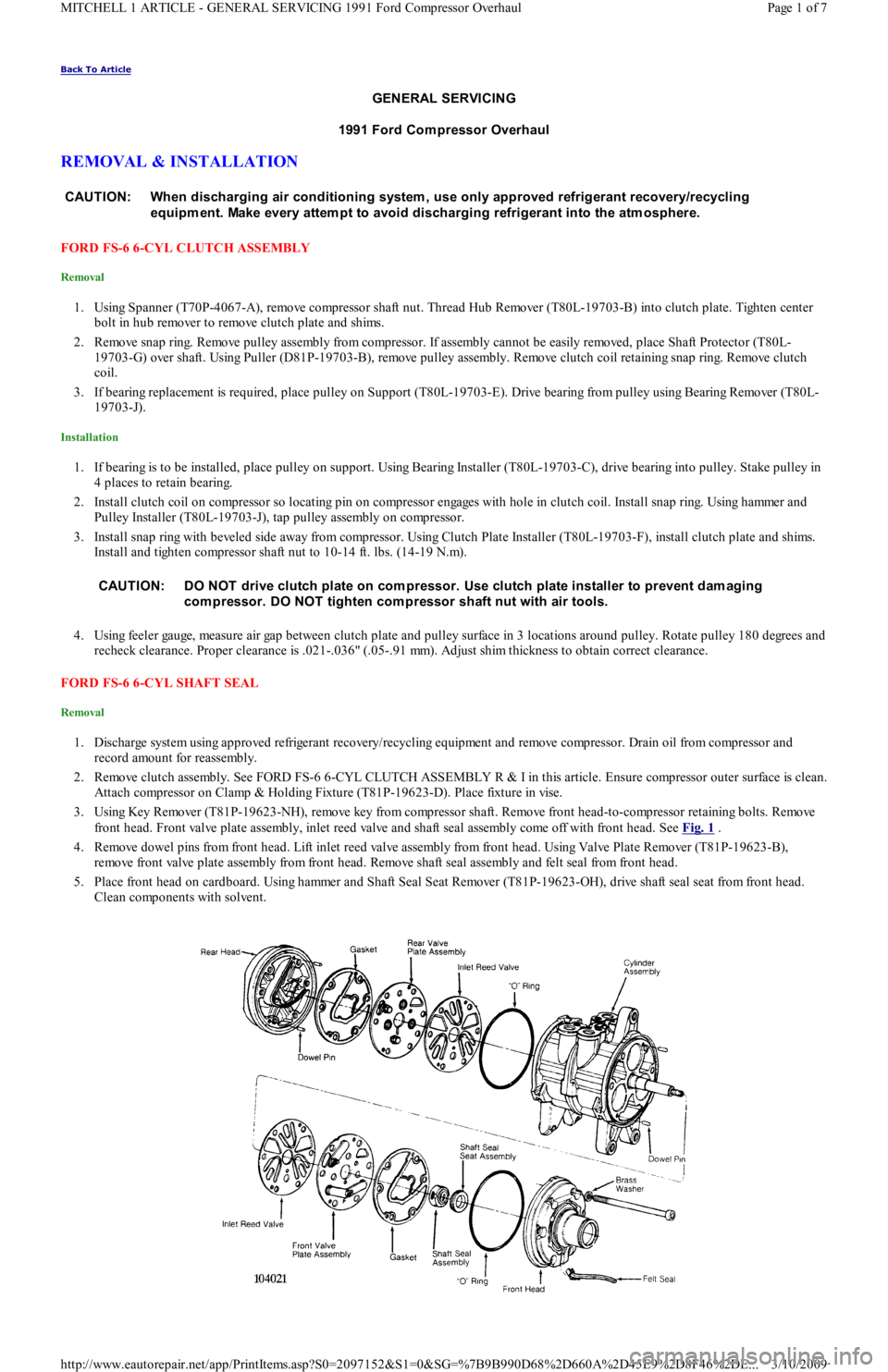
front head. Front valve plate assembly, inlet reed valve and shaft seal assembly come off with front head. See Fig. 1
.
4. Remove dowel pins from front head. Lift inlet reed valve assembly from front head. Using Valve Plate Remover (T81P-19623-B),
remove front valve plate assembly from front head. Remove shaft seal assembly and felt seal from front head.
5. Place front head on cardboard. Using hammer and Shaft Seal Seat Remover (T81P-19623-OH), drive shaft seal seat from front head.
Clean components with solvent. CAUT ION: When discharging air conditioning system , use only approved refrigerant recovery/recycling
equipm ent. Make every attem pt to avoid discharging refrigerant into the atm osphere.
CAUT ION: DO NOT drive clutch plate on com pressor. Use clutch plate installer to prevent dam aging
com pressor. DO NOT tighten com pressor shaft nut with air tools.
Page 1 of 7 MITCHELL 1 ARTICLE - GENERAL SERVICING 1991 Ford Compressor Overhaul
3/10/2009 http://www.eautorepair.net/app/PrintItems.asp?S0=2097152&S1=0&SG=%7B9B990D68%2D660A%2D45E9%2D8F46%2DE
...
Page 312 of 454
1. Discharge system using approved refrigerant recovery/recycling equipment and remove compressor. Using Spanner (T70P-4067-A),
remove clutch plate retaining bolt and discard. Using an 8-mm bolt threaded into clutch plate, remove clutch plate and shims. See Fig.
2 .
2. Remove shaft felt seal. Thoroughly clean seal area of compressor. Using snap ring pliers, remove shaft seal retaining snap ring.
3. Position Shaft Seal Remover (T89P-19623-BH) over compressor shaft. Push shaft seal remover downward against seal. Ensure end of
shaft seal remover is engaged with inside of seal.
4. Rotate shaft seal remover handle clockwise to expand remover tip inside seal. Pull shaft seal from compressor.
Installation
1. Shaft seal protector is included with replacement seal kit. Lubricate shaft seal protector and shaft seal with refrigerant oil.
2. Install shaft seal on shaft seal protector so lip of seal is toward compressor (large end of shaft seal protector). Install shaft seal protector
on compressor shaft.
3. Using Shaft Seal Installer (T89P-19623-AH), push shaft seal down shaft seal protector until seated. Remove shaft seal installer and
protector. Install NEW shaft seal retaining snap ring.
4. Install NEW shaft seal felt. Install clutch plate. Install new clutch plate retaining bolt and tighten to 96-120 INCH lbs. (11-14 N.m).
5. Using feeler gauge, check clearance between clutch plate and pulley assembly mating surfaces in 3 places. Clearance should be .018-
.033" (.46-.84 mm). If clearance is not correct, add or remove shims.
6. Install compressor. Evacuate and recharge system. Perform leak test.
NIPPONDENSO 6E-171 & 6P-148 CLUTCH ASSEMBLY
Removal
1. Using Spanner (T81P-19623-MH), hold clutch plate and remove crankshaft nut. Using Clutch Plate Remover (T80L-19703-B), pull
clutch plate from compressor. Remove clutch plate shims.
2. Remove snap ring and clutch pulley assembly. If pulley assembly cannot be removed by hand, use Shaft Protector (T80L-19703-G) and
3-jaw puller to remove pulley. Remove snap ring. Disconnect electrical wiring and remove clutch coil.
Installation
1. Install clutch coil over locating pin and install snap ring. Connect electrical wiring.
2. Using Pulley Installer (T80L-19703-J) and hammer (if necessary), install pulley assembly. Install snap ring with beveled side away from
compressor.
3. Install clutch plate shims. Ensure clutch plate aligns with crankshaft key. Using Clutch Plate Installer (T80L-19703-F), install clutch
plate.
4. Install crankshaft nut. Using spanner, tighten nut to 10-14 ft. lbs. (13-20 N.m). DO NOT tighten nut with air tools. Using feeler gauge,
check clearance between clutch plate and pulley.
5. Rotate compressor clutch and check clearance in more than one place. Proper clearance is .021-.035" (.53-.89 mm). If clearance is not
correct, add or remove shims.
NIPPONDENSO 6E-171 & 6P-148 SHAFT SEAL
Removal
1. Discharge system using approved refrigerant recovery/recycling equipment and remove compressor. Drain oil from suction port on
compressor and record amount for reassembly.
2. Remove clutch assembly. See NIPPONDENSO 6E-171 & 6P-148 CLUTCH ASSEMBLY R & I in this article. Ensure outer surface of
compressor is clean. Attach compressor on Clamp & Holding Fixture (T81P-19623-LH). Place fixture in vise.
3. Using Key Remover (T81P-19623-NH), remove key from compressor shaft. Remove front head-to-compressor retaining bolts and front
head. Front valve plate assembly, inlet reed valve and shaft seal assembly come off with front head. See Fig. 1
.
4. Remove dowel pins from front head. Lift inlet reed valve assembly from front head. Using Valve Plate Remover (T81P-19623-PH),
remove front valve plate assembly from front head. Remove shaft seal assembly and felt seal from front head.
5. Place front head on cardboard. Drive shaft seal seat from front head using hammer and Shaft Seal Seat Remover (T81P-19623-OH).
Clean components with solvent.
Installation
1. Place dowel pins in compressor. Lubricate inlet reed valve with refrigerant oil. Install inlet reed valve on compressor. Install front valve
plate assembly on compressor.
2. Lubricate shaft seal seat with refrigerant oil. Install Seat Installer (T81P-19623-C) on new seat so installer is placed on grooved side of
seat. Install shaft seal seat.
3. Install shaft seal assembly in front head so sealing surface is toward end of compressor shaft. Ensure flat areas on shaft seal assembly
engage with flat areas on compressor shaft.
4. Lubricate front head "O" ring with refrigerant oil. Install front head and "O" ring. Tighten retaining bolts in a crisscross pattern to 19 ft.
lbs. (26 N.m). DO NOT use air tools to tighten retaining bolts.
5. Install clutch assembly. Add same amount new refrigerant oil to compressor as was drained. Rotate compressor 10 revolutions to
distribute oil. Install compressor. Evacuate and recharge system. Perform leak test. NOTE:Rem ove com pressor when clearance is not adequate for clutch assem bly rem oval.
CAUT ION: DO NOT dry front valve plate assem bly or inlet reed valve with com pressed air.
CAUT ION: DO NOT touch sealing surfaces of shaft seal assem bly or shaft seat assem bly.
Page 3 of 7 MITCHELL 1 ARTICLE - GENERAL SERVICING 1991 Ford Compressor Overhaul
3/10/2009 http://www.eautorepair.net/app/PrintItems.asp?S0=2097152&S1=0&SG=%7B9B990D68%2D660A%2D45E9%2D8F46%2DE
...
Page 313 of 454
NIPPONDENSO 10P13 CLUTCH ASSEMBLY
Removal
1. Discharge system using approved refrigerant recovery/recycling equipment and remove compressor. Using Clutch Holder (1014), hold
clutch plate and remove crankshaft nut. Using Clutch Plate Remover (T80L-19703-B), pull clutch plate from compressor. Remove
clutch plate shims.
2. Remove snap ring and pulley assembly. If pulley assembly cannot be removed by hand, use Shaft Protector (T80L-19703-G) and 3-jaw
puller to remove pulley. Remove snap ring. Disconnect electrical wiring and remove clutch coil.
Installation
1. Install clutch coil over locating pin. Install snap ring with beveled side away from compressor.
2. Install pulley assembly using Pulley Installer (T80L-19703-J) and hammer (if necessary). Install snap ring with beveled side away from
compressor.
3. Install clutch plate shims. Ensure clutch plate aligns with crankshaft key. Install clutch plate using Clutch Plate Installer (T80L-19703-
F).
4. Install crankshaft nut. Using spanner, tighten nut to 10-14 ft. lbs. (13-20 N.m). DO NOT tighten nut with air tools. Using feeler gauge,
check clearance between clutch plate and pulley.
5. Rotate compressor clutch and check clearance in more than one place. Proper clearance is .021-.036" (.53-.91 mm). If clearance is not
correct, add or remove shims.
6. Add same amount new refrigerant oil to compressor as was drained. Rotate compressor 10 revolutions to distribute oil. Install
compressor. Evacuate and recharge system. Perform leak test.
NIPPONDENSO 10P13 SHAFT SEAL
Removal
1. Discharge system using approved refrigerant recovery/recycling equipment and remove compressor. Drain oil from compressor and
record amount for reassembly. Using Clutch Holder (1014), hold clutch plate and remove crankshaft nut.
2. Pull clutch plate from compressor using Clutch Plate Remover (T80L-19703-B). Remove clutch plate shims. Clean compressor area
around seal. Remove felt packing and dust seal retainer from nose of front cover. See Fig. 3
.
3. Using Key Remover (T81P-19623-NH), remove key from compressor shaft. Remove seal seat retaining snap ring. Remove seal seat from
compressor using Seal Seat Remover/Installer (T87P-19623-B).
4. Place Seal Remover/Installer (T87P-19623-C) on compressor. Rotate seal remover/installer clockwise until tangs engage in seal. Pull
seal from compressor.
Installation
1. Lubricate shaft seal, seal seat and inside of compressor nose with refrigerant oil. Install Seal Protector (T71P-19703-H) over compressor
shaft. Using seal remover/installer, install shaft seal in compressor.
2. Rotate seal on compressor shaft to align flat areas on seal with those on compressor shaft.
3. Using seal seat remover/installer, install seal seat until it contacts seal. Install snap ring. Install key in crankshaft with rounded edge
inward.
4. Install clutch plate shims. Ensure clutch plate is aligned with crankshaft key. Using Clutch Plate Installer (T80L-19703-F), install clutch
plate.
5. Install crankshaft nut. Using spanner, tighten nut to 10-14 ft. lbs. (13-20 N.m). DO NOT tighten nut with air tools. Using feeler gauge,
check clearance between clutch plate and pulley.
6. Rotate compressor clutch and check clearance in more than one place. Proper clearance is .021-.036" (.53-.91 mm). If clearance is not
correct, add or remove shims.
7. Add same amount new refrigerant oil to compressor as was drained. Rotate compressor 10 revolutions to distribute oil in compressor.
Install compressor. Evacuate and recharge system. Perform leak test. NOTE:After installing new clutch, cycle clutch 10 tim es with engine at idle speed to prevent clutch slippage.
Page 4 of 7 MITCHELL 1 ARTICLE - GENERAL SERVICING 1991 Ford Compressor Overhaul
3/10/2009 http://www.eautorepair.net/app/PrintItems.asp?S0=2097152&S1=0&SG=%7B9B990D68%2D660A%2D45E9%2D8F46%2DE
...
Page 314 of 454
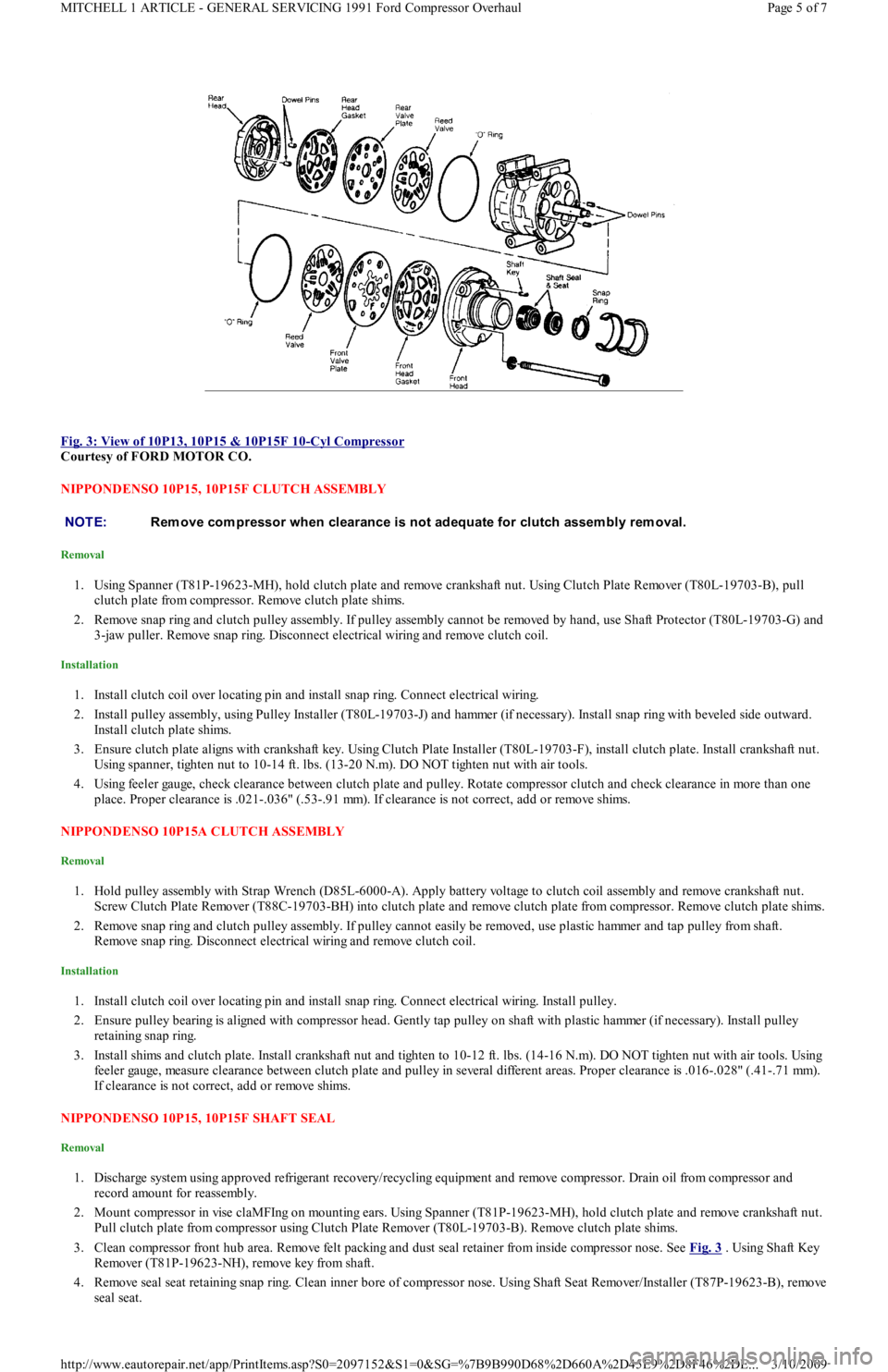
Fig. 3: View of 10P13, 10P15 & 10P15F 10
-Cyl Compressor
Courtesy of FORD MOTOR CO.
NIPPONDENSO 10P15, 10P15F CLUTCH ASSEMBLY
Removal
1. Using Spanner (T81P-19623-MH), hold clutch plate and remove crankshaft nut. Using Clutch Plate Remover (T80L-19703-B), pull
clutch plate from compressor. Remove clutch plate shims.
2. Remove snap ring and clutch pulley assembly. If pulley assembly cannot be removed by hand, use Shaft Protector (T80L-19703-G) and
3-jaw puller. Remove snap ring. Disconnect electrical wiring and remove clutch coil.
Installation
1. Install clutch coil over locating pin and install snap ring. Connect electrical wiring.
2. Install pulley assembly, using Pulley Installer (T80L-19703-J) and hammer (if necessary). Install snap ring with beveled side outward.
Install clutch plate shims.
3. Ensure clutch plate aligns with crankshaft key. Using Clutch Plate Installer (T80L-19703-F), install clutch plate. Install crankshaft nut.
Using spanner, tighten nut to 10-14 ft. lbs. (13-20 N.m). DO NOT tighten nut with air tools.
4. Using feeler gauge, check clearance between clutch plate and pulley. Rotate compressor clutch and check clearance in more than one
place. Proper clearance is .021-.036" (.53-.91 mm). If clearance is not correct, add or remove shims.
NIPPONDENSO 10P15A CLUTCH ASSEMBLY
Removal
1. Hold pulley assembly with Strap Wrench (D85L-6000-A). Apply battery voltage to clutch coil assembly and remove crankshaft nut.
Screw Clutch Plate Remover (T88C-19703-BH) into clutch plate and remove clutch plate from compressor. Remove clutch plate shims.
2. Remove snap ring and clutch pulley assembly. If pulley cannot easily be removed, use plastic hammer and tap pulley from shaft.
Remove snap ring. Disconnect electrical wiring and remove clutch coil.
Installation
1. Install clutch coil over locating pin and install snap ring. Connect electrical wiring. Install pulley.
2. Ensure pulley bearing is aligned with compressor head. Gently tap pulley on shaft with plastic hammer (if necessary). Install pulley
retaining snap ring.
3. Install shims and clutch plate. Install crankshaft nut and tighten to 10-12 ft. lbs. (14-16 N.m). DO NOT tighten nut with air tools. Using
feeler gauge, measure clearance between clutch plate and pulley in several different areas. Proper clearance is .016-.028" (.41-.71 mm).
If clearance is not correct, add or remove shims.
NIPPONDENSO 10P15, 10P15F SHAFT SEAL
Removal
1. Discharge system using approved refrigerant recovery/recycling equipment and remove compressor. Drain oil from compressor and
record amount for reassembly.
2. Mount compressor in vise claMFIng on mounting ears. Using Spanner (T81P-19623-MH), hold clutch plate and remove crankshaft nut.
Pull clutch plate from compressor using Clutch Plate Remover (T80L-19703-B). Remove clutch plate shims.
3. Clean compressor front hub area. Remove felt packing and dust seal retainer from inside compressor nose. See Fig. 3
. Using Shaft Key
Remover (T81P-19623-NH), remove key from shaft.
4. Remove seal seat retaining snap ring. Clean inner bore of compressor nose. Using Shaft Seat Remover/Installer (T87P-19623-B), remove
seal seat.
NOTE:Rem ove com pressor when clearance is not adequate for clutch assem bly rem oval.
Page 5 of 7 MITCHELL 1 ARTICLE - GENERAL SERVICING 1991 Ford Compressor Overhaul
3/10/2009 http://www.eautorepair.net/app/PrintItems.asp?S0=2097152&S1=0&SG=%7B9B990D68%2D660A%2D45E9%2D8F46%2DE
...