Page 871 of 2389

8. INSTALL NEW PADS
(a) Install new pad wear indicator plate to inner pad.
NINT: Be sure the arrow on the pad wear indicator
plate is pointing i n the direction of the disc rotation.
(b) (Except 2VZ±FE Engine of w/ A.B.S.)
Install the one anti±squeal shim to the each pad.
(c) (For 2VZ±FE Engine of w/ A.B.S.)
Install the two anti±squeal shims to the each pad.
HINT: Apply disc brake grease to both side of the inner
anti±squeal shim of the outside pad.
(d) Install the pads onto each support plate.
NOTICE: Do not allow oil or grease to get on the
rubbing face.
(e) Install the two anti±squeal springs.
9. INSTALL CYLINDER
(a) Draw out a small amount of brake fluid from the reser-
voir.
(b) Press in piston with a hammer handle or an equiva-
lent.
HINT: Always change the pad on one wheel at a time as
there is a possibility of the opposite piston flying out.
(c) Insert the brake cylinder carefully ±so the boot is not
wedged. 5. CHECK ROTOR DISC THICKNESS
(See step 2 on page BR±23)
6. CHECK ROTOR DISC RUNOUT
(See step 3 on page BR±23)
7. INSTALL PAD SUPPORT PLATES
± BRAKE SYSTEMFront BrakeBR±20
Page 918 of 2389

INITIAL CHECK
CHECK ACTUATOR OPERATION NOISE
(a) Start the engine and drive at a speed over 6 km/h
(4 mph).
(b) Check that the actuator operation noise is heard.
HINT: A initial check is carried out once each time after the
engine has been started and initial speed exceeds 6
km/h (4 mph). The respective functions, in order, of the 3
position solenoid and pump motor in the actuator are
checked. However, if the brake pedal is depressed, the ini-
tial check is not carried out, but is started after the pedal
has been released.
INSPECTION OF DIAGNOSIS SYSTEM
1. INSPECT BATTERY VOLTAGE
Inspect that the battery voltage is about 12 V.
2. CHECK THAT WARNING LIGHT TURNS ON
(a) Turn the ignition switch on.
(b) Check that the ºANTILOCKº warning light turns on for
3 seconds.
If not, inspect and repair or replace the fuse, bulb and wire
harness.
Diagnosis System
DESCRIPTION
If a malfunction occurs, the system will identify the prob-
lem and the computer will store the codes for the trouble
items.
At the same time, the system informs the driver of a mal-
function via the ºANTILOCKº warning light in the combina-
tion meter.
By turning on the ignition switch and disconnecting the
check connector, the trouble can be identified by the
number of blinks (diagnostic code) of the warning light.
In the event of two codes, that having the smallest num-
ber (code) will be identified first.
HINT: The warning light does not show the diagnostic
codes while the vehicle is running.
± BRAKE SYSTEMAnti±lock Brake System (A.B.S.)BR±67
Page 928 of 2389
Speed Sensor Diagnosis System
PRECAUTION
While checking the speed sensor diagnosis system,
A.B.S. does not work and brake system works as normal
brake system.
INSPECTION OF DIAGNOSIS SYSTEM
1. INSPECT BATTERY VOLTAGE
Inspect that the battery voltage is about 12 V.
2. CHECK THAT WARNING LIGHT TURNS ON
(a) Turn the ignition switch on.
(b) Check that the ºANTILOCKº warning light turns on for
3 seconds.
If not, inspect and repair or replace the fuse, bulb and wire
harness.
(c) Check that the ºANTILOCKº warning light turns off.
(d) Turn the ignition switch off.
3. PERFORM FOLLOWING STEPS
(2WD)
(a) Disconnect the check connector from the actuator.
(b) Pull the parking brake lever up, and start the engine.
(d) Check that the warning light blinks about 4 times ev-
ery 1 second as shown. (c) Depress the brake pedal 4 to 6 times within 2
seconds.
± BRAKE SYSTEMAnti±lock Brake System (A.B.S.)BR±77
Page 929 of 2389

4. INSPECT SENSOR SIGNAL LEVEL
Drive the vehicle straight ahead at about 4 ±6 km/h (2.5
± 3.7 mph), and check that the warning light turns on after
a 1 second pause.
If the warning light turns on without blinking when the ve-
hicle speed is not within the specified speed range above,
stop the vehicle and read the diagnostic code, and repair
the malfunctioning parts.
(See step S on page BR±79)
HINT: If the warning light turns on while the vehicle speed
is within specified speed range above, the check is com-
pleted. And when the vehicle speed exceeds 6 km/h
(3.7mph), the warning light will blink again. In this condi-
tion, speed sensors are OK.
NOTICE: While the warning light is off, do not give any
shocks to vehicle such as acceleration, deceleration, brak-
ing, shift change, steering or shocks from the road condi-
tion.
(4WD)
(a) Remove the rubber cap from the Ts connector lo-
cated in front of the actuator.
(b) Connect the terminals of Ts connector.
(c) Pull the parking brake lever up, and start the engine.
NOTICE: Do not depress the brake pedal.
(d) Check that the warning light blinks about 4 times ev-
ery 1 second as shown.
± BRAKE SYSTEMAnti±lock Brake System (A.B.S.)BR±78
Page 933 of 2389

Deceleration Sensor Operation
Diagnosis System (For 4WD)
PRECAUTION
While checking the deceleration sensor diagnosis
system, A.B.S. does not work and brake system works as
normal brake system.
INSPECTION OF DIAGNOSIS SYSTEM
1. INSPECT BATTERY VOLTAGE
Inspect that the battery voltage is about 12 V.
2. CHECK THAT WARNING LIGHT TURNS ON
(a) Turn the ignition switch on.
(b) Check that the ºANTILOCKº warning light turns on for
3 seconds.
If not, inspect and repair or replace the fuse, bulb and wire
harness.
(e) Check that the ºANTILOCKº warning light turns off.
(d) Turn the ignition switch off.
3. PERFORM FOLLOWING STEPS
(a) Remove the rubber cap from the Ts connector lo-
cated in front of the actuator.
(b) Connect the terminals of Ts connector.
(c) Pull the parking brake lever up and depress the brake
pedal, and start the engine.
4. INSPECT SENSOR DETECTION POINT
(a) Jack up the rear side of the vehicle slowly as shown.
HINT: When measuring the height, measure at the center
of the rear bumper lower edge.
(b) Check that the warning light does not turn on.
(c) Jack down the vehicle and check that the warning
light blinking. (d) Check that the warning light blinks about 1 time every
1 second as shown.
If the warning light does not blink, inspect the parking brake
switch, stop light switch, Ts connector, deceleration sensor
installation and computer.
± BRAKE SYSTEMAnti±lock Brake System (A.B.S.)BR±82
Page 934 of 2389

(d) Jack up the front side of the vehicle slowly as shown.
HINT: When measuring the height, measure at the center
of the lower body or spoiler edge of the vehicle.
(e) Check that the warning light does not turn on.
(f) Jack down the vehicle and check that the warning
light blinking.
If the warning light turns on, inspect the deceleration se
sor installation. And if the sensor installation is ±OK, r
place the deceleration sensor.
(e) Drive the vehicle straight ahead at about 20 km/h
(12.4 mph) or more, depress the brake pedal strong±
ly.
(f) Check that the warning light light pattern changes af-
ter braking as shown.
If the operation is not as specified, inspect the deceleration
sensor installation. And if the sensor installation is OK, r
place the deceleration sensor. 5. INSPECT SENSOR OPERATION
(a) Drive the vehicle straight ahead at about 10 km/h l6.2
mph) or more, lightly depress the brake pedal.
(b) Check that there is no change in the warning light
light pattern.
(c) Drive the vehicle straight ahead at about 20 km/h
(12.4 mph) or more, depress the brake pedal a little
strong.
(d) Check that the warning light turns on while braking.
6. REMOVE SHORT PIN
(a) Stop the engine.
(b) Remove the short pin or wire from the Ts connector.
(c) Install the rubber cap to the Ts connector.
± BRAKE SYSTEMAnti±lock Brake System (A.B.S.)BR±83
Page 936 of 2389

3. CONNECT ACTUATOR CHECKER (SST) TO
ACTUATOR
(a) Connect the actuator checker (SST) to the actuator
and body side wire harness through the sub±wire
harness (SST) as shown.
SST 09990±00150
(b) Connect the red cable of the checker to the battery
positive i
+y terminal and black to the negative (±¿ter-
minal. Connect the black cable of the sub±wire har-
ness to the battery negative (±) terminal or body
ground.
(c) Place the ºSHEET Aº (SST) on the actuator checker.
SST 09990±00163
4. INSPECT BRAKE ACTUATOR OPERATION
(a) Start the engine, and run it at idle.
(b) Turn the selector switch of the actuator checker to
ºFRONT RHº position.
(c) Push and hold in the MOTOR switch for a few sec-
onds.
(d) Depress the brake pedal and hold it until the step 1gf
is completed.
(e) Push the POWER SWITCH, and check that the
brake pedal does not go down.
NOTICE: Do not keep the POWER SWITCH pushing more
than 10 seconds.
(f) Release the switch, and check that the pedal goes
down. 2. DISCONNECT CONNECTORS FROM ACTUATOR
Disconnect the three connectors from the actuator as
shown.
(g) Push and hold in the MOTOR switch for a few sec-
onds, and check that the pedal returns.
(h) Release the brake pedal.
± BRAKE SYSTEMAnti±lock Brake System (A.B.S.)BR±85
Page 954 of 2389
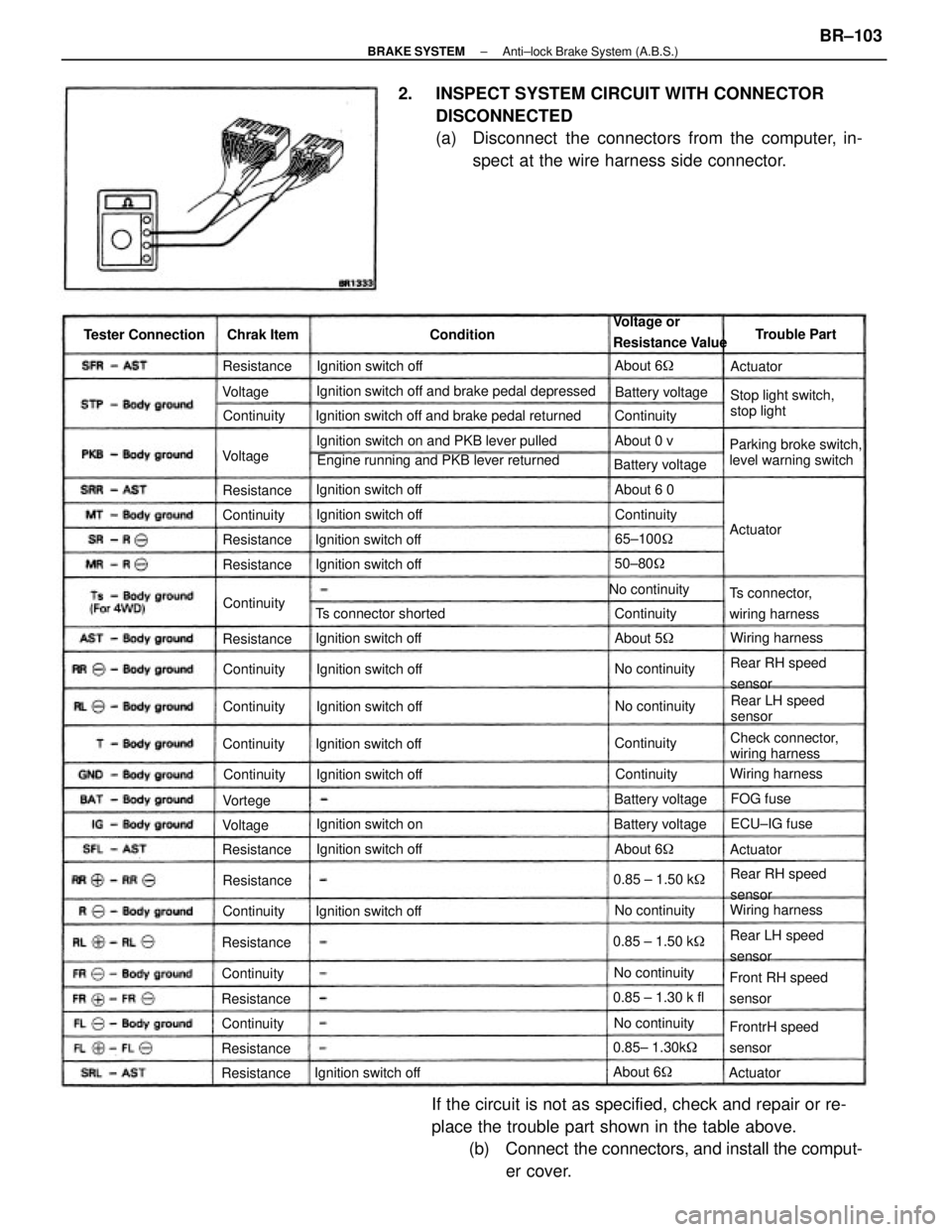
2. INSPECT SYSTEM CIRCUIT WITH CONNECTOR
DISCONNECTED
(a) Disconnect the connectors from the computer, in-
spect at the wire harness side connector.
If the circuit is not as specified, check and repair or re-
place the trouble part shown in the table above.
(b) Connect the connectors, and install the comput-
er cover.
Ignition switch off and brake pedal depressed
Engine running and PKB lever returned Ignition switch off and brake pedal returned
Ignition switch on and PKB lever pulled
Parking broke switch,
level warning switchStop light switch,
stop light Voltage or
Resistance Value
Check connector,
wiring harness
Front RH speed
sensor
FrontrH speed
sensor Ts connector,
wiring harness
Rear RH speed
sensor
Rear RH speed
sensor
Rear LH speed
sensorRear LH speed
sensor Ts connector shorted
Ignition switch offIgnition switch off
Ignition switch off
Ignition switch off Ignition switch off Tester Connection
Ignition switch offIgnition switch off
Ignition switch off
Ignition switch off Ignition switch off Ignition switch off
Ignition switch offIgnition switch off
Ignition switch onBattery voltage
No continuity
Battery voltage
0.85 ± 1.30 k fl
0.85± 1.30k� Battery voltage
Wiring harnessWiring harness
Wiring harness Battery voltage
0.85 ± 1.50 k� 0.85 ± 1.50 k�
No continuityNo continuity
No continuityNo continuityNo continuityTrouble Part
65±100�
ECU±IG fuse Chrak Item
50±80�
About 6� ContinuityResistance
Resistance
About 5� ResistanceAbout 6 0
Resistance
ResistanceAbout 6�
ResistanceContinuity Resistance
Resistance
ResistanceContinuity
ResistanceAbout 6�
ResistanceContinuity
Continuity
Continuity
ContinuityContinuity Continuity
Continuity Continuity
About 0 v
Continuity Continuity
Continuity
Continuity
FOG fuse Condition
ActuatorActuator
Actuator Voltage
VoltageVortege
Actuator Voltage
± BRAKE SYSTEMAnti±lock Brake System (A.B.S.)BR±103
