1985 FORD GRANADA clock
[x] Cancel search: clockPage 182 of 255
12Connect the new bulb, fit it and secure it
with the spring clip.
13Check the light for correct operation, then
refit and secure the cover.
Front foglight (when fitted)
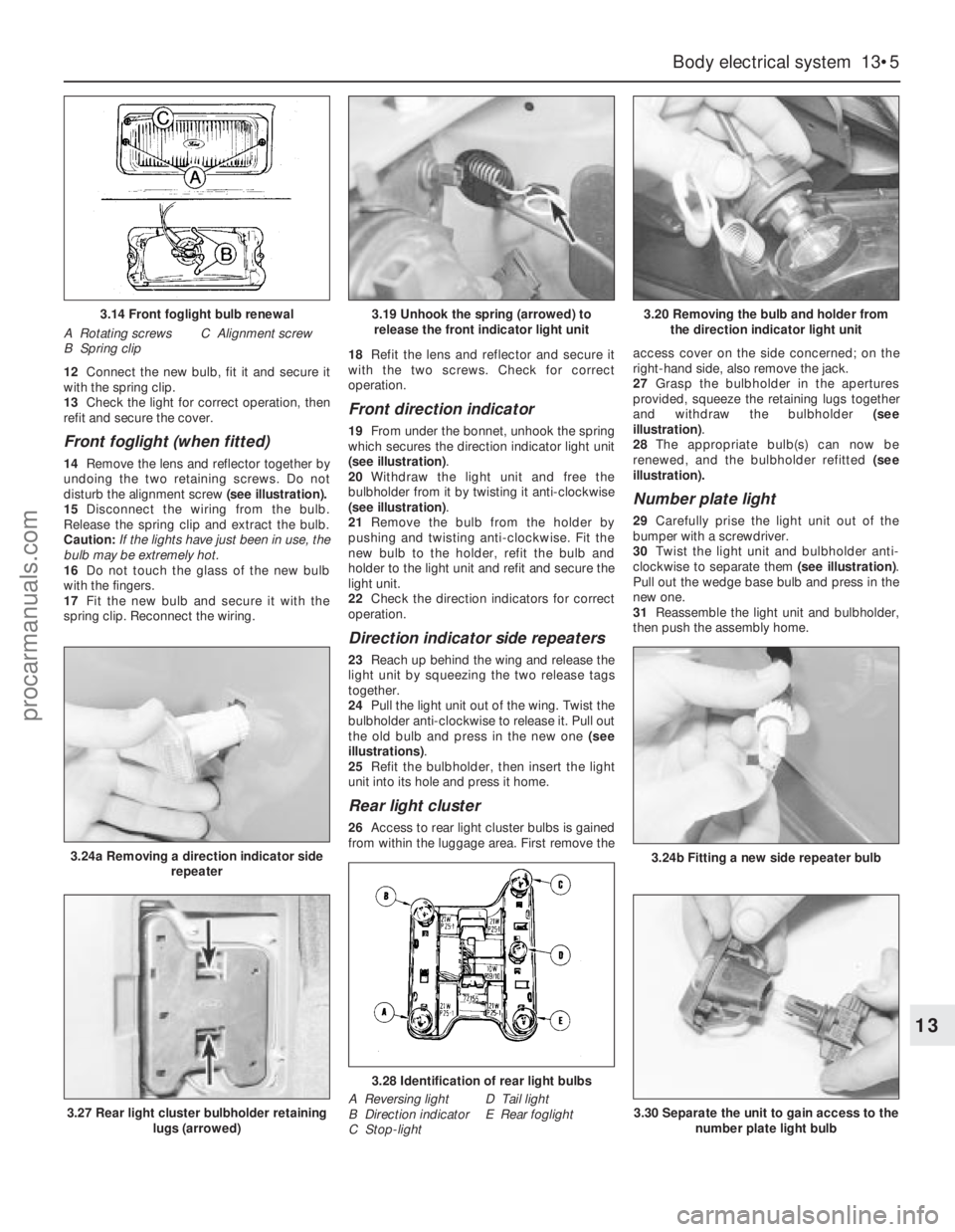
14Remove the lens and reflector together by
undoing the two retaining screws. Do not
disturb the alignment screw (see illustration).
15Disconnect the wiring from the bulb.
Release the spring clip and extract the bulb.
Caution: If the lights have just been in use, the
bulb may be extremely hot.
16Do not touch the glass of the new bulb
with the fingers.
17Fit the new bulb and secure it with the
spring clip. Reconnect the wiring.18Refit the lens and reflector and secure it
with the two screws. Check for correct
operation.
Front direction indicator
19From under the bonnet, unhook the spring
which secures the direction indicator light unit
(see illustration).
20Withdraw the light unit and free the
bulbholder from it by twisting it anti-clockwise
(see illustration).
21Remove the bulb from the holder by
pushing and twisting anti-clockwise. Fit the
new bulb to the holder, refit the bulb and
holder to the light unit and refit and secure the
light unit.
22Check the direction indicators for correct
operation.
Direction indicator side repeaters
23Reach up behind the wing and release the
light unit by squeezing the two release tags
together.
24Pull the light unit out of the wing. Twist the
bulbholder anti-clockwise to release it. Pull out
the old bulb and press in the new one (see
illustrations).
25Refit the bulbholder, then insert the light
unit into its hole and press it home.
Rear light cluster
26Access to rear light cluster bulbs is gained
from within the luggage area. First remove theaccess cover on the side concerned; on the
right-hand side, also remove the jack.
27Grasp the bulbholder in the apertures
provided, squeeze the retaining lugs together
and withdraw the bulbholder (see
illustration).
28The appropriate bulb(s) can now be
renewed, and the bulbholder refitted (see
illustration).
Number plate light
29Carefully prise the light unit out of the
bumper with a screwdriver.
30Twist the light unit and bulbholder anti-
clockwise to separate them (see illustration).
Pull out the wedge base bulb and press in the
newone.
31Reassemble the light unit and bulbholder,
then push the assembly home.
Body electrical system 13•5
13
3.14 Front foglight bulb renewal
A Rotating screws
B Spring clipC Alignment screw
3.24a Removing a direction indicator side
repeater
3.19 Unhook the spring (arrowed) to
release the front indicator light unit3.20 Removing the bulb and holder from
the direction indicator light unit
3.24b Fitting a new side repeater bulb
3.27 Rear light cluster bulbholder retaining
lugs (arrowed)
3.28 Identification of rear light bulbs
A Reversing light
B Direction indicator
C Stop-lightD Tail light
E Rear foglight3.30 Separate the unit to gain access to the
number plate light bulb
procarmanuals.com
Page 185 of 255
Footwell lights
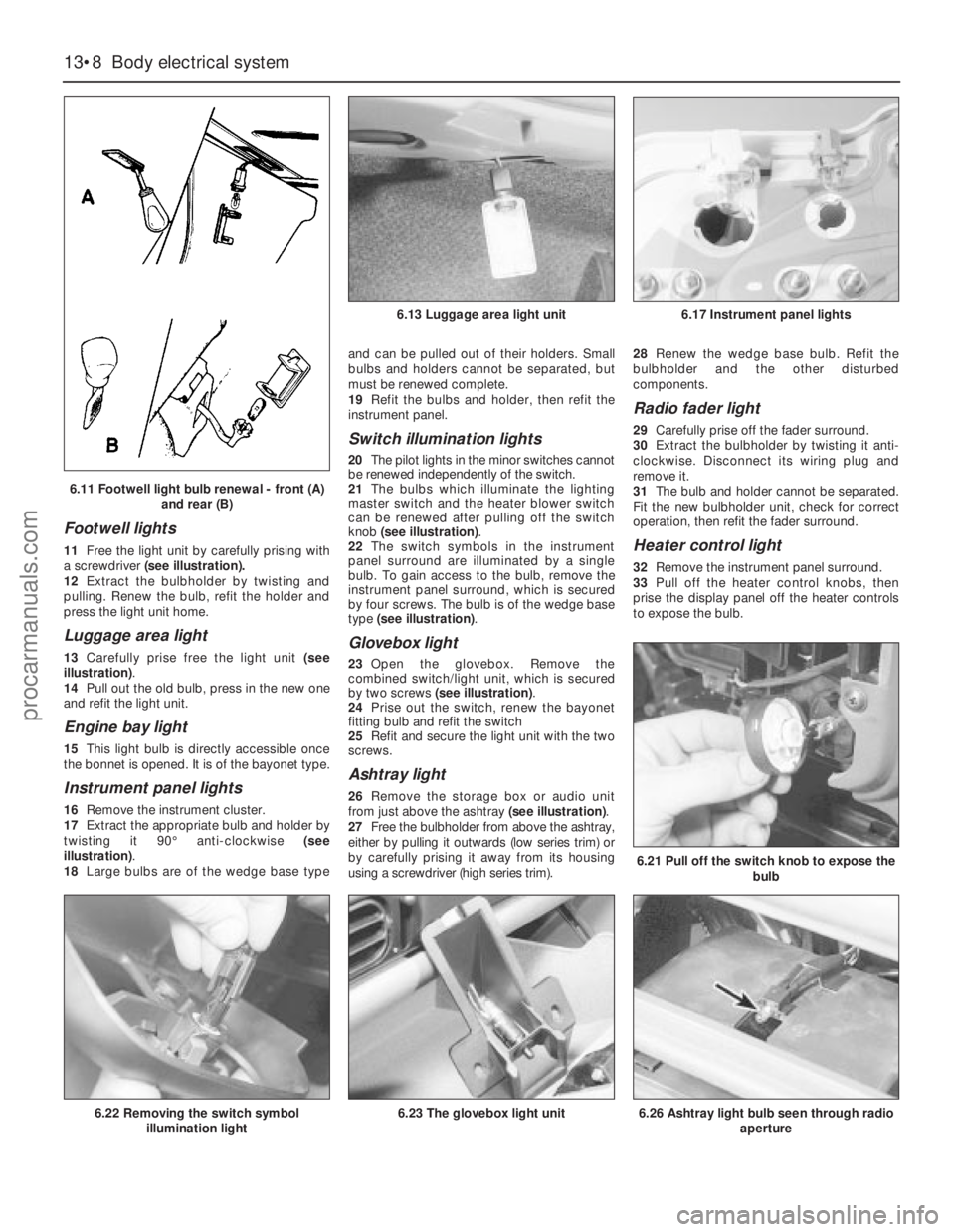
11Free the light unit by carefully prising with
a screwdriver(see illustration).
12Extract the bulbholder by twisting and
pulling. Renew the bulb, refit the holder and
press the light unit home.
Luggage area light
13Carefully prise free the light unit (see
illustration).
14Pull out the old bulb, press in the new one
and refit the light unit.
Engine bay light
15This light bulb is directly accessible once
the bonnet is opened. It is of the bayonet type.
Instrument panel lights
16Remove the instrument cluster.
17Extract the appropriate bulb and holder by
twisting it 90°anti-clockwise (see
illustration).
18Large bulbs are of the wedge base typeand can be pulled out of their holders. Small
bulbs and holders cannot be separated, but
must be renewed complete.
19Refit the bulbs and holder, then refit the
instrument panel.
Switch illumination lights
20The pilot lights in the minor switches cannot
be renewed independently of the switch.
21The bulbs which illuminate the lighting
master switch and the heater blower switch
can be renewed after pulling off the switch
knob (see illustration).
22The switch symbols in the instrument
panel surround are illuminated by a single
bulb. To gain access to the bulb, remove the
instrument panel surround, which is secured
by four screws. The bulb is of the wedge base
type (see illustration).
Glovebox light
23Open the glovebox. Remove the
combined switch/light unit, which is secured
by two screws (see illustration).
24Prise out the switch, renew the bayonet
fitting bulb and refit the switch
25Refit and secure the light unit with the two
screws.
Ashtray light
26Remove the storage box or audio unit
from just above the ashtray (see illustration).
27Free the bulbholder from above the ashtray,
either by pulling it outwards (low series trim) or
by carefully prising it away from its housing
using a screwdriver (high series trim).28Renew the wedge base bulb. Refit the
bulbholder and the other disturbed
components.
Radio fader light
29Carefully prise off the fader surround.
30Extract the bulbholder by twisting it anti-
clockwise. Disconnect its wiring plug and
remove it.
31The bulb and holder cannot be separated.
Fit the new bulbholder unit, check for correct
operation, then refit the fader surround.
Heater control light
32Remove the instrument panel surround.
33Pull off the heater control knobs, then
prise the display panel off the heater controls
to expose the bulb.
13•8Body electrical system
6.21 Pull off the switch knob to expose the
bulb
6.26 Ashtray light bulb seen through radio
aperture6.22 Removing the switch symbol
illumination light6.23 The glovebox light unit
6.13 Luggage area light unit6.17 Instrument panel lights
6.11 Footwell light bulb renewal - front (A)
and rear (B)
procarmanuals.com
Page 186 of 255
34Renew the bulb, check for correct
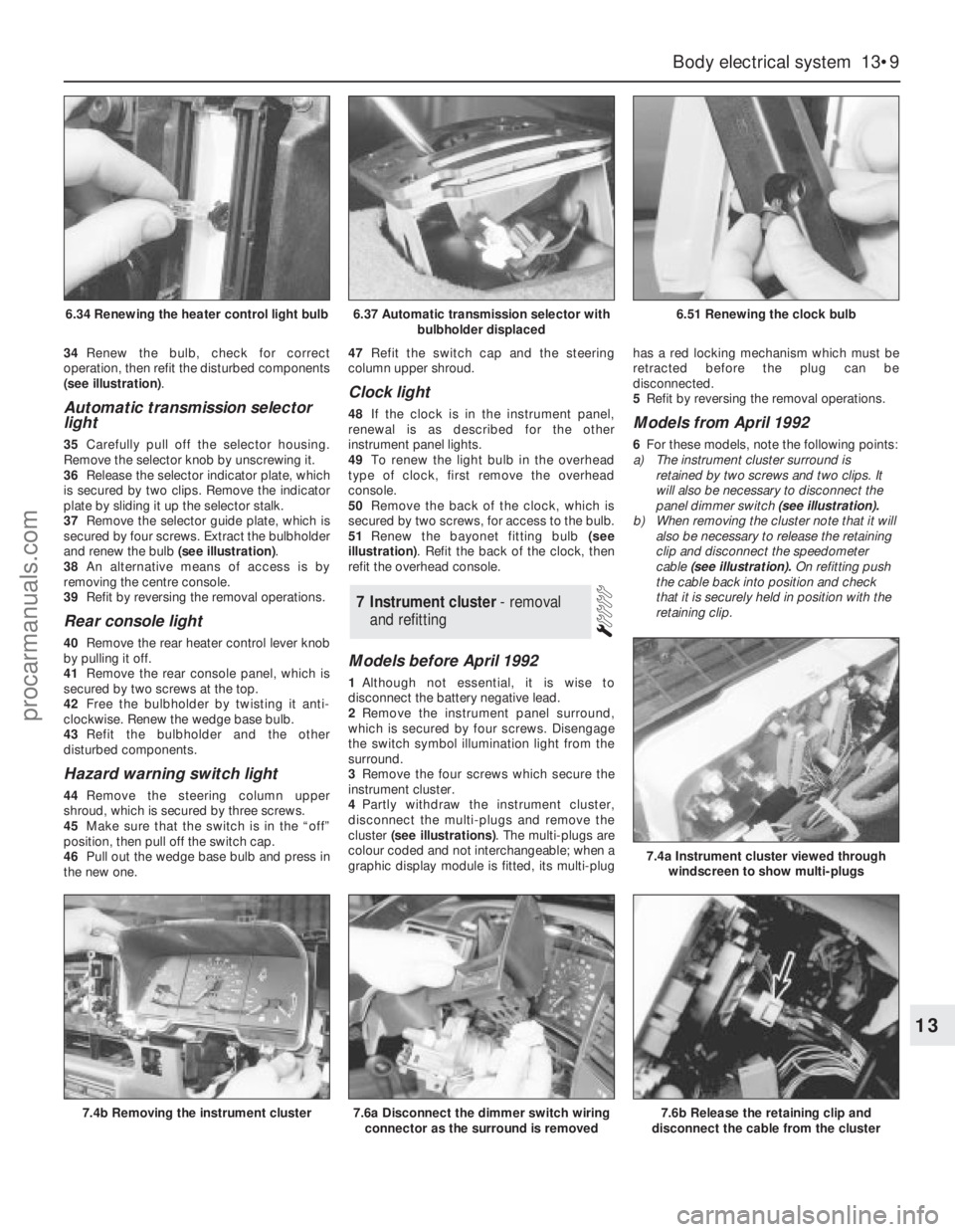
operation, then refit the disturbed components
(see illustration).
Automatic transmission selector
light
35Carefully pull off the selector housing.
Remove the selector knob by unscrewing it.
36Release the selector indicator plate, which
is secured by two clips. Remove the indicator
plate by sliding it up the selector stalk.
37Remove the selector guide plate, which is
secured by four screws. Extract the bulbholder
and renew the bulb (see illustration).
38An alternative means of access is by
removing the centre console.
39Refit by reversing the removal operations.
Rear console light
40Remove the rear heater control lever knob
by pulling it off.
41Remove the rear console panel, which is
secured by two screws at the top.
42Free the bulbholder by twisting it anti-
clockwise. Renew the wedge base bulb.
43Refit the bulbholder and the other
disturbed components.
Hazard warning switch light
44Remove the steering column upper
shroud, which is secured by three screws.
45Make sure that the switch is in the “off”
position, then pull off the switch cap.
46Pull out the wedge base bulb and press in
the new one.47Refit the switch cap and the steering
column upper shroud.
Clock light
48If the clock is in the instrument panel,
renewal is as described for the other
instrument panel lights.
49To renew the light bulb in the overhead
type of clock, first remove the overhead
console.
50Remove the back of the clock, which is
secured by two screws, for access to the bulb.
51Renew the bayonet fitting bulb (see
illustration). Refit the back of the clock, then
refit the overhead console.
Models before April 1992
1Although not essential, it is wise to
disconnect the battery negative lead.
2Remove the instrument panel surround,
which is secured by four screws. Disengage
the switch symbol illumination light from the
surround.
3Remove the four screws which secure the
instrument cluster.
4Partly withdraw the instrument cluster,
disconnect the multi-plugs and remove the
cluster (see illustrations). The multi-plugs are
colour coded and not interchangeable; when a
graphic display module is fitted, its multi-plughas a red locking mechanism which must be
retracted before the plug can be
disconnected.
5Refit by reversing the removal operations.
Models from April 1992
6For these models, note the following points:
a)The instrument cluster surround is
retained by two screws and two clips. It
will also be necessary to disconnect the
panel dimmer switch (see illustration).
b)When removing the cluster note that it will
also be necessary to release the retaining
clip and disconnect the speedometer
cable (see illustration).On refitting push
the cable back into position and check
that it is securely held in position with the
retaining clip.
7Instrument cluster - removal
and refitting
Body electrical system 13•9
13
6.37 Automatic transmission selector with
bulbholder displaced6.51 Renewing the clock bulb
7.4b Removing the instrument cluster7.6a Disconnect the dimmer switch wiring
connector as the surround is removed7.6b Release the retaining clip and
disconnect the cable from the cluster
7.4a Instrument cluster viewed through
windscreen to show multi-plugs
6.34 Renewing the heater control light bulb
procarmanuals.com
Page 187 of 255
1With the instrument cluster removed, a
particular gauge or other component can be
renewed by following the appropriate parts of
this Section.
2Remove all the light bulbs and holders from
the rear of the panel by twisting them anti-
clockwise.
3To remove the printed circuit, unclip and
remove the two multi-plug terminal retainers.
Remove all the nuts and washers from the
printed circuit terminals, then unclip and
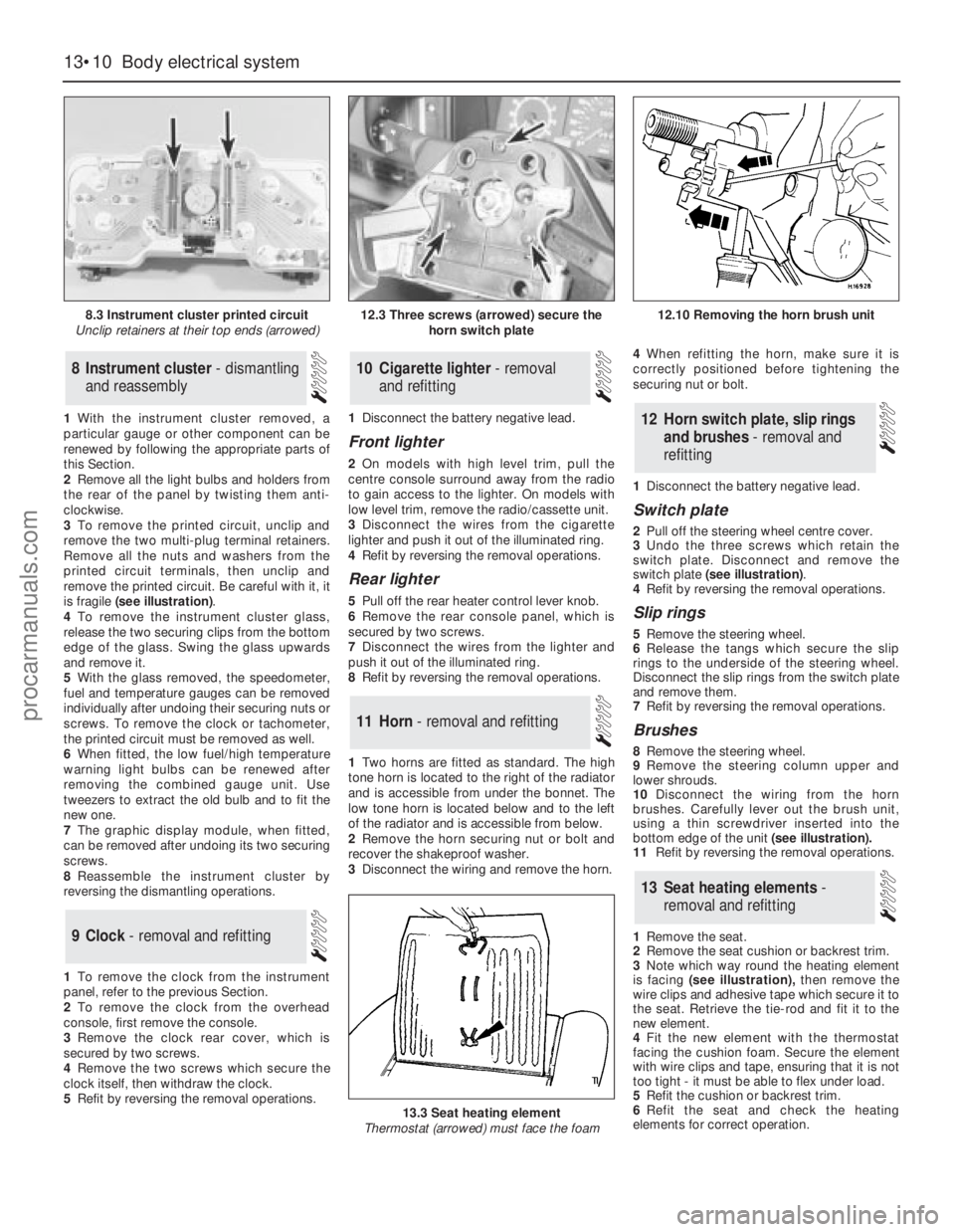
remove the printed circuit. Be careful with it, it
is fragile (see illustration).
4To remove the instrument cluster glass,
release the two securing clips from thebottom
edge of the glass. Swing the glass upwards
and remove it.
5With the glass removed, the speedometer,
fuel and temperature gauges can be removed
individually after undoing their securing nuts or
screws. To remove the clock or tachometer,
the printed circuit must be removed as well.
6When fitted, the low fuel/high temperature
warning light bulbs can be renewed after
removing the combined gauge unit. Use
tweezers to extract the old bulb and to fit the
new one.
7The graphic display module, when fitted,
can be removed after undoing its two securing
screws.
8Reassemble the instrument cluster by
reversing the dismantling operations.
1To remove the clock from the instrument
panel, refer to the previous Section.
2To remove the clock from the overhead
console, first remove the console.
3Remove the clock rear cover, which is
secured by two screws.
4Remove the two screws which secure the
clock itself, then withdraw the clock.
5Refit by reversing the removal operations.1Disconnect the battery negative lead.
Front lighter
2On models with high level trim, pull the
centre console surround away from the radio
to gain access to the lighter. On models with
low level trim, remove the radio/cassette unit.
3Disconnect the wires from the cigarette
lighter and push it out of the illuminated ring.
4Refit by reversing the removal operations.
Rear lighter
5Pull off the rear heater control lever knob.
6Remove the rear console panel, which is
secured by two screws.
7Disconnect the wires from the lighter and
push it out of the illuminated ring.
8Refit by reversing the removal operations.
1Two horns are fitted as standard. The high
tone horn is located to the right of the radiator
and is accessible from under the bonnet. The
low tone horn is located below and to the left
of the radiator and is accessible from below.
2Remove the horn securing nut or bolt and
recover the shakeproof washer.
3Disconnect the wiring and remove the horn.4When refitting the horn, make sure it is
correctly positioned before tightening the
securing nut or bolt.
1Disconnect the battery negative lead.
Switch plate
2Pull off the steering wheel centre cover.
3Undo the three screws which retain the
switch plate. Disconnect and remove the
switch plate (see illustration).
4Refit by reversing the removal operations.
Slip rings
5Remove the steering wheel.
6Release the tangs which secure the slip
rings to the underside of the steering wheel.
Disconnect the slip rings from the switch plate
and remove them.
7Refit by reversing the removal operations.
Brushes
8Remove the steering wheel.
9Remove the steering column upper and
lower shrouds.
10Disconnect the wiring from the horn
brushes. Carefully lever out the brush unit,
using a thin screwdriver inserted into the
bottom edge of the unit(see illustration).
11Refit by reversing the removal operations.
1Remove the seat.
2Remove the seat cushion or backrest trim.
3Note which way round the heating element
is facing (see illustration),then remove the
wire clips and adhesive tape which secure it to
the seat. Retrieve the tie-rod and fit it to the
new element.
4Fit the new element with the thermostat
facing the cushion foam. Secure the element
with wire clips and tape, ensuring that it is not
too tight - it must be able to flex under load.
5Refit the cushion or backrest trim.
6Refit the seat and check the heating
elements for correct operation.
13Seat heating elements -
removal and refitting
12Horn switch plate, slip rings
and brushes - removal and
refitting
11Horn - removal and refitting
10Cigarette lighter - removal
and refitting
9Clock - removal and refitting
8Instrument cluster - dismantling
and reassembly
13•10Body electrical system
8.3 Instrument cluster printed circuit
Unclip retainers at their top ends (arrowed)
13.3 Seat heating element
Thermostat (arrowed) must face the foam
12.3 Three screws (arrowed) secure the
horn switch plate12.10 Removing the horn brush unit
procarmanuals.com
Page 189 of 255
20When refitting, check the switch for
correct operation before refitting the shrouds
and steering wheel centre cover. When fitting
the shrouds, be careful not to trap the switch
rubber gaiter.
Models from April 1992
21Note that if access to the switch retaining
screws cannot be gained with the steering
wheel in position, then the steering wheel
must first be removed.
Windscreen wipe/wash switch
Models before April 1992
22Proceed as described in the previous sub-
section for the direction indicator switch.
Depending on equipment, the wipe/wash
switch may have more than one multi-plug
connected to it.
Models from April 1992
23Note that if access to the switch retaining
screws cannot be gained with the steering
wheel in position, then the steering wheel
must first be removed.
Door pillar switch (for courtesy
light)
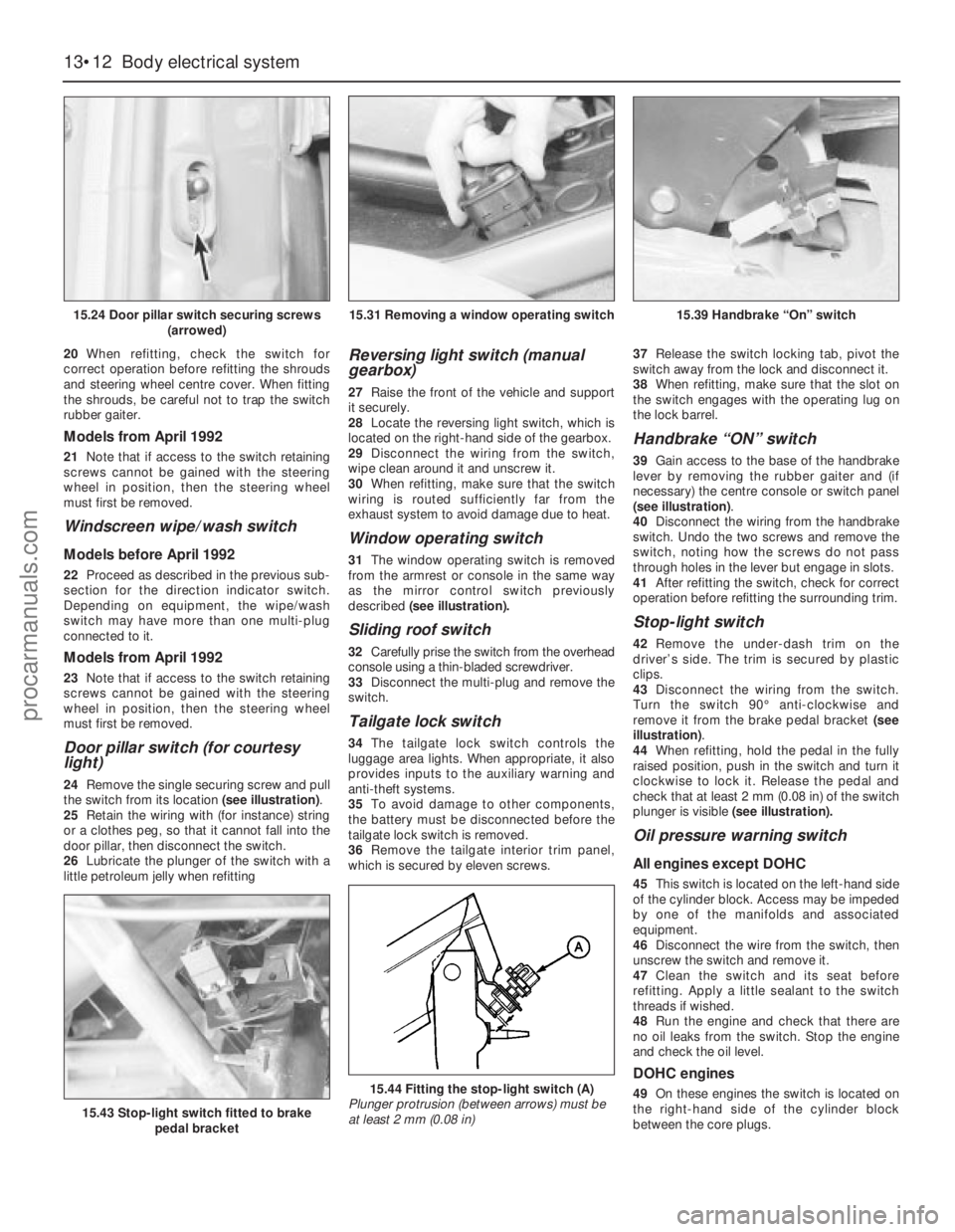
24Remove the single securing screw and pull
the switch from its location (see illustration).
25Retain the wiring with (for instance) string
or a clothes peg, so that it cannot fall into the
door pillar, then disconnect the switch.
26Lubricate the plunger of the switch with a
little petroleum jelly when refitting
Reversing light switch (manual
gearbox)
27Raise the front of the vehicle and support
it securely.
28Locate the reversing light switch, which is
located on the right-hand side of the gearbox.
29Disconnect the wiring from the switch,
wipe clean around it and unscrew it.
30When refitting, make sure that the switch
wiring is routed sufficiently far from the
exhaust system to avoid damage due to heat.
Window operating switch
31The window operating switch is removed
from the armrest or console in the same way
as the mirror control switch previously
described (see illustration).
Sliding roof switch
32Carefully prise the switch from the overhead
console using a thin-bladed screwdriver.
33Disconnect the multi-plug and remove the
switch.
Tailgate lock switch
34The tailgate lock switch controls the
luggage area lights. When appropriate, it also
provides inputs to the auxiliary warning and
anti-theft systems.
35To avoid damage to other components,
the battery must be disconnected before the
tailgate lock switch is removed.
36Remove the tailgate interior trim panel,
which is secured by eleven screws.37Release the switch locking tab, pivot the
switch away from the lock and disconnect it.
38When refitting, make sure that the slot on
the switch engages with the operating lug on
the lock barrel.
Handbrake “ON” switch
39Gain access to the base of the handbrake
lever by removing the rubber gaiter and (if
necessary) the centre console or switch panel
(see illustration).
40Disconnect the wiring from the handbrake
switch. Undo the two screws and remove the
switch, noting how the screws do not pass
through holes in the lever but engage in slots.
41After refitting the switch, check for correct
operation before refitting the surrounding trim.
Stop-light switch
42Remove the under-dash trim on the
driver’s side. The trim is secured by plastic
clips.
43Disconnect the wiring from the switch.
Turn the switch 90°anti-clockwise and
remove it from the brake pedal bracket (see
illustration).
44When refitting, hold the pedal in the fully
raised position, push in the switch and turn it
clockwise to lock it. Release the pedal and
check that at least 2 mm (0.08 in) of the switch
plunger is visible (see illustration).
Oil pressure warning switch
All engines except DOHC
45This switch is located on the left-hand side
of the cylinder block. Access may be impeded
by one of the manifolds and associated
equipment.
46Disconnect the wire from the switch, then
unscrew the switch and remove it.
47Clean the switch and its seat before
refitting. Apply a little sealant to the switch
threads if wished.
48Run the engine and check that there are
no oil leaks from the switch. Stop the engine
and check the oil level.
DOHC engines
49On these engines the switch is located on
the right-hand side of the cylinder block
between the core plugs.
13•12Body electrical system
15.24 Door pillar switch securing screws
(arrowed)
15.43 Stop-light switch fitted to brake
pedal bracket
15.44 Fitting the stop-light switch (A)
Plunger protrusion (between arrows) must be
at least 2 mm (0.08 in)
15.31 Removing a window operating switch15.39 Handbrake “On” switch
procarmanuals.com
Page 195 of 255
Computer module and bulb
Models before April 1992
2Remove the instrument panel surround,
which is secured by four screws.
3Carefully pull the module from its location.
Release the multi-plug by pressing
downwards and disconnect it.
4The module illumination bulbholder may
now be extracted by gripping it with pliers and
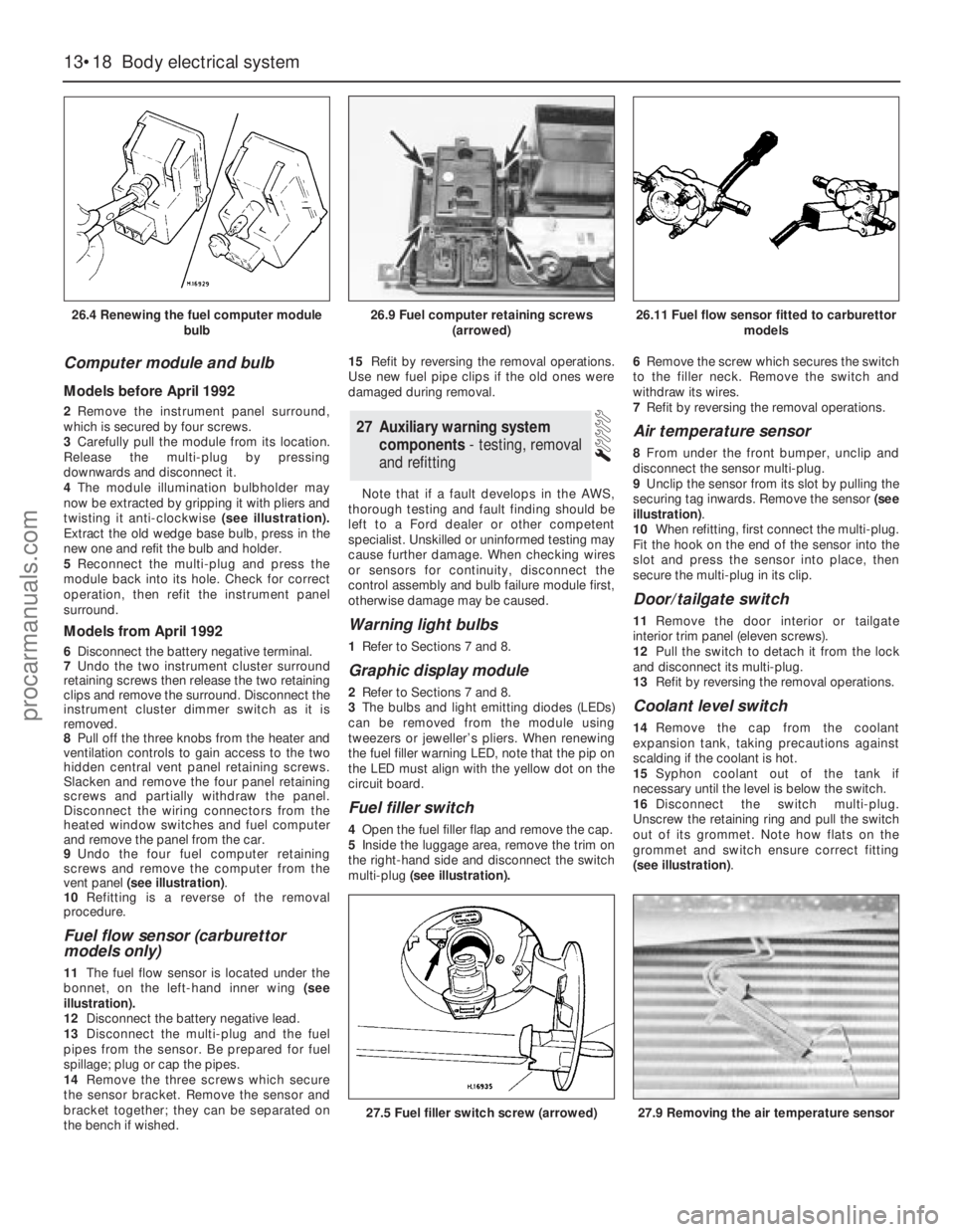
twisting it anti-clockwise (see illustration).
Extract the old wedge base bulb, press in the
new one and refit the bulb and holder.
5Reconnect the multi-plug and press the
module back into its hole. Check for correct
operation, then refit the instrument panel
surround.
Models from April 1992
6Disconnect the battery negative terminal.
7Undo the two instrument cluster surround
retaining screws then release the two retaining
clips and remove the surround. Disconnect the
instrument cluster dimmer switch as it is
removed.
8Pull off the three knobs from the heater and
ventilation controls to gain access to the two
hidden central vent panel retaining screws.
Slacken and remove the four panel retaining
screws and partially withdraw the panel.
Disconnect the wiring connectors from the
heated window switches and fuel computer
and remove the panel from the car.
9Undo the four fuel computer retaining
screws and remove the computer from the
vent panel (see illustration).
10Refitting is a reverse of the removal
procedure.
Fuel flow sensor (carburettor
models only)
11The fuel flow sensor is located under the
bonnet, on the left-hand inner wing (see
illustration).
12Disconnect the battery negative lead.
13Disconnect the multi-plug and the fuel
pipes from the sensor. Be prepared for fuel
spillage; plug or cap the pipes.
14Remove the three screws which secure
the sensor bracket. Remove the sensor and
bracket together; they can be separated on
the bench if wished.15Refit by reversing the removal operations.
Use new fuel pipe clips if the old ones were
damaged during removal.
Note that if a fault develops in the AWS,
thorough testing and fault finding should be
left to a Ford dealer or other competent
specialist. Unskilled or uninformed testing may
cause further damage. When checking wires
or sensors for continuity, disconnect the
control assembly and bulb failure module first,
otherwise damage may be caused.
Warning light bulbs
1Refer to Sections 7 and 8.
Graphic display module
2Refer to Sections 7 and 8.
3The bulbs and light emitting diodes (LEDs)
can be removed from the module using
tweezers or jeweller’s pliers. When renewing
the fuel filler warning LED, note that the pip on
the LED must align with the yellow dot on the
circuit board.
Fuel filler switch
4Open the fuel filler flap and remove the cap.
5Inside the luggage area, remove the trim on
the right-hand side and disconnect the switch
multi-plug(see illustration).6Remove the screw which secures the switch
to the filler neck. Remove the switch and
withdraw its wires.
7Refit by reversing the removal operations.
Air temperature sensor
8From under the front bumper, unclip and
disconnect the sensor multi-plug.
9Unclip the sensor from its slot by pulling the
securing tag inwards. Remove the sensor (see
illustration).
10When refitting, first connect the multi-plug.
Fit the hook on the end of the sensor into the
slot and press the sensor into place, then
secure the multi-plug in its clip.
Door/tailgate switch
11Remove the door interior ortailgate
interior trim panel (eleven screws).
12Pull the switch to detach it from the lock
and disconnect its multi-plug.
13Refit by reversing the removal operations.
Coolant level switch
14Remove the cap from the coolant
expansion tank, taking precautions against
scalding if the coolant is hot.
15Syphon coolant out of the tank if
necessary until the level is below the switch.
16Disconnect the switch multi-plug.
Unscrew the retaining ring and pull the switch
out of its grommet. Note how flats on the
grommet and switch ensure correct fitting
(see illustration).
27Auxiliary warning system
components - testing, removal
and refitting
13•18Body electrical system
26.4 Renewing the fuel computer module
bulb
27.5 Fuel filler switch screw (arrowed)27.9 Removing the air temperature sensor
26.9 Fuel computer retaining screws
(arrowed)26.11 Fuel flow sensor fitted to carburettor
models
procarmanuals.com
Page 198 of 255
8If a new unit has been fitted, trim it by tuning
in a weak medium wave station (around 1500
kHz/200 m) and turning the trimmer screw in
either direction until the best reception is
obtained. On the radio originally fitted, the
trimmer screw is on the front face of the unit;
for other types of radio, consult the
manufacturer’s instructions. Electronic units
are normally self-trimming.
Radio/cassette unit
9Insert the DIN extraction tools (paragraph 1)
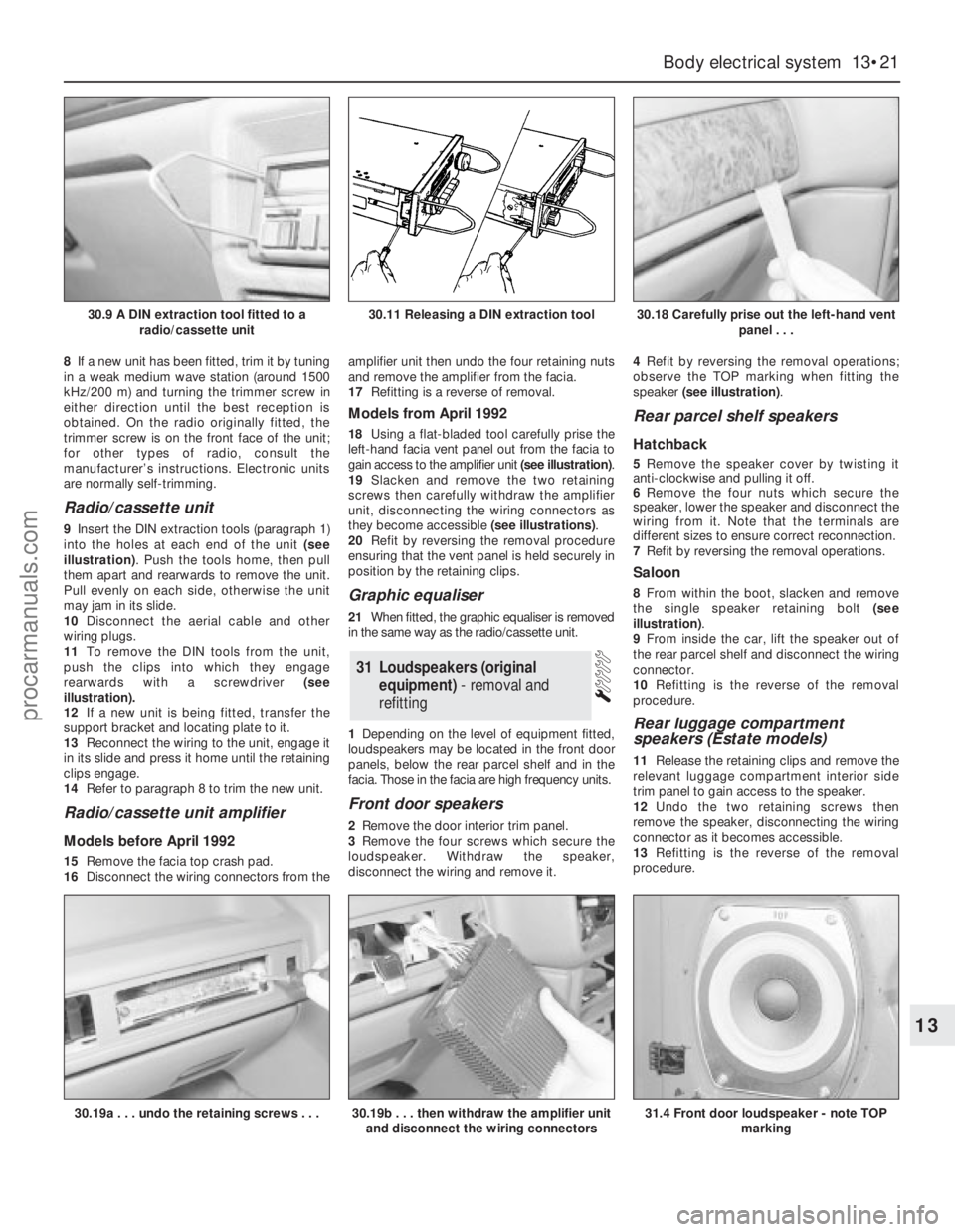
into the holes at each end of the unit (see
illustration). Push the tools home, then pull
them apart and rearwards to remove the unit.
Pull evenly on each side, otherwise the unit
may jam in its slide.
10Disconnect the aerial cable and other
wiring plugs.
11To remove the DIN tools from the unit,
push the clips into which they engage
rearwards with a screwdriver (see
illustration).
12If a new unit is being fitted, transfer the
support bracket and locating plate to it.
13Reconnect the wiring to the unit, engage it
in its slide and press it home until the retaining
clips engage.
14Refer to paragraph 8 to trim the new unit.
Radio/cassette unit amplifier
Models before April 1992
15Remove the facia top crash pad.
16Disconnect the wiring connectors from theamplifier unit then undo the four retaining nuts
and remove the amplifier from the facia.
17Refitting is a reverse of removal.
Models from April 1992
18Using a flat-bladed tool carefully prise the
left-hand facia vent panel out from the facia to
gain access to the amplifier unit (see illustration).
19Slacken and remove the two retaining
screws then carefully withdraw the amplifier
unit, disconnecting the wiring connectors as
they become accessible (see illustrations).
20Refit by reversing the removal procedure
ensuring that the vent panel is held securely in
position by the retaining clips.
Graphic equaliser
21When fitted, the graphic equaliser is removed
in the same way as the radio/cassette unit.
1Depending on the level of equipment fitted,
loudspeakers may be located in the front door
panels, below the rear parcel shelf and in the
facia. Those in the facia are high frequency units.
Front door speakers
2Remove the door interior trim panel.
3Remove the four screws which secure the
loudspeaker. Withdraw the speaker,
disconnect the wiring and remove it.4Refit by reversing the removal operations;
observe the TOP marking when fitting the
speaker (see illustration).
Rear parcel shelf speakers
Hatchback
5Remove the speaker cover by twisting it
anti-clockwise and pulling it off.
6Remove the four nuts which secure the
speaker, lower the speaker and disconnect the
wiring from it. Note that the terminals are
different sizes to ensure correct reconnection.
7Refit by reversing the removal operations.
Saloon
8From within the boot, slacken and remove
the single speaker retaining bolt (see
illustration).
9From inside the car, lift the speaker out of
the rear parcel shelf and disconnect the wiring
connector.
10Refitting is the reverse of the removal
procedure.
Rear luggage compartment
speakers (Estate models)
11Release the retaining clips and remove the
relevant luggage compartment interior side
trim panel to gain access to the speaker.
12Undo the two retaining screws then
remove the speaker, disconnecting the wiring
connector as it becomes accessible.
13Refitting is the reverse of the removal
procedure.
31Loudspeakers (original
equipment) - removal and
refitting
Body electrical system 13•21
13
30.9 A DIN extraction tool fitted to a
radio/cassette unit30.11 Releasing a DIN extraction tool30.18 Carefully prise out the left-hand vent
panel . . .
30.19a . . . undo the retaining screws . . .30.19b . . . then withdraw the amplifier unit
and disconnect the wiring connectors31.4 Front door loudspeaker - note TOP
marking
procarmanuals.com
Page 199 of 255
High frequency units
14Remove the instrument panel surround
and the facia top.
15Remove the two screws which secure the
speaker bracket. Disconnect the wiring and
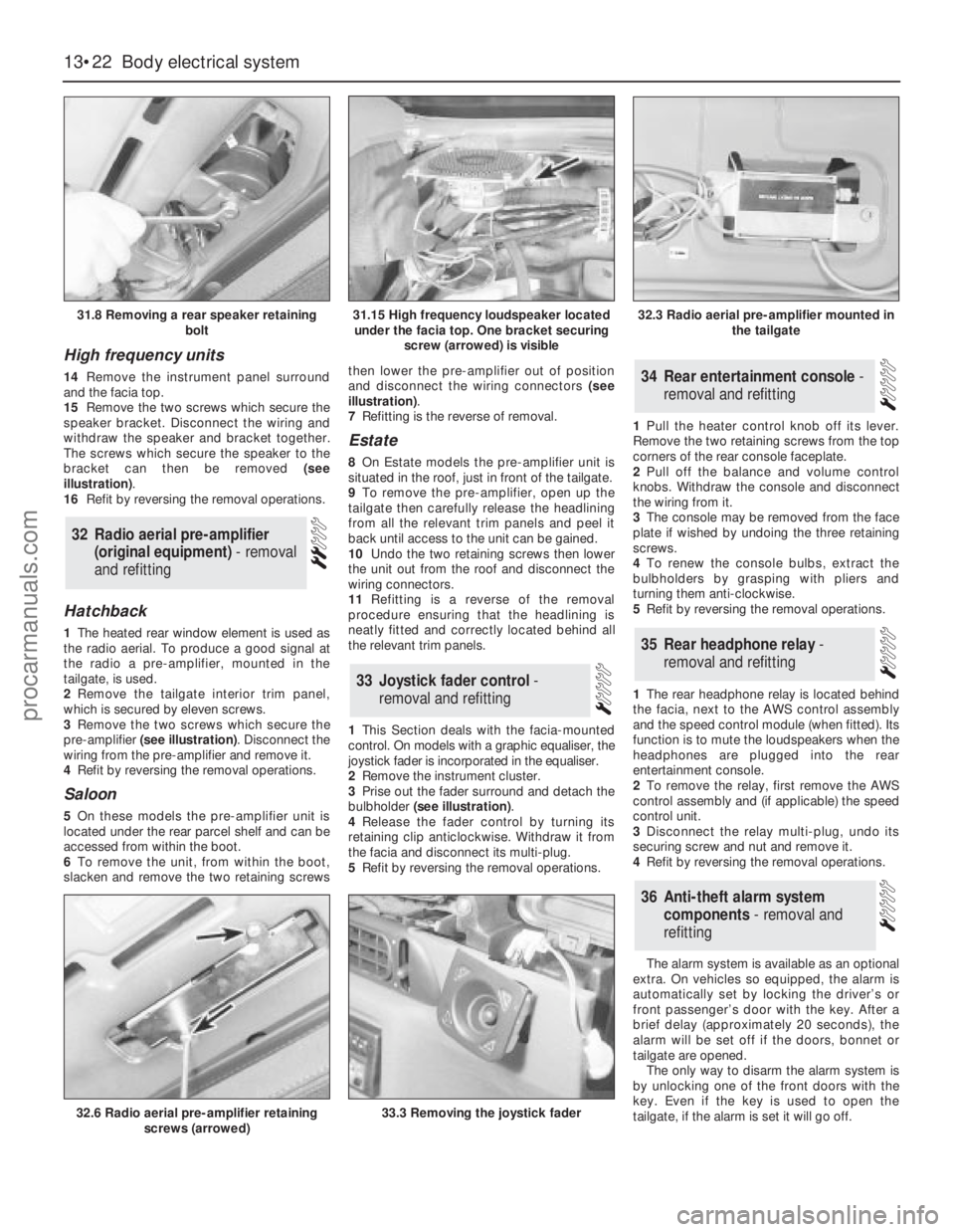
withdraw the speaker and bracket together.
The screws which secure the speaker to the
bracket can then be removed (see
illustration).
16Refit by reversing the removal operations.
Hatchback
1The heated rear window element is used as
the radio aerial. To produce a good signal at
the radio a pre-amplifier, mounted in the
tailgate, is used.
2Remove the tailgate interior trim panel,
which is secured by eleven screws.
3Remove the two screws which secure the
pre-amplifier (see illustration). Disconnect the
wiring from the pre-amplifier and remove it.
4Refit by reversing the removal operations.
Saloon
5On these models the pre-amplifier unit is
located under the rear parcel shelf and can be
accessed from within the boot.
6To remove the unit, from within the boot,
slacken and remove the two retaining screwsthen lower the pre-amplifier out of position
and disconnect the wiring connectors (see
illustration).
7Refitting is the reverse of removal.
Estate
8On Estate models the pre-amplifier unit is
situated in the roof, just in front of the tailgate.
9To remove the pre-amplifier, open up the
tailgate then carefully release the headlining
from all the relevant trim panels and peel it
back until access to the unit can be gained.
10Undo the two retaining screws then lower
the unit out from the roof and disconnect the
wiring connectors.
11Refitting is a reverse of the removal
procedure ensuring that the headlining is
neatly fitted and correctly located behind all
the relevant trim panels.
1This Section deals with the facia-mounted
control. On models with a graphic equaliser, the
joystick fader is incorporated in the equaliser.
2Remove the instrument cluster.
3Prise out the fader surround and detach the
bulbholder (see illustration).
4Release the fader control by turning its
retaining clip anticlockwise. Withdraw it from
the facia and disconnect its multi-plug.
5Refit by reversing the removal operations.1Pull the heater control knob off its lever.
Remove the two retaining screws from the top
corners of the rear console faceplate.
2Pull off the balance and volume control
knobs. Withdraw the console and disconnect
the wiring from it.
3The console may be removed from the face
plate if wished by undoing the three retaining
screws.
4To renew the console bulbs, extract the
bulbholders by grasping with pliers and
turning them anti-clockwise.
5Refit by reversing the removal operations.
1The rear headphone relay is located behind
the facia, next to the AWS control assembly
and the speed control module (when fitted). Its
function is to mute the loudspeakers when the
headphones are plugged into the rear
entertainment console.
2To remove the relay, first remove the AWS
control assembly and (if applicable) the speed
control unit.
3Disconnect the relay multi-plug, undo its
securing screw and nut and remove it.
4Refit by reversing the removal operations.
The alarm system is available as an optional
extra. On vehicles so equipped, the alarm is
automatically set by locking the driver’s or
front passenger’s door with the key. After a
brief delay (approximately 20 seconds), the
alarm will be set off if the doors, bonnet or
tailgate are opened.
The only way to disarm the alarm system is
by unlocking one of the front doors with the
key. Even if the key is used to open the
tailgate, if the alarm is set it will go off.
36Anti-theft alarm system
components - removal and
refitting
35Rear headphone relay -
removal and refitting
34Rear entertainment console -
removal and refitting
33Joystick fader control -
removal and refitting
32Radio aerial pre-amplifier
(original equipment) - removal
and refitting
13•22Body electrical system
31.8 Removing a rear speaker retaining
bolt
32.6 Radio aerial pre-amplifier retaining
screws (arrowed)33.3 Removing the joystick fader
31.15 High frequency loudspeaker located
under the facia top. One bracket securing
screw (arrowed) is visible32.3 Radio aerial pre-amplifier mounted in
the tailgate
procarmanuals.com