1984 CHEVROLET CAVALIER ignition
[x] Cancel search: ignitionPage 37 of 105
Downloaded from www.Manualslib.com manuals search engine • Amount of fuel required for fill-up may not exactly correspond to gage.
• Needle may not move away from FULL until some time after fill-up.
• Needle may move during turns; stops and accelerations.
When the ignition switch is turned to the OFF position, the needle will not
necessarily return
all the way to the EMPTY mark.
Oil Pressure Light
When the ignition is turned to "Run," the "Oil" warning light appears until the
engine is started. Thereafter, the light should be off unless there is insufficient
oil pressure or engine idle speed is below normal. If the light should come on
at any time while driving (other than momentarily at idle speed or after a
sudden stop), stop immediately and investigate the cause of
low oil pressure.
This could possibly be caused by low oil level in the crankcase. Engine
operation with low oil pressure will 9ause damage to the engine.
Engine Coolant Temperature Light
This light is located in the instrument cluster and is designed to come on to warn the driver that the engine coolant has overheated and immediate
action is required to correct the condition. As a check that the bulb and its
circuit are working, the light will come on during engine starting; if it does not,
have it repaired
promptly. If the light comes on at any other time, see "Engine
Cooling System Overheating" in "In Case of Emergency," Section 3 of this manual.
CAUTION: It the Engine Coolant Temperature Light shows an overheat condition or you have other reason to suspect the engine may be overheating, continued operation of the engine EVEN FOR A SHORT TIME may result in a fire and the risk of personal injury and/or severe vehicle damage. Take immediate action as outlined under "Engine Cooling System Overheating" in "In Case of Emergency," Section 3.
Generator Indicator Light
The VOLT light is designed to come on when the ignition key is in the "RUN" position, but before the engine is started. After the engine starts, the light
should go out and remain out. If the light remains· on when engine is running,
have your authorized
dealer locate and correct the trouble as soon as possible.
Shift Indicator Light
The Shift Indicator Light is covered in the "Manual Transaxle" information in
this section.
"Check Engine" Light
Most gasoline engine vehicles sold in the Unijed States (and some vehicles
sold
in Canada) have the Computer Command Control system.
Vehicles with the Computer Command Control system include a "CHECK
ENGINE" light
on the instrument panel designed to indicate the need for
system service. It will come on during engine starting to let you know the bulb
is working. (The light will stay on a short time after the engine starts.)
2-21
Page 38 of 105
Downloaded from www.Manualslib.com manuals search engine Have the system repaired n the "CHECK ENGINE" light does not come on during engine starting. If the light comes on, either intermittently or
continuously while driving, service to the Computer Command Control system
is required. AHhough in most cases the vehicle is drivable, and does not
require towing, see your authorized
dealer as soon as possible for service of
the system.
Continued driving without having the Computer
Command Control system serviced could cause damage to the emission control system. It could also affect fuel economy and drivability.
See also "Computer Command Control system" in Section 5 of this manual.
Brake System Warning Light
The regular braking system is a dual system designed so that one part will
provide some braking if there is a
loss of hydraulic pressure in the other part of
the system. The system has a
"BRAKE" warning light located in the
instrument panel. The "BRAKE" light is designed to come on briefly during
engine starting so you can check that the bulb is okay. To serve as a reminder,
the
light should stay on when the parking brake is not fully released and the
ignition is
on. Have the system repaired if the light does not come on when it should. This warning light does not do away with the need for brake inspection
and maintenaflce. The brakelluid level must be checked regularly. See your
Maintenance Schedule folder for other brake checks.
I! the light remains on aller engine start up or comes on during operation of the vehicle, it may mean that there is something wrong with part of the brake
system.
What
to do:
1. Check to see that the parking brake has been released. I! it has been:
2. Pull off the road and stop carefully. Remember that:
• Stopping distances may be longer.
•
You may have to push harder on the pedal.
•
The pedal may go down farther than normal.
3. Tryout the brakes by starting and stopping on the road shoulder--then:
• I! you judge it to be safe, drive cautiously at a safe speed to the
nearest dealer for repair. Or,
• Have vehicle towed to the nearest dealer for repair.
Continued driving without getting necessary repairs
could be dangerous.
Tachometer
The optional tachometer indicates the speed of the engine in revolutions per
minute. The indicated number, times
100, gives the engine speed. Operating
the engine with the tachometer reading in the color-coded high-speed area
could lead to serious engine damage.
Voltmeter
When the engine is operating, the voltmeter indicates the electrical system
voltage. During minimum electrical load, the pointer will read to the right of the
center.
As the electrical load is increased, or in stop-and-go driving, the pointer
will rotate to the Ieli. A meter reading continuously in the left or right zone
indicates
an electrical system failure. Cause of the failure should be determined and corrected.
2-22
Page 40 of 105
Downloaded from www.Manualslib.com manuals search engine Engine Coolant Temperature Gage
This optional gage is located in the instrument cluster. If the gage shows that
an overheat condition exists-as indicated by pointer moving beyond the
center of the band immediate action by the driver is required. If an overheat
condition is shown, see "Engine
Cooling System Overheating" in "In Case of
Emergency,"
Section 3 of this manual. The coolant temperature indication will VaIY with air temperature and operating conditions. The ignition must be in
"Run" for accurate readings. Prolonged driving or idling in very hot weather
may cause the pointer to move beyond the center of the gage. Make a practice
of scanning this and other gages
while driving, especially in hot weather and!
or when the
vehicle is under load.
CAUTION: II the Engine Coolant Temperature Gage shows an overheat condition or you have other reason to suspect the engine may be overheating, continued operation of the engine EVEN FOR A SHORT TIME may result in a fire and the risk of personal injury and/or severe vehicle damage. Take immediate action as outlined under "Engine Cooling System Overheating" in "In Case of Emergency," Section 3.
Oil Pressure Gage
The oil pressure gage indicates the pressure at which oil is being delivered to
the vaIiOUS paIls of the engine requiring lubrication. Pressures registered by
the gage may
vBIY according to outside air temperatures or weight of oil being
used. Oil pressure of a cold engine being operated at a given speed will be
somewhat higher than when the engine is at normal operating temperature at
the
SaIne speed. Prolonged high speed operation on a hot day at the given
speed will
resuH in somewhatlower oil pressure readings. Readings of 205 to
275 kPa
(30 to 40 psi) may be considered normal during moderate road
speeds of 35 to 40 mph (55 to 60 km!h) with the engine at proper operating
temperature. Gage readings which are consistently high
or low under these conditions may indicate lubrication system and/ or engine malfunction.
Light Switch
The three· position light switch controls the headlights, taillights, paIking lights,
sidemaIker lights,
instrument lights and dome lights.
Instrument light intensity can be varied by turning knob clockwise or
counterclockwise. Full counterclockwise position turns on interior light.
The headlight circuit is protected by a circuit breaker in the
light switch. An overload on the breaker will cause the lights to "flicker" on and off. If this
condition
develops, have your headlight wiring checked immediately. The
headlight beaIn changer is located in the Turn Signal Lever; for operation see
Section 2 under heading "Turn Signal and Muiji-Function Lever."·
Headlight High Beam Indicator Light
The headlights of your vehicle have. high and low beams to provide you with
proper nighttime visibility for most driving conditions. The
"low" beams are
used during most city driving. The
"high" beams are especially useful when
driving on daIk roads since they provide long range illumination. The headlight
beam indicator light (located on the speedometer face) will be ON whenever
the high beams or "brights" are in use. The turn
signal lever controls the
headlight beaIns and is described in "Steering Column Controls."
2-24
Page 41 of 105
Downloaded from www.Manualslib.com manuals search engine Headlight "ON" Warning Buzzer/Chime
The optional headlight reminder buzzer/chime provides an audible warning that the main light switch is in one 01 the "on" positions , either parking lights
or headlights.
The reminder buzzer/chime is activated only when the ignition switch is turned to "OFF," "LOCK" or "ACCESSORY" position and the lights are on.
When the parking lights
or headlights are to be operated with the key in the
OFF position, the reminder buzzer/chime can be shut off by turning the light
switch knob until the instrument cluster lights are not on,
CIgarette Ughter (Optional)
The cigarette lighter is located on the instrument pane! face. To operate, push
~ in. When ~ becomes heated, ~ automatically pops out ready for use. Avoid
holding the lighter in by hand while ~ is heating as damage to the heating
element may result.
Ashtray
The ashtray may be simply pulled out for cleaning:
• Open ashtray.
• Pull ashtray up and remove for cleaning .
•
Push ashtray back into bracket.
VENTILATION SYSTEM
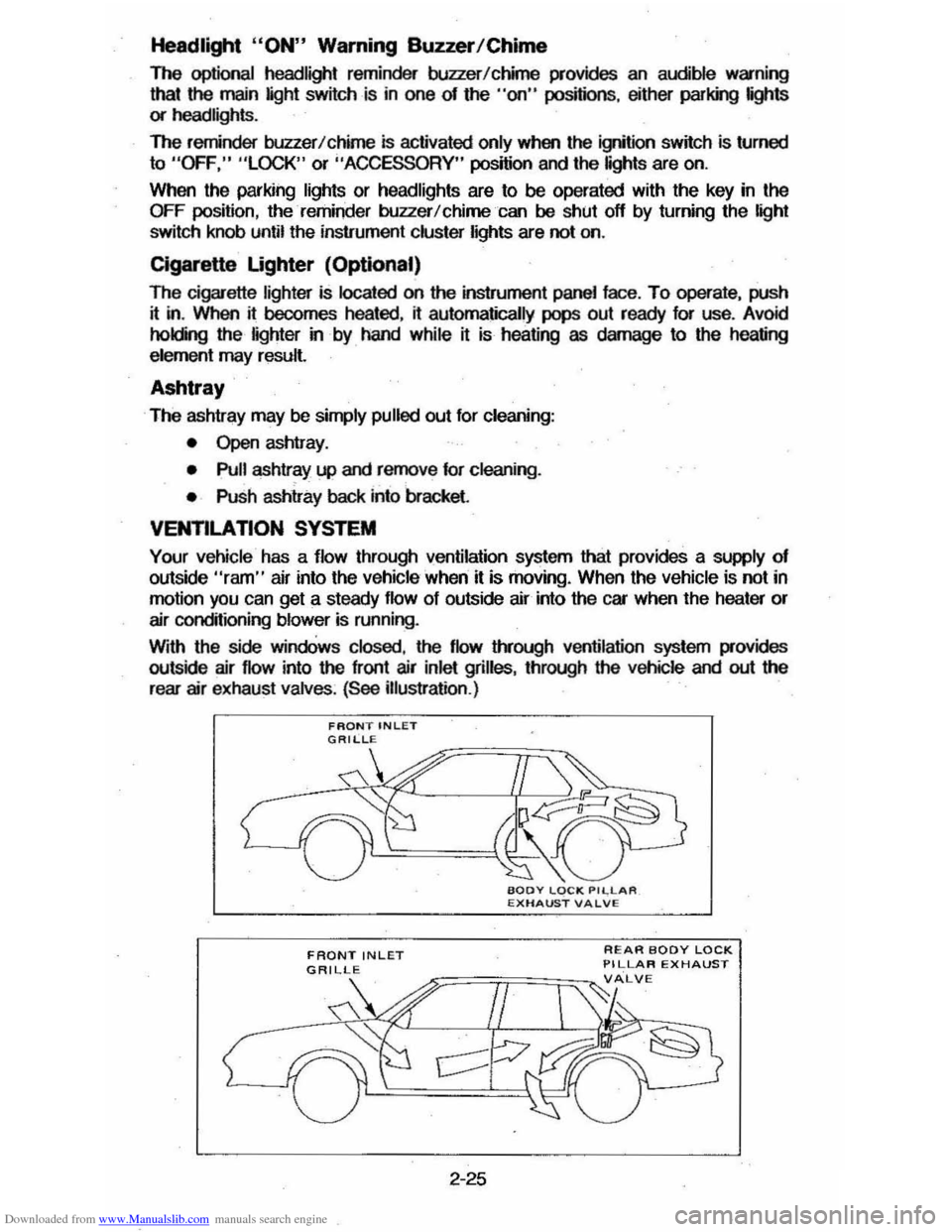
Your vehicle has a flow through ventilation system that provides a supply of outside "ram" air into the vehicle ' when it is moving . When the vehicle is not in
motion you can get a steady flow of outside air into the car when the heater or
air conditioning blower is running.
With the side
windOws closed, the flow lIYough ventilation system provides
outside air flow into the front air inlet grilles, through the vehicle and out the
rear air exhaust valves. (See illustration .)
FRONT INLET
2-25
REAR BODY LOCK PILLAR EXHAUST
Page 44 of 105
Downloaded from www.Manualslib.com manuals search engine • MAX (AIR COND) --Air from the passengel' cOlTlpaftment is mixed with a small amount of outside air. conditioned and discharged from !he upper
outlets . This position. with the temperature
lever in full COLD. is used for
maximum cooling under conditions of high temperature and humidity .
• NORM (AIR COND) --Outside air is conditioned as ~ passes through the
system and is discharged from the upper outlets. This position is used for most air conditioning situations.
• BI-LEVEL (AIR COND) --Outside air is conditioned and directed out the
upper outlets PLUS the heater outlet. This position provides comfort and
keeps the windshield clear under low fogging conditions .
• VENT (ECONOMY) --Outside air is discharged from the upper outlet s. This position is provided for cool to moderate weather operation when
refrigeration is not required. The refrigeration compressor is turned off.
Operating Information -The engine cooling fan is automatically engaged in all air conditioning modes and defrost mode (with high air conditioning pressure).
• HEATER (ECONOMY) --Outside air is delivered from the heater outlet with
a small amount from the defroster outlets and the side window . defogger outlets. This position is used for most winter driving. The air conditioning compressor is turned off.
• DEFROST c_ Outs ide air is cond~ioned and delivered from the defroster
outlets w i1h a small amount from the heater outlet. This position is
recommended for conditions of severe fogging and icing
only.
Operating Tip
For satisfactory operation of the air conditioning system. windows should always be closed, except for the first two or three minutes to remove hot air if
the car has been closed. This provides a fast cool-down in normal air
conditioning mode.
ELECTRO-CLEAR REAR WINDOW DEFOGGER
The optional defogger consists of a heating element bonded to the inside
surface
of the rear glass . The unit is operated by a switch on the instrument panel and functions only in the ON position. When activated an indicator light
will illuminate.
After the defogger has operated for a short time. the system will
automatically shut off. If further defrosting or defogging is desired . simply actuate the switch again.
The defogger
will not function if the ignition is turned off.
Refrain from removing decals or other materjal' from the inside of rear window
with a razor or other sharp instrument since this may damage . the heating
element.
Clear snow and ice from the rear window to improve tihe efficiency of the rear
window defogger.
2-28
Page 45 of 105
Downloaded from www.Manualslib.com manuals search engine I
REAR WINDOW WASHER/WIPER
The optional rear window washer/wiper is available on station wagon and hatchbacl< models.
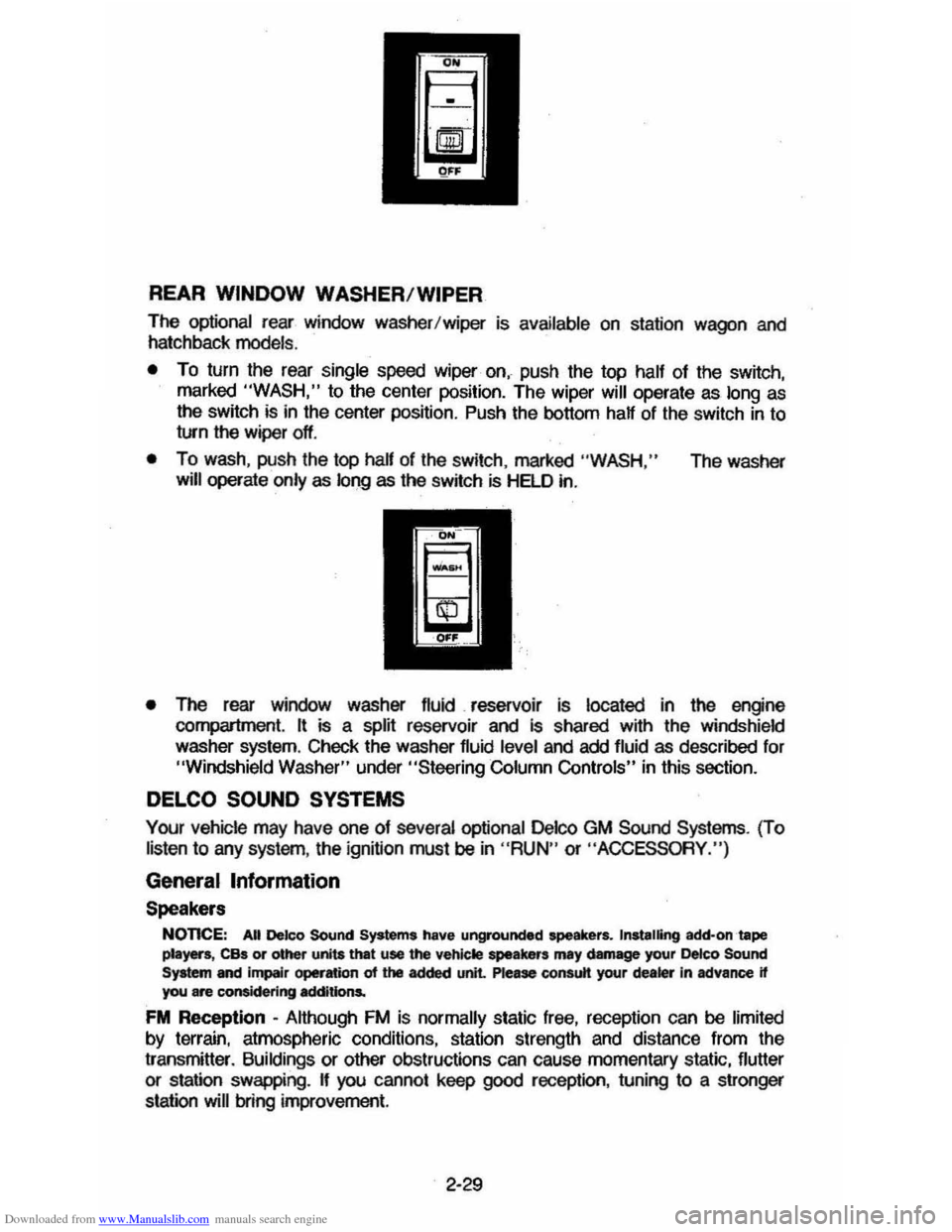
• To turn the rear single speed wiper on, push the top half of the switch,
marked "WASH," to the center position. The wiper will operate as long as
the switch is in the center position. Push the bottom half of the switch in to
turn the wiper off.
• To wash , push the top half of the switch , marked "WASH," The washer
will operate only as 101)9 as the switch is HELD in.
• The rear window washer fluid. reservoir is located in the engine compartment. It is a splij reservoir and is shared wijh the windshield
washer system. ChecI< the washer fluid level and add fluid as described for "Windshield Washer" under "Steeril)9 Column Controls" in this section.
DELCO SOUND SYSTEMS
Your vehicle may have one of several optional Delco GM Sound Systems. (To
listen to any system , the ignition must be in "RUN" or "ACCESSORY. ")
General Information
Speakers
NonCE: AU Deleo Sound Systems have ungrounded speakers. Installing add-on tape pIe)Ws, CBs or other units that use the vehicle speakers ml1 damage your ~co Sound System and impelr operation of the added unit. Please consutt your dealer In advance if you are considering additions.
FM Reception -Although FM is normally static free, reception can be limited by terrain, atmospheric conditions, station strength and distance from the
transmitter.
Buildings or other obstructions can cause momentary static, flutter or station swappil)9. If you cannot keep good reception, tunil)9 to a stronger
station
will 001)9 improvement.
2-29
Page 49 of 105
Downloaded from www.Manualslib.com manuals search engine To listen to an earlier selection, slide EJECT button to the right ("REV") until it locks. When the tape reaches the end, the EJECT button will automatically
return to center position and the tape will resume playing.
To stop reverse at any time, return the EJECT button to its center position.
NOTE: Belore turning off ignition, eject the cassette tape. Insertion 01 the
cassette tape cartridge overrides the radio and the time-ol-day
will be
displayed continuously.
For best results, use only cassettes which are 30 to 60 minutes in length.
ETR AM-FM Stereo (Seek/Scan) with Cassette 5-Band
Equalizer and Clock
VDL+BAL
~o ~ PAOG·ACL
TUNE --Y-FADE
~O
~ AM-FM
o,~ -, 'M ST
".f AM.
SCAN 1 2 3 4 SEEK
-IlIIIIIIlIIIII IIDIDI IBIIIIII IIDDID IDIDID DIIIIIII!IIIII
PWR LOUD
DIb! AUTO REVERSE
DNIl .Cr02
CD
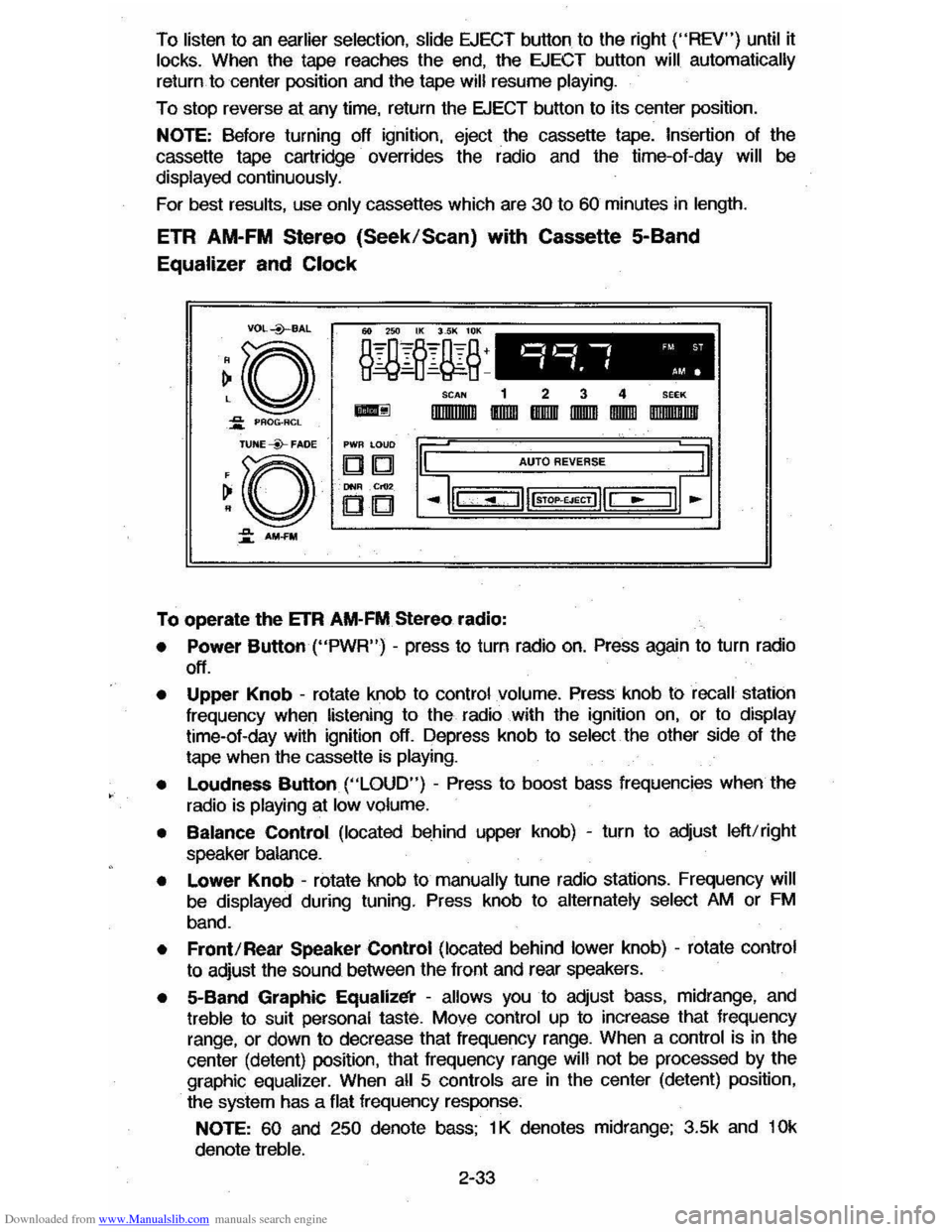
To operate the ETR AM-FM Stereo radio:
• Power Button ("PWR") -press to turn radio on. Press again to turn radio
off.
• Upper Knob -rotate knob to control volume. Press knob ti:> recall station
frequency when listening to the radio with the ignition on, or to display time-ol-day with ignition off. Depress knob to select the other side 01 the
tape when the cassette
is playing.
•
Loudness Button ("LOUD") - Press to boost bass frequencies when the
radio is
playing at low volume.
• Balance Control (located behind upper knob) -turn to adjust left/right
speaker balance.
• Lower Knob -rotate knob to manually tune radio stations. Frequency will
be displayed during tuning. Press knob to alternately select AM or FM
band.
• Front/Rear Speaker Control (located behind lower knob) -rotate control
to adjust the sound between the lront and rear speakers.
• 5-Band Graphic Equalizl!i' -allows you to adjust bass, midrange, and treble to suit personal taste. Move control up to increase that frequency
range, or down to decrease that frequency range. When a control is in the
center (detent) position, that
Irequency range will not be processed by the
graphic equalizer. When all 5 controls are in the center (detent) position,
the system has a flat frequency response:
NOTE: 60 and 250 denote bass; 1 K denotes midrange; 3.5k and 10k
denote treble.
2-33
Page 50 of 105
Downloaded from www.Manualslib.com manuals search engine • Pushbuttons
The radio has four pushbuttons
you can use to easily select your favorite
stations. You may select four AM and four FM stations for a total of eight
selections.
To set push buttons:
1. Make sure the bandswitch is on the band you want. Then, tune in the desired station.
2. Gently pull one of the four station pushbuttons and release.
The radio will then tune to the selected station whenever you press the station button.
• SEEK and SCAN
Use the SEEK and SCAN buttons for automatic station tuning.
Press
SCAN button to automatically sample each station being received. To
stop SCAN, press SCAN button again.
The SCAN indicator light on the frequency dial will be lit during SCAN operation.
Press the SEEK button to automatically locate and retain the next listenable
station on the band.
• Time Set:
To set the hour, gently pull and hold the
SCAN button untif the correct hour
appears.
To set the minutes, gently pull and hold the
SEEK button untif the correct
minute appears.
The
FM stereo indicator will light up whenever an FM station is broadcasting in
stereo. "Stereo" operation means the radio is separating a stereo broadcast
back into the original two channels, called "left" and "right". Stereo sound is
noticeably realistic to the ear.
To operate tape player:
Insert the cassette squarely through the door. This automatically
sw~ches the
unit from radio to tape operation. Ii the sound is garbled (or there is no sound),
eject the tape and reinsert it squarely.
After the cassette has snapped into position, adjust the volume and fader
controls to your preference.
To quickly advance to the next selection, press the button next to the lighted
indicator. To listen to
an earlier selection, press the button next to the
unlighted indicator. To stop the forward or reverse. movement, press the
EJECT button to eject the tape.
When the left indicator light is lit. the top side of the tape is playing. When the
right indicator light is lit. the bottom side of the tape is playing.
NOTE:
When end-of-tape is reached in one direction, the unit will automatically
play
in the opposite direction, and will play the other side of the tape.
When ignition is turned off, the pinch roller automatically releases the tape.
2-34