1969 FORD MUSTANG ECO mode
[x] Cancel search: ECO modePage 114 of 413
03-05-01
Steering Columns And Linkage
03-05-01
PART 3-5 Steering
Columns
and Linkage
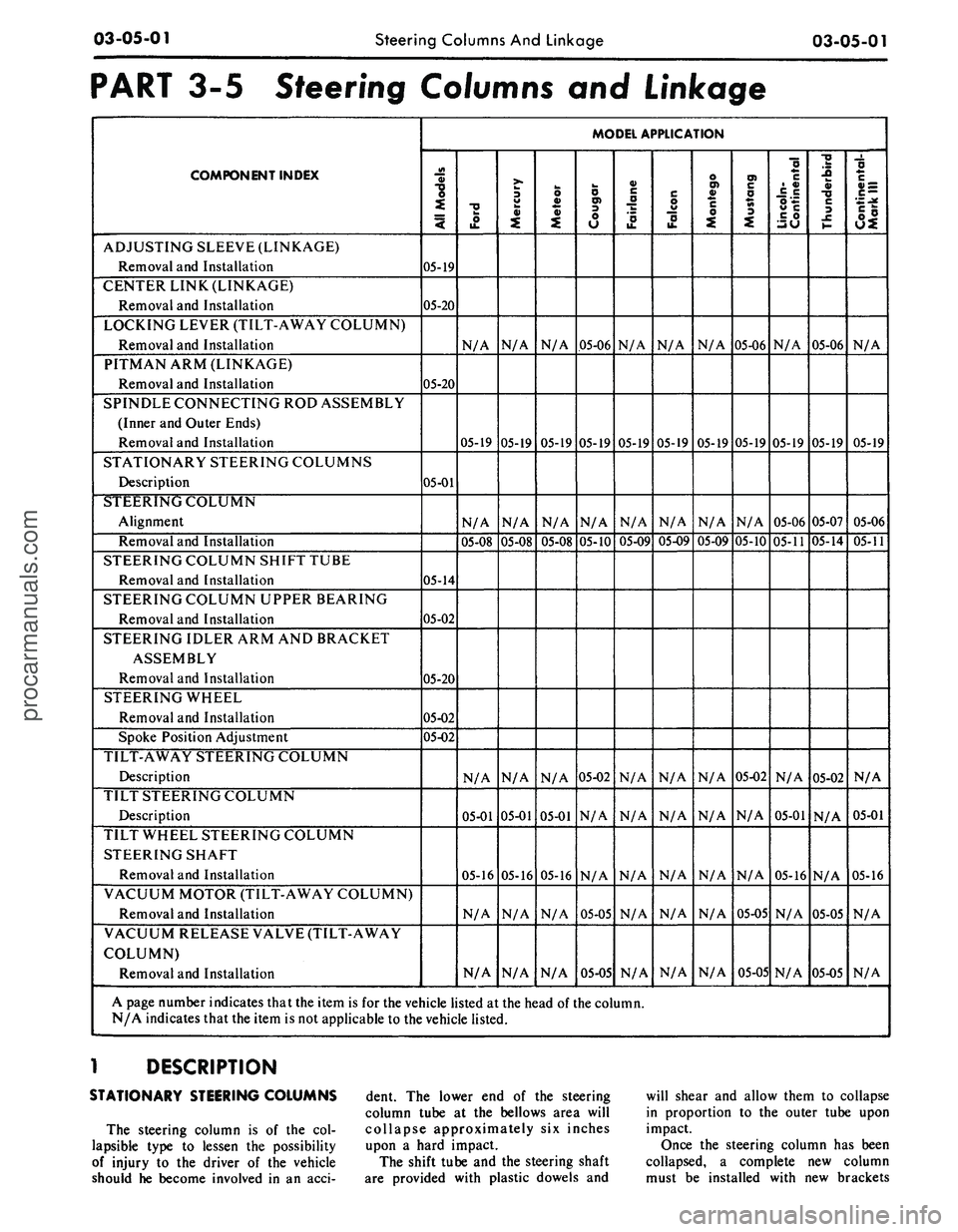
COMPONENT INDEX
ADJUSTING SLEEVE (LINKAGE)
Removal and Installation
CENTER LINK (LINKAGE)
Removal and Installation
LOCKING LEVER (TILT-AWAY COLUMN)
Removal and Installation
PITMAN ARM (LINKAGE)
Removal and Installation
SPINDLE CONNECTING ROD ASSEMBLY
(Inner and Outer Ends)
Removal and Installation
STATIONARY STEERING COLUMNS
Description
STEERING COLUMN
Alignment
Removal and Installation
STEERING COLUMN SHIFT TUBE
Removal and Installation
STEERING COLUMN UPPER BEARING
Removal and Installation
STEERING IDLER ARM AND BRACKET
ASSEMBLY
Removal and Installation
STEERING WHEEL
Removal and Installation
Spoke Position Adjustment
TILT-AWAY STEERING COLUMN
Description
TILT STEERING COLUMN
Description
TILT WHEEL STEERING COLUMN
STEERING SHAFT
Removal and Installation
VACUUM MOTOR (TILT-AWAY COLUMN)
Removal and Installation
VACUUM RELEASE VALVE (TILT-AWAY
COLUMN)
Removal and Installation
MODEL APPLICATION
All
Models
05-19
05-20
05-20
05-01
05-14
05-02
05-20
05-02
05-02
Ford
N/A
05-19
N/A
05-08
N/A
05-01
05-16
N/A
N/A
Mercury
N/A
05-19
N/A
05-08
N/A
05-01
05-16
N/A
N/A
Meteor
N/A
05-19
N/A
05-08
N/A
05-01
05-16
N/A
N/A
Cougar
05-06
05-19
N/A
05-10
05-02
N/A
N/A
05-05
05-05
Fairlane
N/A
05-19
N/A
05-09
N/A
N/A
N/A
N/A
N/A
Falcon
N/A
05-19
N/A
05-09
N/A
N/A
N/A
N/A
N/A
Montego
N/A
05-19
N/A
05-09
N/A
N/A
N/A
N/A
N/A
Mustang
05-06
05-19
N/A
05-10
05-02
N/A
N/A
05-05
05-05
Lincoln-
Continental
N/A
05-19
05-06
05-11
N/A
05-01
05-16
N/A
N/A
Thunderbird
05-06
05-19
05-07
05-14
05-02
N/A
N/A
05-05
05-05
Continental-
Mark
III
N/A
05-19
05-06
05-11
N/A
05-01
05-16
N/A
N/A
A page number indicates that the item is for the vehicle listed at the head of the column.
N/A indicates that the item is not applicable to the vehicle listed.
1 DESCRIPTION
STATIONARY STEERING COLUMNS
The steering column is of the col-
lapsible type to lessen the possibility
of injury to the driver of the vehicle
should he become involved in an acci-
dent. The lower end of the steering
column tube at the bellows area will
collapse approximately six inches
upon a hard impact.
The shift tube and the steering shaft
are provided with plastic dowels and
will shear and allow them to collapse
in proportion to the outer tube upon
impact.
Once the steering column has been
collapsed, a complete new column
must be installed with new brackets
procarmanuals.com
Page 115 of 413
03-05-02
Steering Columns
And
Linkage
03-05-02
which also will shear away during
im-
pact.
TILT STEERING COLUMNS
The steering column
is of the col-
lapsible type
to
lessen
the
possibility
of injury
to the
driver
of the
vehicle
should
he
become involved
in an
acci-
dent.
The
lower
end of the
steering
column tube
at the
bellows area will
collapse approximately
six
inches
upon
a
hard impact.
The shift tube
and the
steering shaft
are provided with plastic dowels
and
will shear
and
allow them
to
collapse
in proportion
to the
outer tube upon
impact.
Once
the
steering column
has
been
collapsed,
a
complete
new
column
must
be
installed.
The tilt column features nine driv-
ing positions (four
up and
four down
from
a
center position).
The
.column
also features
a
turn signal switch with
a lane-changer position turn indicating
position
and
emergency warning flash-
er control.
TILT-AWAY STEERING COLUMNS
The tilt-away steering column
fea-
tures nine driving positions (four
up
and four down from
a
center position)
and
a
tilt-away position that
is
auto-
matically accomplished
on
Mustang
and Cougar models when
the
ignition
key
is
turned
to the
OFF
position
and
the left door
is
opened.
On
Thunder-
bird models,
the
tilt-away occurs when
the shift lever
is
placed
in
PARK
and
the driverns door
is
opened.
The steering column
is of the col-
lapsible type
to
lessen
the
possibility
of injury
to the
driver
of the
vehicle
should
he
become involved
in an
acci-
dent.
The
lower
end of the
steering
column tube
at the
bellows area will
collapse approximately
six
inches
upon
a
hard impact.
The shift tube
and the
steering shaft
are provided with plastic dowels
and
will shear
and
allow them
to
collapse
in proportion
to the
outer tube upon
impact.
Once
the
steering column
has
been
collapsed,
a
complete
new
column
must
be
installed along with mounting
brackets which will also shear away
during impact.
IN-VEHICLE ADJUSTMENTS
AND
REPAIRS
STEERING WHEEL SPOKE
POSITION ADJUSTMENT
When
the
steering gear
is on the
high point,
the
front wheels should
be
in
the
straight-ahead position
and the
steering wheel spokes should
be in
their normal position with
the
Pitman
arm pointing directly forward.
If the
spokes
are not in
their normal posi-
tion, they
can be
adjusted without
dis-
turbing
the
toe-in adjustment (Part
3-1).
STEERING WHEEL
REPLACEMENT
1.
Disconnect
the
negative cable
from
the
battery.
2.
Working from
the
underside
of
the steering wheel spoke, remove
the
crash
pad
attaching screws. Lift
the
crash
pad
from
the
wheel.
(On
Conti-
nental Mark
III
models,
pry out the
crash
pad
insert
and
remove
the two
screws that secure
the
crash
pad. Re-
move
the
crash
pad. On
models
equipped with steering wheel mounted
speed controls, refer
to
Group
16 for
removal instructions). Remove
the
horn ring
(if so
equipped)
by
turning
it counterclockwise.
3.
Remove
the
steering wheel
nut,
and then remove
the
steering wheel
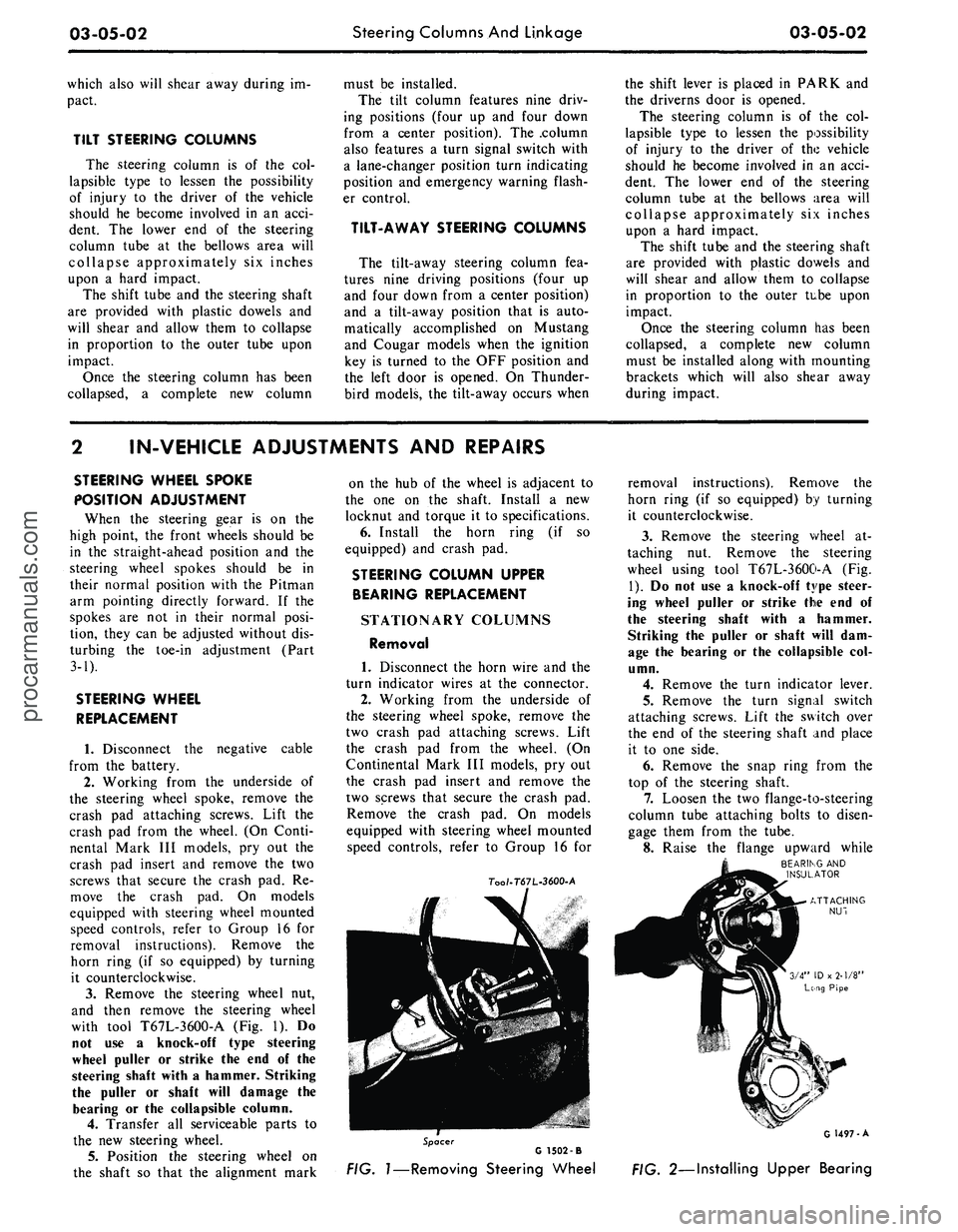
with tool T67L-3600-A
(Fig. 1). Do
not
use a
knock-off type steering
wheel puller
or
strike
the end of the
steering shaft with
a
hammer. Striking
the puller
or
shaft will damage
the
bearing
or the
collapsible column.
4.
Transfer
all
serviceable parts
to
the
new
steering wheel.
5.
Position
the
steering wheel
on
the shaft
so
that
the
alignment mark
on
the hub of the
wheel
is
adjacent
to
the
one on the
shaft. Install
a new
locknut
and
torque
it to
specifications.
6. Install
the
horn ring
(if so
equipped)
and
crash
pad.
STEERING COLUMN UPPER
BEARING REPLACEMENT
STATIONARY COLUMNS
Removal
1. Disconnect
the
horn wire
and the
turn indicator wires
at the
connector.
2.
Working from
the
underside
of
the steering wheel spoke, remove
the
two crash
pad
attaching screws. Lift
the crash
pad
from
the
wheel.
(On
Continental Mark
III
models,
pry out
the crash
pad
insert
and
remove
the
two screws that secure
the
crash
pad.
Remove
the
crash
pad. On
models
equipped with steering wheel mounted
speed controls, refer
to
Group
16 for
7oo/-T67L-3600-A
removal instructions). Remove
the
horn ring
(if so
equipped)
by
turning
it counterclockwise.
3.
Remove
the
steering wheel
at-
taching
nut.
Remove
the
steering
wheel using tool T67L-3600-A
(Fig.
1).
Do not use a
knock-off type steer-
ing wheel puller
or
strike
the end of
the steering shaft with
a
hammer.
Striking
the
puller
or
shaft will
dam-
age
the
bearing
or the
collapsible
col-
umn.
4.
Remove
the
turn indicator lever.
5.
Remove
the
turn signal switch
attaching screws. Lift
the
switch over
the
end of the
steering shaft
and
place
it
to one
side.
6. Remove
the
snap ring from
the
top
of the
steering shaft.
7.
Loosen
the two
flange-to-steering
column tube attaching bolts
to
disen-
gage them from
the
tube.
8. Raise
the
flange upward while
BEARING
AND
INSULATOR
Spacer
G 1502 -B
FIG.
1—Removing
Steering Wheel
G 1497-A
FIG. 2—Installing Upper Bearingprocarmanuals.com
Page 133 of 413
03-05-20
Steering Columns And Linkage
03-05-20
placed if it becomes worn or damaged
(Figs.
18 through 21). Do not attempt
to straighten the sleeve if damaged.
1.
Remove the spindle connecting
rod end assemblies as described in the
previous sub-section.
2.
Screw the spindle rod end assem-
blies into the new sleeve the same
number of turns as the ends that were
removed. Do not tighten the clamp
bolts at this time.
3.
Position the sleeve and end as-
sembly on the center link and the
spindle arm. Install the attaching nut,
torque it to specification, and install
the cotter pin.
4.
Check and, if necessary, adjust
toe-in (Part 3-1). After toe-in is
checked and adjusted, oil the sleeve
clamp bolts then torque them to speci-
fication. The sleeve clamp must be in-
stalled as shown in Figs. 18 through
21.
CENTER LINK
REPLACEMENT
The center link connecting the Pit-
man arm and the idler arm is non-
adjustable and is provided with ta-
pered holes to accommodate the ball
studs (Figs. 18 through 21). The link
should be replaced when damaged or
when worn at the ball studs. On Lin-
coln Continental models, the link
should be replaced if excessive loose-
ness is noticed in either ball stud sock-
et.
REMOVAL
1.
Raise the vehicle on a hoist and
position safety stands.
2.
Remove the cotter pins and nuts
that attach both inner connecting rod
ends to the center link (Figs. 18
through 21).
3.
Disconnect the inner connecting
rod ends from the center link using
Tool 3290-C (Fig. 22).
4.
Remove the cotter pin and nut
attaching the idler arm to the center
link. Disconnect the idler arm from
the center link using Tool 3290-C for
Lincoln Continental models only.
5.
Remove the cotter pin and nut
attaching the Pitman arm to the cen-
ter link. Disconnect the Pitman arm
from the center link (use Tool 3290-C)
and remove the center link. On ve-
hicles equipped with the non-integral
power steering system, remove the
center link from the control valve as
detailed in Part 3-7.
INSTALLATION
1.
Replace the rubber seals on the
spindle connecting rod ends, if re-
quired.
2.
Position the center link to the
Pitman arm and idler arm and install
the attaching nuts loosely. On all ve-
hicles except Lincoln Continental
models, place the idler arm and the
front wheels in the straight ahead po-
sition to insure keeping the steering
wheel aligned and to prevent bushing
damage after the attaching nuts have
been torqued. On Lincoln Continental
models, insure that the seal is properly
installed on the center link. Torque
the nuts to the low end of the specifi-
cation. Continue to tighten each nut
until the slots in the nut align with the
hole in the stud. Then install a new
cotter pin.
3.
Position the spindle connecting
rod ends to the center link and install
the attaching nuts. Torque the nuts to
the low end of the specification. Con-
tinue to tighten each nut until the
slots in the nut align with the hole in
the stud. Then, install a new cotter
pin.
4.
Remove the safety stands, lower
the vehicle, check and adjust toe-in to
specification (Part 3-1).
STEERING IDLER ARM
AND BRACKET ASSEMBLY
REPLACEMENT
REMOVAL
If the idler arm bushings are worn
the complete idler arm assembly must
be replaced. In Lincoln Continental
models, if the socket at the idler
bracket is excessively loose, replace
the complet assembly.
1.
Remove the cotter pin and nut
attaching the steering center link at
the idler arm (Figs. 18 through 21).
2.
Disconnect the center link from
the idler arm (on Lincoln Continental
models, use Tool 3290-C).
3.
Remove the two bolts that attach
the idler arm and bracket assembly to
the frame.
INSTALLATION
1.
Secure the new idler arm and
bracket assembly to the frame with
the two attaching bolts (nuts and flat
washers as shown in Figs. 18, 19 and
21).
2.
On all vehicles except Lincoln
Continental models, place the idler
arm and the front wheels in the
straight ahead position to insure keep-
ing the steering wheel aligned and to
prevent bushing damage after the at-
taching nut has been torqued. Insert
the center link stud through the hole
in the end of the idler arm and install
the nut and washer.
On Lincoln Continental models, in-
sert the center link stud through the
hole in the end of the idler arm insur-
ing that the seal is properly installed
on the center link.
3.
Torque the idler arm rod nut to
specification and install a new cotter
pin.
PITMAN ARM
REPLACEMENT
REMOVAL
1.
Remove the cotter pin from the
castellated nut that attaches the steer-
ing center link to the Pitman arm.
Remove the castellated nut.
2.
Disconnect the steering center
link from the Pitman arm with tool
3290-C.
3.
Remove the Pitman arm attaching
nut and lock washer.
4.
Position the front wheels in the
straight ahead position. Remove the
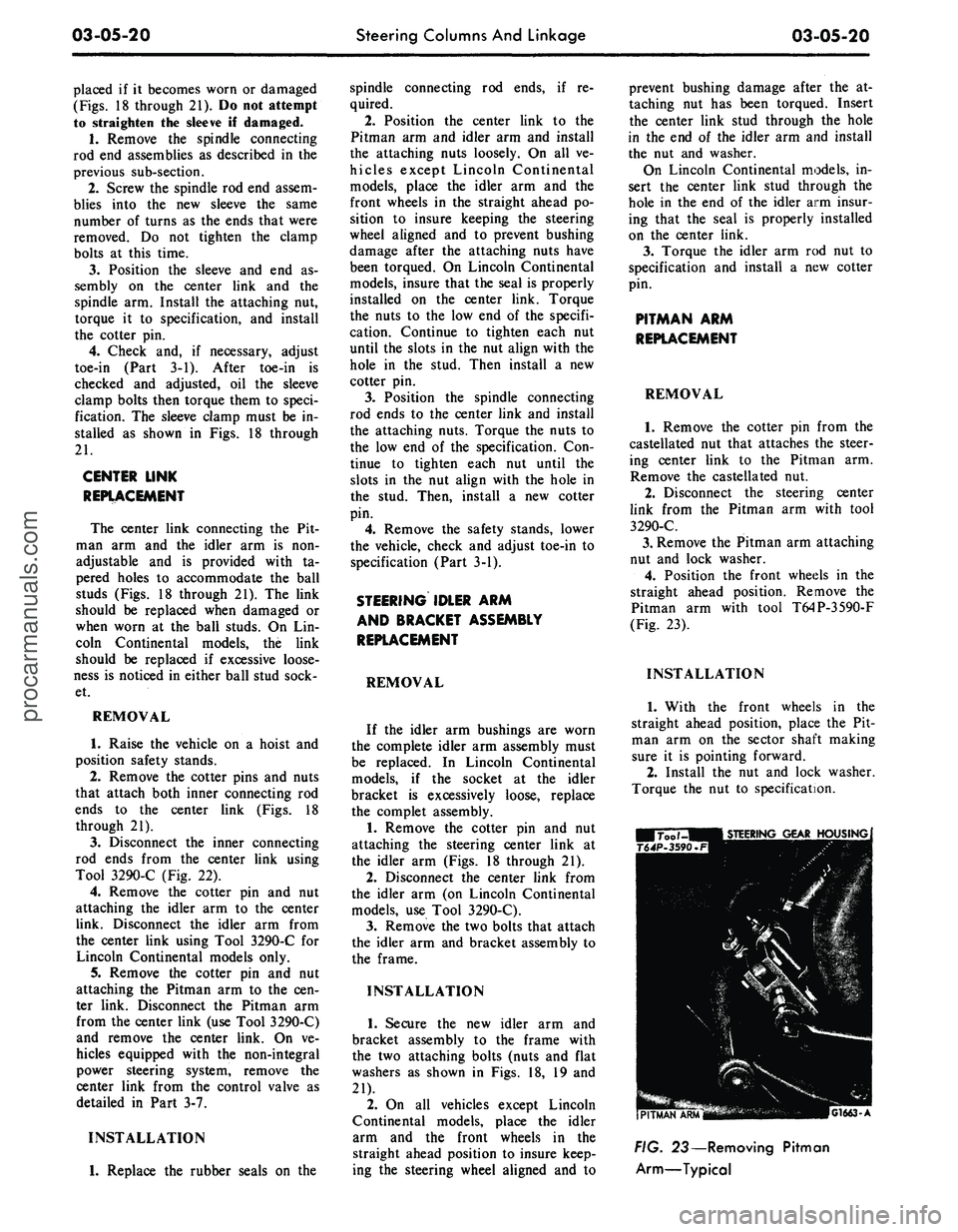
Pitman arm with tool T64P-3590-F
(Fig. 23).
INSTALLATION
1.
With the front wheels in the
straight ahead position, place the Pit-
man arm on the sector shaft making
sure it is pointing forward.
2.
Install the nut and lock washer.
Torque the nut to specification.
G1663-A
FIG. 23— Removing Pitman
Arm—Typicalprocarmanuals.com
Page 189 of 413
04-01-02
General Axle Service
04-01-02
COMPONENT INDEX
MODEL APPLICATION
o
3
I
i
Ji
LUBRICANT LEVEL CHECK
01-10
PINION RETAINER
01-10
Cleaning and Inspection
01-10
SHIM AND BACKLASH CHANGES
01-03
Integral Carrier
Removable Carrier
01-04
N/A
01-04
01-04
01-04
01-04
01-04
01-04
N/A
N/A
N/A
U-JOINT FLANGE
01-10
Cleaning and Inspection
01-10
A page number indicates that the item is for the vehicle listed at the head of the column.
N/A indicates that the item is not applicable to the vehicle listed.
1
COMMON ADJUSTMENTS
AND
REPAIRS
IDENTIFICATION
The AXLE code on the vehicle
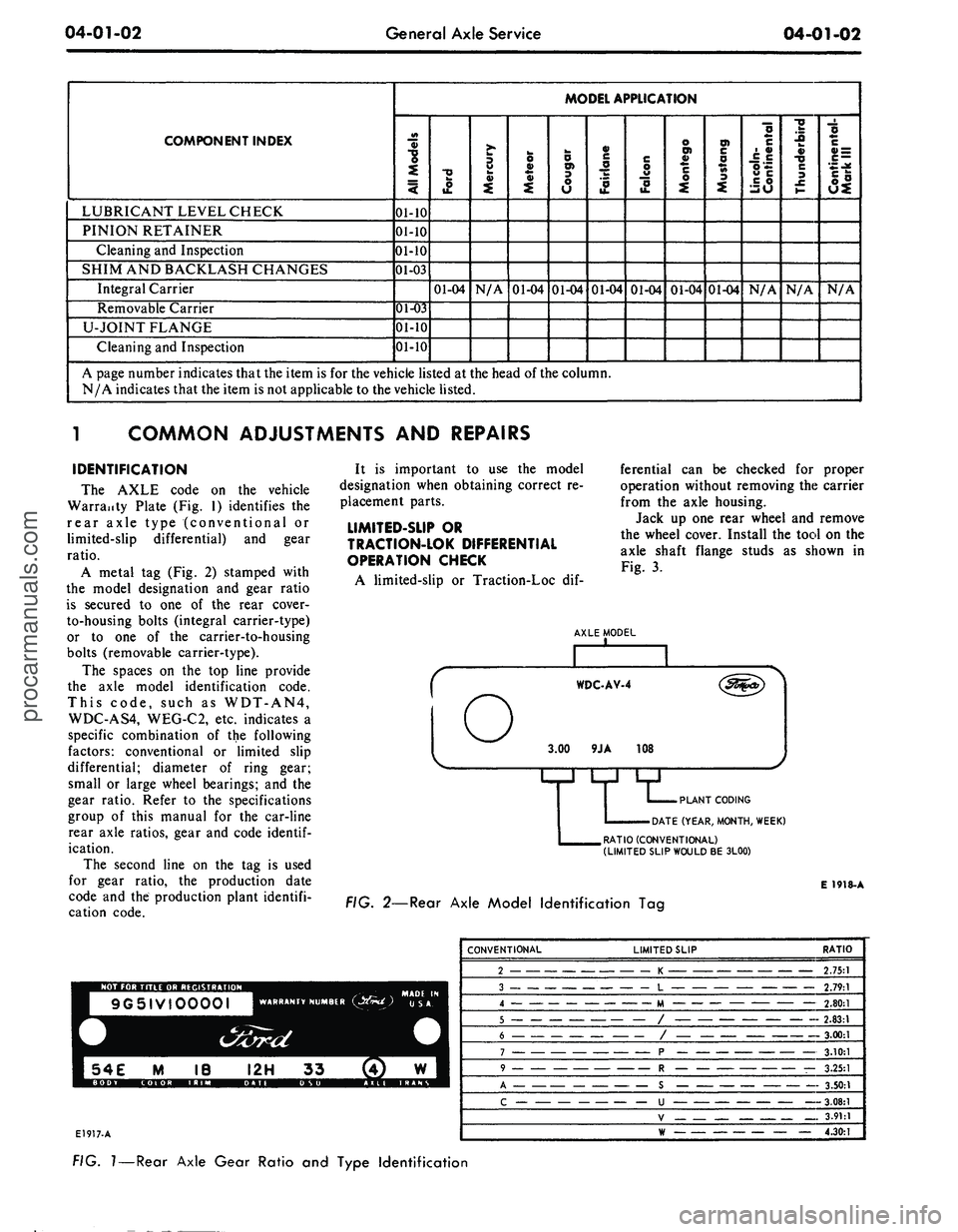
Warranty Plate (Fig. 1) identifies the
rear axle type (conventional or
limited-slip differential) and gear
ratio.
A metal tag (Fig. 2) stamped with
the model designation and gear ratio
is secured to one of the rear cover-
to-housing bolts (integral carrier-type)
or to one of the carrier-to-housing
bolts (removable carrier-type).
The spaces on the top line provide
the axle model identification code.
This code, such as WDT-AN4,
WDC-AS4, WEG-C2, etc. indicates a
specific combination of the following
factors: conventional or limited slip
differential; diameter of ring gear;
small or large wheel bearings; and the
gear ratio. Refer to the specifications
group of this manual for the car-line
rear axle ratios, gear and code
identif-
ication.
The second line on the tag is used
for gear ratio, the production date
code and the production plant identifi-
cation code.
It is important to use the model
designation when obtaining correct re-
placement parts.
LIMITED-SUP
OR
TRACTION-LOK DIFFERENTIAL
OPERATION CHECK
A limited-slip or Traction-Loc dif-
ferential can be checked for proper
operation without removing the carrier
from the axle housing.
Jack up one rear wheel and remove
the wheel cover. Install the tool on the
axle shaft flange studs as shown in
Fig. 3.
AXLE MODEL
PLANT CODING
DATE (YEAR, MONTH, WEEK)
RATIO (CONVENTIONAL)
(LIMITED SLIP WOULD
BE
3L00)
E 1918-A
FIG.
2—Rear
Axle Model Identification
Tag
NOT
FOR
TITLE
OR
REGISTRATION
9G5IVI0000I
WARRANTY NUMBER
E1917-A
CONVENTIONAL
2
3
4
.
5
6
7
A
c
LIMITED SLIP
K
L
M
/
/
p
_ —
R
— —
c
—
u
V
RATIO
2.75:1
2.79:1
— 2.80:1
2.83:1
-
3.00:1
3.10:1
—
3.25:1
3.50:1
3.08:1
3.91:1
— 4.30:1
FIG.
1
— Rear Axle Gear Ratio
and
Type Identificationprocarmanuals.com
Page 248 of 413

05-01-01
05-01-01
Clutch
GROUP
5
PART
5-1
PAGE
Drive Shaft 05-01-01
PART
5-2
General Clutch Service 05-02-01
PART
5-3
Clutch
PART
5-4
Specifications
PAGE
05-03-01
05-04-01
PART
5-1
Drive Shaft
COMPONENT INDEX
DESCRIPTION
DRIVE SHAFT ANGLE CHECK
DRIVE SHAFT BALANCE CHECK
DRIVE SHAFT BALANCING
(Single Universal Joint)
DRIVE SHAFT DISASSEMBLY
AND
OVERHAUL
Single Universal Joint — Ford Design
Double Cardan Joint — Dana Design
Double Cardan Joint — Saginaw Design
DRIVE SHAFT REMOVAL
AND
INSTALLATION
DRIVE SHAFT RUNOUT CHECK
MODEL APPLICATION
All
Models
01-01
01-01
01-01
01-02
01-01
Ford
01-04
01-04
N/A
N/A
Mercury
01-04
01-04
N/A
N/A
Meteor
01-04
01-04
N/A
N/A
Cougar
01-04
01-04
N/A
N/A
Fairlane
01-04
01-04
N/A
N/A
Falcon
01-04
01-04
N/A
N/A
Montego
01-04
01-04
N/A
N/A
Mustang
01-04
01-04
N/A
N/A
Lincoln-
Continental
N/A
N/A
01-04
N/A
Thunderbird
N/A
N/A
N/A
01-05
Continental-
Mark
III
N/A
N/A
N/A
01-05
A page number indicates that the item
is for the
vehicle listed
at the
head
of
the column.
N/A indicates that
the
item
is not
applicable
to the
vehicle listed.
DRIVE SHAFT TESTS
DRIVE LINE BALANCE CHECK
If detailed parts
of the
drive shaft
are replaced
and
shaft vibration
is en-
countered after installation, disconnect
the shaft
at the
slip yoke. Rotate
the
slip yoke
180
degrees; then, reconnect
the shaft
to the
slip yoke.
If the
vibra-
tion persists, disconnect
the
shaft
at
the rear axle companion flange.
Ro-
tate
the
companion flange
180
degrees
and reconnect
the
shaft
to the
flange.
DRIVE LINE ANGLE CHECK
Vibration
or
"shudder" which
is no-
ticeable either
on
fast acceleration
or
when coasting, using
the
engine
for a
brake,
may be
caused
by the
rear axle
housing being loose
on the
rear
springs
or by
improper pinion angle.
Refer
to
Group
3,
Part
2 for
pinion
angle checking procedures.
If the
rear
axle U-bolts (Fairlane, Montego,
Mustang, Cougar, Falcon models
only)
are
loose, torque
the
nuts
to
specification.
DRIVE SHAFT RUNOUT CHECK
Using
a
dial indicator, check
the
runout
at
each
end and in the
middle
of
the
driveshaft.
The
rear check
should
be
made
on the
small tube
sec-
tion
of the
shaft between
the
balance
weights
and the
yoke welds. Drive-
shaft runout should
not
exceed 0.035
inch
at any one
point.
DESCRIPTION
The drive shaft
is the
means
of
transferring power from
the
engine,
through
the
transmission,
to the dif-
ferential
in the
rear axle,
and
then
to
the rear wheels.
The
drive shaft incor-
porates
two
universal joints
and a
slip
yoke
(Fig. 1) or two
double cardan
universal joints,
one at
each
end of the
shaft (Figs.
2 and 3).
Each double
procarmanuals.com
Page 250 of 413

05-01-03
Drive Shaft
05-01-03
DUST SEAL-4859
BALL SOCKET-4A031
UNIVERSAL
JOINT KIT-4635
WASHER
BALL SEAT i \ SPRING
BEARING \\ RETAINER
SEAL
0 \ X \
CENTER
\ \ RETAINER \ YOKE-47R4
SPRING \
BALL SOCKET-4A031
SLIP YOKE-4841
C1770-A
FIG.
3—Drive Shaft and Universal Joints Disassembled —Thunderbird, Continental Mark
REMOVAL AND INSTALLATION
REMOVAL
1.
To maintain drive line balance,
mark the relationship of the rear drive
shaft yoke and the drive pinion flange
of the axle (if the yellow alignment
marks are not visible) with the shaft
so that they may be installed in their
original positions.
2.
Disconnect the rear U-joint or
rear double cardan joint from the
companion flange. Wrap tape around
the loose bearing caps to prevent
them from falling off the spider. Pull
the drive shaft toward the rear of the
vehicle until the slip yoke clears the
transmission extension housing and
the seal. On Lincoln Continental
models, remove the three roller bear-
ing assemblies off the spline teeth in-
side the slip yoke (Fig. 3). Install the
appropriate tool in the extension
housing to prevent lubricant leakage.
INSTALLATION
1.
If either the rubber seal on the
output shaft or the seal in the end of
the transmission extension housing is
damaged in any manner, replace the
seal or seals as required. Also, if the
lugs on the axle pinion flange are
shaved or distorted so that the bear-
ings slide, replace the flange.
2.
On Lincoln Continental models,
install the bearing assemblies over the
spline teeth in the slip yoke. Lubricate
the yoke spline with B8A-19589-A lu-
bricant. This spline is sealed so that
the transmission fluid does not
"wash" away the spline lubricant
(Figs.
4 and 5). Remove the tool from
the extension housing. Install the yoke
on the transmission output shaft. Do
not allow the yoke assembly to bot-
tom on the output shaft with excessive
force.
Install the drive shaft so that the
index marks or the yellow mark (if
visible) on the yoke (light side) is in
line with the yellow mark on the com-
panion flange. This prevents vibration
which occurs when the balance of the
shaft and balance of the axle pinion
flange become additive instead of neu-
01L SEAL (AUTOMATIC TRANSMISSION ONLY)
YOKE
SNAP RING (WRAP TYPE)
. 4—Output Shaft Spline Seal — All except Continental
Mark III and Thunderbird
E U73-Cprocarmanuals.com
Page 271 of 413

06-02-02
Ford Design Three Speed Transmission
06-02-02
DESCRIPTION
DESCRIPTION
The RAN and RAT Model three-
speed transmission (Fig. 1) are used
on models having 170, 200, 240, 250,
302,
351 and 390 C.I.D. engines. The
specifications of this section, Part 6-4,
lists the transmission model numbers
and vehicles in which they are used.
A transmission service identification
tag is located on the right side of the
case at the front (Fig. 2). The first
line on the tag will show the transmis-
sion model and service identification
code when required. The second line
will show the transmission serial num-
ber. Additionally, a driveline compo-
nent identification tag is attached to
the upper right side of the transmis-
sion case.
This transmission is of the fully
synchronized type, with all gears ex-
cept the reverse gear and sleeve being
in constant mesh. All forward-speed
changes are accomplished with syn-
chronizer sleeves.
The forward-speed gears are
helical-cut and are in constant mesh.
Gears used in the reverse gear train
are spur-cut and are not synchronized.
C2O87-A
FIG.
1—Three-Speed
Transmission—Typical
TRANS.
MODEL
SERIAL
NO.
C 2089-A
FIG.
2—Transmission
Identification
Tag
IN-VEHICLE ADJUSTMENTS
AND
REPAIRS
GEAR SHIFT LINKAGE
ADJUSTMENT—COLUMN
MOUNTED
1. Place the gear shift lever in the
neutral position.
2.
Loosen the two gear shift rod
adjustment nuts.
3.
Check shift levers on transmis-
sion to be in neutral position.
4.
Insert a 3/16-inch diameter
alignment tool through the first and
reverse gear shift lever, the second and
third gear shift lever and both holes
in the lower casting (Fig. 3). An align-
ment tool can be made from 3/16
inch drill rod bent to an L shape.
The extensions should be 1 inch and 2
inches from the elbow. The short end
of the tool should be inserted into the
alignment holes.
5.
Tighten the two gear shift rod
adjustment nuts.
6. Remove the alignment tool from
the levers.
7.
Start the engine and shift the se-
lector lever to each position to make
sure it operates freely.
FIG.
3—Gearshift
Linkage Adjustment—Typicalprocarmanuals.com
Page 274 of 413

06-02-05
Ford Design Three Speed Transmission
06-02-05
Dummy
Shaft
FIG. 7—Removing Countershaft
7.
On 6-cylinder vehicles with a
model RAN transmission except
Ford, tap the countershaft from the
rear of the case with a dummy shaft
to remove the expansion plug from
the countershaft bore at the front of
the case.
8. Hold the countershaft gear with
a hook and with the tool shown in
Fig. 7, push the countershaft out the
rear of the case.
The countershaft (cluster) gear and
thrust washers (Fig. 21) can be low-
ered to the bottom of the case. Re-
move the countershaft from the rear
of the case.
9. On some models, remove the
snap ring that secures the speedometer
drive gear on the output shaft. Slide
the speedometer drive gear off the
shaft. Remove the speedometer drive
gear lock ball from the shaft. If the
vehicle is equipped with the new de-
sign retainer, depress the tang on the
speedometer drive gear retaining clip
and slide the gear off the output shaft
(Fig. 10).
10.
Remove the snap ring that re-
tains the output shaft bearing on the
C2070 A
shaft. Remove the bearing from the
case and shaft as shown in Fig. 8.
11.
Place both shift levers in the
neutral (center) position.
12.
Remove the set screw that se-
cures the first and reverse shift fork to
the shift rail. Slide the first and rev-
erse shift rail out through the rear of
the case.
13.
Slide the first and reverse syn-
chronizer forward as far as possible,
and rotate the first and reverse shift
fork upward. Then lift it from the
case.
14.
Move the second and third-
speed shift fork to the second-speed
position to gain access to the set
screw. Remove the set screw from the
fork. Rotate the shift rail 90 degrees
as shown in Fig. 11.
15.
Lift the interlock plug (Fig. 9)
from the case with a magnet.
16.
Tap on the inner end of the sec-
ond and third-speed shift rail to re-
move the expansion plug (Fig. 9) from
the front of the case. Remove the shift
rail.
17.
Remove the second and third-
speed shift rail detent plug and spring
from the detent bore.
18.
Pull the input gear and shaft
forward until the gear contacts the
case,
and then remove the large snap
ring. It is necessary to move the gear
forward to provide clearance when re-
moving the output shaft assembly
from RAT model transmissions. On
all other models, the input shaft and
gear is removed from the front of the
case at this time.
19.
Rotate the second and third-
speed shift fork upward, and lift it
from the case.
20.
Carefully lift the output shaft
assembly out through the top of the
case.
21.
On an RAT model, work the
input shaft bearing and gear back
through the bore in the case and out
through the top. Remove idler gear
shaft, driving from the front of the
case.
22.
Lift the reverse idler gear and
two thrust washer (Fig. 12) from the
case.
Lift the countershaft gear, thrust
washer, and dummy shaft from the
case.
23.
Remove the snap ring from the
front of the output shaft, and slide the
synchronizer and the second-speed
gear (Fig. 13) off the shaft.
24.
Remove the next snap ring and
tabbed thrust washer from the output
shaft. Then slide the first gear and
blocking ring off the shaft.
25.
Remove the next snap ring
from the output shaft. The first and
reverse synchronizer hub is a press fit
on the output shaft. To eliminate the
possibility of damaging the synchro-
nizer assembly, remove the synchro-
nizer hub using an arbor press as
shown in Fig. 21. Do not attempt to
remove or install the hub by hammer-
ing or prying.
C2071-A
FIG. 8—Removing Output Shaft
Bearing
SET SCREW
SCREW
MACHINED SURFACE
2ND AND 3RD SHIFT FORK
EXPANSION PLUG
1ST AND REVERSE
SHIFT RAIL
FIG. 9—Shift Rails and Forks Disassembled
C1798-Aprocarmanuals.com