1969 FORD MUSTANG trans
[x] Cancel search: transPage 367 of 413

07-03-27
FMX Transmission
0703-27
CENTER SUPPORT
PLANETARY CLUTCH
"CAM TYPE" CLUTCH RACE
CHAMFER ON PRODUCTION
PART, ONLY-SERVICE PART NOT CHAMFERED
PLANET CARRIER
D1938-A
FIG. 54—Planetary Clutch, Planet Carrier and Center Support
5.
Carefully position the planet car-
rier on the center support. Move the
carrier forward until the clutch rollers
are felt to contact the bearing surface
of the center support.
6. While applying forward pressure
on the planet carrier, rotate it counte-
rclockwise, as viewed from the rear
(Fig. 55). This will cause the clutch
rollers to roll toward the large open-
ing end of the cams in the race, com-
pressing the spring slightly, so that the
rollers will ride up the chamfer on the
planetary support and onto the inner
race.
7.
Push the planet carrier all the
way forward.
PLANET
CARRIER
8. Check the operation of the plan-
etary clutch by rotating the carrier co-
unterclockwise. It should rotate count-
erclockwise (viewed from the rear)
with a slight drag, and it should lock
up when attempting to rotate it in a
clockwise direction.
9. Install the selective thrust washer
on the pinion carrier rear pilot. II the
end play was not within specifications
when checked prior to disassembly,
replace the washer with one of proper
thickness. Refer to the Specification
Section of Group 7 for selective thrust
washer thickness.
10.
Install the output shaft, careful-
ly meshing the internal gear with the
pinions.
ROTATE CARRIER
COUNTER CLOCKWISE
D 1292-C
. 55—Planetery Clutch Installation in Carrier—Chamfered Center
Support
Installation—Center Support
not Chamfered
1.
Install the center support and the
rear band in the case.
2.
Install the primary sun gear, rear
thrust bearing race, needle bearing
and front thrust bearing race if used
in the planet carrier using petroleum
jelly to retain them in place.
3.
Lubricate the bearing surface of
the center support, the rollers of the
planetary clutch, and the cam race in
the carrier with vaseline.
i. Install the^ planetary clutch on
the center support with the saw teeth
of the clutch cage pointing in the
clockwise direction as viewed from the
rear (Fig. 56). Make sure that all roll-
ers are in the cage.
5.
Position the planet carrier on the
support so that the cams in the carrier
engage the saw teeth on the clutch
cage.
6. Push the planet carrier forward
until the rollers are felt to contact the
surface of the cam race.
7.
While applying forward pressure
on the carrier, rotate it counterclock-
wise as viewed from the rear. This will
cause the rollers to roll toward the
large opening end of the cams in the
race,
compressing the springs slightly,
so that the rollers will enter the cams.
8. Some rollers may become
cocked preventing their entry into the
outer race. These rollers must be posi-
tioned individually with a small screw-
driver by pushing the rear of the roll-
ers toward the transmission and into
the cam race (Fig. 56). Keep pressure
applied to the carrier at all times.
9. After all of the rollers have been
started into the cam race, rotate the
carrier counterclockwise while pushing
it forward. Again, straighten any roll-
ers which still may be in a cocked po-
sition and prevent the carrier from
sliding onto the support.
10.
Make sure that all springs are
entered in the cam race before at-
tempting to push the carrier on the
support. Push the carrier all the way
forward and check the operation of
the clutch by rotating it in a counte-
rclockwise direction. The carrier
should rotate counterclockwise with a
slight drag and should lock up when
attempting to rotate it in a clockwise
direction.
11.
Install the selective thrust wash-
er on the pinion carrier rear pilot. If
the end play was not within specifica-
tions when checked prior to disassem-
bly, replace the washer with one of
proper thickness. Refer to the Specifi-
cation Section of Group 7 for selective
thrust washer thickness.procarmanuals.com
Page 368 of 413

07-03-28
FMX Transmission
07-03-28
CENTER
SUPPORT
ROTATE
CARRIER
COUNTER
CLOCKWISE
SAWTEETH IN
CLOCKWISE
DIRECTION
MOVE ROLLER
TOWARD CENTER
D 1291-D
FIG. 56—Planetary Clutch Installation in Carrier—Center Support
Not Chamfered
er between the large internal gear and
the transmission case. Note the indi-
cator reading. End play should be
0.010-0.029 inch (minimum end play
is preferred).
4.
Remove the indicator and the
tool from the extension housing.
5.
Install the one remaining front
pump attaching bolt and torque it to
specification.
FRONT SERVO
1.
Position the front band forward
in the case with the band ends up.
2.
Position the servo strut with the
slotted end aligned with the servo act-
uating lever, and with the small end
aligned with the band end. Rotate the
band, strut, and servo into position
engaging the anchor end of the band
with the anchor pin in the case.
3.
Locate the servo on the case, and
install the attaching bolts. Tighten the
attaching bolts only two or three
threads.
4.
Install the servo release tube.
REAR SERVO
12.
Install the output shaft, careful-
ly meshing the internal gear with the
pinions.
REAR SUPPORT
1.
Position the needle bearing and
retainer on the rear support (Fig. 24).
2.
Position a new rear support to
case gasket on the rear support. Re-
tain the gasket with transmission
fluid.
3.
Install the rear support. As the
support is installed, insert the tubes
into the case.
GOVERNOR
1.
Position the governor drive ball
in the pocket in the output shaft. Re-
tain the ball with transmission fluid.
2.
Install the governor assembly, al-
igning the groove with the ball in the
output shaft.
3.
Install the governor with the gov-
ernor body plate toward the front of
the vehicle (Fig. 23). Install the gover-
nor snap ring
EXTENSION HOUSING
1.
Insert the extension housing oil
seal re placer and pilot in the housing.
Position a new gasket to the extension
housing and install the extension
housing on the transmission case.
Coat the bolt threads with B5A-
19554-A sealer and install the exten-
sion housing attaching bolts, breather
tube clip, vacuum tube clip, and exter-
nal tooth lock washer. The lock wash-
ers must be installed with the rolled
edge toward the transmission case to
insure a tight seal.
2.
Torque the extension housing at-
taching bolts to specification.
3.
Install the lubrication tube.
FRONT PUMP
1.
Position a new front pump gask-
et in the counterbore of the transmis-
sion case.
2.
Install the front pump, aligning
the pump bolt holes with the holes in
the case. Install three of the front
pump attaching bolts and torque them
to specification.
TRANSMISSION END
PLAY CHECK
1.
Mount the dial indicator support
in a front pump bolt hole. Mount a
dial indicator on the support so that
the contact rests on the end of the tur-
bine shaft.
2.
Use a large screwdriver to pry
the front of the clutch drum toward
the rear of the transmission. Set the
dial indicator at zero.
3.
Remove the screwdriver and pry
the units toward the front of the
transmission by inserting a screwdriv-
1.
Position the servo anchor strut,
and rotate the rear band to engage the
strut.
2.
Position the servo actuating lever
strut with a finger, and then install the
servo and attaching bolts. Torque the
bolts to specification.
3.
Install the front servo apply
tube.
PRESSURE REGULATOR
BODY
1.
Install the pressure regulator
body and attaching bolts, and torque
the bolts to specifications.
2.
Install the control and converter
valve guides and springs. Install the
spring retainer.
CONTROL VALVE BODY
1.
Install the control valve assem-
bly, carefully aligning the servo tubes
with the control valve. Align the inner
downshift lever between the stop and
the downshift valve. Shift the manual
lever to the 1 position. Align the man-
ual valve with the actuating pin in the
manual detent lever. Do not tighten
the attaching bolts.
2.
Move the control valve body
toward the center of the case until the
clearance is less than 0.050 inch be-
tween the manual valve and the act-
uating pin on the manual detent lever.
3.
Torque the attaching bolts toprocarmanuals.com
Page 369 of 413
07-03-29
FMX Transmission
07-03-29
specification. Be sure that the rear
fluid screen retaining clip is installed
under the valve body bolt as shown in
Fig. 17.
4.
Install the large control pressure
tube in the valve body and regulator.
5.
Install the small control pressure
compensator tube in the valve body
and regulator.
6. Turn the manual valve one full
turn in each manual lever detent posi-
tion. If the manual valve binds against
the actuating pin in any detent posi-
tion, loosen the valve body attaching
bolts and move the body away from
the center of the case. Move the body
only enough to relieve the binding.
Torque the attaching bolts and check
the manual valve for binding.
7.
Torque the front servo attaching
bolts to specification.
FRONT AND REAR
BAND ADJUSTMENTS
Adjust the front and rear bands as
detailed in Section 2.
VACUUM DIAPHRAGM UNIT
1.
Position the control rod in the
bore of the vacuum diaphragm unit
and install the diaphragm unit. Make
sure the control rod enters the throttle
valve as the vacuum unit is installed.
2.
Torque the diaphragm unit to
specification.
FLUID FILTER
AND OIL PAN
1.
Position the fluid filter on the
rear clip so that the tang enters the
hole in the filter flange. Then, rotate
the filter (clockwise) until the grom-
met is over the pump inlet port of the
valve body regulator and press the fil-
ter down firmly. Install the filter re-
taining clip.
2.
Place a new gasket on the trans-
mission case and install the pan. In-
stall the attaching bolts and lock
washers and torque the bolts to speci-
fication.
If the converter and converter hous-
ing were removed from the transmis-
sion, install these components. Posi-
tion the transmission assembly on the
transmission jack, and refer to Trans-
mission Installation Procedures for in-
stalling the transmission.procarmanuals.com
Page 370 of 413

07-04-01
C-6 Automatic Transmission
07-04-01
PART 7-4 C-6 Automatic Transmission
Trans-
Selector
mission Engine Lever
Model Model Location
PGA-A3 390-2V Column
PGA-J3 390-2V Console
PGA-AC 390-4VI.P. Column
PGA-AD 390-2VI.P. Console
PGA-AE 390-2V I.P. Console
PGA-Z 429-2V Column
PGA-AA 429-2V Console
PGB-F2 428-4 V®@ Column
PGB-G2 390-2V,4V© Column
PGB-H2 428-4V® Column
PGB-J1 429-4V Column
PGB-AD 429-4V Column
PGB-AE 429-4V Console
PGB-AF-1 428-4VC.J. Console
PGB-AG 428-4V C. J. Column
PGB-AH 428-4V C.J. Console
PGC-B 460-4V Column
PGC-C1 460-4V Column
©Police Interceptor
©All Except 3.25:
1
Axle
©Police, Fleet and Heavy Duty Units
MODEL APPLICATION
All
Models
Ford
X
X
X
X
X
X
X
X
X
Mercury
x
X
X
X
X
X
X
X
Meteor
X
X
X
X
X
X
X
X
Cougar
X
X
Fairlane
X
X
X
X
Falcon
Montego
X
X
X
X
Mustang
X
X
Lincoln-
Continental
X
Thunderbird
X
1
Continental-
Mark
III
X
COMPONENT INDEX
ASSEMBLY OF TRANSMISSION
BAND ADJUSTMENT
Intermediate Band
CONTROL VALVE BODY
Cleaning and Inspection
Disassembly and Overhaul
Removal and Installation
DESCRIPTION
DISASSEMBLY AND OVERHAUL OF
TRANSMISSION
DOWNSHIFT LINKAGE
Adjustment
Parts Repair or Replacement
EXTENSION HOUSING
Cleaning and Inspection
Removal and Installation
EXTENSION HOUSING BUSHING
Removal and Installation
All
Models
04-29
04-11
04-16
04-22
04-12
04-02
04-18
04-05
04-20
04-14
04-11
04-13
COMPONENT INDEX
EXTENSION HOUSING REAR SEAL
Removal and Installation
FORWARD CLUTCH
Cleaning and Inspection
Disassembly and Overhaul
FRONT PUMP
Cleaning and Inspection
Disassembly and Overhaul
GOVERNOR
Cleaning and Inspection
Removal and Installation
INPUT SHELL AND SUN GEAR
Disassembly and Overhaul
LOW-REVERSE CLUTCH PISTON
Disassembly and Overhaul
MANUAL LINKAGE
Adjustment
Parts Repair or Replacement
All
Models
04-13
04-15
04-25
04-15
04-24
04-16
04-11
04-27
04-28
04-05
04-20
procarmanuals.com
Page 371 of 413

07-04-02
C-6 Automatic Transmission
07-04-02
COMPONENT INDEX
NEUTRAL START SWITCH-CONSOLE
SHIFT
Adjustment
Removal
and
Installation
(Refer
to
Part 7-1
for
column shift adjust-
ment
and
removal
and
installation procedures)
ONE-WAY CLUTCH
Cleaning
and
Inspection
Disassembly
and
Overhaul
OUTPUTSHAFT
Disassembly
and
Overhaul
OUTPUT SHAFT HUB
AND
RING GEAR
Disassembly
and
Overhaul
PARKING PAWL LINKAGE
Parts Repair Replacement
REVERSE-HIGH CLUTCH
Cleaning
and
Inspection
Disassembly
and
Overhaul
All
Models
04-05
04-09
04-16
04-28
04-28
04-27
04-21
04-15
04-24
1 DESCRIPTION
DESCRIPTION
Figure
1
shows
the
location
of
the
COMPONENT INDEX
SELECTOR LEVER-CONSOLE SHIFT
Removal
and
Installation
SERVO
Cleaning
and
Inspection
Disassembly
and
Overhaul
Removal
and
Installation
SERVO APPLY LEVER
Parts Repair
or
Replacement
SERVO SEAL
Removal
and
Installation
THROTTLE LINKAGE ADJUSTMENT
TRANSMISSION (Complete)
Removal
and
Installation
TRANSMISSION CASE THREAD REPAIR
All
Models
04-09
04-16
04-28
04-11
04-21
04-12
04-05
04-13
04-21
converter, front pump, clutches, gear
train
and
most
of
the
internal parts
used
in the C6
transmission.
The
iden-
tification
tag (Fig. 2),
attached
to
the
intermediate servo lower front cover
bolt, includes
the
model prefix
and
SUPPORT
CONVERTER
INTERMEDIATE
BAND
FORWARD CLUTCH
HUB
LOW-REVERSE GOVERNOR
AND RING GEAR CLUTCH DISTRIBUTOR SLEEVE
GOVERNOR
REVERSE
RING GEAR
EXTENSION
HOUSING
SEAL
OUTPUT
SHAFT
EXTENSION
HOUSING
INPUT
SHAFT
CONVERTER
ONE-WAY
v>LU I v*ri «wi>i-»>p^fc_
iivir"
n LTR i
REVERSE-HIGH CLUTCH
CONTROL VALVE BODY
FIG.
1—C6
Automatic Transmission—Sectional
REVERSE PLANET
CARRIER
'FRONT PLANET CARRIER
PARKING PAWL ACTUATING
ROD
FORWARD CLUTCH
CONTROL LEVERS
D1924-
A
procarmanuals.com
Page 372 of 413

07-04-03
C-6 Automatic Transmission
07-04-03
suffix, a service identification number,
and serial number. The service
identif-
ication number indicates changes to
service details which affect interchan-
geability when the transmission model
is not changed. For interpretation of
this number, see the Master Parts Ca-
talog.
The C6 transmission is a three
speed unit capable of providing auto-
matic upshifts and downshifts through
the three forward gear ratios, and also
capable of providing manual selection
of first and second gears. The hydrau-
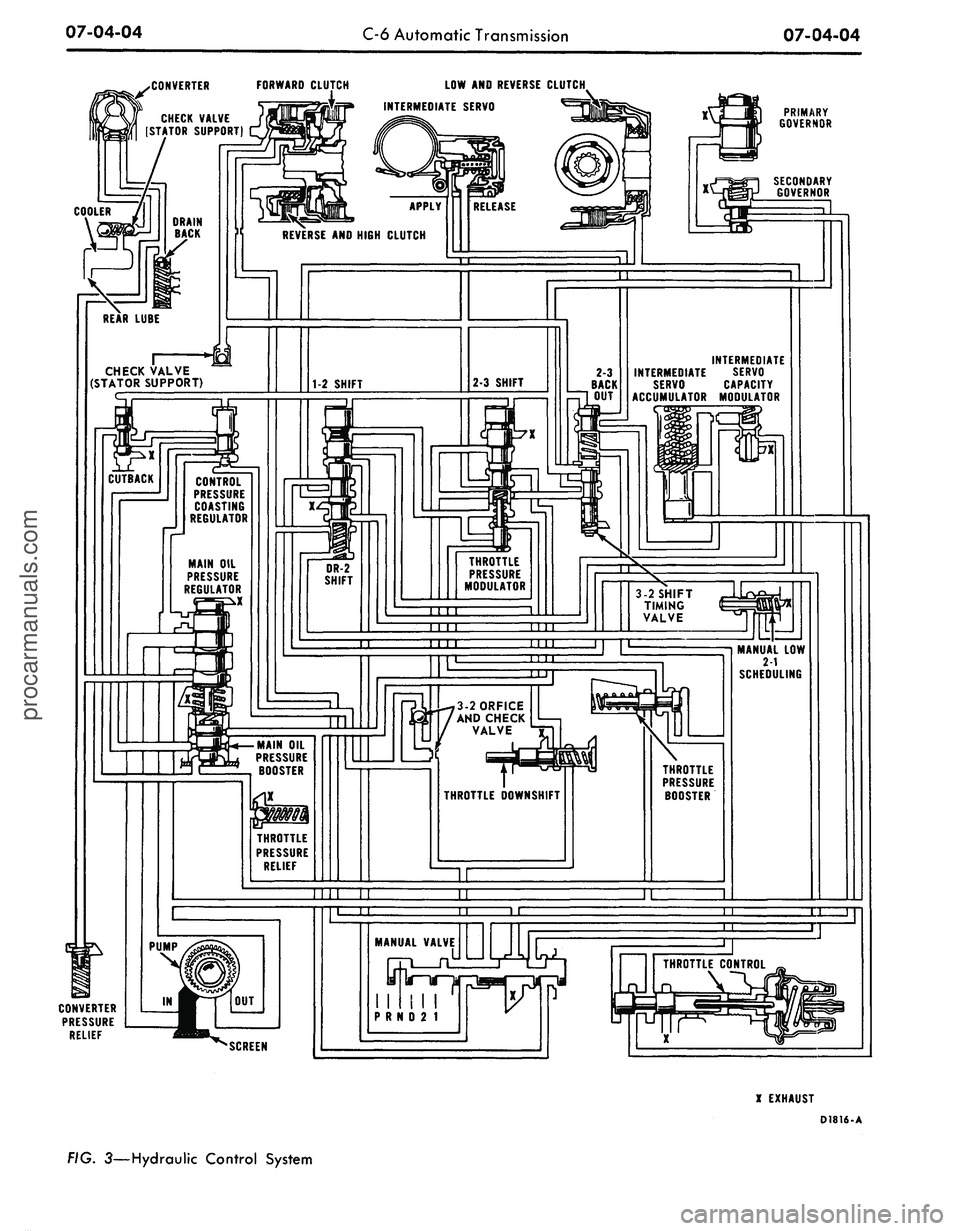
lic control system schematic is shown
in Figure 3. The converter housing
and the fixed splines which engage the
splined OD of the low-reverse clutch
steel plates, are both cast integrally
into the case.
Only one (intermediate) band is
used in the C6 transmission. This
TRANSMISSION
MODEL
FIG. 2—Identification Tag
along with the forward clutch is used
to obtain intermediate gear.
The only adjustment on the trans-
mission proper is the intermediate
band.
The fluid is drained from the trans-
mission by loosening the pan bolts
D1925-A
and allowing it to drain. Finally, to
allow the pan to drain more thorough-
ly, remove all bolts except the two
from the front.procarmanuals.com
Page 373 of 413
07-04-04
C-6 Automatic Transmission
07-04-04
.CONVERTER FORWARD CLUTCH
LOW AND
REVERSE CLUTCH.
INTERMEDIATE SERVO
PRIMARY
GOVERNOR
CHECK VALVE
(STATOR SUPPORT)
SECONDARY
GOVERNOR
REVERSE
AND
HIGH CLUTCH
INTERMEDIATE
INTERMEDIATE SERVO
SERVO CAPACITY
ACCUMULATOR MODULATOR
CHECK VALVE
(STATOR SUPPORT)
CONTROL
PRESSURE
COASTING
REGULATOR
THROTTLE
PRESSURE
MODULATOR
MAIN
OIL
PRESSURE
REGULATOR
X
3-2 SHIFT
TIMING
VALVE
MANUAL
LOW
2-1
SCHEDULING
3-2ORFICE
AND CHECK
VALVE
MAIN
OIL
PRESSURE
BOOSTER
THROTTLE
PRESSURE
BOOSTER
THROTTLE
DOWNSHIFT
THROTTLE
PRESSURE
RELIEF
MANUAL
VALVE
n
I
I
1!
I I
P
R N D 2 1
CONVERTER
PRESSURE
RELIEF
X
EXHAUST
D1816-A
FIG. 3—Hydraulic Control Systemprocarmanuals.com
Page 374 of 413

07-04-05
C-6 Automatic Transmission
07-04-05
IN-VEHICLE ADJUSTMENTS AND REPAIRS
CONTROL LINKAGE
ADJUSTMENTS
The transmission control linkage
adjustments should be performed in
the order in which they appear in this
section of the manual.
THROTTLE AND
DOWNSHIFT LINKAGE
ADJUSTMENTS
Adjusting the throttle linkage is im-
portant to be certain the throttle and
kickdown systems are properly adjust-
ed. The kickdown system should come
in when the accelerator is pressed
through detent, and not before detent.
Refer to Group 10 for detailed
throttle and downshift linkage adjust-
ment procedures.
MANUAL LINKAGE
ADJUSTMENT
Column Shift
1.
Place the selector lever in the D
position tight against the stop.
2.
Loosen the shift rod adjusting
nut at point A (Fig. 4, 5, 6 or 7).
3.
Shift the manual lever at the
transmission into the D detent posi-
tion, third from the rear.
4.
Make sure that the selector lever
has not moved from the D stop; then,
tighten the nut at point A to 10-20 ft-
lbs.
5.
Check the transmission operation
for all selector lever detent positions.
Console Shift
1.
Position the transmission selec-
tor lever in the D position.
2.
Raise the vehicle and loosen the
manual lever shift rod retaining nut
(Fig. 8, 9 or 10). Move the transmis-
sion manual lever to the D position,
fourth detent position from the back
of the transmission.
3.
With the transmission selector
lever and manual lever in the D posi-
tions,
torque the retaining nut 10 to
20 ft-lbs.
4.
Check the operation of the trans-
mission in each selector lever position.
COLUMN SHIFT LEVER
SHIFT ROD
TRANSMISSION
MANUAL LEVER
D2031-A
FIG. 4—Manual Linkage—Column Shift—Ford-Mercury-Meteor
TRANSMISSION
MANUAL LEVER
FIG. 5—Manual Linkage—Column Shift—Fairlane-Montego
NEUTRAL START SWITCH
ADJUSTMENT-
CONSOLE SHIFT
On vehicles equipped with a
column-mounted neutral start switch,
refer to Part 7-1, Section 2, for the
adjustment procedures.
FORD, MERCURY
AND METEOR
1.
With the manual linkage proper-
ly adjusted, check the starter en-
gagement circuit in all positions. The
circuit must be open in all drive posi-
tions and closed only in park and neu-
tral.
2.
Remove the four screws and
plates securing the selector lever
D2032-M
the
handle to the lever. Remove
handle and detent control.
3.
Remove the two screws from the
rear of the console top panel. Pull the
panel back to unhook it from the
front of the console and remove the
panel.
4.
Loosen the two combination
starter neutral and back-up light
switch attaching screws (Fig. 11).
5.
Move the selector lever back and
forth until the gauge pin (No. 43 drill)
can be fully inserted into the gauge
pin holes (Fig. 11).
6. Place the transmission selector
lever firmly against the stop of the
neutral detent position.
7.
Slide the combination starter
neutral and back-up light switch for-
ward or rearward as required, untilprocarmanuals.com