1969 FORD MUSTANG torque
[x] Cancel search: torquePage 353 of 413
07-03-13
FMX Transmission
07-03-13
EXTENSION HOUSING
BUSHING AND REAR SEAL
REPLACEMENT
1.
Disconnect the drive shaft from
the transmission.
2.
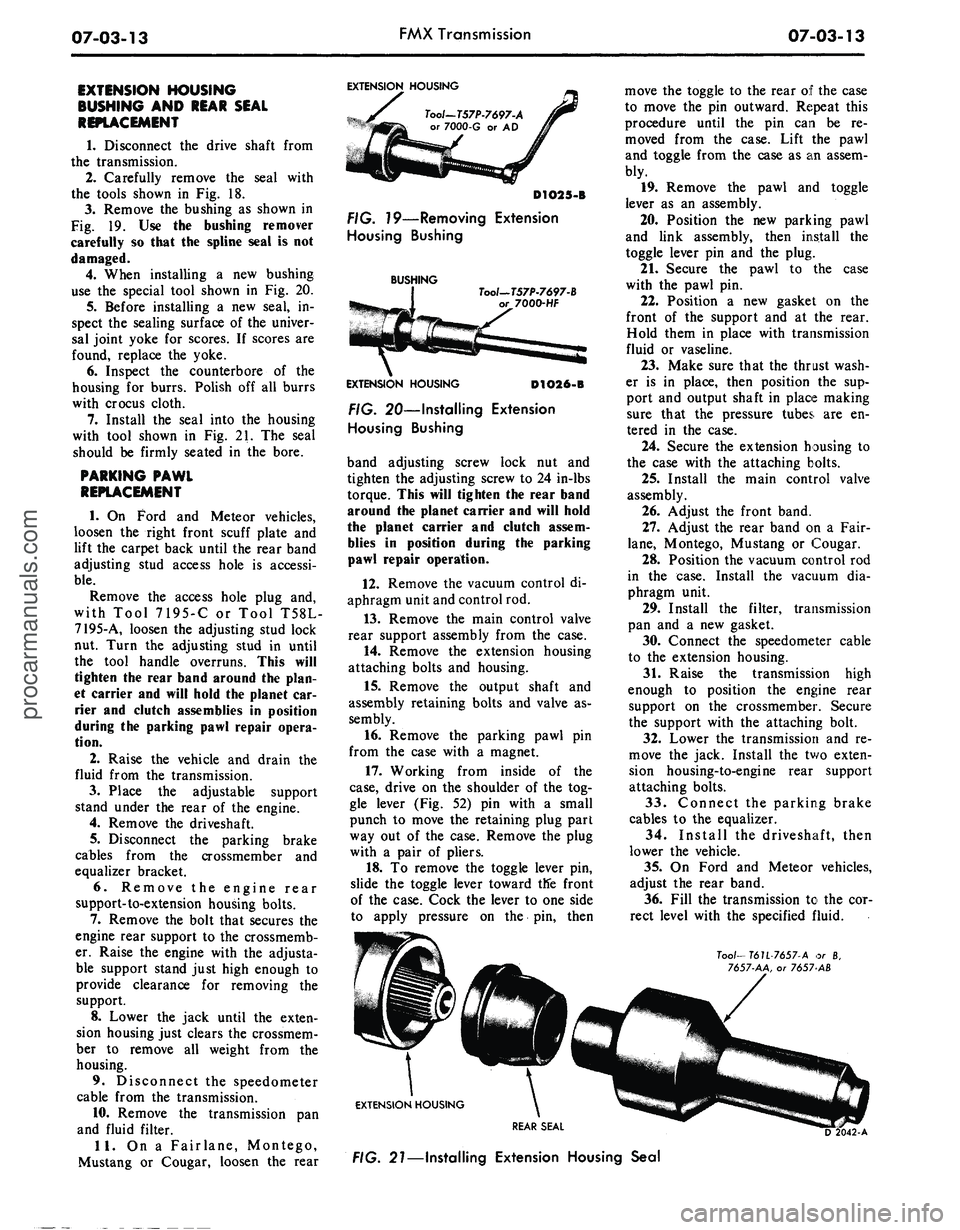
Carefully remove the seal with
the tools shown in Fig. 18.
3.
Remove the bushing as shown in
Fig. 19. Use the bushing remover
carefully so that the spline seal is not
damaged.
4.
When installing a new bushing
use the special tool shown in Fig. 20.
5.
Before installing a new seal, in-
spect the sealing surface of the univer-
sal joint yoke for scores. If scores are
found, replace the yoke.
6. Inspect the counterbore of the
housing for burrs. Polish off all burrs
with crocus cloth.
7.
Install the seal into the housing
with tool shown in Fig. 21. The seal
should be firmly seated in the bore.
PARKING PAWL
REPLACEMENT
1.
On Ford and Meteor vehicles,
loosen the right front scuff plate and
lift the carpet back until the rear band
adjusting stud access hole is accessi-
ble.
Remove the access hole plug and,
with Tool 7195-C or Tool T58L-
7195-A, loosen the adjusting stud lock
nut. Turn the adjusting stud in until
the tool handle overruns. This will
tighten the rear band around the plan-
et carrier and will hold the planet car-
rier and clutch assemblies in position
during the parking pawl repair opera-
tion.
2.
Raise the vehicle and drain the
fluid from the transmission.
3.
Place the adjustable support
stand under the rear of the engine.
4.
Remove the driveshaft.
5.
Disconnect the parking brake
cables from the crossmember and
equalizer bracket.
6. Remove the engine rear
support-to-extension housing bolts.
7.
Remove the bolt that secures the
engine rear support to the crossmemb-
er. Raise the engine with the adjusta-
ble support stand just high enough to
provide clearance for removing the
support.
8. Lower the jack until the exten-
sion housing just clears the crossmem-
ber to remove all weight from the
housing.
9. Disconnect the speedometer
cable from the transmission.
10.
Remove the transmission pan
and fluid filter.
11.
On a Fairlane, Montego,
Mustang or Cougar, loosen the rear
EXTENSION HOUSING
Tool-T57P-7697-A
or 7000-G or AD
D1O25-B
FIG. 79—Removing Extension
Housing Bushing
BUSHING
Tool—T57P-7697-B
7000-HF
EXTENSION HOUSING
D1O26-B
FIG. 20—Installing Extension
Housing Bushing
band adjusting screw lock nut and
tighten the adjusting screw to 24 in-lbs
torque. This will tighten the rear band
around the planet carrier and will hold
the planet carrier and clutch assem-
blies in position during the parking
pawl repair operation.
12.
Remove the vacuum control di-
aphragm unit and control rod.
13.
Remove the main control valve
rear support assembly from the case.
14.
Remove the extension housing
attaching bolts and housing.
15.
Remove the output shaft and
assembly retaining bolts and valve as-
sembly.
16.
Remove the parking pawl pin
from the case with a magnet.
17.
Working from inside of the
case,
drive on the shoulder of the tog-
gle lever (Fig. 52) pin with a small
punch to move the retaining plug part
way out of the case. Remove the plug
with a pair of pliers.
18.
To remove the toggle lever pin,
slide the toggle lever toward tlfe front
of the case. Cock the lever to one side
to apply pressure on the pin, then
move the toggle to the rear of the case
to move the pin outward. Repeat this
procedure until the pin can be re-
moved from the case. Lift the pawl
and toggle from the case as an assem-
bly.
19.
Remove the pawl and toggle
lever as an assembly.
20.
Position the new parking pawl
and link assembly, then install the
toggle lever pin and the plug.
21.
Secure the pawl to the case
with the pawl pin.
22.
Position a new gasket on the
front of the support and at the rear.
Hold them in place with transmission
fluid or vaseline.
23.
Make sure that the thrust wash-
er is in place, then position the sup-
port and output shaft in place making
sure that the pressure tubes are en-
tered in the case.
24.
Secure the extension housing to
the case with the attaching bolts.
25.
Install the main control valve
assembly.
26.
Adjust the front band.
27.
Adjust the rear band on a Fair-
lane,
Montego, Mustang or Cougar.
28.
Position the vacuum control rod
in the case. Install the vacuum dia-
phragm unit.
29.
Install the filter, transmission
pan and a new gasket.
30.
Connect the speedometer cable
to the extension housing.
31.
Raise the transmission high
enough to position the engine rear
support on the crossmember. Secure
the support with the attaching bolt.
32.
Lower the transmission and re-
move the jack. Install the two exten-
sion housing-to-engine rear support
attaching bolts.
33.
Connect the parking brake
cables to the equalizer.
34.
Install the driveshaft, then
lower the vehicle.
35.
On Ford and Meteor vehicles,
adjust the rear band.
36.
Fill the transmission to the cor-
rect level with the specified fluid.
Too/—
T6U-7657-A or 8,
7657-AA, or 7657 AB
EXTENSION HOUSING
REAR SEAL
FIG. 21—Installing Extension Housing Sealprocarmanuals.com
Page 354 of 413

07-03-14
FMX Transmission
07-03-14
REMOVAL AND INSTALLATION
An oil impregnated plastic grommet
is incorporated in the end of the man-
ual shift linkage lever arm on all col-
umn shift vehicles. A special tool
T67P-7341-A is required to install the
grommet in the manual lever, and to
install the manual linkage rod into the
grommet. Refer to Part 7-1, Section
2,
for the grommet replacement pro-
cedures.
TRANSMISSION AND
CONVERTER REPLACEMENT—
FORD-METEOR
REMOVAL
1.
Drive the vehicle on a hoist, but
do not raise at this time.
2.
Remove the two upper bolts and
lock washers which attach the con-
verter housing to the engine.
3.
Raise the vehicle and remove the
cover from the lower front side of the
converter housing. Drain the fluid
from the transmission.
4.
Remove one of the converter
drain plugs. Then rotate the converter
180 degrees and remove the other
plug. Do not attempt to turn the con-
verter with a wrench on the converter
stud nuts. If desired, the converter
may be drained after the unit has been
removed from the vehicle.
5.
Disconnect the fluid filler tube
from the transmission case. Discon-
nect the vacuum hose from the vacu-
um diaphragm unit and the tube from
the extension housing clip.
6. When the fluid has stopped
draining from the transmission and
converter, remove the flywheel to con-
verter nuts and flat washers. Install
the drain plugs in the converter and
torque to specifications. Install the
converter housing front plate to hold
the converter in place when the trans-
mission is removed.
7.
Disconnect the starter cables
from the starter and remove the start-
er.
8. Disconnect the oil cooler lines
from the transmission. Remove the
transmission vent tube.
9. Disconnect the downshift linkage
from the transmission.
10.
Disconnect the selector rod from
the transmission manual lever with
T67P-7341-A.
11.
Disconnect the speedometer
cable from the extension housing, and
remove the driveshaft.
12.
Support the transmission on a
stand. Remove the engine rear support
to transmission bolts, and raise the
transmission slightly to take the
weight off the cross member. Remove
the cross member. Support the rear
part of the engine.
13.
Remove the remaining convert-
er housing to engine attaching bolts.
Move the assembly to the rear and
down to remove it.
INSTALLATION
1.
If the converter has been re-
moved from the converter housing,
carefully position the converter in the
housing, and then install the housing
lower front cover plate to prevent the
converter from slipping out of the
housing.
2.
Install the transmission vent
tube.
Rotate the converter until the
studs adjacent to the drain plugs are
in a vertical position.
3.
Rotate the flywheel as required
to align the drain plug holes with the
drain plugs in the converter. With the
transmission mounted on a support
stand, move the converter and trans-
mission assembly forward into posi-
tion, using care not to damage the fly-
wheel and the converter pilot.
4.
Install the converter lower
housing-to-engine bolts, then torque
the bolts to specification.
5.
Install the cross member.
6. Lower the transmission until the
extension housing rests on the cross
member, and then install the extension
housing-to-cross member bolts.
7.
The converter must rest squarely
against the flywheel. This indicates
that the converter pilot is not binding
in the engine crankshaft.
8. Install the converter attaching
nuts and flat washers. Install the ac-
cess plates.
9. Connect the oil cooler inlet and
outlet lines to the transmission case.
10.
Coat the front universal joint
yoke seal and spline with B8A-
19589-A lubricant, and install the
drive shaft.
11.
Connect the speedometer cable
at the transmission.
12.
Using tool T67P-7341-A install
a new grommet in the manual lever.
Then secure the manual selector rod
to the lever.
13.
Connect the downshift linkage
and bushing at the transmission
throttle lever.
14.
Install the starter motor.
15.
Connect the fluid filter tube to
the transmission case. Connect the
vacuum hose to the vacuum dia-
phragm unit and the tube to its clip.
16.
Lower the transmission support
stand. Then install the upper two con-
verter housing-to-engine bolts and
tighten them to specification.
17.
Lower the vehicle and fill the
transmission with transmission fluid,
following the recommended procedure.
18.
Check the transmission, con-
verter assembly, and fluid cooler lines
for fluid leaks, and then adjust the
manual and downshift linkages.
TRANSMISSION REPLACEMENT
WITHOUT CONVERTER—
FORD-METEOR
The frame construction of the con-
vertible will not permit the transmis-
sion to be moved rearward enough to
clear the turbine shaft from the con-
verter. For this reason, the converter
and transmission must be removed as
a unit from this model.
REMOVAL
1.
Raise the vehicle on a hoist.
2.
Drain the fluid from the trans-
mission.
3.
Disconnect the hose from the
vacuum diaphragm unit and the tube
from its clip. Disconnect the fluid fill-
er tube from the case.
4.
Remove the cover from the lower
front side of the converter housing.
5.
Remove one of the converter
drain plugs. Then rotate the converter
180 degrees and remove the other
plug. Do not attempt to turn the con-
verter with a wrench on the converter
stud nuts.
6. Disconnect the drive shaft from
the rear axle, and remove the drive
shaft.
7.
Disconnect the fluid cooler lines
from the transmission. Remove the
vent tube.
8. Disconnect the downshift linkage
at the transmission.
9. Disconnect the selector rod from
the transmission manual lever with
tool T67P-7341-A.
10.
Disconnect the speedometer
cable at the extension housing.
11.
Remove the two engine rear
support to transmission bolts.
12.
Position a transmission jack
under the transmission and raise it
slightly to take the weight off the
cross member.procarmanuals.com
Page 357 of 413

07-03-17
FMX Transmission
07-03-17
OUTPUT SHAFT
TUBES
REAR SUPPORT
D 1819-A
FIG. 23 — Rear Support
and
Output Shaft Installed
6. Remove
the
rear support
and
gasket from
the
output shaft. Remove
the needle bearings
and
race from
the
rear support
(Fig.
24).
7.
Remove
the
selective thrust
washer from
the
rear
of the
pinion
carrier.
8. Remove
the
pinion carrier.
9. Remove
the
primary
sun
gear
rear thrust bearing
and
races from
the
pinion carrier.
10.
Note
the
rear band position
for
reference
in
assembly.
The
end of the
band next
to
the
adjusting screw
has
a
depression (dimple)
in the
center
of
the boss. Squeeze
the
ends
of
the
rear
band together, tilt
the
band
to the
rear,
and
remove
the
rear band from
the case.
11.
Remove
the
two
center support
outer bolts
(one
each side) from
the
transmission case.
12.
Exert enough pressure
on the
end
of the
input shaft
to
hold
the
clutch units together. Then remove
the
center support
and the
front
and
rear
clutch assemblies
as a
unit
(Fig.
25).
13.
Install
the
clutch assemblies
in
the bench fixture
(Fig.
26).
FRONT CLUTCH
CYLINDER
REAR CLUTCH
DRUM
FRONT BAND
INPUT SHAFT
D1957-A
FIG. 25—Removing
or
Installing
Input Shaft
and
Clutch
FRONT CLUTCH
CYLINDER
INPUT SHAFT
SECONDARY REAR
SUN GEAR auTCH
DRUM
-77530-A
D1958-A
FIG. 26—Input Shaft
and
Clutch
in Holding Fixture
,
GOVERNOR
GOVERNOR NEEDLE ROLLER
DRIVE BALL BEARING
D 1820-A
FIG. 24—Output Shaft Disassembled
14.
Remove
the
thrust washer from
the front
of the
input shaft.
15.
To
remove
the
front band, posi-
tion
the
band ends between
the
case
webbing
and
tilt
the
bottom
of the
band rearward. Then, squeeze
the
ends
of the
band together
and
remove
from
the
rear
of the
case.
16.
Lift
the
front clutch assembly
from
the
primary
sun
gear shaft.
17.
Remove
the
bronze
and the
steel thrust washers from
the
rear
clutch assembly. Wire
the
thrust
washers together
to
assure correct
in-
stallation.
18.
Remove
the
front clutch seal
rings from
the
primary
sun
gear shaft.
19.
Lift
the
rear clutch assembly
from
the
primary
sun
gear shaft.
20.
Remove
the
rear clutch seal
rings from
the
primary
sun
gear shaft.
Do
not
break
the
seal rings.
21.
Remove
the
primary
sun
gear
front thrust washer.
PARTS REPAIR
AND
REPLACEMENT
During
the
repair
of the sub-
assemblies, certain general instructions
which apply
to all
units
of the
trans-
mission must
be
followed. These
in-
structions
are
given here
to
avoid
un-
necessary repetition.
Handle
all
transmission parts care-
fully
to
avoid nicking
or
burring
the
bearing
or
mating surfaces.
Lubricate
all
internal parts
of the
transmission with transmission fluid
before assembly.
Do
not use any
other
lubricants except
on
gaskets
and
thrust washers which
may be
coated
with vaseline
to
facilitate assembly.
Always install
new
gaskets when
as-
sembling parts
of the
transmission.
Tighten
all
bolts
and
screws
to the
recommended torque.
For
detail
cleaning
and
inspection operations
refer
to
Part
7-1.
REAR BRAKE DRUM
SUPPORT BUSHING
REPLACEMENT
1.
If the
rear brake drum support
bushing
is to be
replaced, press
the
bushing from
the
support
as
shown
in
Fig.
27.
2.
Press
a new
bushing into
the
brake drum support with
the
tool
shown
in
Fig.
27.
OUTPUT SHAFT BUSHING
REPLACEMENT
1.
Remove
the
output shaft bushing
if
it is
worn
or
damaged.
Use the
capeprocarmanuals.com
Page 366 of 413

07-03-26
FMX Transmission
07-03-26
MANUAL SHAFT
AND LEVER
DETENT SPRING—«^ DETENT PLUNGER
DETENT
/ LEVER
MANUAL SHAFT
NUT
INNER DOWNSHIFT LEVER
/ DOWNSHIFT
/ SHAFT
NUT
TOGGLE LIFT
ijG
LEVER SPRING
TOGGLE LEVER-
PAWL RETURN SPRING-
TOGGLE LEVER
PIN-
PLUG'
D1967-A
FIG. 52—Transmission Case Control Linkage
pawl return spring. Assemble
the tog-
gle lever
to the
link with
the
toggle
link
pin.
Position
the
pawl return
spring over
the
toggle link pin,
and se-
cure
it in
place with
the
washer
and
the small retainer clip
(Fig. 52). In-
stall
the
assembly
in the
transmission
case
by
installing
the
pawl
pin and the
toggle lever
pin.
Install
the
torsion
lever assembly. Position
the
spring
on
the torsion lever with
a
screwdriver.
Make certain that
the
short side
of
toggle does
not
extend beyond
the
largest diameter
of the
ball
or the
tog-
gle lever
pin
(Fig. 52).
Tap the
toggle
lever
in or out as
necessary
to
center
the toggle lever
on the
ball.
4.
Install
the
manual lever
and
shaft
in the
transmission case. Posi-
tion
the
detent lever
on the
shaft,
and
secure
it
with
a nut.
Tighten
the nut
to 20-30 ft-lbs torque. Rotate
the
manual lever
to the
rear
of the
case.
Position
the
detent spring
in the
case.
Press Ram
Hold
the
detent plug
on the
spring
with
a
3/16-inch socket wrench, then
depress
the
spring until
the
plug
is
flush with
the
case. Carefully rotate
the manual lever
to the
front
of the
case
to
secure
the
plug.
A
piece
of
thin walled tubing
may be
used
to
depress
the
plug
if a
small socket
wrench
is not
available.
5.
Position
the
ends
of the
parking
pawl operating
rod in the
detent lever
and toggle lift lever,
and
secure with
the
two
small retaining pins.
6. Install
a new
seal
on the
down-
shift lever shaft, then install
the
lever
and shaft
in the
case. Position
the
inner downshift lever
on the
inner
end
of
the
shaft with
the
mark
O
facing
toward
the
center
of the
case. Install
the lock washer
and nut,
then tighten
the
nut to
17-20 ft-lbs torque.
7.
Check
the
operation
of the
link-
age.
The
linkage should operate freely
without binding.
Handle
Tool -
T64L.7003-BS
REMOVAL
Tool - T64L-7003-A5
INSTALLATION
D 1745-B
FIG. 53—Replacing Transmission Case Bushing
TRANSMISSION CASE
BUSHING REPLACEMENT
1.
If the
transmission case bushing
is
to be
replaced, press
the
bushing
out
of the
case with
the
tools shown
in
Fig.
53.
2.
Install
a new
transmission case
bushing with
the
tool shown
in Fig.
53.
ASSEMBLY
OF
TRANSMISSION
Do
not use
force
to
assemble
mat-
ing parts.
If the
parts
do not
assemble
freely, examine them
for the
cause_pf
the difficulty. Always
use new
gaskets
and seals during
the
assembly opera-
tions.
CLUTCH ASSEMBLIES
1.
Install
the
front band
in the
transmission case
so
that
the
anchor
end
is
aligned with
the
anchor
in the
case.
2.
Make sure
the
thrust washer
is
in place
on the
input shaft. Lift
the
clutch assemblies
out of the
holding
block.
Do not
allow
the
clutches
to
separate.
3.
Install
the
clutch sub-assemblies
in
the
transmission case while posi-
tioning
the
servo band
on the
drum.
Hold
the
units together while install-
ing them (Fig.
25).
CENTER SUPPORT,
ONE-WAY CLUTCH,
PINION CARRIER,
AND
OUTPUT SHAFT
The production center supports
are
chamfered
at the
edge
of the
race
(Fig.
54). The
service center supports
are
not
chamfered.
The
following
as-
sembly procedures cover both types
of
center supports.
Installation—Center Support
With Chamfered Edge
1.
Install
the
center support
and the
rear band
in the
case.
2.
Install
the
primary
sun
gear rear
thrust bearing race, needle bearing,
and front thrust bearing race
if
used
in
the
planet carrier using petroleum
jelly
to
retain them
in
place.
3.
Lubricate
the
bearing surface
on
the center support,
the
rollers
of the
planetary clutch,
and the cam
race
in
the carrier with petroleum jelly
(Fig.
54).
4.
Install
the
planetary clutch
in the
carrier (Fig.
55).procarmanuals.com
Page 368 of 413

07-03-28
FMX Transmission
07-03-28
CENTER
SUPPORT
ROTATE
CARRIER
COUNTER
CLOCKWISE
SAWTEETH IN
CLOCKWISE
DIRECTION
MOVE ROLLER
TOWARD CENTER
D 1291-D
FIG. 56—Planetary Clutch Installation in Carrier—Center Support
Not Chamfered
er between the large internal gear and
the transmission case. Note the indi-
cator reading. End play should be
0.010-0.029 inch (minimum end play
is preferred).
4.
Remove the indicator and the
tool from the extension housing.
5.
Install the one remaining front
pump attaching bolt and torque it to
specification.
FRONT SERVO
1.
Position the front band forward
in the case with the band ends up.
2.
Position the servo strut with the
slotted end aligned with the servo act-
uating lever, and with the small end
aligned with the band end. Rotate the
band, strut, and servo into position
engaging the anchor end of the band
with the anchor pin in the case.
3.
Locate the servo on the case, and
install the attaching bolts. Tighten the
attaching bolts only two or three
threads.
4.
Install the servo release tube.
REAR SERVO
12.
Install the output shaft, careful-
ly meshing the internal gear with the
pinions.
REAR SUPPORT
1.
Position the needle bearing and
retainer on the rear support (Fig. 24).
2.
Position a new rear support to
case gasket on the rear support. Re-
tain the gasket with transmission
fluid.
3.
Install the rear support. As the
support is installed, insert the tubes
into the case.
GOVERNOR
1.
Position the governor drive ball
in the pocket in the output shaft. Re-
tain the ball with transmission fluid.
2.
Install the governor assembly, al-
igning the groove with the ball in the
output shaft.
3.
Install the governor with the gov-
ernor body plate toward the front of
the vehicle (Fig. 23). Install the gover-
nor snap ring
EXTENSION HOUSING
1.
Insert the extension housing oil
seal re placer and pilot in the housing.
Position a new gasket to the extension
housing and install the extension
housing on the transmission case.
Coat the bolt threads with B5A-
19554-A sealer and install the exten-
sion housing attaching bolts, breather
tube clip, vacuum tube clip, and exter-
nal tooth lock washer. The lock wash-
ers must be installed with the rolled
edge toward the transmission case to
insure a tight seal.
2.
Torque the extension housing at-
taching bolts to specification.
3.
Install the lubrication tube.
FRONT PUMP
1.
Position a new front pump gask-
et in the counterbore of the transmis-
sion case.
2.
Install the front pump, aligning
the pump bolt holes with the holes in
the case. Install three of the front
pump attaching bolts and torque them
to specification.
TRANSMISSION END
PLAY CHECK
1.
Mount the dial indicator support
in a front pump bolt hole. Mount a
dial indicator on the support so that
the contact rests on the end of the tur-
bine shaft.
2.
Use a large screwdriver to pry
the front of the clutch drum toward
the rear of the transmission. Set the
dial indicator at zero.
3.
Remove the screwdriver and pry
the units toward the front of the
transmission by inserting a screwdriv-
1.
Position the servo anchor strut,
and rotate the rear band to engage the
strut.
2.
Position the servo actuating lever
strut with a finger, and then install the
servo and attaching bolts. Torque the
bolts to specification.
3.
Install the front servo apply
tube.
PRESSURE REGULATOR
BODY
1.
Install the pressure regulator
body and attaching bolts, and torque
the bolts to specifications.
2.
Install the control and converter
valve guides and springs. Install the
spring retainer.
CONTROL VALVE BODY
1.
Install the control valve assem-
bly, carefully aligning the servo tubes
with the control valve. Align the inner
downshift lever between the stop and
the downshift valve. Shift the manual
lever to the 1 position. Align the man-
ual valve with the actuating pin in the
manual detent lever. Do not tighten
the attaching bolts.
2.
Move the control valve body
toward the center of the case until the
clearance is less than 0.050 inch be-
tween the manual valve and the act-
uating pin on the manual detent lever.
3.
Torque the attaching bolts toprocarmanuals.com
Page 369 of 413
07-03-29
FMX Transmission
07-03-29
specification. Be sure that the rear
fluid screen retaining clip is installed
under the valve body bolt as shown in
Fig. 17.
4.
Install the large control pressure
tube in the valve body and regulator.
5.
Install the small control pressure
compensator tube in the valve body
and regulator.
6. Turn the manual valve one full
turn in each manual lever detent posi-
tion. If the manual valve binds against
the actuating pin in any detent posi-
tion, loosen the valve body attaching
bolts and move the body away from
the center of the case. Move the body
only enough to relieve the binding.
Torque the attaching bolts and check
the manual valve for binding.
7.
Torque the front servo attaching
bolts to specification.
FRONT AND REAR
BAND ADJUSTMENTS
Adjust the front and rear bands as
detailed in Section 2.
VACUUM DIAPHRAGM UNIT
1.
Position the control rod in the
bore of the vacuum diaphragm unit
and install the diaphragm unit. Make
sure the control rod enters the throttle
valve as the vacuum unit is installed.
2.
Torque the diaphragm unit to
specification.
FLUID FILTER
AND OIL PAN
1.
Position the fluid filter on the
rear clip so that the tang enters the
hole in the filter flange. Then, rotate
the filter (clockwise) until the grom-
met is over the pump inlet port of the
valve body regulator and press the fil-
ter down firmly. Install the filter re-
taining clip.
2.
Place a new gasket on the trans-
mission case and install the pan. In-
stall the attaching bolts and lock
washers and torque the bolts to speci-
fication.
If the converter and converter hous-
ing were removed from the transmis-
sion, install these components. Posi-
tion the transmission assembly on the
transmission jack, and refer to Trans-
mission Installation Procedures for in-
stalling the transmission.procarmanuals.com
Page 374 of 413

07-04-05
C-6 Automatic Transmission
07-04-05
IN-VEHICLE ADJUSTMENTS AND REPAIRS
CONTROL LINKAGE
ADJUSTMENTS
The transmission control linkage
adjustments should be performed in
the order in which they appear in this
section of the manual.
THROTTLE AND
DOWNSHIFT LINKAGE
ADJUSTMENTS
Adjusting the throttle linkage is im-
portant to be certain the throttle and
kickdown systems are properly adjust-
ed. The kickdown system should come
in when the accelerator is pressed
through detent, and not before detent.
Refer to Group 10 for detailed
throttle and downshift linkage adjust-
ment procedures.
MANUAL LINKAGE
ADJUSTMENT
Column Shift
1.
Place the selector lever in the D
position tight against the stop.
2.
Loosen the shift rod adjusting
nut at point A (Fig. 4, 5, 6 or 7).
3.
Shift the manual lever at the
transmission into the D detent posi-
tion, third from the rear.
4.
Make sure that the selector lever
has not moved from the D stop; then,
tighten the nut at point A to 10-20 ft-
lbs.
5.
Check the transmission operation
for all selector lever detent positions.
Console Shift
1.
Position the transmission selec-
tor lever in the D position.
2.
Raise the vehicle and loosen the
manual lever shift rod retaining nut
(Fig. 8, 9 or 10). Move the transmis-
sion manual lever to the D position,
fourth detent position from the back
of the transmission.
3.
With the transmission selector
lever and manual lever in the D posi-
tions,
torque the retaining nut 10 to
20 ft-lbs.
4.
Check the operation of the trans-
mission in each selector lever position.
COLUMN SHIFT LEVER
SHIFT ROD
TRANSMISSION
MANUAL LEVER
D2031-A
FIG. 4—Manual Linkage—Column Shift—Ford-Mercury-Meteor
TRANSMISSION
MANUAL LEVER
FIG. 5—Manual Linkage—Column Shift—Fairlane-Montego
NEUTRAL START SWITCH
ADJUSTMENT-
CONSOLE SHIFT
On vehicles equipped with a
column-mounted neutral start switch,
refer to Part 7-1, Section 2, for the
adjustment procedures.
FORD, MERCURY
AND METEOR
1.
With the manual linkage proper-
ly adjusted, check the starter en-
gagement circuit in all positions. The
circuit must be open in all drive posi-
tions and closed only in park and neu-
tral.
2.
Remove the four screws and
plates securing the selector lever
D2032-M
the
handle to the lever. Remove
handle and detent control.
3.
Remove the two screws from the
rear of the console top panel. Pull the
panel back to unhook it from the
front of the console and remove the
panel.
4.
Loosen the two combination
starter neutral and back-up light
switch attaching screws (Fig. 11).
5.
Move the selector lever back and
forth until the gauge pin (No. 43 drill)
can be fully inserted into the gauge
pin holes (Fig. 11).
6. Place the transmission selector
lever firmly against the stop of the
neutral detent position.
7.
Slide the combination starter
neutral and back-up light switch for-
ward or rearward as required, untilprocarmanuals.com
Page 375 of 413

07-04-06
C-6 Automatic Transmission
0704-06
TRANSMISSION
MANUAL LEVER
STUD-7B415
ENGAGE FLATS OF STUD IN SLOT OF
ROD BEFORE APPLYING TORQUE
FIG. 6—Manual Linkage—Column Shift—Lincoln Continental
INNER BRACKET-7C431
TRANSMISSION
MANUAL LEVER
ROD-7326
SHIFT ROD-7A024
ENGAGE FLAT OF STUD IN SLOT
OF
ROD BEFORE APPLYING TORQUE
POINT A
BRACKET ASSEMBLY-7C324
D1831-A
FIG.
7—Manual
Linkage—Column Shift—Thunderbird-Continental Mark
III
the switch lever contacts
the
selector
lever actuator.
If an
adjustment
can
not
be
made
by
rotating
the
switch,
loosen
the
actuator lever attaching
bolt
and
adjust
the
lever (Fig.
11).
8. Tighten
the
neutral start switch
attaching screws.
If the
actuator lever
was adjusted, tighten
the
actuator
lever bolt.
9. Turn
the
ignition
key to the
ACC position
and
place
the
selector
lever
in the
reverse position
and
check
the operation
of the
back-up lights.
Turn
the key off.
D2033-A
10.
Place
the
console
top
panel
on
the console
and
install
the
retaining
screws.
11.
Position
the
selector lever
de-
tent control
and
handle
on the
selector
lever
and
secure with
the
four plates
and attaching screws.
FAIRLANE-MONTEGO
1.
With
the
manual linkage proper-
ly adjusted, check
the
starter
en-
gagement circuit
in all
positions.
The
circuit must
be
open
in all
drive posi-
tions
and
closed only
in
park
and neu-
tral.
2.
Remove
the
selector lever handle
from
the
lever.
3.
Remove
the
trim panel from
the
top
of the
console.
4.
Remove
the
cover
and
dial indi-
cator
as an
assembly.
5.
Remove
the six
screws that
se-
cure
the
selector lever retainer
to the
selector lever housing. Lift
the
retainer
from
the
housing.
6. Loosen
the two
combination
starter neutral
and
back-up light
switch attaching screws (Fig.
12).
7.
Move
the
selector lever back
and
forth until
the
gauge
pin
(No.
43
drill)
can
be
fully inserted into
the
gauge
pin holes (Fig.
12).
8. Place
the
transmission selector
lever firmly against
the
stop
of the
neutral detent position.procarmanuals.com