1969 FORD MUSTANG tow
[x] Cancel search: towPage 89 of 413

03-02-13
Suspension
03-02-13
BALL JOINT BOLT HEAD
STABILIZER
F1370-A
FIG. 18 —Removing or Installing Front Spring
TURN TO COMPRESS
NUT
•
Tool T 63 P-53J0-A
SHAFT SCREW
Lower Adapter Plate
CAVITY
Upper Adapter Plate
T67P-5370-A
FIG. 79—Spring Tool Installation
through the lower arm. Install and
torque the nut to specification.
3.
Secure the lower end of the
shock absorber to the lower arm with
the two attaching bolts.
4.
Secure the strut and the rebound
bumper to the lower arm with the two
F
1492.
A
attaching bolts. Torque the bolts to
specification
5.
Connect the sway bar to the
lower arm with the attaching washer
and insulators as shown in Fig. 1.
Torque the nut to specification.
6. Check the front end alignment
and adjust it to the recommended
specifications if required.
COUGAR, FAIRLANE,
FALCON, MONTEGO,
MUSTANG
Removal
1.
Remove the shock absorber and
upper mounting bracket as an assem-
bly.
2.
Raise the vehicle on a hoist, in-
stall safety stands, and remove the
wheel cover or hub cap.
3.
Remove the grease cap from the
hub;
then, remove the cotter pin, nut
lock, adjusting nut and outer bearing
from the hub.
4.
Pull the wheel, tire and the hub
and drum off the spindle as an assem-
bly.
5.
Install the spring compressor
tool as shown in Figs. 19, 20 and 21.
6. Remove 2 upper arm-to-spring
tower attaching nuts and swing the
upper arm outboard from the spring
tower (Fig. 21).
7.
Release the spring compressor
tool and remove the tool from the
spring. Then, remove the spring from
the vehicle.
Installation
1.
Place the spring upper insulator
on the spring and secure in place with
tape.
2.
Position the spring in the spring
tower. Install the spring compressor,
(Fig. 19) and compress the spring.
3.
Swing the upper arm inboard
and insert the bolts through the holes
in the side of the spring tower. Then,
install the attaching nuts and torque
them to specification.
4.
Release the spring pressure and
guide the spring into the upper arm
spring seat. The end o! the spring
must seat against the tab on the
spring seat.
5. Remove the spring compressor
and position the wheel, tire, and hub
and drum on the spindle.
6. Install the bearing, washer, ad-
justing nut and lock nut. Adjust the
wheel bearing as outlined in Part 3-12
and install the cotter pin, grease cap,
and hub cap or wheel cover.
7.
Lower the vehicle and install the
shock absorber and upper mounting
bracket.
8. Check caster, camber, and toe-in
and adjust as necessary (Part 3-1).procarmanuals.com
Page 90 of 413

03-02-14
Suspension
03-02-14
FRONT SPRING AND
LOWER ARM
LINCOLN CONTINENTAL
Removal
1.
Raise the vehicle. Place a sup-
port under each underbody side rail to
the rear of the lower arm in the lifting
pad area.
2.
Remove the wheel and tire from
the hub.
3.
Remove 2 bolts and washers that
attach the caliper to the spindle. Re-
move the caliper from the rotor and
wire it to the underbody to prevent
damage to the brake hose.
4.
Remove the hub and rotor from
the spindle.
5.
Loosen the splash shield to pro-
vide clearance at the end of the arm
when it is lowered.
6. Remove the shock absorber.
7.
Disconnect the stabilizing strut
(drag strut) from the lower arm.
8. Disconnect the stabilizer bar
from the suspension bar.
9. Remove the cotter pin from the
slotted nut attaching the lower ball
joint to the end of the spindle boss.
Loosen the nut one to two turns.
10.
Place a box wrench over the
lower end of the ball joint remover
tool, and position the tool as in Fig.
13.
The tool should seat firmly against
the ends of both studs, and not
against the lower stud nut.
11.
Turn the wrench until both
studs are under tension, then, tap the
spindle with a hammer near the lower
stud to loosen it from the spindle. Do
not loosen the stud with tool pressure
alone.
12.
Place a jack under the outer
end of the lower arm and raise the
arm several inches.
13.
Install the spring compressor
Tool 5310-A (Fig. 23) inside the
spring with the jaws of the tool
toward the center of the vehicle.
14.
Remove the nut from the ball
joint stud. Lower the jack until the
spindle and spring are free, and re-
move the spring and insulators.
15.
Remove the lower arm- to-
crossmember nut, bolt, washers, and
spacer, then remove the arm.
Installation
1.
Connect the inner end of the
lower arm to the underbody
crossmember. Do not tighten the at-
taching nut at this time. Refer to Fig.
22.
Basic Tool Adapter F 1288-B
FIG. 20—Spring Compressor Tool Installed—Upper View—Typical
DETAIL NO 3 T63P-5310-A DETAIL NO.4
DETAIL
NO.
I
21 —Compressing Spring—Lower View—Montego, Falcon
and Fairlaneprocarmanuals.com
Page 97 of 413

03-02-21
Suspension
03-02-21
8. Place a box wrench over the
lower end of the ball joint remover
tool, and position the tool as in Fig.
13.
The tool should seat firmly against
the ends of both studs, and not
against the stud nuts.
9. Turn the wrench until both studs
are under tension, and then, tap the
spindle with a hammer near the studs
to loosen them from the spindle. Do
not loosen
the
studs with tool pressure
alone.
10.
Place a jack under the outer
end of the lower arm, and raise the
arm several inches. Remove both ball
stud nuts, and remove t^e spindle.
Installation
1.
Position the new spindle onto the
upper and lower ball joint studs, in-
stall the stud nuts and tighten the nuts
to specifications. Continue to tighten
both nuts until the cotter pin holes
line up with the slots, then install new
cotter pines.
2.
Connect the spindle connecting
rod to the spindle arm. Install the re-
taining nut and tighten the nut to
specification. Continue to tighten the
nut until the cotter pin hole lines up
with the slot, then install a new cotter
pin.
3.
Install the gasket and splash
shield on the spindle. Tighten the at-
taching bolts to specifications.
4.
Install the hub and rotor on the
spindle.
5.
Install the caliper to the spindle
and tighten the attaching bolts to spe-
cifications. Check for the correct flex-
ible hose routing (Part 2-2).
6. Install the wheel and tire and ad-
just the wheel bearings (Part 3-12).
7.
Lubricate the steering stop on
the lower arm and the mating flat on
the spindle with the specified lubri-
cant.
8. Remove the safety stands, lower
the car and check camber, caster and
toe-in.
FRONT SHOCK ABSORBER
REPLACEMENT
FORD, MERCURY,
METEOR, THUNDERBIRD,
CONTINENTAL MARK III
1.
Remove the nut, washer, and
bushing from the shock absorber
upper end.
2.
Raise the vehicle on a hoist and
install safety stands.
3.
Remove 2 bolts attaching the
shock absorber to the lower arm and
remove the shock absorber.
4.
Place a washer and bushing on
the shock absorber top stud and posi-
tion the shock absorber inside the
front spring. Install the 2 lower at-
taching bolts and torque them to spe-
cifications.
5.
Remove the safety stands and
lower the vehicle.
6. Place a bushing and washer on
the shock absorber top stud and in-
stall the attaching nut. Torque it to
specification.
COUGAR, FAIRLANE,
FALCON, MONTEGO,
MUSTANG
Removal
1. Raise the hood and remove 3
shock absorber upper mounting
bracket-to-spring tower attaching
nuts.
2.
Raise the front of the vehicle and
place safety stands under the lower
arms.
3.
Remove 2 shock absorber lower
attaching nuts and washers.
4.
Lift the shock absorber and
upper bracket from the spring tower
(Fig. 26) and remove the bracket from
the shock absorber.
Installation
1. Install the upper mounting
bracket on the shock absorber and
torque to specification.
2.
Position the shock absorber and
upper mounting bracket in the spring
tower, making sure the shock absor-
ber lower studs are in the pivot plate
holes.
3.
Install the 2 washers and attach-
ing nuts on the shock absorber lower
studs and torque to specification.
4.
Install the 3 shock absorber
upper mounting bracket-to-spring
tower attaching nuts and torque to
specification. Then, remove the safety
stands and lower the vehicle.
LINCOLN CONTINENTAL
Removal
1.
Remove the stud nut at the
upper eye of the shock absorber. Re-
move the upper eye stud bracket to
crossmember attaching bolt and re-
move the stud bracket. Refer to Fig.
22.
2.
Remove the bolts which attach
the shock absorber to the suspension
lower arm. Lower, and remove the
shock absorber.
3.
Examine the shock absorber unit
and rubber bushings. Replace parts
that are defective, deteriorated, or
worn.
Installation
1. Fully extend the shock absorber
and position it inside the coil spring.
Connect the lower end of the shock
absorber to the suspension lower arm.
Torque the attaching nuts to specifica-
tion.
2.
Insert the upper bracket stud
through the bushing in the shock ab-
sorber upper eye. Install the stud
bracket to crossmember attaching
bolt. Do not tighten the bolt: at this
time.
3.
Install the upper eye bracket
stud nut. Torque the nut to specifica-
tion.
4.
Torque the stud bracket- to-
crossmember attaching bolt to specifi-
cation.
The
shock absorber upper
eye
stud
nut
must
be
tightened
to com-
press
the
rubber bushing before
the
stud bracket
is
bolted
to the
crossmember;
otherwise,
the
upper
at-
tachment could
be
loose
and
noisy.
REAR SHOCK ABSORBER
REPLACEMENT
FORD, MERCURY,
METEOR, THUNDERBIRD,
CONTINENTAL MARK 1(11
1.
Raise the vehicle on a hoist.
2.
Remove the shock absorber at-
taching nut, washer and insulator
from the upper stud at the upper side
of the spring upper seat. Compress the
shock absorber to clear the hole in the
spring seat, and remove the inner in-
sulator and washer from the upper at-
taching stud.
3.
Remove the self-locking attach-
ing nut, and disconnect the shock ab-
sorber lower stud from the mounting
bracket on the rear axle housing (Fig.
4).
4.
Expel all air by performing step
3 On Vehicle Tests in Part 3-1.
5.
Place the inner washer and insu-
lator on the upper attaching stud, and
position the shock absorber so that
the upper attaching stud enters the
hole in the spring upper seat. While
holding the shock absorber in this po-
sition, install the outer insulator andprocarmanuals.com
Page 104 of 413

03-02-28
Suspension
03-02-28
used, these components should
be re-
placed
on the
bench.
Do not wash the ball joint with sol-
vent.
The
solvent
may
attack parts
within the joint.
BUSHING AND INNER
SHAFT REPLACEMENT
LINCOLN CONTINENTAL
Always replace both upper
arm
bushings,
if
either bushing
is
worn
or
damaged. Install only
new
bushings
when replacing
the
inner shaft. Refer
to Section
3 for
the upper arm remov-
al procedure.
1.
Remove
the
bolts, lock washers,
and flat washers from the ends
of
the
upper arm shaft.
2.
Assemble
the
remover, tool
3044-LA,
to the
shaft
at the
front
bushing. Press
the
bushing
out of the
arm using
the
support cup, tool 6069-
H,
and the
remover tool 3044-AB3
(Fig. 40).
PRESS RAM
FIG.
40
—Removing Upper
Arm
Front Bushing
3.
Remove
the
shaft.
4.
Remove
the
upper
arm
rear
bushing using
the
support
cup,
tool
3069-H, and
the
remover, tool 3069-L
(Fig. 41).
5.
Both upper
arm
bushings
are
pressed into the arm from the outside
toward the inside
of
the arm. To facil-
itate installation, use silicone
or
liquid
oap
as a
lubricant.
See
Fig.
41 for
PRESS RAM
Tool-3069-H
F 1480-A
FIG. 41—Removing Upper
Arm
Rear Bushing
proper assembly
of the
shaft
and
bushings.
6. Press the upper arm rear bushing
into
the arm
using
the
support cup,
tool 3069-H,
and the
replacer, tool
3068 (Fig. 43). Press
the
bushing
in
until
the
shoulder stop
is
reached.
7.
Insert
the end of the
shaft into
the rear bushing. Press the front bush-
ing onto
the
shaft
and
into
the arm
using the replacer, tool 3068 (Fig. 44).
REAR BUSHING
FRONT BUSHING
F 1479-A
FIG. 42— Upper Arm, Shaft,
and
Bushing Assembly
PRESS RAM
Tool— 3068
JF 1478-A
Bottom the bushing flange against the
flange
in the
arm.
8. Install
the
flat washers, lock-
washers,
and
bolts
at
the ends
of
the
upper
arm
shaft.
Do not
tighten
the
bolts
at
this time. These must
be
tightened after
the
arm assembly
has
been installed, and when the front end
weight
of
the vehicle
is
on the wheels.
These bolts
are
made
of a
special
material. Use only the specified bolt
if
replacement
is
necessary.
PRESS
RAM
FIG. 43—Installing Upper
Arm
Rear Bushing
FIG. 44—Installing Upper
Arm
Front Bushing
REAR SPRING OVERHAUL-
SPRING REMOVED
LINCOLN CONTINENTAL
Front Hanger Assembly
If
the
front hanger
or
bushings
are
to
be
replaced, proceed
as
follows:
1.
Remove
the
nuts and lock wash-
ers from
the
spring front mounting
bolt (Fig.
6).
2.
Tap the
spring mounting stud
out
of the
bushing
and
hanger, then
separate
the
hanger from
the
spring.
3.
Remove
the
front bushing from
the spring with tool T64N-5781-A.
4.
Install
the
bushing
in the
spring
with tool T64N-5781-A.
5.
Assemble the front hanger
to
the
spring
eye and
install
the
spring
mounting stud through
the
hanger,
bushings,
and
spring eye
as
shown
in
Fig.
6.
6. Install the lock washers and nuts
on
the
mounting stud
and
tighten
the
outboard
nut to
specification. Tighten
the inboard
nut to
specification with
the vehicle
at
curb riding height.procarmanuals.com
Page 117 of 413
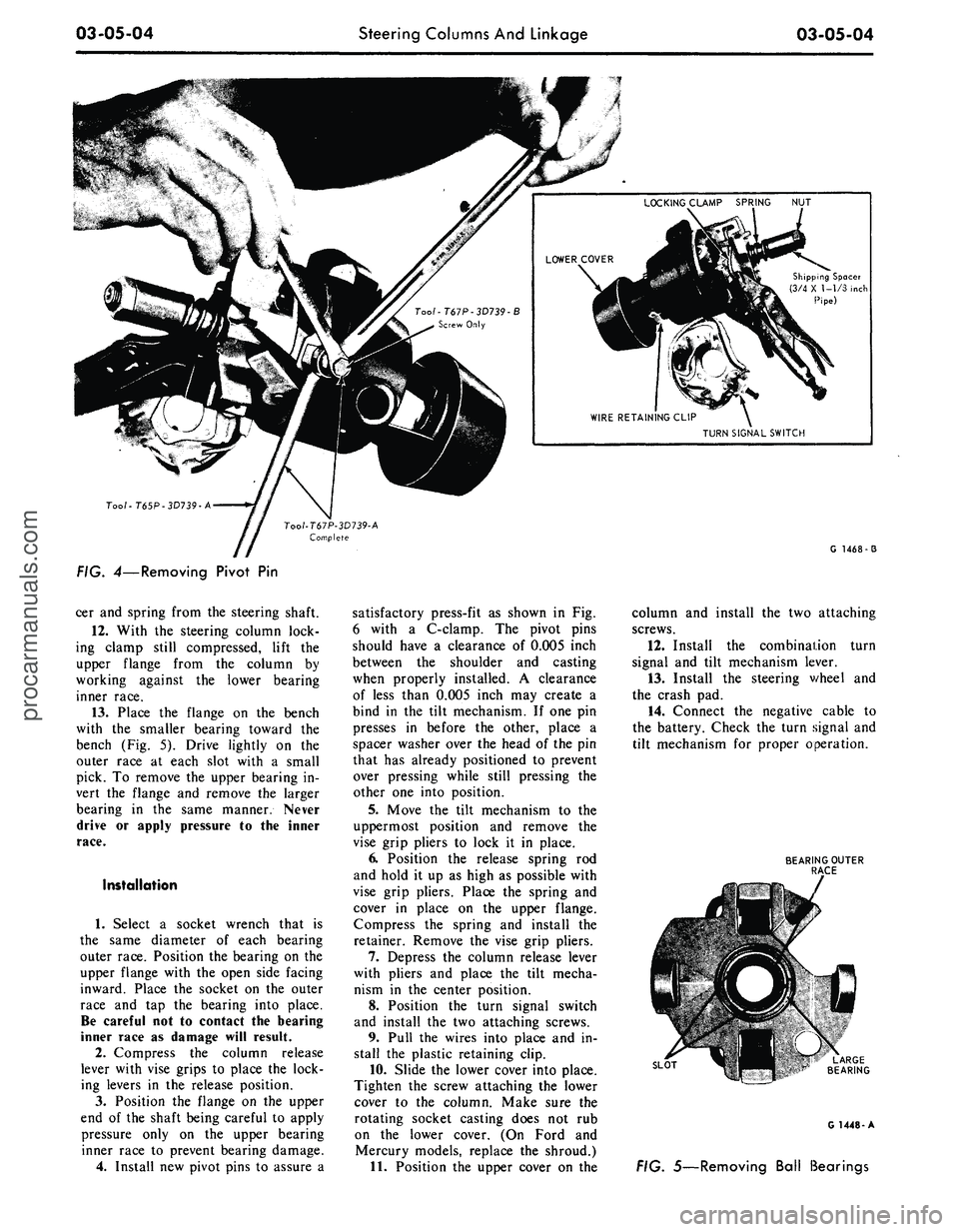
03-05-04
Steering Columns And Linkage
03-05-04
Shipping Spacer
(3/4 X 1-1/3 inch
Pipe)
TURN SIGNAL SWITCH
Too/-T65P-3D739-A
G 1468-3
FIG. 4—Removing Pivot
Pin
cer and spring from the steering shaft.
12.
With
the
steering column lock-
ing clamp still compressed, lift
the
upper flange from
the
column
by
working against
the
lower bearing
inner race.
13.
Place
the
flange
on the
bench
with
the
smaller bearing toward
the
bench (Fig.
5).
Drive lightly
on the
outer race
at
each slot with
a
small
pick.
To
remove the upper bearing in-
vert
the
flange
and
remove
the
larger
bearing
in the
same manner. Never
drive
or
apply pressure
to the
inner
race.
Installation
1.
Select
a
socket wrench that
is
the same diameter
of
each bearing
outer race. Position the bearing on the
upper flange with the open side facing
inward. Place
the
socket
on the
outer
race
and tap the
bearing into place.
Be careful not
to
contact
the
bearing
inner race
as
damage will result.
2.
Compress
the
column release
lever with vise grips
to
place the lock-
ing levers
in the
release position.
3.
Position
the
flange
on the
upper
end
of
the shaft being careful
to
apply
pressure only
on the
upper bearing
inner race
to
prevent bearing damage.
4.
Install new pivot pins
to
assure
a
satisfactory press-fit
as
shown
in Fig.
6 with
a
C-clamp.
The
pivot pins
should have
a
clearance
of
0.005 inch
between
the
shoulder
and
casting
when properly installed.
A
clearance
of less than 0.005 inch may create
a
bind
in the
tilt mechanism.
If
one pin
presses
in
before
the
other, place
a
spacer washer over the head
of
the pin
that has already positioned
to
prevent
over pressing while still pressing
the
other one into position.
5.
Move
the
tilt mechanism
to the
uppermost position
and
remove
the
vise grip pliers
to
lock
it in
place.
6. Position
the
release spring
rod
and hold
it
up
as
high
as
possible with
vise grip pliers. Place
the
spring
and
cover
in
place
on the
upper flange.
Compress
the
spring
and
install
the
retainer. Remove the vise grip pliers.
7.
Depress
the
column release lever
with pliers
and
place
the
tilt mecha-
nism
in the
center position.
8. Position
the
turn signal switch
and install
the
two attaching screws.
9. Pull
the
wires into place and
in-
stall
the
plastic retaining clip.
10.
Slide the lower cover into place.
Tighten
the
screw attaching the lower
cover
to the
column. Make sure
the
rotating socket casting does
not rub
on
the
lower cover.
(On
Ford
and
Mercury models, replace
the
shroud.)
11.
Position the upper cover
on the
column
and
install
the
two attaching
screws.
12.
Install
the
combination turn
signal
and
tilt mechanism lever.
13.
Install
the
steering v/heel
and
the crash pad.
14.
Connect
the
negative cable
to
the battery. Check the turn signal and
tilt mechanism
for
proper operation.
BEARING OUTER
RACE
SLOT
G 1448-A
FIG. 5—Removing Ball Bearingsprocarmanuals.com
Page 120 of 413

03-05-07
Steering Columns And Linkage
03-05-07
the steering column
(F in Fig. 8).
7.
Disconnect
the
transmission shift
rod
at the
shift tube.
8. Working under
the
hood, install
the aligning spacer (Fig.
9)
around
the
visible portion
of the
steering shaft
and slide
it up the
shaft into
the
steer-
ing column.
It may be
necessary
to
move
the
shaft back
and
forth
to
com-
pletely install
the
spacer.
9.
At
this point
the
steering column
assembly, being loose,
may
have
dropped toward
the
steering gear
grounding
the
steering shaft
on the
steering gear input shaft.
To
properly
establish
the
steering shaft
to
steering
gear clearance, insert
a 1/8
diameter
rod
or
drill through
the
opening
in the
upper half
of the
flex coupling.
10.
Tighten
to a
snug
fit
(approxi-
mately
2-3
ft-lb)
the
nuts retaining
the
toe plates
to the
dash panel
(B in Fig.
8).
11.
If the
aligning spacer cannot
be
rotated freely,
the
dash panel holes
must
be
filed
or
reamed
for
greater
travel
(as
mentioned
in the
second
paragraph
at the
beginning
of
this
procedure).
12.
Tighten
all
nuts
and
bolts
(noted
as C, D and E in
Fig.
8) in the
passenger compartment
to a
snug
fit
(approximately 2-3 ft-lb). Again check
aligning spacer
for
looseness. Perform
these tightening operations
in
alpha-
betical order.
13.
Tighten
the
lateral adjustment
bolt
(F in Fig. 8) to
snug
fit.
Again
check
the
aligning spacer
for
loose-
ness.
14.
Tighten
all
bolts and nuts
to the
proper torque value (listed
in Fig. 8)
in alphabetical order.
15.
Remove
the
steering shaft
al-
igning spacer.
16.
Remove
the 1/8
diameter
rod or
drill previously inserted
in the
flex
coupling.
17.
Reinstall
the
trim
at the
instru-
ment panel
to
steering column mount-
ing.
LINCOLN CONTINENTAL
If
a
condition
of
high shift
or
steer-
ing effort
is
experienced
it may be
caused
by
improper alignment
of the
energy absorbing steering column.
The
following procedures outline
the
steps
necessary
to
correctly realign either
fixed
or
tilt columns:
1.
Disconnect
the
battery.
2.
Loosen four
toe
plate attaching
nuts (Fig.
10).
3.
Loosen
one toe
plate
to
steering
column clamp bolt
and nut.
Check
alignment
of
steering shaft
to
shift
-HANDLE PORTION
2-3/4"
-*- 3/4"
BEND AROUND
STEERING SHAFT
DIMENSION
A:
STANDARD COLUMN 7/16"
TILT WHEEL COLUMN
1-1/8"
•2-3/4
FABRICATE ALIGNING SPACER OUT OF
PLASTIC SHIPPING COLLAR PROVIDED
ON SERVICE DRIVESHAFTS, OR OUT
OF
1/32"—1/16" CARDBOARD
STEERING SHAFT
ALIGNMENT SPACER-BEND AROUND
STEERING SHAFT (DIMENSION
A)
AND
SLIDE UP THE SHAFT INTO COLUMN
G1537-A
FIG. 9—Aligning Spacer Fabrication
and
Insertion
BRAKE PEDAL
SUPPORT BRACKET
PART
A-TOE PLATE
B-CLAMP
C-C0LUMN BRACKET
D-BRAKE PEDAL
SUPPORT BRACKET
TORQUE VALUE
8-12 FT. LB.
3-5 FT. LB.
10-15
FT.
LB.
8-12 FT. LB.
G1541-A
FIG. 10—Steering Column Alignment Locations
and
Torque
Specifications—Lincoln Continentalprocarmanuals.com
Page 127 of 413

03-05-14
Steering Columns And Linkage
03-05-14
8. Connect the turn signal and
emergency flasher switch wires at the
multiple connectors. Connect the wires
to the neutral start switch. Adjust-
ments for the neutral start switch are
detailed in Group 7 of this manual.
9. Connect the tilt-column control
cable to the release cable retainer and
vacuum motor (if so equipped). To re-
move cable slack, loosen the bracket
attaching screw and pull it slightly
toward the column, then tighten the
screw. If difficulty in adjusting this
control is experienced, the retainer
slot may be filed to gain additional
travel.
10.
Install the instrument panel
steering column plate and cover and
the instrument panel lower outer fin-
ish panel.
11.
Connect the negative cable to
the battery.
12.
Start the engine and check the
operation of the steering column and
switches.
LINCOLN CONTINENTAL
Removal
1.
Disconnect the battery.
2.
Disconnect the rod from the
lever at the lower end of the selector
tube.
Loosen the clamp bolt that locks
the flexible coupling to the steering
shaft.
3.
Working from the underside of
the steering wheel spoke, remove the
two screws that secure the crash pad.
Remove the pad. Do not use a ham-
mer or knock-off type wheel puller.
Striking the puller or shaft may cause
damage to the bearings and/or col-
lapsible column. Remove the steering
wheel as shown in Fig. 15.
4.
Remove the instrument panel
steering column finish plate.
5.
Remove the four screws that at-
tach the lower retainer to the dash
panel.
6. Disconnect the turn signal switch
and emergency flasher wires at the
connectors. Disconnect the wires from
the neutral start switch.
7.
While supporting the steering
column, remove the bolts that attach
the lower clamp to the upper bracket
(Fig. 15). Lift the column from the ve-
hicle.
Installation
1.
Position the column in the vehi-
cle,
making sure that the steering
shaft engages the flex coupling.
2.
Install the column retainer-
to-dash panel attaching screws, but do
not tighten them.
3.
Install the lower clamp and the
attaching nuts. Tighten the nuts fing-
ertight.
4.
Move the lower flange as re-
quired to center the steering shaft in
the tube. Aligning procedures are de-
tailed in Part 3-1. Tighten the lower
flange attaching nuts when the shaft is
centered.
5.
Connect the shift rod to the shift
lever at the lower end of the column.
6. Install and tighten the flex cou-
pling attaching bolt.
7.
Tighten the instrument panel-
to-clamp attaching nuts.
8. Connect the turn signal and
emergency flasher switch wirss at the
multiple connectors. Connect the wires
to the neutral start switch. Adjust-
ments for the neutral start switch are
detailed in Group 7 of this manual.
9. Install the instrument panel
steering column finish plate.
10.
Install the steering wheel and
crash pad.
MAJOR REPAIR OPERATIONS
STEERING COLUMN
SHIFT TUBE REPLACEMENT
STATIONARY COLUMN
WITH STANDARD
TRANSMISSION
Removal
1.
Working from the underside of
the steering wheel spoke, remove the
two screws that secure the crash pad.
Remove the pad. (On Continental
Mark III models, pry out the crash
pad insert and remove the two screws
that secure the crash pad. Remove the
crash pad. On models equipped with
steering wheel mounted speed con-
trols,
refer to Group 16 for removal
instructions).
2.
Remove the steering wheel from
the steering shaft with tool T67L-
3600-A (Fig. 1). Then, remove the
tool from the steering wheel. Do not
use a knock-off type steering Wheel
puller or strike the end of the steering
shaft with a hammer. Striking the
puller or shaft will damage the bear-
ing or the collapsible column.
3.
Remove the steering column
from the vehicle.
4.
Remove the selector lever from
the hub (Fig. 16).
5.
Remove the bearing upper snap
ring. It may be necessary to pull the
turn signal switch out to remove the
snap ring.
6. Remove the screws that attach
the shift tube bearing, shift arms, and
shift tube to the lower end of the
steering column.
7.
Slip the shift tube and steering
shaft from the lower end of the steer-
ing column tube. The upper bearing
has a slight press fit on the steering
shaft.
8. Remove the C-washer from the
upper end of the steering shaft, and
pull the shift tube from the steering
shaft.
9. Remove the shift tube bearing
from the lower end of the tube
Installation
1.
Position the shift tube bearing
(Fig. 16) on the tube and insert the
steering shaft in the shift tube.
2.
Install the C-washer on the
upper end of the steering shaft.
3.
Insert the shift tube and steering
shaft into the steerint column tube
and install the three attaching screws
at the lower end of the steering col-
umn tube.
4.
Position the bearing and insula-
tor on the shaft if it was disturbed
during removal. Work it down onto
the shaft as far as possible, then place
a piece of 3/4 ID x 2 1/8 inch pipe
over the end of shaft and install the
steering wheel attaching nut (Fig. 2).
5.
Tighten the nut until the bearing
is seated in the flange, then remove
the nut and pipe from the shaft.
6. Position the turn signal switch
on the flange and install the three at-
taching screws. Install the upper snap
ring.
7.
Install the selector lever and the
turn signal lever in the column.
8. Adjust and install the neutral
start switch as detailed in Group 7.
9. Install the steering column in the
vehicle.procarmanuals.com
Page 138 of 413

03-06-04
Manual Steering
03-06-04
adjuster and the adjuster nut and
bearing cup. Leave the nut loose.
12.
Adjust the worm bearing pre-
load, using an in-lb torque wrench
(Fig. 9). See Part 3-13 for the speci-
fied preload.
13.
Position the sector adjusting
screw and adjuster shim, and check
the end clearance which should not
exceed 0.002 inch between the screw
head and the end of the sector shaft.
If clearance is greater than 0.002 inch,
add enough shims to reduce the end
play to within the 0.002 inch toler-
ance.
14.
Start the sector shaft adjusting
screw into the housing cover.
15.
Install a new gasket on the
housing cover.
16.
Rotate the steering shaft until
the ball nut teeth are in position to
mesh with the sector gear, tilting the
In - /b Torque Wrench
ADJUSTER NUT
21-A
FIG. 9—Checking Steering Shaft
Bearing Preload
housing so that the ball will tip
toward the housing cover opening.
17.
Lubricate the sector shaft jour-
nal and install the sector shaft and
cover.
18.
With the housing cover turned
out of the way fill the gear with 0.97
lbs of gear lubricant. Push the
housing cover and sector shaft assem-
blies into place, and install the two
top housing cover bolts. Do not tight-
en the cover bolts until it is certain
that there is some lash between ball
nut and sector gear teeth. Hold or
push the cover away from the ball nut,
then torque the bolts to specification.
19.
After loosely installing the sec-
tor shaft adjusting screw lock nut, ad-
just the sector shaft mesh load. See
Part 3-13 for the specified mesh load;
then, tighten the adjusting screw lock
nut.procarmanuals.com