1969 FORD MUSTANG service
[x] Cancel search: servicePage 367 of 413

07-03-27
FMX Transmission
0703-27
CENTER SUPPORT
PLANETARY CLUTCH
"CAM TYPE" CLUTCH RACE
CHAMFER ON PRODUCTION
PART, ONLY-SERVICE PART NOT CHAMFERED
PLANET CARRIER
D1938-A
FIG. 54—Planetary Clutch, Planet Carrier and Center Support
5.
Carefully position the planet car-
rier on the center support. Move the
carrier forward until the clutch rollers
are felt to contact the bearing surface
of the center support.
6. While applying forward pressure
on the planet carrier, rotate it counte-
rclockwise, as viewed from the rear
(Fig. 55). This will cause the clutch
rollers to roll toward the large open-
ing end of the cams in the race, com-
pressing the spring slightly, so that the
rollers will ride up the chamfer on the
planetary support and onto the inner
race.
7.
Push the planet carrier all the
way forward.
PLANET
CARRIER
8. Check the operation of the plan-
etary clutch by rotating the carrier co-
unterclockwise. It should rotate count-
erclockwise (viewed from the rear)
with a slight drag, and it should lock
up when attempting to rotate it in a
clockwise direction.
9. Install the selective thrust washer
on the pinion carrier rear pilot. II the
end play was not within specifications
when checked prior to disassembly,
replace the washer with one of proper
thickness. Refer to the Specification
Section of Group 7 for selective thrust
washer thickness.
10.
Install the output shaft, careful-
ly meshing the internal gear with the
pinions.
ROTATE CARRIER
COUNTER CLOCKWISE
D 1292-C
. 55—Planetery Clutch Installation in Carrier—Chamfered Center
Support
Installation—Center Support
not Chamfered
1.
Install the center support and the
rear band in the case.
2.
Install the primary sun gear, rear
thrust bearing race, needle bearing
and front thrust bearing race if used
in the planet carrier using petroleum
jelly to retain them in place.
3.
Lubricate the bearing surface of
the center support, the rollers of the
planetary clutch, and the cam race in
the carrier with vaseline.
i. Install the^ planetary clutch on
the center support with the saw teeth
of the clutch cage pointing in the
clockwise direction as viewed from the
rear (Fig. 56). Make sure that all roll-
ers are in the cage.
5.
Position the planet carrier on the
support so that the cams in the carrier
engage the saw teeth on the clutch
cage.
6. Push the planet carrier forward
until the rollers are felt to contact the
surface of the cam race.
7.
While applying forward pressure
on the carrier, rotate it counterclock-
wise as viewed from the rear. This will
cause the rollers to roll toward the
large opening end of the cams in the
race,
compressing the springs slightly,
so that the rollers will enter the cams.
8. Some rollers may become
cocked preventing their entry into the
outer race. These rollers must be posi-
tioned individually with a small screw-
driver by pushing the rear of the roll-
ers toward the transmission and into
the cam race (Fig. 56). Keep pressure
applied to the carrier at all times.
9. After all of the rollers have been
started into the cam race, rotate the
carrier counterclockwise while pushing
it forward. Again, straighten any roll-
ers which still may be in a cocked po-
sition and prevent the carrier from
sliding onto the support.
10.
Make sure that all springs are
entered in the cam race before at-
tempting to push the carrier on the
support. Push the carrier all the way
forward and check the operation of
the clutch by rotating it in a counte-
rclockwise direction. The carrier
should rotate counterclockwise with a
slight drag and should lock up when
attempting to rotate it in a clockwise
direction.
11.
Install the selective thrust wash-
er on the pinion carrier rear pilot. If
the end play was not within specifica-
tions when checked prior to disassem-
bly, replace the washer with one of
proper thickness. Refer to the Specifi-
cation Section of Group 7 for selective
thrust washer thickness.procarmanuals.com
Page 372 of 413

07-04-03
C-6 Automatic Transmission
07-04-03
suffix, a service identification number,
and serial number. The service
identif-
ication number indicates changes to
service details which affect interchan-
geability when the transmission model
is not changed. For interpretation of
this number, see the Master Parts Ca-
talog.
The C6 transmission is a three
speed unit capable of providing auto-
matic upshifts and downshifts through
the three forward gear ratios, and also
capable of providing manual selection
of first and second gears. The hydrau-
lic control system schematic is shown
in Figure 3. The converter housing
and the fixed splines which engage the
splined OD of the low-reverse clutch
steel plates, are both cast integrally
into the case.
Only one (intermediate) band is
used in the C6 transmission. This
TRANSMISSION
MODEL
FIG. 2—Identification Tag
along with the forward clutch is used
to obtain intermediate gear.
The only adjustment on the trans-
mission proper is the intermediate
band.
The fluid is drained from the trans-
mission by loosening the pan bolts
D1925-A
and allowing it to drain. Finally, to
allow the pan to drain more thorough-
ly, remove all bolts except the two
from the front.procarmanuals.com
Page 380 of 413

07-04-11
C-6 Automatic Transmission
07-04-11
BAND ADJUSTMENT
INTERMEDIATE BAND
1.
Raise the vehicle on a hoist or
jack stands.
2.
Clean all the dirt from the band
adjusting screw area. Remove and dis-
card the lock nut.
3.
Install a new lock nut and tight-
en the adjusting screw to 10 ft-lbs tor-
que (Fig. 15).
4.
Back off the adjusting screw ex-
actly 1 full turn.
5.
Hold the adjusting screw from
turning and torque the lock nut to
specification.
6. Lower the vehicle.
EXTENSION HOUSING OR
GOVERNOR REPLACEMENT
REMOVAL
1.
Raise the vehicle on a hoist or
stands.
2.
Disconnect the parking brake
cable from the equalizer. On a Lin-
coln Continental, remove the equaliz-
er.
3.
Disconnect the driveshaft from
the rear axle flange and remove it
from the transmission.
4.
Disconnect the speedometer
cable from the extension housing.
5.
Remove the engine rear
support-to-extension housing attaching
bolts.
On a Lincoln Continental, remove
the reinforcement plate from under
the transmission oil pan.
6. Place a jack under the transmis-
sion and raise it just enough to re-
move the weight from the engine rear
support.
7.
Remove the bolt that secures the
engine rear support to the crossmemb-
er and remove the support.
8. Place a drain pan under the rear
of the transmission case.
9. Lower the transmission and re-
move the extension housing attaching
bolts.
Slide the extension housing off
the output shaft and allow the fluid to
drain.
10.
Remove the governor attaching
bolts (Fig. 16) and remove the gover-
nor from the flange.
INSTALLATION
1.
Secure the governor (Fig. 16) to
the distributor flange with the attach-
ing bolts. Torque the bolts to specifi-
cation.
TOOL-T59 P-77370-B
FIG. 75—Adjusting Band
D 1597-A
TUBES
DISTRIBUTOR
GOVERNOR
SPACER
D1598-A
FIG. 76—Governor Installed
2.
Clean the mounting surface on
the transmission and on the extension
housing. Position a new gasket on the
transmission.
3.
Hold the extension housing in
place and secure it with the attaching
bolts.
4.
Raise the transmission high
enough to position the engine rear
support on the crossmember.
5.
Secure the support to the cross
member with the attaching bolt and
nut. Torque the bolt to specification.
6. Lower the transmission and re-
move the jack. Install and torque the
engine rear support-to-extension hous-
ing attaching bolts to specification.
On a Lincoln Continental, install
the reinforcement plate and secure it
with the attaching bolts.
7.
Secure the speedometer cable to
the extension housing with the attach-
ing bolt.
8. Connect the parking brake cable
to the equalizer. On a Lincoln Conti-
nental, connect the parking brake
equalizer. Adjust the parking brake as
required.
9. Install the drive shaft.
10.
Fill the transmission to the cor-
rect level with the specified fluid.
SERVO REPLACEMENT
ALL VEHICLES EXCEPT
LINCOLN CONTINENTAL
Removal
1.
Raise the vehicle on a hoist or
stands.
2.
Remove the engine rear
support-to-extension housing attaching
bolts.
3.
Raise the transmission high
enough to remove the weight from the
engine rear support.
4.
Remove the bolt that secures the
engine rear support to the crossmemb-
er. Remove the support.
5.
Lower the transmission and re-
move the jack.
6. Place a drain pan beneath the
servo.
Remove the bolts that attach
the servo cover to the transmission
case.
7.
Remove the cover, piston, spring
and gasket from the case, screwing the
band adjusting screw inwards as the
piston is removed. This insures that
there will be enough tension on the
band to keep the struts properly en-
gaged in the band end notches while
the piston is removed.
SEAL REPLACEMENT
1.
Apply air pressure to the port in
the servo cover to remove the piston
and rod.
2.
Remove the seals from the piston
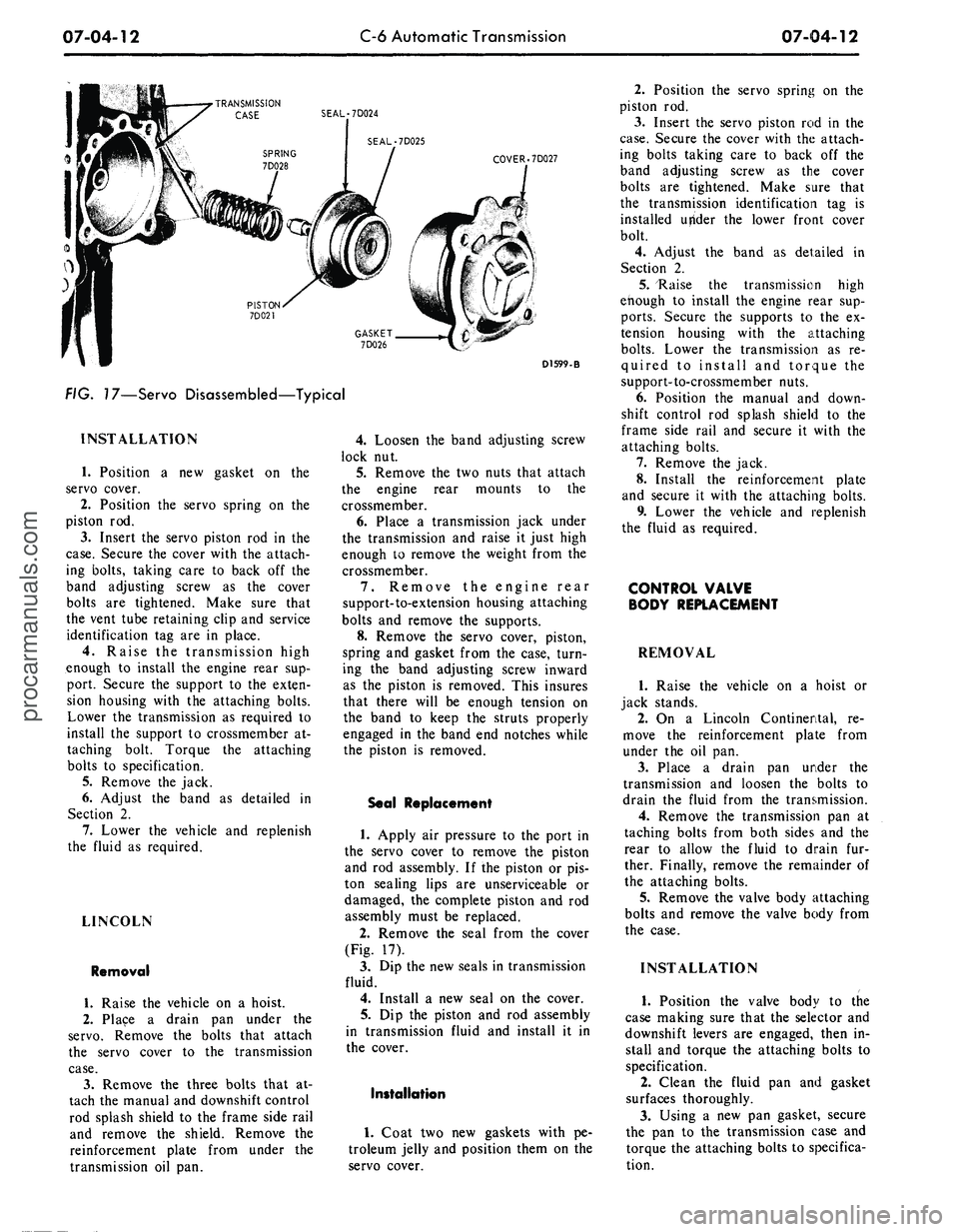
(Fig. 17).
On a Continental Mark III, replace
the complete piston and rod assembly
if the piston or piston sealing lips are
unserviceable or damaged.
3.
Remove the seal from the cover.
4.
Dip the new seals in transmission
fluid.
5.
Install the new seals on the pis-
ton and cover.
6. Coat two new gaskets with pe-
troleum jelly and install the gaskets
on the cover.
7.
Dip the piston in transmission
fluid and install it in the cover.procarmanuals.com
Page 381 of 413
07-04-12
C-6 Automatic Transmission
07-04-12
•TRANSMISSION
CASE SEAL-7D024
SEAL-7D025
COVER .7D027
D1599-B
FIG. 17—Servo Disassembled—Typical
INSTALLATION
1.
Position a new gasket on the
servo cover.
2.
Position the servo spring on the
piston rod.
3.
Insert the servo piston rod in the
case.
Secure the cover with the attach-
ing bolts, taking care to back off the
band adjusting screw as the cover
bolts are tightened. Make sure that
the vent tube retaining clip and service
identification tag are in place.
4.
Raise the transmission high
enough to install the engine rear sup-
port. Secure the support to the exten-
sion housing with the attaching bolts.
Lower the transmission as required to
install the support to crossmember at-
taching bolt. Torque the attaching
bolts to specification.
5.
Remove the jack.
6. Adjust the band as detailed in
Section 2.
7.
Lower the vehicle and replenish
the fluid as required.
LINCOLN
Removal
1.
Raise the vehicle on a hoist.
2.
Place a drain pan under the
servo.
Remove the bolts that attach
the servo cover to the transmission
case.
3.
Remove the three bolts that at-
tach the manual and downshift control
rod splash shield to the frame side rail
and remove the shield. Remove the
reinforcement plate from under the
transmission oil pan.
4.
Loosen the band adjusting screw
lock nut.
5.
Remove the two nuts that attach
the engine rear mounts to the
crossmember.
6. Place a transmission jack under
the transmission and raise it just high
enough to remove the weight from the
crossmember.
7.
Remove the engine rear
support-to-extension housing attaching
bolts and remove the supports.
8. Remove the servo cover, piston,
spring and gasket from the case, turn-
ing the band adjusting screw inward
as the piston is removed. This insures
that there will be enough tension on
the band to keep the struts properly
engaged in the band end notches while
the piston is removed.
Seal Replacement
1.
Apply air pressure to the port in
the servo cover to remove the piston
and rod assembly. If the piston or pis-
ton sealing lips are unserviceable or
damaged, the complete piston and rod
assembly must be replaced.
2.
Remove the seal from the cover
(Fig. 17).
3.
Dip the new seals in transmission
fluid.
4.
Install a new seal on the cover.
5.
Dip the piston and rod assembly
in transmission fluid and install it in
the cover.
Installation
1.
Coat two new gaskets with pe-
troleum jelly and position them on the
servo cover.
2.
Position the servo spring on the
piston rod.
3.
Insert the servo piston rod in the
case.
Secure the cover with the attach-
ing bolts taking care to back off the
band adjusting screw as the cover
bolts are tightened. Make sure that
the transmission identification tag is
installed utfider the lower front cover
bolt.
4.
Adjust the band as detailed in
Section 2.
5.
"Raise the transmission high
enough to install the engine rear sup-
ports.
Secure the supports to the ex-
tension housing with the attaching
bolts.
Lower the transmission as re-
quired to install and torque the
support-to-crossmember nuts.
6. Position the manual and down-
shift control rod splash shield to the
frame side rail and secure it with the
attaching bolts.
7.
Remove the jack.
8. Install the reinforcement plate
and secure it with the attaching bolts.
9. Lower the vehicle and replenish
the fluid as required.
CONTROL VALVE
BODY REPLACEMENT
REMOVAL
1.
Raise the vehicle on a hoist or
jack stands.
2.
On a Lincoln Continental, re-
move the reinforcement plate from
under the oil pan.
3.
Place a drain pan under the
transmission and loosen the bolts to
drain the fluid from the transmission.
4.
Remove the transmission pan at
taching bolts from both sides and the
rear to allow the fluid to drain fur-
ther. Finally, remove the remainder of
the attaching bolts.
5.
Remove the valve body attaching
bolts and remove the valve body from
the case.
INSTALLATION
1.
Position the valve body to the
case making sure that the selector and
downshift levers are engaged, then in-
stall and torque the attaching bolts to
specification.
2.
Clean the fluid pan and gasket
surfaces thoroughly.
3.
Using a new pan gasket, secure
the pan to the transmission case and
torque the attaching bolts to specifica-
tion.procarmanuals.com
Page 390 of 413
07-04-21
C-6 Automatic Transmission
07-04-21
Parking Pawl Linkage
1.
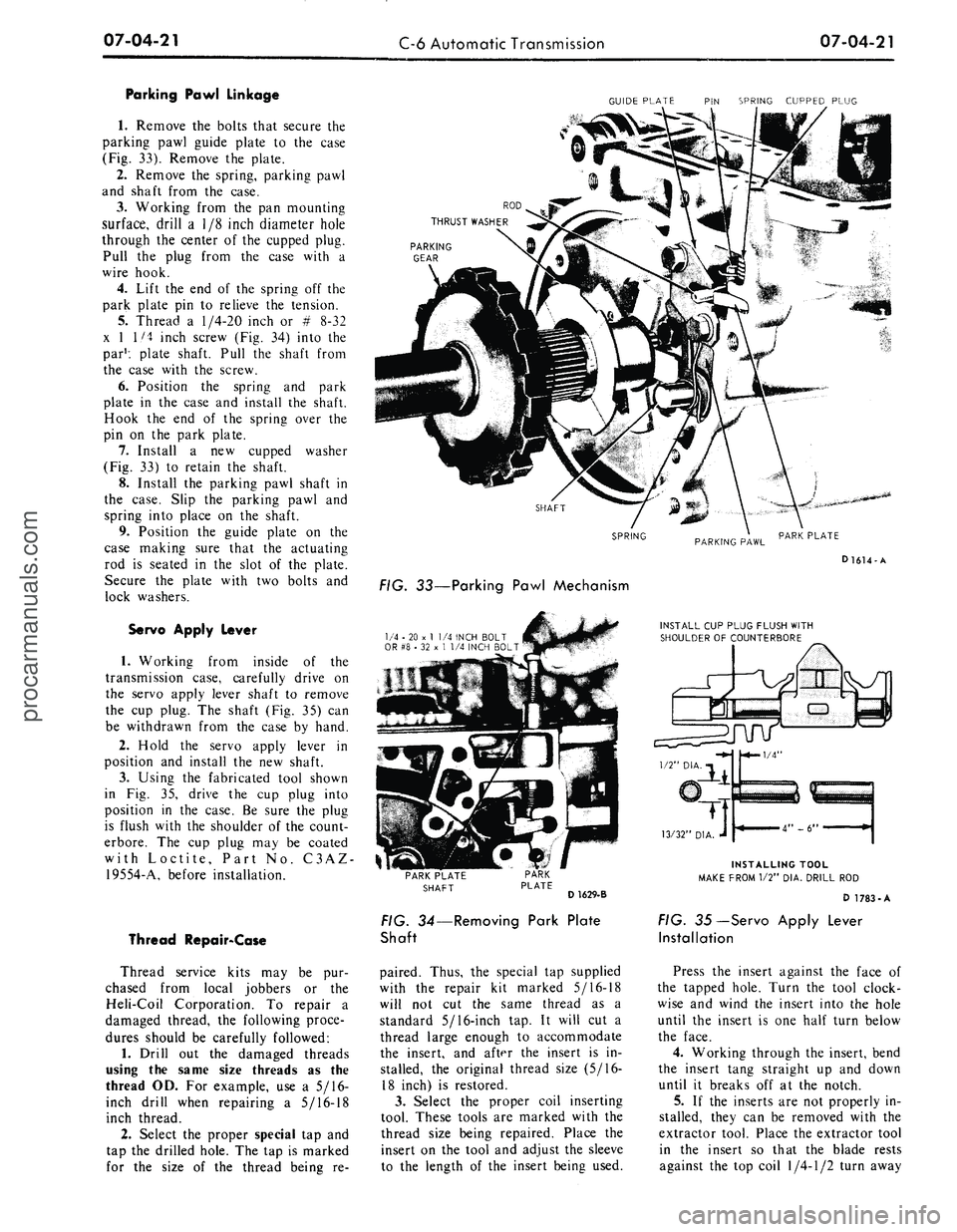
Remove the bolts that secure the
parking pawl guide plate to the case
(Fig. 33). Remove the plate.
2.
Remove the spring, parking pawl
and shaft from the case.
3.
Working from the pan mounting
surface, drill a 1/8 inch diameter hole
through the center of the cupped plug.
Pull the plug from the case with a
wire hook.
4.
Lift the end of the spring off the
park plate pin to relieve the tension.
5.
Thread a
1/4-20
inch or # 8-32
x 1 1/4 inch screw (Fig. 34) into the
par1: plate shaft. Pull the shaft from
the case with the screw.
6. Position the spring and park
plate in the case and install the shaft.
Hook the end of the spring over the
pin on the park plate.
7.
Install a new cupped washer
(Fig. 33) to retain the shaft.
8. Install the parking pawl shaft in
the case. Slip the parking pawl and
spring into place on the shaft.
9. Position the guide plate on the
case making sure that the actuating
rod is seated in the slot of the plate.
Secure the plate with two bolts and
lock washers.
Servo Apply Lever
1.
Working from inside of the
transmission case, carefully drive on
the servo apply lever shaft to remove
the cup plug. The shaft (Fig. 35) can
be withdrawn from the case by hand.
2.
Hold the servo apply lever in
position and install the new shaft.
3.
Using the fabricated tool shown
in Fig. 35, drive the cup plug into
position in the case. Be sure the plug
is flush with the shoulder of the count-
erbore. The cup plug may be coated
with Loctite, Part No. C3AZ-
19554-A, before installation.
Thread Repair-Case
Thread service kits may be pur-
chased from local jobbers or the
Heli-Coil Corporation. To repair a
damaged thread, the following proce-
dures should be carefully followed:
1.
Drill out the damaged threads
using the same size threads as the
thread OD. For example, use a 5/16-
inch drill when repairing a 5/16-18
inch thread.
2.
Select the proper special tap and
tap the drilled hole. The tap is marked
for the size of the thread being re-
GUIDE PLATE PIN SPRING CUPPED PLUG
PARKING
GEAR
SHAFT
SPRING
PARKING PAWL
PARK PLATE
D1614-A
FIG. 33—Parking Pawl Mechanism
1/4 - 20 x
1
1/4 INCH BOLT
OR #8 • 32 x 1 1/4 INCH BOLT
INSTALL CUP PLUG FLUSH WITH
SHOULDER OF COUNTERBORE
PARK PLATE
SHAFT
D 1629-B
FIG. 34—Removing Park Plate
Shaft
paired. Thus, the special tap supplied
with the repair kit marked 5/16-18
will not cut the same thread as a
standard 5/16-inch tap. It will cut a
thread large enough to accommodate
the insert, and after the insert is in-
stalled, the original thread size (5/16-
18 inch) is restored.
3.
Select the proper coil inserting
tool. These tools are marked with the
thread size being repaired. Place the
insert on the tool and adjust the sleeve
to the length of the insert being used.
INSTALLING TOOL
MAKE FROM 1/2" DIA. DRILL ROD
D 1783-A
FIG. 35—Servo Apply Lever
Installation
Press the insert against the face of
the tapped hole. Turn the tool clock-
wise and wind the insert into the hole
until the insert is one half turn below
the face.
4.
Working through the insert, bend
the insert tang straight up and down
until it breaks off at the notch.
5.
If the inserts are not properly in-
stalled, they can be removed with the
extractor tool. Place the extractor tool
in the insert so that the blade rests
against the top coil
1/4-1/2
turn awayprocarmanuals.com
Page 397 of 413

07-04-28
C-6 Automatic Transmission
07-04-28
SNAP RING
REMOVAL INSTALLATION
FIG. 48 — Replacing Reverse-High Clutch Rear Bushing
D2035-A
Press Ram
Tool-T69L-7D044-A
D2036-A
FIG. 49—Installing Reverse-High
Clutch Front Bushing
D1898-A
FIG. 50—Checking Reverse-High
Clutch Snap Ring Clearance
ONE-WAY CLUTCH
Disassembly
1.
Remove the snap ring and rear
bushing from the rear of the low-
reverse clutch hub (Fig. 59).
2.
Remove the springs and rollers
from the spring retainer and lift the
spring retainer from the hub.
3.
Remove the remaining bushing
and snap ring from the hub.
Assembly
1.
Install a snap ring in the forward
snap ring groove of the low-reverse
clutch hub.
2.
Place the low-reverse clutch hub
on the bench with the forward end
down (Fig. 60).
3.
Place the forward clutch bushing
against the snap ring with the flat side
up.
Install the one-way clutch spring
retainer on top of the bushing. Be sure
to install the retainer in the hub so
that the springs load the rollers in a
counterclockwise direction when look-
ing down at the unit (Fig. 60).
4.
Install a spring and roller into
each of the spring retainer compart-
ments by slightly compressing each
spring and positioning the roller be-
tween the spring and the spring retain-
er (Fig. 60).
5.
Install the rear bushing on top of
the retainer with the flat side down.
6. Install the remaining snap ring
at the rear of the low-reverse clutch
hub to secure the assembly.
SERVO
Disassembly
1.
Apply air pressure to the port in
the servo cover to remove the piston
and rod.
2.
Remove the seals from the pis-
ton.
On Lincoln Continental and Conti-
nental Mark III models, replace the
complete piston and rod assembly if
the piston or piston sealing lips are
unserviceable or damaged.
3.
Remove the seal from the cover.
D1899-A
FIG. 51—Removing Forward
Clutch Pressure Plate Snap Ring
Assembly
1.
Dip the new seals in transmission
fluid.
2.
Install new seals on the cover
and servo piston. Fig. 61 shows the
correct servo piston and cover for the
transmission.
3.
Dip the piston in transmission
fluid and install it in the cover.
LOW-REVERSE CLUTCH
PISTON
Disassembly
1.
Remove the inner and the outer
seal from the reverse clutch piston.
Assembly
1.
Dip the two new seals in clean
transmission fluid.
2.
Install the seals on the piston.
OUTPUT SHAFT
Disassembly
1.
Remove the governor attaching
bolts and remove the governor.
2.
Remove the snap ring that se-
cures the governor distributor on the
output shaft (Fig. 62) and slide it off
the front of the shaft.
3.
Remove the seal rings from the
distributor.
Assembly
1.
Carefully install new seal rings
on the distributor.
2.
Working from the front end of
the output shaft, slide the governorprocarmanuals.com
Page 401 of 413

07-05-01
Specifications
07-05-01
PART
7-5
Specifications
APPROXIMATE
REFILL
CAPACITIES
FMX
Transmission—All
Car
Lines
C4
Transmission—Ford
All
Engines
Falcon
and
Mustang—170
and 200
Engines
All Other
Engines
C6Transmission—Lincoln,
Mark
III
All Other Models
U.S.
Measure
11
qt.
WA
qt.
8
qt.
9
qt.
13
qt.
123/4
qt.
Imperial
Measure
9M
qt.
8Va
qt.
V/i
qt.
7%
qt.
103/4
qt.
10VS
qt.
CONVERTER IDENTIFICATION
AND
STALL SPEEDS
FMX
TRANSMISSION
Converter Part Number
C90P-7902-A
C8AP-7902-D
Nominal
Size
12
12
Stall
Ratio
2.05:1
2.05:1
Identification
No.
0
54
48
Transmission
Model
PHD-A
PHD-B
PHB-C,
D, E,
PHB-F,
G, H,
PHB-A
Engine
CID
240-IV
302-2V
351-2V
351-4V
390-2V
Stall
Speed
1300-1500
1450-1650
1580-1780
1650-1850
1680-1880
®
Converter identification
is
stamped
on the
converter cover adjacent
to the
converter drive
stud.
C4
TRANSMISSION
Converter Part Number
C5DP-7902-D
C8AP-7902-E
C8ZP-7902-A
Nominal
Size
ioy4
12
11V4
Stall
Ratio
2.10:1
2.05:1
2.02:1
Identification
No.®
AL
BB
BC
Transmission
Model
PEB-C2
PEB-B2,
C2
PEA-A2,
PEA-MI,
Nl
PEE-AD,
AE,
AF
PEE-M,
V, AC
Engine
CID
170-1V
200-IV
240-IV
302-2
V
250-IV
302-2V
Stall
Speed
1400-1600
1500-1700
1300-1500
1450-1650
1630-1830
1800-2000
®
Converter identification
is
stamped
on the
converter cover adjacent
to the
converter drive
stud.
C6
TRANSMISSION
Converter Part Number
C8AP-7902-A
C8OP-7902-A®
C8SP-7902-A
C8OP-7902-A®
C8VP-7902-B
C8OP-79O2-A0
C8OP-7902-B
C8OP-7902-A
Nominal
Size
12
12
12
12
12
Stall
Ratio
2.05:1
2.05:1
2.05:1
2.05:1
2.05:1
Identification
No.®
44
46
52
55
53
Transmission
Model
PGA-A3
PGA-J3 PGB-G2
PGB-JI,
AD, AE
PGC-B,
Cl
PGA-A3,
J3, G2
PGB-G2
PGA-AC,AD,AE
PGB-F2,
®
H2
PGA-Z, AA, AB
PGB-AF-1,
AG, AH
Engine
CID
390-2V©®
429-4V
460-4V
390-2V®®
390-4V
390-4V
©
428-4V
429-2V
427-4V
428-4V
CJ
Stall
Speed
1680-:,900
1880-2100
1950-2150
1680-1880
1740-1940
1760-1980
1850-2050
1820-2020
1850-2050
1830-2030
D
Converter identification
is
stamped
on the
converter cover adjacent
to the
converter drive
stud.
v
Regular
©
Premium Fuel
0
Service Replacement
®
Improved Performance
®
Poli
Police Interceptorprocarmanuals.com
Page 405 of 413
07-05-05
Specifications
07-05-05
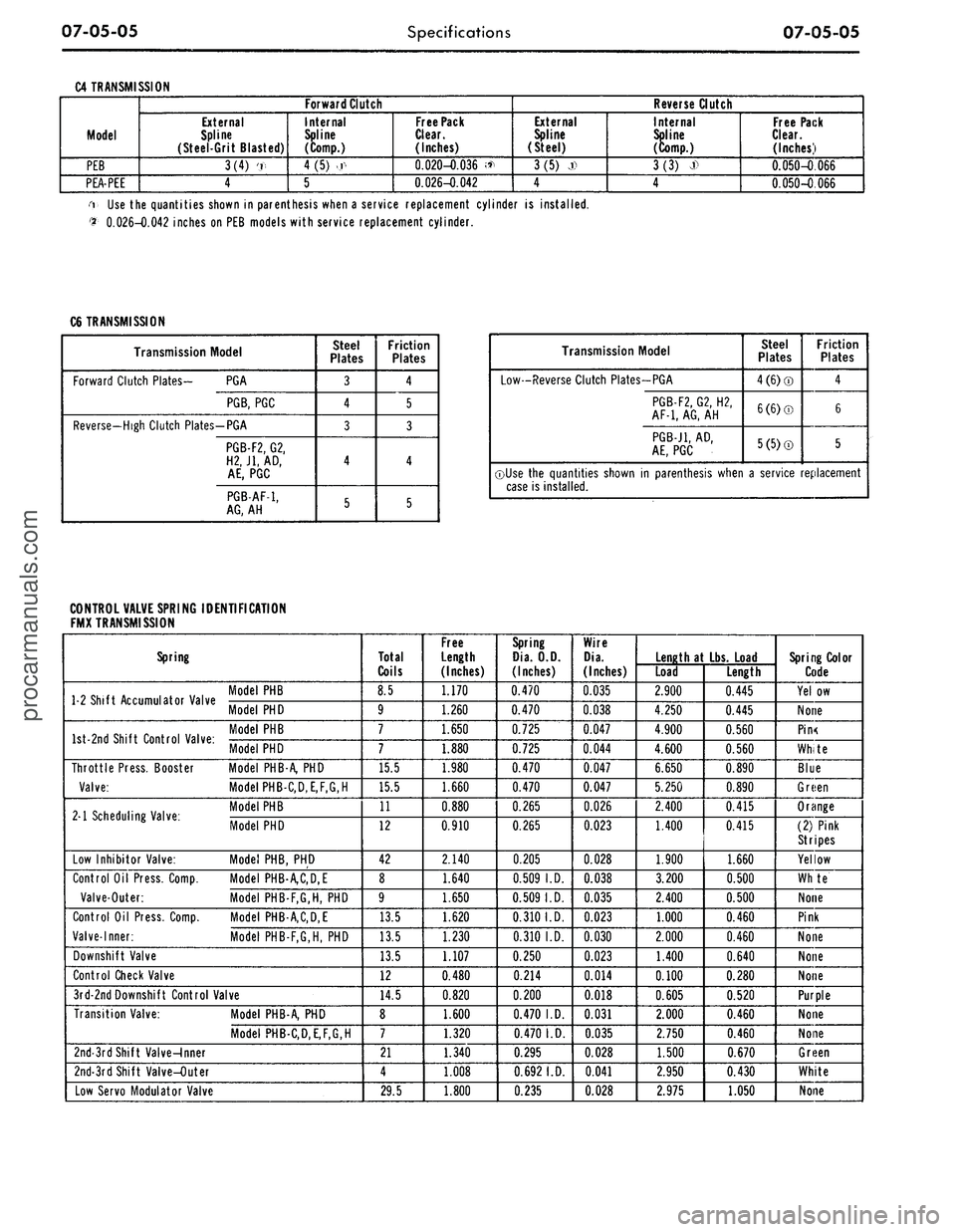
C4 TRANSMISSION
Model
PEB
PEA-PEE
Forward Clutch
External
Spline
(Steel-Grit Blasted)
3(4) '.,
4
Internal
Spline
(Comp.)
4
(5)
>.r<
5
Free Pack
Clear.
(Inches)
0.020-0.036 <*
0.026-0.042
Reverse Clutch
External
Spline
(Steel)
3(5) j)
4
Internal
Spline
(Comp.)
3(3)
J>
4
Free Pack
Clear.
(Inches)
0.050-0.066
0.050-0.066
i Use the quantities shown in parenthesis when a service replacement cylinder is installed.
$•
0.026-0.042 inches on PEB models with service replacement cylinder.
C6 TRANSMISSION
Transmission Model
Forward Clutch Plates- PGA
PGB,
PGC
Reverse-High Clutch Plates-PGA
PGB-F2,
G2,
H2J1,
AD,
AE,
PGC
PGB-AF-1,
AG,
AH
Steel
Plates
3
4
3
4
5
Friction
Plates
4
5
3
4
5
Transmission Model
Low-Reverse Clutch Plates-PGA
PGB-F2,
G2, H2,
AF-1,
AG,
AH
PGB-J1,
AD,
AE,
PGC
Steel
Plates
4(6)®
6(6)©
5(5)®
Friction
Plates
4
6
5
©Use the quantities shown in parenthesis when a service replacement
case is installed.
CONTROL VALVE SPRING IDENTIFICATION
FMX TRANSMISSION
Spring
1 2 Shift Accumulator Valve '° C
Model
PHD
W °nri Shift Pnntrnl Vilur
Model PHD
Throttle Press. Booster Model PHB-A, PHD
Valve:
Model PHB-C,D,E,F,G,H
M Scheduling Valve-
M°delPHB
. 1 Scheduling Valve. Mode, PHD
Low Inhibitor Valve: Model PHB, PHD
Control Oil Press. Comp. Model PHB-A,C,D,E
Valve-Outer: Model PHB-F,G,H, PHD
Control Oil Press. Comp. Model PHB-A,C,D,E
Valve-Inner: Model PHB-F,G,H, PHD
Downshift Valve
Control Check Valve
3rd-2ndDownshift Control Valve
Transition Valve: Model PHB-A, PHD
Model PHB-C,D,E,F,G,H
2nd-3rd Shift Valve-Inner
2nd-3rd Shift Valve-Outer
Low Servo Modulator Valve
Total
Coils
8.5
9
7
7
15.5
15.5
11
12
42
8
9
13.5
13.5
13.5
12
14.5
8
7
21
4
29.5
Free
Length
(Inches)
1.170
1.260
1.650
1.880
1.980
1.660
0.880
0.910
2.140
1.640
1.650
1.620
1.230
1.107
0.480
0.820
1.600
1.320
1.340
1.008
1.800
Spring
Dia.
O.D.
(Inches)
0.470
0.470
0.725
0.725
0.470
0.470
0.265
0.265
0.205
0.509
I.D.
0.509
I.D.
0.310
I.D.
0.310 I.D.
0.250
0.214
0.200
0.470
I.D.
0.470
I.D.
0.295
0.692
I.D.
0.235
Wire
Dia.
(Inches)
0.035
0.038
0.047
0.044
0.047
0.047
0.026
0.023
0.028
0.038
0.035
0.023
0.030
0.023
0.014
0.018
0.031
0.035
0.028
0.041
0.028
Length
at Lbs.
Load
Load
2.900
4.250
4.900
4.600
6.650
5.250
2.400
1.400
1.900
3.200
2.400
1.000
2.000
1.400
0.100
0.605
2.000
2.750
1.500
2.950
2.975
Length
0.445
0.445
0.560
0.560
0.890
0.890
0.415
0.415
1.660
0.500
0.500
0.460
0.460
0.640
0.280
0.520
0.460
0.460
0.670
0.430
1.050
Spring Color
Code
Yel.ow
None
Pin<
White
Blue
Green
Orange
(2) Pink
Stripes
Yellow
Whte
None
Pink
None
None
None
Purple
None
None
Green
White
Noneprocarmanuals.com