1967 CHEVROLET CAMARO turn
[x] Cancel search: turnPage 546 of 659

ELECTRICAL-BODY AND CHASSIS 12-34
5. To replace, reverse the removal procedure.
SPEEDOMETER REPLACEMENT
1.
Remove instrument cluster as previously described
in this section.
2.
Remove clock set shaft knob.
3.
Remove eight screws securing cluster housing to
bezel trim panel. Separate parts carefully observing
stack up of parts.
4.
Remove two screws securing speedometer head to
rear of cluster housing.
NOTE:
Servicing of the speedometer head
should be performed by an authorized AC Speed-
ometer Service Station.
5. To install, reverse the removal procedure..
SPEEDOMETER CABLE
Replacement or Lubricatibn
1.
Disconnect the speedometer cable from the speed-
ometer head. Remove the old cable by pulling it out
from speedometer end of conduit.
NOTE:
If old cable is broken it may be neces-
sary to remove lower piece from transmission
end of conduit.
2.
Lubricate the lower 3/4 of cable with speedometer
cable lubricant and push the cable into the conduit.
Connect the upper end to the speedometer head and
road test vehicle for proper speedometer operation.
INDICATOR LIGHT REPLACEMENT
To replace any indicator or cluster bulb, unsnap the
proper socket from rear of instrument cluster, remove
and replace bulb, and reinsert unit into rear of cluster
housing.
OIL PRESSURE INDICATOR
If the light does not come on when the ignition switch
is turned on, or if the light comes on and remains on
after the engine is started, one or more of the following
conditions is indicated:
• Low oil pressure
• High engine temperature
• Defective wiring or switch
Switch Replacement
1.
Disconnect wiring harness connector from sender
unit terminal (located in block above starter on
L-6 engines and at left front of distributor on V-8
engines).
2.
Remove sender unit, replace with new unit, and
; check operation.
GENERATOR INDICATOR
1.
Ignition on, engine not running and telltale light off.
a. Indicator bulb burned out, replace bulb.
b.
Open circuit or loose connection in the telltale
light circuit.
2.
Telltale light stays on after engine is started.
a. If indicator light does not go out at engine idle
speed, refer to Charging Systems under Engine
Electrical, Section 6Y.
TEMPERATURE (COOLING SYSTEM) INDICATOR
The temperature indicator circuit consists of two re-
motely located units, indicator gauge and engine sender
unit. The indicator gauge on all models uses a single
red light to indicate an overheated engine condition.
Engine Sender Unit Replacement
1.
Drain engine cooling system to a level below unit.
2.
Remove sender unit (located in the inlet manifold
near water pump housing on V-8 engines and in the
cylinder head near an exhaust port on L-6 engines)
and replace with new unit.
3.
Refill cooling system and check operation of unit.
CORVETTE INSTRUMENTS AND GAUGES
INDEX
Page
General Description ., 12-34
Service Operations . 12-35
Instrument Cluster ., 12-35
Fuel Gauge 12-35
Speedometer/Tachometer Service. 12-35
Temperature Gauge 12-35
Ammeter/Oil Pressure Gauges 12-35
GENERAL DESCRIPTION
All Corvette instruments and gauges are conveniently
located in the dash-mounted cluster. The entire cluster
is removable to permit servicing of the various instru-
ments and gauges. The indicator and cluster illuminating
bulbs may be replaced without removing the cluster from
the panel.
Regular maintenance is not required on the instrument
cluster or its components other than maintaining clean
and keeping the speedometer and tachometer cables
properly lubricated.
CHEVROLET CHASSIS SERVICE MANUAL
Page 548 of 659

ELECTRICAL-BODY
AND
CHASSIS
12-36
CAMARO INSTRUMENTS AND GAUGES
INDEX
Page
General Description
12-36
Service Operations
12-36
Instrument Cluster
. . . 12-36
Instrument Lamps
12-36
Printed Circuit
12-36
Fuel Gauge
12-37
Tachometer
. . 12-37
Seat Separator Instrument Console
12-37
Page
Fuel Gauge
12-37
Ammeter
12-37
Temperature Gauge
12-37
Oil Pressure Gauge
. 12-37
Fuel Warning Unit
12-37
Clock.
... 12-37
Oil Pressure Indicator
12-37
Generator Indicator
12-38
Temperature Indicator
12-38
GENERAL DESCRIPTION
The standard Camaro instrument cluster assembly con-
sists
of two
circular units which house
the
speedometer
and fuel gauge assemblies.
The oil
pressure, left-hand
directional
and
brake warning indicators
are
located
in
the face
of the
speedometer bezel while generator,
tem-
perature
and
right-hand directional indicators are grouped
with
the
fuel gauge unit.
The
high beam indicator
is
located between
the
cluster bezels.
A special instrumentation package
is
available with
the
eight-cylinder engine
and
center floor console combina-
tion.
The
special cluster includes:
a
clock; coolant
temperature,
oil
pressure, fuel
and
ammeter gauges,
mounted forward
on the
seat separator console;
a ta-
chometer
in the
right circular housing
of the
dash
in-
strument cluster; and
a low
fuel level indicator replacing
the
oil
pressure indicator lamp
in the
instrument cluster.
The instruments
and
gauges,
may be
serviced only
after
the
instrument cluster
is
removed from
the
vehicle.
Indicator
and
cluster lamps except
for the
high beam
indicator
may be
replaced without removing
the
cluster
assembly. Partial cluster removal
is
necessary when
replacing
the
high beam indicator due
to its
proximity
to
the upper brace
rod
anchor plate.
The
bulbs
are in-
stalled
in
plastic sockets which lock into
the
cluster
housing and make contact with
the
printed circuit.
A
low
level fuel warning system
is a
special feature
available with
the
floor console gauge pack. This
sys-
tem includes
an
indicator lamp
in the
dash cluster and
a
semi-conductor unit senses
the
change
in
electrical
re-
sistance
of the
fuel system circuitry
as
variations
in
fuel level occur.
The
sensing device
is
replaced
as a
unit
if
found defective.
The brake warning light serves
a
dual purpose.
It
functions
as an
indicator when
the
parking brake
is ap-
plied
and
also
if
there
is a
malfunction (loss
of
hydraulic
pressure)
in the
brake system. Switches which provide
the signal
to
operate
the
light
are
located
at the
parking
brake assembly
and at the
brake master cylinder
in the
hydraulic lines. Service
of the
brake pressure differ-
ential switch unit
is
covered
in
Section
5 of
this manual.
Regular maintenance
is not
required on
the
instrument
cluster
or its
components other than maintaining clean,
tight electrical connections, replacing defective parts
and keeping
the
speedometer properly lubricated.
SERVICE OPERATIONS
INSTRUMENT CLUSTER (Figs.
50
thru
53)
Removal
and
Installation
1.
Disconnect battery ground cable.
2.
Remove mast jacket lower support screws
at toe
pan.
3.
Remove mast jacket upper support bolts
and
allow
steering wheel
to
rest
on
seat cushion.
CAUTION: Both supports must
be
detached
to
prevent distortion
of
mast jacket.
4.
Remove cluster attaching screws from face
of
panel
and partially remove assembly from console opening.
5. Reaching behind cluster assembly, disconnect speed-
ometer cable, speed warning device
(if so
equipped
-
Fig.
51) and
chassis harness connector
at
rear
of
panel.
6. Remove assembly from console opening to
a
suitable
bench area
for
required service operations.
7.
To
install, reverse removal procedure.
INSTRUMENT CLUSTER LAMP REPLACEMENT
1.
Turn bulb holder counterclockwise
and
pull
out to
remove from
the
cluster housing.
2.
Pull bulb straight out
to
remove from socket.
3.
Press replacement bulb inward
to
lock
in
socket.
4.
Insert lamp assembly into housing, with lugs
on
holder entering notches
in
housing,
and
turn clock-
wise
to
lock
in
place.
PRINTED CIRCUIT REPLACEMENT
1.
Remove instrument cluster
as
previously described
in this section.
2.
Remove
all
cluster illuminating and indicator lamps
from housing.
3.
Remove fuel gauge terminal nuts
or
tachometer
re-
taining nuts securing printed circuit
to
housing.
4.
Remove four
hex
head screws retaining printed
cir-
cuit
to the
cluster housing
and
remove circuit from
housing.
5.
To
install, reverse removal procedure.
CAUTION:
The
retaining screws
are
part
of
the grounding circuit
and
must
be
installed
to
provide proper connections
for the
printed
eir-
cuit.
CHEVROLET CHASSIS SERVICE MANUAL
Page 549 of 659

ELECTRICAL-BODY AND CHASSIS 12-37
Fig.
50 - Instrument Cluster Installation — Camaro
FUEL GAUGE REPLACEMENT
1.
Remove instrument cluster assembly as previously
described.
2.
Remove cluster lamps from gauge cover plate,
ground screw and terminal nuts attaching printed
circuit to fuel gauge.
3.
Remove three screws retaining gauge assembly to
cluster housing.
4.
Carefully move printed circuit away from gauge and
remove gauge assembly from cluster housing.
5. Remove terminal nuts securing gauge to cover plate,
and detach gauge unit.
6. To install, reverse removal procedure.
TACHOMETER
NOTE:
The tachometer is a self-contained, all
transistor unit requiring very little service
other than keeping the terminal nuts clean and
tight. The unit is not serviceable and must be
replaced, if defective.
1.
Remove instrument cluster as previously described
in this section.
2.
Remove cluster lamps from rear of gauge cover and
disconnect harness wiring connections from gauge
terminals.
3.
Remove three screws retaining gauge to cluster
housing.
4.
Move printed circuit away from gauge area and re-
move gauge unit from housing.
5. Remove terminal nuts securing gauge to cover
detach unit.
6. To install, reverse removal procedure.
SEAT SEPARATOR INSTRUMENT CONSOLE
(Fig.
54)
(Fuel,
Ammeter, Temperature, Oil Pressure Gauges,
Low Fuel Warning Unit, and Clock)
1.
Disconnect battery ground cable.
2.
Remove clock shaft knob from face of cluster.
3.
Remove cover retaining screws (4) and cover from
cluster assembly.
NOTE:
Use an alien wrench to remove the two
screws located in the top of the cover below the
instrument console.
4.
Remove four screws retaining gauge mounting plate
to cluster housing.
5. Carefully disengage gauge plate from housing and
disconnect oil pipe and all electrical connections at
rear of gauges.
NOTE:
At this point, with gauge package re-
moval from housing all gauges including the low
fuel warning system may easily be serviced.
6. To install assembly, use reverse of removal
procedure.
OIL PRESSURE INDICATOR
If the light does not come on when the ignition switch
is turned on, or if the light comes on and remains on
after the engine is started, one or more of the following
conditions is indicated.
• Low oil pressure
• Defective wiring or switch
Sending Unit Replacement
1.
Disconnect wiring harness connector from sender
unit terminal (located in block above starter on L-6
engines and at left front of distributor on V-8
engines).
Fig.
51 - Speed Warning Device
CHEVROLET CHASSIS SERVICE MANUAL
Page 554 of 659
ELECTRICAL-BODY AND CHASSIS 12-42
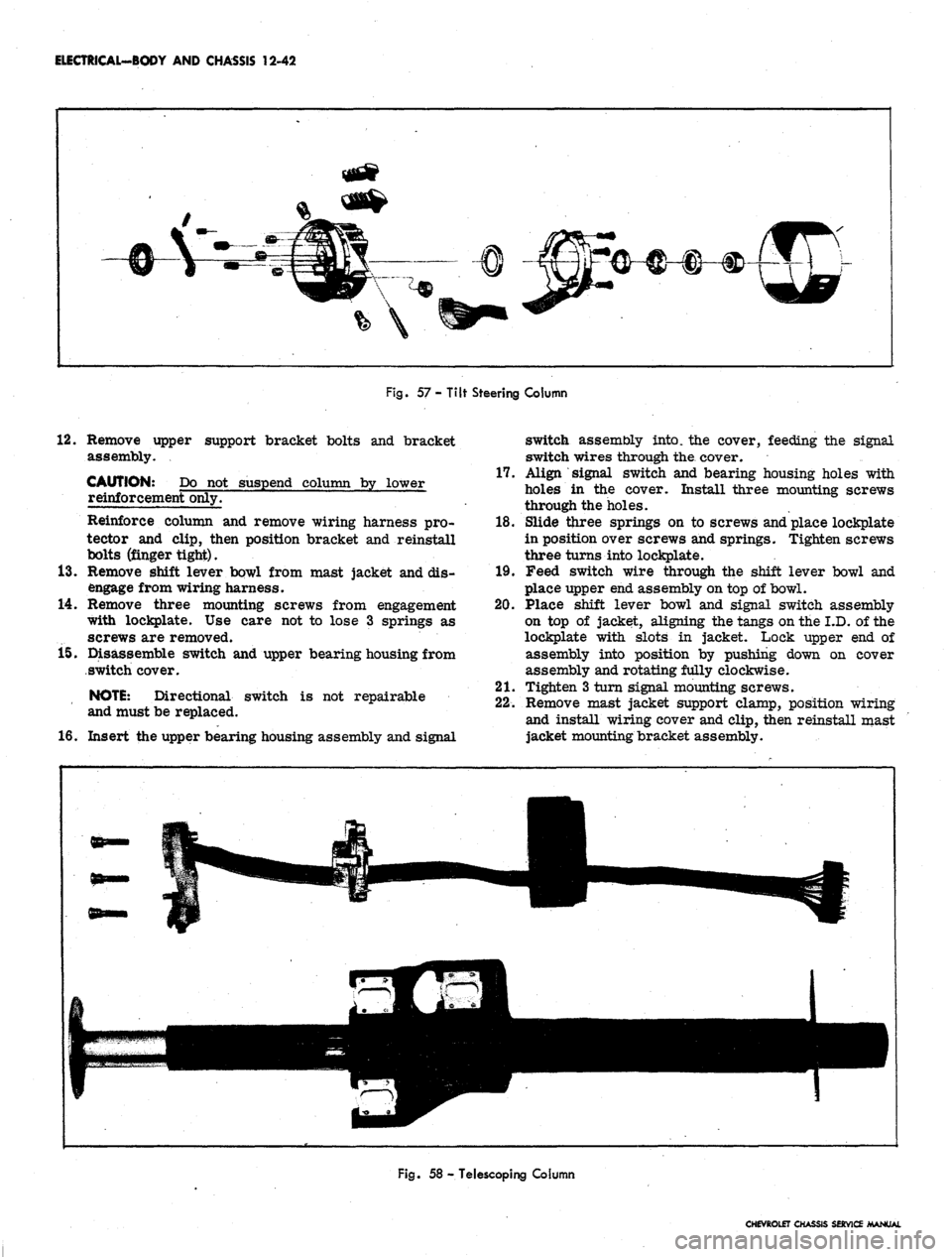
Fig.
57 - Tilt Steering Column
12.
Remove upper support bracket bolts and bracket
assembly.
CAUTION: Do not suspend column by lower
reinforcement only.
Reinforce column and remove wiring harness pro-
tector and clip, then position bracket and reinstall
bolts (finger tight).
13.
Remove shift lever bowl from mast jacket and dis-
engage from wiring harness.
14.
Remove three mounting screws from engagement
with lockplate. Use care not to lose 3 springs as
screws are removed.
15.
Disassemble switch and upper bearing housing from
switch cover.
NOTE:
Directional switch is not repairable
and must be replaced.
16.
Insert the upper bearing housing assembly and signal
switch assembly into, the cover, feeding the signal
switch wires through the. cover.
17.
Align signal switch and bearing housing holes with
holes in the cover. Install three mounting screws
through the holes.
18.
Slide three springs on to screws and place lockplate
in position over screws and springs. Tighten screws
three turns into lockplate.
19.
Feed switch wire through the shift lever bowl and
place upper end assembly on top of bowl.
20.
Place shift lever bowl and signal switch assembly
on top of jacket, aligning the tangs on the I.D. of the
lockplate with slots in jacket. Lock upper end of
assembly into position by pushing down on cover
assembly and rotating fully clockwise.
21.
Tighten 3 turn signal mounting screws.
22.
Remove mast jacket support clamp, position wiring
and install wiring cover and clip, then reinstall mast
jacket mounting bracket assembly.
Fig.
58 - Telescoping Column
CHEVROLET CHASSIS SERVICE MANUAL
Page 555 of 659

ELECTRICAL-BODY AND CHASSIS 12-43
23.
Install
MCtT
ring over steering shaft using snap ring
installer J-22659 (refer to Section 9).
NOTE: Be sure retaining ring is completely
seated into groove.
24.
Install dial pointer on Chevrolet and Chevelle models
equipped with automatic transmission (if applicable).
25.
Install dial indicator and lamp assembly on Camaro
and Chevy n models equipped with automatic
transmission.
26.
Install mast jacket lower trim covers (if applicable).
27.
Install hazard warning knob and turn signal lever.
28.
Install shift lever.
29.
Install steering wheel.
30.
Install multiple connector to switch wiring using old
harness for wire color guide and connect to body
harness connector.
31.
Connect battery ground cable and check operation of
assembly.
Tilt Steering Column (Fig. 57)
Chevrolet, Chevelle and Camaro
1.
Disconnect battery ground cable.
2.
Disconnect directional switch wiring harness from
body harness at multiple connector under instrument
panel.
3.
Remove steering wheel assembly (refer to Steering,
Section 9).
4.
Remove preload spring and cancelling cam from end
of shaft.
5.
Remove shift lever pin and lever from steering col-
umn (except floor shift).
6. Remove directional le*ver screw and lever.
7.
Push in hazard warning knob and unscrew knob.
8. On Camaro models equipped with automatic trans-
mission, remove quadrant dial and lamp assembly
from column.
9. Remove mast jacket trim cover
(s).
10.
On Chevrolet and Chevelle models with automatic
transmission, loosen set screw and remove quadrant
dial pointer.
11.
Assemble slide hammer Tool J-6585-1 to turn signal
cover remover Tool J-21486. Place cover remover
over turn signal cover, tighten clamp, and pull cover
from end of column with slide hammer (Refer to
Steering, Section 9).
12.
Remove three switch mounting screws, noting short
length of top screw.
13.
Cut multiple connector from switch wiring and slide
switch from end of column.
14.
To install new switch, feed wiring through the bear-
ing housing, around support, and through shift bowl
and shroud.
15.
Feed through wiring protector. If clearance is not
sufficient loosen mast jacket bracket retaining bolts.
16.
Insert switch wiring terminals in multiple connector.
Use old connector
and
wiring for color guide.
17.
Position switch and install three mounting screws
with short screw in top position.
18.
Be sure hazard warning switch is pushed in, then
install turn signal cover using special Tool J-21853.
On automatic columns align key in cover with keyway
in bearing housing.
19.
Install turn signal lever, hazard warning knob and
tilt lever.
20.
Install shift lever and roll pin (where applicable).
21.
Install dial pointer on Chevrolet and Chevelle. On
Camaro install dial indicator and lamp assembly.
22.
Install trim covers and retaining screws.
23.
Install cancelling cam and preload spring.
24.
Install steering wheel (Refer to Section 9).
25.
Connect switch wiring to body harness under instru-
ment panel.
26.
Connect battery ground cable and check operation of
unit.
Standard and Telescoping Steering Column
Corvette (Fig. 58)
1.
Disconnect battery ground cable.
2.
Disconnect signal switch harness wiring from chas-
sis wiring harness at multiple connector under in-
strument panel.
3.
Remove steering wheel assembly as outlined in
Steering, Section 9.
4.
Remove preload spring and cancelling cam.
5.
Remove directional signal lever screw and lever.
6. Push in hazard warning knob, unscrew and remove
knob.
7.
Remove lower trim cover retaining screws and
cover.
8. Remove retaining ring, thrust and wave washers
from upper end of shaft.
9. Cut wiring above connector.
10.
Remove three switch mounting screws, slide switch,
cover and upper bearing housing from column, pull-
ing wire through protector and escutcheon.
11.
To install replacement switch, assemble upper bear-
ing housing and turn signal switch into switch cover,
then feed wiring through escutcheon and protector
until switch can be positioned on mast jacket.
12.
With switch positioned on mast jacket, install three
switch mounting screws.
13.
Install thrust and wave washers and snap lock ring
in place.
14.
Install turn signal lever and hazard warning knob.
15.
Install cancelling cam and upper bearing preload
spring on steering shaft.
16.
Install steering wheel assembly.
NOTE:
Be sure directional signal switch is in
neutral position before installing wheel.
17.
Install connector on directional signal wiring har-
ness and connect to body harness connector.
CHEVROLET CHASSIS SERVICE
Page 560 of 659

ELECTRICAL-BODY
AND CHASSIS 12-48
NOTE:
Screws, nuts and lock washers for re-
assembling cover to wiper are contained in a
service repair package.
6. Remove output gear and shaft assembly, then slide
,
intermediate gear and pinion assembly off shaft.
7. If necessary, remove terminal board and park switch
assembly as follows:
a. Unsolder motor leads from terminals. Coding of
motor leads is not necessary on single-speed
wipers.
b.
Drill out rivets securing terminal board and park
switch ground strap to mounting plate.
NOTE:
Screws, nuts and washers for attaching
a replacement terminal board-park switch as-
sembly are included with the replacement
assembly.
Motor
(Fig. 65)
1.
Follow Steps 1 through 7b under gear box
disassembly.
2.
Remove, motor through bolts, tap motor frame
lightly, and remove motor from mounting plate.
3.
Remove brush spring tension (fig. 68), slide arma-
ture and end plate from motor frame. Pull end
plate from armature.
NOTE:
Thrust plug located between armature
shaft and end plate.
4.
Remove end play adjusting washers from armature,
noting arrangement for proper reinstallation.
INSPECTION
Check and inspect all parts for serviceability, replace
as necessary. All parts can be replaced individually
except motor frame and field, which is serviced as an
assembly. Service kits also provide screws, nuts and
washers to replace gear cpver and terminal board rivets.
ASSEMBLY
Refer to Figure 65 for exploded view of motor and gear
train.
Motor
Reassemble motor using reverse of disassembly
procedures.
NOTE:
Armature end play is controlled by end
play washers. See Figure 69 for proper assem-
bly of end play washers. Lubricate armature
shaft bushings with light machine oil.
Gear Box
1.
Assemble gear box using reverse of disassembly
procedure.
NOTE:
Lubricate gear teeth with Delco Cam
and Ball Bearing lubricant or equivalent. Be
sure cover is properly located over dowel pins
and be sure to reinstall ground strap.
2.
Place wiper in park position and install crank arm
on output shaft, rotate crank so alignment marks line
up with those on cover (fig. 70).
3.
Replace retaining nut, place crank arm in vise,
tighten retaining nut.
WINDSHIELD
WASHER PUMP
The windshield washer pump used on the 2-speed Type
"E"
wiper motor assembly is a positive displacement
type pump employing a small bellows, bellows spring and
valve arrangement. The pumping mechanism is actuated
by a four lobe cam and driven directly by the wiper motor
(fig. 71). Thus, when the wiper is operated, this rotor is
always turning with the gear. Programming is accom-
plished electrically and mechanically by a relay assembly
and ratchet wheel arrangement.
GEAR
CASE GROOVES
r— CRANK ARM GROOVES
WASHER PUMP
Ha
ACTUATOR
IB
•
^^HTS4LOBE
•MMBW
CAM
Fig.
70 - Wiper Crank Arm in Park Position
Fig.
71 - Wash Pump Drive Cam and Actuator
CHEVROLET
CHASSIS SERVICE MANUAL
Page 561 of 659

ELECTRICAL-BODY
AND
CHASSIS
12-49
BELLOWS
AND
SPRING
HOUSING
COIL
AND
POLE
ASSEMBLY
VALVE
ASSEMBLY
RATCHET
PAWL
ASSEMBLY
RATCHET
WHEEL
ACTUATOR
PLUNGER
ARM
ACTUATOR
PIN
HOLDING CONTACTS
OPEN
RAMP TANG
PLUNGER
ARM
Fig.
73 -
Releasing
Pump from
Lockout Position
Fig.
72 -
Washer
Pump
Mechanism
REMOVAL AND INSTALLATION
Removal of the washer pump from the wiper motor
consists of:
1.
Disconnect wiring harness and washer hoses from
washer.
2.
Remove the two pump-to-wiper retaining screws and
remove washer from wiper (fig. 66).
3.
Reverse removal procedure to install assembly.
DISASSEMBLY-ASSEMBLY
Refer to Figure
1.
Remove washer pump cover.
2.
Relay
a. To remove relay unsolder coil leads from
terminals.
NOTE:
No coil polarity is necessary when re-
soldering coil leads.
b.
Remove coil retainer clip and slip coil assembly
out of mounting bracket.
3.
Ratchet Pawl
a. To remove ratchet pawl disengage spring from
ratchet pawl and slide ratchet pawl from shaft.
CAUTION: Be sure spring is properly assem-
bled before replacing washer pump cover.
Terminal Board
a. Remove terminal board attaching screws, ratchet
dog and board from washer base.
Ratchet Wheel
a. Remove lock ring from shaft.
b.
Slide ratchet wheel from shaft.
Valve Assembly
a. To remove valve assembly remove screws that
secure valve assembly to bellows housing.
CAUTION: It may be necessary to carefully
pry bellows lip out of the valve body groove.
Bellows
a. To remove bellows first remove valve assembly.
b.
Manually operate pump clockwise to release pump
from 'lock-out" position (fig, 73).
c. Hold bellows plunger arm from moving, then push
in against bottom of bellows with thumb and twist
bellows spring from housing.
Actuator Pin
a. Remove actuator pin retaining spring and slide
pin from washer base.
Reverse disassembly procedure to assemble washer.
DEPRESSED PARK 2-SPEED WIPER
CHEVROLET
GENERAL DESCRIPTION
The Type "C" two speed electric wiper assembly (fig.
74) incorporates a depressed park type (blades park
against windshield lower molding when the motor is
turned off) motor and gear train. The wiper has a com-
pound wound 12 volt motor and a gear box section con-
taining the gear mechanism and relay control. The motor
armature is fitted with a worm gear which drives the
main gear assembly and crank arm.
The relay control, consisting of a relay coil, relay
armature and switch assembly, is located in the gear box
section bid controls the starting and stopping of the wiper
through a latching mechanism (fig. 75).
An electric washer pump is mounted on the gear box
section of the wiper and is driven by the wiper unit gear
assembly (fig* 75).
The overhaul procedures for the wiper are broken down
into three major areas: The motor section, gear box
section and washer pump section. Each section maybe
serviced independently of the other.
CHEVROLET CHASSIS SEftVKX
Page 571 of 659

ELECTRICAL-BODY AND CHASSIS 12-59
NOTE: it may be necessary at this point to
rotate the armature slightly before the worm
will engage with the worm gear.
5.
Rotate the case as required to align the holes in the
case with those in the housing.
6. Being very careful not to pinch any of the motor
leads between the case and edge of the field, push the
case onto the field until it butts against the housing.
7.
Secure case to housing with two tie bolts.
8. Install end-play adjusting screws and locknut and
adjust end-play by tightening adjusting screw finger
tight; then back off screw 1/4 turn and tighten
locknut.
GEAR BOX SECTION
The gear box section is subdivided into two areas, (A)
the relay control and latching mechanism and (B) the
drive gear mechanism.
A—Relay Control and Latching Mechanism:
Disassembly
1.
Remove four screws which secure the washer pump
assembly to gear box.
2.
Refer to Figure 97. Disconnect coil spring, remove
"E"
ring and lift the latch and follower assembly off
the pivot pin and relay armature.
3.
Remove the stop assembly retaining screw. This
will permit the stop assembly to be moved as neces-
sary to allow clearance for removing the relay con-
trol assembly.
Fig.
100 - Assembly Gear and Eccentric Shaft
4.
Remove the two screws that secure the relay control
assembly.
5.
Lift the relay control assembly out of the gearbox
and unsolder leads as required.
Reassembly
1.
Solder existing green and yellow wiper leads to relay
control switch and solder the relay coil Iea4 to the
wiper unit terminal board as shown in Figure
B—Drive Gear Mechanism:
Disassembly
Refer to Figure 84 unless other wise specified.
1.
Remove the crank arm retaining nut (No. 1).
2.
Remove crank arm (No. 2), snap ring (No. 3) and
rubber seal (No. 4).
3.
Remove the retaining ring (No. 5), end play washers
(No.
6), shield (No. 7) and spacer washer (No. 8).
4.
Follow Steps 1 through 3 under relay control and
latch mechanism disassembly.
Fig.
99 - Lock and Drive Pawi Mechanism
Fig.
101 - Drive Gear Mechanism Installed
CHEVROLET CHASSIS SER\