2024 MAZDA CX90 Start
[x] Cancel search: StartPage 271 of 687
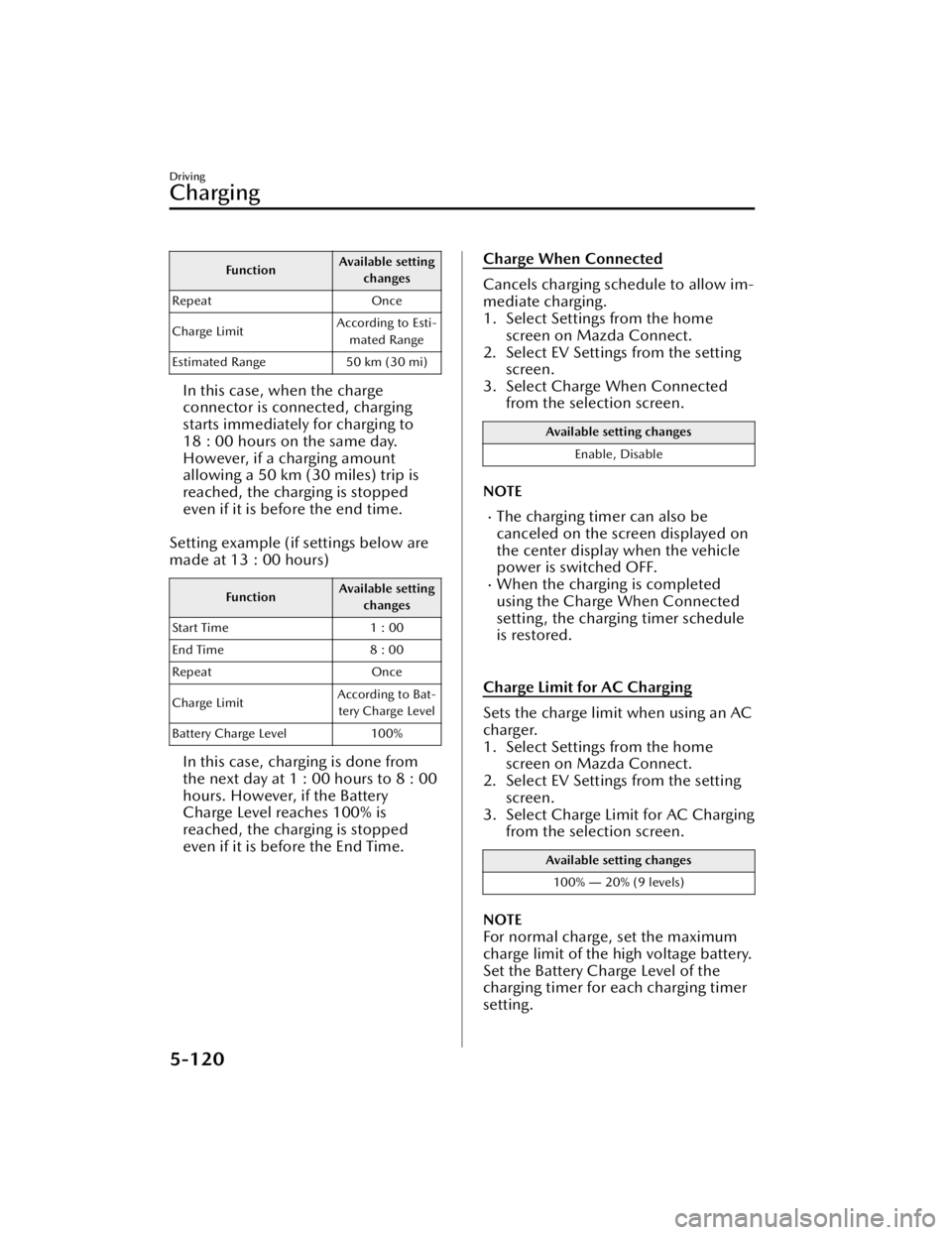
FunctionAvailable setting
changes
Repeat Once
Charge Limit According to Esti-
mated Range
Estimated Range 50 km (30 mi)
In this case, when the charge
connector is connected, charging
starts immediately for charging to
18 : 00 hours on the same day.
However, if a charging amount
allowing a 50 km (30 miles) trip is
reached, the charging is stopped
even if it is before the end time.
Setting example (if settings below are
made at 13 : 00 hours)
Function Available setting
changes
Start Time 1 : 00
End Time 8 : 00
Repeat Once
Charge Limit According to Bat-
tery Charge Level
Battery Charge Level 100%
In this case, charging is done from
the next day at 1 : 00 hours to 8 : 00
hours. However, if the Battery
Charge Level reaches 100% is
reached, the charging is stopped
even if it is before the End Time.
Charge When Connected
Cancels charging schedule to allow im-
mediate charging.
1. Select Settings from the home screen on Mazda Connect.
2. Select EV Settings from the setting
screen.
3. Select Charge When Connected from the selection screen.
Available setting changes
Enable, Disable
NOTE
The charging timer can also be
canceled on the screen displayed on
the center display when the vehicle
power is switched OFF.
When the charging is completed
using the Charge When Connected
setting, the charging timer schedule
is restored.
Charge Limit for AC Charging
Sets the charge limit when using an AC
charger.
1. Select Settings from the home screen on Mazda Connect.
2. Select EV Settings from the setting
screen.
3. Select Charge Limit for AC Charging from the selection screen.
Available setting changes
100% ― 20% (9 levels)
NOTE
For normal charge, set the maximum
charge limit of the high voltage battery.
Set the Battery Charge Level of the
charging timer for each charging timer
setting.
Driving
Charging
5-120
CX-90_8KG7-EA-22L_Edition1_new 2022-11-17 16:05:04
Page 272 of 687

Climate control timer
The climate control timer is a function
which operates the cooling or heating
system automatically according to a
preset time. The power consumption
of the air conditioner after starting to
drive the vehicle is reduced by
operating the air conditioner and
providing a comfortable temperature
in the cabin before driving.
Refer to Convenient Ways to Use the
Fully Automatic Air-Conditioning on
page 6-12.
Charge Connector Lock
The charge connector lock is a function
which locks the charge connector con-
nected to the vehicle so that it cannot
be pulled out. You can also select the
lock conditions for the charge connec-
tor according to locations and situa-
tions.
1. Select Settings from the homescreen on Mazda Connect.
2. Select EV Settings from the setting screen.
3. Select Charge Connector Lock from the selection screen.
4. Set the lock condition from the se- lection screen.
Available setting changes
Locked When Charging
Unlocks connector when charging is complete
or vehicle is unlocked.
Locked When Connected
Unlocks connector only when vehicle is un-
locked.
Available setting changes
Off
Charge connector remains unlocked at all
times.
Functions using a Smartphone
You can check the remaining high
voltage battery power, operate the
charging, and operate the air
conditioner remotely by a Smartphone
remote control operation using the
Connected Service. For details, consult
an Authorized Mazda Dealer.
Driving
Charging
5-121
CX-90_8KG7-EA-22L_Edition1_new 2022-11-17 16:05:04
Page 284 of 687

The target object is extremely
small.
The target object is extremely low/
high.
A vehicle approaches while
turning.
A vehicle that has stopped
suddenly starts to move.
Multiple objects move at the same
time.
The bumper around a front side
radar sensor is deformed.
Foreign matter is adhering to the
bumper around a front side radar
sensor.
The temperature near a front side
radar sensor is extremely hot.
The front side radar sensors may not
detect the following target objects.
Animals.Pedestrians.Bicycles and small motorcycles
moving at a low speed.
Shopping carts.Stationary objects on the road or
roadside.
Vehicles with shapes that may not
reflect radar waves.
Rear side radar sensors
The following systems utilize rear side
radar sensors.
Blind Spot Monitoring (BSM)Blind Spot Monitoring (BSM) Vehicle
Exit Warning
Rear Cross Traffic Alert (RCTA)Smart Brake Support (SBS) Rear
Crossing
Emergency Lane Keeping (ELK) Blind
Spot Assist
NOTE
When any of the following
conditions is met, the rear side radar
sensors may not be able to detect
target objects.
During inclement weather.The vehicle is driven on a sharp
curve or on bumpy roads.
Radar sensor from an adjacent
vehicle causes radio wave
interference.
The detection range of a front side
radar sensor is obstructed by an
adjacent wall or vehicle, or the
radar is reflected.
A vehicle suddenly enters the
detection range from the front or
side of your vehicle.
The target object is extremely
small.
The target object is extremely low/
high.
A vehicle approaches while
turning.
A vehicle that has stopped
suddenly starts to move.
Multiple objects move at the same
time.
The bumper around a rear side
radar sensor is deformed.
Foreign matter is adhering to the
bumper around a rear side radar
sensor.
The temperature near a rear side
radar sensor is extremely hot.
When towing a trailer.The rear side radar sensors may not
detect the following target objects.
Animals.Pe de st r ia ns .Bicycles and small motorcycles
moving at a low speed.
Shopping carts.Stationary objects on the road or
roadside.
Driving
Radar Sensors
5-133
CX-90_8KG7-EA-22L_Edition1_new 2022-11-17 16:05:04
Page 311 of 687

Front Cross Traffic Alert(FCTA)
*
The FCTA assists the driver in checking
both sides of the vehicle when the
vehicle starts to drive at an
intersection. When a vehicle
approaching from the blind spots on
the front left or right side is detected, a
screen display and warning sound
notify the driver of the danger.
Warnings and Cautions
for Using the Front Cross Tra ffi c Alert (FCTA)
WARNING
Always check the surrounding area
visually when the vehicle starts to
drive at an intersection.
Due to certain limitations with the
operation of the FCTA, the screen
display and warning sound might be
delayed even though there is a vehicle
approaching from a blind spot. Always
make it your responsibility as a driver
to check the left and right sides.
Driving
Front Cross
Tra ffi c Alert (FCTA)
5-160*Some models.
CX-90_8KG7-EA-22L_Edition1_new
2022-11-17 16:05:04
Page 318 of 687

How to Use the Mazda Radar Cruise Control (MRCC)
MRCC operation conditions
The MRCC can be set when all of the following conditions are met.
The brake pedal is not depressed.The vehicle speed is about 0 km/h (0 mph) to 145 km/h (90 mph).The Hill Descent Control is not operating.
Setting the MRCC
1. Press the MRCC switch to turn the system on.
When the system is on, the MRCC standby indication (white) is displayed on
the screen.
2. Accelerate to the desired speed.
3. Set the vehicle speed by pressing the RES switch up (SET+) or down (SET-).
Constant speed driving starts when the vehicle speed is set. In addition, the set
speed is displayed on the screen, and the MRCC standby indication (white)
changes to the MRCC set indication (green) .
If a vehicle ahead is detected while traveling at a constant speed, the system
switches to headway control. The vehicle ahead indication is displayed on the screen
while in headway control.
Driving
Mazda Radar Cruise Control (MRCC)
5-167
CX-90_8KG7-EA-22L_Edition1_new 2022-11-17 16:05:04
Page 320 of 687

If the distance between vehicles control is disabled using Mazda Connect, the
system switches to the cruise control. At this time, the MRCC switch functions as
the cruise control switch.
Refer to the Settings section in the Mazda Connect Owner's Manual.
If the vehicle power is switched OFF while the distance between vehicles control is
disabled, the distance between vehicles control is enabled automatically the next
time the vehicle power is switched ON.
If the vehicle ahead stops during headway control, your vehicle in headway control
also stops. When the vehicle is stopped, the MRCC indicator light
in the
instrument cluster turns on.
When the vehicle ahead accelerates from a stop and one of the following operations
is performed, your vehicle starts driving.
Press the RES switch.Depress the accelerator pedal.
If you do not start driving the vehicle af ter the vehicle ahead has resumed driving,
the system urges the driver to resume driving.
NOTE
If the vehicle ahead resumes driving within 3 seconds after the vehicle was
stopped by the system, your vehicle also resumes driving automatically.
If the vehicle is stopped by the system continuously for 10 minutes or longer, the
parking brake is applied automatically. At this time, the MRCC is canceled.
Even if the MRCC is canceled while the vehicle is stopped, the vehicle is held in its
stopped position.
Refer to AUTOHOLD on page 5-63.
If the MRCC is canceled while the vehicle is stopped and there is no vehicle
ahead, you cannot resume driving the ve hicle using the RES switch. Depress the
accelerator pedal and start driving the vehicle.
Changing the set vehicle speed
Changing the set vehicle speed using the RES switch
Press the RES switch up (SET+) or down (SET-) to the desired speed.
Press and release immediately: 1 km/h (1 mph)Press and hold: 10 km/h (5 mph)
Changing the set vehicle speed using the accelerator pedal
Depress the accelerator pedal until the vehicle speed reaches the desired speed,
then press the RES switch up (SET+) or down (SET-).
Reading the set vehicle speed from the speed limit sign using the RES switch
Press the RES switch when the speed limit sign set indication
turns on.
Driving
Mazda Radar Cruise Control (MRCC)
5-169
CX-90_8KG7-EA-22L_Edition1_new 2022-11-17 16:05:04
Page 328 of 687

How to Use the Cruising & Traffic Support (CTS)
CTS operation conditions
The CTS speed can be set when all of the following conditions are met.
The brake pedal is not depressed.The vehicle speed is about 0 km/h (0 mph) to 145 km/h (90 mph).The Hill Descent Control is not operating.The Mazda Radar Cruise Control is available.
Setting the CTS
1. Press the CTS switch to turn the system on.
When the system is on, the CTS standby indication (white) is displayed on
the screen.
2. Accelerate to the desired speed.
3. Set the vehicle speed by pressing the RES switch up (SET+) or down (SET-).
Constant speed driving starts when the vehicle speed is set. In addition, the set
speed is displayed on the screen, and the CTS standby indication (white)
changes to the CTS set indication (green).
If a vehicle ahead is detected while traveling at a constant speed, the system
switches to headway control. The vehicle ahead indication is displayed on the screen
while in headway control.
Driving
Cruising & Tra ffi c Support (CTS)
5-177
CX-90_8KG7-EA-22L_Edition1_new
2022-11-17 16:05:04
Page 332 of 687

If the vehicle ahead stops during headway control, your vehicle in headway control
also stops. While the vehicle is stopped, the CTS indicator light
in the
Instrument cluster turns on.
When the vehicle ahead accelerates from a stop and one of the following operations
is performed, your vehicle starts driving.
Press the RES switch.Depress the accelerator pedal.
If you do not start driving the vehicle af ter the vehicle ahead has resumed driving,
the system urges the driver to resume driving.
NOTE
If the vehicle ahead resumes driving within 3 seconds after the vehicle was
stopped by the system, your vehicle also resumes driving automatically.
If the vehicle is stopped by the system continuously for 10 minutes or longer, the
parking brake is applied automatically. At this time, the CTS is canceled.
Even if the CTS is canceled while the vehicle is stopped, the vehicle is held in its
stopped position.
Refer to AUTOHOLD on page 5-63.
If the CTS is canceled while the vehicle is stopped and there is no vehicle ahead,
you cannot resume driving the vehicl e using the RES switch. Depress the
accelerator pedal and start driving the vehicle.
Changing the set vehicle speed
Changing the set vehicle speed using the RES switch
Press the RES switch up (SET+) or down (SET-) to the desired speed.
Press and release immediately: 1 km/h (1 mph)Press and hold: 10 km/h (5 mph)
Changing the set vehicle speed using the accelerator pedal
Depress the accelerator pedal until the vehicle speed reaches the desired speed,
then press the RES switch up (SET+) or down (SET-).
Reading the set vehicle speed from the speed limit sign using the RES switch
Press the RES switch when the speed limit sign set indication
turns on.
Driving
Cruising & Tra ffi c Support (CTS)
5-181
CX-90_8KG7-EA-22L_Edition1_new
2022-11-17 16:05:04