2024 MAZDA CX90 Start
[x] Cancel search: StartPage 252 of 687

CAUTION
Each tire, including the spare (if
provided), should be checked
monthly when cold and inflated to
the
inflation pressure recommended
by the vehicle manufacturer on the
vehicle placard or tire inflation
pressure label. (If your vehicle has
tires of a different size than the size
indicated on the vehicle placard or
tire inflation pressure label, you
should determine the proper tire
inflation pressure for those tires.)
As an added safety feature, your
vehicle has been equipped with a
tire pressure monitoring system
(TPMS) that illuminates a low tire
pressure telltale when one or more
of your tires is significantly
under-inflated. Accordingly, when
the low tire pressure telltale
illuminates, you should stop and
check your tires as soon as possible,
and inflate them to the proper
pressure. Driving on a significantly
under-inflated tire causes the tire to
overheat and can lead to tire failure.
Under-inflation also reduces fuel
efficiency and tire tread life, and may
affect the vehicle's handling and
stopping ability.
Please note that the TPMS is not a
substitute for proper tire
maintenance, and it is the driver's
responsibility to maintain correct tire
pressure, even if under-inflation has
not reached the level to trigger
illumination of the TPMS low tire
pressure telltale.
Your vehicle has also been equipped
with a TPMS malfunction indicator to
indicate when the system is not
operating properly.
The TPMS malfunction indicator is
combined with the low tire pressure
telltale. When the system detects a
malfunction, the telltale will flash for
approximately one minute and then
remain continuously illuminated.
This sequence will continue upon
subsequent vehicle start-ups as long
as the malfunction exists. When the
malfunction indicator is illuminated,
the system may not be able to detect
or signal low tire pressure as
intended. TPMS malfunctions may
occur for a variety of reasons,
including the installation of
replacement or alternate tires or
wheels on the vehicle that prevent
the TPMS from functioning properly.
Always check the TPMS malfunction
telltale after replacing one or more
tires or wheels on your vehicle to
ensure that the replacement or
alternate tires and wheels allow the
TPMS to continue to function
properly.
To avoid false readings, the system
samples for a little while before
indicating a problem. As a result it
will not instantaneously register a
rapid tire deflation or blow out.
Driving
Tire Pressure Monitoring System (TPMS)
5-101
CX-90_8KG7-EA-22L_Edition1_new 2022-11-17 16:05:04
Page 256 of 687

Always close the door and windows
when refueling. If a fire occurs with
the doors or windows open, the
flames may spread into cabin.
Do not spill fuel on the vehicle while
refueling. It may cause discoloration,
stains, or paint damage.
Do not use any non-genuine
fuel-filler cap. Use of a non-genuine
fuel-filler cap may lead to a
malfunction in the fuel system or
emission system.
(U.S.A. and Canada)
It may also cause the check engine
light in the instrument cluster to
illuminate.
When using an automatic car wash
or a high water pressure car wash,
make sure that the fuel lid is closed
and lock the doors. Otherwise, the
fuel lid may open unexpectedly and
become damaged.
(U.S.A. and Canada)
If the check fuel cap warning light
illuminates, the fuel-filler cap may
not be properly installed. If the
warning light illuminates, park your
vehicle safely off the right-of-way,
remove the fuel-filler cap and
reinstall it correctly. After the cap has
been correctly installed, the fuel cap
warning light may continue to
illuminate until a number of driving
cycles have been completed. A drive
cycle consists of starting the engine
(after four or more hours with the
engine off) and driving the vehicle on
city and highway roads. Continuing
to drive with the check fuel cap
warning light illuminated could cause
the check engine light to illuminate
as well.Refueling
1. Close all the doors, windows, and
the liftgate.
2. Switch the vehicle power OFF.
3. Press the fuel-filler lid opener switch.
“Preparing for Refuelling” is
displayed in the instrument cluster.
4. Make sure that the indication in the instrument cluster changes to
“Ready to Refuel”.
5. Unlock the driver's door.
6. Press the fuel-filler lid.
The fuel-filler lid opens.
Driving
Refueling
5-105
CX-90_8KG7-EA-22L_Edition1_new 2022-11-17 16:05:04
Page 260 of 687

Warnings and Cautionsfor Using the Emission Control System
WARNING
Never park over or near anything
flammable.
Parking over or near anything
flammable, such as dry grass, is
dangerous. Even with the engine
turned off, the exhaust system remains
very hot after normal use and could
ignite anything flammable. A resulting
fire could cause serious injury or death.
CAUTION
Ignoring the following precautions
could cause lead to accumulate on the
catalyst inside the converter or cause
the converter to get very hot. Either
condition will dama
ge the converter
and cause poor performance.
USE ONLY UNLEADED FUEL.
Do not drive your Mazda with any
sign of engine malfunction.
Do not coast if the vehicle power is
switched OFF.
Do not descend steep grades in gear
if the vehicle power is switched OFF.
Do not operate the engine at high
idle for more than 2 minutes.
Do not tamper with the emission
control system. All inspections and
adjustments must be made by a
qualified technician.
Do not push-start or pull-start this
vehicle.
Warnings and Cautions
for Engine Exhaust
(Carbon monoxide)
WARNING
Do not drive your vehicle if you smell
exhaust gas inside the vehicle:
Engine exhaust gas is dangerous. This
gas contains carbon monoxide (CO),
which is colorless, odorless, and
poisonous. When inhaled, it can cause
loss of consciousness and death. If you
smell exhaust gas inside the vehicle,
keep all windows fully open and
contact an Authorized Mazda Dealer
immediately.
Do not run the engine when inside an
enclosed area:
Running the engine inside an enclosed
area, such as a garage, is dangerous.
Exhaust gas, which contains poisonous
carbon monoxide, could easily enter
the cabin. Loss of consciousness or
even death could occur.
Open the windows or adjust the
heating or cooling system to draw
fresh air when idling the engine:
Exhaust gas is dangerous. When the
vehicle is stopped with the windows
closed and the engine running for a
long time even in an open area,
exhaust gas, which contains poisonous
carbon monoxide, could enter the
cabin. Loss of consciousness or even
death could occur.
Driving
Refueling
5-109
CX-90_8KG7-EA-22L_Edition1_new 2022-11-17 16:05:04
Page 261 of 687

Clear snow from underneath and
around your vehicle, particularly the
tail pipe, before starting the engine:
Running the engine when a vehicle is
stopped in deep snow is dangerous.
The exhaust pipe could be blocked by
the snow, allowing exhaust gas to
enter the cabin. Because exhaust gas
contains poisonous carbon monoxide,
it could cause loss of consciousness or
even death to occupants in the cabin.
Driving
Refueling
5-110
CX-90_8KG7-EA-22L_Edition1_new2022-11-17 16:05:04
Page 267 of 687

How to Perform Charging
It can be charged with a maximum of
7.2 kW of power.
When charging is started after the high
voltage battery warning indication/
warning light turns on, the time until
fully charged is as follows.
(7.2 kW normal charging)
About 2.5 hours
For charging, the charging timer
function can be used to charge
automatically from start to finish. For
details on use, refer to [Charging
Settings].
NOTE
Installation of charging equipment is
required for 7.2 kW normal charging.
Consult an Authorized Mazda Dealer
for details.
If a power outage occurs while
charging, remove the charge plug
and the charge connector and start
charging from the beginning again.
Make sure that no water has
accumulated in the charge connector
and the charging port before
charging. If any foreign matter enters
the charge connector or the charging
port, do not start charging and
consult an Authorized Mazda Dealer.
1. Switch the vehicle power OFF.
2.
3. Open the charging port cap.
4. Connect the charge plug to the outlet.
5. Connect the charge connector to the charging port.
Charging starts after connection is
completed.
NOTE
When the charging timer is set,
charging does not start even if the
charge connector is connected.
When you prefer to start charging
immediately, use the charging timer
cancellation function.
Make sure to lock all the doors
before leaving the vehicle while
charging.
6. When charging is finished, unlock the door to unlock the charge
connector.
7. Remove the charge connector.
8. Close the charging port cap.
9. Close the charging port lid.
10.Disconnect the charge plug.
Driving
Charging
5-116
CX-90_8KG7-EA-22L_Edition1_new 2022-11-17 16:05:04
Page 268 of 687

Charge indicator
The illumination/flash pattern of the
charge indicator can be checked using
the labels on the charge lid.
Charge indicator
illumination/flash pattern Content
— OFF Charging is possible.
(White) ON
Turns on when waiting for
starting to charge.
(White) Flashes
slowly The brightness changes
when the charging timer is
set.
(Green)
Flashes
slowly The brightness changes
during charging.
(Green)
ONTu r n s o n w h e n c h a rg i n g i s
completed.
Turns off after a certain pe-
riod of time has passed
since charging was com-
pleted.
(Amber)
FlashesFlashes when the charging
connector is connected and
the selector lever is in a po-
sition other than P.
Shift the selector lever to
the P position.
Charge indicator
illumination/
flash pattern Content
(Amber)
ONTurns on if there is a prob-
lem with the charging sys-
tem when the charging
connector is connected.
Wait a few minutes then re-
connect the charging con-
nector.
(Red)
ONTurns on if there is a prob-
lem with the charging sys-
tem and the charging port
lid is opened or the charg-
ing connector is connected.
Have your vehicle inspect-
ed by an Authorized Mazda
Dealer.
Charge status screen
When the driver's door is opened
while the charge connector is
connected, the charging status is
displayed in the instrument cluster.
1. Charge status icon
2. Message
3. Remaining power of the high
voltage battery (Displayed only
when vehicle power is switched
OFF)
4. Time to complete charging
5. EV maximum driving distance (Displayed only when vehicle
power is switched OFF)
Driving
Charging
5-117
CX-90_8KG7-EA-22L_Edition1_new 2022-11-17 16:05:04
Page 269 of 687

NOTE
When charging is started, the charging
status screen is displayed. The charging
status screen turns off after a certain
period of time passes or the doors or
liftgate is locked. The screen is
displayed again when the doors or
liftgate is unlocked.Convenient Ways to Useof Charging
Charging Schedule
Timer charging is a function which
charges the battery automatically ac-
cording to a preset time.
You can charge the battery using this
function during time periods when
electricity rates are low. In addition,
the maximum charge limit can be set
and changed.
1. Select Settings from the homescreen on Mazda Connect.
2. Select EV Settings from the setting
screen.
3. Select Charging Schedule from the selection screen.
Function Available setting changes
1 ----
Enable, Disa-ble
*1Edit, Delete*2
2 ----
3 ----
4 ----
5 ----
6 ----
7 ----
*1 If a list selected using the cursor has beenset, the item can be Enable or Disable.
*2 Settings can be Edit/Delete by sliding a listselected using the cursor to the right.
NOTE
The charging timer does not work
immediately after the lead-acid
battery is removed or installed, or
when no GPS signal has been
received. When charging without
receiving GPS, charging begins.
When GPS signals are received, the
charging timer becomes operational.
Driving
Charging
5-118
CX-90_8KG7-EA-22L_Edition1_new 2022-11-17 16:05:04
Page 270 of 687
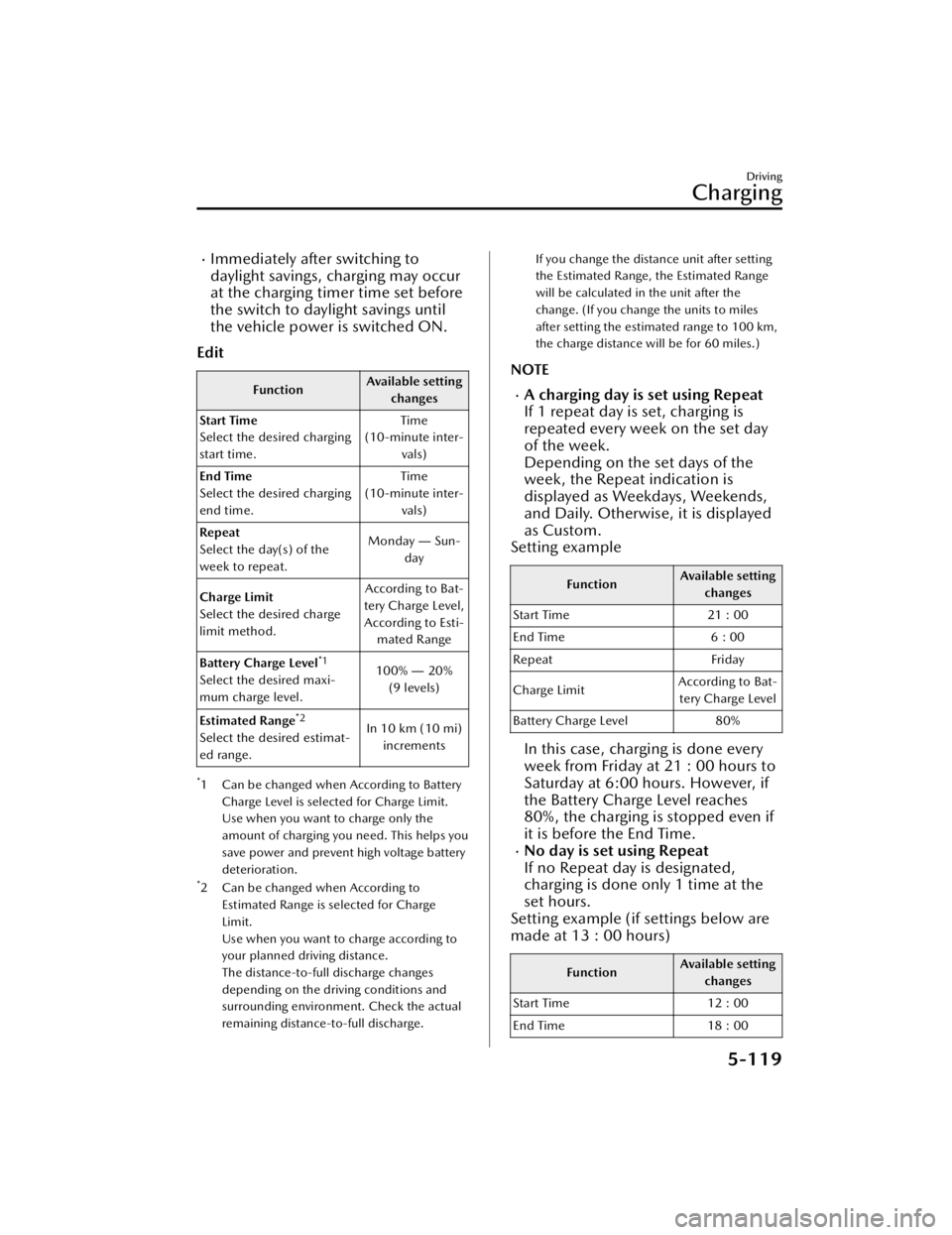
Immediately after switching to
daylight savings, charging may occur
at the charging timer time set before
the switch to daylight savings until
the vehicle power is switched ON.
Edit
Function Available setting
changes
Start Time
Select the desired charging
start time. Time
(10-minute inter- vals)
End Time
Select the desired charging
end time. Time
(10-minute inter- vals)
Repeat
Select the day(s) of the
week to repeat. Monday
― Sun-
day
Charge Limit
Select the desired charge
limit method. According to Bat-
tery Charge Level, According to Esti- mated Range
Battery Charge Level
*1
Select the desired maxi-
mum charge level. 100%
― 20%
(9 levels)
Estimated Range
*2
Select the desired estimat-
ed range. In 10 km (10 mi)
increments
*1 Can be changed when According to Battery
Charge Level is selected for Charge Limit.
Use when you want to charge only the
amount of charging you need. This helps you
save power and prevent high voltage battery
deterioration.
*2 Can be changed when According toEstimated Range is selected for Charge
Limit.
Use when you want to charge according to
your planned driving distance.
The distance-to-full discharge changes
depending on the driving conditions and
surrounding environment. Check the actual
remaining distance-to-full discharge.
If you change the distance unit after setting
the Estimated Range, the Estimated Range
will be calculated in the unit after the
change. (If you change the units to miles
after setting the estimated range to 100 km,
the charge distance will be for 60 miles.)
NOTE
A charging day is set using Repeat
If 1 repeat day is set, charging is
repeated every week on the set day
of the week.
Depending on the set days of the
week, the Repeat indication is
displayed as Weekdays, Weekends,
and Daily. Otherwise, it is displayed
as Custom.
Setting example
Function Available setting
changes
Start Time 21 : 00
End Time 6 : 00
Repeat Friday
Charge Limit According to Bat-
tery Charge Level
Battery Charge Level 80%
In this case, charging is done every
week from Friday at 21 : 00 hours to
Saturday at 6:00 hours. However, if
the Battery Charge Level reaches
80%, the charging is stopped even if
it is before the End Time.
No day is set using Repeat
If no Repeat day is designated,
charging is done only 1 time at the
set hours.
Setting example (if settings below are
made at 13 : 00 hours)
Function Available setting
changes
Start Time 12 : 00
End Time 18 : 00
Driving
Charging
5-119
CX-90_8KG7-EA-22L_Edition1_new 2022-11-17 16:05:04