Page 173 of 687

WARNING
Appropriate disposal of the high voltage battery.
If the high voltage battery is not collected and disposed of appropriately, such as by
leaving it unattended or illegally abando ning it, some other person may touch it
which could cause electrocution leading to serious injury.
Fuel
CAUTION
The e-SKYACTIV PHEV can be driven on electricity, but depending on the driving
conditions and mode, the vehicle will be driven using the engine and will need to
be refueled. Check the remaining amount of fuel and replenish the fuel if
necessary.
Refer to How to Use the Mazda intelligent Drive Select (Mi-Drive) on page 5-96.
Depending on the vehicle usage conditions, fuel may remain in the tank for a long
period of time and the quality of the fuel may change. Refuel at least 25 L of fuel
every 12 months (total amount of refueling for 12 months is at least 25 L), as this
may affect parts of the fuel system and the engine.
If the fuel has not been replenished for a certain period of time and the quality of
the fuel in the fuel tank is expected to change, a message is displayed in the
instrument cluster when the hybrid system is started. When a certain amount of
fuel is consumed, the message displayed in the instrument cluster is no longer
displayed.
Driving
e-SKYACTIV PHEV
5-22
CX-90_8KG7-EA-22L_Edition1_new 2022-11-17 16:05:04
Page 174 of 687

How to Use the
e-SKYACTIV PHEV
Switching the Drive Mode
You can switch the drive mode of the
hybrid system by operating the switch.
TOWING mode/SPORT mode/
NORMAL mode/EV mode/
OFF-ROAD mode
Refer to How to Use the Mazda
intelligent Drive Select (Mi-Drive) on
page 5-96.
CHARGE Mode
The engine is used as a generator, and
the vehicle is driven while charging the
high voltage battery.
1. Start the hybrid system.
2.
When CHARGE mode is activated, the
CHARGE mode indicator light
in
the instrument cluster turns on.
Power is generated to the preset target
charge amount, and when the target
charge amount is reached, power is
generated to maintain it.
NOTE
Switching to CHARGE mode may not
be possible depending on the
conditions of the hybrid system.
When power consumption is high
due to the vehicle driving conditions,
outside air temperature, or when the
air conditioner is used, charging may
take longer than usual or may not
occur.
When the vehicle is driven while in
CHARGE mode, the engine operates
to generate electricity, therefore fuel
consumption may increase
compared to when driving the
vehicle in a mode other than
CHARGE mode.
If the vehicle power is switched OFF
while switching the mode to
CHARGE mode, the CHARGE mode
will be canceled the next time the
vehicle power is switched ON.
When pressing the charge mode
switch while the Mazda intelligent
Drive Select (Mi-Drive) is in EV
mode, the Mi-Drive switches to
NORMAL mode and the vehicle is
driven in CHARGE mode.
The mode may not be able to switch
to CHARGE mode when the fuel is
low.
The target charge amount can be
changed.
Refer to the Settings section in the
Mazda Connect Owner's Manual.
Po we r Me te r
Displays in the instrument cluster while
driving in NORMAL mode or EV mode.
Driving
e-SKYACTIV PHEV
5-23
CX-90_8KG7-EA-22L_Edition1_new 2022-11-17 16:05:04
Page 180 of 687
The display changes each time the INFO switch is pressed.
1. Basic display
2. Average electrical power consumption rate display
Driving
Instrument Cluster
5-29
CX-90_8KG7-EA-22L_Edition1_new 2022-11-17 16:05:04
Page 184 of 687
How to Use the
Odometer/Trip Meter
The display changes each time the TRIP
switch is pressed.
1. Odometer display
2. Trip meter A display
3. Trip meter B display
When returning the trip meter to “0”,
press the TRIP switch for 2 seconds or
longer while the trip meter is
displayed.
NOTE
If the lead-acid battery is disconnected
for vehicle maintenance or other
reasons, the trip meter display returns
to “0”.
High Voltage Battery Temperature Gauge
Displays the high voltage battery
temperature. The blue range of the
gauge indicates that the high voltage
battery temperature is low and the red
range indicates that it is high and
overheating.
Driving
Instrument Cluster
5-33
CX-90_8KG7-EA-22L_Edition1_new 2022-11-17 16:05:04
Page 200 of 687

Operating the AUTO P (Parking Lock)
Function
Meet the following conditions while
the vehicle is stopped.
Switch the vehicle power from ON to
OFF.
Unfasten the driver’s seat belt and
open the driver’s door while the shift
position is in the D/R position.
The AUTO P (parking lock) function
operates and the shift position
automatically changes to P.
NOTE
When the AUTO P (parking lock)
function operates, only the
transmission shift position changes to
the P position automatically. The shift
position indication in the instrument
cluster will differ from the selector
lever position because the selector
lever position does not change. Check
the shift position indication in the
instrument cluster and shift the
selector lever to the P position.
Using Neutral Hold Mode
When in neutral hold mode, a
condition is maintained for about 25
minutes in which the vehicle power is
switched to ACC, the shift position is
in the N position, and the parking
brake is released. Use this mode when
it is necessary to release the parking
brake and change the shift position to
the N position, such as in an automatic
car wash that moves the vehicle by
placing the front and rear tires on one
side of the vehicle on a belt conveyor.
Neutral Hold Mode activation method
1
1. Start the hybrid system.
2. Release the parking brake.
3. Shift the selector lever to the N position.
4. Turn off the AUTOHOLD.
5. Press the electric parking brake (EPB) switch continuously until a
sound is activated.
6. Press the power switch immediately after the sound is activated.
Neutral hold mode operates.
Neutral Hold Mode activation method
2
1. Start the hybrid system.
2. Release the parking brake.
3. Shift the selector lever to the N position.
4. Turn off the AUTOHOLD.
5. Press the power switch while pressing the electric parking brake
(EPB) switch.
Neutral hold mode operates.
Canceling Neutral Hold Mode
If any of the following operations is
performed, neutral hold mode is
canceled.
Switch the vehicle power ON.Shift the selector lever to the P
position.
NOTE
Neutral hold mode is canceled
automatically after about 25 minutes
have passed since it was operated, and
the vehicle power is switched OFF. At
this time, the AUTO P (parking lock)
function operates and the shift
position changes to the P position.
Driving
Selector Lever
5-49
CX-90_8KG7-EA-22L_Edition1_new 2022-11-17 16:05:04
Page 219 of 687
How to Use the LightSwitch
NOTE
Headlights which do not blind drivers
approaching in the opposite direction
have been adopted. Therefore, it is not
necessary to adjust the optical axis of
the headlights even when traveling
temporarily in a country where vehicles
are driven on the right-hand side of the
road.
Using the Lights Automatically
Using the Auto Light*
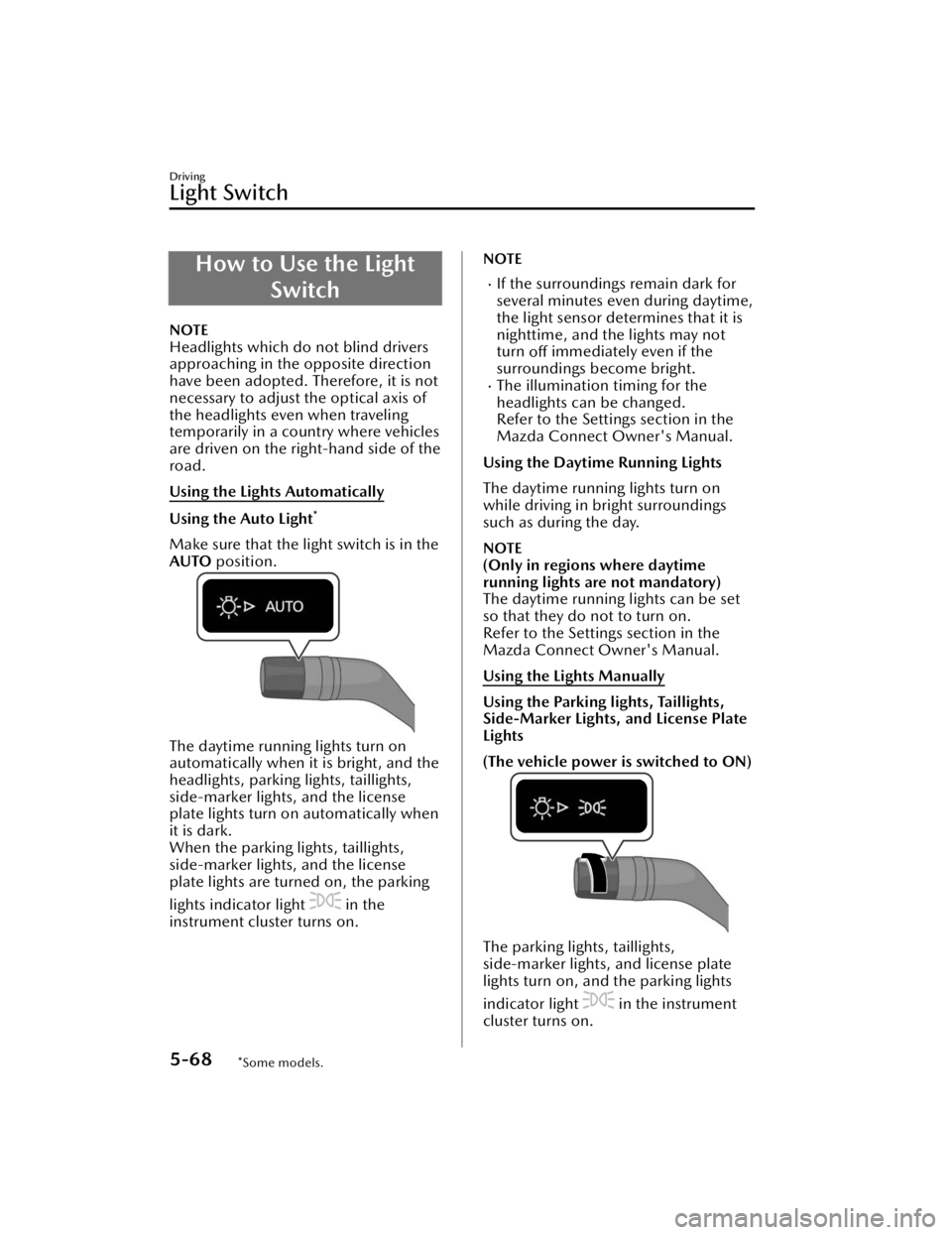
Make sure that the light switch is in the
AUTO position.
The daytime running lights turn on
automatically when it is bright, and the
headlights, parking lights, taillights,
side-marker lights, and the license
plate lights turn on automatically when
it is dark.
When the parking lights, taillights,
side-marker lights, and the license
plate lights are turned on, the parking
lights indicator light
in the
instrument cluster turns on.
NOTE
If the surroundings remain dark for
several minutes even during daytime,
the light sensor determines that it is
nighttime, and the lights may not
turn off immediately even if the
surroundings become bright.
The illumination timing for the
headlights can be changed.
Refer to the Settings section in the
Mazda Connect Owner's Manual.
Using the Daytime Running Lights
The daytime running lights turn on
while driving in bright surroundings
such as during the day.
NOTE
(Only in regions where daytime
running lights are not mandatory)
The daytime running lights can be set
so that they do not to turn on.
Refer to the Settings section in the
Mazda Connect Owner's Manual.
Using the Lights Manually
Using the Parking lights, Taillights,
Side-Marker Lights, and License Plate
Lights
(The vehicle power is switched to ON)
The parking lights, taillights,
side-marker lights, and license plate
lights turn on, and the parking lights
indicator light
in the instrument
cluster turns on.
Driving
Light Switch
5-68*Some models.
CX-90_8KG7-EA-22L_Edition1_new 2022-11-17 16:05:04
Page 221 of 687

Turning off the Lights
Turn the light switch to the OFF
position when the vehicle is stopped.
(With Auto Light)
The light switch returns to the AUTO
position automatically.
All the lights that are turned on turn
off, and the parking lights indicator
light
in the instrument cluster
turns off.
Headlight Leveling
The number of passengers and weight
of cargo in the luggage compartment
change the angle of the headlights. The
angle of the headlights will be
automatically adjusted when turning
on the headlights. A system
malfunction or operation conditions
are indicated by a warning.
Refer to Exterior Lights Warning Light
on page 8-50.
Convenient Ways to Use the Light Switch
Coming Home Light
After the vehicle power is switched
OFF, the headlights can be turned on
for a while.
Using the coming home light
1. Switch the vehicle power to ACC orOFF.
2.
The headlights turn on, and then turn
off when any of the following
conditions is met.
A certain amount of time has passed
since occupants got out of the
vehicle and all the doors closed.
Three minutes have passed since the
headlights turned on.
The light switch was operated after
the headlights turned on.
NOTE
The time until the headlights turn off
can be changed.
Refer to the Settings section in the
Mazda Connect Owner's Manual.
Leaving Home Light
The lights of your vehicle parked at a
distance can be turned on by operating
the key.
Driving
Light Switch
5-70
CX-90_8KG7-EA-22L_Edition1_new 2022-11-17 16:05:04
Page 223 of 687
How to Use the TurnSignal Lever
When the lever is operated, the turn
signal lights flash/turn
off.
Using the Turn Signal Lever
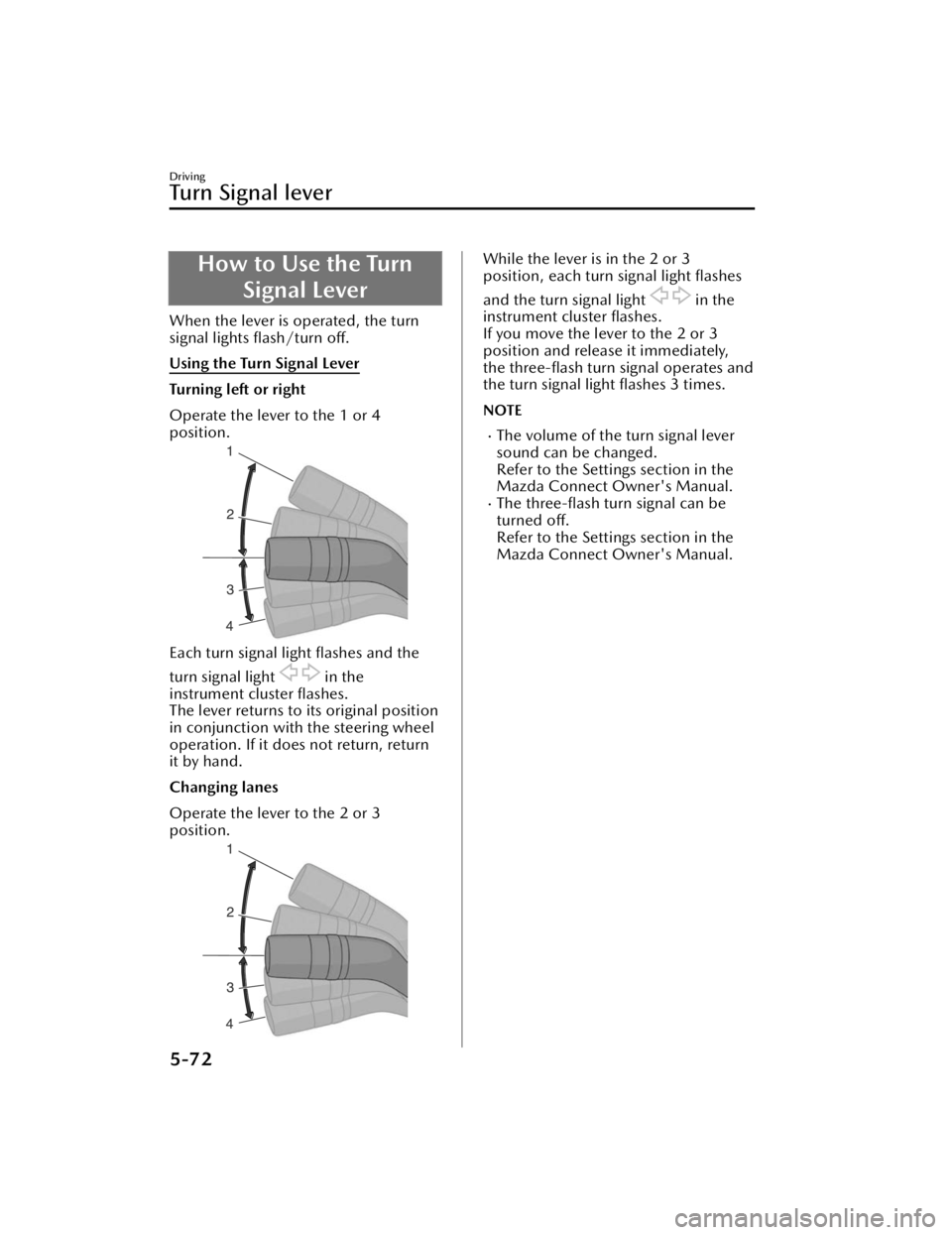
Turning left or right
Operate the lever to the 1 or 4
position.
Each turn signal light flashes and the
turn signal light
in the
instrument cluster flashes.
The lever returns to its original position
in conjunction with the steering wheel
operation. If it does not return, return
it by hand.
Changing lanes
Operate the lever to the 2 or 3
position.
While the lever is in the 2 or 3
position, each turn signal light flashes
and the turn signal light
in the
instrument cluster flashes.
If you move the lever to the 2 or 3
position and release it immediately,
the three-flash turn signal operates and
the turn signal light flashes 3 times.
NOTE
The volume of the turn signal lever
sound can be changed.
Refer to the Settings section in the
Mazda Connect Owner's Manual.
The three-flash turn signal can be
turned off.
Refer to the Settings section in the
Mazda Connect Owner's Manual.
Driving
Tu r n S i g n a l l e v e r
5-72
CX-90_8KG7-EA-22L_Edition1_new 2022-11-17 16:05:04

