2024 MAZDA CX90 light
[x] Cancel search: lightPage 300 of 687

the instrument cluster screen display (white)
is not displayed.
In addition, when the door in the
direction in which an approaching
vehicle is detected is opened, the
driver is notified of the danger by
flashing of the warning lights, the
warning sound, and the instrument
cluster warning indication (amber).
BSM warning light
Instrument cluster
NOTE
The Vehicle Exit Warning may not
operate normally if any of the
following conditions is met.
The rear side radar sensors cannot
detect an object.
Refer to Radar Sensors on page
5-131.
There is a parked vehicle near your
vehicle.
Moving objects are slow.The Vehicle Exit Warning is not
automatically turned off even if a
Mazda genuine trailer hitch is used.
If a trailer is towed or a bicycle
carrier is attached to the rear of the
vehicle, the radar signal may be
blocked and the Vehicle Exit Warning
may not operate correctly.
The Vehicle Exit Warning may
operate with stationary objects on
the road or the roadside (such as
guardrails, sidewalls, and parked
vehicles).
The brightness of the BSM warning
lights is linked to the panel light
control.
Refer to Dashboard Illumination on
page 5-35.
Tu r n i n g off the BSM and the Vehicle
Exit Warning
There are 2 ways to turn off the BSM
and the Vehicle Exit Warning.
Tu r n
off the BSM and the Vehicle Exit
Warning using Mazda Connect.
Refer to the Settings section in the
Mazda Connect Owner's Manual.
Tu r n off the BSM and the Vehicle Exit
Warning using the i-ACTIVSENSE
OFF switch.
Refer to How to Use the
i-ACTIVSENSE OFF switch on page
5-126.
Driving
Blind Spot Monitoring (BSM)
5-149
CX-90_8KG7-EA-22L_Edition1_new 2022-11-17 16:05:04
Page 314 of 687

Rear Cross Traffic Alert(RCTA)
*
The RCTA assists the driver in checking
the area to the rear of the vehicle, such
as while reversing out of a parking
space. When a vehicle approaching
from the rear on the left or right is
detected, various screen displays and
warning sounds notify the driver of the
danger.
Warnings and Cautions
for Using the Rear Cross Tra ffi c Alert (RCTA)
WARNING
Do not rely completely on the RCTA.
The RCTA is a system to assist the
driver in checking the area to the rear
of the vehicle while reversing. Due to
certain limitations with the operation
of the system, the BSM warning light
may not
flash or it might be delayed
even though a vehicle is at the rear of
your vehicle. Always make it your
responsibility as a driver to check the
rear.
Driving
Rear Cross Tra ffi c Alert (RCTA)
*Some models.5-163
CX-90_8KG7-EA-22L_Edition1_new
2022-11-17 16:05:04
Page 315 of 687

How to Use the Rear
Cross Traffic Alert (RCTA)
Operating the RCTA
The RCTA operates when all of the
following conditions are met.
The vehicle is about to be driven in
reverse.
The system detects an approaching
vehicle.
When the RCTA operates, the driver is
notified of the danger by flashing of
the BSM warning lights, a warning
indication, and a warning sound.
NOTE
The system may operate even if a
vehicle is not approaching
depending on the conditions around
your vehicle.
The RCTA may not operate normally
if any of the following conditions is
met.
The rear side radar sensors cannot
detect an object.
Refer to Radar Sensors on page
5-131.
The vehicle speed when reversing
is about 15 km/h (9 mph) or
faster.
A vehicle is approaching directly
from the rear of your vehicle.
A vehicle is approaching at an
angle from the rear of your vehicle.
If a Mazda genuine trailer hitch is
used, the RCTA is automatically
turned off when the trailer's
electrical connector is connected.
When pulling a trailer other than
with a Mazda genuine trailer hitch,
or while an accessory such as a
bicycle carrier is installed to the rear
of the vehicle, turn off the RCTA.
Otherwise, the radar’s radio waves
will be blocked causing the RCTA to
not operate normally.
The brightness of the BSM warning
lights is linked to the panel light
control.
Refer to Dashboard Illumination on
page 5-35.
Turning off the RCTA
There are 2 ways to turn off the RCTA.
Turn off the RCTA using Mazda
Connect.
Refer to the Settings section in the
Mazda Connect Owner's Manual.
Turn off the RCTA using the
i-ACTIVSENSE OFF switch.
Refer to How to Use the
i-ACTIVSENSE OFF switch on page
5-126.
Driving
Rear Cross Tra ffi c Alert (RCTA)
5-164
CX-90_8KG7-EA-22L_Edition1_new
2022-11-17 16:05:04
Page 319 of 687
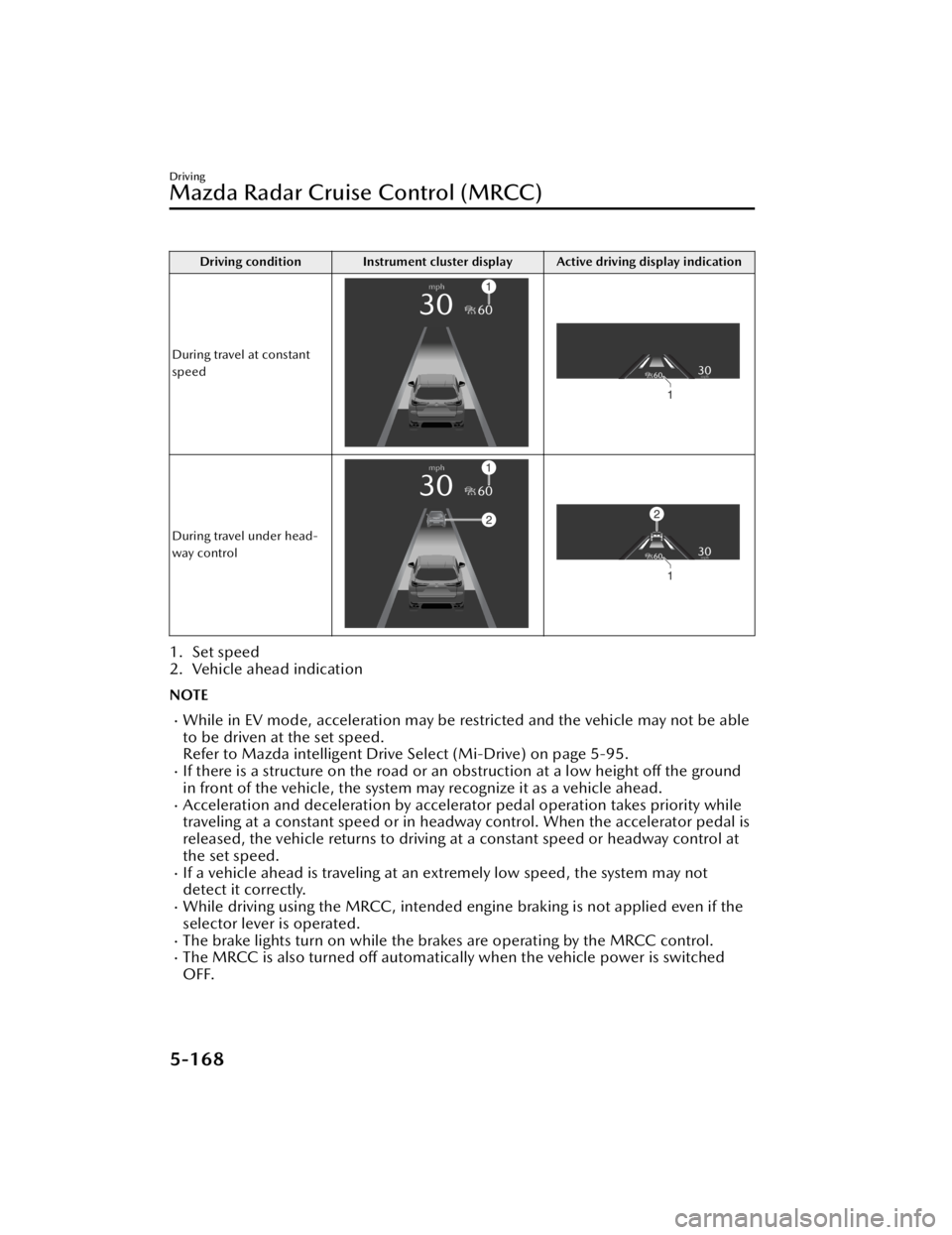
Driving condition Instrument cluster display Active driving display indication
During travel at constant
speed
During travel under head-
way control
1. Set speed
2. Vehicle ahead indication
NOTE
While in EV mode, acceleration may be restricted and the vehicle may not be able
to be driven at the set speed.
Refer to Mazda intelligent Drive Select (Mi-Drive) on page 5-95.
If there is a structure on the road or an obstruction at a low height off the ground
in front of the vehicle, the system may recognize it as a vehicle ahead.
Acceleration and deceleration by accelerator pedal operation takes priority while
traveling at a constant speed or in headway control. When the accelerator pedal is
released, the vehicle returns to driving at a constant speed or headway control at
the set speed.
If a vehicle ahead is traveling at an extremely low speed, the system may not
detect it correctly.
While driving using the MRCC, intended engine braking is not applied even if the
selector lever is operated.
The brake lights turn on while the brakes are operating by the MRCC control.The MRCC is also turned off automatically when the vehicle power is switched
OFF.
Driving
Mazda Radar Cruise Control (MRCC)
5-168
CX-90_8KG7-EA-22L_Edition1_new 2022-11-17 16:05:04
Page 320 of 687

If the distance between vehicles control is disabled using Mazda Connect, the
system switches to the cruise control. At this time, the MRCC switch functions as
the cruise control switch.
Refer to the Settings section in the Mazda Connect Owner's Manual.
If the vehicle power is switched OFF while the distance between vehicles control is
disabled, the distance between vehicles control is enabled automatically the next
time the vehicle power is switched ON.
If the vehicle ahead stops during headway control, your vehicle in headway control
also stops. When the vehicle is stopped, the MRCC indicator light
in the
instrument cluster turns on.
When the vehicle ahead accelerates from a stop and one of the following operations
is performed, your vehicle starts driving.
Press the RES switch.Depress the accelerator pedal.
If you do not start driving the vehicle af ter the vehicle ahead has resumed driving,
the system urges the driver to resume driving.
NOTE
If the vehicle ahead resumes driving within 3 seconds after the vehicle was
stopped by the system, your vehicle also resumes driving automatically.
If the vehicle is stopped by the system continuously for 10 minutes or longer, the
parking brake is applied automatically. At this time, the MRCC is canceled.
Even if the MRCC is canceled while the vehicle is stopped, the vehicle is held in its
stopped position.
Refer to AUTOHOLD on page 5-63.
If the MRCC is canceled while the vehicle is stopped and there is no vehicle
ahead, you cannot resume driving the ve hicle using the RES switch. Depress the
accelerator pedal and start driving the vehicle.
Changing the set vehicle speed
Changing the set vehicle speed using the RES switch
Press the RES switch up (SET+) or down (SET-) to the desired speed.
Press and release immediately: 1 km/h (1 mph)Press and hold: 10 km/h (5 mph)
Changing the set vehicle speed using the accelerator pedal
Depress the accelerator pedal until the vehicle speed reaches the desired speed,
then press the RES switch up (SET+) or down (SET-).
Reading the set vehicle speed from the speed limit sign using the RES switch
Press the RES switch when the speed limit sign set indication
turns on.
Driving
Mazda Radar Cruise Control (MRCC)
5-169
CX-90_8KG7-EA-22L_Edition1_new 2022-11-17 16:05:04
Page 329 of 687

Driving condition Instrument cluster display Active driving display indication
During travel at constant
speed
During travel under head-
way control
1. Set speed
2. Vehicle ahead indication
NOTE
While in EV mode, acceleration may be restricted and the vehicle may not be able
to be driven at the set speed.
Refer to Mazda intelligent Drive Select (Mi-Drive) on page 5-95.
If there is a structure on the road or an obstruction at a low height off the ground
in front of the vehicle, the system may recognize it as a vehicle ahead.
Acceleration and deceleration by accelerator pedal operation takes priority while
traveling at a constant speed or in headway control. When the accelerator pedal is
released, the vehicle returns to driving at a constant speed or headway control at
the set speed.
The Forward Sensing Camera (FSC) may not be able to detect target objects
correctly, and the CTS may not operate normally.
Refer to Forward Sensing Camera (FSC) on page 5-127.
If a vehicle ahead is traveling at an extremely low speed, the system may not
detect it correctly.
While driving using the CTS, intended engine braking is not applied even if the
selector lever is operated.
The brake lights turn on while the brakes are operating by the CTS control.
Driving
Cruising & Tra ffi c Support (CTS)
5-178
CX-90_8KG7-EA-22L_Edition1_new
2022-11-17 16:05:04
Page 332 of 687

If the vehicle ahead stops during headway control, your vehicle in headway control
also stops. While the vehicle is stopped, the CTS indicator light
in the
Instrument cluster turns on.
When the vehicle ahead accelerates from a stop and one of the following operations
is performed, your vehicle starts driving.
Press the RES switch.Depress the accelerator pedal.
If you do not start driving the vehicle af ter the vehicle ahead has resumed driving,
the system urges the driver to resume driving.
NOTE
If the vehicle ahead resumes driving within 3 seconds after the vehicle was
stopped by the system, your vehicle also resumes driving automatically.
If the vehicle is stopped by the system continuously for 10 minutes or longer, the
parking brake is applied automatically. At this time, the CTS is canceled.
Even if the CTS is canceled while the vehicle is stopped, the vehicle is held in its
stopped position.
Refer to AUTOHOLD on page 5-63.
If the CTS is canceled while the vehicle is stopped and there is no vehicle ahead,
you cannot resume driving the vehicl e using the RES switch. Depress the
accelerator pedal and start driving the vehicle.
Changing the set vehicle speed
Changing the set vehicle speed using the RES switch
Press the RES switch up (SET+) or down (SET-) to the desired speed.
Press and release immediately: 1 km/h (1 mph)Press and hold: 10 km/h (5 mph)
Changing the set vehicle speed using the accelerator pedal
Depress the accelerator pedal until the vehicle speed reaches the desired speed,
then press the RES switch up (SET+) or down (SET-).
Reading the set vehicle speed from the speed limit sign using the RES switch
Press the RES switch when the speed limit sign set indication
turns on.
Driving
Cruising & Tra ffi c Support (CTS)
5-181
CX-90_8KG7-EA-22L_Edition1_new
2022-11-17 16:05:04
Page 352 of 687

1. “BRAKE!”
Active driving display
1. “BRAKE!”
NOTE
If any of the following conditions is
met, the forward detection function
may not operate normally.
The Forward Sensing Camera (FSC)
cannot detect target objects.
Refer to Forward Sensing Camera
(FSC) on page 5-127.
The front radar sensor cannot
detect target objects.
Refer to Radar Sensors on page
5-131.
When there is the possibility of a
partial contact with a target object.
The driver deliberately performs
driving operations (accelerator pedal
operation, steering wheel operation,
selector lever operation, and turn
signal lever operation).
If any of the follo wing conditions is
met, the forward detection function
may operate.
An animal or object on the road is
detected.
Passing an approaching vehicle
while rounding a curve.
Vehicle is passing through a narrow
gate or a gate with a low ceiling.
There is a metal object, bump, or a
protruding object on the road.
(Vehicles with Driver Monitoring
(DM))
If the system determines that the
driver is not paying attention to the
road, it activates the collision
warning earlier than normal.
If the forward detection function
performs brake control and the
vehicle is stopped, the system will
continue to hold the brakes for a
brief time unless there is an
operation performed by the driver.
The operation distance and volume
of the collision warning can be
changed.
Refer to the Settings section in the
Mazda Connect Owner's Manual.
The Turn-Across Tra ffi c operation
conditions*
The Turn-Across
Tra ffi c operates when
all of the following conditions are met.
The vehicle speed is about 4 km/h
to 20 km/h (3 mph to 12 mph).
The left turn signal light is turned on
and the vehicle is turning left.
A lane line between your vehicle and
the vehicle approaching in the
opposite direction is detected.
The system determines that there is a
possibility of collision with an object
ahead.
When the Turn-Across Tra ffi c operates,
the driver is notified of the danger by
the screen display and warning sound.
Furthermore, if the possibility of a
collision increases, brake control is
performed.
Instrument cluster
Driving
Smart Brake Support (SBS)
*Some models.5-201
CX-90_8KG7-EA-22L_Edition1_new 2022-11-17 16:05:04