2024 MAZDA CX90 light
[x] Cancel search: lightPage 262 of 687

Warnings and CautionsFor Charging
WARNING
For occupants who use any medical
device such as an implanted-type
heart pacer or defibrillator, ask a
doctor or manufacturer of the device
about how the medical device may be
affected by the charging operation.
Otherwise, the operation of the
medical device could be affected
resulting in an accident.
For occupants who use any medical
device such as an implanted-type
heart pacer or defibrillator, do not
enter the cabin including the luggage
compartment while charging.
Otherwise, the operation of the
medical device could be affected
resulting in an accident.
Do not disassemble or modify the
charge port and the charge cable.
Otherwise, it could lead to an
electrical shock resulting in an
accident.
Always heed the following when
charging.
Otherwise, it could lead to an
electrical shock resulting in an
accident.
Never allow children to charge the
battery.
Do not charge the battery while the
vehicle is covered with a car cover.
Always heed the following when
charging in the rain or snow.
Otherwise, it could lead to an
electrical shock resulting in an
accident.
Do not charge the battery outside if
there is the possibility of heavy rain,
strong winds, or lightning.
Remove water with a clean cloth if
the charge connector or charge plug
is wet.
Do not touch the charge port or
charge cable with wet hands.
If the outlet is covered with snow
while charging, turn
off the power
such as turning off the breaker,
remove the snow, and then remove
the charge plug.
Refer to the instruction manual
accompanying the charge cable and
use the charge cable correctly.
If you handle the charge cable
mistakenly, it could result in an
unexpected accident.
Do not use the charge cable if it has
any of the following malfunctions.
Otherwise, it could lead to an
electrical shock resulting in an
accident.
The charge connector is rusted or
corroded.
The charge connector is damaged or
foreign matter penetrates the charge
connector.
Always heed the following when
using the charge cable.
Otherwise, the charge cable could be
damaged resulting in an accident.
Do not pull out or bend the charge
cable excessively.
Do not step on the charge cable or
drag it on the ground.
Driving
Charging
5-111
CX-90_8KG7-EA-22L_Edition1_new 2022-11-17 16:05:04
Page 264 of 687

Charging Related Part Overview
Charge cable
The charge cable is connected to the electrical outlet and the vehicle to send
electrical power to the vehicle. For details regarding the charge cable, refer to the
instruction manual accompanying the charge cable.
1. Charge connector
2. Control box
3. Charge plug
charge connector
The charge connector is the part used for connecting to the charging port on the
vehicle side.
When the charge connector is connected to the charging port, a vehicle system locks
the charge connector.
When the charge connector is locked by the vehicle system, it unlocks when the
driver’s door is unlocked.
If the charge connector locked by the vehicle system is not unlocked even though
the driver’s door is unlocked, consult an Authorized Mazda Dealer.
NOTE
The conditions for locking the vehicle system can be changed.
Refer to Convenient Ways to Use of Charging on page 5-118.
Control box
The control box indicates the charge status by turning on/flashing the indicator light.
For the indicator light illumination/flash pattern, refer to the instruction manual
accompanying the charge cable.
charge plug
The charge plug is the part for connecting to the electrical outlet.
In general, keep the charge cable at home. If the charge cable is kept in the vehicle,
firmly secure it using the following procedure.
1. Store the charge cable in its special storage bag.
Driving
Charging
5-113
CX-90_8KG7-EA-22L_Edition1_new 2022-11-17 16:05:04
Page 266 of 687
![MAZDA CX90 2024 Owners Manual Charging indicator
The charging indicator indicates the charging status by turning
on/flashing the light.
For the charging indicator illumination/flash pattern, refer to [Charging].
Charging port l](/manual-img/28/59014/w960_59014-265.png "MAZDA CX90 2024 Owners Manual Charging indicator
The charging indicator indicates the charging status by turning
on/flashing the light.
For the charging indicator illumination/flash pattern, refer to [Charging].
Charging port l")
Charging indicator
The charging indicator indicates the charging status by turning
on/flashing the light.
For the charging indicator illumination/flash pattern, refer to [Charging].
Charging port lid
The charging port lid is locked/unlocke d in conjunction with the door locking/
unlocking mechanism.
When unlocking the driver’s door, the charging port lid is unlocked. When locking
the driver’s door, the charging port lid is locked.
However, if the driver’s door is unlocked using the auxiliary key, the charging port lid
is not unlocked.
NOTE
When the driver's door is locked using an y of the following functions, the charging
port lid is also locked at the same time.
Vehicle speed sensing auto door lock functionAuto re-lock function
Charge port
The charge port is the part used for connecting to the charge connector of the
charge cable. It is used for charging.
Driving
Charging
5-115
CX-90_8KG7-EA-22L_Edition1_new 2022-11-17 16:05:04
Page 267 of 687

How to Perform Charging
It can be charged with a maximum of
7.2 kW of power.
When charging is started after the high
voltage battery warning indication/
warning light turns on, the time until
fully charged is as follows.
(7.2 kW normal charging)
About 2.5 hours
For charging, the charging timer
function can be used to charge
automatically from start to finish. For
details on use, refer to [Charging
Settings].
NOTE
Installation of charging equipment is
required for 7.2 kW normal charging.
Consult an Authorized Mazda Dealer
for details.
If a power outage occurs while
charging, remove the charge plug
and the charge connector and start
charging from the beginning again.
Make sure that no water has
accumulated in the charge connector
and the charging port before
charging. If any foreign matter enters
the charge connector or the charging
port, do not start charging and
consult an Authorized Mazda Dealer.
1. Switch the vehicle power OFF.
2.
3. Open the charging port cap.
4. Connect the charge plug to the outlet.
5. Connect the charge connector to the charging port.
Charging starts after connection is
completed.
NOTE
When the charging timer is set,
charging does not start even if the
charge connector is connected.
When you prefer to start charging
immediately, use the charging timer
cancellation function.
Make sure to lock all the doors
before leaving the vehicle while
charging.
6. When charging is finished, unlock the door to unlock the charge
connector.
7. Remove the charge connector.
8. Close the charging port cap.
9. Close the charging port lid.
10.Disconnect the charge plug.
Driving
Charging
5-116
CX-90_8KG7-EA-22L_Edition1_new 2022-11-17 16:05:04
Page 270 of 687
Immediately after switching to
daylight savings, charging may occur
at the charging timer time set before
the switch to daylight savings until
the vehicle power is switched ON.
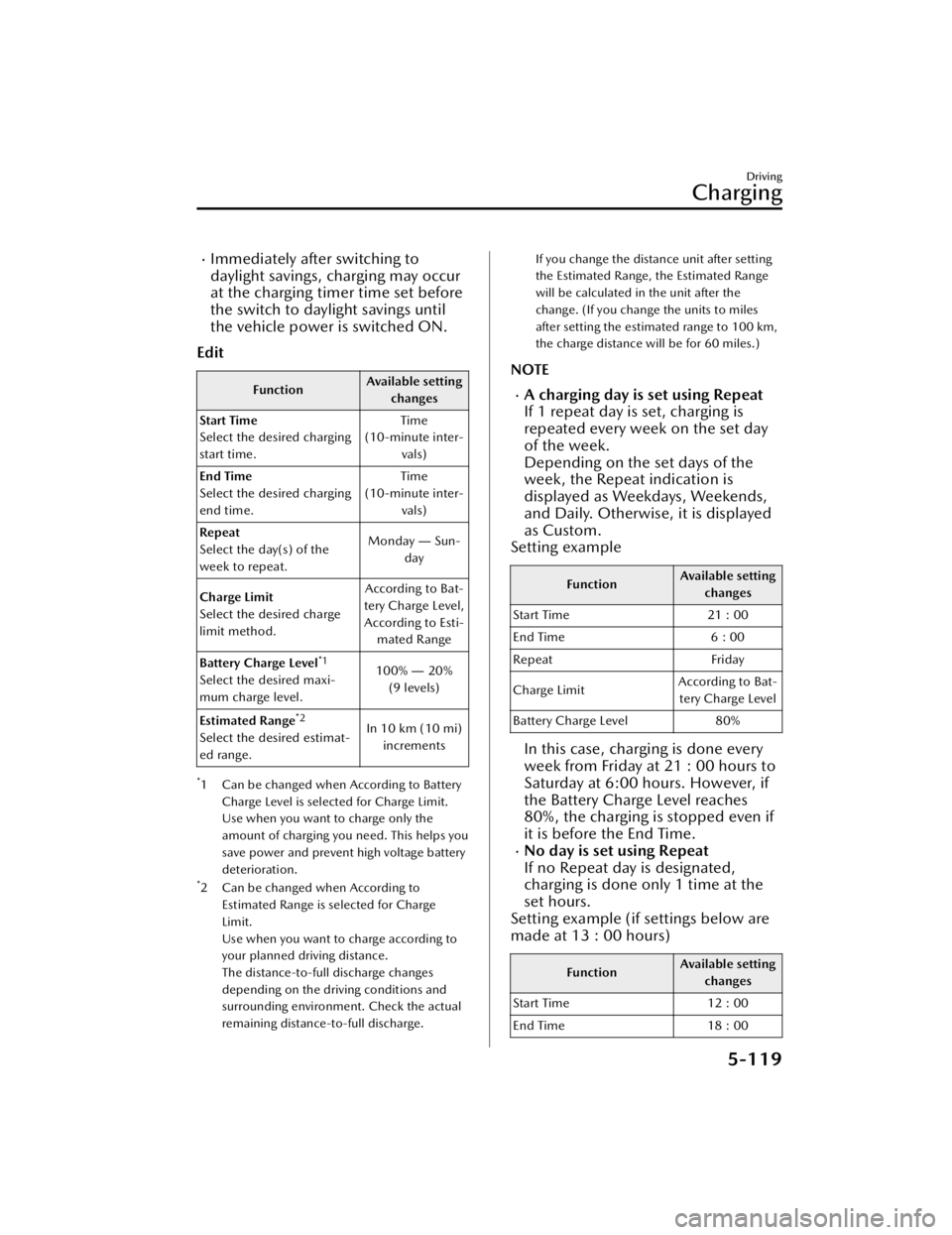
Edit
Function Available setting
changes
Start Time
Select the desired charging
start time. Time
(10-minute inter- vals)
End Time
Select the desired charging
end time. Time
(10-minute inter- vals)
Repeat
Select the day(s) of the
week to repeat. Monday
― Sun-
day
Charge Limit
Select the desired charge
limit method. According to Bat-
tery Charge Level, According to Esti- mated Range
Battery Charge Level
*1
Select the desired maxi-
mum charge level. 100%
― 20%
(9 levels)
Estimated Range
*2
Select the desired estimat-
ed range. In 10 km (10 mi)
increments
*1 Can be changed when According to Battery
Charge Level is selected for Charge Limit.
Use when you want to charge only the
amount of charging you need. This helps you
save power and prevent high voltage battery
deterioration.
*2 Can be changed when According toEstimated Range is selected for Charge
Limit.
Use when you want to charge according to
your planned driving distance.
The distance-to-full discharge changes
depending on the driving conditions and
surrounding environment. Check the actual
remaining distance-to-full discharge.
If you change the distance unit after setting
the Estimated Range, the Estimated Range
will be calculated in the unit after the
change. (If you change the units to miles
after setting the estimated range to 100 km,
the charge distance will be for 60 miles.)
NOTE
A charging day is set using Repeat
If 1 repeat day is set, charging is
repeated every week on the set day
of the week.
Depending on the set days of the
week, the Repeat indication is
displayed as Weekdays, Weekends,
and Daily. Otherwise, it is displayed
as Custom.
Setting example
Function Available setting
changes
Start Time 21 : 00
End Time 6 : 00
Repeat Friday
Charge Limit According to Bat-
tery Charge Level
Battery Charge Level 80%
In this case, charging is done every
week from Friday at 21 : 00 hours to
Saturday at 6:00 hours. However, if
the Battery Charge Level reaches
80%, the charging is stopped even if
it is before the End Time.
No day is set using Repeat
If no Repeat day is designated,
charging is done only 1 time at the
set hours.
Setting example (if settings below are
made at 13 : 00 hours)
Function Available setting
changes
Start Time 12 : 00
End Time 18 : 00
Driving
Charging
5-119
CX-90_8KG7-EA-22L_Edition1_new 2022-11-17 16:05:04
Page 278 of 687
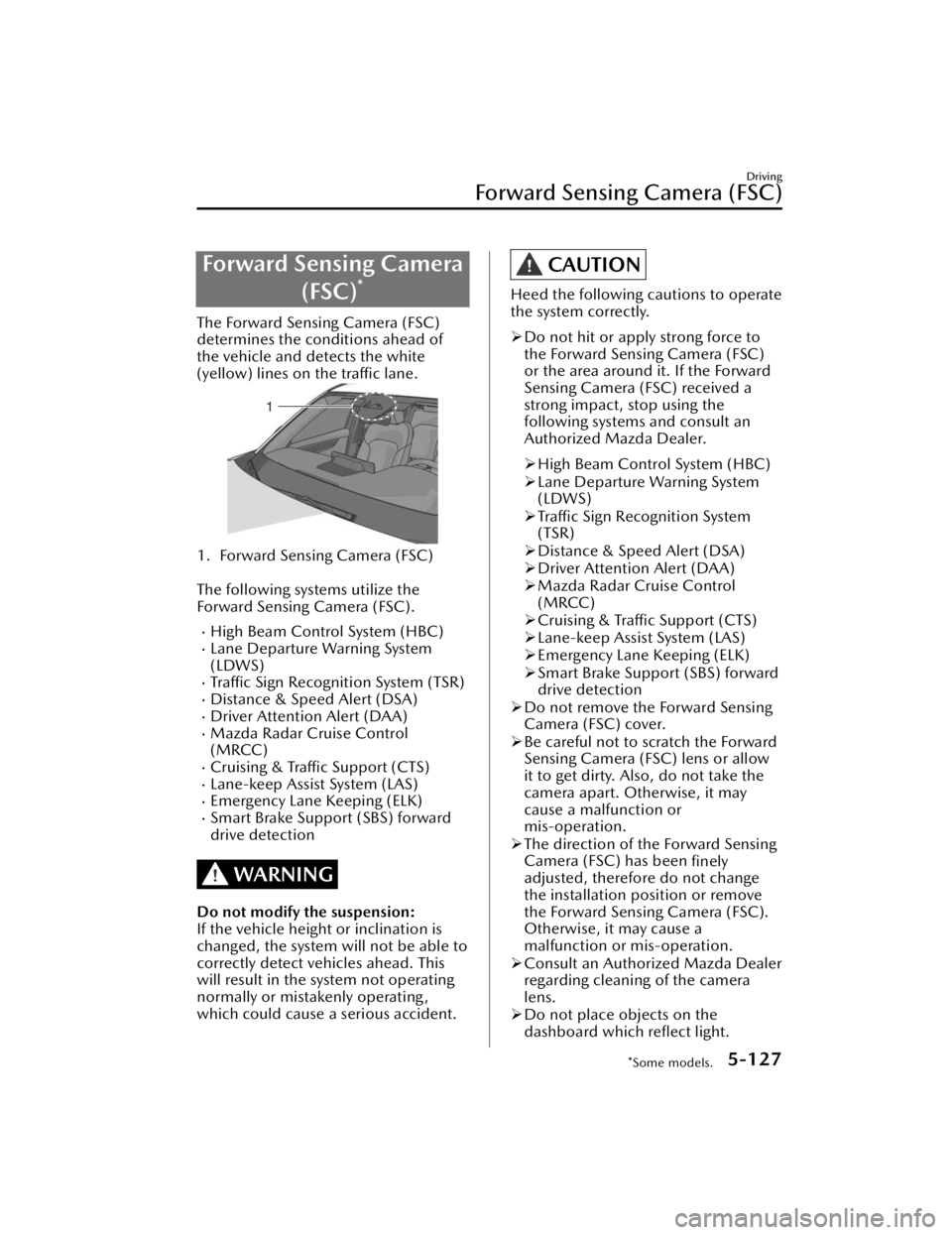
Forward Sensing Camera(FSC)
*
The Forward Sensing Camera (FSC)
determines the conditions ahead of
the vehicle and detects the white
(yellow) lines on the traffic lane.
1. Forward Sensing Camera (FSC)
The following systems utilize the
Forward Sensing Camera (FSC).
High Beam Control System (HBC)Lane Departure Warning System
(LDWS)
Traffic Sign Recognition System (TSR)Distance & Speed Alert (DSA)Driver Attention Alert (DAA)Mazda Radar Cruise Control
(MRCC)
Cruising & Traffic Support (CTS)Lane-keep Assist System (LAS)Emergency Lane Keeping (ELK)Smart Brake Support (SBS) forward
drive detection
WARNING
Do not modify the suspension:
If the vehicle height or inclination is
changed, the system will not be able to
correctly detect vehicles ahead. This
will result in the system not operating
normally or mistakenly operating,
which could cause a serious accident.
CAUTION
Heed the following cautions to operate
the system correctly.
Do not hit or apply strong force to
the Forward Sensing Camera (FSC)
or the area around it. If the Forward
Sensing Camera (FSC) received a
strong impact, stop using the
following systems and consult an
Authorized Mazda Dealer.
High Beam Control System (HBC)
Lane Departure Warning System
(LDWS)
Traffic Sign Recognition System
(TSR)
Distance & Speed Alert (DSA)
Driver Attention Alert (DAA)
Mazda Radar Cruise Control
(MRCC)
Cruising & Traffic Support (CTS)
Lane-keep Assist System (LAS)
Emergency Lane Keeping (ELK)
Smart Brake Support (SBS) forward
drive detection
Do not remove the Forward Sensing
Camera (FSC) cover.
Be careful not to scratch the Forward
Sensing Camera (FSC) lens or allow
it to get dirty. Also, do not take the
camera apart. Otherwise, it may
cause a malfunction or
mis-operation.
The direction of the Forward Sensing
Camera (FSC) has been
finely
adjusted, therefore do not change
the installation position or remove
the Forward Sensing Camera (FSC).
Otherwise, it may cause a
malfunction or mis-operation.
Consult an Authorized Mazda Dealer
regarding cleaning of the camera
lens.
Do not place objects on the
dashboard which
reflect light.
Driving
Forward Sensing Camera (FSC)
*Some models.5-127
CX-90_8KG7-EA-22L_Edition1_new
2022-11-17 16:05:04
Page 280 of 687

When the Forward Sensing Camera
(FSC) detects that the windshield is
dirty or foggy, the functions related
to the Forward Sensing Camera
(FSC) are temporarily stopped. In
this case, the following warning
indications turn on. However, this
does not indicate a problem.
Remove the dirt from the windshield
or press the windshield defroster
switch.
HBC warning indicationi-ACTIVSENSE warning indicationSBS OFF indication
Detection of pedestrians
The Forward Sensing Camera (FSC)
detects pedestrians when all of the
following conditions are met.
The height of a pedestrian is about 1
to 2 meters.
The outline of a pedestrian is
recognized such as the head, both
shoulders, or the feet.
The Forward Sensing Camera (FSC)
may not be able to detect pedestrians
when any of the following conditions is
met.
There are multiple pedestrians.A pedestrian is close to a separate
object.
A pedestrian is crouching , lying, or
slouching.
A pedestrian suddenly jumps into
the road.
A pedestrian is holding something
(such as an open umbrella or large
baggage).
A pedestrian blends into the
background (such as in a dark
location at night or by wearing
clothes matching the background
color).
Detection of objects
When any of the following conditions
is met, the Forward Sensing Camera
(FSC) may not be able to detect target
objects correctly, and each system may
not operate normally.
You are driving your vehicle at the
same speed as the vehicle ahead.
The headlights of your vehicle are not
turned on during the night or in a
tunnel.
The target object is in the blind spot
of the Forward Sensing Camera
(FSC).
A person or object bursts onto the
road from the shoulder or cuts right
in front of you.
The distance between your vehicle
and the target object is extremely
close or extremely far.
You change the course and approach
a target object.
The target object (vehicle ahead,
white line (yellow line), sign) is dirty
or worn.
A vehicle ahead has a special shape
(such as a vehicle carrier).
A vehicle ahead is a truck with a low
loading platform.
A vehicle ahead has an extremely
low or high profile.
A vehicle ahead is outside the
illumination range of the headlights.
The illumination area of the taillights
of the vehicle ahead is small.
The taillights of a vehicle ahead are
dim or turned off.
The headlights of an on-coming
vehicle are dim or turned off.
Under bad weather conditions (rain,
fog , and snow).
Front visibility is reduced (due to a
vehicle ahead casting off water,
snow, or sand).
Driving
Forward Sensing Camera (FSC)
5-129
CX-90_8KG7-EA-22L_Edition1_new 2022-11-17 16:05:04
Page 281 of 687

Strong light is directed at the front of
your vehicle (such as backlight and
high-beam headlights).
The surrounding area is dark (such as
during the night, early evening, or
early morning, or in a tunnel or
indoor parking lot).
There are light sources in the
surrounding area (such as street
lamps, illuminated signboards, andtraffic signals).
There are objects which reflect light
(such as reflective plates and signs)
in the surrounding area.
The surrounding brightness suddenly
changes (such as when entering or
exiting a tunnel).
The brightness of the headlights of
your vehicle is insufficient (such as
the illumination is weakened due to
a dirty lens or the optical axis is
deviated).
Tires other than the specified size are
used on your vehicle (such as when
tire chains or temporary spare tires
are used).
The tires on your vehicle havesignificantly different wear.
Foreign matter is stuck to the
windshield (such as ice, fog, snow,
frost, raindrops, dirt, or a piece of
plastic).
The windshield is dirty or fogged.The Forward Sensing Camera (FSC) is
blocked by an obstruction, causing
poor forward visibility (such as when
roof rails are installed to the vehicle
and a long object is loaded).
The windshield washer is being used.The windshield wipers are not used
when it is raining.
Your vehicle is tilted (such as when
heavy luggage is in the luggage
compartment or on the rear seat).
The vehicle is making a sharp curve,
or ascending or descending a steep
slope.
The vehicle is driven on a road with
sharp curves or up and down (wavy)
slopes.
The vehicle is driven on uneven
roads.
The vehicle is driven next to walls
with no patterning (including fences
and longitudinally striped walls).
There is a strong reflection of light
from the road surface.
Driving
Forward Sensing Camera (FSC)
5-130
CX-90_8KG7-EA-22L_Edition1_new 2022-11-17 16:05:04