2024 CHEVROLET SILVERADO EV infotainment
[x] Cancel search: infotainmentPage 22 of 429
Chevrolet Silverado EV Owner Manual (GMNA-Localizing-U.S./Canada-
16702912) - 2024 - CRC - 1/23/23
Keys, Doors, and Windows 21
.To open the hood, pressdon the
instrument panel to the left of the
steering wheel.
To close the hood, press and hold
d
until the hood closes.
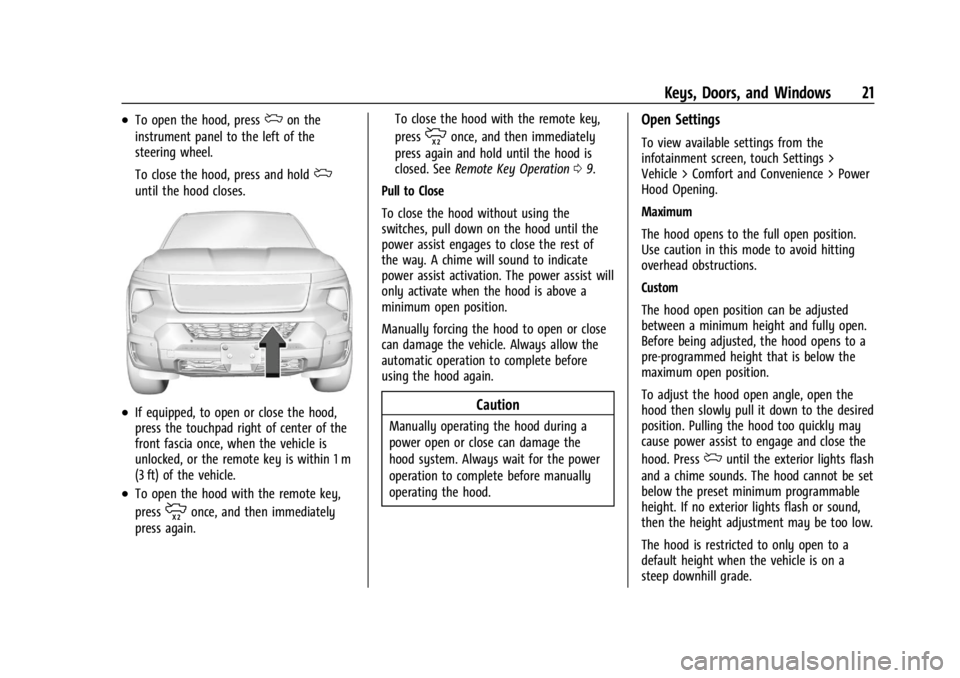
.If equipped, to open or close the hood,
press the touchpad right of center of the
front fascia once, when the vehicle is
unlocked, or the remote key is within 1 m
(3 ft) of the vehicle.
.To open the hood with the remote key,
press
monce, and then immediately
press again. To close the hood with the remote key,
press
monce, and then immediately
press again and hold until the hood is
closed. See Remote Key Operation 09.
Pull to Close
To close the hood without using the
switches, pull down on the hood until the
power assist engages to close the rest of
the way. A chime will sound to indicate
power assist activation. The power assist will
only activate when the hood is above a
minimum open position.
Manually forcing the hood to open or close
can damage the vehicle. Always allow the
automatic operation to complete before
using the hood again.
Caution
Manually operating the hood during a
power open or close can damage the
hood system. Always wait for the power
operation to complete before manually
operating the hood.
Open Settings
To view available settings from the
infotainment screen, touch Settings >
Vehicle > Comfort and Convenience > Power
Hood Opening.
Maximum
The hood opens to the full open position.
Use caution in this mode to avoid hitting
overhead obstructions.
Custom
The hood open position can be adjusted
between a minimum height and fully open.
Before being adjusted, the hood opens to a
pre-programmed height that is below the
maximum open position.
To adjust the hood open angle, open the
hood then slowly pull it down to the desired
position. Pulling the hood too quickly may
cause power assist to engage and close the
hood. Press
duntil the exterior lights flash
and a chime sounds. The hood cannot be set
below the preset minimum programmable
height. If no exterior lights flash or sound,
then the height adjustment may be too low.
The hood is restricted to only open to a
default height when the vehicle is on a
steep downhill grade.
Page 37 of 429
Chevrolet Silverado EV Owner Manual (GMNA-Localizing-U.S./Canada-
16702912) - 2024 - CRC - 1/23/23
36 Keys, Doors, and Windows
Heated Mirrors
To heat the mirrors, pressKon the
infotainment display.
See “Rear Window Defogger” underDual
Automatic Climate Control System 0174.
Automatic Dimming Mirror
The driver outside mirror automatically
adjusts for the glare of the headlamps from
behind. This feature comes on when the
vehicle is started.
Reverse Tilt Mirrors
If equipped with reverse tilt mirrors and
memory seats, the passenger and/or driver
mirror tilts to a preselected position when
the vehicle is in R (Reverse). This allows the
curb to be seen when parallel parking.
The mirror(s) may move from their tilted
position when:
.The vehicle is shifted out of R (Reverse) or
remains in R (Reverse) for about
30 seconds.
.The vehicle is turned off.
.The vehicle is driven in R (Reverse) above
a set speed. To view available settings from the
infotainment screen, touch Settings >
Vehicle > Comfort and Convenience.
Interior Mirrors
Interior Rearview Mirrors
Adjust the rearview mirror for a clear view
of the area behind the vehicle.
Do not spray glass cleaner directly on the
mirror. Use a soft towel dampened with
water.
Manual Rearview Mirror
If equipped, push the tab forward for
daytime use and pull it rearward for
nighttime use to avoid glare of the
headlamps from behind.
Automatic Dimming Rearview
Mirror
If equipped, automatic dimming reduces the
glare of headlamps from behind. The
dimming feature comes on when the vehicle
is started.
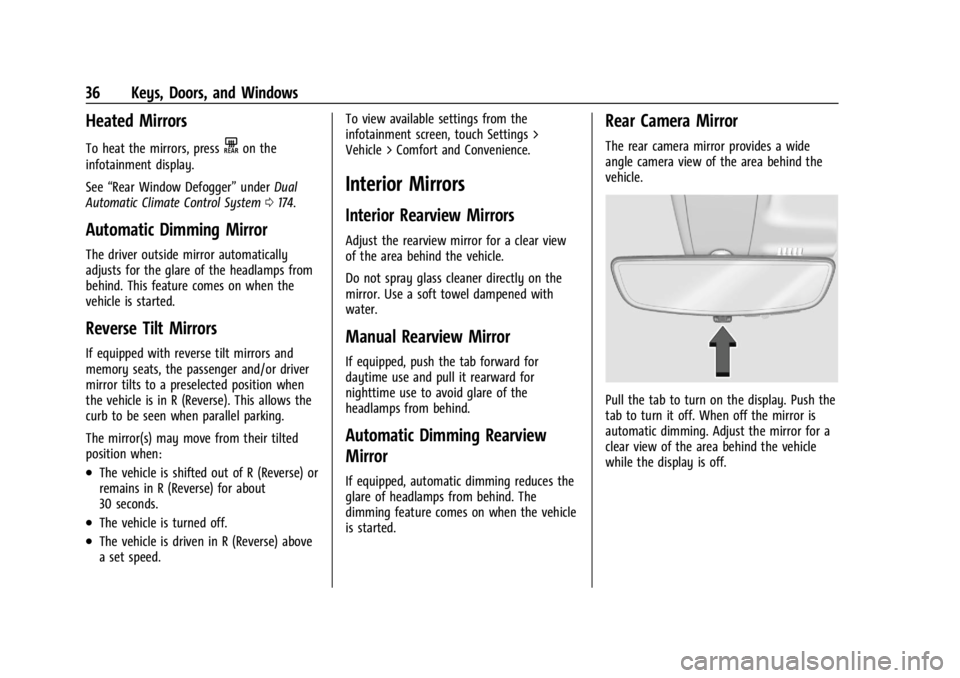
Rear Camera Mirror
The rear camera mirror provides a wide
angle camera view of the area behind the
vehicle.
Pull the tab to turn on the display. Push the
tab to turn it off. When off the mirror is
automatic dimming. Adjust the mirror for a
clear view of the area behind the vehicle
while the display is off.
Page 40 of 429
Chevrolet Silverado EV Owner Manual (GMNA-Localizing-U.S./Canada-
16702912) - 2024 - CRC - 1/23/23
Keys, Doors, and Windows 39
The vehicle aerodynamics are designed to
improve vehicle range performance. This
may result in a pulsing sound when either
rear window is down and the front windows
are up. To reduce the sound, open either a
front window or the sunroof, if equipped.
Power Windows
{Warning
Children could be seriously injured or
killed if caught in the path of a closing
window. Never leave the remote key in a
vehicle with children. When there are(Continued)
Warning (Continued)
children in the rear seat, use the window
lockout switch to prevent operation of
the windows. SeeKeys08.
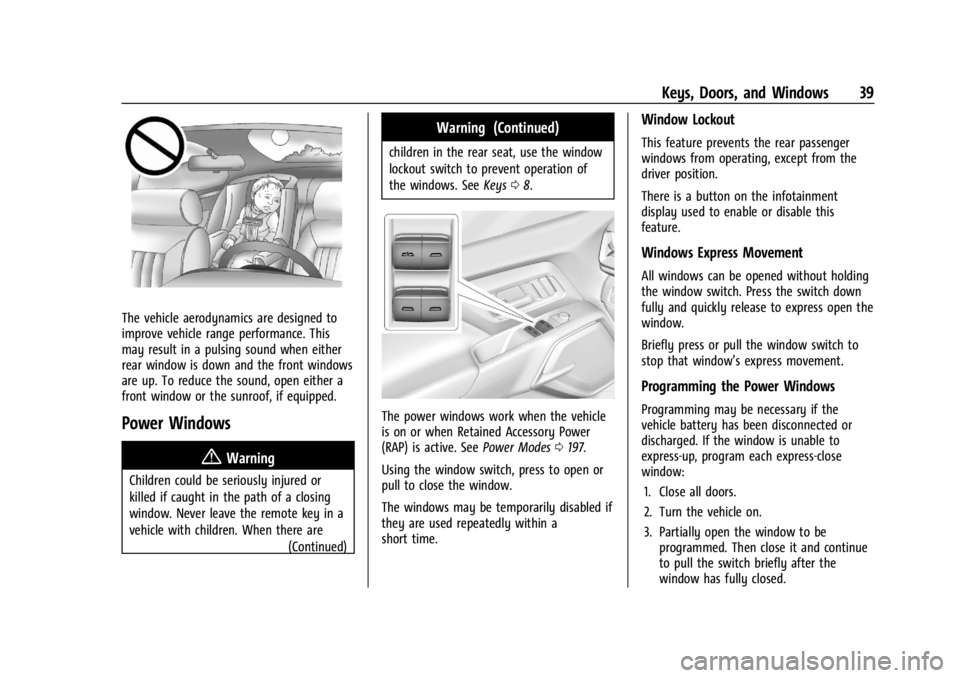
The power windows work when the vehicle
is on or when Retained Accessory Power
(RAP) is active. See Power Modes0197.
Using the window switch, press to open or
pull to close the window.
The windows may be temporarily disabled if
they are used repeatedly within a
short time.
Window Lockout
This feature prevents the rear passenger
windows from operating, except from the
driver position.
There is a button on the infotainment
display used to enable or disable this
feature.
Windows Express Movement
All windows can be opened without holding
the window switch. Press the switch down
fully and quickly release to express open the
window.
Briefly press or pull the window switch to
stop that window’s express movement.
Programming the Power Windows
Programming may be necessary if the
vehicle battery has been disconnected or
discharged. If the window is unable to
express-up, program each express-close
window: 1. Close all doors.
2. Turn the vehicle on.
3. Partially open the window to be programmed. Then close it and continue
to pull the switch briefly after the
window has fully closed.
Page 41 of 429
Chevrolet Silverado EV Owner Manual (GMNA-Localizing-U.S./Canada-
16702912) - 2024 - CRC - 1/23/23
40 Keys, Doors, and Windows
4. Open the window and continue to pressthe switch briefly after the window has
fully opened.
Remote Window Operation
If equipped, this feature allows the windows
to be opened remotely. If enabled in vehicle
settings, double press and hold
Kon the
remote key. To view available settings from
the infotainment screen, touch Settings >
Vehicle > Remote Lock, Unlock, Start.
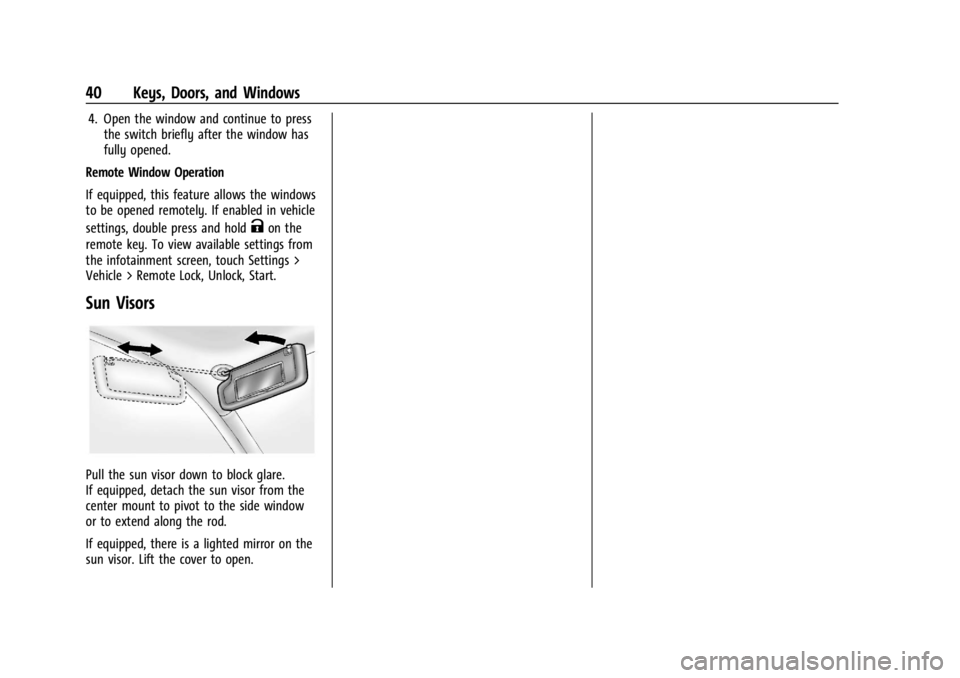
Sun Visors
Pull the sun visor down to block glare.
If equipped, detach the sun visor from the
center mount to pivot to the side window
or to extend along the rod.
If equipped, there is a lighted mirror on the
sun visor. Lift the cover to open.
Page 54 of 429

Chevrolet Silverado EV Owner Manual (GMNA-Localizing-U.S./Canada-
16702912) - 2024 - CRC - 1/13/23
Seats and Restraints 53
Why Seat Belts Work
When riding in a vehicle, you travel as fast
as the vehicle does. If the vehicle stops
suddenly, you keep going until something
stops you. It could be the windshield, the
instrument panel, or the seat belts!
When you wear a seat belt, you and the
vehicle slow down together. There is more
time to stop because you stop over a longer
distance and, when worn properly, your
strongest bones take the forces from the
seat belts. That is why wearing seat belts
makes such good sense.
Questions and Answers About Seat Belts
Q: Will I be trapped in the vehicle after acrash if I am wearing a seat belt?
A: You could be— whether you are
wearing a seat belt or not. Your chance
of being conscious during and after a
crash, so you canunbuckle and get out,
is much greater if you are belted.
Q: If my vehicle has airbags, why should I have to wear seat belts?
A: Airbags are supplemental systems only.
They work withseat belts —not instead
of them. Whether or not an airbag is
provided, all occupants still have to
buckle up to get the most protection.
Also, in nearly all states and in all
Canadian provinces, the law requires
wearing seat belts.
Buckle To Drive
If equipped, this feature delays the vehicle
from shifting out of P (Park) when the driver
seat belt is not buckled. The Buckle to Drive
feature must be turned ON in the
infotainment system to work. To turn the
Buckle to Drive feature on or off, select
Settings > Vehicle > Buckle to Drive. See
Teen Driver 0168, if equipped. If the vehicle is on and the brake pedal is
pressed with the vehicle in P (Park) but the
driver seat belt is not buckled, a message
displays in the Driver Information
Center (DIC) and the vehicle will be delayed
from shifting out of P (Park). Buckle the
driver seat belt to clear the message and
shift out of P (Park). Shifting from P (Park)
will be delayed once for each time the
vehicle is started.
On some models, Buckle to Drive may also
delay shifting out of P (Park) if a front
passenger seat belt is unbuckled. A message
displays in the DIC. Buckle the front
passenger seat belt to clear the message
and shift out of P (Park). This feature may
delay the vehicle from shifting out of
P (Park) if an object, such as a briefcase,
handbag, grocery bag, laptop, or other
electronic device, is on the front passenger
seat. If this happens, remove the object
from the seat or buckle the seat belt to shift
out of P (Park).
If the driver, or on some vehicles, the
present front passenger remains unbuckled,
the DIC message will turn off after several
seconds and the vehicle can be shifted out
of P (Park). See
“Seat Belts”and“Child
Page 100 of 429

Chevrolet Silverado EV Owner Manual (GMNA-Localizing-U.S./Canada-
16702912) - 2024 - CRC - 1/13/23
Instruments and Controls 99
{Warning
In freezing weather, do not use the
washer until the windshield is warmed.
Otherwise the washer fluid can form ice
on the windshield, blocking your vision.
{Warning
Before driving the vehicle, always clear
snow and ice from the hood, windshield,
washer nozzles, roof, and rear of the
vehicle, including all lamps and windows.
Reduced visibility from snow and ice
buildup could lead to a crash.
Wiper Parking
If the vehicle is turned off while the wipers
are on LO, HI, or INT, they will
immediately stop.
If the windshield wiper lever is then moved
to OFF before the driver door is opened or
within 10 minutes, the wipers will restart
and move to the base of the windshield.
If the vehicle is turned off while the wipers
are performing wipes due to windshield
washing, the wipers continue to run until
they reach the base of the windshield.
Rain Sense
If equipped with Rain Sense and the feature
is turned on, a sensor near the top center of
the windshield detects the amount of water
on the windshield and controls the
frequency of the windshield wiper based on
the current sensitivity setting.
Keep this area of the windshield clear of
debris to allow for best system performance.
To turn the Rain Sense feature on or off, see
“Rain Sense Wipers” under Settings >
Vehicle > Comfort and Convenience > Rain
Sense > Enable/Disable.
If Rain Sense is enabled in Settings, turning
the wiper lever to INT will activate Rain
Sense.
Clock
Set the time and date using the
infotainment system. See "Time/Date" under
Settings 0166.
Power Outlets
Power Outlets 12-Volt Direct Current
The vehicle has two 12-volt outlets that can
be used to plug in electrical equipment, such
as a tablet or MP3 player. Lift the cover to access the outlet and
replace when not in use.
The power outlets are located:
.In the center console storage area under
the armrest
.In the eTrunk™
area
Center Console 12 Volt Power Outlet
Page 104 of 429
Chevrolet Silverado EV Owner Manual (GMNA-Localizing-U.S./Canada-
16702912) - 2024 - CRC - 1/13/23
Instruments and Controls 103
{Warning
Using a damaged power outlet could
result in electrical shock causing personal
injury or death. Inspect the power outlet
for damage before use and do not use
the outlet if it is damaged.
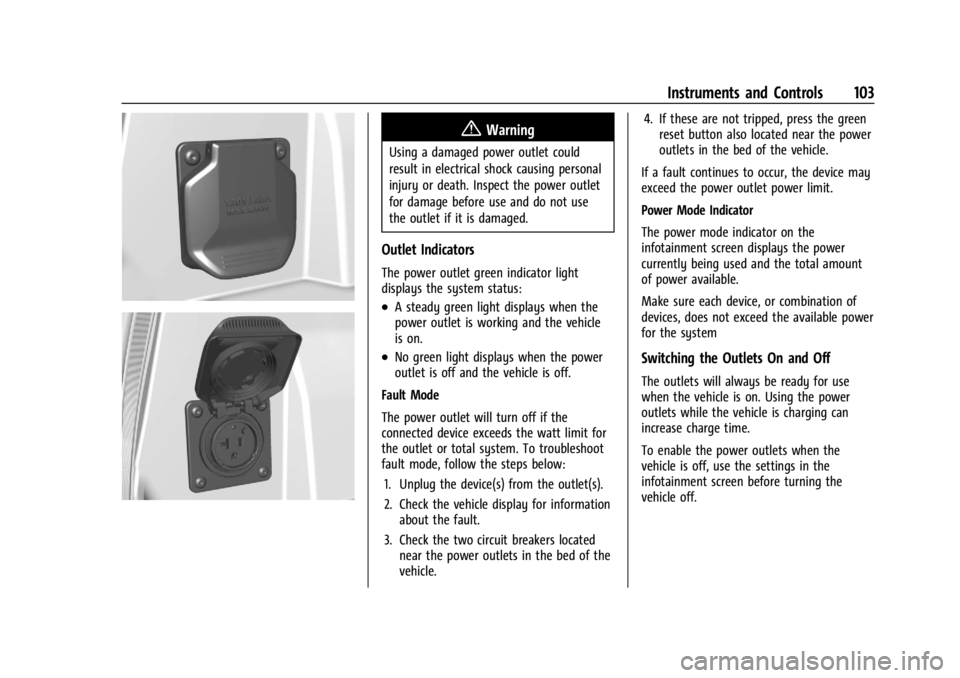
Outlet Indicators
The power outlet green indicator light
displays the system status:
.A steady green light displays when the
power outlet is working and the vehicle
is on.
.No green light displays when the power
outlet is off and the vehicle is off.
Fault Mode
The power outlet will turn off if the
connected device exceeds the watt limit for
the outlet or total system. To troubleshoot
fault mode, follow the steps below: 1. Unplug the device(s) from the outlet(s).
2. Check the vehicle display for information about the fault.
3. Check the two circuit breakers located near the power outlets in the bed of the
vehicle. 4. If these are not tripped, press the green
reset button also located near the power
outlets in the bed of the vehicle.
If a fault continues to occur, the device may
exceed the power outlet power limit.
Power Mode Indicator
The power mode indicator on the
infotainment screen displays the power
currently being used and the total amount
of power available.
Make sure each device, or combination of
devices, does not exceed the available power
for the systemSwitching the Outlets On and Off
The outlets will always be ready for use
when the vehicle is on. Using the power
outlets while the vehicle is charging can
increase charge time.
To enable the power outlets when the
vehicle is off, use the settings in the
infotainment screen before turning the
vehicle off.
Page 105 of 429

Chevrolet Silverado EV Owner Manual (GMNA-Localizing-U.S./Canada-
16702912) - 2024 - CRC - 1/13/23
104 Instruments and Controls
Troubleshooting
The power outlets will be momentarily
unavailable at the start and the end of a
350 kW DC Fast Charge. This is normal
operation.
For any error messages that can not be
resolved by resetting fault mode as
discussed earlier in this section, see your
dealer.
{Warning
The power outlets contain high-voltage
electrical equipment. Disassembling the
power outlets may result in electrical
shock causing personal injury or death.
Never attempt to disassemble a power
outlet.
Wireless Charging
If equipped and enabled, the vehicle has
wireless charging in the bin below the
climate control system. The system operates
at 145 kHz and wirelessly charges one Qi
compatible smartphone. The power output
of the system is capable of charging at a
rate up to 3 amp (15 W), as requested by
the compatible smartphone. SeeRadio
Frequency Statement 0404.
{Warning
Wireless charging may affect the
operation of an implanted pacemaker or
other medical devices. If you have one, it
is recommended to consult with your
doctor before using the wireless charging
system.
The vehicle must be on or Retained
Accessory Power (RAP) must be active. The
wireless charging feature may not correctly
indicate charging when the vehicle is in RAP,
during a Bluetooth phone call, or when
phone projection (e.g. Apple CarPlay/Android
Auto) is active. See Power Modes0197.
The operating temperature is −40 °C (−40 °F)
to 85 °C (185 °F) for the charging system and
0 °C (32 °F) to 35 °C (95 °F) for the phone.
A charging stopped alert may be displayed
on the infotainment screen, if the wireless
charger or smartphone are outside of
normal operating temperature. Charging will
automatically resume when a normal
operating temperature is reached.
{Warning
Remove all objects from the charger
before charging your compatible
smartphone. Objects, such as coins, keys,
rings, paper clips, or cards, between the
smartphone and charger may become
very hot.
On the rare occasion that the charging
system does not detect an object, and
the object gets wedged between the
smartphone and charger, remove the
smartphone and allow the object to cool
before removing it from the charger, to
prevent burns.
To charge a compatible smartphone: 1. Confirm the smartphone is capable of wireless charging.
2. The wireless charger is below the climate control system.