Page 2 of 560
2TABLE OF CONTENTS
For your information...................6
Reading this manual ................ 11
How to search .......................... 12
Pictorial index .......................... 14
1-1. For safe use Before driving ................... 26
For safe driving ................ 27
Seat belts ......................... 29
SRS airbags ..................... 33
Front passenger occupant classification system ...... 43
Exhaust gas precautions.. 48
1-2. Child safety Riding with children .......... 49
Child restraint systems..... 50
1-3. Emergency assistance Safety Connect ................ 65
1-4. Hybrid system Hybrid system features .... 70
Hybrid system precautions ....................................... 75
1-5. Theft deterrent system Immobilizer system .......... 80
Alarm................................ 81
2-1. Instrument cluster Warning lights and indicators....................................... 84
Gauges and meters (Vehi- cles with 7-inch multi-infor-
mation display) ............... 90Gauges and meters (Vehi-
cles with 12.3-inch multi-
information display) ........ 94
Multi-information display (7- inch multi-information dis-
play)............................. 100
Multi-information display (12.3-inch multi-information
display) ........................ 111
Head-up display ............ 123
Energy monitor/consumption screen.......................... 128
3-1. Key information Keys .............................. 134
3-2. Opening, closing and lock- ing the doors
Side doors ..................... 137
Back door ...................... 142
Smart key system .......... 154
3-3. Adjusting the seats Front seats .................... 159
Rear seats ..................... 160
Driving position memory 162
Head restraints .............. 166
3-4. Adjusting the steering wheel and mirrors
Steering wheel............... 168
Inside rear view mirror ... 169
Digital Rear-view Mirror . 170
Outside rear view mirrors .................................... 181
3-5. Opening, closing the win- dows
Power windows ............. 183
1For safety and security
2
Vehicle status
information and
indicators
3Before driving
Page 14 of 560
14Pictorial index
Pictorial index
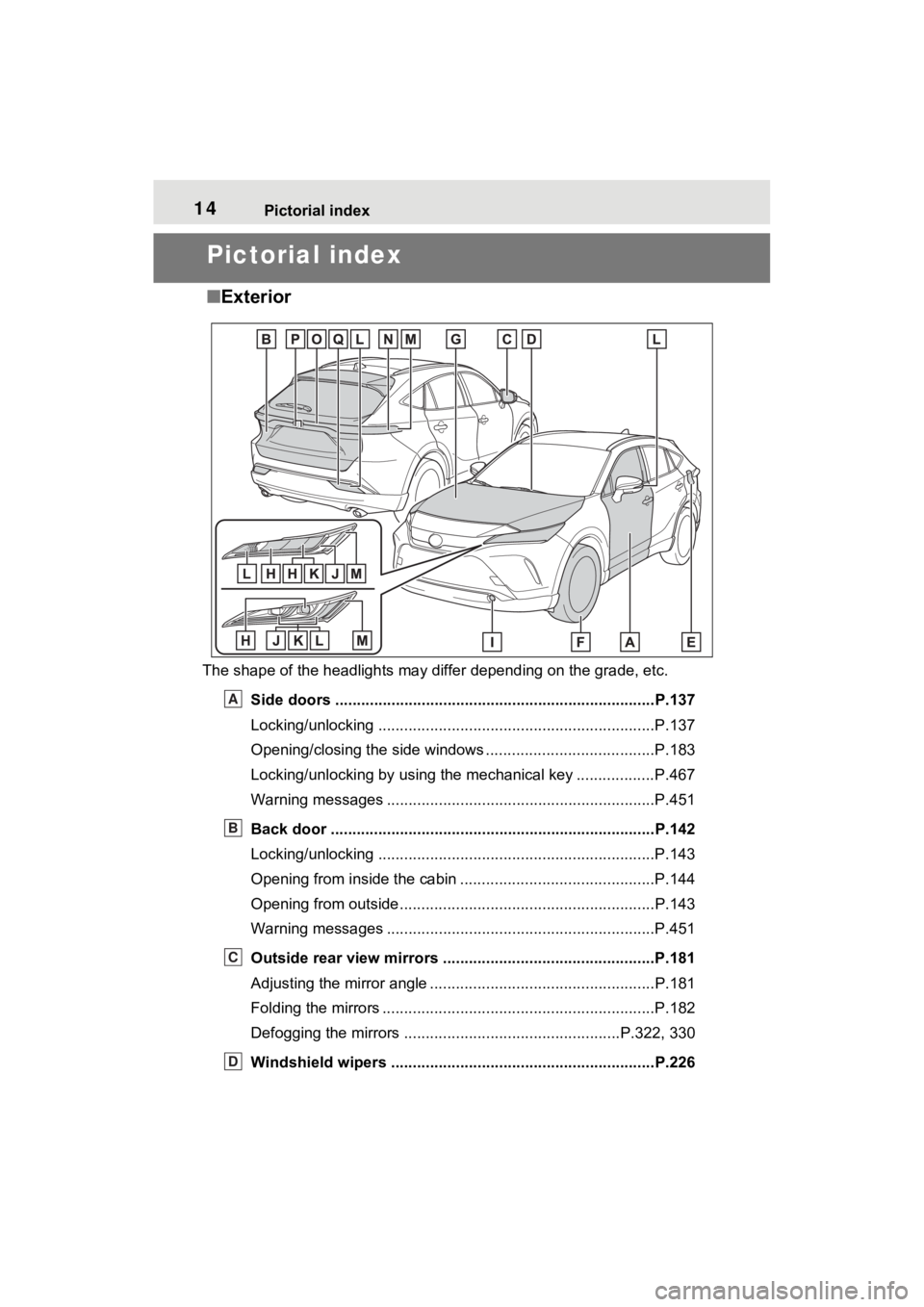
■Exterior
The shape of the headlights may differ depending on the grade, etc.
Side doors ......... ................................. ................................P.137
Locking/unlocking ................................................................P.137
Opening/closing the side windows ............................... ........P.183
Locking/unlocking by using the mechanical key .................. P.467
Warning messages ..............................................................P.451
Back door ...................................................... .....................P.142
Locking/unlocking ................................................................P.143
Opening from inside the cabin .................................. ...........P.144
Opening from outside........................................... ................P.143
Warning messages ..............................................................P.451
Outside rear view mirrors .................................................P.181
Adjusting the mirror angle ..................................... ...............P.181
Folding the mirrors ...............................................................P.182
Defogging the mirrors .......................................... ........P.322, 330
Windshield wipers .............................................. ...............P.226
A
B
C
D
Page 19 of 560
19Pictorial index
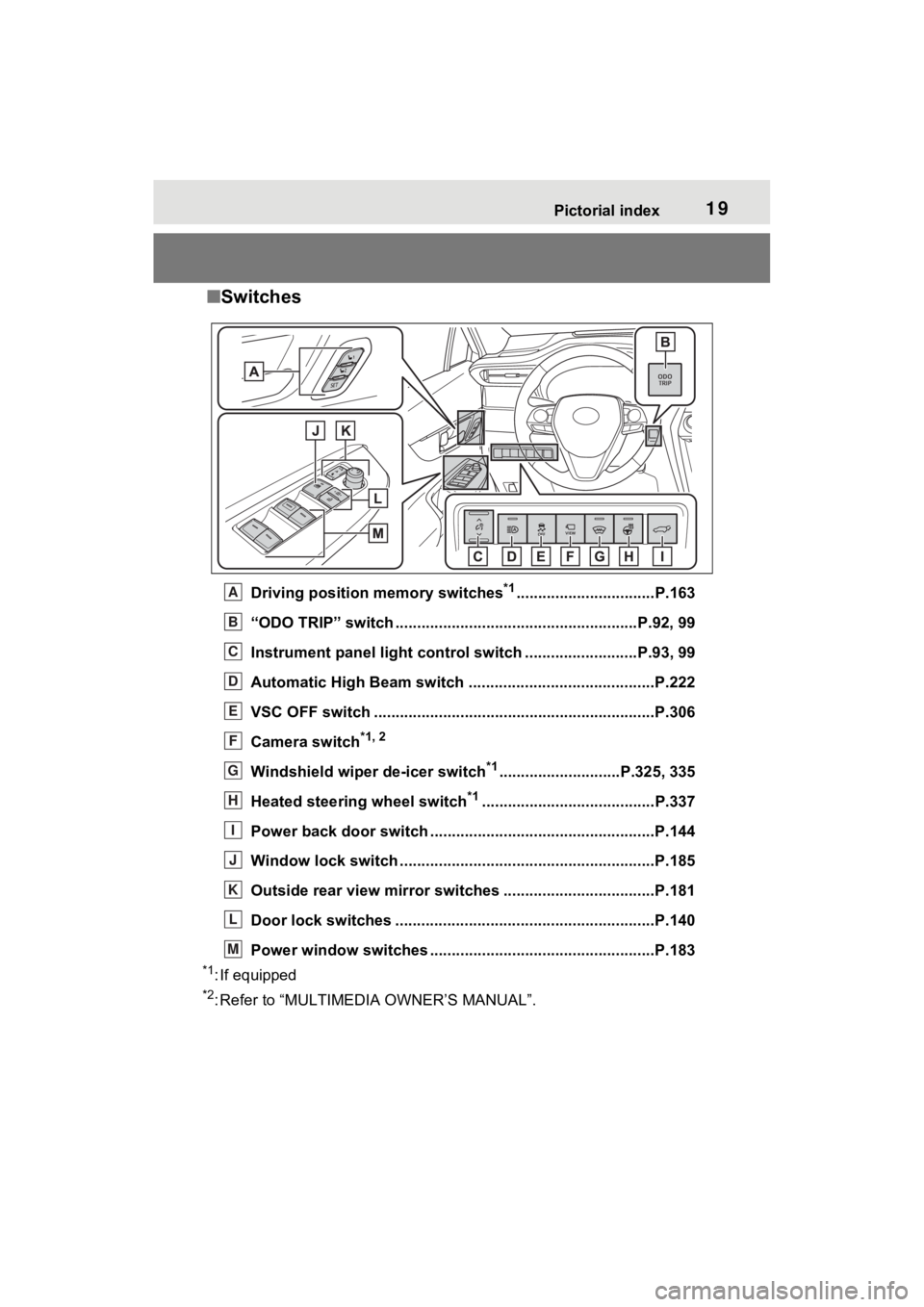
■Switches
Driving position memory switches*1................................P.163
“ODO TRIP” switch .............................................. ..........P.92, 99
Instrument panel light cont rol switch ..........................P.93, 99
Automatic High Beam switch ..................................... ......P.222
VSC OFF switch .................................................................P.306
Camera switch
*1, 2
Windshield wiper de-icer switch*1............................P.325, 335
Heated steering wheel switch
*1........................................P.337
Power back door switch ... .................................................P.144
Window lock switch ............................................. ..............P.185
Outside rear view mirror swi tches ...................................P.181
Door lock switches ............................................................P.140
Power window switches ....... .............................................P.183
*1: If equipped
*2: Refer to “MULTIMEDIA OWNER’S MANUAL”.
A
B
C
D
E
F
G
H
I
J
K
L
M
Page 23 of 560
23Pictorial index
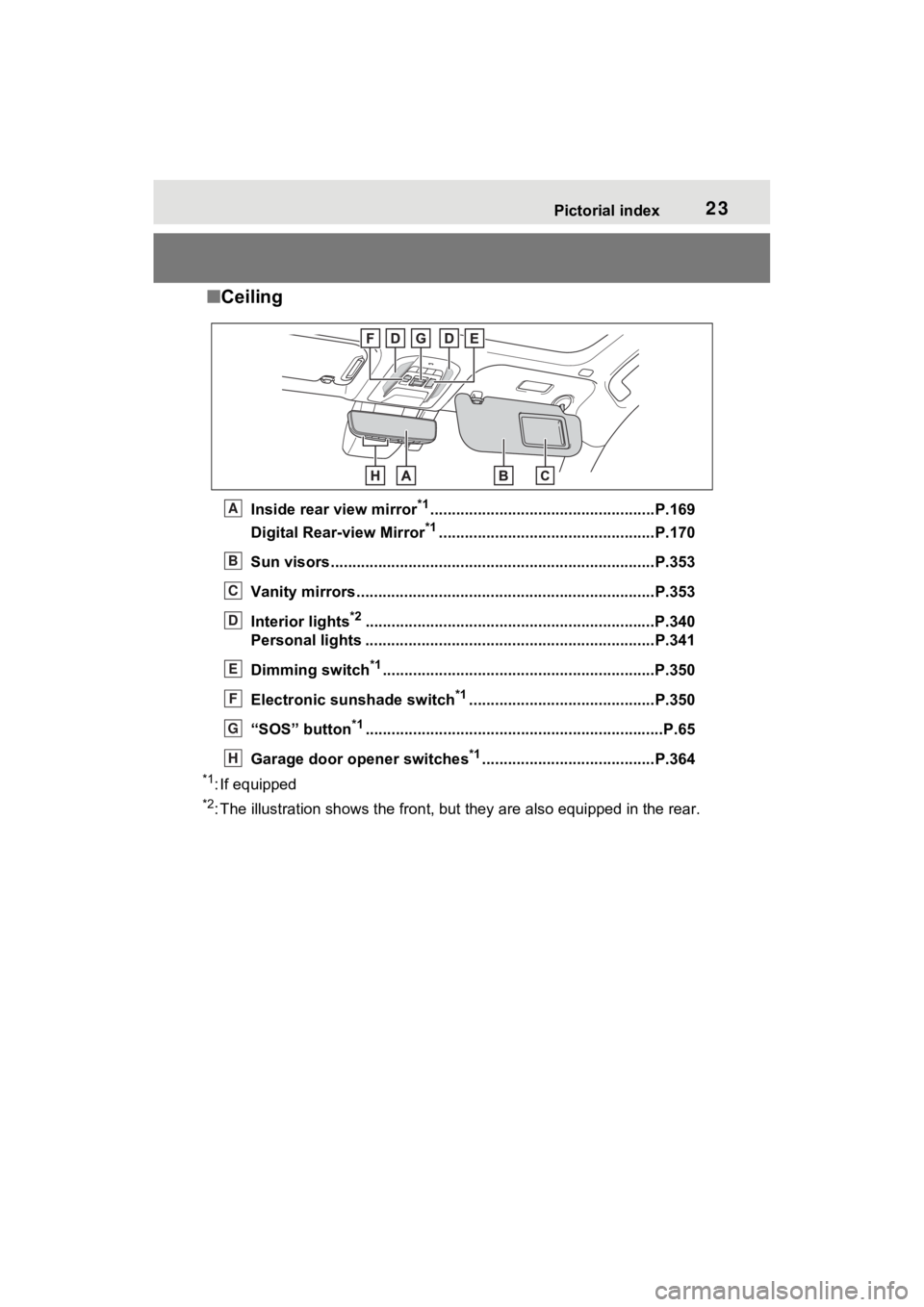
■Ceiling
Inside rear view mirror*1....................................................P.169
Digital Rear-view Mirror
*1..................................................P.170
Sun visors..................................................... ......................P.353
Vanity mirrors.....................................................................P.353
Interior lights
*2............................................................... ....P.340
Personal lights ................................................ ...................P.341
Dimming switch
*1............................................................... P.350
Electronic sunshade switch
*1...........................................P.350
“SOS” button
*1............................................................... ......P.65
Garage door opener switches
*1........................................P.364
*1: If equipped
*2: The illustration shows the fron t, but they are also equipped i n the rear.
A
B
C
D
E
F
G
H
Page 27 of 560
271-1. For safe use
1
For safety and security
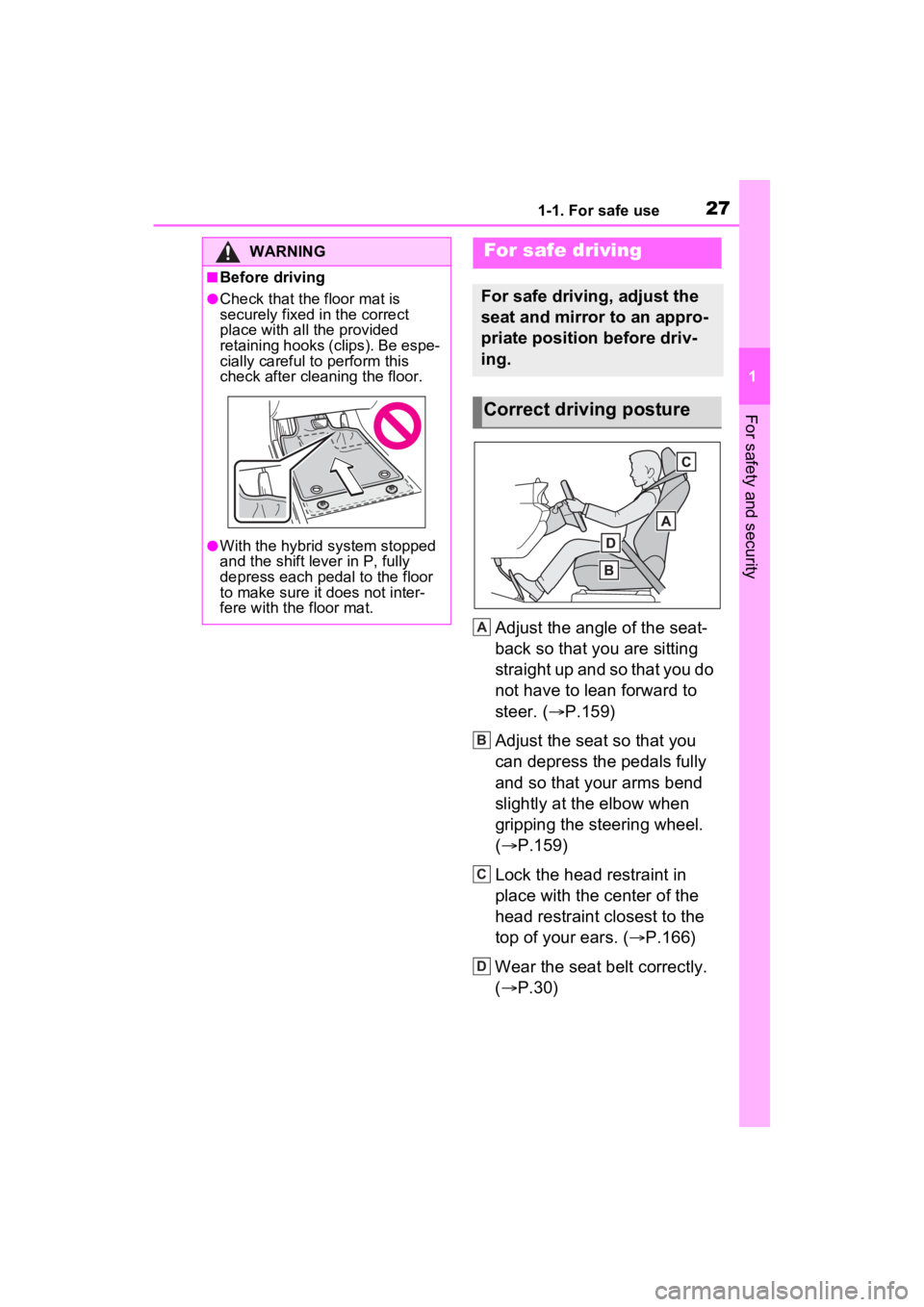
Adjust the angle of the seat-
back so that you are sitting
straight up and so that you do
not have to lean forward to
steer. (P.159)
Adjust the seat so that you
can depress the pedals fully
and so that your arms bend
slightly at the elbow when
gripping the steering wheel.
( P.159)
Lock the head restraint in
place with the center of the
head restraint closest to the
top of your ears. ( P.166)
Wear the seat belt correctly.
( P.30)
WARNING
■Before driving
●Check that the floor mat is
securely fixed in the correct
place with all the provided
retaining hooks (clips). Be espe-
cially careful to perform this
check after cleaning the floor.
●With the hybrid system stopped
and the shift lever in P, fully
depress each pedal to the floor
to make sure it does not inter-
fere with the floor mat.
For safe driving
For safe driving, adjust the
seat and mirror to an appro-
priate position before driv-
ing.
Correct driving posture
A
B
C
D
Page 28 of 560
281-1. For safe use
Make sure that all occupants are
wearing their seat belts before
driving the vehicle. (P.30)
Use a child restraint system
appropriate for the child until the
child becomes large enough to properly wear the vehicle’s seat
belt. (
P.50)
Make sure that you can see
backward clearly by adjusting
the inside rear view mirror (if
equipped), Digital Rear-view
Mirror (if equipped) and outside
rear view mirrors properly.
( P.169, 170, 181)
WARNING
Observe the following precau-
tions.
Failure to do so m ay result in
death or serious injury.
●Do not adjust the position of the
driver’s seat while driving.
Doing so could cause the driver
to lose control of the vehicle.
●Do not place a cushion between
the driver or passenger and the
seatback. A cushion may pre-
vent correct pos ture from being
achieved, and reduce the effec-
tiveness of the seat belt and
head restraint.
●Do not place anything under the
front seats.
Objects placed under the front
seats may become jammed in
the seat tracks and stop the
seat from locking in place. This
may lead to an accident and the
adjustment mechanism may
also be damaged.
●Always observe the legal speed
limit when driving on public
roads.
●When driving over long dis-
tances, take regular breaks
before you start to feel tired.
Also, if you feel tired or sleepy
while driving, do not force your-
self to continue driving and take
a break immediately.
Correct use of the seat
belts
Adjusting the mirrors
Page 84 of 560
842-1. Instrument cluster
2-1.Instrument cluster
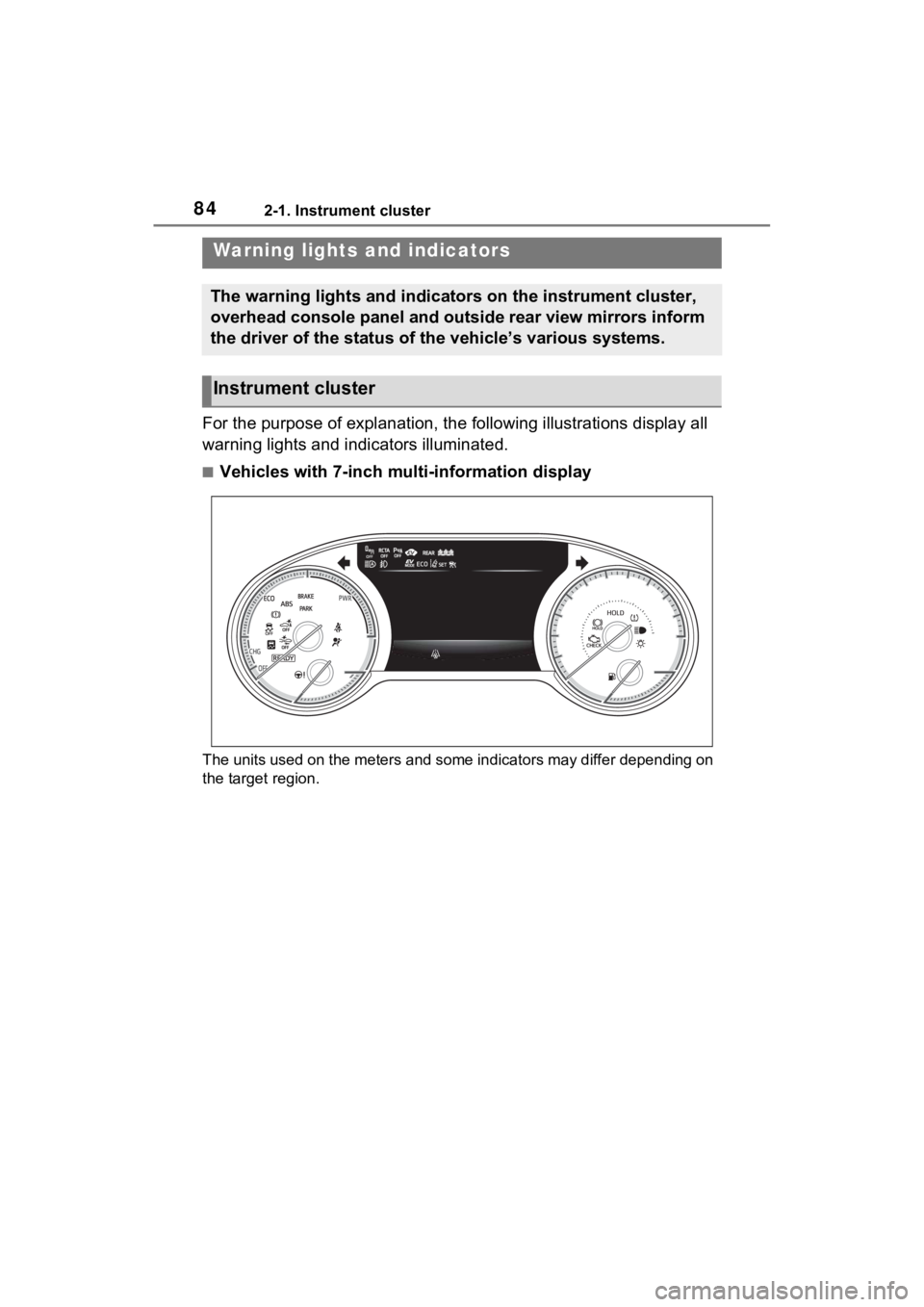
For the purpose of explanation, the following illustrations display all
warning lights and indicators illuminated.
■Vehicles with 7-inch multi-information display
The units used on the meters and some indicators may differ dep ending on
the target region.
Warning lights and indicators
The warning lights and indicators on the instrument cluster,
overhead console panel and outside rear view mirrors inform
the driver of the status of the vehicle’s various systems.
Instrument cluster
Page 88 of 560
882-1. Instrument cluster
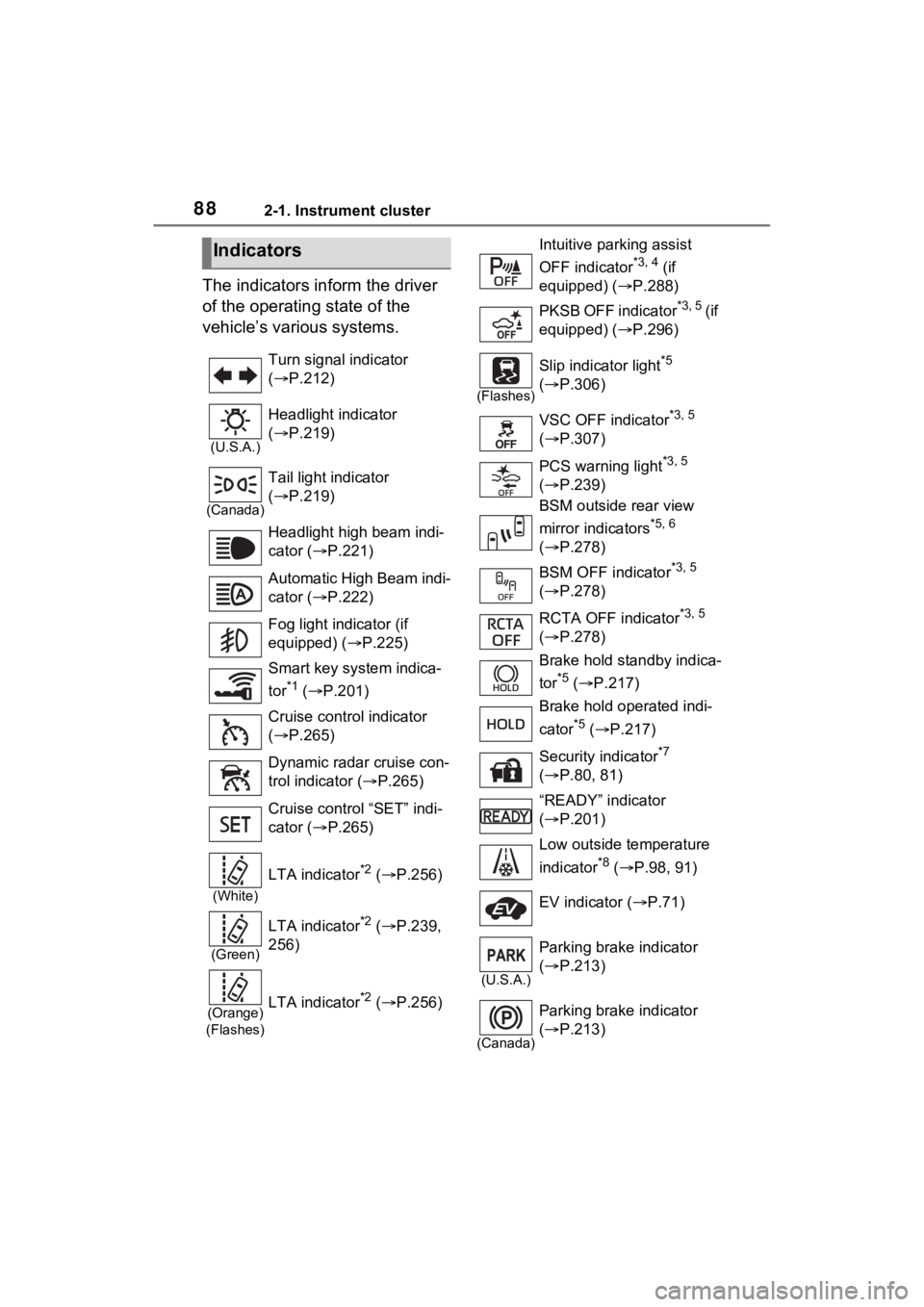
The indicators inform the driver
of the operating state of the
vehicle’s various systems.
Indicators
Turn signal indicator
( P.212)
(U.S.A.)
Headlight indicator
( P.219)
(Canada)
Tail light indicator
( P.219)
Headlight high beam indi-
cator ( P.221)
Automatic High Beam indi-
cator ( P.222)
Fog light indicator (if
equipped) ( P.225)
Smart key system indica-
tor
*1 ( P.201)
Cruise control indicator
( P.265)
Dynamic radar cruise con-
trol indicator ( P.265)
Cruise control “SET” indi-
cator ( P.265)
(White)
LTA indicator*2 ( P.256)
(Green)
LTA indicator*2 ( P.239,
256)
(Orange)
(Flashes)LTA indicator*2 ( P.256)
Intuitive parking assist
OFF indicator
*3, 4 (if
equipped) ( P.288)
PKSB OFF indicator
*3, 5 ( i f
equipped) ( P.296)
(Flashes)
Slip indicator light*5
( P.306)
VSC OFF indicator
*3, 5
( P.307)
PCS warning light
*3, 5
( P.239)
BSM outside rear view
mirror indicators
*5, 6
( P.278)
BSM OFF indicator
*3, 5
( P.278)
RCTA OFF indicator
*3, 5
( P.278)
Brake hold standby indica-
tor
*5 ( P.217)
Brake hold operated indi-
cator
*5 ( P.217)
Security indicator
*7
( P.80, 81)
“READY” indicator
( P.201)
Low outside temperature
indicator
*8 ( P.98, 91)
EV indicator ( P.71)
(U.S.A.)
Parking brake indicator
( P.213)
(Canada)
Parking brake indicator
( P.213)