2023 TOYOTA VENZA HYBRID glove box
[x] Cancel search: glove boxPage 157 of 560

1573-2. Opening, closing and locking the doors
3
Before driving
performing any of the following:
●Bring the electronic key close to
either front door handle and oper-
ate the entry function.
●Operate the wireless remote con-
trol.
If the doors cannot be
locked/unlocked using the above
methods, use the mechanical key.
( P.136)
If the hybrid system cannot be
started using the smart key system,
refer to P.467.
■Note for the entry function
●Even when the electronic key is
within the effective range (detec-
tion areas), the system may not
operate properly in the following
cases:
• The electronic key is too close to
the window or outside door han-
dle, near the ground, or in a high
place when the doors are locked
or unlocked.
• The electronic key is on the instru- ment panel, luggage cover or
floor, or in the door pockets or
glove box when the hybrid system
is started or po wer switch modes
are changed.
●Do not leave the electronic key on
top of the instrument panel or near
the door pockets when exiting the
vehicle. Depending on the radio
wave reception conditions, it may
be detected by the antenna out-
side the cabin and the door will
become lockable from the outside,
possibly trapping the electronic
key inside the vehicle.
●As long as the electronic key is
within the effective range, the
doors may be locked or unlocked
by anyone. However, only the
doors detecting the electronic key
can be used to unl ock the vehicle.
●Even if the electronic key is not
inside the vehicle, it may be possi-
ble to start the hybrid system if the
electronic key is near the window.
●The doors may unlock if a large
amount of water splashes on the
door handle, such as in the rain or
in a car wash when the electronic
key is within the effective range.
(The doors will automatically be
locked after approximately 60 sec-
onds if the doors are not opened
and closed.)
●If the wireless remote control is
used to lock the doors when the
electronic key is near the vehicle,
there is a possib ility that the door
may not be unlocked by the entry
function. (Use the wireless remote
control to unlock the doors.)
●Touching the door lock sensor
while wearing gloves may delay or
prevent lock operation. Remove
the gloves and touch the lock sen-
sor again.
●When the lock operation is per-
formed using the lock sensor, rec-
ognition signals will be shown up
to two consecutive times. After
this, no recognition signals will be
given.
●If the door handle becomes wet
while the electronic key is within
the effective range, the door may
lock and unlock repeatedly. In that
case, follow the following correc-
tion procedures to wash the vehi-
cle:
• Place the electronic key in a loca-
tion 6 ft. (2 m) or more away from
the vehicle. (Take care to ensure
that the key is not stolen.)
• Set the electronic key to battery- saving mode to disable the smart
key system. ( P.156)
●If the electronic key is inside the
vehicle and a door handle
becomes wet during a car wash, a
message may be shown on the
multi-information display and a
buzzer will sound outside the vehi-
cle. To turn off th e alarm, lock all
the doors.
●The lock sensor may not work
properly if it comes into contact
with ice, snow, m ud, etc. Clean
Page 192 of 560
1924-1. Before driving
WARNING
■If you hear a squealing or
scraping noise (brake pad
wear limit indicators)
Have the brake pads checked and
replaced by your Toyota dealer as
soon as possible.
Rotor damage may result if the
pads are not replaced when
needed.
It is dangerous to drive the vehicle
when the wear limits of the brake
pads and/or those of the brake
discs are exceeded.
■When the vehicle is stopped
●Do not depress t he accelerator
pedal unnecessarily.
If the shift lever is in any posi-
tion other than P or N, the vehi-
cle may accelerate suddenly
and unexpectedly, causing an
accident.
●In order to prev ent accidents
due to the vehicle rolling away,
always keep depressing the
brake pedal while stopped with
the “READY” indicator is illumi-
nated, and apply the parking
brake as necessary.
●If the vehicle is stopped on an
incline, in order to prevent acci-
dents caused by the vehicle roll-
ing forward or backward, always
depress the brake pedal and
securely apply the parking
brake as needed.
●Avoid revving or racing the
engine.
Running the engine at high
speed while the vehicle is
stopped may cause the exhaust
system to overheat, which could
result in a fire if combustible
material is nearby.
■When the vehicle is parked
●Do not leave glasses, cigarette
lighters, spray cans, or soft
drink cans in the vehicle when it
is in the sun.
Doing so may result in the fol-
lowing:
• Gas may leak from a cigarette lighter or spray can, and may
lead to a fire.
• The temperature inside the vehicle may cause the plastic
lenses and plastic material of
glasses to deform or crack.
• Soft drink cans may fracture, causing the contents to spray
over the interior of the vehicle,
and may also cause a short cir-
cuit in the vehicle’s electrical
components.
●Do not leave cigarette lighters in
the vehicle. If a cigarette lighter
is in a place such as the glove
box or on the floor, it may be lit
accidentally when luggage is
loaded or the se at is adjusted,
causing a fire.
●Do not attach adhesive discs to
the windshield or windows. Do
not place containers such as air
fresheners on the instrument
panel or dashboard. Adhesive
discs or containers may act as
lenses, causing a fire in the
vehicle.
●Do not leave a door or window
open if the curved glass is
coated with a metallized film
such as a silver-colored one.
Reflected sunlight may cause
the glass to act a s a lens, caus-
ing a fire.
Page 343 of 560
3435-3. Using the storage features
5
Interior features
5-3.Using the storage features
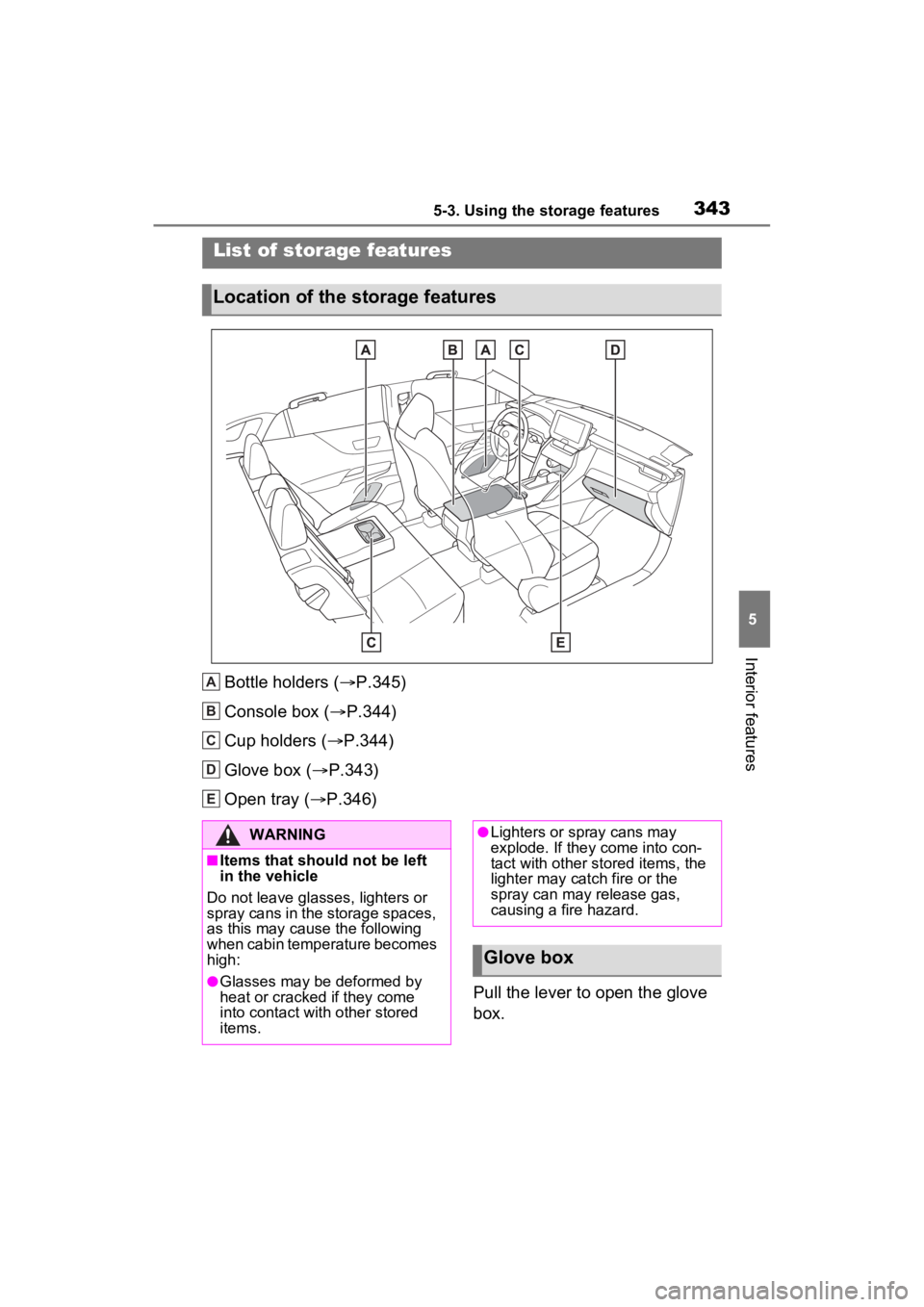
Bottle holders (P.345)
Console box ( P.344)
Cup holders ( P.344)
Glove box ( P.343)
Open tray ( P.346)
Pull the lever to open the glove
box.
List of storage features
Location of the storage features
A
B
C
D
E
:$51,1*
■Items that should not be left
in the vehicle
Do not leave glasses, lighters or
spray cans in the storage spaces,
as this may cau se the following
when cabin temperature becomes
high:
●Glasses may be deformed by
heat or cracked if they come
into contact with other stored
items.
●Lighters or spray cans may
explode. If they come into con-
tact with other stored items, the
lighter may catch fire or the
spray can may release gas,
causing a fire hazard.
Glove box
Page 344 of 560
3445-3. Using the storage features
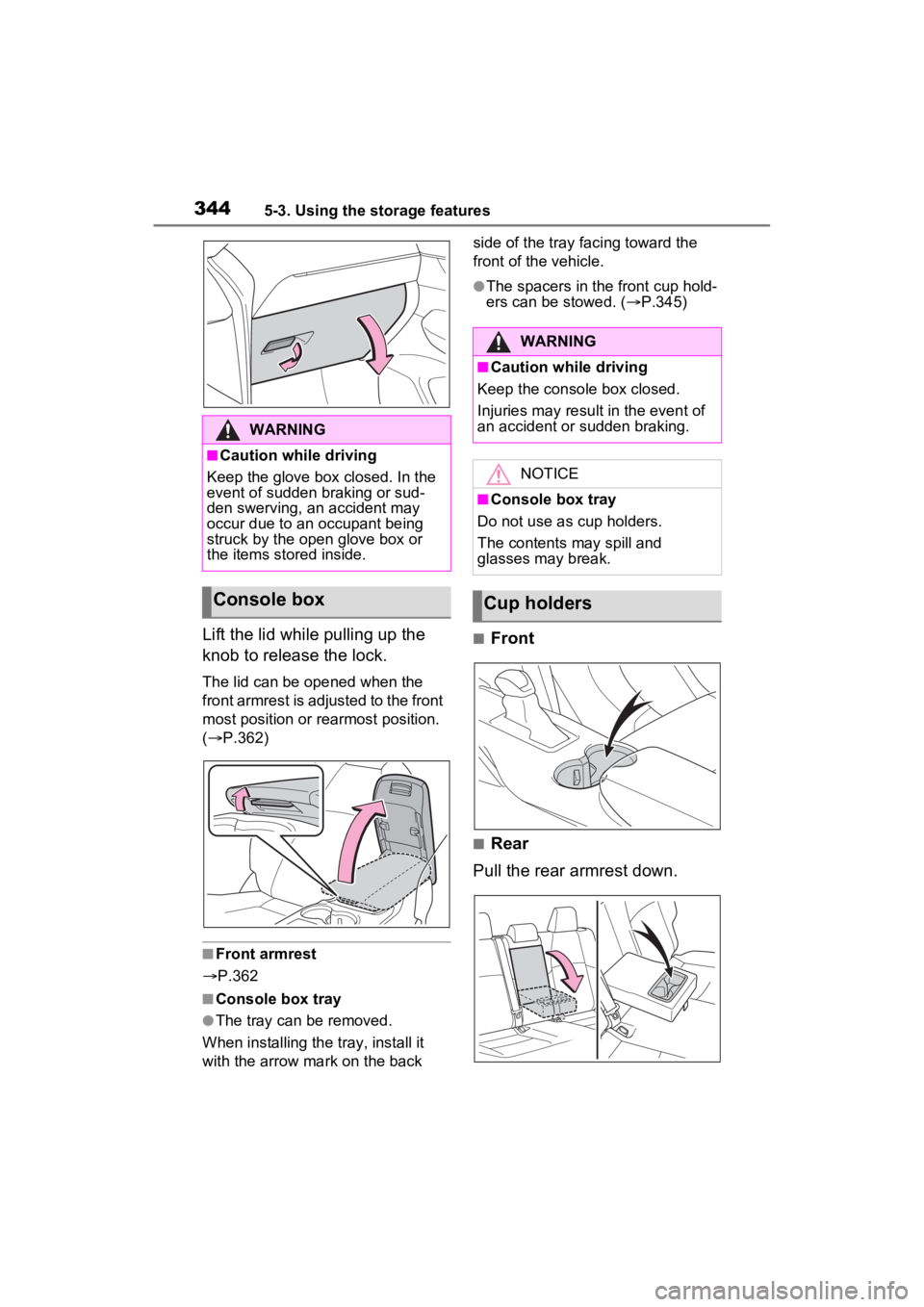
Lift the lid while pulling up the
knob to release the lock.
The lid can be opened when the
front armrest is adjusted to the front
most position or rearmost position.
( P.362)
■Front armrest
P.362
■Console box tray
●The tray can be removed.
When installing the tray, install it
with the arrow mark on the back side of the tray facing toward the
front of the vehicle.
●The spacers in the front cup hold-
ers can be stowed. (
P.345)
■Front
■Rear
Pull the rear armrest down.
WARNING
■Caution while driving
Keep the glove box closed. In the
event of sudden braking or sud-
den swerving, an accident may
occur due to an occupant being
struck by the open glove box or
the items stored inside.
Console box
WARNING
■Caution while driving
Keep the console box closed.
Injuries may resul t in the event of
an accident or sudden braking.
NOTICE
■Console box tray
Do not use as cup holders.
The contents may spill and
glasses may break.
Cup holders
Page 415 of 560
4156-3. Do-it-yourself maintenance
6
Maintenance and care
Use only Toyota wheel nuts
and wrenches designed for
use with your aluminum
wheels.
When rotating, repairing or
changing your tires, check
that the wheel nuts are still
tight after driving 1000 miles
(1600 km).
Be careful not to damage the
aluminum wheels when using
tire chains.
Use only Toyota genuine bal-
ance weights or equivalent
and a plastic or rubber ham-
mer when balancing your
wheels. 1
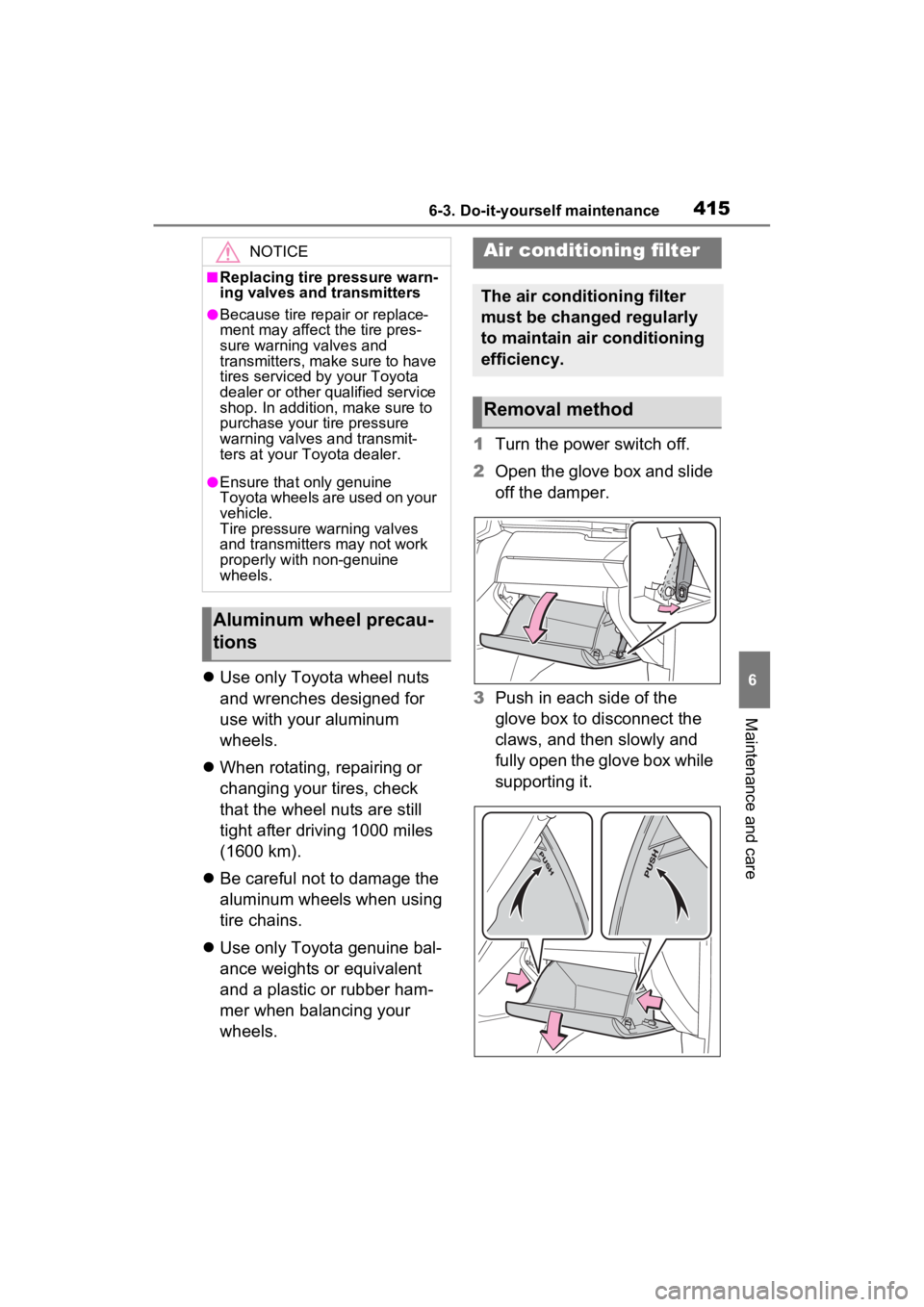
Turn the power switch off.
2 Open the glove box and slide
off the damper.
3 Push in each side of the
glove box to disconnect the
claws, and then slowly and
fully open the glove box while
supporting it.
NOTICE
■Replacing tire pressure warn-
ing valves and transmitters
●Because tire repair or replace-
ment may affect the tire pres-
sure warning valves and
transmitters, make sure to have
tires serviced by your Toyota
dealer or other qualified service
shop. In addition, make sure to
purchase your tire pressure
warning valves and transmit-
ters at your Toyota dealer.
●Ensure that only genuine
Toyota wheels are used on your
vehicle.
Tire pressure warning valves
and transmitters may not work
properly with non-genuine
wheels.
Aluminum wheel precau-
tions
Air conditioning filter
The air conditioning filter
must be changed regularly
to maintain air conditioning
efficiency.
Removal method
Page 416 of 560
4166-3. Do-it-yourself maintenance
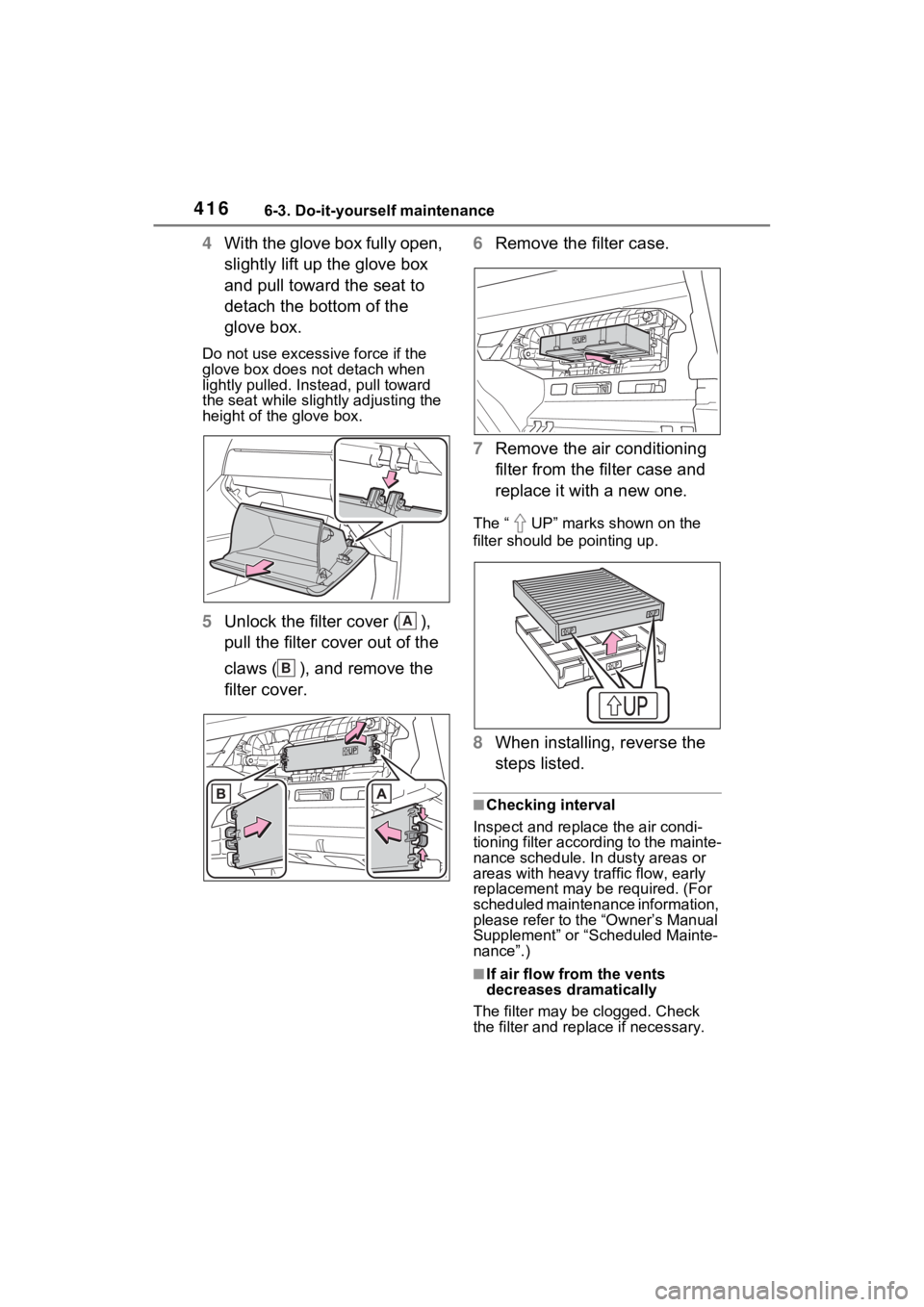
4With the glove box fully open,
slightly lift up the glove box
and pull toward the seat to
detach the bottom of the
glove box.
Do not use excessive force if the
glove box does not detach when
lightly pulled. Ins tead, pull toward
the seat while slightly adjusting the
height of the glove box.
5 Unlock the filter cover ( ),
pull the filter cover out of the
claws ( ), and remove the
filter cover. 6
Remove the filter case.
7 Remove the air conditioning
filter from the filter case and
replace it with a new one.
The “ UP” marks shown on the
filter should be pointing up.
8When installing, reverse the
steps listed.
■Checking interval
Inspect and replace the air condi-
tioning filter according to the mainte-
nance schedule. In dusty areas or
areas with heavy traffic flow, early
replacement may be required. (For
scheduled maintenance information,
please refer to the “Owner’s Manual
Supplement” or “Scheduled Mainte-
nance”.)
■If air flow from the vents
decreases dramatically
The filter may be clogged. Check
the filter and rep lace if necessary.
A
B
Page 417 of 560
4176-3. Do-it-yourself maintenance
6
Maintenance and care
■Scheduled maintenance of the
air intake vent is necessary
when
In some situations such as when the
vehicle is used frequently or in
heavy traffic or dusty areas, the air
intake vent may need to be cleaned
more regularly. For details, refer to
“Owner’s Warranty Information
Booklet” or “Owner’s Manual Sup-
plement”.
■Cleaning the air intake vent
Improper handling of the air intake
vent cover and filter may result in
damage to them. If you have any
concerns about cleaning the filter,
contact your Toyota dealer.
NOTICE
■When using the air condition-
ing system
Make sure that a filter is always
installed. Using the air condition-
ing system without a filter may
cause damage to the system.
■When removing the glove box
Always follow the specified proce-
dure to remove the glove box
( P.415). If the glove box is
removed without following the
specified procedure, the hinge of
the glove box may become dam-
aged.
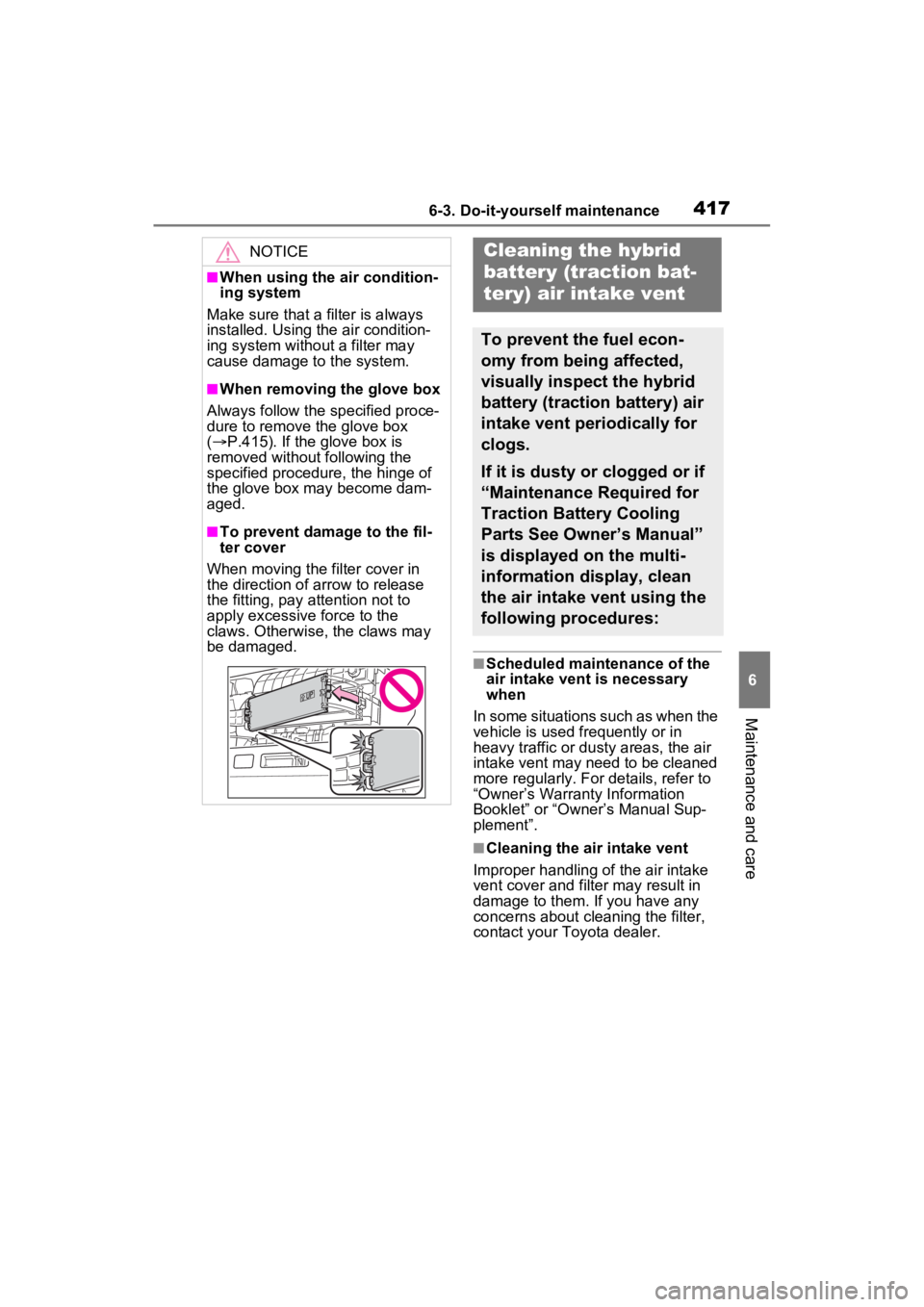
■To prevent damage to the fil-
ter cover
When moving the filter cover in
the direction of arrow to release
the fitting, pay attention not to
apply excessive force to the
claws. Otherwise, the claws may
be damaged.
Cleaning the hybrid
battery (traction bat-
tery) air intake vent
To prevent the fuel econ-
omy from being affected,
visually inspect the hybrid
battery (traction battery) air
intake vent periodically for
clogs.
If it is dusty or clogged or if
“Maintenance Required for
Traction Battery Cooling
Parts See Owner’s Manual”
is displayed on the multi-
information display, clean
the air intake vent using the
following procedures:
Page 537 of 560

Alphabetical Index537
Warning light ........................ 443
EV drive mode ........................ 206
Event data recorder (EDR)......... 8
EV indicator .............................. 71
F
Flat tire .................................... 456 Tire pressure warning system........................................... 402
Floor mats ................................. 26
Fluid Brake ............................ 394, 485
Hybrid transmission.............. 484
Rear differential .................... 484
Washer ................................. 396
Fog lights Switch................................... 225
Footwell lights ..... ................... 339
Front passenger’s seat belt reminder light ....................... 447
Front passenger occupant clas- sification system .................... 43
Front position lights Light switch .......................... 219
Front seat heaters .................. 337
Front seats .............................. 159 Adjustment ........................... 159
Cleaning ............................... 376
Correct driving posture ........... 27
Driving position memory....... 162
Head restraints ..................... 166
Memory recall function ......... 164
Power easy access system .. 162
Seat heaters ......................... 337
Seat position memory .......... 162
Seat ventilators .................... 337
Front side marker lights ........ 219 Light switch .......................... 219
Replacing light bulbs ............ 430
Front turn signal lights Replacing light bulbs ............ 430
Turn signal lever................... 212 Fuel
Capacity ...............................481
Fuel gauge .............................90
Gas station information ........560
Information ......... ..................488
Refueling ..............................231
Type .............................481, 488
Warning light ........................446
Fuel filler door.........................232 If the fuel filler door cannot be opened ...............................465
Refueling ..............................231
Fuel gauge.................................90
Fuses .......................................426
G
Garage door opene r ...............364
Gas station information .........560
Gauges ......................................90
Glove box ................................343
H
Headlights ...............................219 Automatic High Beam system...........................................222
Light switch...........................219
Replacing light bulbs ............430
Headlights aim ........................429
Head restraints .......................166
Head-up display ......................123 Driving position memory .......163
Driving support system display area ....................................125
HUD (Head-up display) switch ...........................................124
Hybrid System Indicator .......126
Memory recall function .........164
Navigation system-linked display ...........................................123
Outside temperature display 127
Pop-up display......................125