Page 90 of 560
902-1. Instrument cluster
The units used on the meter and display may differ depending on the target
region.
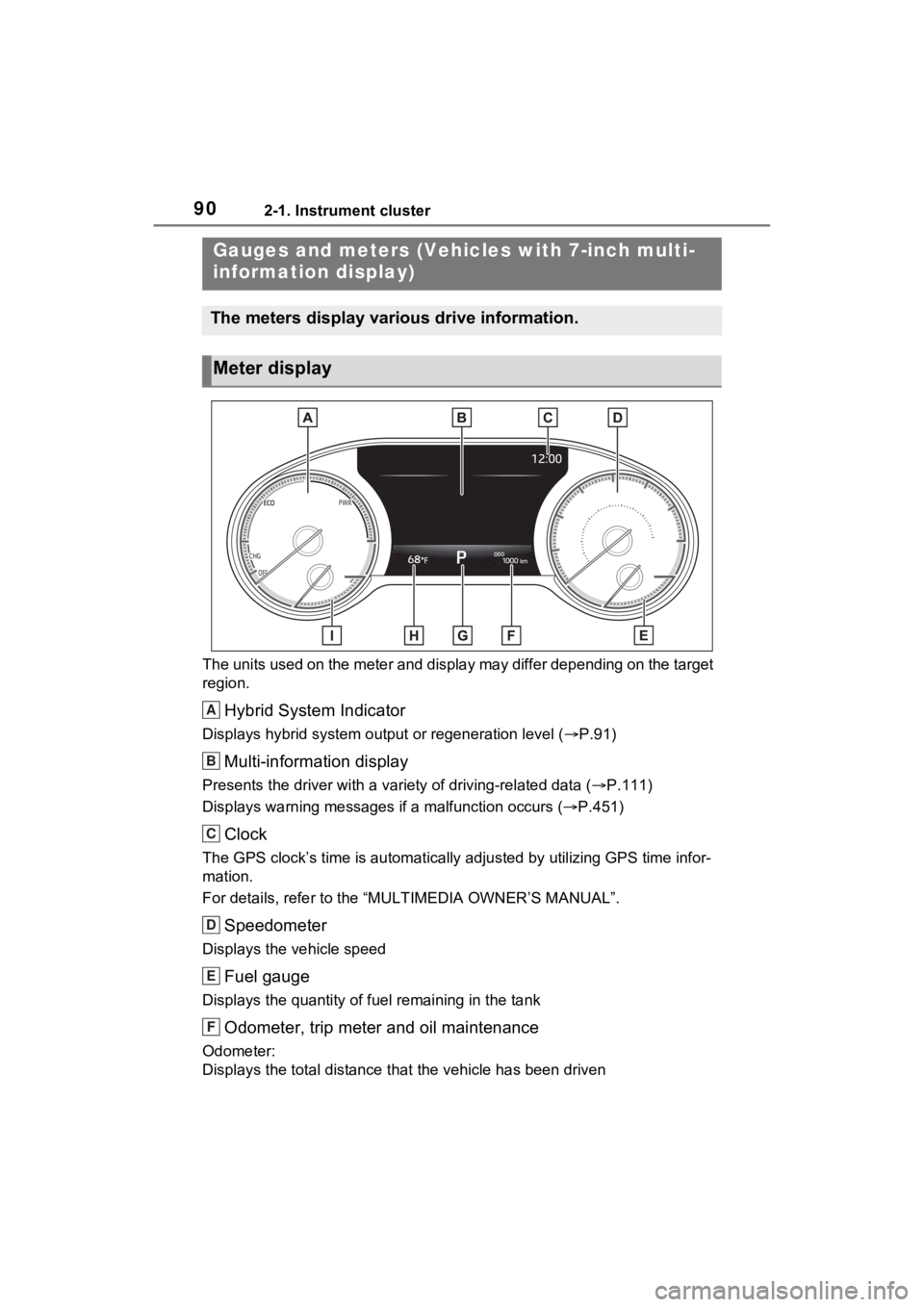
Hybrid System Indicator
Displays hybrid system output or regeneration level ( P.91)
Multi-information display
Presents the driver with a variety of driving-related data ( P.111)
Displays warning messages if a malfunction occurs (P.451)
Clock
The GPS clock’s time is automatically adjus ted by utilizing GPS time infor-
mation.
For details, refer to the “MULTIMEDIA OWNER’S MANUAL”.
Speedometer
Displays the vehicle speed
Fuel gauge
Displays the quantity of fu el remaining in the tank
Odometer, trip meter and oil maintenance
Odometer:
Displays the total distance th at the vehicle has been driven
Gauges and meters (Vehicles with 7-inch multi-
information display)
The meters display various drive information.
Meter display
A
B
C
D
E
F
Page 95 of 560

952-1. Instrument cluster
2
Vehicle status information and indicators
Displays the selected shift position or selected shift range (P.208)
Clock
The GPS clock’s time is automatically adjus ted by utilizing GPS time infor-
mation.
Widget (Audio system-linked display) (if equipped)
Displays the selected audio s ource or track on the meter. ( P.116)
While list of items for content display area ( P.113) is displayed, widget
will not be displayed.
Distance to empty
Displays the driving rang e with remaining fuel (P.97)
Fuel gauge
Displays the quantity of fu el remaining in the tank
In the following sit uations, the actual quantity of fuel remain ing in the tank
may not be displayed correctly. Refer to P.98 if the actual quantity of fuel
remaining in the tank is not displayed correctly.
• A small amount of fuel is added.
• Fuel is added with the fuel gauge near or at “F”.
• The vehicle is stopp ed on an uneven surface, such as a slope.
• The vehicle is driven on a slope or around a curve.
Widget (Fuel economy)
Displays the engine coolant temperature ( P.116)
While list of items for content display area ( P.113) is displayed, widget
will not be displayed.
Engine coolant temperature gauge
Displays the engine c oolant temperature
Odometer and trip meter display ( P.98)
F
G
H
I
J
K
L
Page 96 of 560
962-1. Instrument cluster
Type 3
The location of some displayed items and the units of measure may differ
depending on the intended des tination of the vehicle.
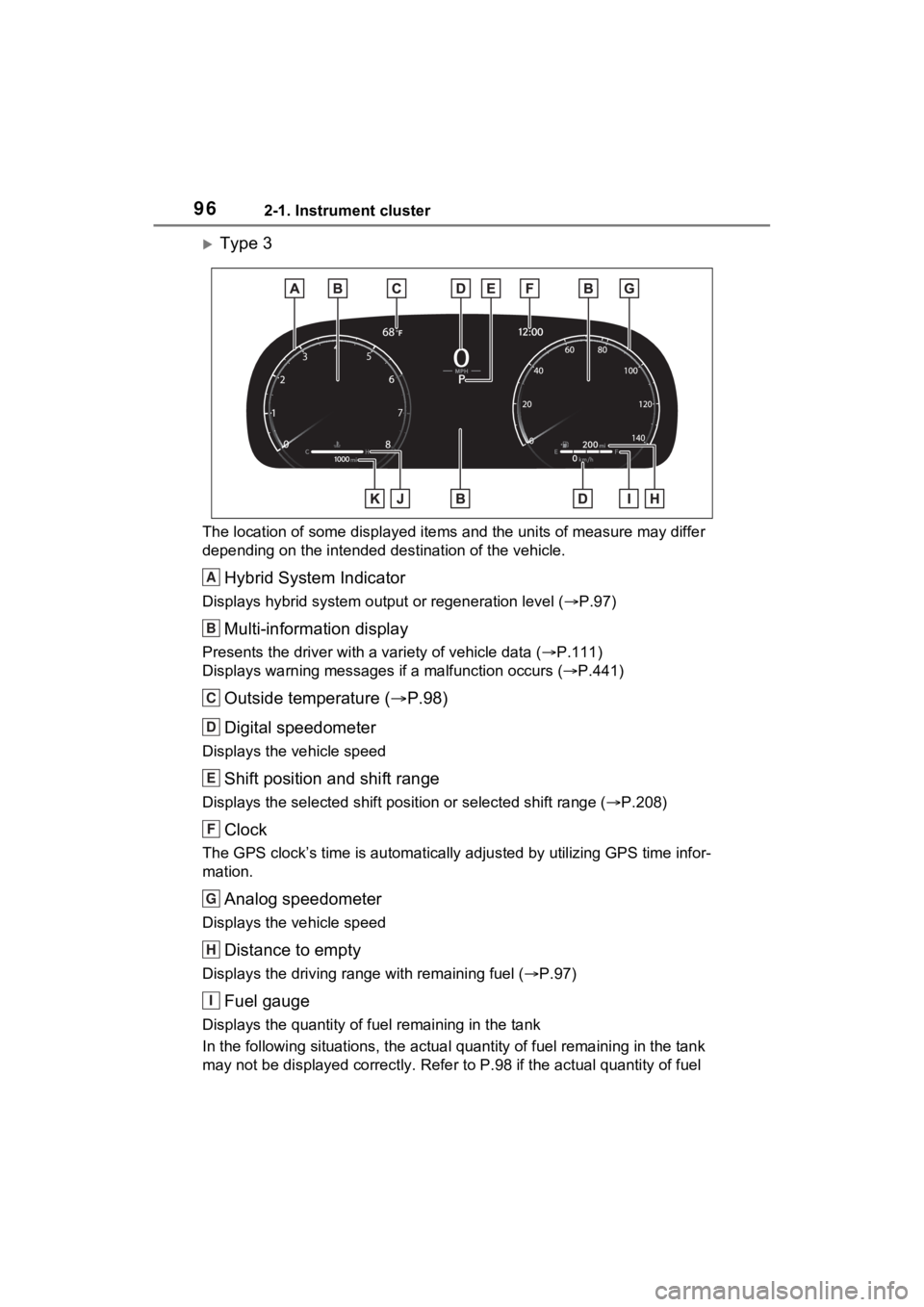
Hybrid System Indicator
Displays hybrid system output or regeneration level ( P.97)
Multi-information display
Presents the driver with a variety of vehicle data (P.111)
Displays warning messages if a malfunction occurs (P.441)
Outside temperature ( P.98)
Digital speedometer
Displays the vehicle speed
Shift position and shift range
Displays the selected shift posit ion or selected shift range (P.208)
Clock
The GPS clock’s time is automatically adjus ted by utilizing GPS time infor-
mation.
Analog speedometer
Displays the vehicle speed
Distance to empty
Displays the driving rang e with remaining fuel (P.97)
Fuel gauge
Displays the quantity of fu el remaining in the tank
In the following sit uations, the actual quantity of fuel remain ing in the tank
may not be displayed correctly. Refer to P.98 if the actual quantity of fuel
A
B
C
D
E
F
G
H
I
Page 320 of 560
3205-1. Using the air conditioning system and defogger
5-1.Using the air conditioning system and defogger
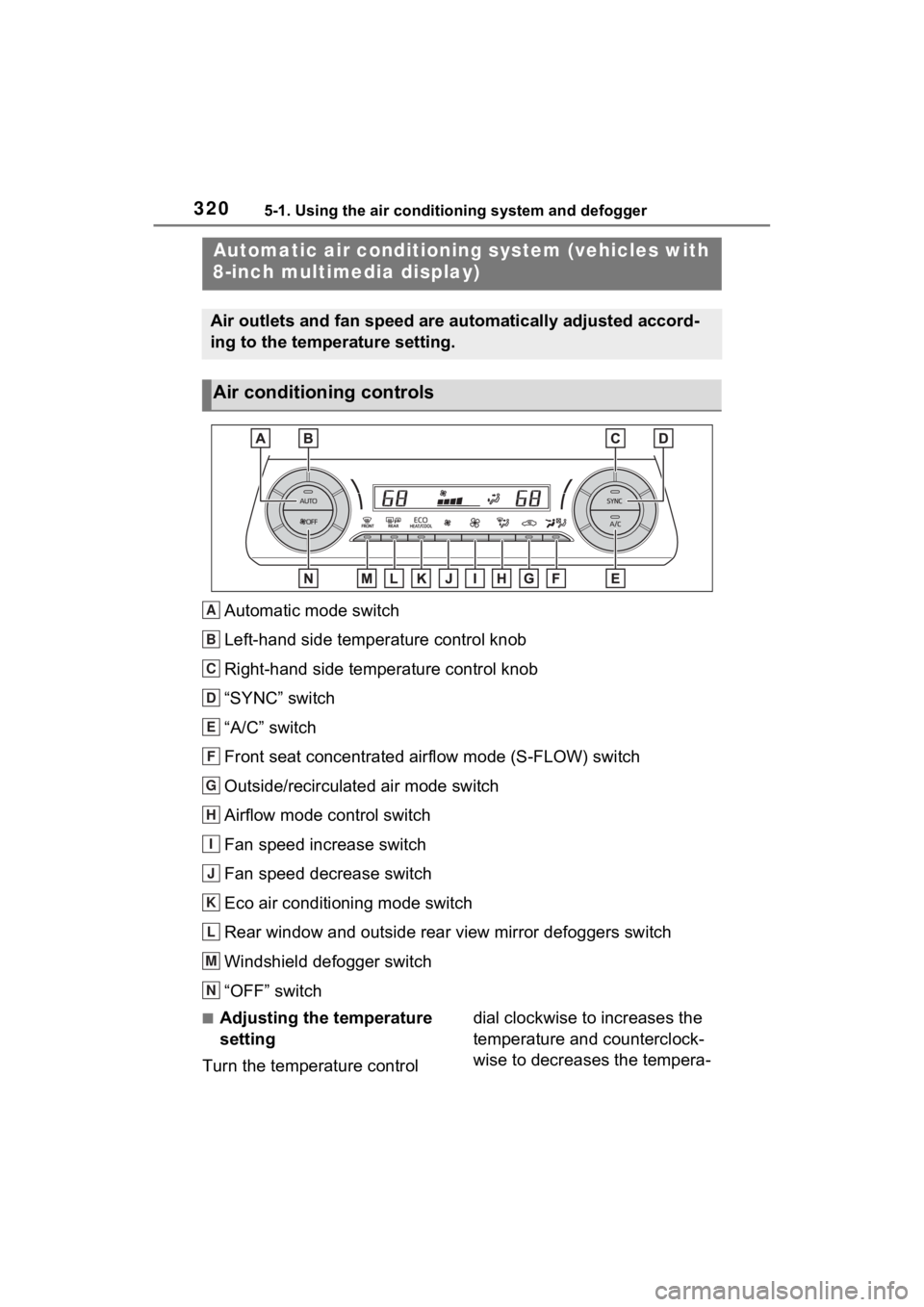
Automatic mode switch
Left-hand side temperature control knob
Right-hand side temperature control knob
“SYNC” switch
“A/C” switch
Front seat concentrated airflow mode (S-FLOW) switch
Outside/recirculated air mode switch
Airflow mode control switch
Fan speed increase switch
Fan speed decrease switch
Eco air conditioning mode switch
Rear window and outside rear view mirror defoggers switch
Windshield defogger switch
“OFF” switch
■Adjusting the temperature
setting
Turn the temperature control dial clockwise to increases the
temperature and counterclock-
wise to decreases the tempera-
Automatic air c
onditioning system (vehicles with
8-inch multimedia display)
Air outlets and fan speed are automatically adjusted accord-
ing to the temperature setting.
Air conditioning controls
A
B
C
D
E
F
G
H
I
J
K
L
M
N
Page 391 of 560
3916-3. Do-it-yourself maintenance
6
Maintenance and care
check the oil level on the dip-
stick.
■Checking the engine oil
1 Park the vehicle on level
ground. After warming up the
engine and turning off the
hybrid system, wait more
than 5 minutes for the oil to
drain back into the bottom of
the engine.
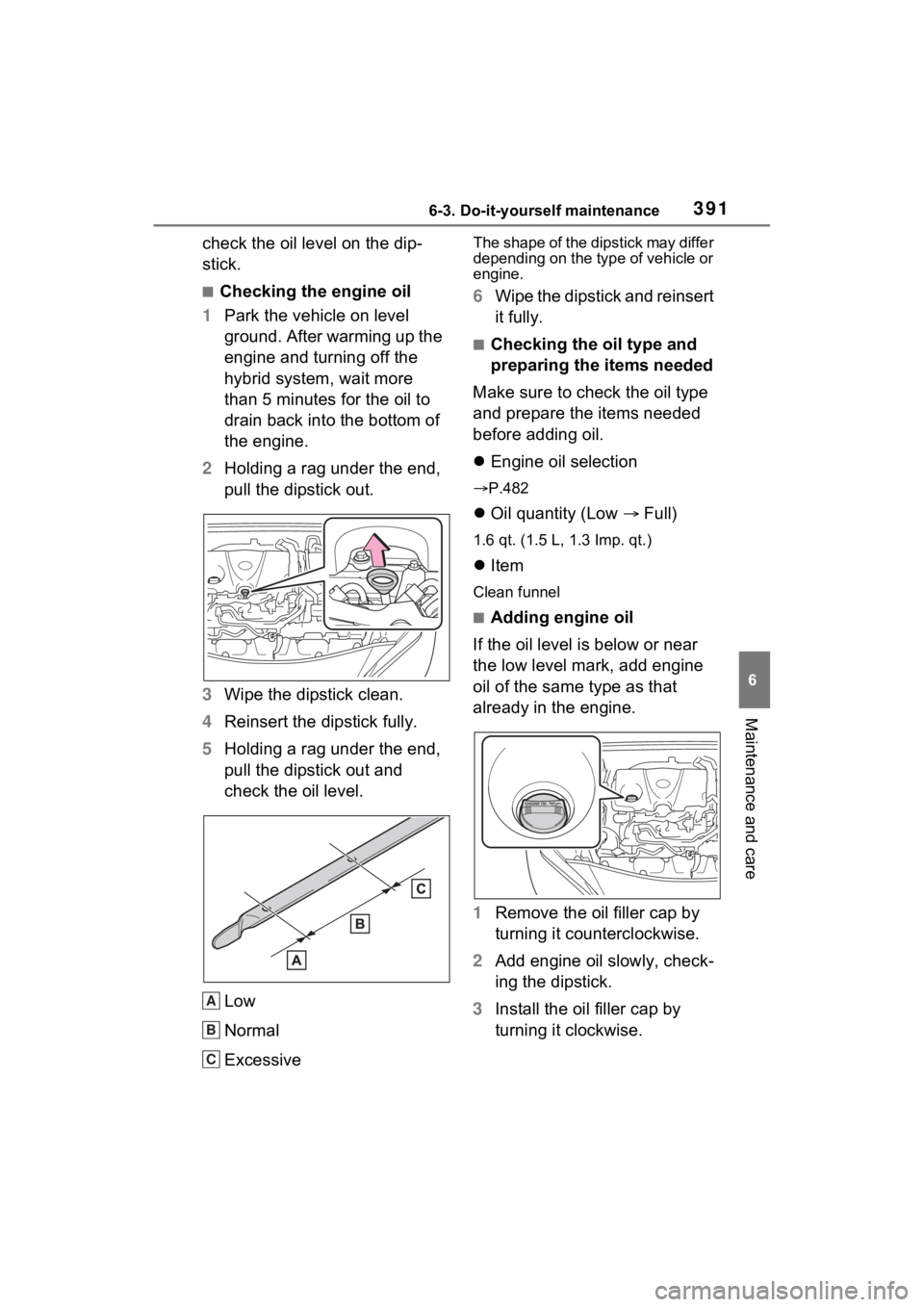
2 Holding a rag under the end,
pull the dipstick out.
3 Wipe the dipstick clean.
4 Reinsert the dipstick fully.
5 Holding a rag under the end,
pull the dipstick out and
check the oil level.
Low
Normal
Excessive
The shape of the dipstick may differ
depending on the type of vehicle or
engine.
6Wipe the dipstick and reinsert
it fully.
■Checking the oil type and
preparing the items needed
Make sure to check the oil type
and prepare the items needed
before adding oil.
Engine oil selection
P.482
Oil quantity (Low Full)
1.6 qt. (1.5 L, 1.3 Imp. qt.)
Item
Clean funnel
■Adding engine oil
If the oil level is below or near
the low level mark, add engine
oil of the same type as that
already in the engine.
1 Remove the oil filler cap by
turning it counterclockwise.
2 Add engine oil slowly, check-
ing the dipstick.
3 Install the oil filler cap by
turning it clockwise.
A
B
C