Page 108 of 616
1082. Instrument cluster
WARNING
■Caution for use while driving
● When operating the multi-information display while driving, pay extra
attention to the safety of the area around the vehicle.
● Do not look continuously at the multi-information display while driving as
you may fail to see pedestrians, objects on the road, etc. ahea d of the
vehicle.
■ Cautions during setting up the display
As the engine needs to be running during setting up the display , ensure that
the vehicle is parked in a place with adequate ventilation. In a closed area
such as a garage, exhaust gases including harmful carbon monoxi de (CO)
may collect and enter the vehicle. This may lead to death or a serious
health hazard.
NOTICE
■ During setting up the display
To prevent battery discharge, ensure that the engine is running while setting
up the display features.
Page 109 of 616

1092. Instrument cluster
2
Instrument cluster
Fuel consumption information
Press the “APPS” button, and then select “Eco” on the screen.
■Trip information
If the “Past Record” screen is displayed, select “Trip Informat ion”.
Resetting the consumption
data
Average vehicle speed since
the engine was started
Elapsed time since the
engine was started
Fuel consumption in the past
15 minutes
Cruising range ( P. 11 0 )
Current fuel consumption
Average fuel consumption for the past 15 minutes is divided by
color into past averages and averages attained since the engine
switch was last turned to the “ON” position (vehicles without a
smart key system) or IGNITION ON mode (vehicles with a smart
key system). Use the displayed a verage fuel consumption as a ref-
erence.
These images are examples only.
: If equipped
The fuel consumption information can be displayed on the navi-
gation system or multimedia system.
Display the trip information or past record screen
Fuel consumption
1
2
3
4
5
6
Page 110 of 616

1102. Instrument cluster
■Past record
If the “Trip Information” screen is displayed, select “Past Record”.
Resetting the past record
data
Best recorded fuel consump-
tion
Average fuel consumption (if
equipped)
Previous fuel consumption
record
Update the average fu el consumption data
The average fuel consumption history is divided by color into p ast
averages and the average fuel con sumption since the last updated.
Use the displayed average fuel consumption as a reference.
These images are examples only.
■ Resetting the data
The fuel consumption data can be deleted by selecting “Clear”.
■ Updating the past record data
Update the average fuel consumption by selecting “Update” to me asure the
current fuel consumption again.
■ Cruising range
Displays the estimated maximum distance that can be driven with the quan-
tity of fuel remaining.
This distance is computed based on your average fuel consumptio n. As a
result, the actual distance that can be driven may differ from that displayed.
1
2
3
4
5
Page 125 of 616

1253-2. Opening, closing and locking the doors
3
Operation of each component
■Rear seat reminder function
●In order to remind you not to forget luggage, etc. in the rear seat, when the
engine switch is turned off after any of the following conditio ns are met, a
message will be displayed on the multi-information display for approximately
6 seconds.
• The engine is started within 10 minutes after opening and clos ing a rear
door.
• A rear door has been opened and closed after the engine was st arted.
However, if a rear door is opened and then closed within approx imately 2 sec-
onds, the rear seat reminder function may not operate.
● The rear seat reminder function determines that luggage, etc., has been
placed in a rear seat based on opening and closing of a rear door. There-
fore, depending on the situation, the rear seat reminder function may not
operate and you may still forget luggage, etc., in the rear seat, or it may
operate unnecessarily.
● The rear seat reminder function can be enabled/disabled. ( P. 574)
■ Customization that can be configured at Toyota dealer
Settings (e.g. unlocking function using a key) can be changed.
(Customizable features: P. 574)
WARNING
■ To prevent an accident
Observe the following precautions while driving the vehicle.
Failure to do so may result in a door opening and an occupant throwing out
of the vehicle, resulting in death or serious injury.
● Ensure that all doors are properly closed and locked.
● Do not pull the inside handle of the doors while driving.
Be especially careful for the front doors, as the doors may be opened even
if the inside lock buttons are in locked position.
● Double Cab models only: Set the rear door child-protector locks when chil-
dren are seated in the rear seats.
NOTICE
■When opening or closing the front door and access door (Access Cab
models only)
The front door and access door could be damaged if they hit each other
when being opened or closed.
Page 132 of 616

1323-2. Opening, closing and locking the doors
■Effective range (areas within which the electronic key is detec ted)
■ Alarms and warning indicators
A combination of exterior and interior alarms as well as warnin g messages
shown on the multi-information display are used to prevent theft of the vehicle
and accidents resulting from erroneous operation. Take appropriate mea-
sures in response to any warning message on the multi-information display.
( P. 489)
The following table describes circumstances and correction procedures when
only alarms are sounded.
When locking or unlocking the
doors
The system can be operated
when the electronic key is within
about 2.3 ft. (0.7 m) either of the
outside front door handles. (Only
the door detecting the key can be
operated.)
When starting the engine or changing engine switch modes
The system can be operated when the electronic key is inside the
vehicle.
AlarmSituationCorrection procedure
Exterior alarm sounds
once for 5 seconds An attempt was made
to lock the vehicle while
a door was open.Close all of the doors
and lock the doors
again.
Exterior alarm sounds
once for 5 seconds An attempt was made
to lock the doors using
the smart key system
while the electronic key
was still inside the vehi-
cle.
Retrieve the electronic
key from the vehicle
and lock the doors
again.
An attempt was made
to lock either front door
by opening a door and
putting the inside lock
button into the lock
position, then closing
the door by pulling on
the outside door handle
with the electronic key
still inside the vehicle.
Page 170 of 616

1704-1. Before driving
■When starting off on an uphill (v ehicles with the hill-start assist control
system)
The hill-start assist control will activate. ( P. 324)
■ Driving in the rain
●Drive carefully when it is raining, because visibility will be reduced, the win-
dows may become fogged-up, and the road will be slippery.
● Drive carefully when it starts to rain, because the road surface will be espe-
cially slippery.
● Refrain from high speeds when driving on an expressway in the r ain,
because there may be a layer of water between the tires and the road sur-
face, preventing the steering and brakes from operating properl y.
■ Engine speed while driving (vehic les with an automatic transmission)
In the following conditions, the engine speed may become high w hile driving.
This is due to automatic up-shifting control or down-shifting implementation to
meet driving conditions. It does not indicate sudden acceleration.
● The vehicle is judged to be driving uphill or downhill
● When the accelerator pedal is released
● When the brake pedal is depressed while power mode is selected
■ Restraining the engine out put (Brake Override System)
● When the accelerator and brake pedals are depressed at the same time, the
engine output may be restrained.
● A warning message is displayed on the multi-information display while the
system is operating. ( P. 493)
■ Restraining sudden start (Drive-Start Control: vehicles with an automatic
transmission)
● When the following unusual operation is performed, the engine o utput may
be restrained.
• When the shift lever is shifted from R to D, D to R, N to R, P to D, or P to
R (D includes S) with the accelerator pedal depressed, a warnin g mes-
sage appears on the multi-information display.
• When the accelerator pedal is depressed too much while the veh icle is in
reverse.
● While Drive-Start Control is being activated, your vehicle may have trouble
escaping from the mud or fresh snow. In such case, perform the following
actions to cancel Drive-Start Control so that the vehicle may b ecome able to
escape from the mud or fresh snow.
• Deactivate TRAC ( P. 324)
• When the AUTO LSD system is turned on.
(P. 307)
• 4WD models: The four-wheel drive control switch is in “4L” pos ition.
(P. 303)
Page 205 of 616
2054-2. Driving procedures
4
Driving
Engine (ignition) switch (vehicles with a
smart key system)
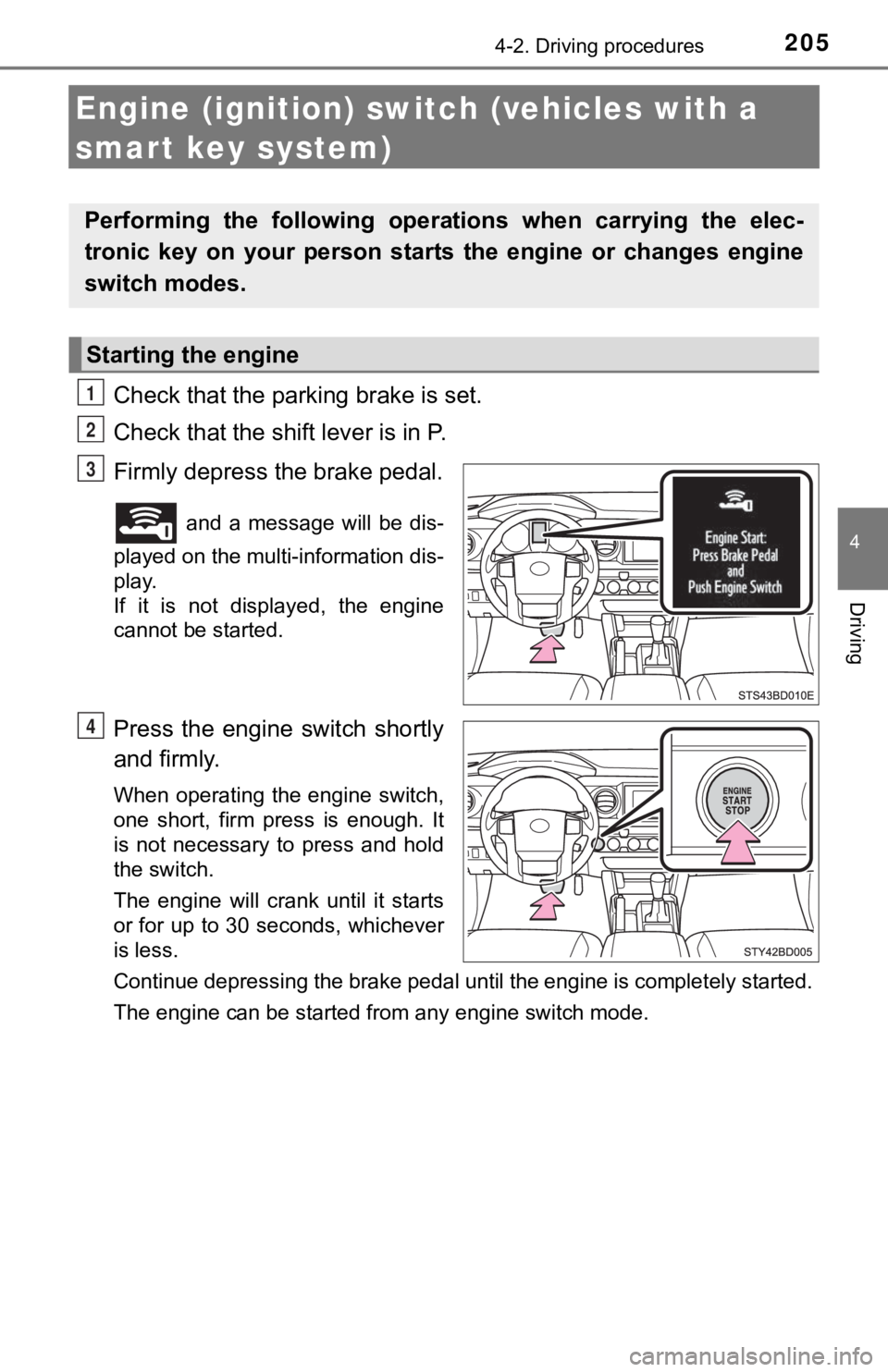
Check that the parking brake is set.
Check that the shift lever is in P.
Firmly depress the brake pedal.
and a message will be dis-
played on the multi-information dis-
play.
If it is not displayed, the engine
cannot be started.
Press the engine switch shortly
and firmly.
When operating the engine switch,
one short, firm press is enough. It
is not necessary to press and hold
the switch.
The engine will crank until it starts
or for up to 30 seconds, whichever
is less.
Continue depressing the brake pedal until the engine is complet ely started.
The engine can be started from any engine switch mode.
Performing the following opera tions when carrying the elec-
tronic key on your person starts the engine or changes engine
switch modes.
Starting the engine
1
2
3
4
Page 206 of 616
2064-2. Driving procedures
Stop the vehicle.
Set the parking brake (P. 219), and shift the shift lever to P.
Press the engine switch.
Release the brake pedal and chec k that the display on the instru-
ment cluster is off.
Modes can be changed by pressing the engine switch with brake
pedal released. (The mode changes each time the switch is pressed.)
Off
*
The emergency flashers can be
used.
ACCESSORY mode
Some electrical components such
as the audio system can be used.
“ACCESSORY” will be displayed
on the multi-information display.
IGNITION ON mode
All electrical components can be
used.
“IGNITION ON” will be displayed
on the multi-information display.
*: If the shift lever is in a position other than P when turning off the
engine, the engine switch will be
turned to ACCESSORY mode, not
to off.
Stopping the engine
Changing engine switch modes
1
2
3
4
1
2
3