2023 TOYOTA RAV4 PRIME service schedule
[x] Cancel search: service schedulePage 131 of 662

1312-2. Charging
2
Plug-in hybrid system
schedule settings.
For details about Toyota Apps, refer
to http://www.toyota.com/
connectedservices in the United
States and
http://www.toyota.ca/connected
in
Canada.
■When charging schedules are
ignored
When the following operations are
performed while the charging
schedule is on standby, charging
schedule is temporarily canceled
and charging is started.
●When the Remote Air Condition-
ing System ( P.431) is operated
●When turning “My Room Mode”
on ( P.148)
●When turning “Charge Now” on
( P.135, 141, 147)
●When an operation that temporar-
ily cancels charg ing using the
charging schedule is performed
( P.123)
■Effects of outside temperature
When the charging mode is set to
“Departure” or “Departure time”,
charging schedule may be ignored
due to the outside temperature and
charging may start.
■“Battery Heater” ( P.113) /
“Battery Cooler” ( P.114)
When charging is c arried out using
the charging schedule, the hybrid
battery (traction battery) heating or
cooling function may operate
according to the te mperature of the
hybrid battery (traction battery).
●When the charging mode is set to
“Start” or “Start at set time”, the
function starts at the set charging
start time.
●“Battery Heater”: When the
charging mode is set to “Depar-
ture” or “Departure time”, the func-
tion starts automatically to
complete heating by the desired
departure time.
●“Battery Cooler”: When the
charging mode is set to “Depar-
ture” or “Departu re time”, cooling
starts approximately 30 minutes
before the charg ing start time.
However, if there i s no time to fin-
ish charging by the charging
schedule, the hybrid battery (trac-
tion battery) cooling time may be
shortened and “Battery Cooler”
may not operate.
When operating charging
schedule, use the meter control
switches.
Meter control switches
( P.185)
Multi-information display
■Registering the charging
schedule
1 Press or of the meter
control switches to select .
2 Press or of the meter
control switches to select
“Vehicle Settings”, and then
press and hold .
Setting operations on 7-
inch multi-information
display (if equipped)
A
B
Page 155 of 662
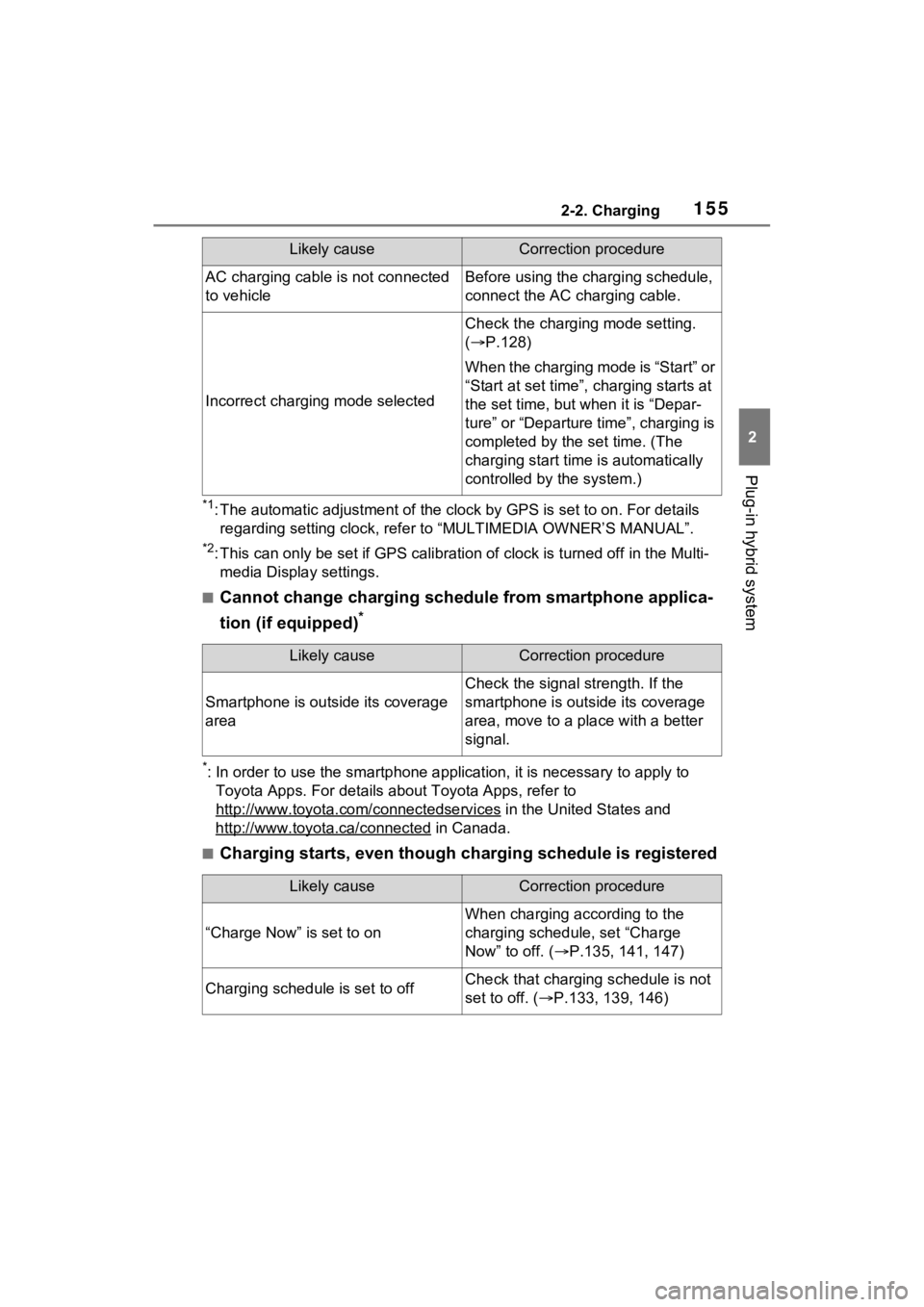
1552-2. Charging
2
Plug-in hybrid system
*1: The automatic adjustment of the clock by GPS is set to on. For details
regarding setting clock, refer t o “MULTIMEDIA OWNER’S MANUAL”.
*2: This can only be set if GPS ca libration of clock is turned off in the Multi-
media Display settings.
■Cannot change charging schedule from smartphone applica-
tion (if equipped)
*
*: In order to use the smartphon e application, it is necessary to apply to
Toyota Apps. For details about Toyota Apps, refer to
http://www.toyota.com/connectedservices
in the United States and
http://www.toyota.ca/connected
in Canada.
■Charging starts, even though charging schedule is registered
AC charging cable i s not connected
to vehicleBefore using the charging schedule,
connect the AC charging cable.
Incorrect charging mode selected
Check the charging mode setting.
( P.128)
When the charging mode is “Start” or
“Start at set time”, c harging starts at
the set time, but w hen it is “Depar-
ture” or “Departure time”, charging is
completed by the set time. (The
charging start time is automatically
controlled by the system.)
Likely causeCorrection procedure
Smartphone is outsi de its coverage
area
Check the signal strength. If the
smartphone is outside its coverage
area, move to a pl ace with a better
signal.
Likely causeCorrection procedure
“Charge Now” is set to on
When charging according to the
charging schedule, set “Charge
Now” to off. ( P.135, 141, 147)
Charging schedule is set to offCheck that charging schedule is not
set to off. ( P.133, 139, 146)
Likely causeCorrection procedure
Page 476 of 662

4787-2. Maintenance
7-2.Maintenance
■Repair and replacement
It is recommended that genuine
Toyota parts be used for repairs to
ensure performanc e of each sys-
tem. If non-Toyota p arts are used in
replacement or if a repair shop other
than a Toyota dealer performs
repairs, confirm the warranty cover-
age.
■Allow inspection and repairs to
be performed by a Toyota
dealer
●Toyota technicians are well-
trained specialists and are kept up
to date with the latest service
information. They are well
informed about the operations of
all systems on your vehicle.
●Keep a copy of the repair order. It
proves that the maintenance that
has been performed is under war-
ranty coverage. If any problem
should arise while your vehicle is
under warranty, your Toyota
dealer will promptly take care of it.
General maintenance should be
performed on a daily basis. This
can be done by yourself or by a
Toyota dealer.
Scheduled maintenance should
be performed at specified inter-
vals according to the mainte-
nance schedule.
For details about maintenance
items and schedules, refer to the
“Scheduled Maintenance Guide” or
“Owner’s Manual Supplement”.
Maintenance require-
ments
To ensure safe and econom-
ical driving, day-to-day care
and regular maintenance
are essential. It is the
owner’s responsibility to
perform regular checks.
Toyota recommends the fol-
lowing maintenance:
WARNING
■If your vehicle is not properly
maintained
Improper maintenance could
result in serious damage to the
vehicle and possible death or seri-
ous injury.
■Handling of the 12-volt bat-
tery
●Engine exhaust, some of its
constituents, and a wide variety
of automobile components con-
tain or emit chemicals known to
the State of California to cause
cancer and birth defects and
other reproductive harm. Work
in a well ventilated area.
●Oils, fuels and fluids contained
in vehicles as well as waste pro-
duced by component wear con-
tain or emit chemicals known to
the State of California to cause
cancer and birth defects or
other reproductive harm. Avoid
exposure and wash any
affected area immediately.
●12-volt battery posts, terminals
and related accessories con-
tain lead and lead compounds
which are known to cause brain
damage. Wash your hands after
handling. ( P.495)
General maintenance
Scheduled maintenance
Page 480 of 662

4827-2. Maintenance
The OBD system determines
that a problem exists some-
where in the emission control
system. Your vehicle may not
pass the I/M test and may need
to be repaired. Contact your
Toyota dealer to service the
vehicle.
When the 12-volt battery is
disconnected or discharged
Readiness codes that are set
during ordinary driving are
erased.
Also, depending on your driv-
ing habits, the readiness
codes may not be completely
set.
When the fuel tank cap is
Vehicle exterior
ItemsCheck points
Doors
• Do the doors
operate
smoothly?
Engine hood
• Does the engine hood lock system
work properly?
Fluid leaks
• There should not be any signs of
fluid leakage
after the vehicle
has been parked.
Tires
• Is the tire infla-tion pressure
correct?
• The tires should not be damaged
or excessively
worn.
• Have the tires been rotated
according to the
maintenance
schedule?
• The wheel nuts should not be
loose.
Windshield
wipers/rear
window wiper
• The wiper blades should not show
any signs of
cracking, split-
ting, wear, con-
tamination or
deformation.
• The wiper blades should clear the
windshield/rear
window without
streaking or skip-
ping.
Emission inspection
and maintenance (I/M)
programs
Some states have vehicle
emission inspection pro-
grams which include OBD
(On Board Diagnostics)
checks. The OBD system
monitors the operation of
the emission control sys-
tem.
If the malfunction indica-
tor lamp comes on
Your vehicle may not
pass the I/M test in the fol-
lowing situations:
Page 600 of 662

6029-2. Customization
*1: For details about each function: P.191
*2: The default setting varies according to country.
*3: This can only be set if GPS ca libration of clock is turned off in the multi-
media system settings.
“Fuel Economy”“Total Aver- age”“Trip Average”
–O–“Tank Aver- age”
“Power Consumption”“Total Aver-age”“Trip Average”–O–
Audio system linked displayOnOff–O–
Energy monitorOnOff–O–
AWD system displayOnOff–O–
Drive information typeTripTotal–O–
Drive informatio n items (first
item)Distance
Average Speed
–O–
Total Time
Drive information items (sec-
ond item)Total Time
Average Speed
–O–
Distance
“Closing Display”“Drive Info”
“ECO Score”
–O–“Charging
Schedule”
Pop-up displayOnOff–O–
Calendar*3–––O–
Multi-Information display offOffOn–O–
Convenience Services (Sug-
gestion function)On
On (when the vehicle is stopped)
O–O
Off
Function*1Default settingCustomized settingABC
Page 635 of 662

Alphabetical Index637
Charging schedule function.. 128
Charging time may increase 120
High voltage components....... 85
How to charge ...................... 121
Information related to charging display ................................ 116
Opening and closing the charging port lid .................... 98
Power sources precautions .. 112
Power sources th at can be used
........................................... 110
Safety functions.................... 117
When charging cannot be car- ried out ............................... 152
Charging port ........................... 97 If the charging port lid does not open ................................... 106
Locking and unlocking.......... 105
Opening and closing .............. 98
Child-protector ....................... 226
Child restraint s ystem ............. 50
Fixed with a LATCH system ... 59
Fixed with a seat belt ............. 54
Front passenger occupant clas- sification system ................... 43
Points to remember ................ 50
Riding with children ................ 49
Types of child restraint system installation met hod ............... 52
Using an anchor bracket ........ 61
Child safety ............................... 49 12-volt battery precautions . 495, 573
Airbag precautions ................. 38
Back door precautions ......... 227
Charging precautions ........... 118
Child restraint system............. 52
Heated steering wheel and seat
heater precautions ............. 433
How your child should wear the seat belt................................ 30
Moon roof precau tions ......... 274 Panoramic moon roof precau-
tions ....................................278
Power window lock switch ....272
Power window precautions...271
Rear door child-protectors ....226
Seat belt extender precautions .............................................30
Seat belt precautions..............29
Seat heater precautions .......433
Cleaning ..........................472, 475 Aluminum wheels .................472
DC/DC Converter air intake vent
...........................................515
Exterior .................................472
Front camera ........................336
Interior ..................................475
Radar sensor ........................336
Seat belts .............................475
Water-repellent coating ........473
Coat hooks ..............................455
Condenser ............. ..................492
Console box ............................439
Consumption screen ..............212
Convenience Services (Sugges- tion function).........195, 207, 601
Coolant Capacity ...............................583
Checking ..............................491
Preparing and checking before winter ..................................413
Warning light ........................542
Cooling system .......................491 Engine overheating ..............574
Hybrid system overheating ...576
Cruise control Dynamic radar cruise control with full-speed range ..........366
Cup holders.............................439
Current fuel economy ....186, 199
Curtain shield airbags ..............33
Customizable featu res ...........599