2023 TOYOTA RAV4 PRIME front bumper
[x] Cancel search: front bumperPage 42 of 662
421-1. For safe use
WARNING
●Modifications to the front door
panel (such as making a hole in
it)
●Repairs or modifications of the
front fender, front bumper, or
side of the occupant compart-
ment
●Installation of a grille guard (bull
bars, kangaroo bar, etc.), snow
plows, winches or roof luggage
carrier
●Modifications to the vehicle’s
suspension system
●Installation of electronic devices
such as mobile two-way radios
and CD players
●Modifications to your vehicle for
a person with a physical disabil-
ity
Page 334 of 662

3365-5. Using the driving support systems
WARNING
■To avoid malfunction of the
radar sensor
Observe the following precau-
tions.
Otherwise, the radar sensor may
not operate properly, possibly
leading to an accident resulting in
death or serious injury.
●Keep the radar sensor and the
radar sensor cover clean at all
times.
Radar sensor
Radar sensor cover
If the front of the r adar sensor or
the front or back of the radar sen-
sor cover is dirty or covered with
water droplets, snow, etc., clean
it.
Clean the radar sensor and radar
sensor cover with a soft cloth to
avoid damaging them.
●Do not attach accessories,
stickers (including transparent
stickers) or other items to the
radar sensor, radar sensor
cover or surrounding area.
●Do not subject the radar sensor
or its surrounding area to a
strong impact.
If the radar sensor, fron t grille,
or front bumper has been sub-
jected to a strong impact, have
the vehicle insp ected by your
Toyota dealer.
A
B
●Do not disassemble the radar
sensor.
●Do not modify or paint the radar
sensor or radar sensor cover.
●In the following cases, the radar
sensor must be recalibrated.
Contact your Toyota dealer for
details.
• When the radar s ensor or front
grille are removed and installed,
or replaced
• When the front bumper is replaced
■To avoid malfunction of the
front camera
Observe the following precau-
tions.
Otherwise, the f ront camera may
not operate properly, possibly
leading to an accident resulting in
death or serious injury.
●Keep the windshield clean at all
times.
• If the windshield is dirty or cov-
ered with an o ily film, water
droplets, snow, etc., clean the
windshield.
• If a glass coating agent is applied to the windshield, it will
still be necessary to use the
windshield wipers to remove
water droplets, etc. from the
area of the windshield in front of
the front camera.
• If the inner side of the wind- shield where the front camera is
installed is dirty, contact your
Toyota dealer.
Page 335 of 662
3375-5. Using the driving support systems
5
Driving
WARNING
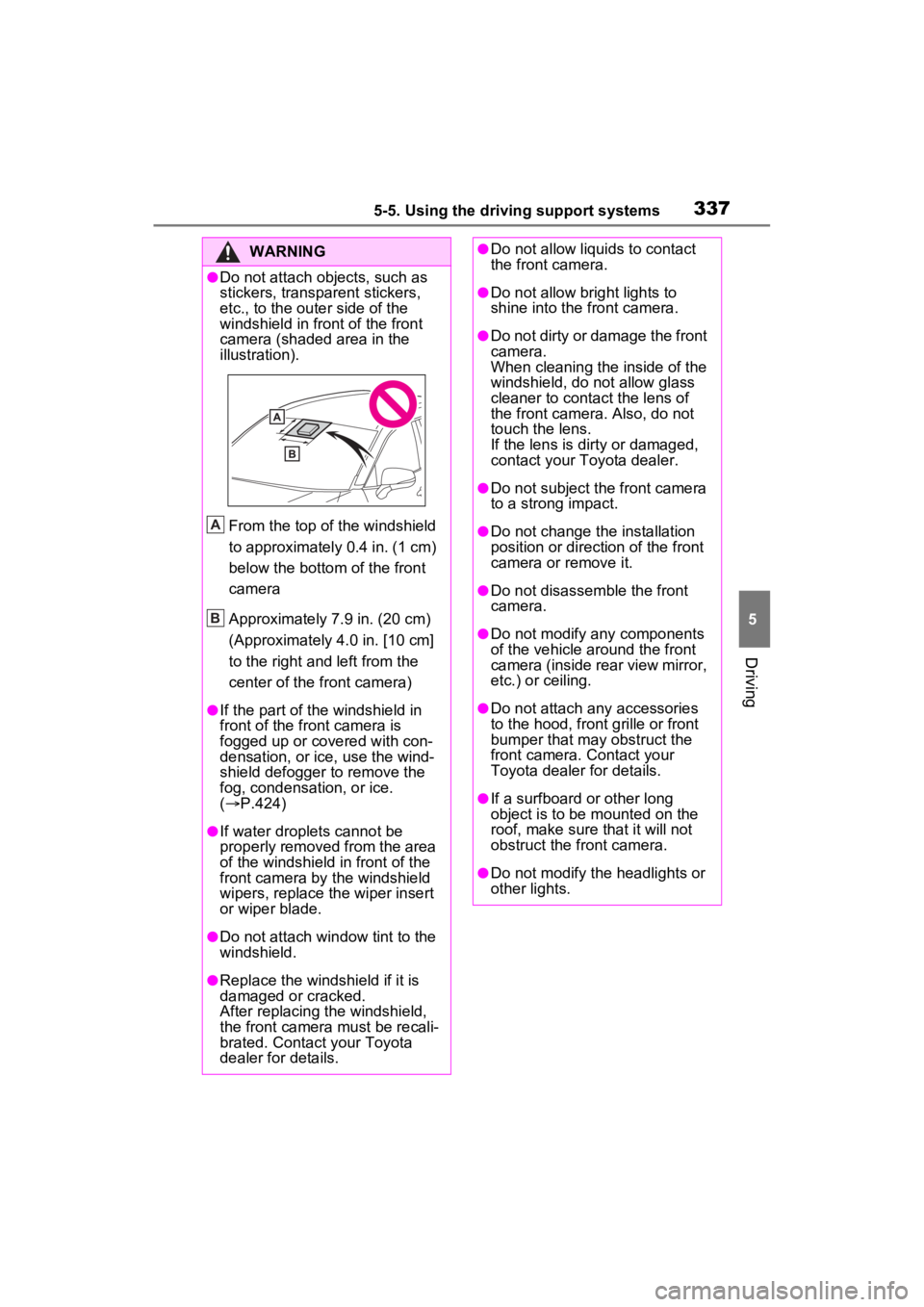
●Do not attach objects, such as
stickers, transparent stickers,
etc., to the outer side of the
windshield in fr ont of the front
camera (shaded area in the
illustration).
From the top of the windshield
to approximately 0.4 in. (1 cm)
below the bottom of the front
camera
Approximately 7.9 in. (20 cm)
(Approximately 4.0 in. [10 cm]
to the right and left from the
center of the front camera)
●If the part of the windshield in
front of the front camera is
fogged up or covered with con-
densation, or ice, use the wind-
shield defogger to remove the
fog, condensation, or ice.
( P.424)
●If water droplets cannot be
properly removed from the area
of the windshield in front of the
front camera by the windshield
wipers, replace the wiper insert
or wiper blade.
●Do not attach win dow tint to the
windshield.
●Replace the windshield if it is
damaged or cracked.
After replacing the windshield,
the front camera must be recali-
brated. Contact your Toyota
dealer for details.
A
B
●Do not allow liquids to contact
the front camera.
●Do not allow bright lights to
shine into the front camera.
●Do not dirty or damage the front
camera.
When cleaning the inside of the
windshield, do not allow glass
cleaner to contact the lens of
the front camera . Also, do not
touch the lens.
If the lens is dirty or damaged,
contact your Toyota dealer.
●Do not subject the front camera
to a strong impact.
●Do not change the installation
position or direction of the front
camera or remove it.
●Do not disassemble the front
camera.
●Do not modify any components
of the vehicle around the front
camera (inside rear view mirror,
etc.) or ceiling.
●Do not attach any accessories
to the hood, front grille or front
bumper that may obstruct the
front camera. Contact your
Toyota dealer for details.
●If a surfboard or other long
object is to be mounted on the
roof, make sure that it will not
obstruct the front camera.
●Do not modify the headlights or
other lights.
Page 347 of 662
3495-5. Using the driving support systems
5
Driving
• When part of a detectable object is hidden by an object, such as
large baggage, an umbrella, or
guardrail
• When there are many things which can reflect the radio waves
of the radar in the vicinity (tunnels,
truss bridges, gravel roads, snow
covered road that have tracks,
etc.)
• When there is an effect on the
radio waves to the radar that is
installed on another vehicle
• When multiple detectable objects are close together
• If the sun or other light is shining directly on a detectable object
• When a detectable object is a
shade of white and looks
extremely bright
• When a detectable object appears
to be nearly the same color or
brightness as its surroundings
• If a detectable object cuts or sud-
denly emerges in front of your
vehicle
• When the front of your vehicle is
hit by water, snow, dust, etc.
• When a very bright light ahead, such as the sun or the headlights
of oncoming traffic, shines directly
into the front camera
• When approaching the side or
front of a vehicle ahead
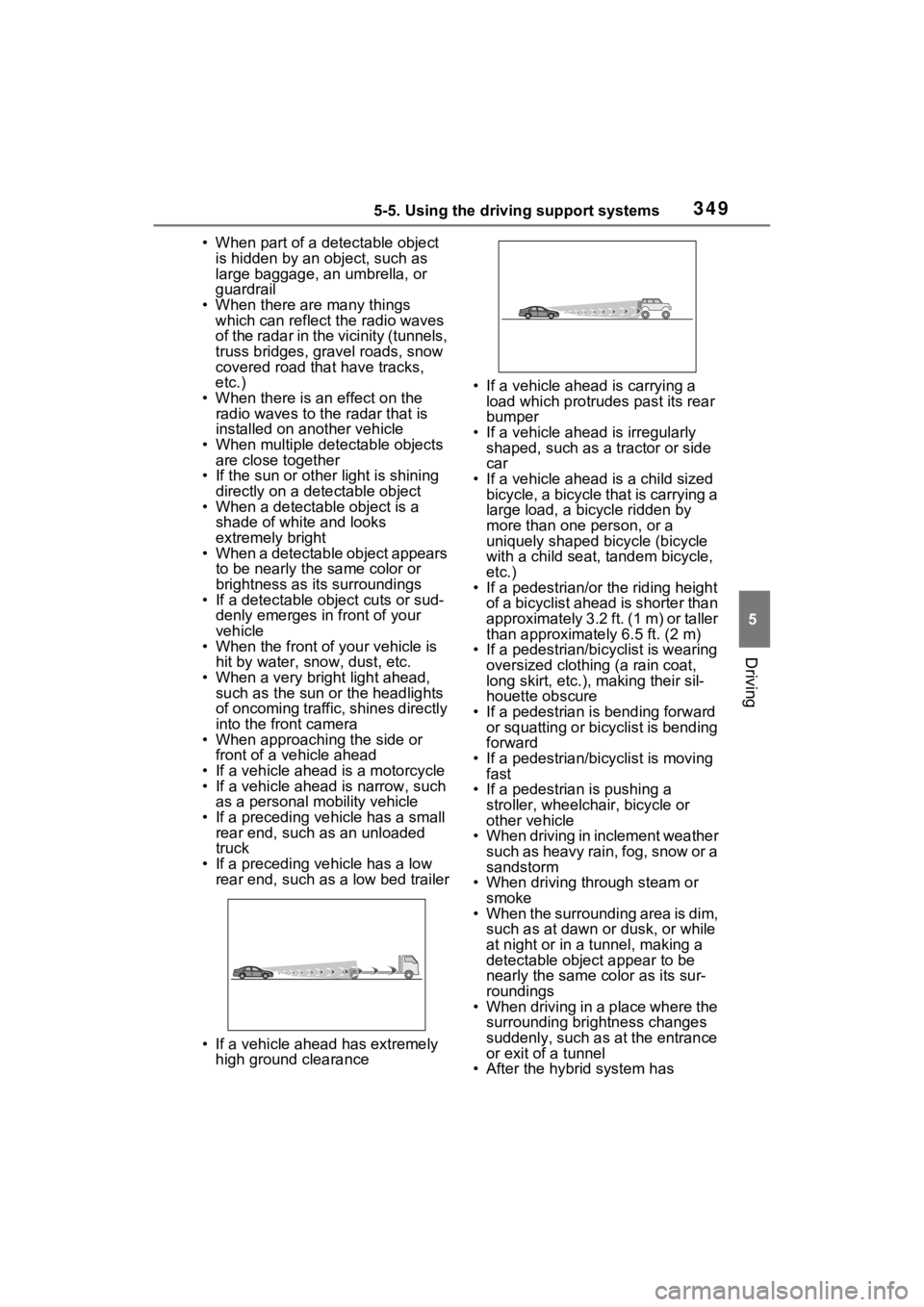
• If a vehicle ahead is a motorcycle
• If a vehicle ahead is narrow, such as a personal mobility vehicle
• If a preceding vehicle has a small rear end, such as an unloaded
truck
• If a preceding vehicle has a low rear end, such as a low bed trailer
• If a vehicle ahead has extremely high ground clearance • If a vehicle ahead is carrying a
load which protrudes past its rear
bumper
• If a vehicle ahead is irregularly shaped, such as a tractor or side
car
• If a vehicle ahead is a child sized bicycle, a bicycle that is carrying a
large load, a bicycle ridden by
more than one person, or a
uniquely shaped bicycle (bicycle
with a child seat, tandem bicycle,
etc.)
• If a pedestrian/or the riding height of a bicyclist ahead is shorter than
approximately 3.2 ft. (1 m) or taller
than approximate ly 6.5 ft. (2 m)
• If a pedestrian/bic yclist is wearing
oversized clothing (a rain coat,
long skirt, etc.), making their sil-
houette obscure
• If a pedestrian is bending forward or squatting or bicyclist is bending
forward
• If a pedestrian/bicyclist is moving fast
• If a pedestrian is pushing a
stroller, wheelchair, bicycle or
other vehicle
• When driving in inclement weather
such as heavy rain, fog, snow or a
sandstorm
• When driving through steam or
smoke
• When the surrounding area is dim, such as at dawn or dusk, or while
at night or in a tunnel, making a
detectable object appear to be
nearly the same co lor as its sur-
roundings
• When driving in a place where the surrounding brightness changes
suddenly, such as at the entrance
or exit of a tunnel
• After the hybrid system has
Page 384 of 662

3865-5. Using the driving support systems
●When towing a trailer.
●When there is a significant differ-
ence in height between your vehi-
cle and the vehicle that enters the
detection area.
●When a sensor or the area around
a sensor is extremely hot or cold.
●If the suspension has been modi-
fied or tires of a size other than
specified are installed.
●If the front of the vehicle is raised
or lowered due to the carried load.
●When turning while backing up.
●When a vehicle turns into the
detection area.
■Situations in which the system
may operate even if there is no
possibility of a collision
Instances of the RCTA function
unnecessarily detec ting a vehicle
and/or object may increase in the
following situations:
●When the parking space faces a street and vehicles are being
driven on the street.
●When the distance between your
vehicle and metal objects, such as
a guardrail, wall, sign, or parked
vehicle, which may reflect electri-
cal waves toward the rear of the
vehicle, is short.
●When equipment that may
obstruct a sensor is installed, such
as a towing eyelet, bumper pro-
tector (an additional trim strip,
etc.), bicycle c
arrier, or snow
plow.
●When a vehicle passes by the
side of your vehicle.
●When a detected vehicle turns
while approaching the vehicle.
Page 385 of 662
3875-5. Using the driving support systems
5
Driving
●When there are spinning objects
near your vehicle such as the fan
of an air conditioning unit.
●When water is splashed or
sprayed toward the rear bumper,
such as from a sprinkler.
●Moving objects (flags, exhaust
fumes, large rain droplets or
snowflakes, rain water on the road
surface, etc.).
●When the distanc e between your
vehicle and a guardr ail, wall, etc.,
that enters the detection area is
short.
●Gratings and gutters.
●When a sensor or the area around
a sensor is extremely hot or cold.
●If the suspension has been modi-
fied or tires of a size other than
specified are installed.
●If the front of the vehicle is raised
or lowered due to the carried load.
*: If equipped
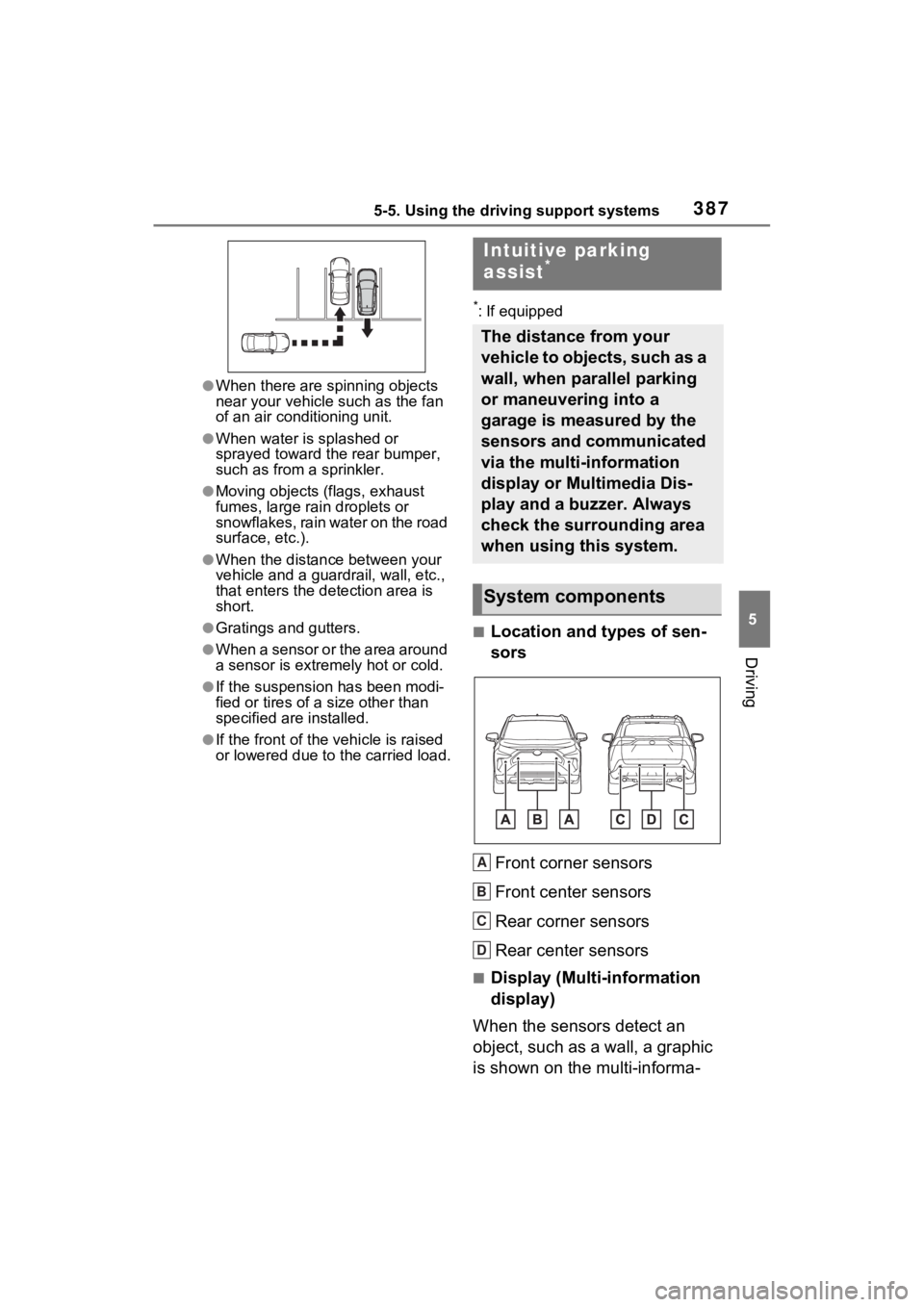
■Location and types of sen-
sors
Front corner sensors
Front center sensors
Rear corner sensors
Rear center sensors
■Display (Multi-information
display)
When the sensors detect an
object, such as a wall, a graphic
is shown on the multi-informa-
Intuitive parking
assist*
The distance from your
vehicle to objects, such as a
wall, when parallel parking
or maneuvering into a
garage is measured by the
sensors and communicated
via the multi-information
display or Multimedia Dis-
play and a buzzer. Always
check the surrounding area
when using this system.
System components
A
B
C
D
Page 387 of 662

3895-5. Using the driving support systems
5
Driving
The Intuitive parking assist can
be enabled/disabled on the
screen of the multi-information
display. (P.191, 203)
When the intuitive parking assist
function is disabled, the intuitive
parking assist OFF indicator
( P.170) illuminate s on the multi-
information display.
To re-enable the system, select
on the multi-inform ation display,
select and turn it on.
If the system is disabled, it will
remain off even if the power switch
is turned to ON after the power
switch has been turned off.
Turning intuitive parking
assist on/off
WARNING
■Cautions regarding the use of
the system
There is a limit to the degree of
recognition accuracy and control
performance that this system can
provide, do not ov erly rely on this
system. The driver is always
responsible for paying attention to
the vehicle’s surroundings and
driving safely.
■To ensure the system can
operate properly
Observe the following precau-
tions.
Failing to do so may result in the
vehicle being unable to be driven
safely and possibly cause an acci-
dent.
●Do not damage the sensors,
and always keep them clean.
●Do not attach a sticker or install
an electronic component, such
as a backlit licen se plate (espe-
cially fluorescent type), fog
lights, fender po le or wireless
antenna near a radar sensor.
●Do not subject the surrounding
area of the sensor to a strong
impact. If subjected to an
impact, have the vehicle
inspected by your Toyota
dealer. If the front or rear
bumper needs to be
removed/installed or replaced,
contact your Toyota dealer.
●Do not modify, disassemble or
paint the sensors.
●Do not attach a license plate
cover.
●Keep your tires properly
inflated.
■When to disable the function
In the following situations, disable
the function as it may operate
even though there is no possibility
of a collision.
●Failing to observe the warnings
above.
●A non-genuine Toyota suspen-
sion (lowered suspension, etc.)
is installed.
■Notes when washing the vehi-
cle
Do not apply intensive bursts of
water or steam to the sensor
area.
Doing so may result in the sensor
malfunctioning.
●When using a high pressure
washer to wash the vehicle, do
not spray the sensors directly,
as doing so may cause a sensor
to malfunction.
Page 388 of 662

3905-5. Using the driving support systems
■The system can be operated
when
●The power switch is in ON.
●Intuitive parking assist function is
on.
●The vehicle speed is less than
about 6 mph (10 km/h).
●The shift lever is in a position
other than P.
■If “Clean Parking Assist Sen-
sor” is displayed on the multi-
information display
A sensor may be covered with ice,
snow, dirt, etc. R emove the ice,
snow, dirt, etc., from the sensor to
return the system to normal.
Also, due to ice forming on a sensor
at low temperatures, a warning
message may be displayed or the
sensor may not be able to detect an
object. Once the ice melts, the sys-
tem will return to normal.
If a warning message is displayed
even if the sensor is clean, there
may be a sensor malfunction. Have
the vehicle insp ected by your
Toyota dealer.
■If “Parking Assi st Unavailable”
is displayed on the multi-infor-
mation display
Water may be con tinuously flowing over the sensor surface, such as in
a heavy rain. When the system
determines that it is normal, the sys-
tem will return to normal.
■Sensor detection information
●The sensor’s detection areas are
limited to the areas around the
vehicle’s front and rear bumpers.
●The following situations may occur
during use.
• Depending on the shape of the
object and other factors, the
detection distance may shorten,
or detection may be impossible.
• Detection may be impossible if static objects draw too close to the
sensor.
• There will be a short delay between static object detection
and display (warning buzzer
sounds). Even at low speeds,
there is a possibility that the object
will come within 9.8 in. (25 cm)
before the display is shown and
the warning buzzer sounds.
• It might be diffic ult to hear the
buzzer due to the volume of the
audio system or air flow noise of
the air conditioning system.
• It may be diffi cult to hear the
sound of this sys tem due to the
buzzers of other systems.
■Objects which the system may
not properly detect
The shape of the object may pre-
vent the sensor from detecting it.
Pay particular atte ntion to the fol-
lowing objects:
●Wires, fences, ropes, etc.
●Cotton, snow and other materials
that absorb sound waves
●Sharply-angled objects
●Low objects
●Tall objects with upper sections
projecting outwards in the direc-
tion of your vehicle
People may not be detected if they
are wearing certain types of cloth-
ing.
WARNING
●When using steam to clean the
vehicle, do not direct steam too
close to the sensors as doing so
may cause a sens or to malfunc-
tion.